IT Security Awareness
   January 24, 2011
        MATC
    Chapter 2
 Desktop Security
Security Awareness


      Chapter 2
   Desktop Security
Objectives
                 After completing this chapter, you should be
                 able to do the following:
                 •Describe the different types of software
                 and hardware attacks
                 •List types of desktop defenses
                 •Explain how to recover from an attack


Security Awareness, 3rd Edition                          3
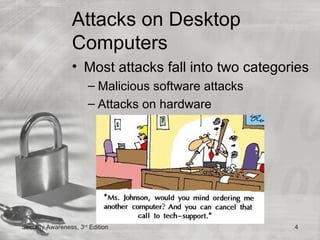
Attacks on Desktop
                 Computers
                 • Most attacks fall into two categories
                       – Malicious software attacks
                       – Attacks on hardware


Security Awareness, 3rd Edition                       4
Malicious Software Attacks
                 • Malware
                    – Wide variety of damaging
                      or annoying attack
                      software
                    – Enters a computer system
                      without the owner’s
                      knowledge or consent
                 • Primary objectives of
                   malware
                    – Infect a computer system
                      with destructive software
                    – Conceal a malicious action
Security Awareness, 3rd Edition                    5
Infecting Malware
                 • Viruses
                       – Malicious program that needs a
                         ‘‘carrier’’ to survive
                       – Two carriers
                             • Program or document
                             • User


Security Awareness, 3rd Edition                           6
Infecting Malware (cont’d.)
         •   EVERY IT Security lecture must have a picture of a
             padlock in it, somewhere
         •   Viruses have performed the following functions:
              – Caused a computer to crash repeatedly
              – Erased files from a hard drive
              – Installed hidden programs, such as stolen software,
                 which is then secretly distributed from the computer
              – Made multiple copies of itself and consumed all of the
                 free space in a hard drive
              – Reduced security settings and allowed intruders to
                 remotely access the computer
              – Reformatted the hard disk drive


Security Awareness, 3rd Edition                                          7
Infecting Malware (cont’d.)
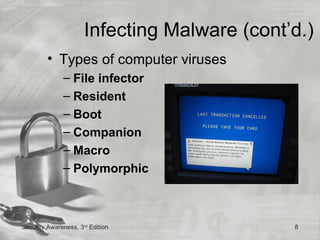
         • Types of computer viruses
              – File infector
              – Resident
              – Boot
              – Companion
              – Macro
              – Polymorphic


Security Awareness, 3rd Edition               8
Infecting Malware (cont’d.)
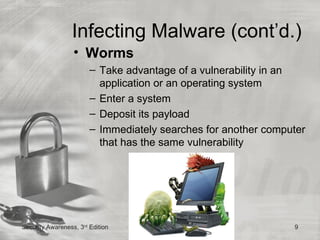
                  • Worms
                        – Take advantage of a vulnerability in an
                          application or an operating system
                        – Enter a system
                        – Deposit its payload
                        – Immediately searches for another computer
                          that has the same vulnerability


Security Awareness, 3rd Edition                                 9
Infecting Malware (cont’d.)
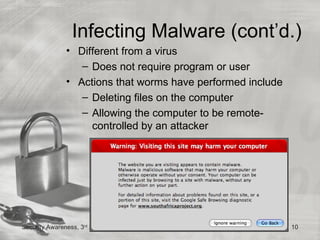
               • Different from a virus
                  – Does not require program or user
               • Actions that worms have performed include
                  – Deleting files on the computer
                  – Allowing the computer to be remote-
                    controlled by an attacker


Security Awareness, 3rd Edition                              10
Concealing Malware
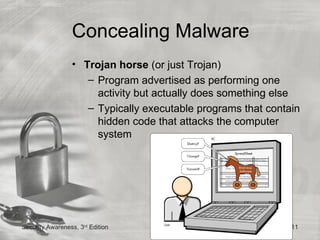
                 • Trojan horse (or just Trojan)
                    – Program advertised as performing one
                      activity but actually does something else
                    – Typically executable programs that contain
                      hidden code that attacks the computer
                      system


Security Awareness, 3rd Edition                               11
Concealing Malware
                 (cont’d.)
                 • Rootkit
                    – Set of software tools
                    – Used to break into a computer, obtain special
                      privileges to perform unauthorized functions
                    – Goal is not to damage a computer directly
                    – Go to great lengths to ensure that they are
                      not detected and removed
                    – Replace operating system commands with
                      modified versions that are specifically
                      designed to ignore malicious activity
                    – Detecting a rootkit can be difficult
Security Awareness, 3rd Edition                               12
Concealing Malware
                 (cont’d.)
                 • Logic bomb
                    – Computer program or a part of a program that
                      lies dormant until it is triggered by a specific
                      logical event
                    – Once triggered, performs malicious activities
                    – Extremely difficult to detect before they are
                      triggered


Security Awareness, 3rd Edition                                 13
Concealing Malware
                 (cont’d.)


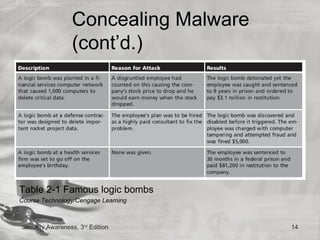
Table 2-1 Famous logic bombs
Course Technology/Cengage Learning


Security Awareness, 3rd Edition       14
Concealing Malware
            (cont’d.)
                • Zombie
                      – Infected ‘‘robot’’
                         computer
                • Botnet
                      – Hundreds, thousands,
                         or tens of thousands of
                         zombies
                • Internet Relay Chat (IRC)
                      – Used to remotely control
                         the zombies
                • Number of zombies and
               rd
                     botnets is staggering
Security Awareness, 3 Edition                      15
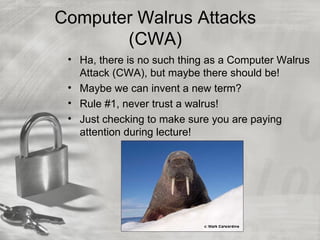
Computer Walrus Attacks
       (CWA)
 • Ha, there is no such thing as a Computer Walrus
   Attack (CWA), but maybe there should be!
 • Maybe we can invent a new term?
 • Rule #1, never trust a walrus!
 • Just checking to make sure you are paying
   attention during lecture!
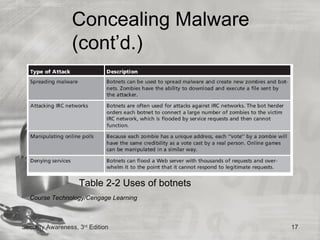
Concealing Malware
                 (cont’d.)


                    Table 2-2 Uses of botnets
  Course Technology/Cengage Learning


Security Awareness, 3rd Edition                 17
Hardware Attacks
                  • Types of hardware that
                    is targeted includes
                     – BIOS
                     – USB devices
                     – Cell phones
                     – Physical theft of
                        laptop computers
                        and information


Security Awareness, 3rd Edition              18
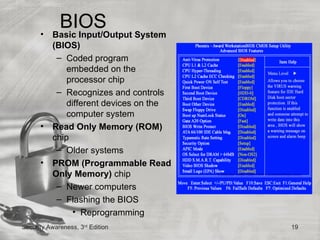
•
           BIOS System
          Basic Input/Output
          (BIOS)
           – Coded program
              embedded on the
              processor chip
           – Recognizes and controls
              different devices on the
              computer system
      •   Read Only Memory (ROM)
          chip
           – Older systems
      •   PROM (Programmable Read
          Only Memory) chip
           – Newer computers
           – Flashing the BIOS
                • Reprogramming
Security Awareness, 3rd Edition          19
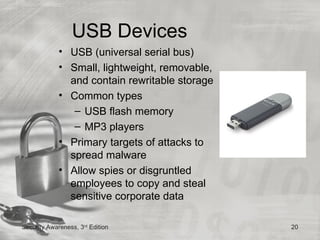
USB Devices
             • USB (universal serial bus)
             • Small, lightweight, removable,
               and contain rewritable storage
             • Common types
                – USB flash memory
                – MP3 players
             • Primary targets of attacks to
               spread malware
             • Allow spies or disgruntled
               employees to copy and steal
               sensitive corporate data

Security Awareness, 3rd Edition                 20
USB Devices (cont’d.)
                 • Reduce the risk introduced by USB
                   devices
                       – Prohibit by written policy
                       – Disable with technology
                             • Disable the USB in hardware
                             • Disable the USB through the operating
                               system
                             • Use third-party software


Security Awareness, 3rd Edition                                    21
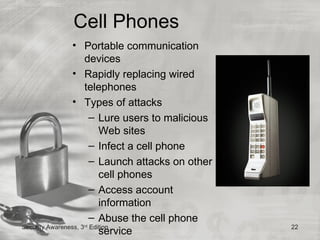
Cell Phones
                • Portable communication
                     devices
                • Rapidly replacing wired
                     telephones
                • Types of attacks
                      – Lure users to malicious
                         Web sites
                      – Infect a cell phone
                      – Launch attacks on other
                         cell phones
                      – Access account
                         information
                      – Abuse the cell phone
Security Awareness, 3 Edition
               rd
                                                  22
                         service
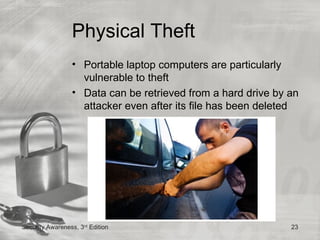
Physical Theft
                 • Portable laptop computers are particularly
                   vulnerable to theft
                 • Data can be retrieved from a hard drive by an
                   attacker even after its file has been deleted


Security Awareness, 3rd Edition                               23
Desktop Defenses
              • Defenses include:
                 – Managing patches
                 – Installing antivirus software
                 – Using buffer overflow protection
                 – Protecting against theft
                 – Creating data backups
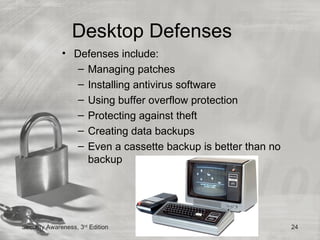
                 – Even a cassette backup is better than no
                   backup


Security Awareness, 3rd Edition                               24
Managing Patches
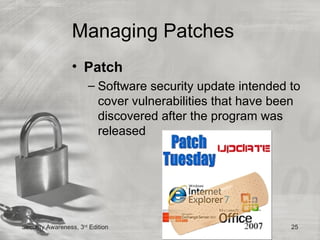
                 • Patch
                       – Software security update intended to
                         cover vulnerabilities that have been
                         discovered after the program was
                         released


Security Awareness, 3rd Edition                            25
Managing Patches (cont’d.)
                 • Automatic update configuration
                   options for most operating systems
                       – Install updates automatically
                       – Download updates but let me choose
                         when to install them
                       – Check for updates but let me choose
                         whether to download and install them
                       – Never check for updates


Security Awareness, 3rd Edition                           26
Antivirus Software
            • Scan a computer’s hard drive for infections
            • Monitor computer activity
            • Examine all new documents that might contain a
              virus
            • Drawback of AV software
               – Must be continuously updated to recognize
                 new viruses
            • Should be configured to constantly monitor for
              viruses and automatically check for updated
              signature files


Security Awareness, 3rd Edition                           27
Buffer Overflow Protection
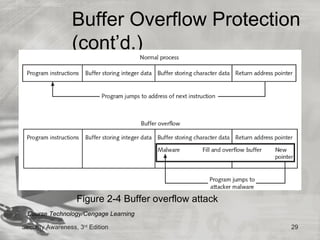
                 • Buffer overflow
                    – Occurs when a computer process attempts to
                      store data in RAM beyond the boundaries of
                      a fixed-length storage buffer
                    – May cause computer to stop functioning
                 • Windows-based system protection
                    – Data Execution Prevention (DEP)
                    – Address Space Layout Randomization
                      (ASLR)


Security Awareness, 3rd Edition                            28
Buffer Overflow Protection
                 (cont’d.)


                   Figure 2-4 Buffer overflow attack
 Course Technology/Cengage Learning

Security Awareness, 3rd Edition                        29
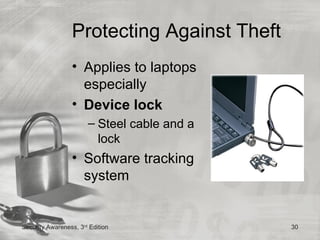
Protecting Against Theft
                 • Applies to laptops
                   especially
                 • Device lock
                       – Steel cable and a
                         lock
                 • Software tracking
                   system


Security Awareness, 3rd Edition              30
Creating Data Backups
                 • Copying data from a computer’s
                   hard drive onto other digital media
                       – Then storing it in a secure location
                 • Sophisticated hardware and
                   software can back up data on a
                   regular schedule
                 • Personal computer users
                       – Operating system functions
                       – Third-party software
Security Awareness, 3rd Edition                                 31
Creating Data Backups
                 (cont’d.)
                 • What information to back up
                    – Back up only user files
                    – Back up all files
                 • Frequency of backups
                    – Regular schedule
                 • RAID (Redundant Array of Independent
                   Drives)
                    – Uses multiple hard disk drives for increased
                      reliability
                    – Several RAID configurations
                       • Called levels
Security Awareness, 3rd Edition                                32
Creating Data Backups
                 (cont’d.)


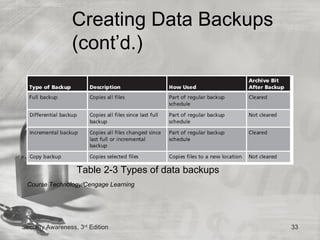
                   Table 2-3 Types of data backups
 Course Technology/Cengage Learning


Security Awareness, 3rd Edition                      33
Creating Data Backups (cont’d.)
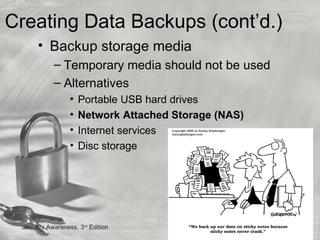
      • Backup storage media
            – Temporary media should not be used
            – Alternatives
                  •   Portable USB hard drives
                  •   Network Attached Storage (NAS)
                  •   Internet services
                  •   Disc storage


 Security Awareness, 3rd Edition                       34
Creating Data Backups (cont’d.)
                   • Location of backup storage
                      – Protect against not only virus attacks but also
                        against hardware malfunctions, user error,
                        software corruption, and natural disasters
                      – Backups ideally should be stored in a location
                        away from the device that contains the
                        information


  Security Awareness, 3rd Edition                                 35
Recovering from an Attack
                 • Basic steps to perform
                       – Disconnect
                       – Identify
                       – Disinfect
                       – Recheck
                       – Reinstall
                       – Analyze


Security Awareness, 3rd Edition             36
Summary
             • Never trust a walrus
             • Malicious software (malware)
                – Enters a computer system without the
                  owner’s knowledge or consent
                – Includes a wide variety of damaging or
                  annoying software
                – Infecting malware
                – Concealing malware
             • Hardware is also the target of attackers
             • Tactics for defending desktop systems
             • Basic steps to disinfect and restore a computer

Security Awareness, 3rd Edition                              37

Desktop pc computer security

  • 1.
    IT Security Awareness January 24, 2011 MATC Chapter 2 Desktop Security
  • 2.
    Security Awareness Chapter 2 Desktop Security
  • 3.
    Objectives After completing this chapter, you should be able to do the following: •Describe the different types of software and hardware attacks •List types of desktop defenses •Explain how to recover from an attack Security Awareness, 3rd Edition 3
  • 4.
    Attacks on Desktop Computers • Most attacks fall into two categories – Malicious software attacks – Attacks on hardware Security Awareness, 3rd Edition 4
  • 5.
    Malicious Software Attacks • Malware – Wide variety of damaging or annoying attack software – Enters a computer system without the owner’s knowledge or consent • Primary objectives of malware – Infect a computer system with destructive software – Conceal a malicious action Security Awareness, 3rd Edition 5
  • 6.
    Infecting Malware • Viruses – Malicious program that needs a ‘‘carrier’’ to survive – Two carriers • Program or document • User Security Awareness, 3rd Edition 6
  • 7.
    Infecting Malware (cont’d.) • EVERY IT Security lecture must have a picture of a padlock in it, somewhere • Viruses have performed the following functions: – Caused a computer to crash repeatedly – Erased files from a hard drive – Installed hidden programs, such as stolen software, which is then secretly distributed from the computer – Made multiple copies of itself and consumed all of the free space in a hard drive – Reduced security settings and allowed intruders to remotely access the computer – Reformatted the hard disk drive Security Awareness, 3rd Edition 7
  • 8.
    Infecting Malware (cont’d.) • Types of computer viruses – File infector – Resident – Boot – Companion – Macro – Polymorphic Security Awareness, 3rd Edition 8
  • 9.
    Infecting Malware (cont’d.) • Worms – Take advantage of a vulnerability in an application or an operating system – Enter a system – Deposit its payload – Immediately searches for another computer that has the same vulnerability Security Awareness, 3rd Edition 9
  • 10.
    Infecting Malware (cont’d.) • Different from a virus – Does not require program or user • Actions that worms have performed include – Deleting files on the computer – Allowing the computer to be remote- controlled by an attacker Security Awareness, 3rd Edition 10
  • 11.
    Concealing Malware • Trojan horse (or just Trojan) – Program advertised as performing one activity but actually does something else – Typically executable programs that contain hidden code that attacks the computer system Security Awareness, 3rd Edition 11
  • 12.
    Concealing Malware (cont’d.) • Rootkit – Set of software tools – Used to break into a computer, obtain special privileges to perform unauthorized functions – Goal is not to damage a computer directly – Go to great lengths to ensure that they are not detected and removed – Replace operating system commands with modified versions that are specifically designed to ignore malicious activity – Detecting a rootkit can be difficult Security Awareness, 3rd Edition 12
  • 13.
    Concealing Malware (cont’d.) • Logic bomb – Computer program or a part of a program that lies dormant until it is triggered by a specific logical event – Once triggered, performs malicious activities – Extremely difficult to detect before they are triggered Security Awareness, 3rd Edition 13
  • 14.
    Concealing Malware (cont’d.) Table 2-1 Famous logic bombs Course Technology/Cengage Learning Security Awareness, 3rd Edition 14
  • 15.
    Concealing Malware (cont’d.) • Zombie – Infected ‘‘robot’’ computer • Botnet – Hundreds, thousands, or tens of thousands of zombies • Internet Relay Chat (IRC) – Used to remotely control the zombies • Number of zombies and rd botnets is staggering Security Awareness, 3 Edition 15
  • 16.
    Computer Walrus Attacks (CWA) • Ha, there is no such thing as a Computer Walrus Attack (CWA), but maybe there should be! • Maybe we can invent a new term? • Rule #1, never trust a walrus! • Just checking to make sure you are paying attention during lecture!
  • 17.
    Concealing Malware (cont’d.) Table 2-2 Uses of botnets Course Technology/Cengage Learning Security Awareness, 3rd Edition 17
  • 18.
    Hardware Attacks • Types of hardware that is targeted includes – BIOS – USB devices – Cell phones – Physical theft of laptop computers and information Security Awareness, 3rd Edition 18
  • 19.
    BIOS System Basic Input/Output (BIOS) – Coded program embedded on the processor chip – Recognizes and controls different devices on the computer system • Read Only Memory (ROM) chip – Older systems • PROM (Programmable Read Only Memory) chip – Newer computers – Flashing the BIOS • Reprogramming Security Awareness, 3rd Edition 19
  • 20.
    USB Devices • USB (universal serial bus) • Small, lightweight, removable, and contain rewritable storage • Common types – USB flash memory – MP3 players • Primary targets of attacks to spread malware • Allow spies or disgruntled employees to copy and steal sensitive corporate data Security Awareness, 3rd Edition 20
  • 21.
    USB Devices (cont’d.) • Reduce the risk introduced by USB devices – Prohibit by written policy – Disable with technology • Disable the USB in hardware • Disable the USB through the operating system • Use third-party software Security Awareness, 3rd Edition 21
  • 22.
    Cell Phones • Portable communication devices • Rapidly replacing wired telephones • Types of attacks – Lure users to malicious Web sites – Infect a cell phone – Launch attacks on other cell phones – Access account information – Abuse the cell phone Security Awareness, 3 Edition rd 22 service
  • 23.
    Physical Theft • Portable laptop computers are particularly vulnerable to theft • Data can be retrieved from a hard drive by an attacker even after its file has been deleted Security Awareness, 3rd Edition 23
  • 24.
    Desktop Defenses • Defenses include: – Managing patches – Installing antivirus software – Using buffer overflow protection – Protecting against theft – Creating data backups – Even a cassette backup is better than no backup Security Awareness, 3rd Edition 24
  • 25.
    Managing Patches • Patch – Software security update intended to cover vulnerabilities that have been discovered after the program was released Security Awareness, 3rd Edition 25
  • 26.
    Managing Patches (cont’d.) • Automatic update configuration options for most operating systems – Install updates automatically – Download updates but let me choose when to install them – Check for updates but let me choose whether to download and install them – Never check for updates Security Awareness, 3rd Edition 26
  • 27.
    Antivirus Software • Scan a computer’s hard drive for infections • Monitor computer activity • Examine all new documents that might contain a virus • Drawback of AV software – Must be continuously updated to recognize new viruses • Should be configured to constantly monitor for viruses and automatically check for updated signature files Security Awareness, 3rd Edition 27
  • 28.
    Buffer Overflow Protection • Buffer overflow – Occurs when a computer process attempts to store data in RAM beyond the boundaries of a fixed-length storage buffer – May cause computer to stop functioning • Windows-based system protection – Data Execution Prevention (DEP) – Address Space Layout Randomization (ASLR) Security Awareness, 3rd Edition 28
  • 29.
    Buffer Overflow Protection (cont’d.) Figure 2-4 Buffer overflow attack Course Technology/Cengage Learning Security Awareness, 3rd Edition 29
  • 30.
    Protecting Against Theft • Applies to laptops especially • Device lock – Steel cable and a lock • Software tracking system Security Awareness, 3rd Edition 30
  • 31.
    Creating Data Backups • Copying data from a computer’s hard drive onto other digital media – Then storing it in a secure location • Sophisticated hardware and software can back up data on a regular schedule • Personal computer users – Operating system functions – Third-party software Security Awareness, 3rd Edition 31
  • 32.
    Creating Data Backups (cont’d.) • What information to back up – Back up only user files – Back up all files • Frequency of backups – Regular schedule • RAID (Redundant Array of Independent Drives) – Uses multiple hard disk drives for increased reliability – Several RAID configurations • Called levels Security Awareness, 3rd Edition 32
  • 33.
    Creating Data Backups (cont’d.) Table 2-3 Types of data backups Course Technology/Cengage Learning Security Awareness, 3rd Edition 33
  • 34.
    Creating Data Backups(cont’d.) • Backup storage media – Temporary media should not be used – Alternatives • Portable USB hard drives • Network Attached Storage (NAS) • Internet services • Disc storage Security Awareness, 3rd Edition 34
  • 35.
    Creating Data Backups(cont’d.) • Location of backup storage – Protect against not only virus attacks but also against hardware malfunctions, user error, software corruption, and natural disasters – Backups ideally should be stored in a location away from the device that contains the information Security Awareness, 3rd Edition 35
  • 36.
    Recovering from anAttack • Basic steps to perform – Disconnect – Identify – Disinfect – Recheck – Reinstall – Analyze Security Awareness, 3rd Edition 36
  • 37.
    Summary • Never trust a walrus • Malicious software (malware) – Enters a computer system without the owner’s knowledge or consent – Includes a wide variety of damaging or annoying software – Infecting malware – Concealing malware • Hardware is also the target of attackers • Tactics for defending desktop systems • Basic steps to disinfect and restore a computer Security Awareness, 3rd Edition 37