ADM 316 Computers and Information Processing Workshop 5
Devotion / Prayer
Chapter 10 Computer Security and Risks
A computer is a tool.
Computer Crime Computer crime is any crime accomplished through knowledge or use of computer technology. Most computer crimes are committed by company insiders and are typically covered up or not reported to authorities to avoid embarrassment.
Computer Crime
Computers are used to steal: Money Goods Information Computer resources
Online Fraud The use of deception to get individuals to reveal sensitive information (social engineering) Online auctions Sweepstakes / bank scams Phishing / spoofing
Protecting Yourself from Identity Theft Make all your online purchases using a separate credit card with a low credit limit for your online transactions.  Make sure a secure, encrypted Web site is managing your transaction. Don’t disclose personal information over the phone. Shred sensitive information.
Malware Virus: spreads by making copies of itself from program to program or disk to disk, requires user intervention to spread Trojan horse: performs a useful task while also being secretly destructive (Michaelangelo) Worm: program that travels independently over computer networks, seeking uninfected sites (ILOVEYOU, Anna, Blaster, Sobig.F, MyDoom)
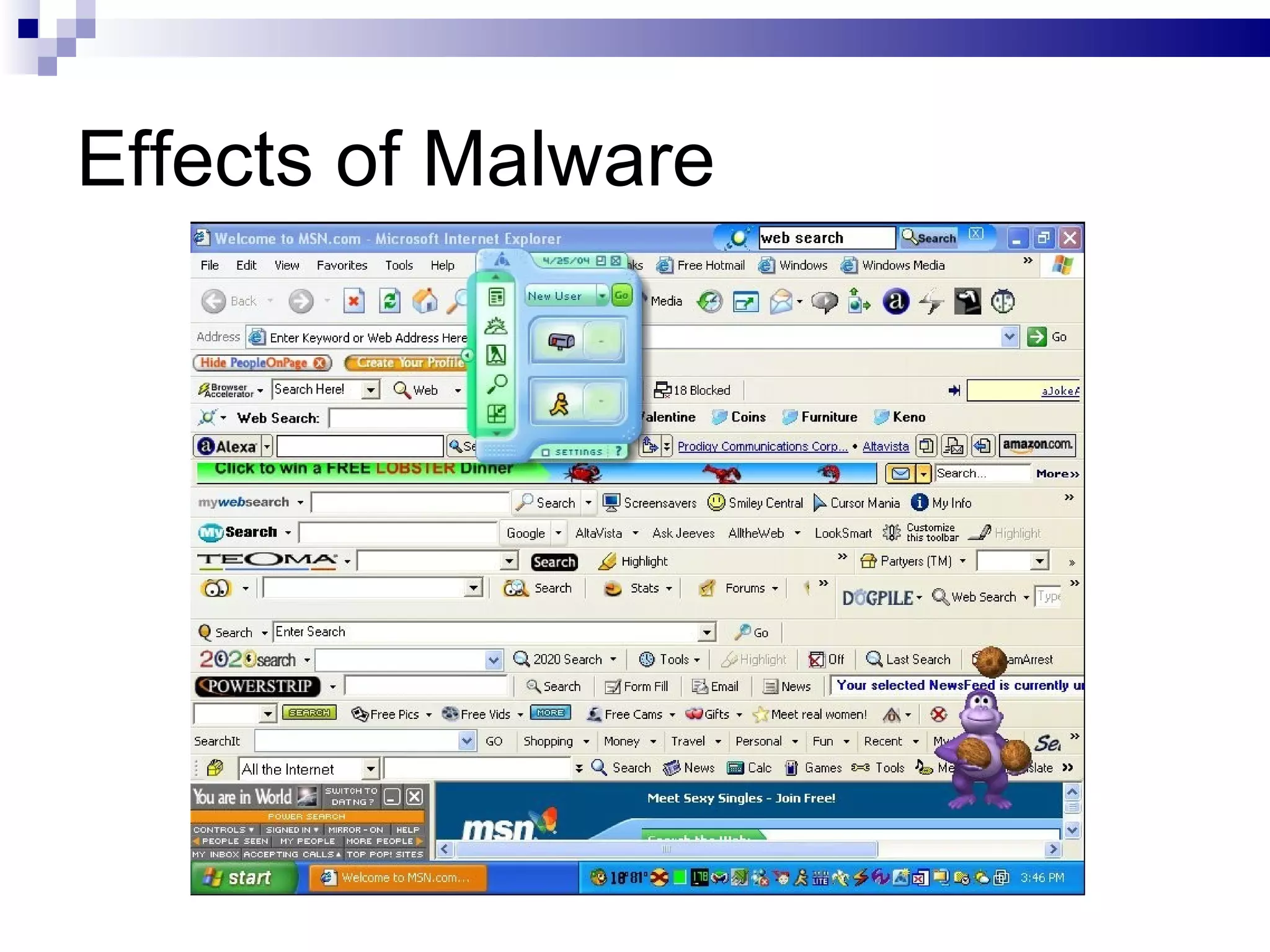
Effects of Malware Proliferation through address lists Modification or removal of startup files Modification or removal of data or application files Generation of denial-of-service attacks
Spyware Collects information from computer users (such as keystrokes, screenshots, history) without their knowledge or consent Other names: adware, crapware, spybots Sometimes from legitimate sources (Microsoft reporting, software updates, manufacturer sales pitches)
Effects of Spyware Unwanted advertising Unwanted toolbars Unwanted pop-ups Unwanted browser changes (home page, favorites) Unwanted interruptions Unwanted redirections Drains CPU usage / performance
Effects of Malware
Reducing Risks Restrict physical access (keys, biometrics, special facilities) Restrict logical access (passwords, CAPTCHA, user accounts) Fortify the architecture (firewalls, encryption, UPS) Maintain “clean” facilities (anti-virus software, auditing)

ADM 316 Workshop 5 Slides

  • 1.
    ADM 316 Computersand Information Processing Workshop 5
  • 2.
  • 3.
    Chapter 10 ComputerSecurity and Risks
  • 4.
  • 5.
    Computer Crime Computercrime is any crime accomplished through knowledge or use of computer technology. Most computer crimes are committed by company insiders and are typically covered up or not reported to authorities to avoid embarrassment.
  • 6.
  • 7.
    Computers are usedto steal: Money Goods Information Computer resources
  • 8.
    Online Fraud Theuse of deception to get individuals to reveal sensitive information (social engineering) Online auctions Sweepstakes / bank scams Phishing / spoofing
  • 9.
    Protecting Yourself fromIdentity Theft Make all your online purchases using a separate credit card with a low credit limit for your online transactions. Make sure a secure, encrypted Web site is managing your transaction. Don’t disclose personal information over the phone. Shred sensitive information.
  • 10.
    Malware Virus: spreadsby making copies of itself from program to program or disk to disk, requires user intervention to spread Trojan horse: performs a useful task while also being secretly destructive (Michaelangelo) Worm: program that travels independently over computer networks, seeking uninfected sites (ILOVEYOU, Anna, Blaster, Sobig.F, MyDoom)
  • 11.
    Effects of MalwareProliferation through address lists Modification or removal of startup files Modification or removal of data or application files Generation of denial-of-service attacks
  • 12.
    Spyware Collects informationfrom computer users (such as keystrokes, screenshots, history) without their knowledge or consent Other names: adware, crapware, spybots Sometimes from legitimate sources (Microsoft reporting, software updates, manufacturer sales pitches)
  • 13.
    Effects of SpywareUnwanted advertising Unwanted toolbars Unwanted pop-ups Unwanted browser changes (home page, favorites) Unwanted interruptions Unwanted redirections Drains CPU usage / performance
  • 14.
  • 15.
    Reducing Risks Restrictphysical access (keys, biometrics, special facilities) Restrict logical access (passwords, CAPTCHA, user accounts) Fortify the architecture (firewalls, encryption, UPS) Maintain “clean” facilities (anti-virus software, auditing)