Dell Active Infrastructure
Simplified Convergence and IT Infrastructure Provisioning
Erwin uit de Bos
EMEA Enterprise Technologist - ASM
Dell Solutions Tour
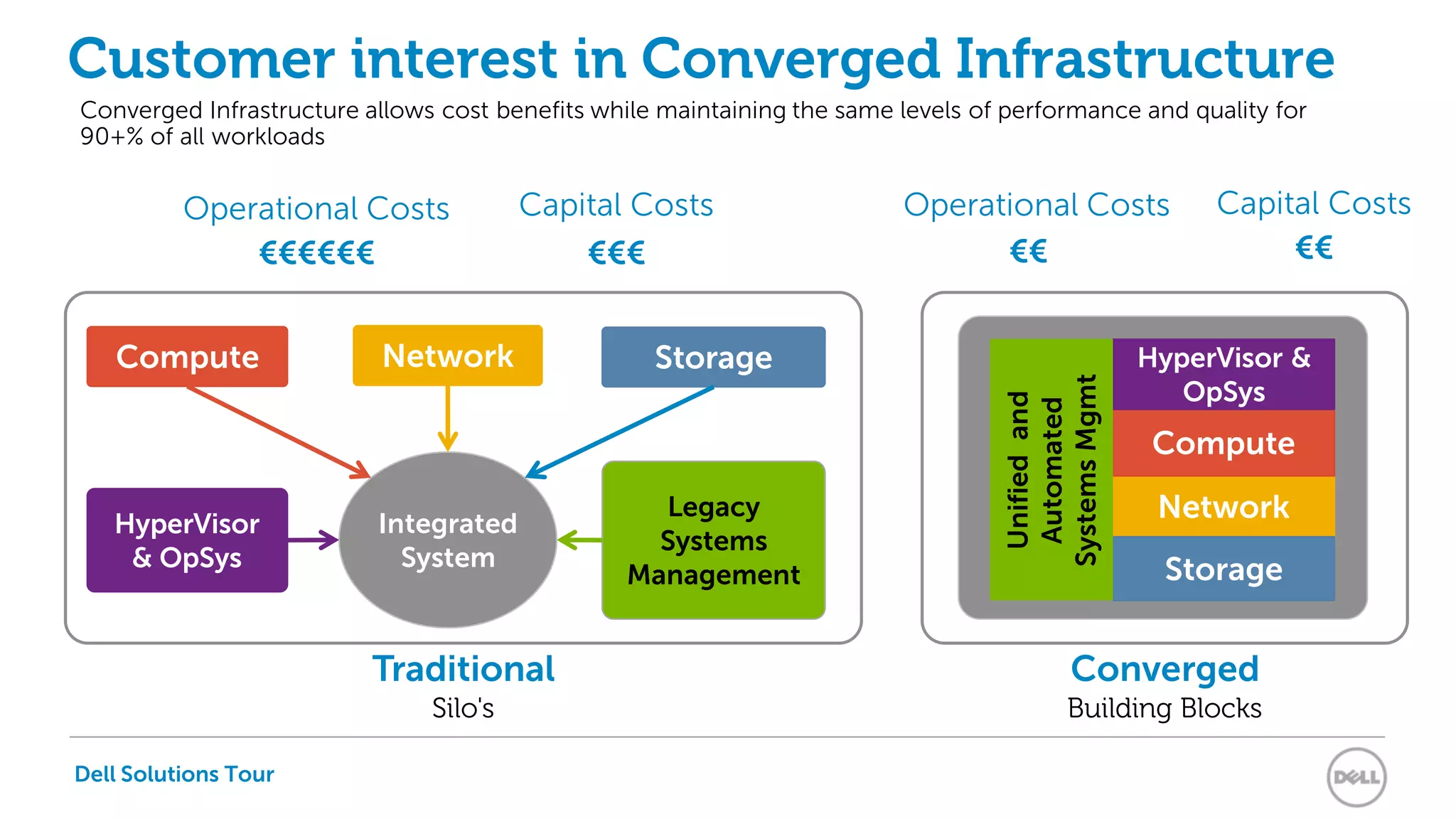
Traditional
Silo's
Converged
Building Blocks
Customer interest in Converged Infrastructure
HyperVisor
& OpSys
StorageNetwork
Integrated
System
Legacy
Systems
Management
Compute
Network
Storage
Compute
HyperVisor &
OpSys
Unifiedand
Automated
SystemsMgmt
Operational Costs Capital Costs
€€€€€€ €€€ €€ €€
Converged Infrastructure allows cost benefits while maintaining the same levels of performance and quality for
90+% of all workloads
Operational Costs Capital Costs
Dell Solutions Tour
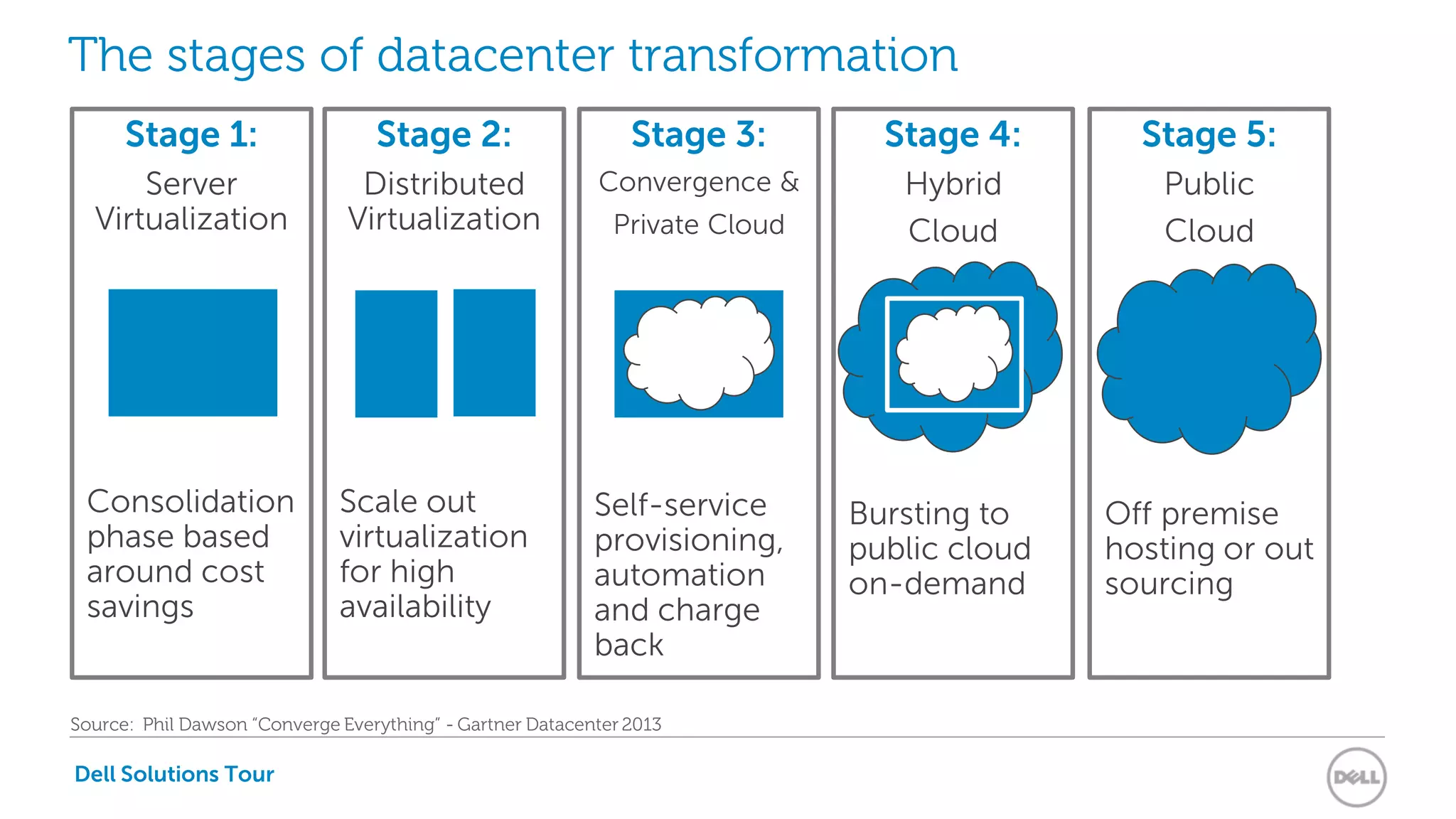
The stages of datacenter transformation
Stage 1:
Server
Virtualization
Consolidation
phase based
around cost
savings
Stage 2:
Distributed
Virtualization
Scale out
virtualization
for high
availability
Stage 3:
Convergence &
Private Cloud
Self-service
provisioning,
automation
and charge
back
Stage 4:
Hybrid
Cloud
Bursting to
public cloud
on-demand
Stage 5:
Public
Cloud
Off premise
hosting or out
sourcing
Source: Phil Dawson “Converge Everything” - Gartner Datacenter 2013
Dell Active
Infrastructure
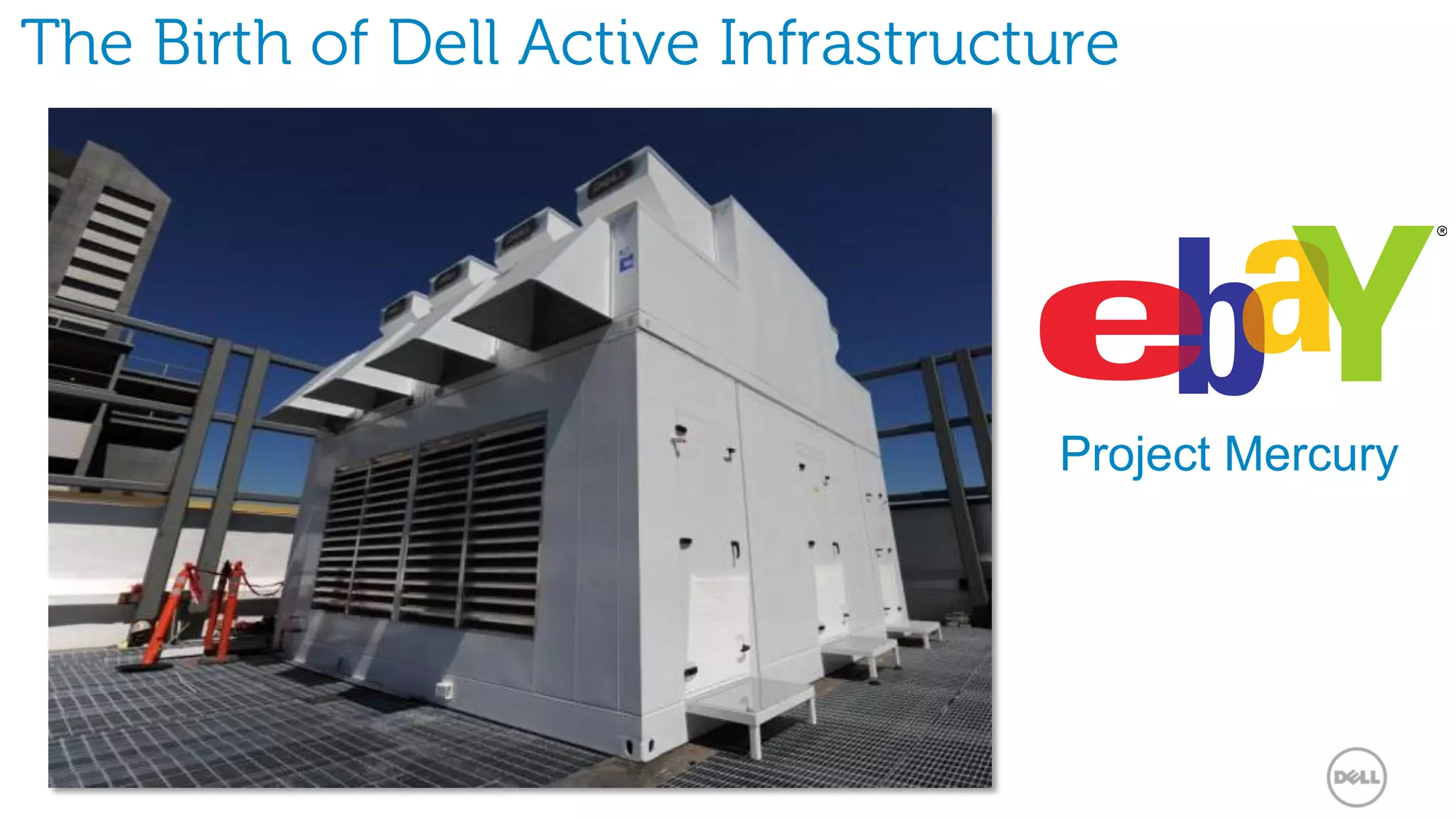
The Birth of Dell Active Infrastructure
Project Mercury
Dell Solutions Tour
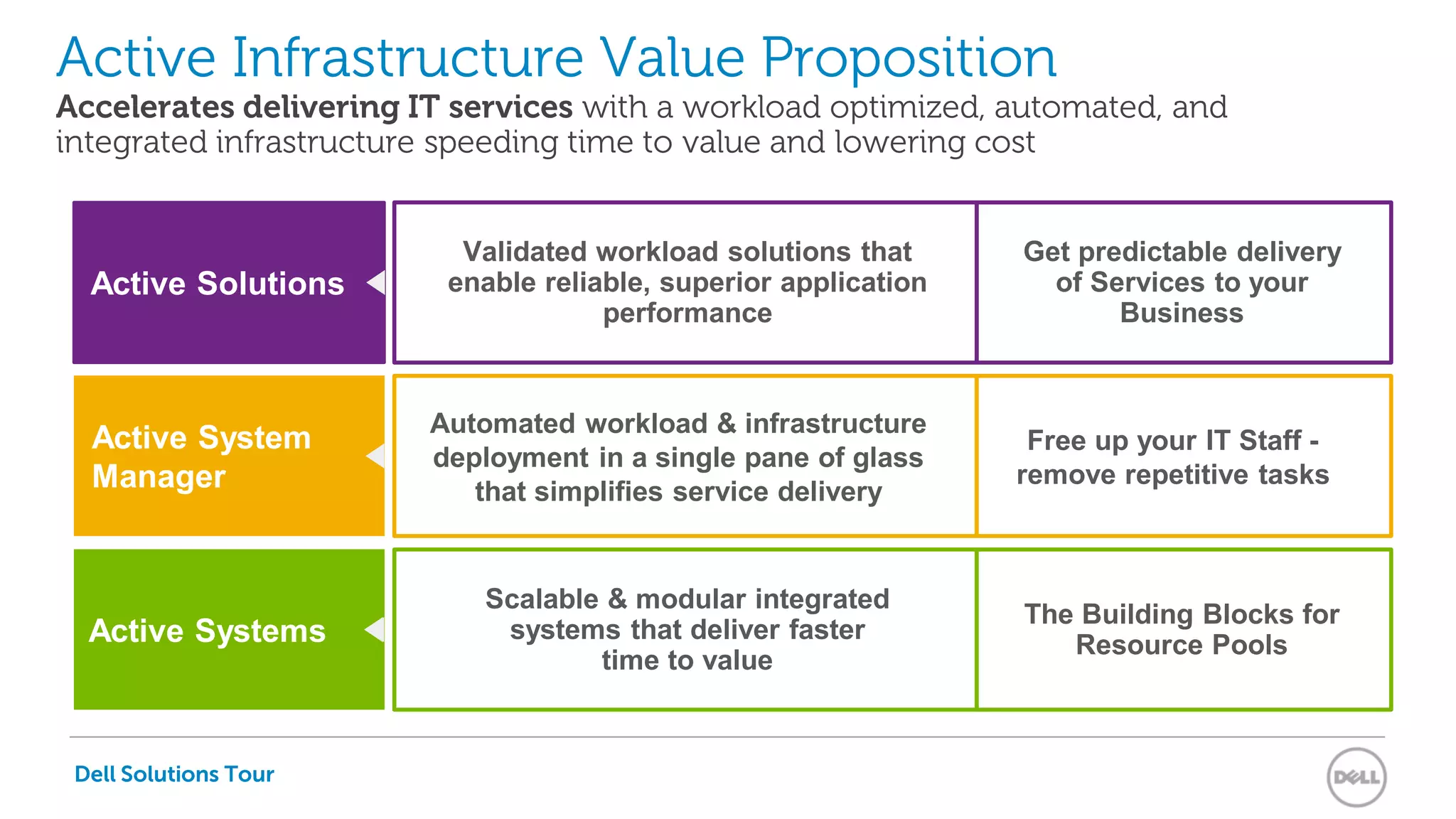
Active Infrastructure Value Proposition
Accelerates delivering IT services with a workload optimized, automated, and
integrated infrastructure speeding time to value and lowering cost
Validated workload solutions that
enable reliable, superior application
performance
Active Solutions
Active System
Manager
Active Systems
Automated workload & infrastructure
deployment in a single pane of glass
that simplifies service delivery
Scalable & modular integrated
systems that deliver faster
time to value
Get predictable delivery
of Services to your
Business
Free up your IT Staff -
remove repetitive tasks
The Building Blocks for
Resource Pools
Dell Solutions Tour
Dell Solutions Tour
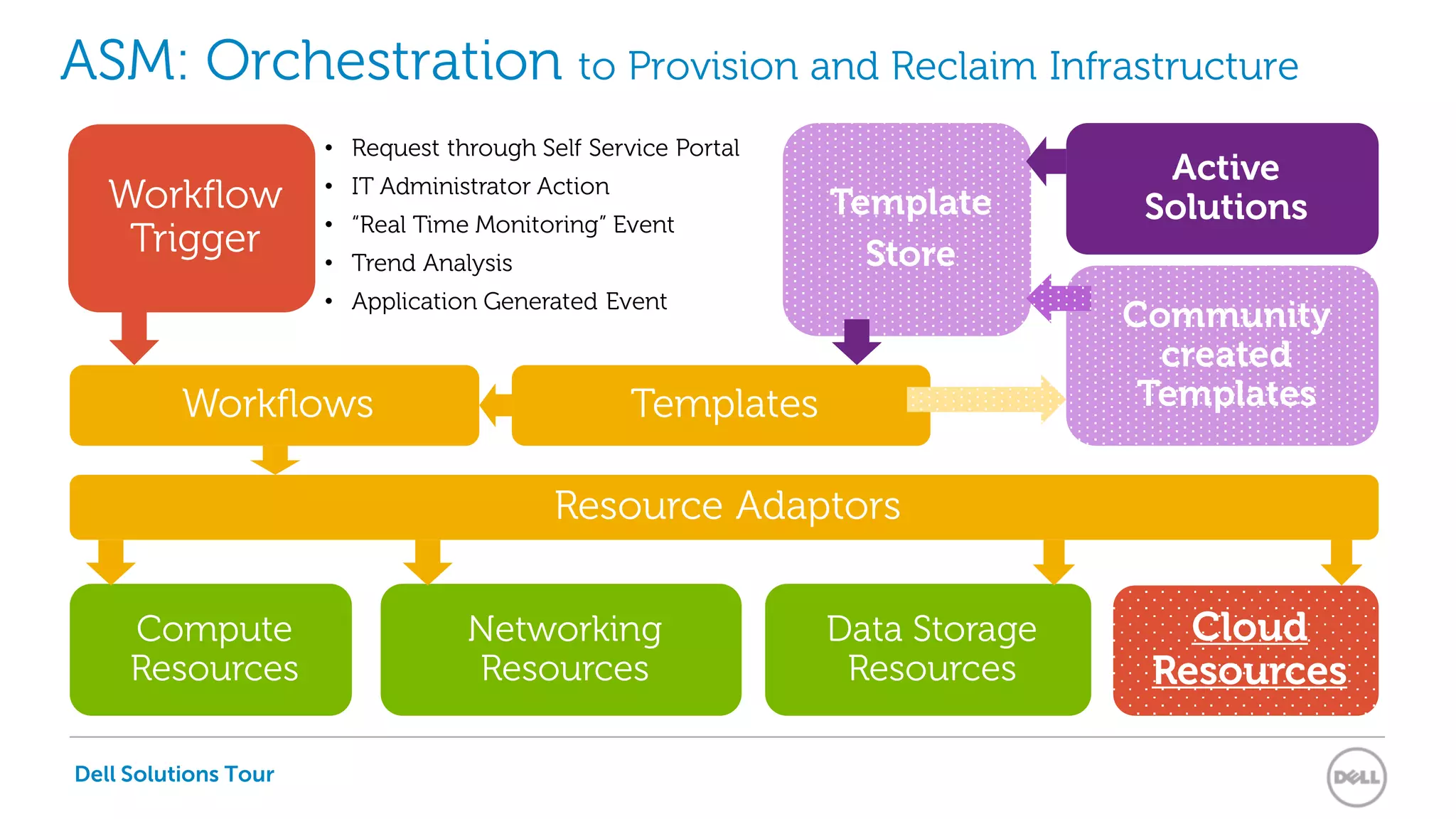
ASM: Orchestration to Provision and Reclaim Infrastructure
Compute
Resources
Data Storage
Resources
Networking
Resources
Resource Adaptors
Workflows Templates
Template
Store
Cloud
Resources
Community
created
Templates
• Request through Self Service Portal
• IT Administrator Action
• “Real Time Monitoring” Event
• Trend Analysis
• Application Generated Event
Active
SolutionsWorkflow
Trigger
Dell Solutions Tour
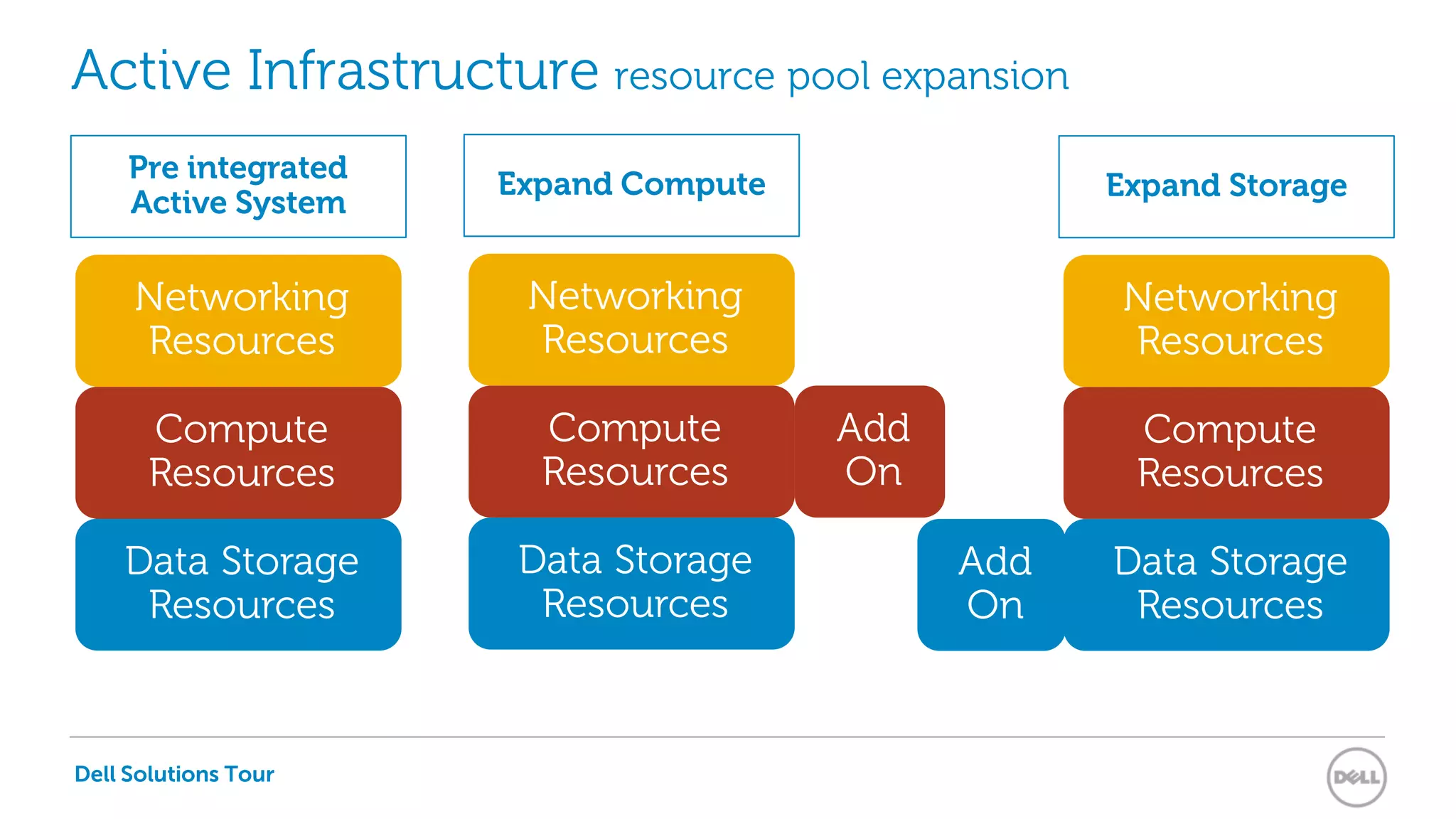
Active Infrastructure resource pool expansion
Compute
Resources
Data Storage
Resources
Networking
Resources
Pre integrated
Active System
Compute
Resources
Data Storage
Resources
Networking
Resources
Expand Compute
Compute
Resources
Data Storage
Resources
Networking
Resources
Expand Storage
Add
On
Add
On
Dell Solutions Tour
Dell Solutions Tour
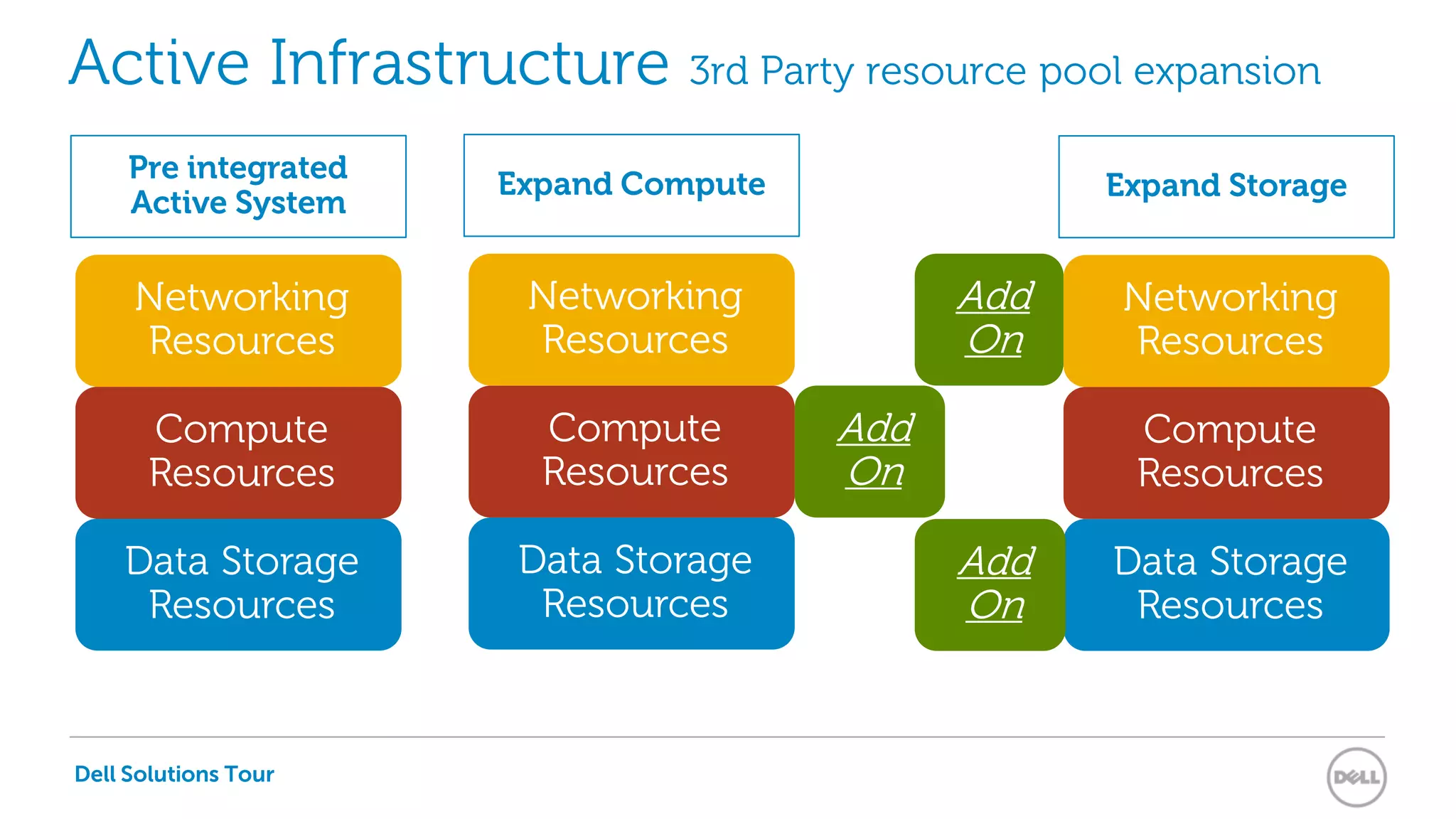
Active Infrastructure 3rd Party resource pool expansion
Compute
Resources
Data Storage
Resources
Networking
Resources
Compute
Resources
Data Storage
Resources
Networking
Resources
Compute
Resources
Data Storage
Resources
Networking
Resources
Add
On
Add
On
Pre integrated
Active System
Expand Compute Expand Storage
Add
On
Dell Solutions Tour
Dell Solutions Tour
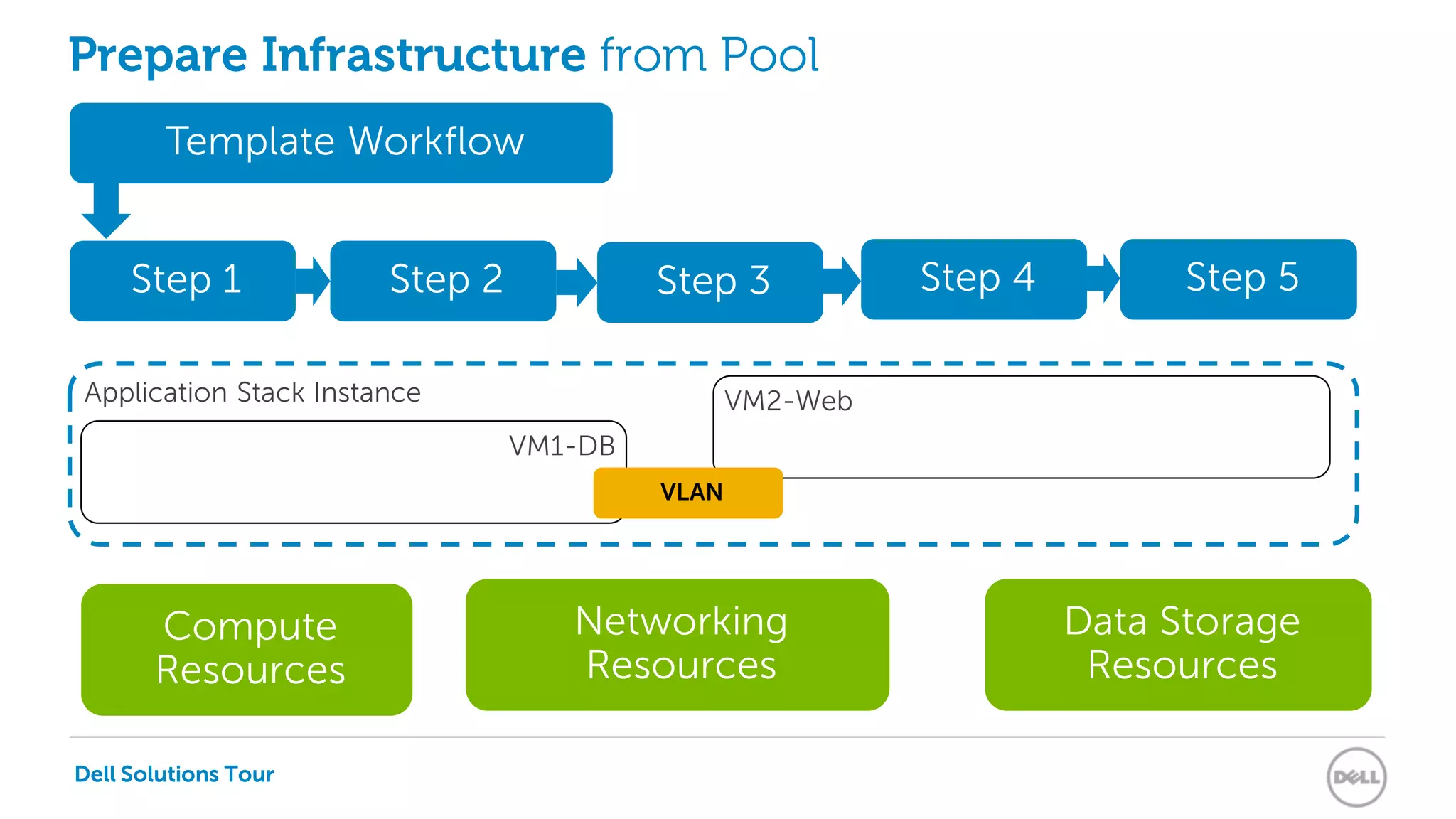
Application Stack Instance
CPU 2 LAN 2 Disk 2LAN 1 Disk 1CPU 1
Prepare Infrastructure from Pool
Compute
Resources
Data Storage
Resources
Networking
Resources
Step 1
Template Workflow
Step 2 Step 3 Step 4 Step 5
VM1-DB
VM2-Web
VLAN
Dell Solutions Tour
Dell Solutions Tour
Data Storage
Resources
Networking
Resources
Compute
Resources
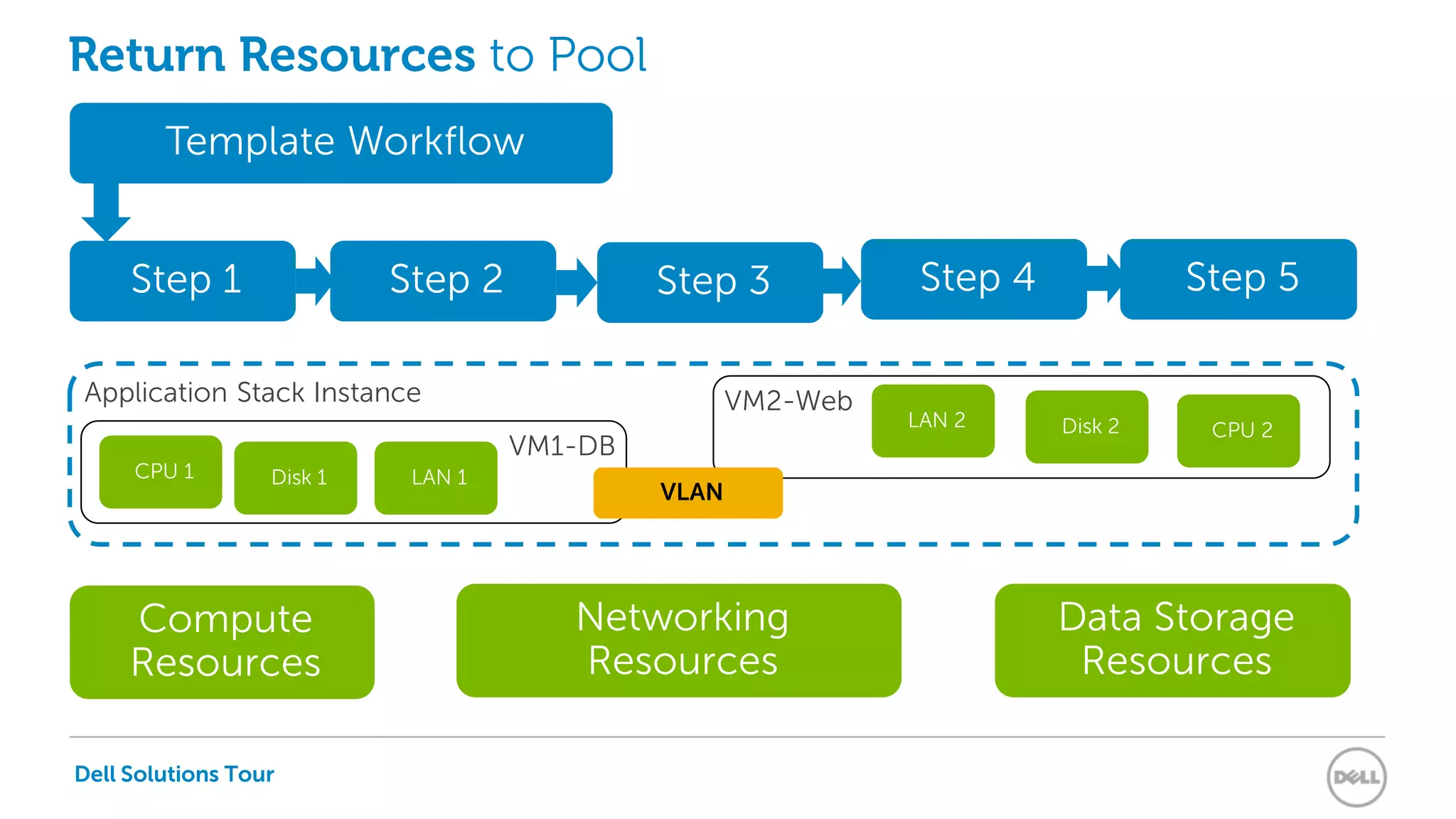
Application Stack Instance
CPU 2LAN 2 Disk 2
LAN 1Disk 1CPU 1
Return Resources to Pool
Step 1
Template Workflow
Step 2 Step 3 Step 4 Step 5
VM1-DB
VM2-Web
VLAN
Dell Solutions Tour
Dell Active
Infrastructure
Functionalities
Dell Solutions Tour
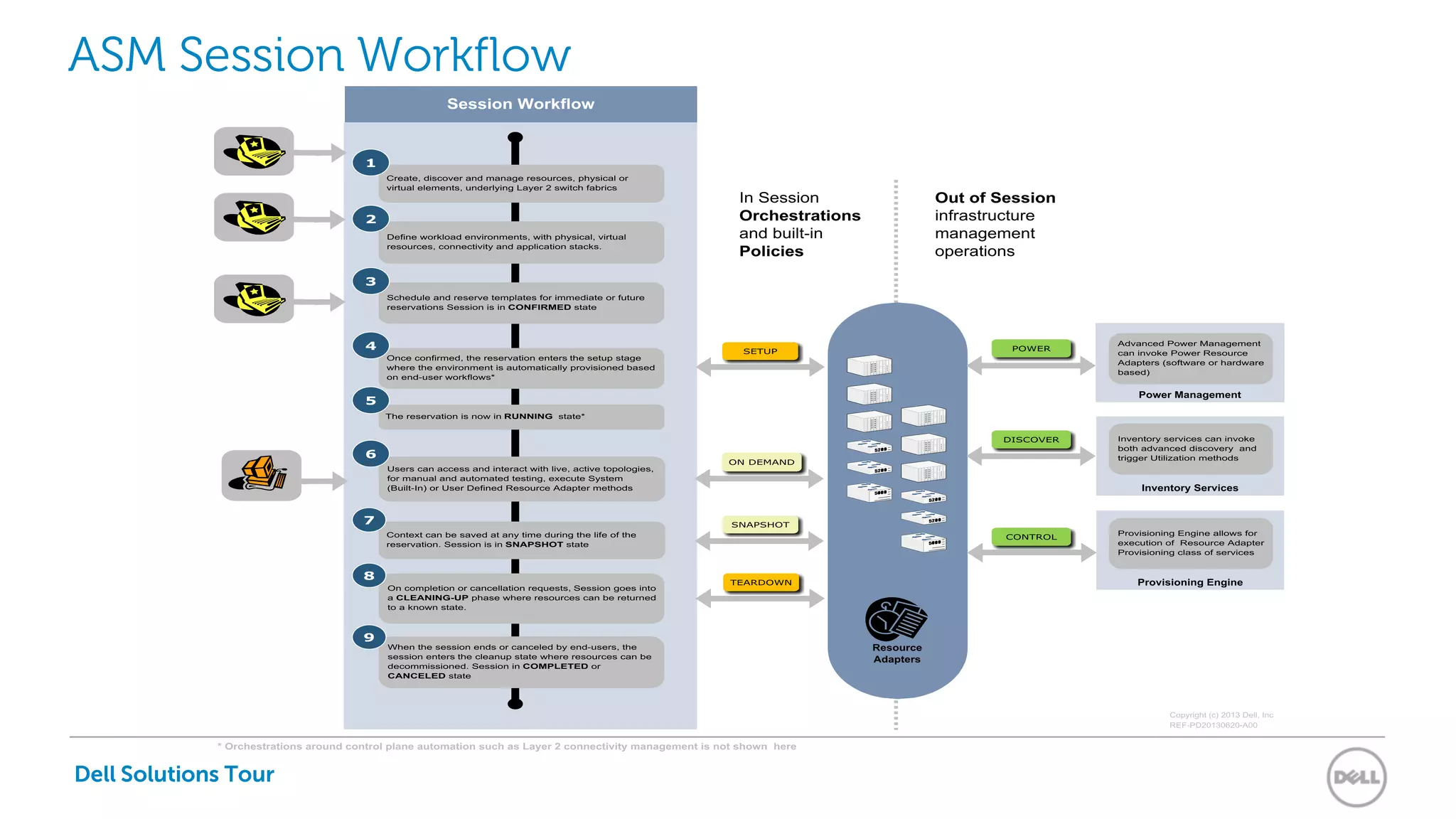
ASM Session Workflow
Dell Solutions Tour
Dell Solutions Tour
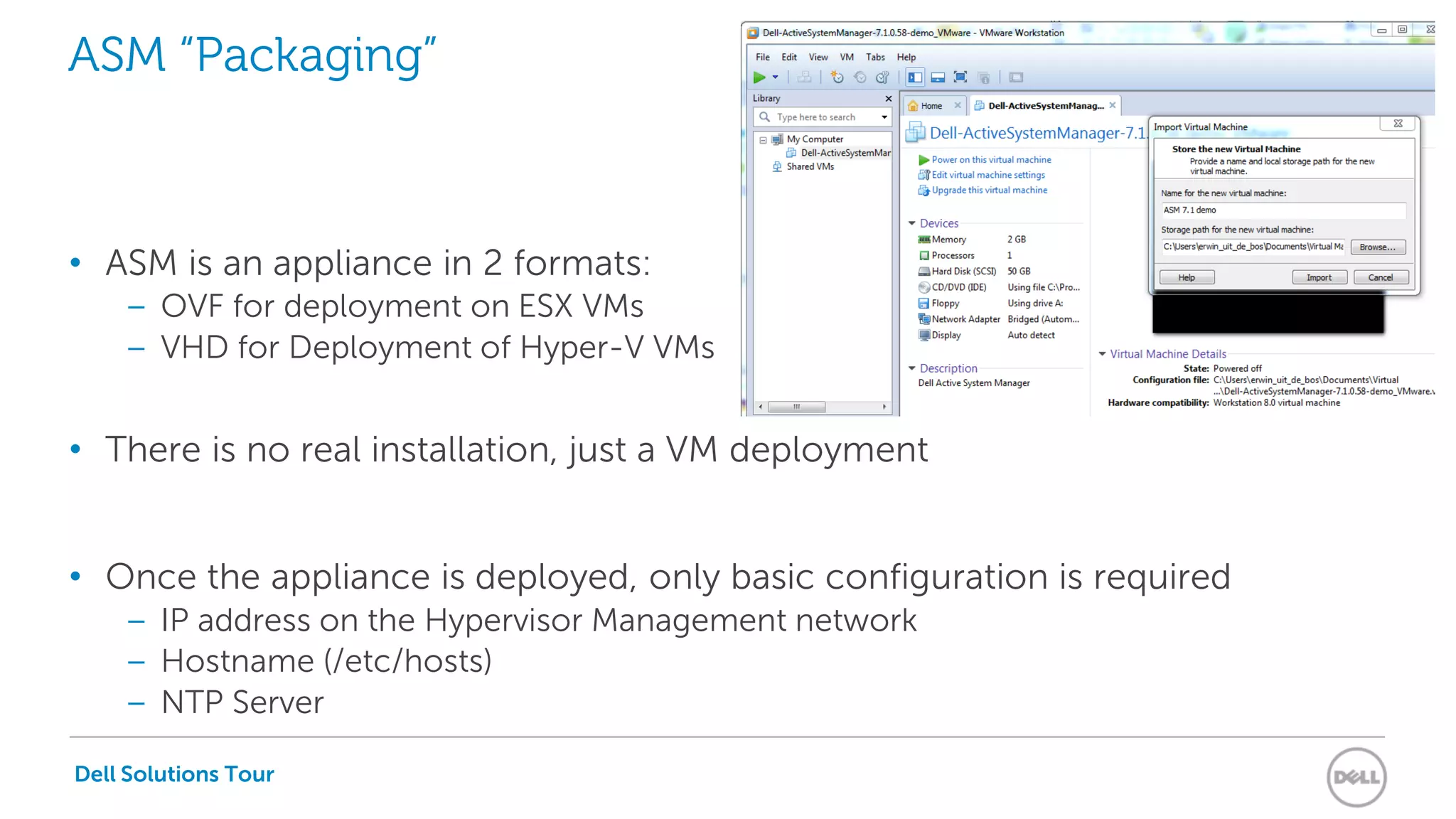
ASM “Packaging”
• ASM is an appliance in 2 formats:
– OVF for deployment on ESX VMs
– VHD for Deployment of Hyper-V VMs
• There is no real installation, just a VM deployment
• Once the appliance is deployed, only basic configuration is required
– IP address on the Hypervisor Management network
– Hostname (/etc/hosts)
– NTP Server
Dell Solutions Tour
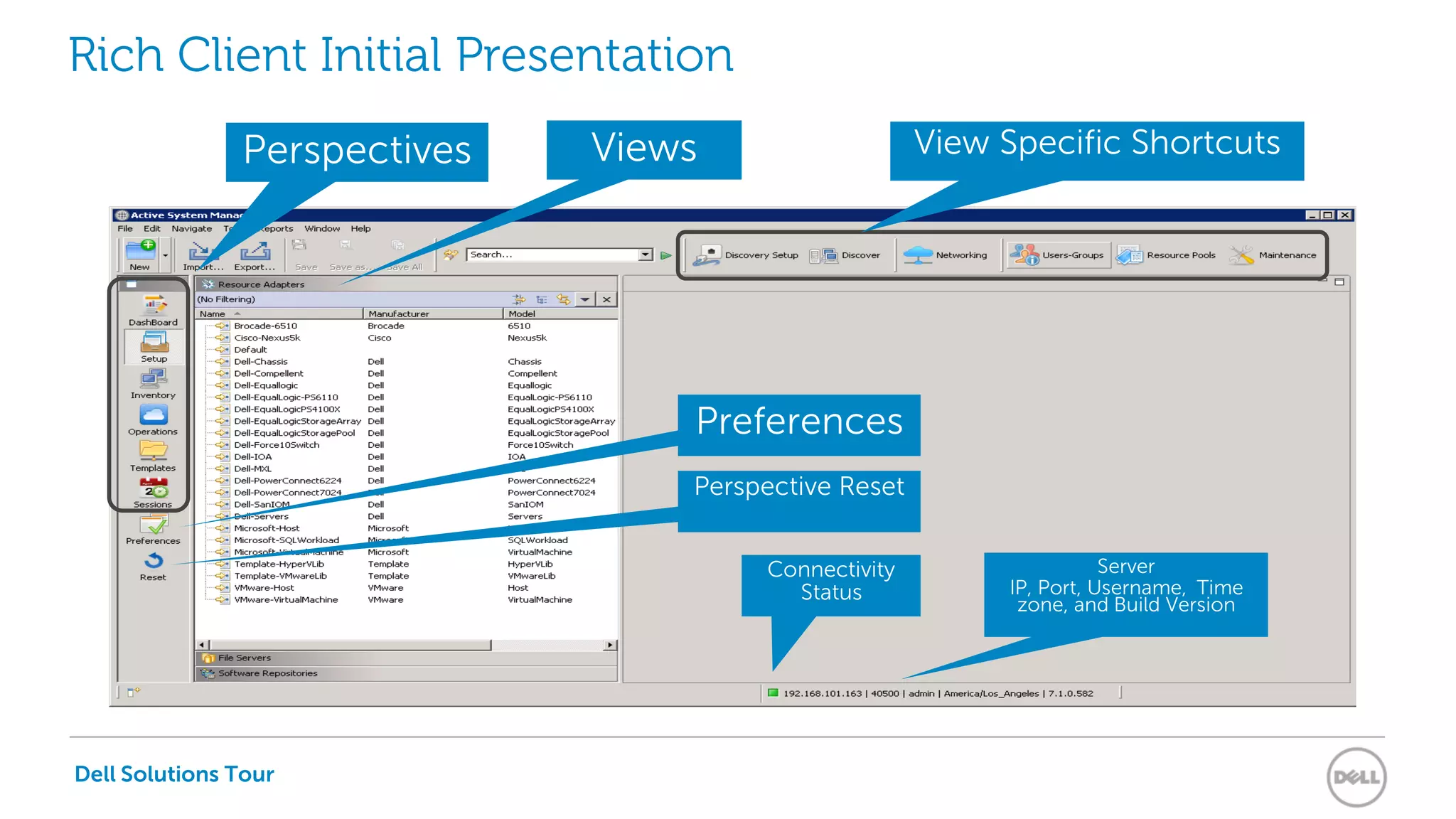
Rich Client Initial Presentation
View Specific ShortcutsPerspectives
Preferences
Perspective Reset
Connectivity
Status
Server
IP, Port, Username, Time
zone, and Build Version
Views
Dell Solutions Tour
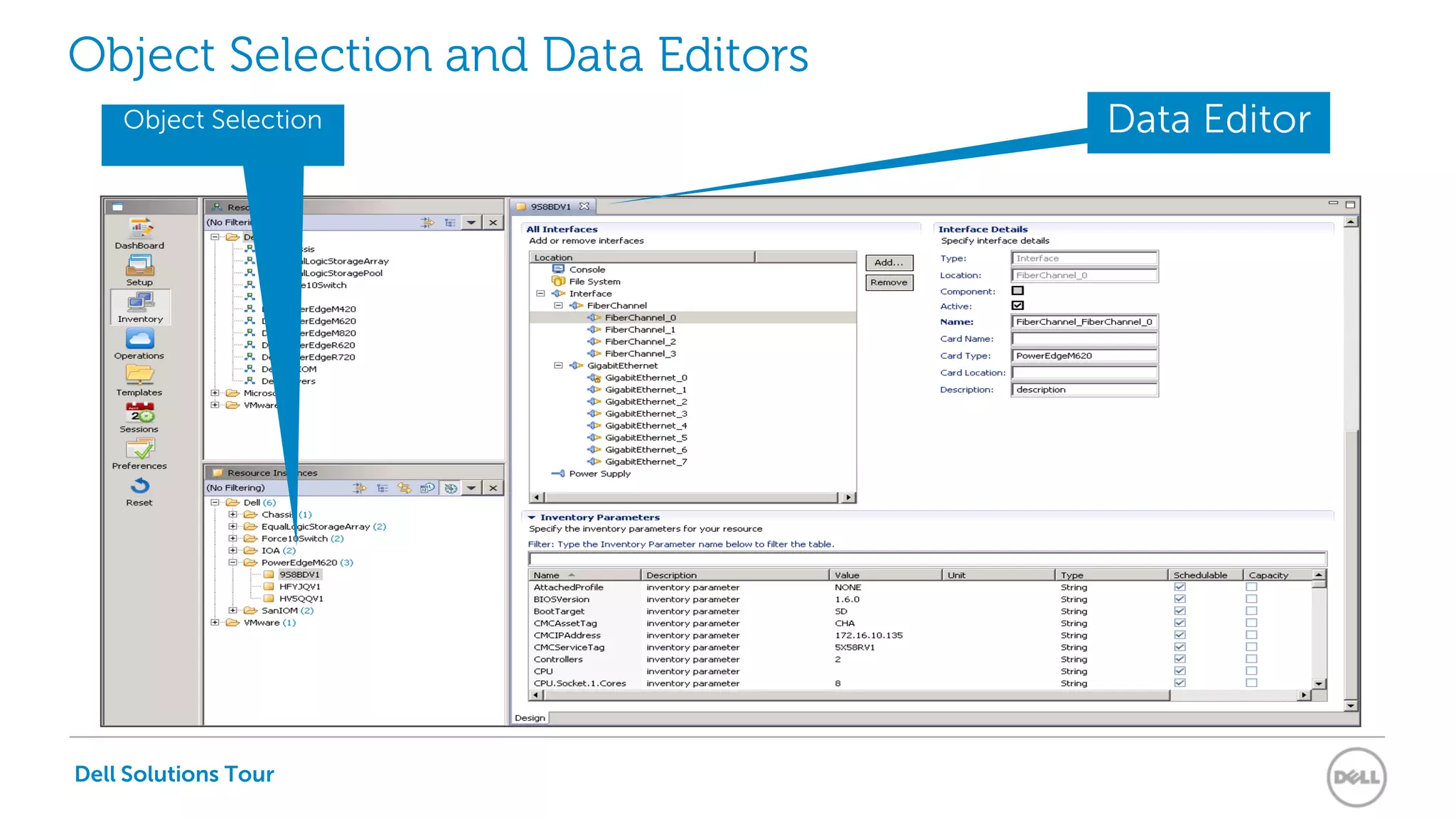
Object Selection and Data Editors
Object Selection Data Editor
Dell Solutions Tour
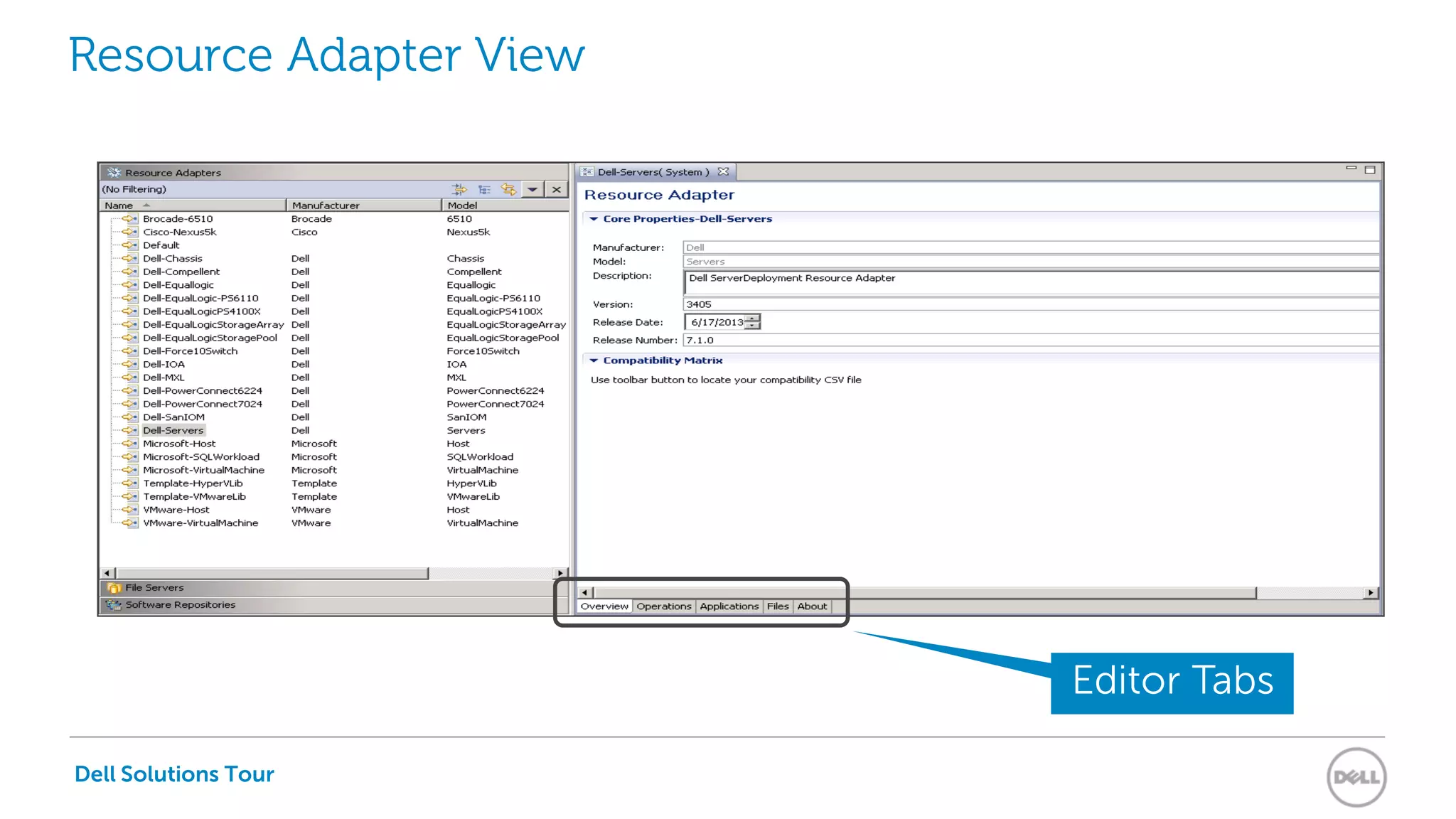
Resource Adapter View
Editor Tabs
Dell Solutions Tour
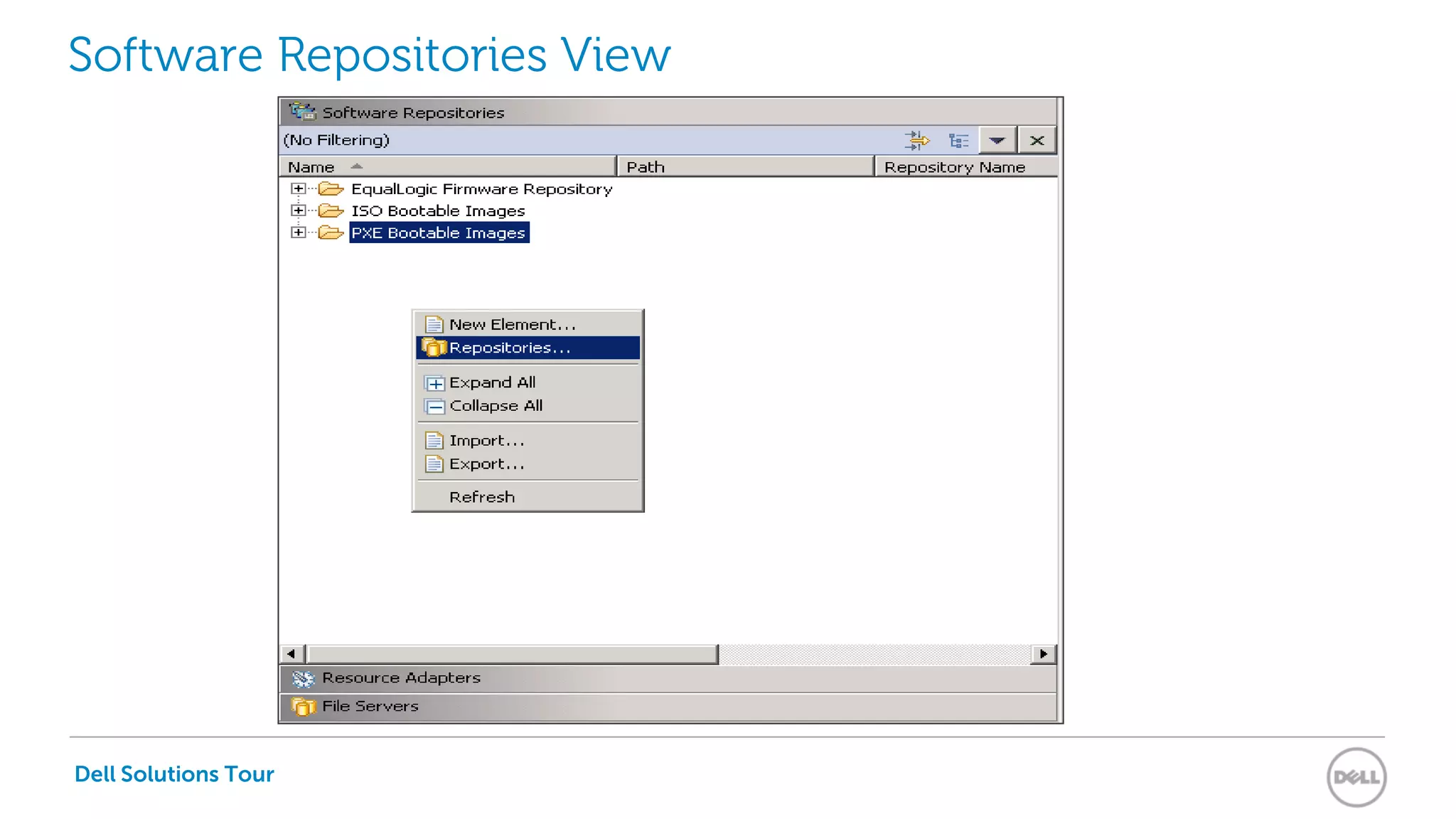
Software Repositories View
Dell Solutions Tour
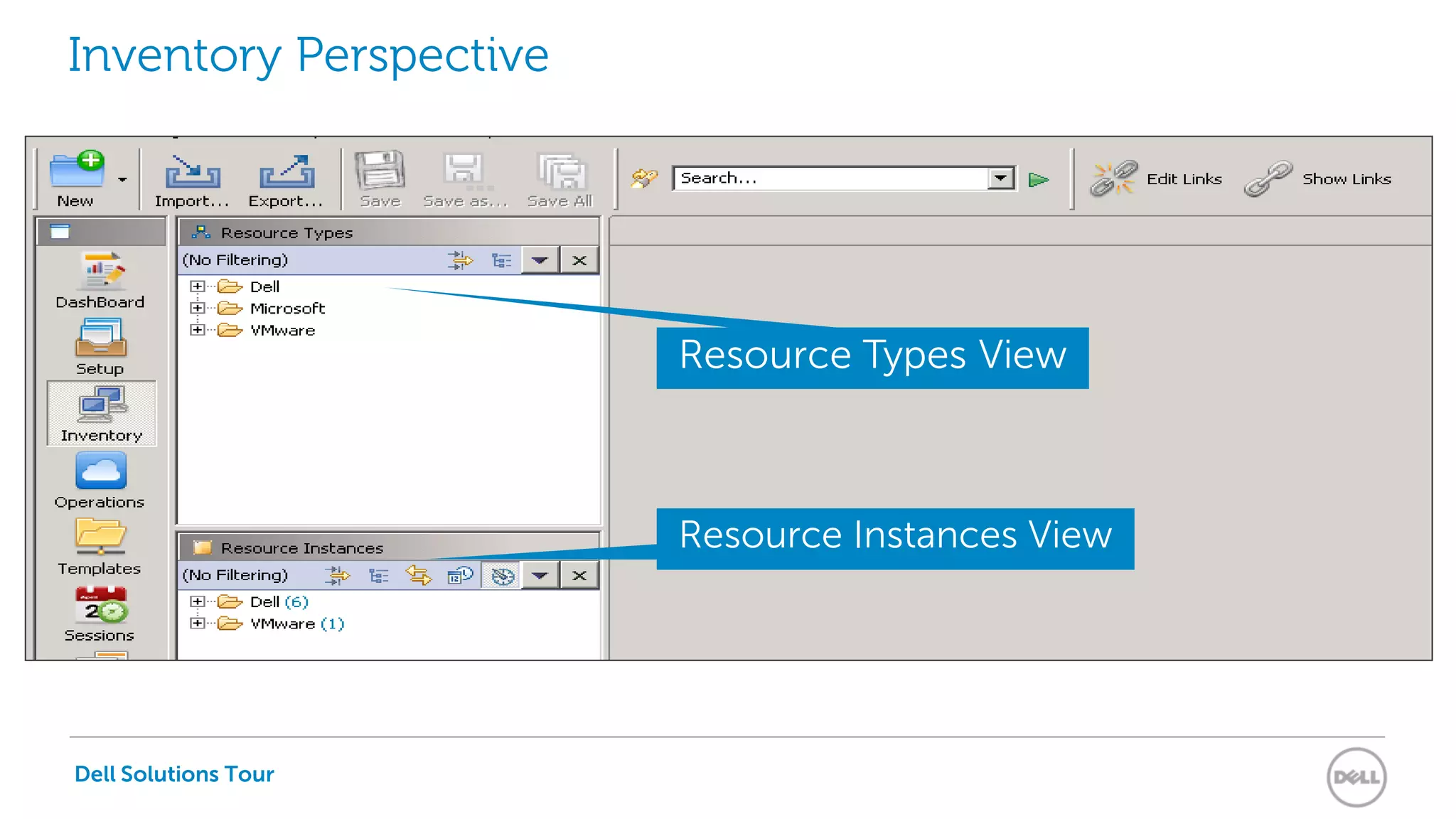
Inventory Perspective
Resource Types View
Resource Instances View
Dell Solutions Tour
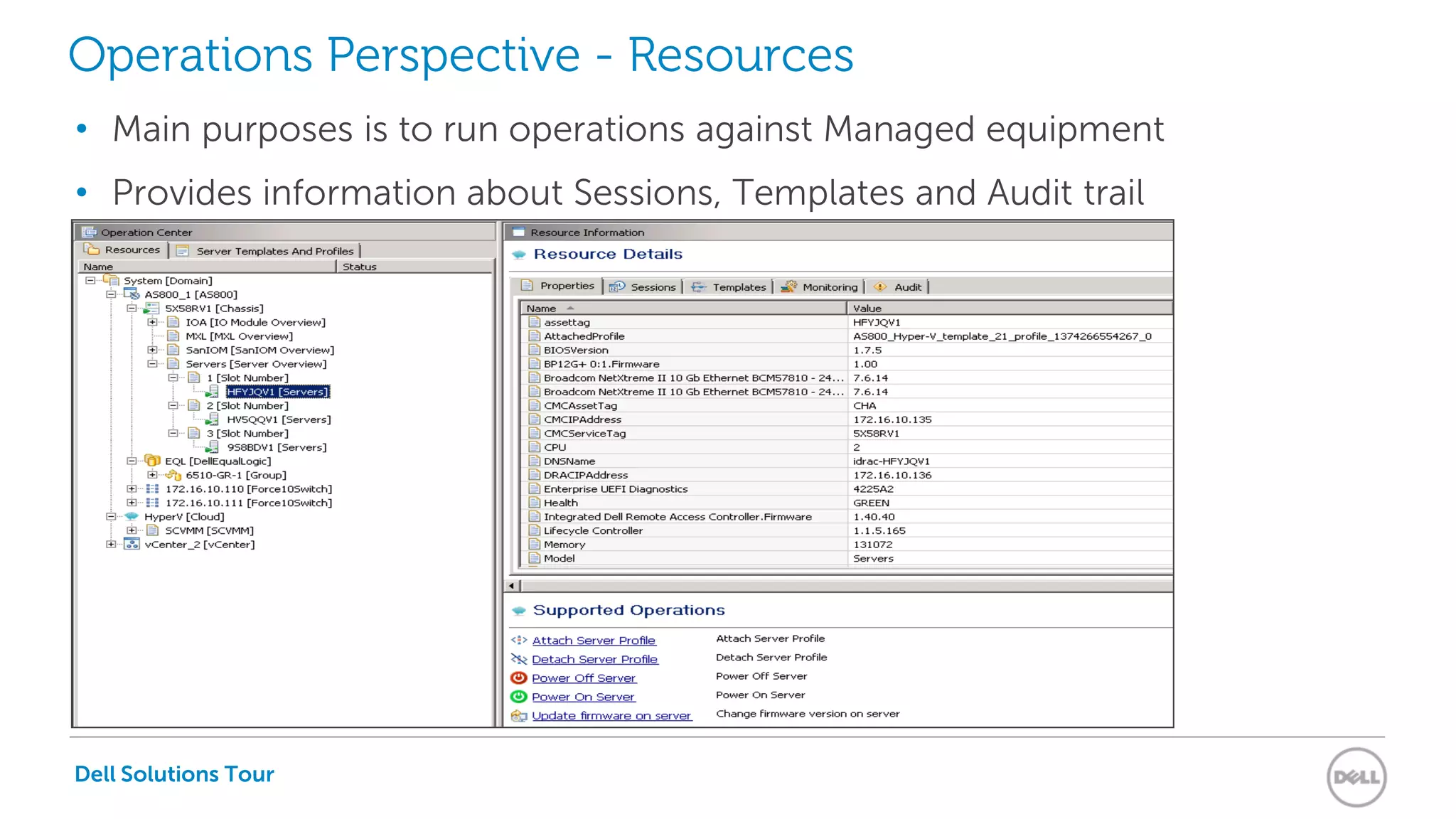
Operations Perspective - Resources
• Main purposes is to run operations against Managed equipment
• Provides information about Sessions, Templates and Audit trail
Dell Solutions Tour
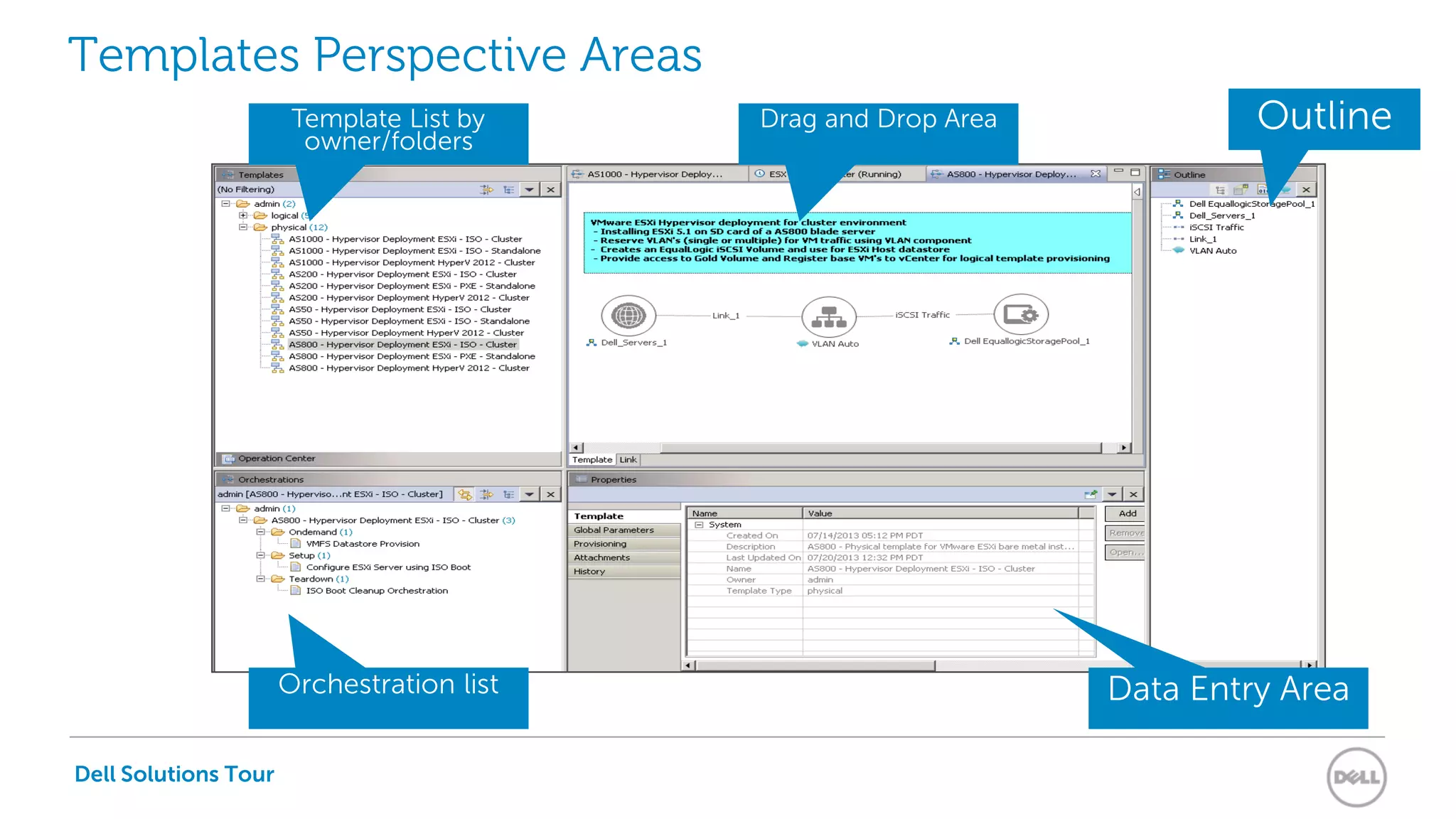
Templates Perspective Areas
Template List by
owner/folders
Drag and Drop Area Outline
Data Entry AreaOrchestration list
Dell Solutions Tour
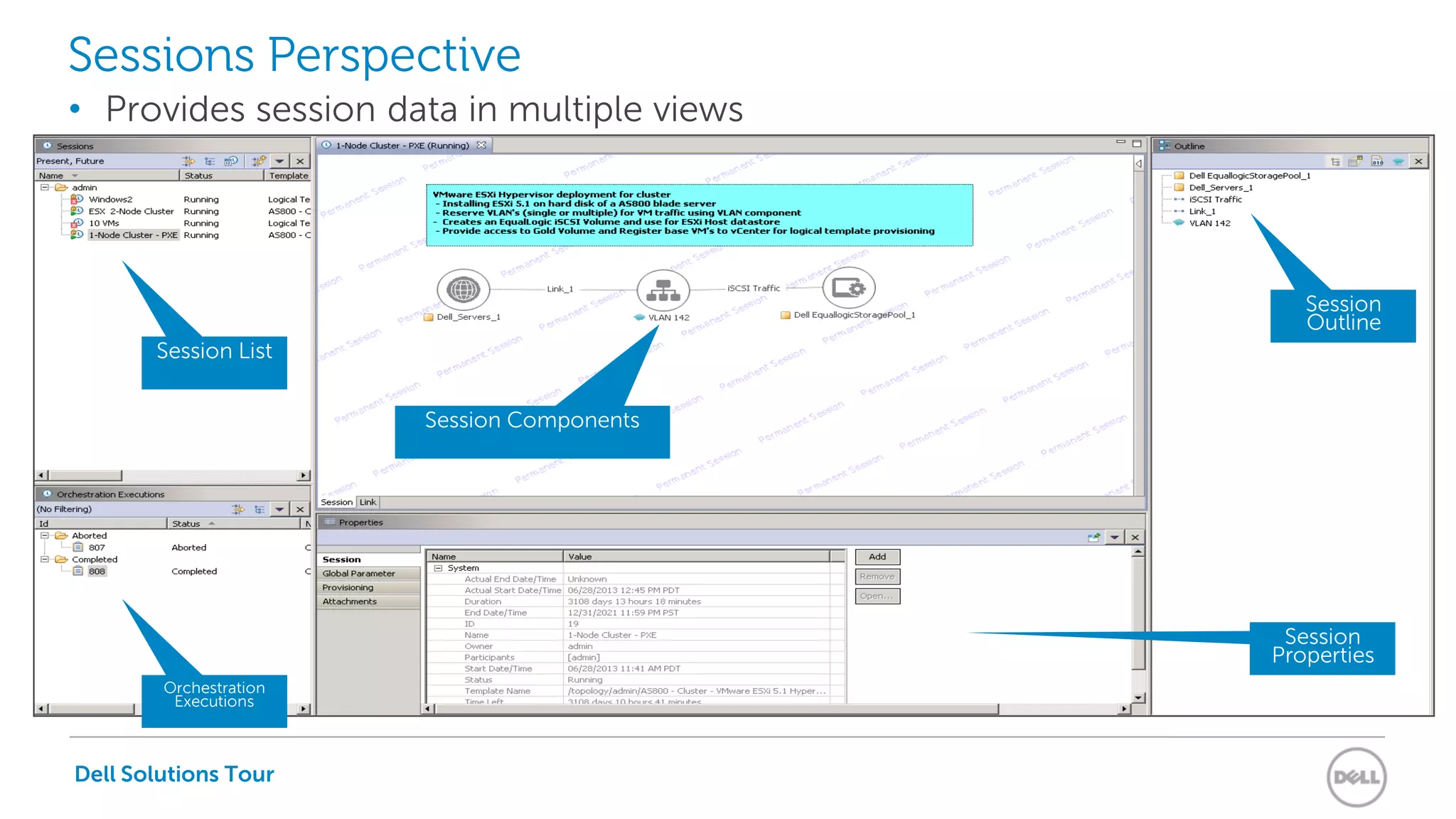
Sessions Perspective
• Provides session data in multiple views
Session List
Session Components
Session
Outline
Orchestration
Executions
Session
Properties
Dell Solutions Tour
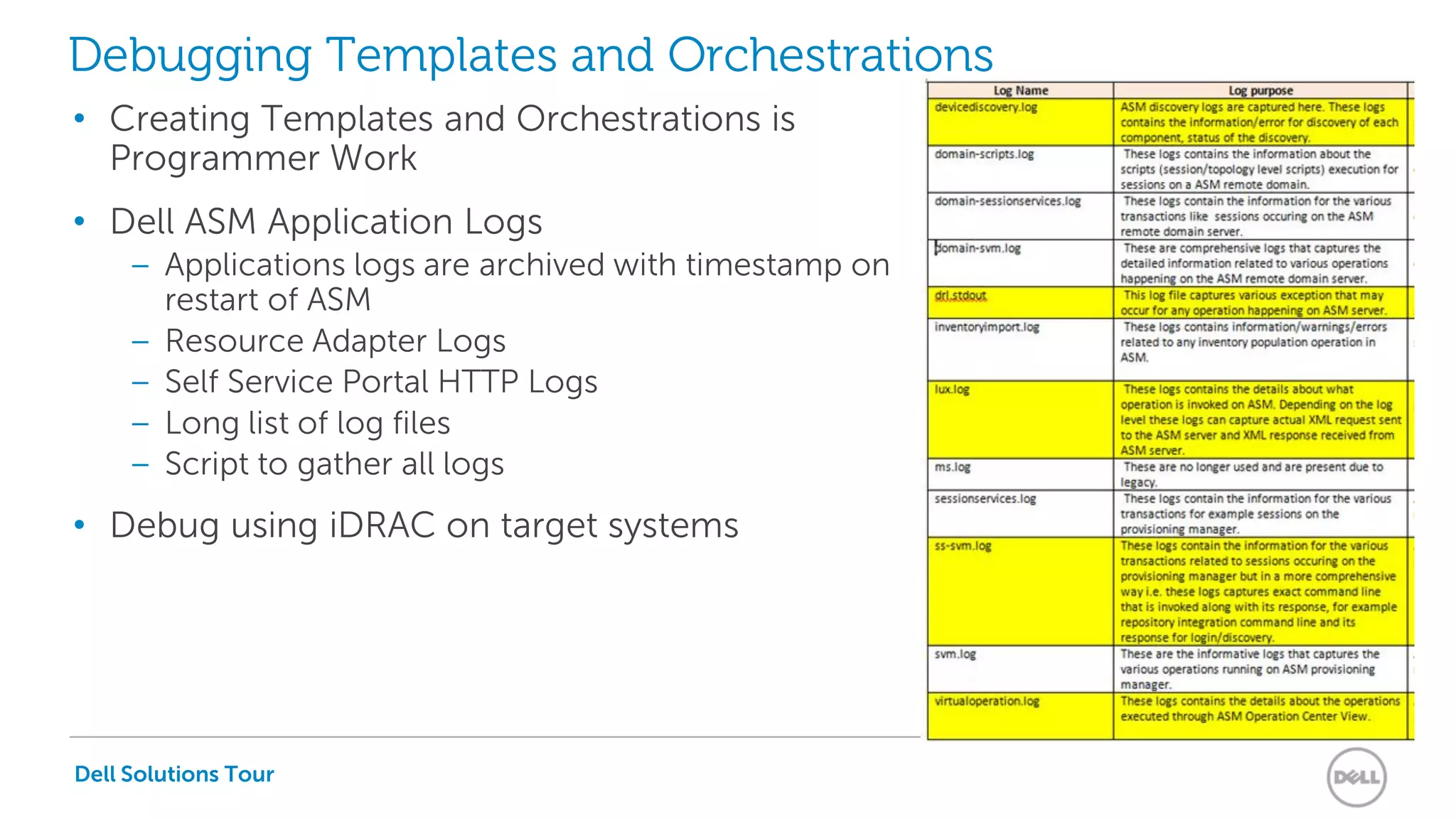
Debugging Templates and Orchestrations
• Creating Templates and Orchestrations is
Programmer Work
• Dell ASM Application Logs
– Applications logs are archived with timestamp on
restart of ASM
– Resource Adapter Logs
– Self Service Portal HTTP Logs
– Long list of log files
– Script to gather all logs
• Debug using iDRAC on target systems
Dell Solutions Tour
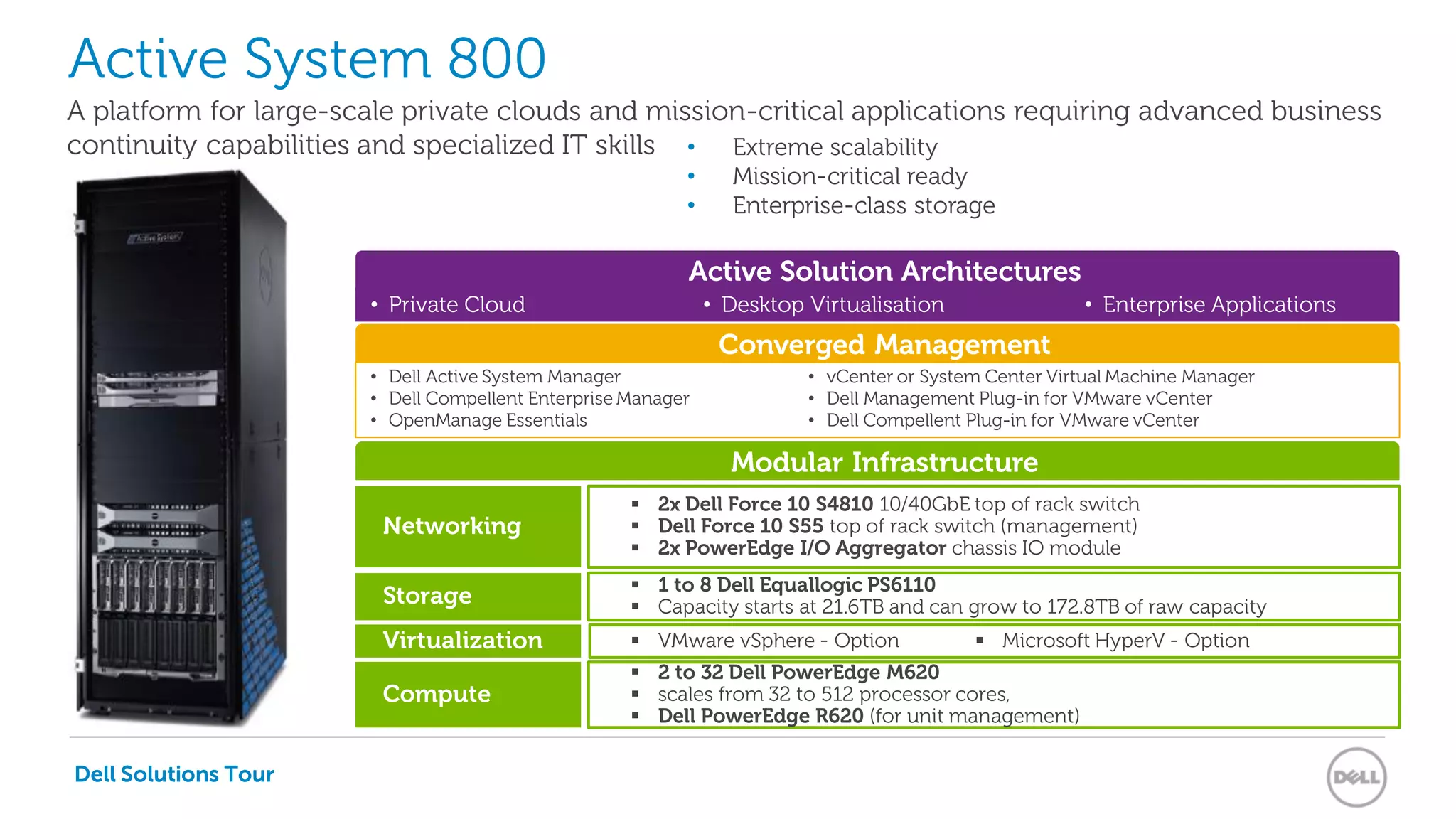
• Private Cloud • Desktop Virtualisation • Enterprise Applications
Active System 800
Modular Infrastructure
A platform for large-scale private clouds and mission-critical applications requiring advanced business
continuity capabilities and specialized IT skills
Storage
 1 to 8 Dell Equallogic PS6110
 Capacity starts at 21.6TB and can grow to 172.8TB of raw capacity
Virtualization  VMware vSphere - Option
Compute
 2 to 32 Dell PowerEdge M620
 scales from 32 to 512 processor cores,
 Dell PowerEdge R620 (for unit management)
 Microsoft HyperV - Option
Active Solution Architectures
Networking
 2x Dell Force 10 S4810 10/40GbE top of rack switch
 Dell Force 10 S55 top of rack switch (management)
 2x PowerEdge I/O Aggregator chassis IO module
Dell Solutions Tour
• Extreme scalability
• Mission-critical ready
• Enterprise-class storage
Converged Management
• Dell Active System Manager
• Dell Compellent Enterprise Manager
• OpenManage Essentials
• vCenter or System Center Virtual Machine Manager
• Dell Management Plug-in for VMware vCenter
• Dell Compellent Plug-in for VMware vCenter
Dell Solutions Tour
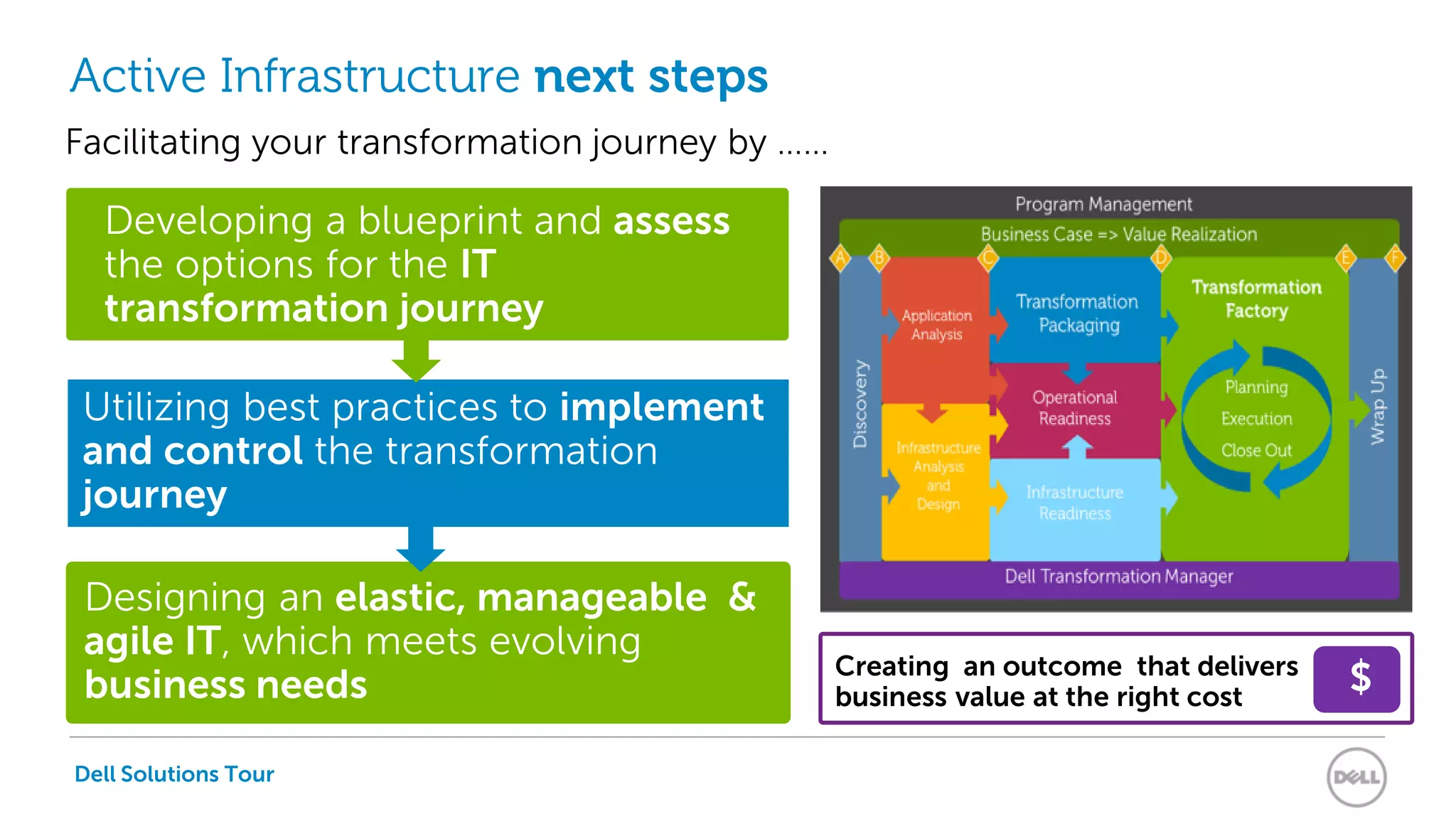
Active Infrastructure next steps
Designing an elastic, manageable &
agile IT, which meets evolving
business needs
Creating an outcome that delivers
business value at the right cost
Developing a blueprint and assess
the options for the IT
transformation journey
Utilizing best practices to implement
and control the transformation
journey
Facilitating your transformation journey by ……
$
Thank you !
Dell efficiency through convergence - Dell Active Infrastructure

Dell efficiency through convergence - Dell Active Infrastructure

  • 1.
    Dell Active Infrastructure SimplifiedConvergence and IT Infrastructure Provisioning Erwin uit de Bos EMEA Enterprise Technologist - ASM
  • 2.
    Dell Solutions Tour Traditional Silo's Converged BuildingBlocks Customer interest in Converged Infrastructure HyperVisor & OpSys StorageNetwork Integrated System Legacy Systems Management Compute Network Storage Compute HyperVisor & OpSys Unifiedand Automated SystemsMgmt Operational Costs Capital Costs €€€€€€ €€€ €€ €€ Converged Infrastructure allows cost benefits while maintaining the same levels of performance and quality for 90+% of all workloads Operational Costs Capital Costs
  • 3.
    Dell Solutions Tour Thestages of datacenter transformation Stage 1: Server Virtualization Consolidation phase based around cost savings Stage 2: Distributed Virtualization Scale out virtualization for high availability Stage 3: Convergence & Private Cloud Self-service provisioning, automation and charge back Stage 4: Hybrid Cloud Bursting to public cloud on-demand Stage 5: Public Cloud Off premise hosting or out sourcing Source: Phil Dawson “Converge Everything” - Gartner Datacenter 2013
  • 4.
  • 5.
    The Birth ofDell Active Infrastructure Project Mercury
  • 6.
    Dell Solutions Tour ActiveInfrastructure Value Proposition Accelerates delivering IT services with a workload optimized, automated, and integrated infrastructure speeding time to value and lowering cost Validated workload solutions that enable reliable, superior application performance Active Solutions Active System Manager Active Systems Automated workload & infrastructure deployment in a single pane of glass that simplifies service delivery Scalable & modular integrated systems that deliver faster time to value Get predictable delivery of Services to your Business Free up your IT Staff - remove repetitive tasks The Building Blocks for Resource Pools Dell Solutions Tour
  • 7.
    Dell Solutions Tour ASM:Orchestration to Provision and Reclaim Infrastructure Compute Resources Data Storage Resources Networking Resources Resource Adaptors Workflows Templates Template Store Cloud Resources Community created Templates • Request through Self Service Portal • IT Administrator Action • “Real Time Monitoring” Event • Trend Analysis • Application Generated Event Active SolutionsWorkflow Trigger
  • 8.
    Dell Solutions Tour ActiveInfrastructure resource pool expansion Compute Resources Data Storage Resources Networking Resources Pre integrated Active System Compute Resources Data Storage Resources Networking Resources Expand Compute Compute Resources Data Storage Resources Networking Resources Expand Storage Add On Add On Dell Solutions Tour
  • 9.
    Dell Solutions Tour ActiveInfrastructure 3rd Party resource pool expansion Compute Resources Data Storage Resources Networking Resources Compute Resources Data Storage Resources Networking Resources Compute Resources Data Storage Resources Networking Resources Add On Add On Pre integrated Active System Expand Compute Expand Storage Add On Dell Solutions Tour
  • 10.
    Dell Solutions Tour ApplicationStack Instance CPU 2 LAN 2 Disk 2LAN 1 Disk 1CPU 1 Prepare Infrastructure from Pool Compute Resources Data Storage Resources Networking Resources Step 1 Template Workflow Step 2 Step 3 Step 4 Step 5 VM1-DB VM2-Web VLAN Dell Solutions Tour
  • 11.
    Dell Solutions Tour DataStorage Resources Networking Resources Compute Resources Application Stack Instance CPU 2LAN 2 Disk 2 LAN 1Disk 1CPU 1 Return Resources to Pool Step 1 Template Workflow Step 2 Step 3 Step 4 Step 5 VM1-DB VM2-Web VLAN Dell Solutions Tour
  • 12.
  • 13.
    Dell Solutions Tour ASMSession Workflow Dell Solutions Tour
  • 14.
    Dell Solutions Tour ASM“Packaging” • ASM is an appliance in 2 formats: – OVF for deployment on ESX VMs – VHD for Deployment of Hyper-V VMs • There is no real installation, just a VM deployment • Once the appliance is deployed, only basic configuration is required – IP address on the Hypervisor Management network – Hostname (/etc/hosts) – NTP Server
  • 15.
    Dell Solutions Tour RichClient Initial Presentation View Specific ShortcutsPerspectives Preferences Perspective Reset Connectivity Status Server IP, Port, Username, Time zone, and Build Version Views
  • 16.
    Dell Solutions Tour ObjectSelection and Data Editors Object Selection Data Editor
  • 17.
    Dell Solutions Tour ResourceAdapter View Editor Tabs
  • 18.
  • 19.
    Dell Solutions Tour InventoryPerspective Resource Types View Resource Instances View
  • 20.
    Dell Solutions Tour OperationsPerspective - Resources • Main purposes is to run operations against Managed equipment • Provides information about Sessions, Templates and Audit trail
  • 21.
    Dell Solutions Tour TemplatesPerspective Areas Template List by owner/folders Drag and Drop Area Outline Data Entry AreaOrchestration list
  • 22.
    Dell Solutions Tour SessionsPerspective • Provides session data in multiple views Session List Session Components Session Outline Orchestration Executions Session Properties
  • 23.
    Dell Solutions Tour DebuggingTemplates and Orchestrations • Creating Templates and Orchestrations is Programmer Work • Dell ASM Application Logs – Applications logs are archived with timestamp on restart of ASM – Resource Adapter Logs – Self Service Portal HTTP Logs – Long list of log files – Script to gather all logs • Debug using iDRAC on target systems
  • 24.
    Dell Solutions Tour •Private Cloud • Desktop Virtualisation • Enterprise Applications Active System 800 Modular Infrastructure A platform for large-scale private clouds and mission-critical applications requiring advanced business continuity capabilities and specialized IT skills Storage  1 to 8 Dell Equallogic PS6110  Capacity starts at 21.6TB and can grow to 172.8TB of raw capacity Virtualization  VMware vSphere - Option Compute  2 to 32 Dell PowerEdge M620  scales from 32 to 512 processor cores,  Dell PowerEdge R620 (for unit management)  Microsoft HyperV - Option Active Solution Architectures Networking  2x Dell Force 10 S4810 10/40GbE top of rack switch  Dell Force 10 S55 top of rack switch (management)  2x PowerEdge I/O Aggregator chassis IO module Dell Solutions Tour • Extreme scalability • Mission-critical ready • Enterprise-class storage Converged Management • Dell Active System Manager • Dell Compellent Enterprise Manager • OpenManage Essentials • vCenter or System Center Virtual Machine Manager • Dell Management Plug-in for VMware vCenter • Dell Compellent Plug-in for VMware vCenter
  • 25.
    Dell Solutions Tour ActiveInfrastructure next steps Designing an elastic, manageable & agile IT, which meets evolving business needs Creating an outcome that delivers business value at the right cost Developing a blueprint and assess the options for the IT transformation journey Utilizing best practices to implement and control the transformation journey Facilitating your transformation journey by …… $
  • 26.