1 Performance Monitoring 
Virtualization Performance Management 
Christian Ledwidge 
Director Monitoring EMEA 
Christian.Ledwidge@software.dell.com 
#DellST14 DellDirekte.no/DellST14
2 Performance Monitoring 
Survey: How many Virtual Machines are currently in your environment? 
• 
Fewer than 1000 
• 
1000 to 2500 
• 
2500 to 5000 
• 
5000 or more
3 Performance Monitoring 
Question: If you could only pick one, which of these would be your top line priority for your virtual environment? 
• 
Reducing operational expenses and capital cost. 
• 
Analyzing current growth and predicting future requirements within your virtual environment. 
• 
Optimization of your existing virtual infrastructure. 
• 
Troubleshooting and resolution of virtual performance issues. 
• 
Automating reoccurring or mundane virtual housekeeping tasks.
4 Performance Monitoring 
Question #1 
• 
What is our VM Density? 
– 
# servers / # VMs 
• 
Why is this important? 
– 
VM Density is a measurement of how effective you use virtualization 
• 
Fact 
– 
Customers of Dell Foglight for Virtualization have been able to increase VM density by 1-2 VMs per host by simply optimizing their environment 
– 
In one case this equated to over 200 additional VMs on the same hardware
5 Performance Monitoring 
Question #2 
• 
How much wasted disk space do we have? 
– 
Over-allocated virtual files? 
– 
Abandoned templates? 
– 
Powered off VMs? 
• 
Why is this important? 
– 
Over-allocation of files is rampant and in some cases VM’s are “lost” and not visible in vCenter yet still exist and consume space 
– 
Even if you thin-provision disks within a storage array, there is waste 
• 
Fact 
– 
Dell Foglight for Virtualization has found 1000’s of terabytes of wasted disk space
6 Performance Monitoring 
Question #3 
• 
How many Zombie VM’s do we have? 
– 
VM is running, but is anyone using it? 
– 
In 24 hours? 
– 
In 1 week, month, quarter, year? 
• 
Why is this important? 
– 
VM Sprawl has created millions of VMs that are powered on but never used 
• 
Fact 
– 
Dell Foglight for Virtualization has found 1000’s of Zombie VMs and removed them
7 Performance Monitoring 
Question #4 
• 
How do we maintain SLAs, and how to we pinpoint virtual performance problems? How long does it take, hours, minutes, seconds? 
– 
Do we proactively know if a host or VM is “beginning” to have problems? 
– 
Proactive alerts? 
– 
Single pane of glass? 
– 
Email/text alerts? 
– 
Automation? 
• 
Why is this important? 
– 
The optimum VM to Admin ratio is 1:150 – without intelligent analytics and automation, it is impossible to meet SLAs and a high ratio 
• 
Fact 
– 
Dell Foglight for Virtualization is the de-facto standard for mid-to-large scale virtual infrastructure at almost 8,000 installations.
8 Performance Monitoring 
Question #5 
• 
How do we know when a host is running out of resources before it happens? 
– 
How many additional VMs can we add to our environment? 
– 
What is the gating factor to growth? CPU? Memory? Storage? 
• 
Why is this important? 
– 
Would you rather know weeks or hours before you hit a CPU/Memory/Storage limitation? 
– 
How do you plan for future server and storage acquisitions? 
• 
Fact 
– 
Dell Foglight for Virtualization has predictive analytics to tell you when resources are going to run out
9 Performance Monitoring 
Visualize, Analyze, Optimize, Automate…… Dell Foglight for Virtualization
10 Performance Monitoring 
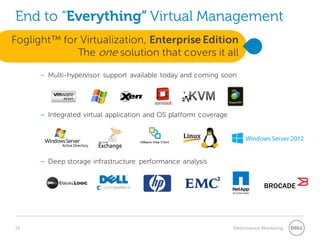
End to “Everything” Virtual Management 
– 
Multi-hypervisor support available today and coming soon 
– 
Integrated virtual application and OS platform coverage 
– 
Deep storage infrastructure performance analysis 
Foglight™ for Virtualization, Enterprise Edition The one solution that covers it all
11 Performance Monitoring 
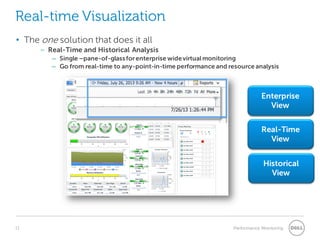
Real-time Visualization 
• 
The one solution that does it all 
– 
Real-Time and Historical Analysis 
– 
Single –pane-of-glass for enterprise wide virtual monitoring 
– 
Go from real-time to any-point-in-time performance and resource analysis 
Enterprise View 
Real-Time View 
Historical View
12 Performance Monitoring 
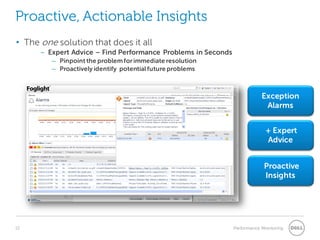
Proactive, Actionable Insights 
Exception Alarms 
+ Expert Advice 
• 
The one solution that does it all 
– 
Expert Advice – Find Performance Problems in Seconds 
– 
Pinpoint the problem for immediate resolution 
– 
Proactively identify potential future problems 
Proactive Insights
13 Performance Monitoring 
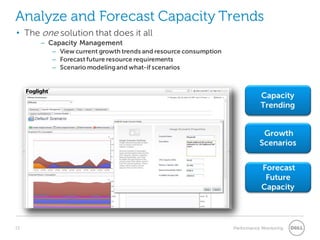
Analyze and Forecast Capacity Trends 
• 
The one solution that does it all 
– 
Capacity Management 
– 
View current growth trends and resource consumption 
– 
Forecast future resource requirements 
– 
Scenario modeling and what-if scenarios
14 Performance Monitoring 
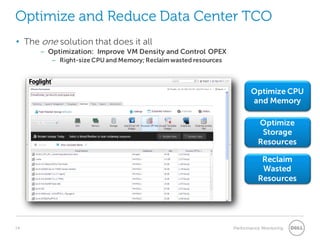
Optimize and Reduce Data Center TCO 
Optimize CPU and Memory 
Reclaim Wasted Resources 
• 
The one solution that does it all 
– 
Optimization: Improve VM Density and Control OPEX 
– 
Right-size CPU and Memory; Reclaim wasted resources 
Optimize Storage Resources
15 Performance Monitoring 
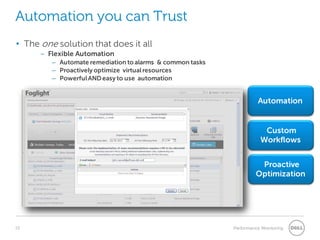
Automation you can Trust 
Automation 
Custom Workflows 
Proactive Optimization 
• 
The one solution that does it all 
– 
Flexible Automation 
– 
Automate remediation to alarms & common tasks 
– 
Proactively optimize virtual resources 
– 
Powerful AND easy to use automation
16 Performance Monitoring 
Question: Which hypervisors are you using today? 
• 
ESX (VMware) 
• 
Hyper-V 
• 
Xen 
• 
KVM 
• 
Oracle VM 
• 
Power VM 
• 
REV (red hat enterprise virtualization)
17 Performance Monitoring 
Bringing IT All Together
18 Performance Monitoring 
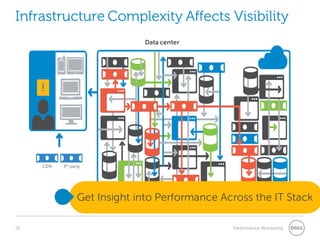
Infrastructure Complexity Affects Visibility 
CDN 
3rd party 
Data center 
Private 
cloud 
Get Insight into Performance Across the IT Stack
19 Performance Monitoring 
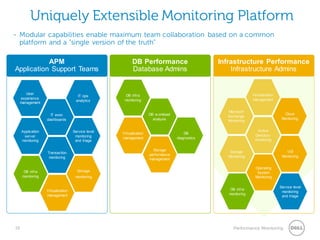
Uniquely Extensible Monitoring Platform 
- 
Modular capabilities enable maximum team collaboration based on a common platform and a “single version of the truth” 
DB Performance Database Admins 
APM Application Support Teams 
Virtualization management 
Storage 
monitoring 
DB infra monitoring 
Transaction monitoring 
Service level monitoring and triage 
Application server monitoring 
IT exec dashboards 
IT ops analytics 
User experience management 
Storage performance management 
DB diagnostics 
Virtualization management 
DB workload analysis 
DB infra monitoring 
Storage Monitoring 
Active Directory monitoring 
Microsoft Exchange Monitoring 
Virtualization management 
Infrastructure Performance 
Infrastructure Admins 
Operating System Monitoring 
Cloud Monitoring 
VDI Monitoring 
DB infra monitoring 
Service level monitoring and triage
20 Performance Monitoring 
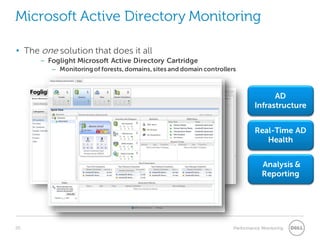
Microsoft Active Directory Monitoring 
AD Infrastructure 
Real-Time AD Health 
Analysis & Reporting 
• 
The one solution that does it all 
– 
Foglight Microsoft Active Directory Cartridge 
– 
Monitoring of forests, domains, sites and domain controllers
21 Performance Monitoring 
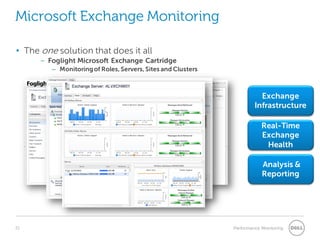
Microsoft Exchange Monitoring 
Exchange Infrastructure 
Real-Time Exchange Health 
Analysis & Reporting 
• 
The one solution that does it all 
– 
Foglight Microsoft Exchange Cartridge 
– 
Monitoring of Roles, Servers, Sites and Clusters
22 Performance Monitoring 
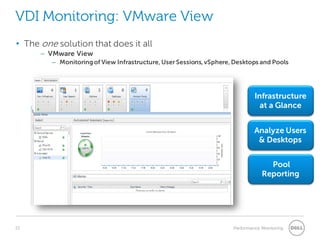
VDI Monitoring: VMware View 
Infrastructure at a Glance 
Analyze Users & Desktops 
Pool Reporting 
• 
The one solution that does it all 
– 
VMware View 
– 
Monitoring of View Infrastructure, User Sessions, vSphere, Desktops and Pools
23 Performance Monitoring 
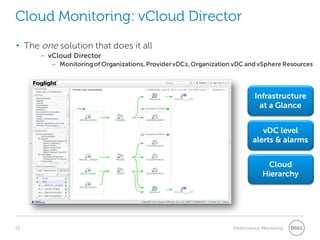
Cloud Monitoring: vCloud Director 
Infrastructure at a Glance 
vDC level alerts & alarms 
Cloud Hierarchy 
• 
The one solution that does it all 
– 
vCloud Director 
– 
Monitoring of Organizations, Provider vDCs, Organization vDC and vSphere Resources
24 Performance Monitoring 
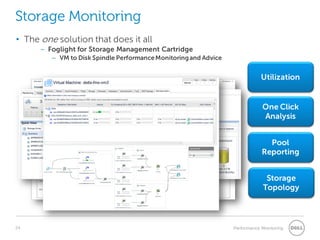
Storage Monitoring 
Utilization 
One Click Analysis 
Pool Reporting 
• 
The one solution that does it all 
– 
Foglight for Storage Management Cartridge 
– 
VM to Disk Spindle Performance Monitoring and Advice 
Storage Topology
25 Performance Monitoring

Virtualization performance management

  • 1.
    1 Performance Monitoring Virtualization Performance Management Christian Ledwidge Director Monitoring EMEA Christian.Ledwidge@software.dell.com #DellST14 DellDirekte.no/DellST14
  • 2.
    2 Performance Monitoring Survey: How many Virtual Machines are currently in your environment? • Fewer than 1000 • 1000 to 2500 • 2500 to 5000 • 5000 or more
  • 3.
    3 Performance Monitoring Question: If you could only pick one, which of these would be your top line priority for your virtual environment? • Reducing operational expenses and capital cost. • Analyzing current growth and predicting future requirements within your virtual environment. • Optimization of your existing virtual infrastructure. • Troubleshooting and resolution of virtual performance issues. • Automating reoccurring or mundane virtual housekeeping tasks.
  • 4.
    4 Performance Monitoring Question #1 • What is our VM Density? – # servers / # VMs • Why is this important? – VM Density is a measurement of how effective you use virtualization • Fact – Customers of Dell Foglight for Virtualization have been able to increase VM density by 1-2 VMs per host by simply optimizing their environment – In one case this equated to over 200 additional VMs on the same hardware
  • 5.
    5 Performance Monitoring Question #2 • How much wasted disk space do we have? – Over-allocated virtual files? – Abandoned templates? – Powered off VMs? • Why is this important? – Over-allocation of files is rampant and in some cases VM’s are “lost” and not visible in vCenter yet still exist and consume space – Even if you thin-provision disks within a storage array, there is waste • Fact – Dell Foglight for Virtualization has found 1000’s of terabytes of wasted disk space
  • 6.
    6 Performance Monitoring Question #3 • How many Zombie VM’s do we have? – VM is running, but is anyone using it? – In 24 hours? – In 1 week, month, quarter, year? • Why is this important? – VM Sprawl has created millions of VMs that are powered on but never used • Fact – Dell Foglight for Virtualization has found 1000’s of Zombie VMs and removed them
  • 7.
    7 Performance Monitoring Question #4 • How do we maintain SLAs, and how to we pinpoint virtual performance problems? How long does it take, hours, minutes, seconds? – Do we proactively know if a host or VM is “beginning” to have problems? – Proactive alerts? – Single pane of glass? – Email/text alerts? – Automation? • Why is this important? – The optimum VM to Admin ratio is 1:150 – without intelligent analytics and automation, it is impossible to meet SLAs and a high ratio • Fact – Dell Foglight for Virtualization is the de-facto standard for mid-to-large scale virtual infrastructure at almost 8,000 installations.
  • 8.
    8 Performance Monitoring Question #5 • How do we know when a host is running out of resources before it happens? – How many additional VMs can we add to our environment? – What is the gating factor to growth? CPU? Memory? Storage? • Why is this important? – Would you rather know weeks or hours before you hit a CPU/Memory/Storage limitation? – How do you plan for future server and storage acquisitions? • Fact – Dell Foglight for Virtualization has predictive analytics to tell you when resources are going to run out
  • 9.
    9 Performance Monitoring Visualize, Analyze, Optimize, Automate…… Dell Foglight for Virtualization
  • 10.
    10 Performance Monitoring End to “Everything” Virtual Management – Multi-hypervisor support available today and coming soon – Integrated virtual application and OS platform coverage – Deep storage infrastructure performance analysis Foglight™ for Virtualization, Enterprise Edition The one solution that covers it all
  • 11.
    11 Performance Monitoring Real-time Visualization • The one solution that does it all – Real-Time and Historical Analysis – Single –pane-of-glass for enterprise wide virtual monitoring – Go from real-time to any-point-in-time performance and resource analysis Enterprise View Real-Time View Historical View
  • 12.
    12 Performance Monitoring Proactive, Actionable Insights Exception Alarms + Expert Advice • The one solution that does it all – Expert Advice – Find Performance Problems in Seconds – Pinpoint the problem for immediate resolution – Proactively identify potential future problems Proactive Insights
  • 13.
    13 Performance Monitoring Analyze and Forecast Capacity Trends • The one solution that does it all – Capacity Management – View current growth trends and resource consumption – Forecast future resource requirements – Scenario modeling and what-if scenarios
  • 14.
    14 Performance Monitoring Optimize and Reduce Data Center TCO Optimize CPU and Memory Reclaim Wasted Resources • The one solution that does it all – Optimization: Improve VM Density and Control OPEX – Right-size CPU and Memory; Reclaim wasted resources Optimize Storage Resources
  • 15.
    15 Performance Monitoring Automation you can Trust Automation Custom Workflows Proactive Optimization • The one solution that does it all – Flexible Automation – Automate remediation to alarms & common tasks – Proactively optimize virtual resources – Powerful AND easy to use automation
  • 16.
    16 Performance Monitoring Question: Which hypervisors are you using today? • ESX (VMware) • Hyper-V • Xen • KVM • Oracle VM • Power VM • REV (red hat enterprise virtualization)
  • 17.
    17 Performance Monitoring Bringing IT All Together
  • 18.
    18 Performance Monitoring Infrastructure Complexity Affects Visibility CDN 3rd party Data center Private cloud Get Insight into Performance Across the IT Stack
  • 19.
    19 Performance Monitoring Uniquely Extensible Monitoring Platform - Modular capabilities enable maximum team collaboration based on a common platform and a “single version of the truth” DB Performance Database Admins APM Application Support Teams Virtualization management Storage monitoring DB infra monitoring Transaction monitoring Service level monitoring and triage Application server monitoring IT exec dashboards IT ops analytics User experience management Storage performance management DB diagnostics Virtualization management DB workload analysis DB infra monitoring Storage Monitoring Active Directory monitoring Microsoft Exchange Monitoring Virtualization management Infrastructure Performance Infrastructure Admins Operating System Monitoring Cloud Monitoring VDI Monitoring DB infra monitoring Service level monitoring and triage
  • 20.
    20 Performance Monitoring Microsoft Active Directory Monitoring AD Infrastructure Real-Time AD Health Analysis & Reporting • The one solution that does it all – Foglight Microsoft Active Directory Cartridge – Monitoring of forests, domains, sites and domain controllers
  • 21.
    21 Performance Monitoring Microsoft Exchange Monitoring Exchange Infrastructure Real-Time Exchange Health Analysis & Reporting • The one solution that does it all – Foglight Microsoft Exchange Cartridge – Monitoring of Roles, Servers, Sites and Clusters
  • 22.
    22 Performance Monitoring VDI Monitoring: VMware View Infrastructure at a Glance Analyze Users & Desktops Pool Reporting • The one solution that does it all – VMware View – Monitoring of View Infrastructure, User Sessions, vSphere, Desktops and Pools
  • 23.
    23 Performance Monitoring Cloud Monitoring: vCloud Director Infrastructure at a Glance vDC level alerts & alarms Cloud Hierarchy • The one solution that does it all – vCloud Director – Monitoring of Organizations, Provider vDCs, Organization vDC and vSphere Resources
  • 24.
    24 Performance Monitoring Storage Monitoring Utilization One Click Analysis Pool Reporting • The one solution that does it all – Foglight for Storage Management Cartridge – VM to Disk Spindle Performance Monitoring and Advice Storage Topology
  • 25.