MT46
Virtualization Integration with
Unity
Steve Spataro, Dell EMC Core Technologies
@steve_spataro
2
The challenge for work in virtual environments are:
• Application workloads are
intermingled like strands
within rope.
• Servers and storage have
to have built in intelligence
to deal effectively with VMs
• Dell EMC Unity™ does. Let’s see how
3
• What is in the Dell EMC Unity™ architecture that make it great for
virtualized infrastructure?
• Virtualization Integration with Unity
– Microsoft
– VMware
– OpenStack
• UnityVSA
Agenda
4
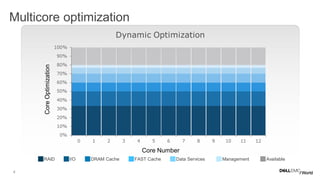
Dynamic Optimization
Multicore optimization
RAID I/O DRAM Cache FAST Cache Data Services Management Available
CoreOptimization
Core Number
5
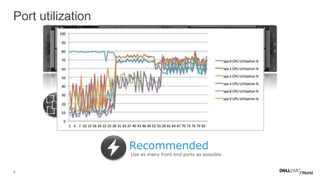
Port utilization
Multicore
Load Balance  Efficient
Port-to-core affinity  Max potential
iSCSI
CNA Offload  Save CPU
I/O Module Offload
Recommended
Use as many front end ports as possible
6
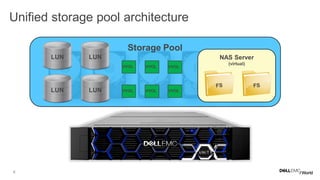
Unified storage pool architecture
Storage Pool
NAS Server
(virtual)
VVOL VVOLVVOL
LUN LUN
LUN LUN VVOL VVOLVVOL
7
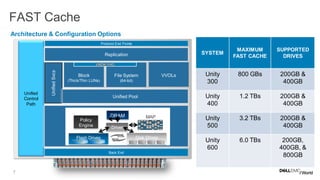
FAST Cache
Back End
UnifiedSvcs
Unified
Control
Path
Unified Pool
Protocol End Points
Replication
Block
(Thick/Thin LUNs)
File System
(64-bit)
VVOLs
VMDK/VHD
MAP
Policy
Engine Driver
DRAM
Flash Drives Disk Drives
• Support for file and block
• Extends cache with Flash drives
• Hot data automatically ends up in
FAST Cache
• In an SP failure; no need to warm
up the cache, it’s mirrored.
Architecture & Configuration Options
SYSTEM
MAXIMUM
FAST CACHE
SUPPORTED
DRIVES
Unity
300
800 GBs 200GB &
400GB
Unity
400
1.2 TBs 200GB &
400GB
Unity
500
3.2 TBs 200GB &
400GB
Unity
600
6.0 TBs 200GB,
400GB, &
800GB
8
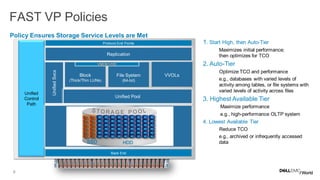
FAST VP Policies
Back End
UnifiedSvcs
Unified
Control
Path
Unified Pool
Protocol End Points
Replication
Block
(Thick/Thin LUNs)
File System
(64-bit)
VVOLs
VMDK/VHD
Policy Ensures Storage Service Levels are Met
1. Start High, then Auto-Tier
Maximizes initial performance;
then optimizes for TCO
2. Auto-Tier
Optimize TCO and performance
e.g., databases with varied levels of
activity among tables, or file systems with
varied levels of activity across files
3. Highest Available Tier
Maximize performance
e.g., high-performance OLTP system
4. Lowest Available Tier
Reduce TCO
e.g., archived or infrequently accessed
dataSSD HDD
9
..
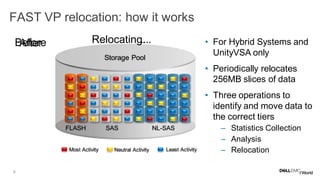
FAST VP relocation: how it works
FLASH SAS NL-SAS
Most Activity Neutral Activity Least Activity
Storage Pool
BeforeAfter Relocating.. . • For Hybrid Systems and
UnityVSA only
• Periodically relocates
256MB slices of data
• Three operations to
identify and move data to
the correct tiers
– Statistics Collection
– Analysis
– Relocation
10
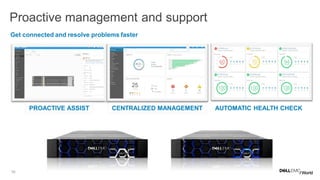
Get connected and resolve problems faster
Proactive management and support
PROACTIVE ASSIST CENTRALIZED MANAGEMENT AUTOMATIC HEALTH CHECK
11
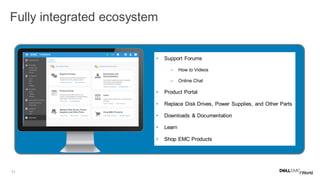
Fully integrated ecosystem ECOSYSTEM
• Support Forums
– How to Videos
– Online Chat
• Product Portal
• Replace Disk Drives, Power Supplies, and Other Parts
• Downloads & Documentation
• Learn
• Shop EMC Products
12
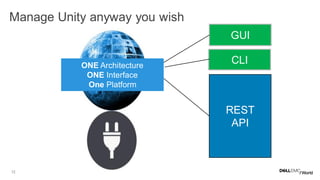
REST
API
CLI
GUI
ONE Architecture
ONE Interface
One Platform
Manage Unity anyway you wish
13
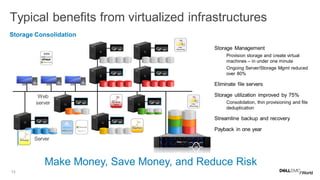
Typical benefits from virtualized infrastructures
Storage Consolidation
• Storage Management
– Provision storage and create virtual
machines – in under one minute
– Ongoing Server/Storage Mgmt reduced
over 80%
• Eliminate file servers
• Storage utilization improved by 75%
– Consolidation, thin provisioning and file
deduplication
• Streamline backup and recovery
• Payback in one year
VNXe Benefits
Employee desktops
Server
Web
server
Virtualized
Application servers
File servers
Make Money, Save Money, and Reduce Risk
Hyper-V
14
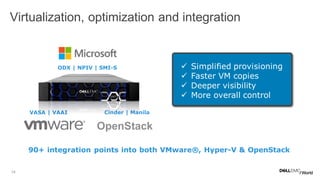
Virtualization, optimization and integration
VASA | VAAI
ODX | NPIV | SMI-S  Simplified provisioning
 Faster VM copies
 Deeper visibility
 More overall control
90+ integration points into both VMware®, Hyper-V & OpenStack
OpenStack
Cinder | Manila
15 EMC Storage/Replication Platforms
FC, SMB3,iSCSI
VNX VMAX XtremIO RecoverPoint
SMI-S, ODX
Microsoft
Windows
Hyper-V
Resource Providers
Service Reporting
Service Management
System Center
Virtual Machine
Manager
Operations
Manager
Orchestrator
VPLEX
Avamar in
Azure
Spanning
Backup for
O365
Azure
ExpressRoute
Azure Site
Recovery
SMI-S
Providers
ViPR
SCVMM
Add-in
Data
Protection
Suite
Avamar Virtual
Edition
ESI MMC
Plugin
EMC
PowerPath/VE
ESI Powershell
Toolkit
ESI
Powershell
Toolkit
Networker
SCVMM
Add-in
REST
API
REST
API
REST
API
REST
API
CloudBoost
Isilon Cloud
Pools
CoprHD
Powershell
Module
CloudArray
for Azure
Isilon
CloudLink
CloudLink
SCOM
MPs
SCORCH
IP
ESI Powershell Toolkit
Applications and Platforms
SQL Server Exchange SharePoint
REST
API
ESI Powershell Toolkit
Networker/DDBoost
AppSync
SourceOne
DSA
ProtectPoint
SourceOne
Service Automation (EHC)
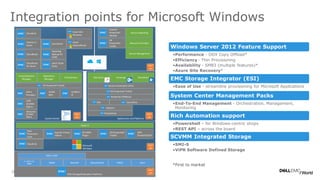
Windows Server 2012 Feature Support
•Performance - ODX Copy Offload*
•Efficiency - Thin Provisioning
•Availability - SMB3 (multiple features)*
•Azure Site Recovery*
EMC Storage Integrator (ESI)
•Ease of Use - streamline provisioning for Microsoft Applications
System Center Management Packs
•End-To-End Management - Orchestration, Management,
Monitoring
Rich Automation support
•Powershell – for Windows-centric shops
•REST API – across the board
SCVMM Integrated Storage
•SMI-S
•ViPR Software Defined Storage
Integration points for Microsoft Windows
*First to market
16
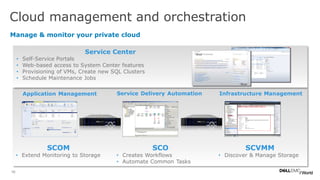
Manage & monitor your private cloud
Cloud management and orchestration
Application Management Service Delivery Automation Infrastructure Management
SCVMM
• Discover & Manage Storage
SCO
• Creates Workflows
• Automate Common Tasks
SCOM
• Extend Monitoring to Storage
Service Center
• Self-Service Portals
• Web-based access to System Center features
• Provisioning of VMs, Create new SQL Clusters
• Schedule Maintenance Jobs
17
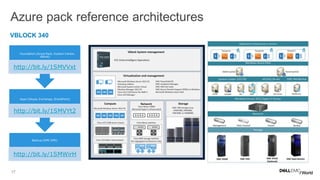
Backup (EMC DPS)
http://bit.ly/1SMWirH
Apps (Skype, Exchange, SharePoint)
http://bit.ly/1SMVYt2
•Foundation (Azure Pack, System Center,
vBlock)
http://bit.ly/1SMVVxt
Azure pack reference architectures
VBLOCK 340
18
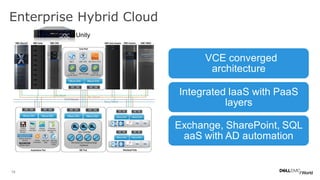
•VCE converged
architecture
Integrated IaaS with PaaS
layers
Exchange, SharePoint, SQL
aaS with AD automation
Enterprise Hybrid Cloud
Unity
19
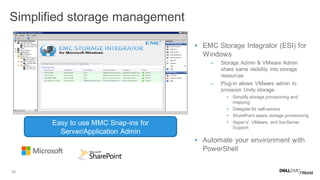
• EMC Storage Integrator (ESI) for
Windows
– Storage Admin & VMware Admin
share same visibility into storage
resources
– Plug-in allows VMware admin to
provision Unity storage
• Simplify storage provisioning and
mapping
• Delegate for self-service
• SharePoint aware storage provisioning
• Hyper-V, VMware, and XenServer
Support
• Automate your environment with
PowerShell
Simplified storage management
Easy to use MMC Snap-ins for
Server/Application Admin
20
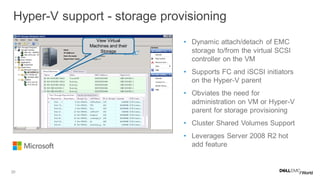
• Dynamic attach/detach of EMC
storage to/from the virtual SCSI
controller on the VM
• Supports FC and iSCSI initiators
on the Hyper-V parent
• Obviates the need for
administration on VM or Hyper-V
parent for storage provisioning
• Cluster Shared Volumes Support
• Leverages Server 2008 R2 hot
add feature
Hyper-V support - storage provisioning
View Virtual
Machines and their
Storage
21
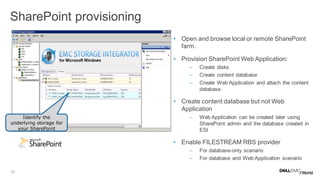
• Open and browse local or remote SharePoint
farm.
• Provision SharePoint Web Application:
– Create disks
– Create content database
– Create Web Application and attach the content
database.
• Create content database but not Web
Application
– Web Application can be created later using
SharePoint admin and the database created in
ESI
• Enable FILESTREAM RBS provider
– For database-only scenario
– For database and Web Application scenario
SharePoint provisioning
Identify the
underlying storage for
your SharePoint
22
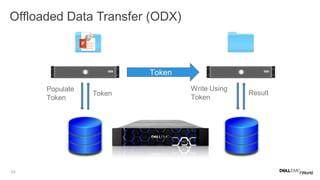
• Introduced in Windows Server 2012
– SCSI commands used by NTFS and Hyper-V
• Two stage operation
– Populate Token
• Returns a token which names a region of data (ROD)
• ROD can include multiple segments
– Write Using Token
• Copies the data described by the passed token to destination ROD
• Can be issued by different host than PT
Offloaded Data Transfer (ODX)
23
Offloaded Data Transfer (ODX)
Populate
Token
Token
Write Using
Token
Result
Token
24
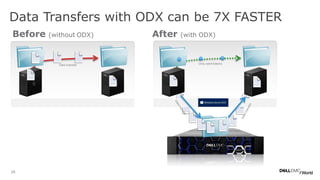
Before (without ODX) After (with ODX)
Data Transfers with ODX can be 7X FASTER
Only send tokens
Data transfer
25
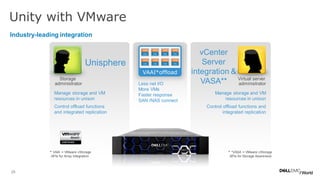
Unity with VMware
Industry-leading integration
Virtual server
administrator
Storage
administrator
VAAI*offload
Unisphere
Less net I/O
More VMs
Faster response
SAN /NAS connect
Manage storage and VM
resources in unison
Control offload functions and
integrated replication
Manage storage and VM
resources in unison
Control offload functions
and integrated replication
* VAAI = VMware vStorage
APIs for Array Integration
* *VASA = VMware vStorage
APIs for Storage Awareness
vCenter
Server
integration &
VASA**
26
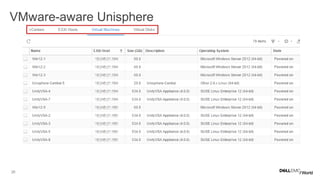
VMware-aware Unisphere
27
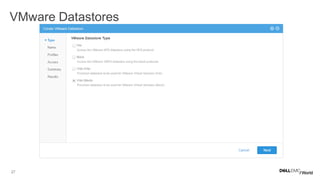
VMware Datastores
28
• VMware APIs for Array Integration (VAAI)
• Offloads storage-related tasks to Unity
• Supports both File and Block primitives
• VMware APIs for Storage Awareness (VASA)
• On-array VASA provider
• Supports VASA 1.0 and 2.0 (VVols)
VMware APIs
29
• Virtual Storage Integrator (VSI)
• EMC Storage Replication Adapter (SRA) for VMware Site
Recovery Manager (SRM)
• EMC Storage Analytics (ESA)
Unity ecosystem for VMware environments
30
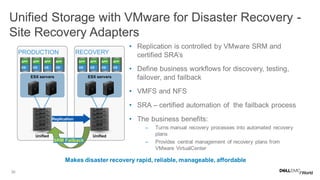
Unified Storage with VMware for Disaster Recovery -
Site Recovery Adapters
• Replication is controlled by VMware SRM and
certified SRA’s
• Define business workflows for discovery, testing,
failover, and failback
• VMFS and NFS
• SRA – certified automation of the failback process
• The business benefits:
– Turns manual recovery processes into automated recovery
plans
– Provides central management of recovery plans from
VMware VirtualCenter
PRODUCTION
ESX servers
RECOVERY
ESX servers
Replication
APP
OS
APP
OS
APP
OS
APP
OS
APP
OS
APP
OS
APP
OS
APP
OS
Unified Unified
SRM Failback
Makes disaster recovery rapid, reliable, manageable, affordable
31
• Increased visibility across the virtual to storage infrastructure
• Proactively detect VNX storage performance and capacity faults in real-
time with actionable information
• Provides health alerts and health scores to help identify when mission
critical resources are at risk of reaching capacity in the future
• Helps build a stronger relationship between the VMware and Storage
administrators
• Built on proven VMware’s vCenter Operations Manager Analytics &
Visualization platform
• Extensible to vCenter Operations Manager Enterprise
EMC Storage Analytics
32
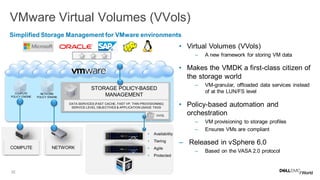
VMware Virtual Volumes (VVols)
STORAGE POLICY-BASED
MANAGEMENT
VVOL
DATA SERVICES (FAST CACHE, FAST VP, THIN PROVISIONING)
SERVICE LEVEL OBJECTIVES & APPLICATION USAGE TAGS
COMPUTE
POLICY ENGINE
NETWORK
POLICY ENGINE
NETWORK
• Availability
• Tiering
• Agile
• Protected
• Virtual Volumes (VVols)
– A new framework for storing VM data
• Makes the VMDK a first-class citizen of
the storage world
– VM-granular, offloaded data services instead
of at the LUN/FS level
• Policy-based automation and
orchestration
– VM provisioning to storage profiles
– Ensures VMs are compliant
– Released in vSphere 6.0
– Based on the VASA 2.0 protocol
Simplified Storage Management for VMware environments
COMPUTE
33
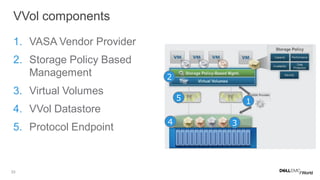
1. VASA Vendor Provider
2. Storage Policy Based
Management
3. Virtual Volumes
4. VVol Datastore
5. Protocol Endpoint
VVol components
1
2
3
5
4
34
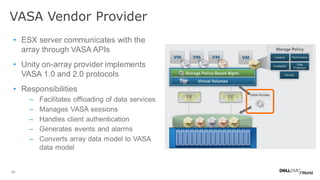
• ESX server communicates with the
array through VASA APIs
• Unity on-array provider implements
VASA 1.0 and 2.0 protocols
• Responsibilities
– Facilitates offloading of data services
– Manages VASA sessions
– Handles client authentication
– Generates events and alarms
– Converts array data model to VASA
data model
VASA Vendor Provider
35
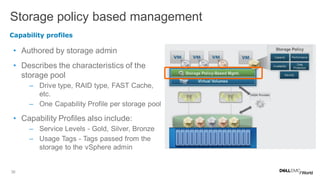
• Authored by storage admin
• Describes the characteristics of the
storage pool
– Drive type, RAID type, FAST Cache,
etc.
– One Capability Profile per storage pool
• Capability Profiles also include:
– Service Levels - Gold, Silver, Bronze
– Usage Tags - Tags passed from the
storage to the vSphere admin
Storage policy based management
Capability profiles
36
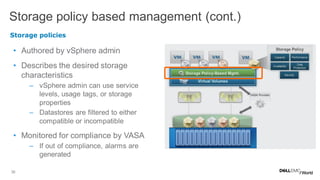
• Authored by vSphere admin
• Describes the desired storage
characteristics
– vSphere admin can use service
levels, usage tags, or storage
properties
– Datastores are filtered to either
compatible or incompatible
• Monitored for compliance by VASA
– If out of compliance, alarms are
generated
Storage policy based management (cont.)
Storage policies
37
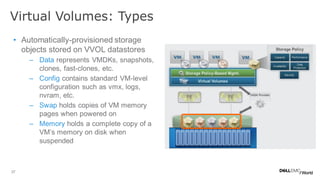
• Automatically-provisioned storage
objects stored on VVOL datastores
– Data represents VMDKs, snapshots,
clones, fast-clones, etc.
– Config contains standard VM-level
configuration such as vmx, logs,
nvram, etc.
– Swap holds copies of VM memory
pages when powered on
– Memory holds a complete copy of a
VM’s memory on disk when
suspended
Virtual Volumes: Types
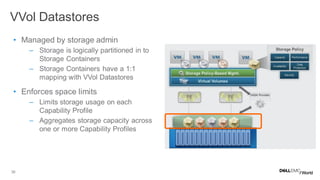
38
• Managed by storage admin
– Storage is logically partitioned in to
Storage Containers
– Storage Containers have a 1:1
mapping with VVol Datastores
• Enforces space limits
– Limits storage usage on each
Capability Profile
– Aggregates storage capacity across
one or more Capability Profiles
VVol Datastores
39
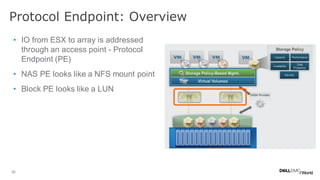
• IO from ESX to array is addressed
through an access point - Protocol
Endpoint (PE)
• NAS PE looks like a NFS mount point
• Block PE looks like a LUN
Protocol Endpoint: Overview
40
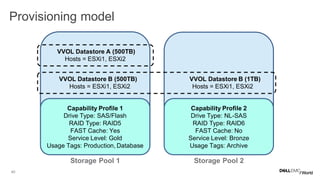
Provisioning model
Capability Profile 1
Drive Type: SAS/Flash
RAID Type: RAID5
FAST Cache: Yes
Service Level: Gold
Usage Tags: Production, Database
Capability Profile 2
Drive Type: NL-SAS
RAID Type: RAID6
FAST Cache: No
Service Level: Bronze
Usage Tags: Archive
VVOL Datastore A (500TB)
Hosts = ESXi1, ESXi2
VVOL Datastore B (500TB) VVOL Datastore B (1TB)
Hosts = ESXi1, ESXi2 Hosts = ESXi1, ESXi2
Storage Pool 1 Storage Pool 2
41
• Space Efficiency – Thin or Thick
– A standard VMware defined capability
• Service Level – Platinum, Gold, Silver, Bronze (recommended)
– Defined by SPBM internal logic using underlying pool characteristics
• Usage Tag – Storage Admin defines set of strings (recommended)
– Strings such as “Exchange”, “Oracle”, “SQL”, “Database”, “Archive”
• Storage Properties – Low level storage capabilities (advanced):
– Drive Type
– RAID Level
– FAST Cache
– Tiering Policy
Supported storage capabilities
42
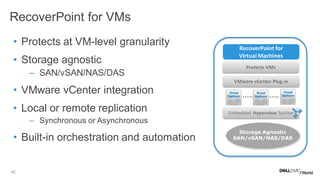
• Protects at VM-level granularity
• Storage agnostic
– SAN/vSAN/NAS/DAS
• VMware vCenter integration
• Local or remote replication
– Synchronous or Asynchronous
• Built-in orchestration and automation
RecoverPoint for VMs
RecoverPoint for
Virtual Machines
VMware vCenter Plug-in
Embedded Hypervisor Splitter
Storage Agnostic
SAN/vSAN/NAS/DAS
Protects VMs
43
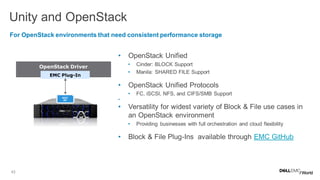
• OpenStack Unified
• Cinder: BLOCK Support
• Manila: SHARED FILE Support
• OpenStack Unified Protocols
• FC, iSCSI, NFS, and CIFS/SMB Support
•
• Versatility for widest variety of Block & File use cases in
an OpenStack environment
• Providing businesses with full orchestration and cloud flexibility
• Block & File Plug-Ins available through EMC GitHub
Unity and OpenStackV
For OpenStack environments that need consistent performance storage
OpenStack Driver
EMC Plug-In
REST
API
44
TECHNOLOGY
LEADERSHIP
Multicore
Optimized
Designed for
Virtualization
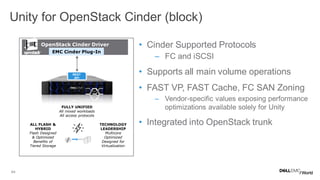
• Cinder Supported Protocols
– FC and iSCSI
• Supports all main volume operations
• FAST VP, FAST Cache, FC SAN Zoning
– Vendor-specific values exposing performance
optimizations available solely for Unity
• Integrated into OpenStack trunk
Unity for OpenStack Cinder (block)
FULLY UNIFIED
All mixed workloads
All access protocols
ALL FLASH &
HYBRID
Flash Designed
& Optimized
Benefits of
Tiered Storage
OpenStack Cinder Driver
EMC Cinder Plug-In
REST
API
45
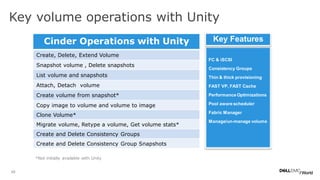
Key volume operations with Unity
Cinder Operations with Unity
Create, Delete, Extend Volume
Snapshot volume , Delete snapshots
List volume and snapshots
Attach, Detach volume
Create volume from snapshot*
Copy image to volume and volume to image
Clone Volume*
Migrate volume, Retype a volume, Get volume stats*
Create and Delete Consistency Groups
Create and Delete Consistency Group Snapshots
FC & iSCSI
Consistency Groups
Thin & thick provisioning
FAST VP, FAST Cache
Performance Optimizations
Pool aware scheduler
Fabric Manager
Manage/un-manage volume
Key Features
*Not initially available with Unity
46
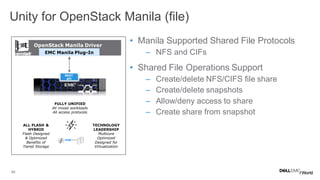
• Manila Supported Shared File Protocols
– NFS and CIFs
• Shared File Operations Support
– Create/delete NFS/CIFS file share
– Create/delete snapshots
– Allow/deny access to share
– Create share from snapshot
Unity for OpenStack Manila (file)
FULLY UNIFIED
All mixed workloads
All access protocols
ALL FLASH &
HYBRID
Flash Designed
& Optimized
Benefits of
Tiered Storage
TECHNOLOGY
LEADERSHIP
Multicore
Optimized
Designed for
Virtualization
OpenStack Manila Driver
EMC Manila Plug-In
REST
API
47
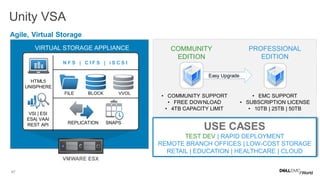
Unity VSA
Agile, Virtual Storage
• COMMUNITY SUPPORT
• FREE DOWNLOAD
• 4TB CAPACITY LIMIT
• EMC SUPPORT
• SUBSCRIPTION LICENSE
• 10TB | 25TB | 50TB
COMMUNITY
EDITION
PROFESSIONAL
EDITION
Easy Upgrade
USE CASES
TEST DEV | RAPID DEPLOYMENT
REMOTE BRANCH OFFICES | LOW-COST STORAGE
RETAIL | EDUCATION | HEALTHCARE | CLOUD
VMWARE ESX
N F S | C I F S | i S C S I
BLOCKFILE
REPLICATION SNAPS
HTML5
UNISPHERE
VVOL
VSI | ESI
ESA| VAAI
REST API
VIRTUAL STORAGE APPLIANCE
48
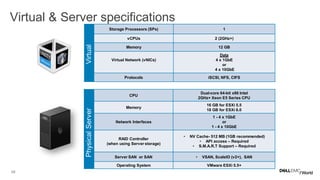
CPU
Dual-core 64-bit x86 Intel
2GHz+ Xeon E5 Series CPU
Memory
16 GB for ESXi 5.5
18 GB for ESXi 6.0
Network Interfaces
1 - 4 x 1GbE
or
1 - 4 x 10GbE
RAID Controller
(when using Server storage)
• NV Cache- 512 MB (1GB recommended)
• API access – Required
• S.M.A.R.T Support – Required
Server SAN or SAN • VSAN, ScaleIO (v2+), SAN
Operating System VMware ESXi 5.5+
Virtual & Server specifications
Storage Processors (SPs) 1
vCPUs 2 (2GHz+)
Memory 12 GB
Virtual Network (vNICs)
Data
4 x 1GbE
or
4 x 10GbE
Protocols iSCSI, NFS, CIFS
VirtualPhysicalServer
49
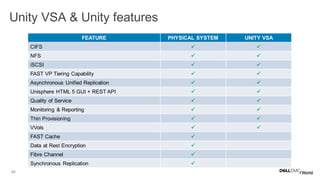
Unity VSA & Unity features COMPARISON
FEATURE PHYSICAL SYSTEM UNITY VSA
CIFS  
NFS  
iSCSI  
FAST VP Tiering Capability  
Asynchronous Unified Replication  
Unisphere HTML 5 GUI + REST API  
Quality of Service  
Monitoring & Reporting  
Thin Provisioning  
VVols  
FAST Cache 
Data at Rest Encryption 
Fibre Channel 
Synchronous Replication 
50
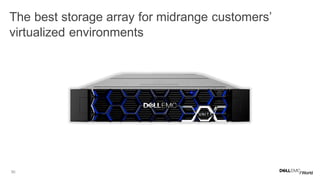
The best storage array for midrange customers’
virtualized environments COMPARISON
51
QUESTIONS?
MT46 Virtualization Integration with Unity

MT46 Virtualization Integration with Unity

  • 1.
    MT46 Virtualization Integration with Unity SteveSpataro, Dell EMC Core Technologies @steve_spataro
  • 2.
    2 The challenge forwork in virtual environments are: • Application workloads are intermingled like strands within rope. • Servers and storage have to have built in intelligence to deal effectively with VMs • Dell EMC Unity™ does. Let’s see how
  • 3.
    3 • What isin the Dell EMC Unity™ architecture that make it great for virtualized infrastructure? • Virtualization Integration with Unity – Microsoft – VMware – OpenStack • UnityVSA Agenda
  • 4.
    4 Dynamic Optimization Multicore optimization RAIDI/O DRAM Cache FAST Cache Data Services Management Available CoreOptimization Core Number
  • 5.
    5 Port utilization Multicore Load Balance Efficient Port-to-core affinity  Max potential iSCSI CNA Offload  Save CPU I/O Module Offload Recommended Use as many front end ports as possible
  • 6.
    6 Unified storage poolarchitecture Storage Pool NAS Server (virtual) VVOL VVOLVVOL LUN LUN LUN LUN VVOL VVOLVVOL
  • 7.
    7 FAST Cache Back End UnifiedSvcs Unified Control Path UnifiedPool Protocol End Points Replication Block (Thick/Thin LUNs) File System (64-bit) VVOLs VMDK/VHD MAP Policy Engine Driver DRAM Flash Drives Disk Drives • Support for file and block • Extends cache with Flash drives • Hot data automatically ends up in FAST Cache • In an SP failure; no need to warm up the cache, it’s mirrored. Architecture & Configuration Options SYSTEM MAXIMUM FAST CACHE SUPPORTED DRIVES Unity 300 800 GBs 200GB & 400GB Unity 400 1.2 TBs 200GB & 400GB Unity 500 3.2 TBs 200GB & 400GB Unity 600 6.0 TBs 200GB, 400GB, & 800GB
  • 8.
    8 FAST VP Policies BackEnd UnifiedSvcs Unified Control Path Unified Pool Protocol End Points Replication Block (Thick/Thin LUNs) File System (64-bit) VVOLs VMDK/VHD Policy Ensures Storage Service Levels are Met 1. Start High, then Auto-Tier Maximizes initial performance; then optimizes for TCO 2. Auto-Tier Optimize TCO and performance e.g., databases with varied levels of activity among tables, or file systems with varied levels of activity across files 3. Highest Available Tier Maximize performance e.g., high-performance OLTP system 4. Lowest Available Tier Reduce TCO e.g., archived or infrequently accessed dataSSD HDD
  • 9.
    9 .. FAST VP relocation:how it works FLASH SAS NL-SAS Most Activity Neutral Activity Least Activity Storage Pool BeforeAfter Relocating.. . • For Hybrid Systems and UnityVSA only • Periodically relocates 256MB slices of data • Three operations to identify and move data to the correct tiers – Statistics Collection – Analysis – Relocation
  • 10.
    10 Get connected andresolve problems faster Proactive management and support PROACTIVE ASSIST CENTRALIZED MANAGEMENT AUTOMATIC HEALTH CHECK
  • 11.
    11 Fully integrated ecosystemECOSYSTEM • Support Forums – How to Videos – Online Chat • Product Portal • Replace Disk Drives, Power Supplies, and Other Parts • Downloads & Documentation • Learn • Shop EMC Products
  • 12.
    12 REST API CLI GUI ONE Architecture ONE Interface OnePlatform Manage Unity anyway you wish
  • 13.
    13 Typical benefits fromvirtualized infrastructures Storage Consolidation • Storage Management – Provision storage and create virtual machines – in under one minute – Ongoing Server/Storage Mgmt reduced over 80% • Eliminate file servers • Storage utilization improved by 75% – Consolidation, thin provisioning and file deduplication • Streamline backup and recovery • Payback in one year VNXe Benefits Employee desktops Server Web server Virtualized Application servers File servers Make Money, Save Money, and Reduce Risk Hyper-V
  • 14.
    14 Virtualization, optimization andintegration VASA | VAAI ODX | NPIV | SMI-S  Simplified provisioning  Faster VM copies  Deeper visibility  More overall control 90+ integration points into both VMware®, Hyper-V & OpenStack OpenStack Cinder | Manila
  • 15.
    15 EMC Storage/ReplicationPlatforms FC, SMB3,iSCSI VNX VMAX XtremIO RecoverPoint SMI-S, ODX Microsoft Windows Hyper-V Resource Providers Service Reporting Service Management System Center Virtual Machine Manager Operations Manager Orchestrator VPLEX Avamar in Azure Spanning Backup for O365 Azure ExpressRoute Azure Site Recovery SMI-S Providers ViPR SCVMM Add-in Data Protection Suite Avamar Virtual Edition ESI MMC Plugin EMC PowerPath/VE ESI Powershell Toolkit ESI Powershell Toolkit Networker SCVMM Add-in REST API REST API REST API REST API CloudBoost Isilon Cloud Pools CoprHD Powershell Module CloudArray for Azure Isilon CloudLink CloudLink SCOM MPs SCORCH IP ESI Powershell Toolkit Applications and Platforms SQL Server Exchange SharePoint REST API ESI Powershell Toolkit Networker/DDBoost AppSync SourceOne DSA ProtectPoint SourceOne Service Automation (EHC) Windows Server 2012 Feature Support •Performance - ODX Copy Offload* •Efficiency - Thin Provisioning •Availability - SMB3 (multiple features)* •Azure Site Recovery* EMC Storage Integrator (ESI) •Ease of Use - streamline provisioning for Microsoft Applications System Center Management Packs •End-To-End Management - Orchestration, Management, Monitoring Rich Automation support •Powershell – for Windows-centric shops •REST API – across the board SCVMM Integrated Storage •SMI-S •ViPR Software Defined Storage Integration points for Microsoft Windows *First to market
  • 16.
    16 Manage & monitoryour private cloud Cloud management and orchestration Application Management Service Delivery Automation Infrastructure Management SCVMM • Discover & Manage Storage SCO • Creates Workflows • Automate Common Tasks SCOM • Extend Monitoring to Storage Service Center • Self-Service Portals • Web-based access to System Center features • Provisioning of VMs, Create new SQL Clusters • Schedule Maintenance Jobs
  • 17.
    17 Backup (EMC DPS) http://bit.ly/1SMWirH Apps(Skype, Exchange, SharePoint) http://bit.ly/1SMVYt2 •Foundation (Azure Pack, System Center, vBlock) http://bit.ly/1SMVVxt Azure pack reference architectures VBLOCK 340
  • 18.
    18 •VCE converged architecture Integrated IaaSwith PaaS layers Exchange, SharePoint, SQL aaS with AD automation Enterprise Hybrid Cloud Unity
  • 19.
    19 • EMC StorageIntegrator (ESI) for Windows – Storage Admin & VMware Admin share same visibility into storage resources – Plug-in allows VMware admin to provision Unity storage • Simplify storage provisioning and mapping • Delegate for self-service • SharePoint aware storage provisioning • Hyper-V, VMware, and XenServer Support • Automate your environment with PowerShell Simplified storage management Easy to use MMC Snap-ins for Server/Application Admin
  • 20.
    20 • Dynamic attach/detachof EMC storage to/from the virtual SCSI controller on the VM • Supports FC and iSCSI initiators on the Hyper-V parent • Obviates the need for administration on VM or Hyper-V parent for storage provisioning • Cluster Shared Volumes Support • Leverages Server 2008 R2 hot add feature Hyper-V support - storage provisioning View Virtual Machines and their Storage
  • 21.
    21 • Open andbrowse local or remote SharePoint farm. • Provision SharePoint Web Application: – Create disks – Create content database – Create Web Application and attach the content database. • Create content database but not Web Application – Web Application can be created later using SharePoint admin and the database created in ESI • Enable FILESTREAM RBS provider – For database-only scenario – For database and Web Application scenario SharePoint provisioning Identify the underlying storage for your SharePoint
  • 22.
    22 • Introduced inWindows Server 2012 – SCSI commands used by NTFS and Hyper-V • Two stage operation – Populate Token • Returns a token which names a region of data (ROD) • ROD can include multiple segments – Write Using Token • Copies the data described by the passed token to destination ROD • Can be issued by different host than PT Offloaded Data Transfer (ODX)
  • 23.
    23 Offloaded Data Transfer(ODX) Populate Token Token Write Using Token Result Token
  • 24.
    24 Before (without ODX)After (with ODX) Data Transfers with ODX can be 7X FASTER Only send tokens Data transfer
  • 25.
    25 Unity with VMware Industry-leadingintegration Virtual server administrator Storage administrator VAAI*offload Unisphere Less net I/O More VMs Faster response SAN /NAS connect Manage storage and VM resources in unison Control offload functions and integrated replication Manage storage and VM resources in unison Control offload functions and integrated replication * VAAI = VMware vStorage APIs for Array Integration * *VASA = VMware vStorage APIs for Storage Awareness vCenter Server integration & VASA**
  • 26.
  • 27.
  • 28.
    28 • VMware APIsfor Array Integration (VAAI) • Offloads storage-related tasks to Unity • Supports both File and Block primitives • VMware APIs for Storage Awareness (VASA) • On-array VASA provider • Supports VASA 1.0 and 2.0 (VVols) VMware APIs
  • 29.
    29 • Virtual StorageIntegrator (VSI) • EMC Storage Replication Adapter (SRA) for VMware Site Recovery Manager (SRM) • EMC Storage Analytics (ESA) Unity ecosystem for VMware environments
  • 30.
    30 Unified Storage withVMware for Disaster Recovery - Site Recovery Adapters • Replication is controlled by VMware SRM and certified SRA’s • Define business workflows for discovery, testing, failover, and failback • VMFS and NFS • SRA – certified automation of the failback process • The business benefits: – Turns manual recovery processes into automated recovery plans – Provides central management of recovery plans from VMware VirtualCenter PRODUCTION ESX servers RECOVERY ESX servers Replication APP OS APP OS APP OS APP OS APP OS APP OS APP OS APP OS Unified Unified SRM Failback Makes disaster recovery rapid, reliable, manageable, affordable
  • 31.
    31 • Increased visibilityacross the virtual to storage infrastructure • Proactively detect VNX storage performance and capacity faults in real- time with actionable information • Provides health alerts and health scores to help identify when mission critical resources are at risk of reaching capacity in the future • Helps build a stronger relationship between the VMware and Storage administrators • Built on proven VMware’s vCenter Operations Manager Analytics & Visualization platform • Extensible to vCenter Operations Manager Enterprise EMC Storage Analytics
  • 32.
    32 VMware Virtual Volumes(VVols) STORAGE POLICY-BASED MANAGEMENT VVOL DATA SERVICES (FAST CACHE, FAST VP, THIN PROVISIONING) SERVICE LEVEL OBJECTIVES & APPLICATION USAGE TAGS COMPUTE POLICY ENGINE NETWORK POLICY ENGINE NETWORK • Availability • Tiering • Agile • Protected • Virtual Volumes (VVols) – A new framework for storing VM data • Makes the VMDK a first-class citizen of the storage world – VM-granular, offloaded data services instead of at the LUN/FS level • Policy-based automation and orchestration – VM provisioning to storage profiles – Ensures VMs are compliant – Released in vSphere 6.0 – Based on the VASA 2.0 protocol Simplified Storage Management for VMware environments COMPUTE
  • 33.
    33 1. VASA VendorProvider 2. Storage Policy Based Management 3. Virtual Volumes 4. VVol Datastore 5. Protocol Endpoint VVol components 1 2 3 5 4
  • 34.
    34 • ESX servercommunicates with the array through VASA APIs • Unity on-array provider implements VASA 1.0 and 2.0 protocols • Responsibilities – Facilitates offloading of data services – Manages VASA sessions – Handles client authentication – Generates events and alarms – Converts array data model to VASA data model VASA Vendor Provider
  • 35.
    35 • Authored bystorage admin • Describes the characteristics of the storage pool – Drive type, RAID type, FAST Cache, etc. – One Capability Profile per storage pool • Capability Profiles also include: – Service Levels - Gold, Silver, Bronze – Usage Tags - Tags passed from the storage to the vSphere admin Storage policy based management Capability profiles
  • 36.
    36 • Authored byvSphere admin • Describes the desired storage characteristics – vSphere admin can use service levels, usage tags, or storage properties – Datastores are filtered to either compatible or incompatible • Monitored for compliance by VASA – If out of compliance, alarms are generated Storage policy based management (cont.) Storage policies
  • 37.
    37 • Automatically-provisioned storage objectsstored on VVOL datastores – Data represents VMDKs, snapshots, clones, fast-clones, etc. – Config contains standard VM-level configuration such as vmx, logs, nvram, etc. – Swap holds copies of VM memory pages when powered on – Memory holds a complete copy of a VM’s memory on disk when suspended Virtual Volumes: Types
  • 38.
    38 • Managed bystorage admin – Storage is logically partitioned in to Storage Containers – Storage Containers have a 1:1 mapping with VVol Datastores • Enforces space limits – Limits storage usage on each Capability Profile – Aggregates storage capacity across one or more Capability Profiles VVol Datastores
  • 39.
    39 • IO fromESX to array is addressed through an access point - Protocol Endpoint (PE) • NAS PE looks like a NFS mount point • Block PE looks like a LUN Protocol Endpoint: Overview
  • 40.
    40 Provisioning model Capability Profile1 Drive Type: SAS/Flash RAID Type: RAID5 FAST Cache: Yes Service Level: Gold Usage Tags: Production, Database Capability Profile 2 Drive Type: NL-SAS RAID Type: RAID6 FAST Cache: No Service Level: Bronze Usage Tags: Archive VVOL Datastore A (500TB) Hosts = ESXi1, ESXi2 VVOL Datastore B (500TB) VVOL Datastore B (1TB) Hosts = ESXi1, ESXi2 Hosts = ESXi1, ESXi2 Storage Pool 1 Storage Pool 2
  • 41.
    41 • Space Efficiency– Thin or Thick – A standard VMware defined capability • Service Level – Platinum, Gold, Silver, Bronze (recommended) – Defined by SPBM internal logic using underlying pool characteristics • Usage Tag – Storage Admin defines set of strings (recommended) – Strings such as “Exchange”, “Oracle”, “SQL”, “Database”, “Archive” • Storage Properties – Low level storage capabilities (advanced): – Drive Type – RAID Level – FAST Cache – Tiering Policy Supported storage capabilities
  • 42.
    42 • Protects atVM-level granularity • Storage agnostic – SAN/vSAN/NAS/DAS • VMware vCenter integration • Local or remote replication – Synchronous or Asynchronous • Built-in orchestration and automation RecoverPoint for VMs RecoverPoint for Virtual Machines VMware vCenter Plug-in Embedded Hypervisor Splitter Storage Agnostic SAN/vSAN/NAS/DAS Protects VMs
  • 43.
    43 • OpenStack Unified •Cinder: BLOCK Support • Manila: SHARED FILE Support • OpenStack Unified Protocols • FC, iSCSI, NFS, and CIFS/SMB Support • • Versatility for widest variety of Block & File use cases in an OpenStack environment • Providing businesses with full orchestration and cloud flexibility • Block & File Plug-Ins available through EMC GitHub Unity and OpenStackV For OpenStack environments that need consistent performance storage OpenStack Driver EMC Plug-In REST API
  • 44.
    44 TECHNOLOGY LEADERSHIP Multicore Optimized Designed for Virtualization • CinderSupported Protocols – FC and iSCSI • Supports all main volume operations • FAST VP, FAST Cache, FC SAN Zoning – Vendor-specific values exposing performance optimizations available solely for Unity • Integrated into OpenStack trunk Unity for OpenStack Cinder (block) FULLY UNIFIED All mixed workloads All access protocols ALL FLASH & HYBRID Flash Designed & Optimized Benefits of Tiered Storage OpenStack Cinder Driver EMC Cinder Plug-In REST API
  • 45.
    45 Key volume operationswith Unity Cinder Operations with Unity Create, Delete, Extend Volume Snapshot volume , Delete snapshots List volume and snapshots Attach, Detach volume Create volume from snapshot* Copy image to volume and volume to image Clone Volume* Migrate volume, Retype a volume, Get volume stats* Create and Delete Consistency Groups Create and Delete Consistency Group Snapshots FC & iSCSI Consistency Groups Thin & thick provisioning FAST VP, FAST Cache Performance Optimizations Pool aware scheduler Fabric Manager Manage/un-manage volume Key Features *Not initially available with Unity
  • 46.
    46 • Manila SupportedShared File Protocols – NFS and CIFs • Shared File Operations Support – Create/delete NFS/CIFS file share – Create/delete snapshots – Allow/deny access to share – Create share from snapshot Unity for OpenStack Manila (file) FULLY UNIFIED All mixed workloads All access protocols ALL FLASH & HYBRID Flash Designed & Optimized Benefits of Tiered Storage TECHNOLOGY LEADERSHIP Multicore Optimized Designed for Virtualization OpenStack Manila Driver EMC Manila Plug-In REST API
  • 47.
    47 Unity VSA Agile, VirtualStorage • COMMUNITY SUPPORT • FREE DOWNLOAD • 4TB CAPACITY LIMIT • EMC SUPPORT • SUBSCRIPTION LICENSE • 10TB | 25TB | 50TB COMMUNITY EDITION PROFESSIONAL EDITION Easy Upgrade USE CASES TEST DEV | RAPID DEPLOYMENT REMOTE BRANCH OFFICES | LOW-COST STORAGE RETAIL | EDUCATION | HEALTHCARE | CLOUD VMWARE ESX N F S | C I F S | i S C S I BLOCKFILE REPLICATION SNAPS HTML5 UNISPHERE VVOL VSI | ESI ESA| VAAI REST API VIRTUAL STORAGE APPLIANCE
  • 48.
    48 CPU Dual-core 64-bit x86Intel 2GHz+ Xeon E5 Series CPU Memory 16 GB for ESXi 5.5 18 GB for ESXi 6.0 Network Interfaces 1 - 4 x 1GbE or 1 - 4 x 10GbE RAID Controller (when using Server storage) • NV Cache- 512 MB (1GB recommended) • API access – Required • S.M.A.R.T Support – Required Server SAN or SAN • VSAN, ScaleIO (v2+), SAN Operating System VMware ESXi 5.5+ Virtual & Server specifications Storage Processors (SPs) 1 vCPUs 2 (2GHz+) Memory 12 GB Virtual Network (vNICs) Data 4 x 1GbE or 4 x 10GbE Protocols iSCSI, NFS, CIFS VirtualPhysicalServer
  • 49.
    49 Unity VSA &Unity features COMPARISON FEATURE PHYSICAL SYSTEM UNITY VSA CIFS   NFS   iSCSI   FAST VP Tiering Capability   Asynchronous Unified Replication   Unisphere HTML 5 GUI + REST API   Quality of Service   Monitoring & Reporting   Thin Provisioning   VVols   FAST Cache  Data at Rest Encryption  Fibre Channel  Synchronous Replication 
  • 50.
    50 The best storagearray for midrange customers’ virtualized environments COMPARISON
  • 51.