





Delivering
the Presentation
Business
Presentation Skills
Prepared by
Ms Foram A. Patel
DELIVERING THE PRESENTATION
 If you want to leave behind a professional flavor of a presentation among an
audience, keep it simple, as short as adequate and entertaining and leave
ample opportunity for audience questions and interactions.
 A good presenter is judged by how he responds to questions from the
audience rather than how rich the contents appeared on the screen.
Basic Principles:
1. Purpose:
 Keep the Occasion in Mind – for a formal speech, certain approaches
to certain topics may not be appropriate.
 Understand Your Purpose – be sure that your choices are appropriate
to the overall goal of your speech. If it is to inform, for instance, be
careful not to take a biased approach to the topic.
3. Audience:
It is vital to know your audience – the information you include in your presentation
should be determined by your audience’s current knowledge about your topic, as
well as the information they need to get out of your presentation. Here are some
paths towards understanding your audience:
 Audience Makeup – Knowledge of education level, economic status, gender,
and other demographic characteristics can help you adapt your
presentation.
 Audience Dispositions Towards the Topic – How does your audience
currently feel about your topic? Do they agree or disagree?
 Audience Benefit – How will the audience benefit from your presentation?
This is the most important question, as fulfilling the needs of your audience
(and the assignment, of course) is the first priority for a presentation
DELIVERING YOUR PRESENTATION
Three main areas of consideration
1. Body Language and Movement
2. Using your Voice
3. Interacting with the Audience
2. Performing Research:
You may need to do a little or a lot of research, depending on the type of
presentation and how much work you have done already. Here are some
tips to help you do that research more effectively.
 Hit the “stacks” – Once you have found the correct section of the library
shelves, you can find a wealth of material by browsing the titles.
 Consult with the library staff – Research librarians are there to help you. Use
them.
 Check out the databases.
 Check out the web – There may be many useful websites; however, be sure
that they are credible websites.
Confident body language:
 Standing up straight and face the audience head-on.
 Using your hands to emphasize and reinforce your
points.
 Varying your gestures and positioning.
 Nodding your head and smiling to emphasize what you
are saying.
 Aiming to make eye contact with all members of the
audience.
Body language that creates barriers:
 Putting your hand or your notes over your mouth.
 Standing stationary or hiding behind
equipment/furniture.
 Constantly rubbing your nose, ear, chin etc.
 Playing with jewelry, your hair, and/or coins and keys
in your pockets.
 Crossing your arms or legs.
 Speaking to your notes or to the screen or flip chart,
with your head turned away from the audience.
Using your Voice
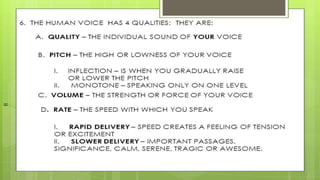
 Volume – It is essential that everyone
can hear what you are saying. Before
you begin ask a friend to stand at the
back, whilst you speak to, and do a
sound check. You might also ask the
audience if they can hear you once you
begin and adjust accordingly. You may
need to arrange to use a microphone.
Using your Voice
 Pace – Aim to speak at an even pace that is comfortable to
listen to. Count how many words a news reader says in 30
seconds and practice doing approximately the same. It
should feel slower than when you are having a normal
conversation. If you feel yourself speeding up, pause, take a
deep breath and continue at a slower pace. We often speak
too quickly because try to include too much in our allocated
time!
Using your Voice
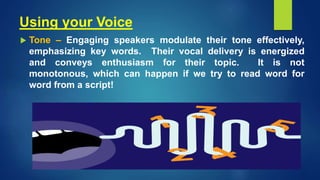
 Tone – Engaging speakers modulate their tone effectively,
emphasizing key words. Their vocal delivery is energized
and conveys enthusiasm for their topic. It is not
monotonous, which can happen if we try to read word for
word from a script!
Interacting with the Audience
 There are a number of ways to engage and interact with your audience.
 A quick and effective technique is to ask them a question at the beginning of
your presentation and get a show of hands. This has three main benefits.
 First, it allows you to gauge the audience's opinion and/or
understanding of the topic.
 Second, it encourages the audience to actively engage with
your topic rather than remaining passive, and allows them to
consider their position before you start.
 And third, it shows the audience that you are interested in
their opinion.
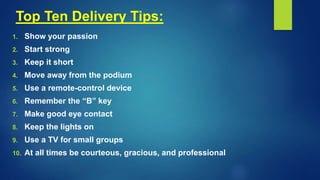
Top Ten Delivery Tips:
1. Show your passion
2. Start strong
3. Keep it short
4. Move away from the podium
5. Use a remote-control device
6. Remember the “B” key
7. Make good eye contact
8. Keep the lights on
9. Use a TV for small groups
10. At all times be courteous, gracious, and professional
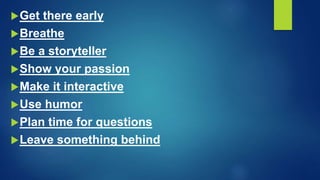
Get there early
Breathe
Be a storyteller
Show your passion
Make it interactive
Use humor
Plan time for questions
Leave something behind
The first step is completed. Your
wonderful presentation is created
and ready for prime time.
Now is your chance to shine when
you deliver it to an audience. Here
are tips to make this presentation a
successful venture.
Know your material
Knowing your material thoroughly will help you decide
what information is essential to your presentation and
what can be left out.
It will help your presentation to flow naturally, allowing
you to adjust to unexpected questions or events, and it
will help you feel more comfortable when speaking in
front of an audience.
Do not memorize
This is, after all, a presentation, not a recital.
Every presentation needs two major components -
life and energy. Recite from memory and your
presentation will be sadly lacking both of these
factors.
Not only will you lose your audience, but you will
be hard pressed to adapt to unexpected events
that may throw you off your mental script.
Rehearse your presentation
Rehearse your presentation out loud,
accompanied by the slide show. If possible, get
someone to listen while you rehearse.
Have the person sit at the back of the room so you
can practice speaking loudly and clearly. Ask your
listener for honest feedback about your
presentation skills.
Make changes where necessary and run through
the whole show again. Keep repeating until you
feel comfortable with the process.
Pace yourself
As part of your practice, learn to pace your
presentation. Generally, you should spend about
one minute per slide. If there are time constraints,
make sure that the presentation will finish on time.
During your delivery, be ready to adjust your pace
in case you need to clarify information for your
audience or answer questions.
Know the room
Be familiar with the place in which you will
speak. Arrive ahead of time, walk around the
speaking area, and sit in the seats.
Seeing the setup from your audience’s
perspective will help you decide where to
stand, what direction to face, and how loudly
you will need to speak.
Know the equipment
If you are using a microphone, make sure it works.
The same goes for the projector.
If it is your projector, carry a spare bulb. Also,
check to see if the projector is bright enough to
overpower the room’s lighting.
If not, find out how to dim the lights.
Copy your presentation to the computer’s hard
drive
Whenever possible, run your presentation from the
hard disk rather than a CD. Running the show from a
CD may slow your presentation.
Use a remote control
Do not hide at the back of the room with the projector.
Get up front where your audience can see and hear
you. Also, just because you have a remote, do not
wander around the room - it will only distract your
audience. Remember you are the focal point of the
presentation.
Avoid using a laser pointer
Often the projected light dot on a laser
pointer is too small to be seen effectively.
If you are at all nervous, the dot may be
hard to hold still in your shaking hands.
Besides, a slide should hold only key
phrases.
Put it in a handout and refer to it rather
than having to point out specific details of
a slide to your audience.
Do not speak to your slides
Many presenters watch their presentation
rather than their audience. You made the
slides, so you already know what is on
them.
Turn to your audience and make eye
contact with them. It will make it easier for
them to hear what you are saying, and they
will find your presentation much more
interesting.
Learn to navigate your presentation
Audiences often ask to see the previous
screen again. Practice moving forward and
backward through your slides.
With PowerPoint you can also move
through your presentation non-
sequentially. Learn how to jump ahead or
back to a certain slide, without having to go
through the entire presentation.
Have a backup plan
What if your projector dies? Or the computer
crashes? Or the CD drive does not work? Or
your CD gets stepped on?
For the first two, you may have no choice but
to go with an AV free presentation, so have a
printed copy of your notes with you.
For the last two, carry a backup of your
presentation on a USB flash drive or email
yourself a copy, or better yet, do both.
Delivering the presentation

Delivering the presentation

  • 1.
  • 2.
    DELIVERING THE PRESENTATION If you want to leave behind a professional flavor of a presentation among an audience, keep it simple, as short as adequate and entertaining and leave ample opportunity for audience questions and interactions.  A good presenter is judged by how he responds to questions from the audience rather than how rich the contents appeared on the screen. Basic Principles: 1. Purpose:  Keep the Occasion in Mind – for a formal speech, certain approaches to certain topics may not be appropriate.  Understand Your Purpose – be sure that your choices are appropriate to the overall goal of your speech. If it is to inform, for instance, be careful not to take a biased approach to the topic.
  • 3.
    3. Audience: It isvital to know your audience – the information you include in your presentation should be determined by your audience’s current knowledge about your topic, as well as the information they need to get out of your presentation. Here are some paths towards understanding your audience:  Audience Makeup – Knowledge of education level, economic status, gender, and other demographic characteristics can help you adapt your presentation.  Audience Dispositions Towards the Topic – How does your audience currently feel about your topic? Do they agree or disagree?  Audience Benefit – How will the audience benefit from your presentation? This is the most important question, as fulfilling the needs of your audience (and the assignment, of course) is the first priority for a presentation
  • 4.
    DELIVERING YOUR PRESENTATION Threemain areas of consideration 1. Body Language and Movement 2. Using your Voice 3. Interacting with the Audience
  • 5.
    2. Performing Research: Youmay need to do a little or a lot of research, depending on the type of presentation and how much work you have done already. Here are some tips to help you do that research more effectively.  Hit the “stacks” – Once you have found the correct section of the library shelves, you can find a wealth of material by browsing the titles.  Consult with the library staff – Research librarians are there to help you. Use them.  Check out the databases.  Check out the web – There may be many useful websites; however, be sure that they are credible websites.
  • 7.
    Confident body language: Standing up straight and face the audience head-on.  Using your hands to emphasize and reinforce your points.  Varying your gestures and positioning.  Nodding your head and smiling to emphasize what you are saying.  Aiming to make eye contact with all members of the audience.
  • 9.
    Body language thatcreates barriers:  Putting your hand or your notes over your mouth.  Standing stationary or hiding behind equipment/furniture.  Constantly rubbing your nose, ear, chin etc.  Playing with jewelry, your hair, and/or coins and keys in your pockets.  Crossing your arms or legs.  Speaking to your notes or to the screen or flip chart, with your head turned away from the audience.
  • 10.
    Using your Voice Volume – It is essential that everyone can hear what you are saying. Before you begin ask a friend to stand at the back, whilst you speak to, and do a sound check. You might also ask the audience if they can hear you once you begin and adjust accordingly. You may need to arrange to use a microphone.
  • 11.
    Using your Voice Pace – Aim to speak at an even pace that is comfortable to listen to. Count how many words a news reader says in 30 seconds and practice doing approximately the same. It should feel slower than when you are having a normal conversation. If you feel yourself speeding up, pause, take a deep breath and continue at a slower pace. We often speak too quickly because try to include too much in our allocated time!
  • 12.
    Using your Voice Tone – Engaging speakers modulate their tone effectively, emphasizing key words. Their vocal delivery is energized and conveys enthusiasm for their topic. It is not monotonous, which can happen if we try to read word for word from a script!
  • 15.
    Interacting with theAudience  There are a number of ways to engage and interact with your audience.  A quick and effective technique is to ask them a question at the beginning of your presentation and get a show of hands. This has three main benefits.  First, it allows you to gauge the audience's opinion and/or understanding of the topic.  Second, it encourages the audience to actively engage with your topic rather than remaining passive, and allows them to consider their position before you start.  And third, it shows the audience that you are interested in their opinion.
  • 16.
    Top Ten DeliveryTips: 1. Show your passion 2. Start strong 3. Keep it short 4. Move away from the podium 5. Use a remote-control device 6. Remember the “B” key 7. Make good eye contact 8. Keep the lights on 9. Use a TV for small groups 10. At all times be courteous, gracious, and professional
  • 18.
    Get there early Breathe Bea storyteller Show your passion Make it interactive Use humor Plan time for questions Leave something behind
  • 20.
    The first stepis completed. Your wonderful presentation is created and ready for prime time. Now is your chance to shine when you deliver it to an audience. Here are tips to make this presentation a successful venture.
  • 21.
    Know your material Knowingyour material thoroughly will help you decide what information is essential to your presentation and what can be left out. It will help your presentation to flow naturally, allowing you to adjust to unexpected questions or events, and it will help you feel more comfortable when speaking in front of an audience.
  • 22.
    Do not memorize Thisis, after all, a presentation, not a recital. Every presentation needs two major components - life and energy. Recite from memory and your presentation will be sadly lacking both of these factors. Not only will you lose your audience, but you will be hard pressed to adapt to unexpected events that may throw you off your mental script.
  • 23.
    Rehearse your presentation Rehearseyour presentation out loud, accompanied by the slide show. If possible, get someone to listen while you rehearse. Have the person sit at the back of the room so you can practice speaking loudly and clearly. Ask your listener for honest feedback about your presentation skills. Make changes where necessary and run through the whole show again. Keep repeating until you feel comfortable with the process.
  • 24.
    Pace yourself As partof your practice, learn to pace your presentation. Generally, you should spend about one minute per slide. If there are time constraints, make sure that the presentation will finish on time. During your delivery, be ready to adjust your pace in case you need to clarify information for your audience or answer questions.
  • 25.
    Know the room Befamiliar with the place in which you will speak. Arrive ahead of time, walk around the speaking area, and sit in the seats. Seeing the setup from your audience’s perspective will help you decide where to stand, what direction to face, and how loudly you will need to speak.
  • 26.
    Know the equipment Ifyou are using a microphone, make sure it works. The same goes for the projector. If it is your projector, carry a spare bulb. Also, check to see if the projector is bright enough to overpower the room’s lighting. If not, find out how to dim the lights.
  • 27.
    Copy your presentationto the computer’s hard drive Whenever possible, run your presentation from the hard disk rather than a CD. Running the show from a CD may slow your presentation. Use a remote control Do not hide at the back of the room with the projector. Get up front where your audience can see and hear you. Also, just because you have a remote, do not wander around the room - it will only distract your audience. Remember you are the focal point of the presentation.
  • 28.
    Avoid using alaser pointer Often the projected light dot on a laser pointer is too small to be seen effectively. If you are at all nervous, the dot may be hard to hold still in your shaking hands. Besides, a slide should hold only key phrases. Put it in a handout and refer to it rather than having to point out specific details of a slide to your audience.
  • 29.
    Do not speakto your slides Many presenters watch their presentation rather than their audience. You made the slides, so you already know what is on them. Turn to your audience and make eye contact with them. It will make it easier for them to hear what you are saying, and they will find your presentation much more interesting.
  • 30.
    Learn to navigateyour presentation Audiences often ask to see the previous screen again. Practice moving forward and backward through your slides. With PowerPoint you can also move through your presentation non- sequentially. Learn how to jump ahead or back to a certain slide, without having to go through the entire presentation.
  • 31.
    Have a backupplan What if your projector dies? Or the computer crashes? Or the CD drive does not work? Or your CD gets stepped on? For the first two, you may have no choice but to go with an AV free presentation, so have a printed copy of your notes with you. For the last two, carry a backup of your presentation on a USB flash drive or email yourself a copy, or better yet, do both.