
Recovering from a
System Crash
BY- ABHISHEK KUMAR GUPTA
1PI12IS002
1
ARIES Recovery Algorithm
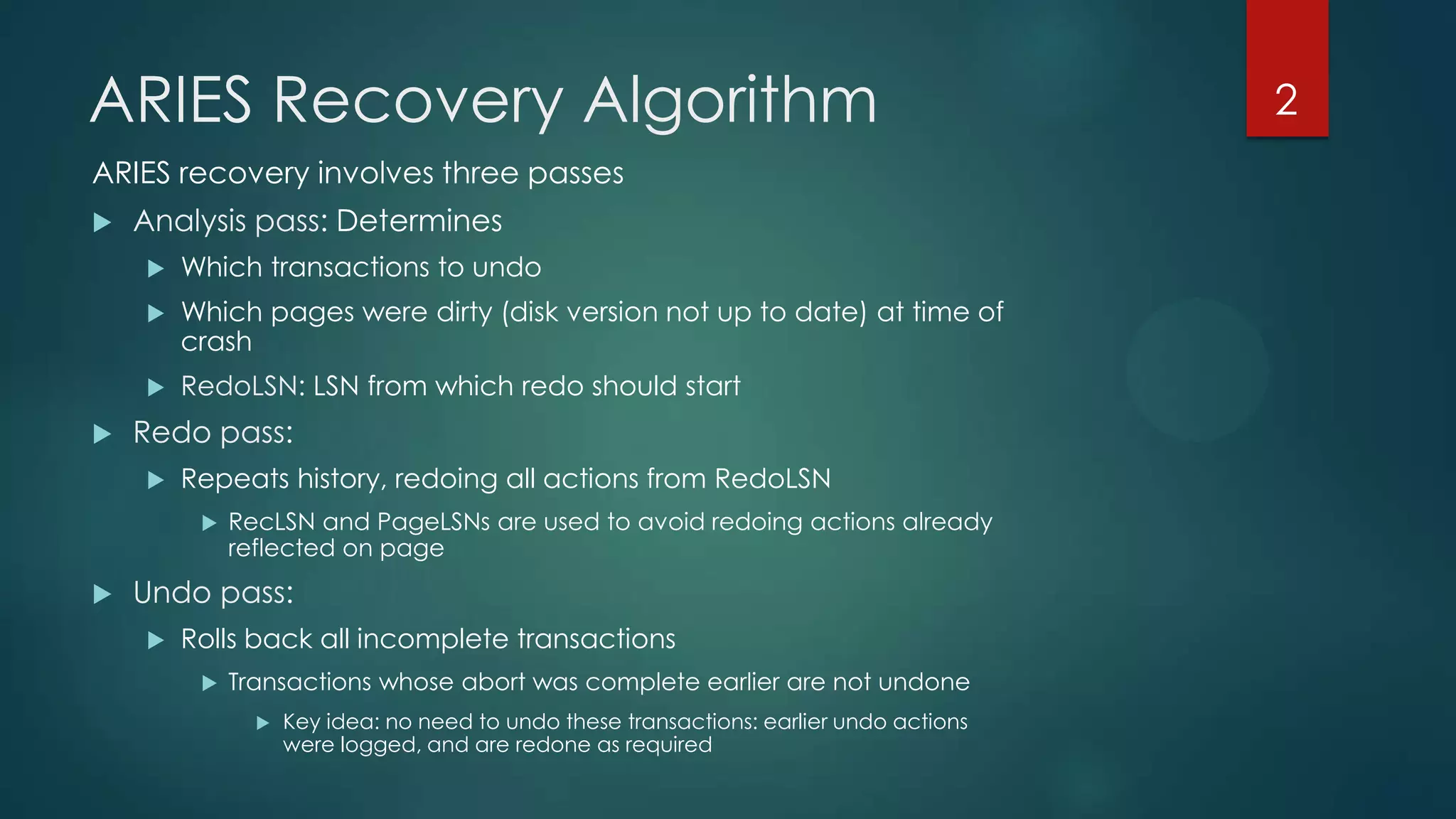
ARIES recovery involves three passes
 Analysis pass: Determines
 Which transactions to undo
 Which pages were dirty (disk version not up to date) at time of
crash
 RedoLSN: LSN from which redo should start
 Redo pass:
 Repeats history, redoing all actions from RedoLSN
 RecLSN and PageLSNs are used to avoid redoing actions already
reflected on page
 Undo pass:
 Rolls back all incomplete transactions
 Transactions whose abort was complete earlier are not undone
 Key idea: no need to undo these transactions: earlier undo actions
were logged, and are redone as required
2
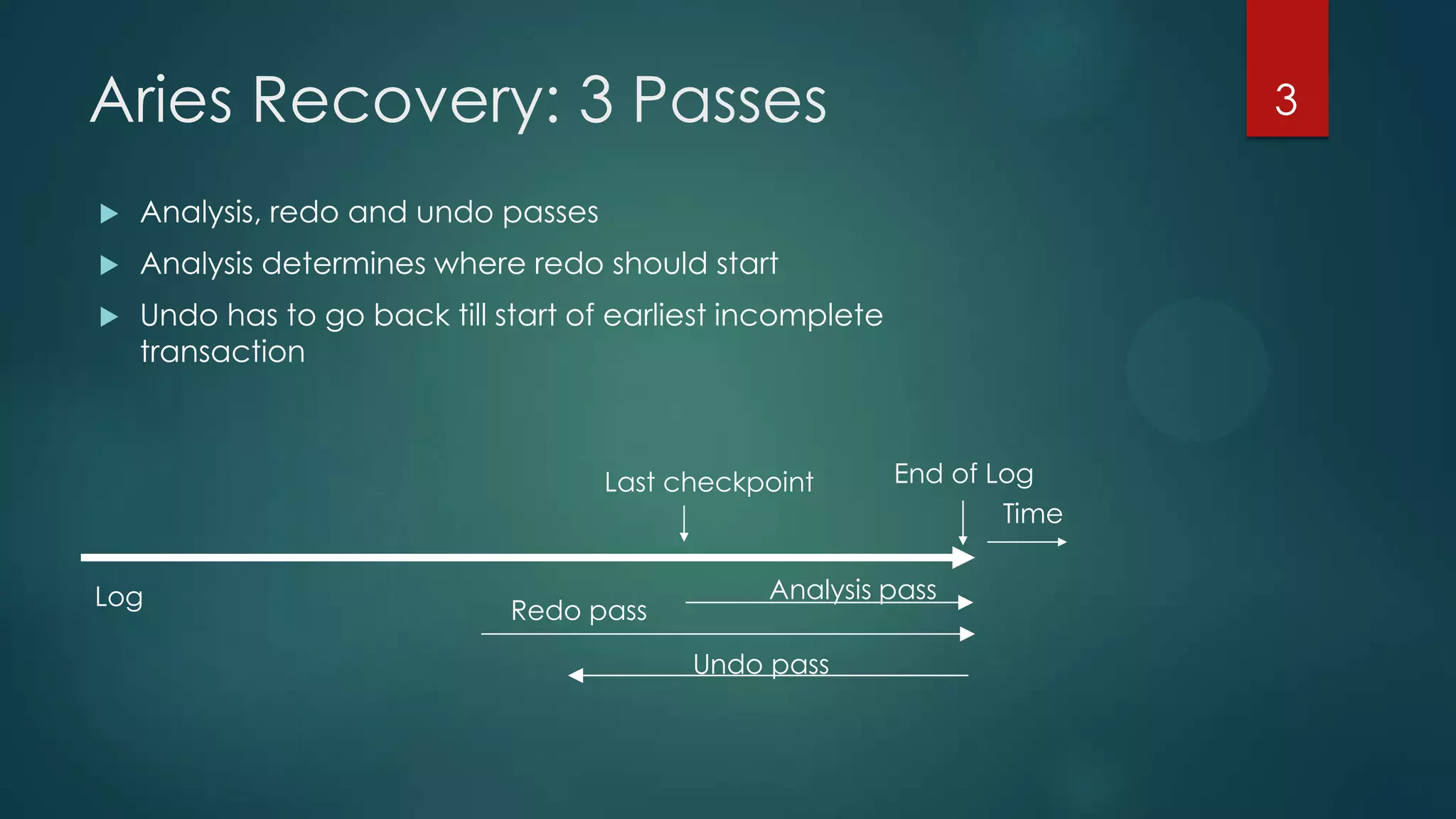
Aries Recovery: 3 Passes
 Analysis, redo and undo passes
 Analysis determines where redo should start
 Undo has to go back till start of earliest incomplete
transaction
Last checkpoint
Log
Time
End of Log
Analysis pass
Redo pass
Undo pass
3
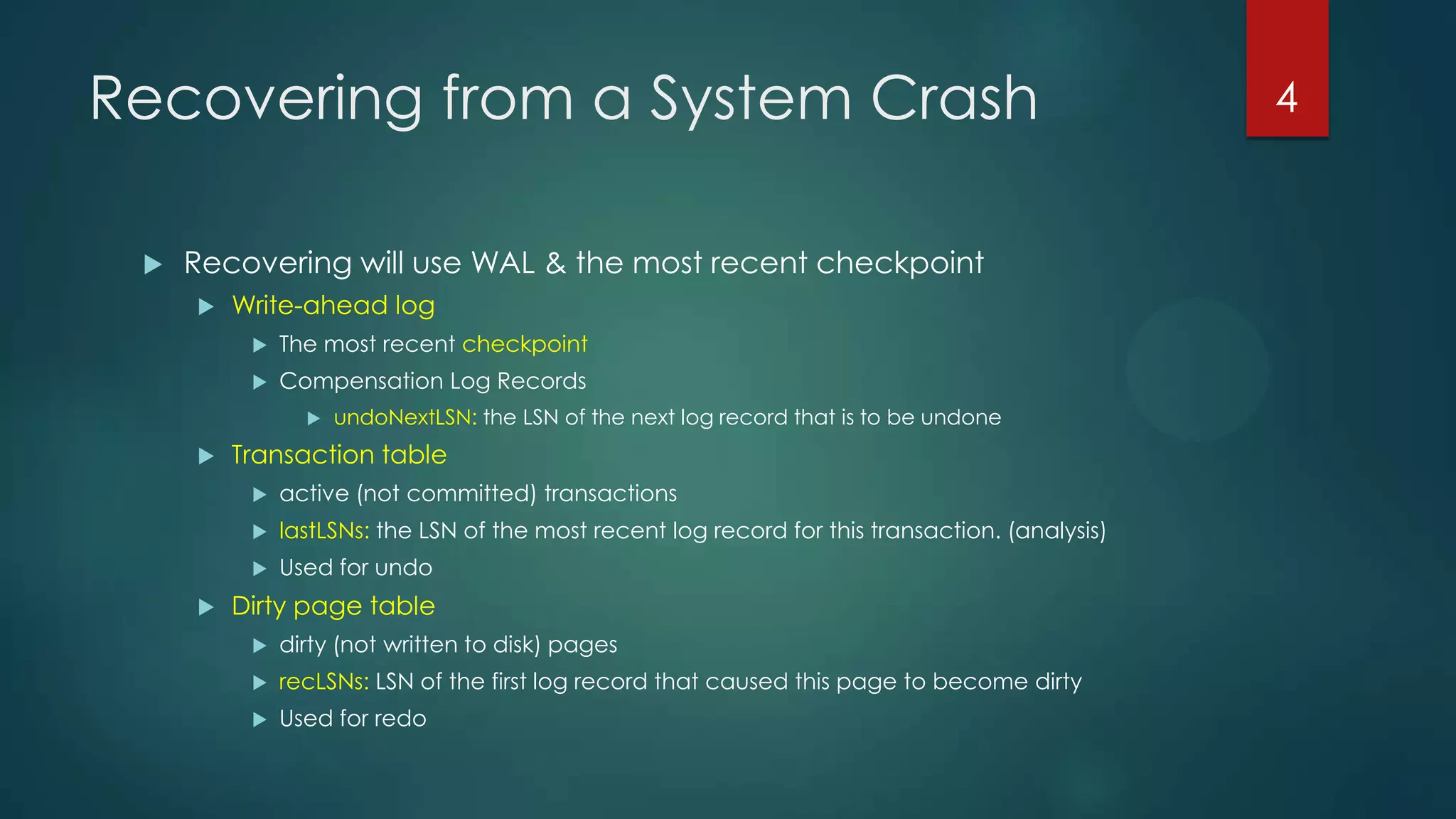
Recovering from a System Crash
 Recovering will use WAL & the most recent checkpoint
 Write-ahead log
 The most recent checkpoint
 Compensation Log Records
 undoNextLSN: the LSN of the next log record that is to be undone
 Transaction table
 active (not committed) transactions
 lastLSNs: the LSN of the most recent log record for this transaction. (analysis)
 Used for undo
 Dirty page table
 dirty (not written to disk) pages
 recLSNs: LSN of the first log record that caused this page to become dirty
 Used for redo
4
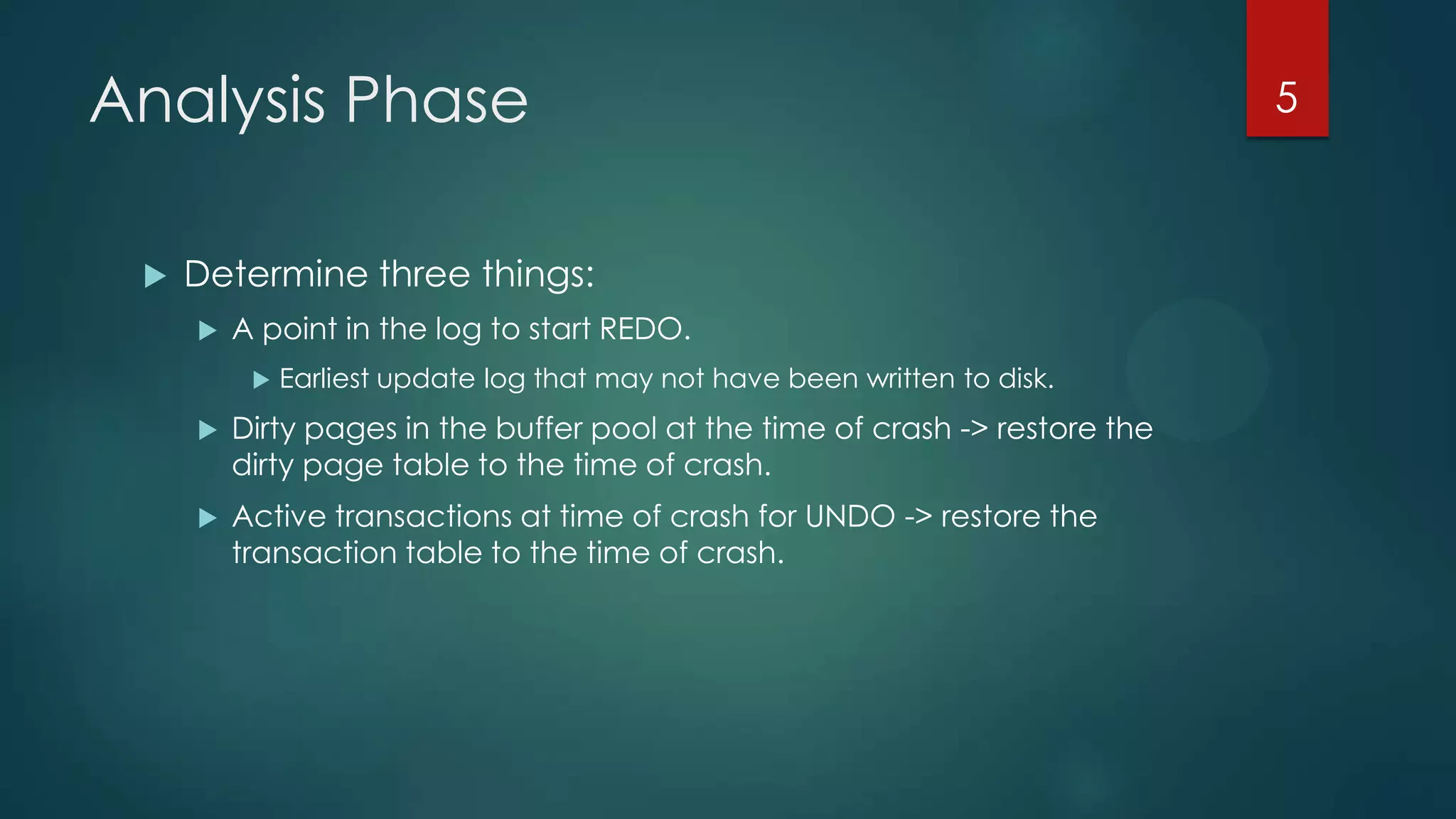
Analysis Phase
 Determine three things:
 A point in the log to start REDO.
 Earliest update log that may not have been written to disk.
 Dirty pages in the buffer pool at the time of crash -> restore the
dirty page table to the time of crash.
 Active transactions at time of crash for UNDO -> restore the
transaction table to the time of crash.
5
Analysis Phase: Algorithm
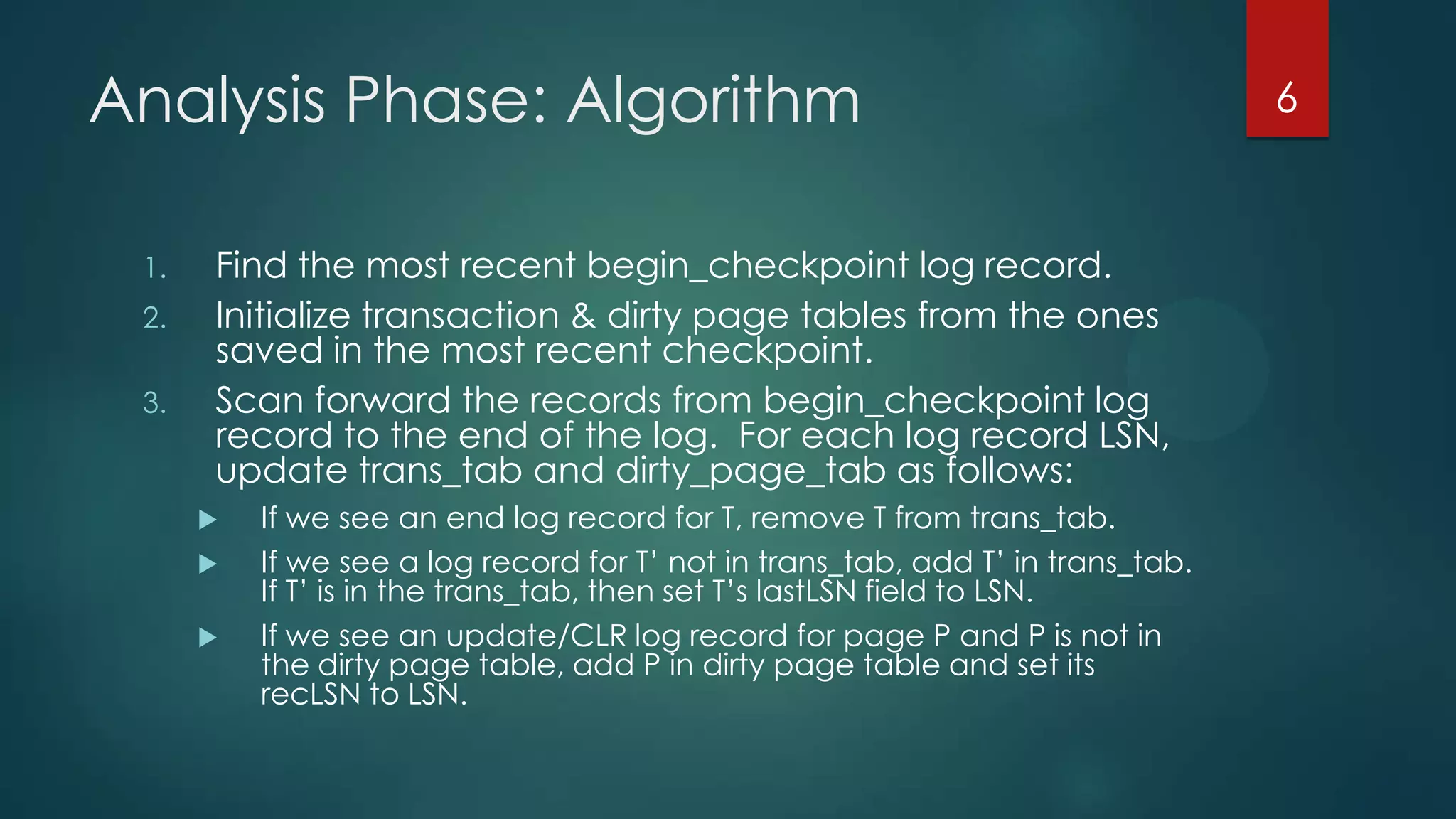
1. Find the most recent begin_checkpoint log record.
2. Initialize transaction & dirty page tables from the ones
saved in the most recent checkpoint.
3. Scan forward the records from begin_checkpoint log
record to the end of the log. For each log record LSN,
update trans_tab and dirty_page_tab as follows:
 If we see an end log record for T, remove T from trans_tab.
 If we see a log record for T’ not in trans_tab, add T’ in trans_tab.
If T’ is in the trans_tab, then set T’s lastLSN field to LSN.
 If we see an update/CLR log record for page P and P is not in
the dirty page table, add P in dirty page table and set its
recLSN to LSN.
6
Analysis Phase: Example (1)
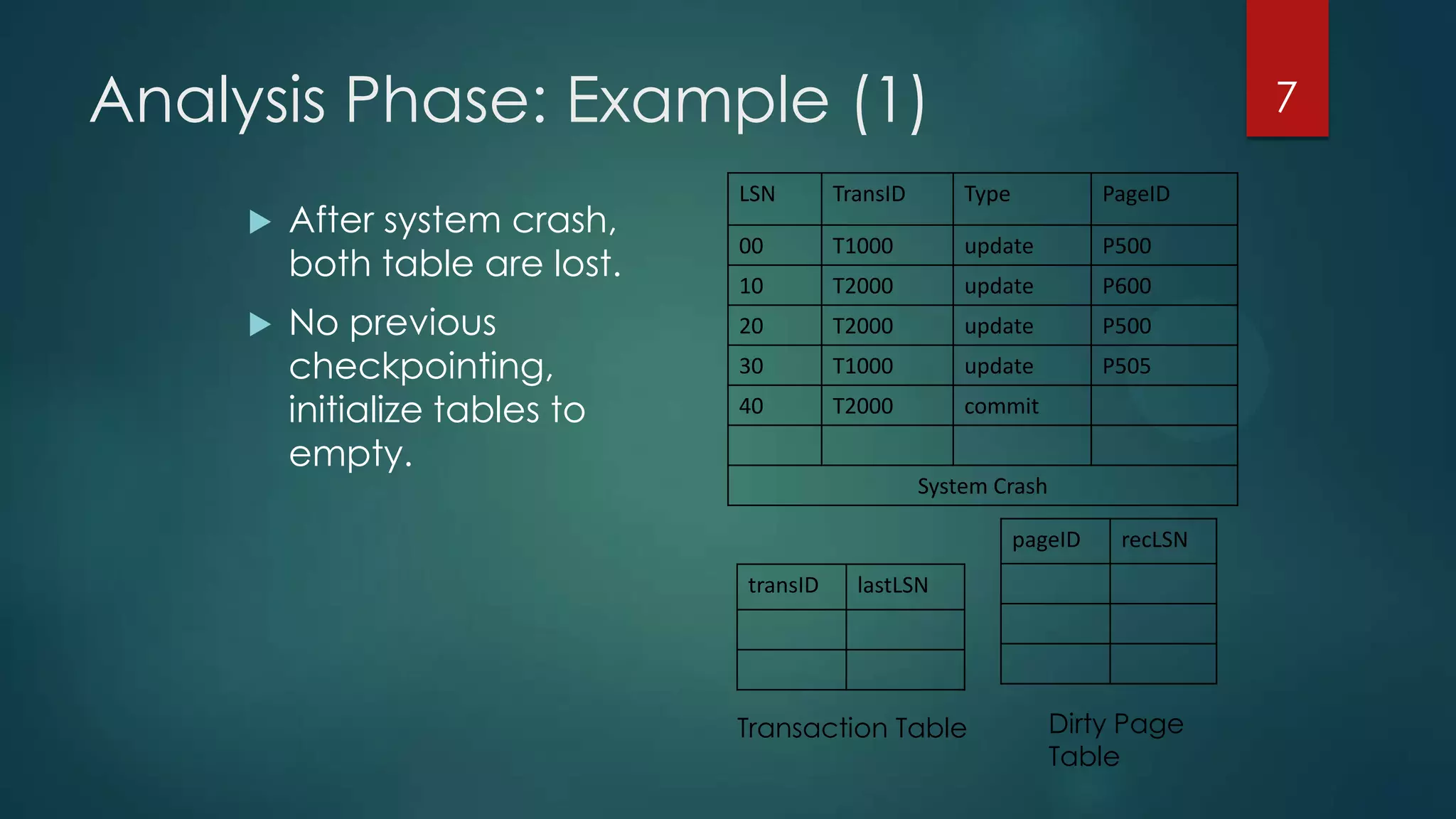
LSN TransID Type PageID
00 T1000 update P500
10 T2000 update P600
20 T2000 update P500
30 T1000 update P505
40 T2000 commit
System Crash
 After system crash,
both table are lost.
 No previous
checkpointing,
initialize tables to
empty.
7
pageID recLSN
Transaction Table Dirty Page
Table
transID lastLSN
Analysis Phase: Example (2)
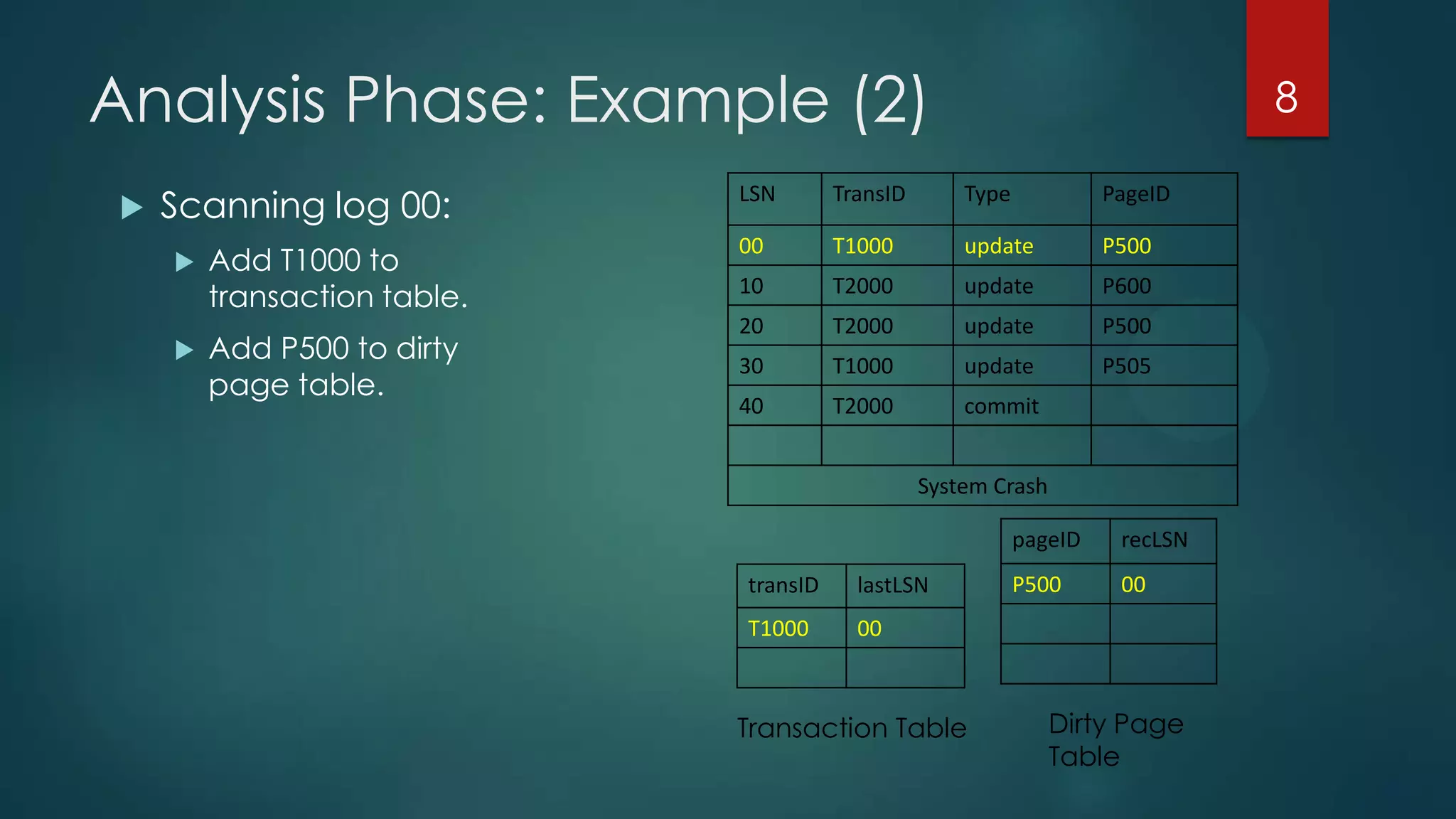
LSN TransID Type PageID
00 T1000 update P500
10 T2000 update P600
20 T2000 update P500
30 T1000 update P505
40 T2000 commit
System Crash
 Scanning log 00:
 Add T1000 to
transaction table.
 Add P500 to dirty
page table.
8
pageID recLSN
P500 00transID lastLSN
T1000 00
Transaction Table Dirty Page
Table
Analysis Phase: Example (3)
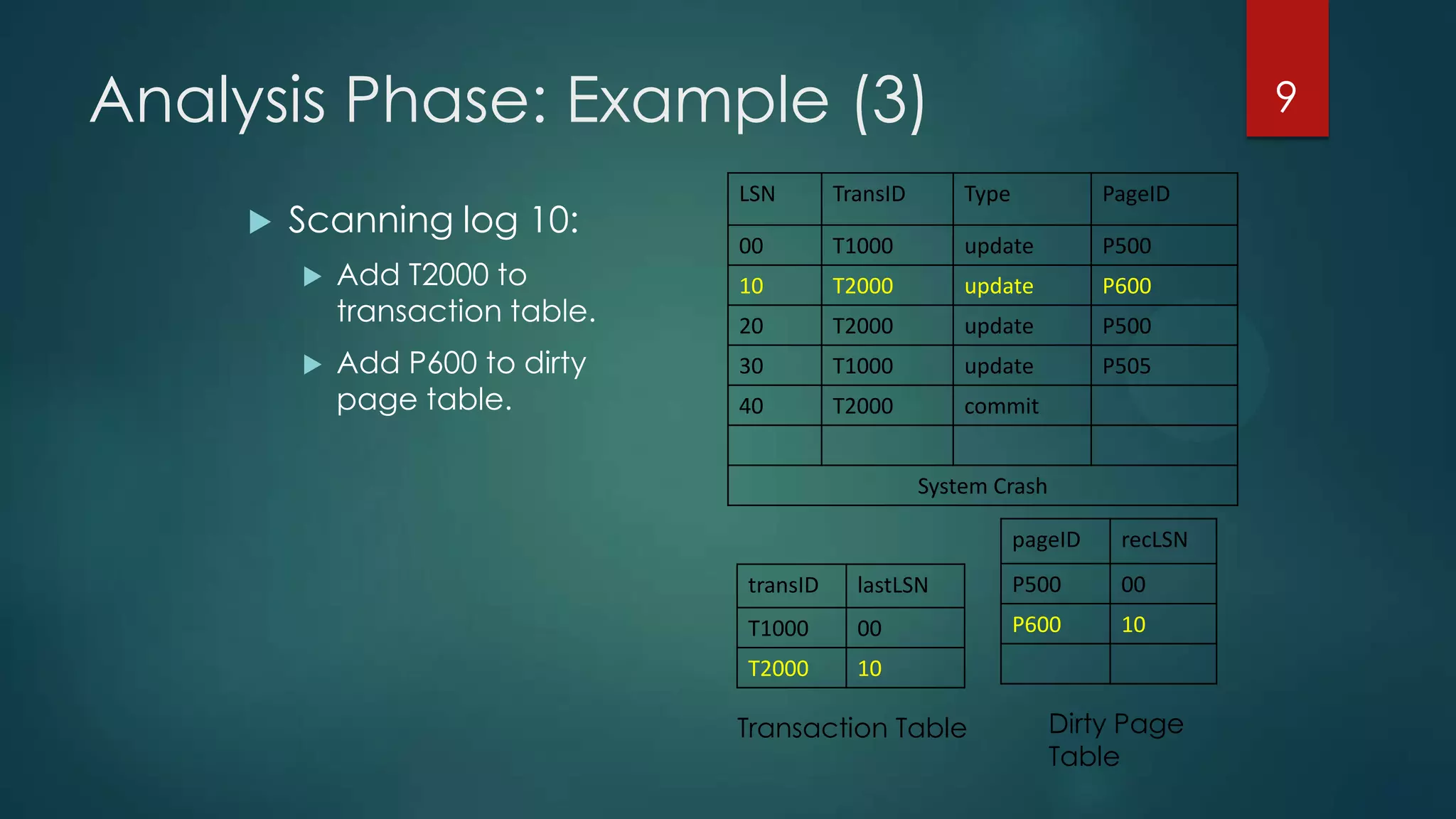
LSN TransID Type PageID
00 T1000 update P500
10 T2000 update P600
20 T2000 update P500
30 T1000 update P505
40 T2000 commit
System Crash
 Scanning log 10:
 Add T2000 to
transaction table.
 Add P600 to dirty
page table.
9
pageID recLSN
P500 00
P600 10
transID lastLSN
T1000 00
T2000 10
Transaction Table Dirty Page
Table
Analysis Phase: Example (4)
LSN TransID Type PageID
00 T1000 update P500
10 T2000 update P600
20 T2000 update P500
30 T1000 update P505
40 T2000 commit
System Crash
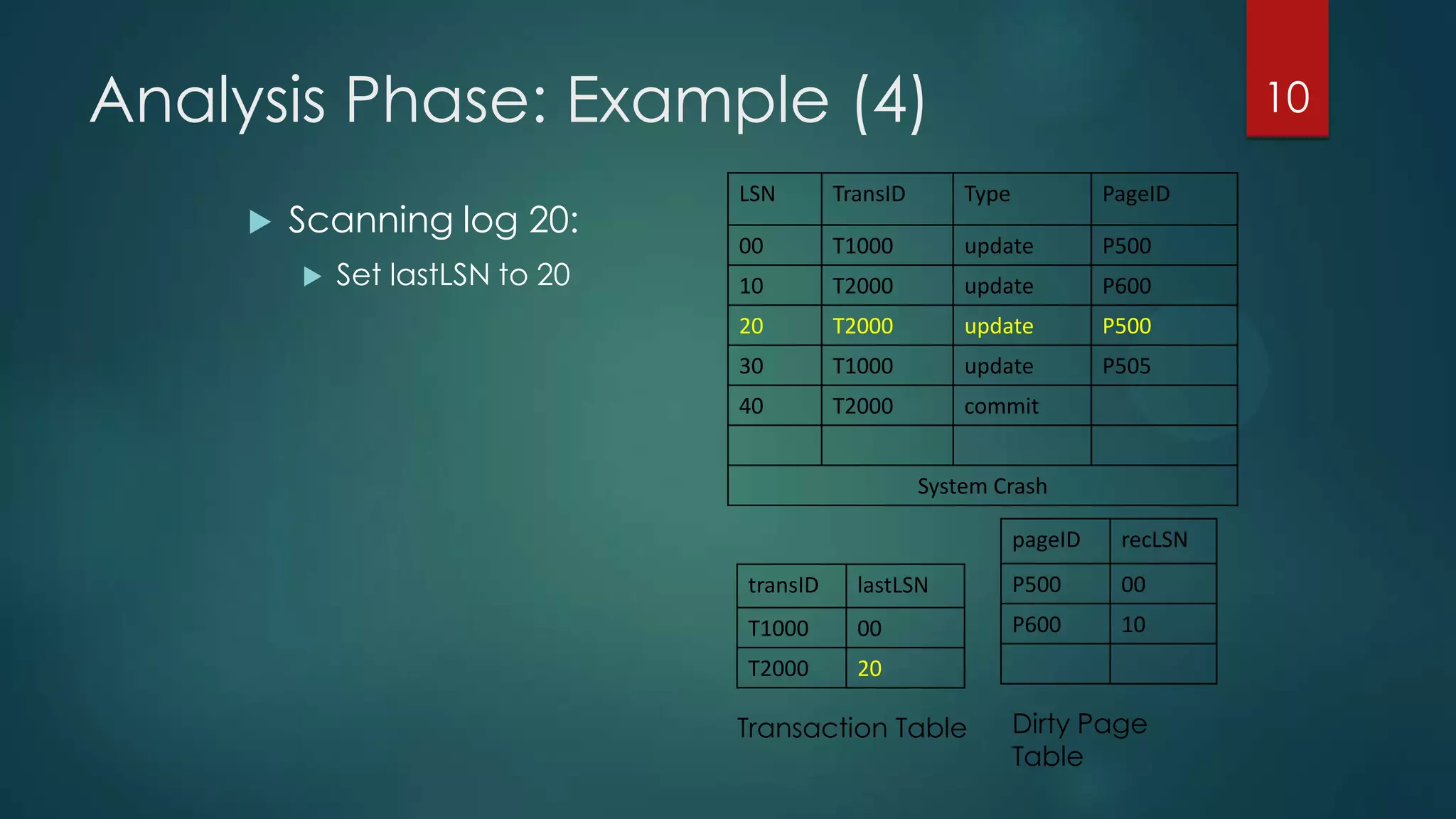
 Scanning log 20:
 Set lastLSN to 20
10
pageID recLSN
P500 00
P600 10
transID lastLSN
T1000 00
T2000 20
Transaction Table Dirty Page
Table
Analysis Phase: Example (5)
LSN TransID Type PageID
00 T1000 update P500
10 T2000 update P600
20 T2000 update P500
30 T1000 update P505
40 T2000 commit
System Crash
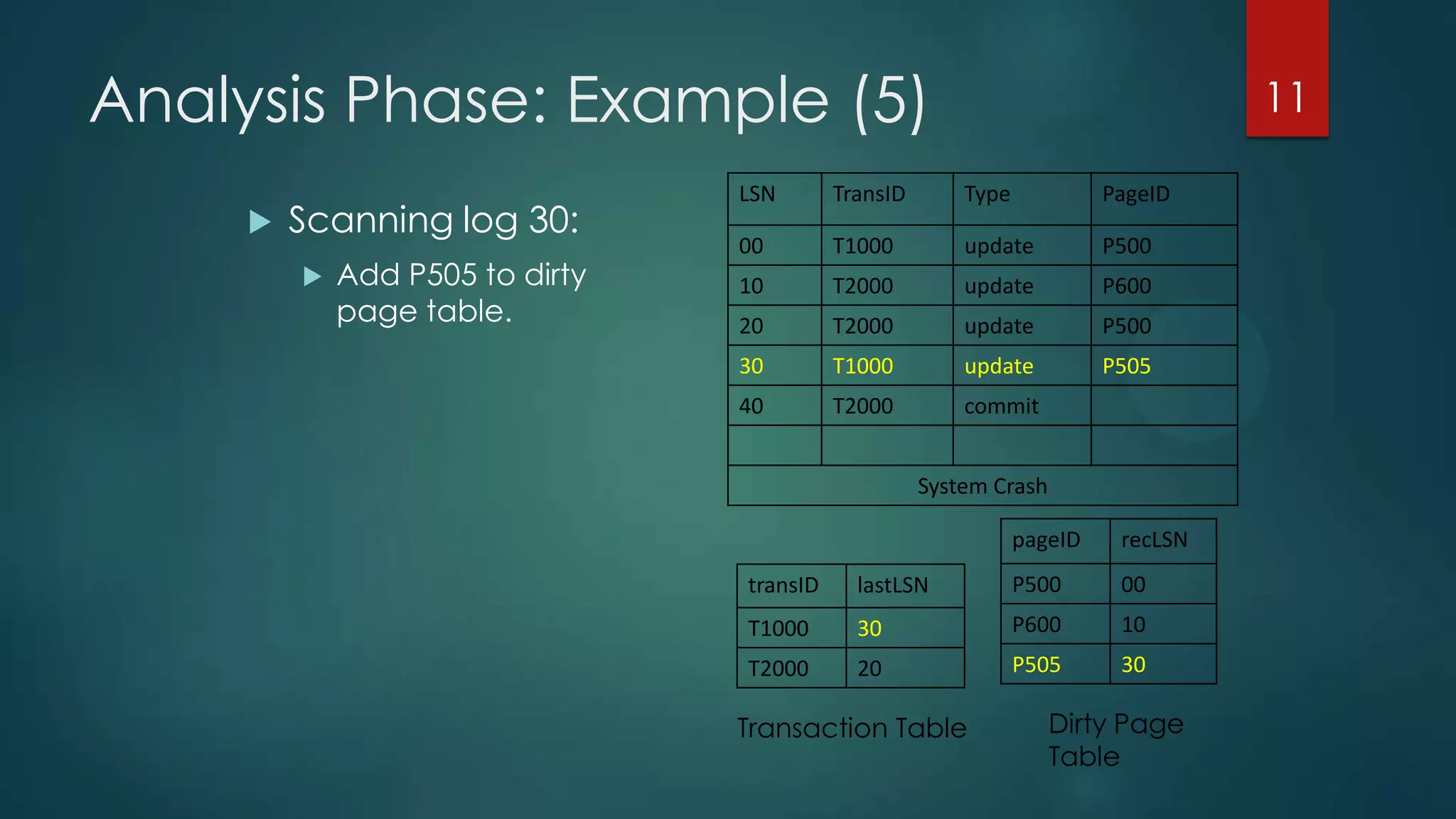
 Scanning log 30:
 Add P505 to dirty
page table.
11
pageID recLSN
P500 00
P600 10
P505 30
transID lastLSN
T1000 30
T2000 20
Transaction Table Dirty Page
Table
Analysis Phase: Example (6)
LSN TransID Type PageID
00 T1000 update P500
10 T2000 update P600
20 T2000 update P500
30 T1000 update P505
40 T2000 Commit
System Crash
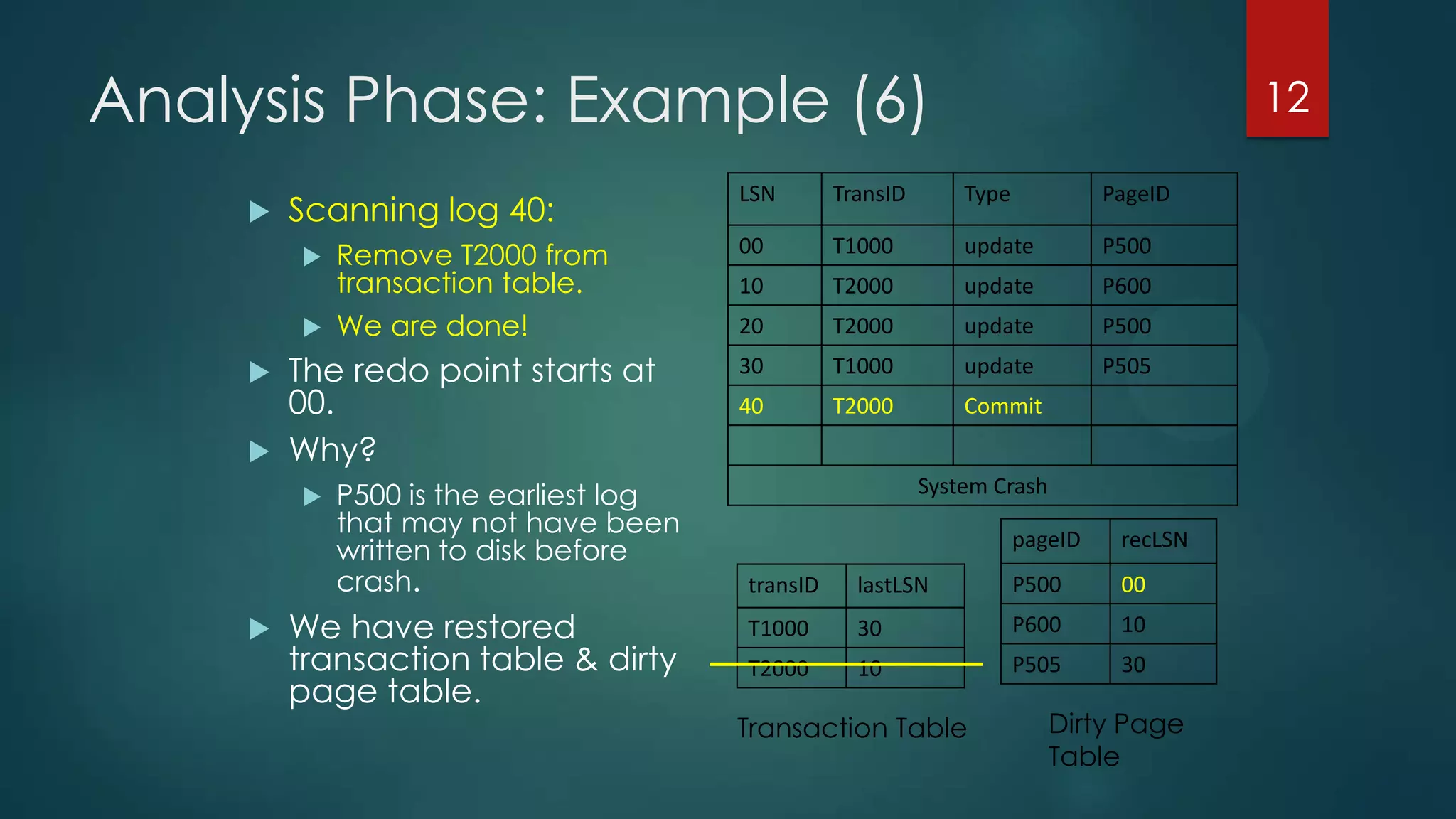
 Scanning log 40:
 Remove T2000 from
transaction table.
 We are done!
 The redo point starts at
00.
 Why?
 P500 is the earliest log
that may not have been
written to disk before
crash.
 We have restored
transaction table & dirty
page table.
12
pageID recLSN
P500 00
P600 10
P505 30
transID lastLSN
T1000 30
T2000 10
Transaction Table Dirty Page
Table
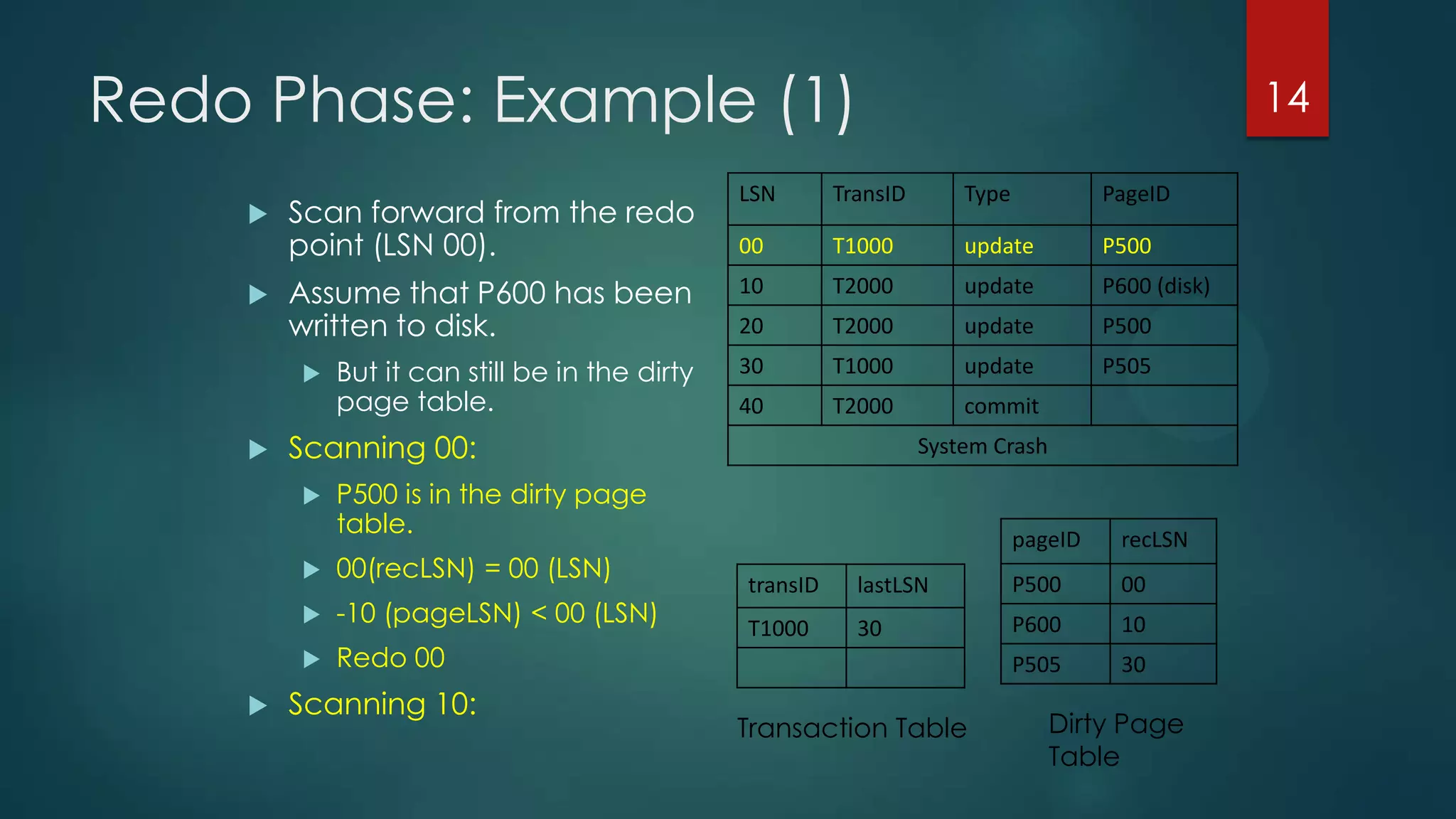
Redo Phase: Algorithm
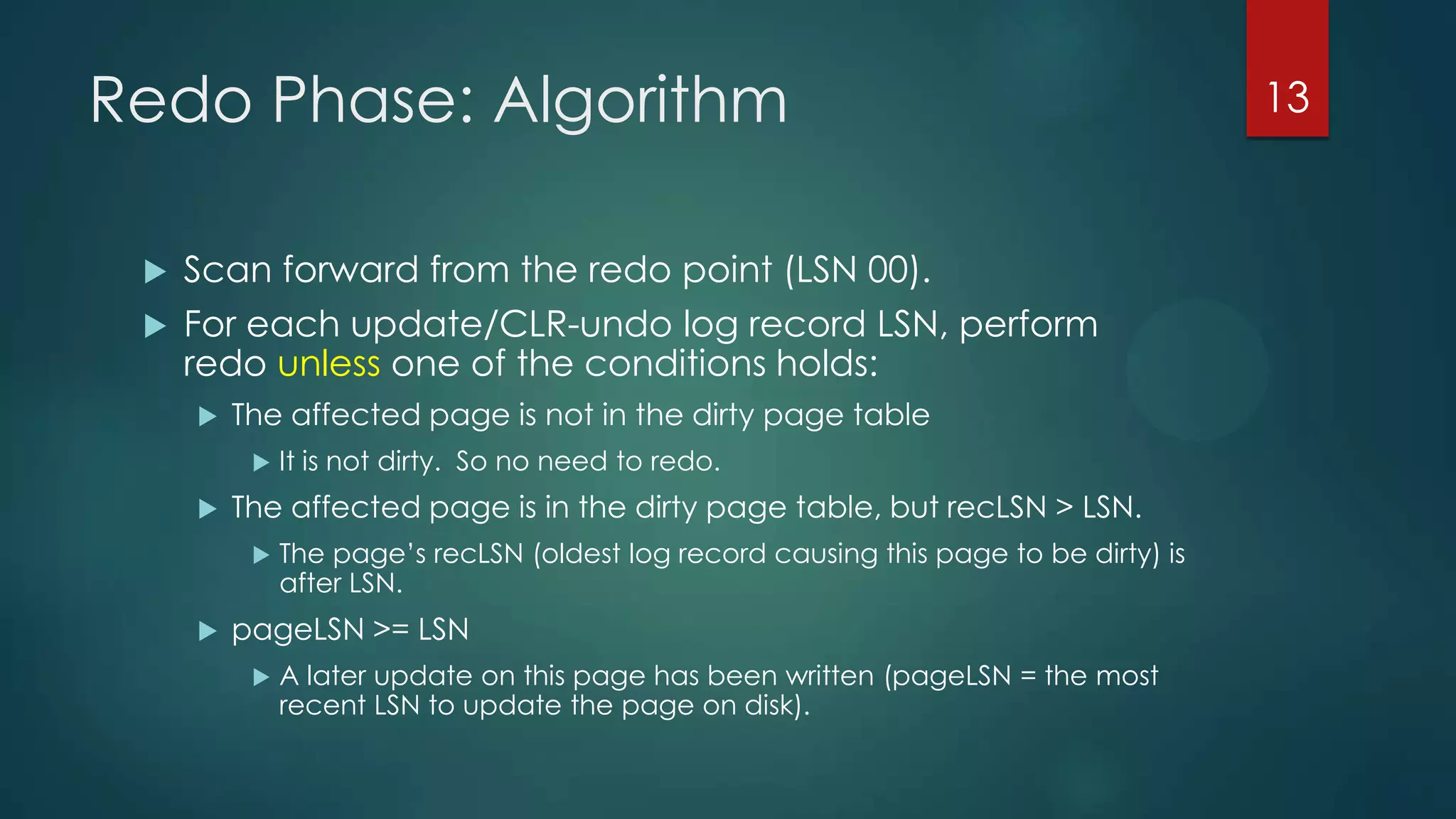
 Scan forward from the redo point (LSN 00).
 For each update/CLR-undo log record LSN, perform
redo unless one of the conditions holds:
 The affected page is not in the dirty page table
 It is not dirty. So no need to redo.
 The affected page is in the dirty page table, but recLSN > LSN.
 The page’s recLSN (oldest log record causing this page to be dirty) is
after LSN.
 pageLSN >= LSN
 A later update on this page has been written (pageLSN = the most
recent LSN to update the page on disk).
13
Redo Phase: Example (1)
LSN TransID Type PageID
00 T1000 update P500
10 T2000 update P600 (disk)
20 T2000 update P500
30 T1000 update P505
40 T2000 commit
System Crash
 Scan forward from the redo
point (LSN 00).
 Assume that P600 has been
written to disk.
 But it can still be in the dirty
page table.
 Scanning 00:
 P500 is in the dirty page
table.
 00(recLSN) = 00 (LSN)
 -10 (pageLSN) < 00 (LSN)
 Redo 00
 Scanning 10:
14
pageID recLSN
P500 00
P600 10
P505 30
transID lastLSN
T1000 30
Transaction Table Dirty Page
Table
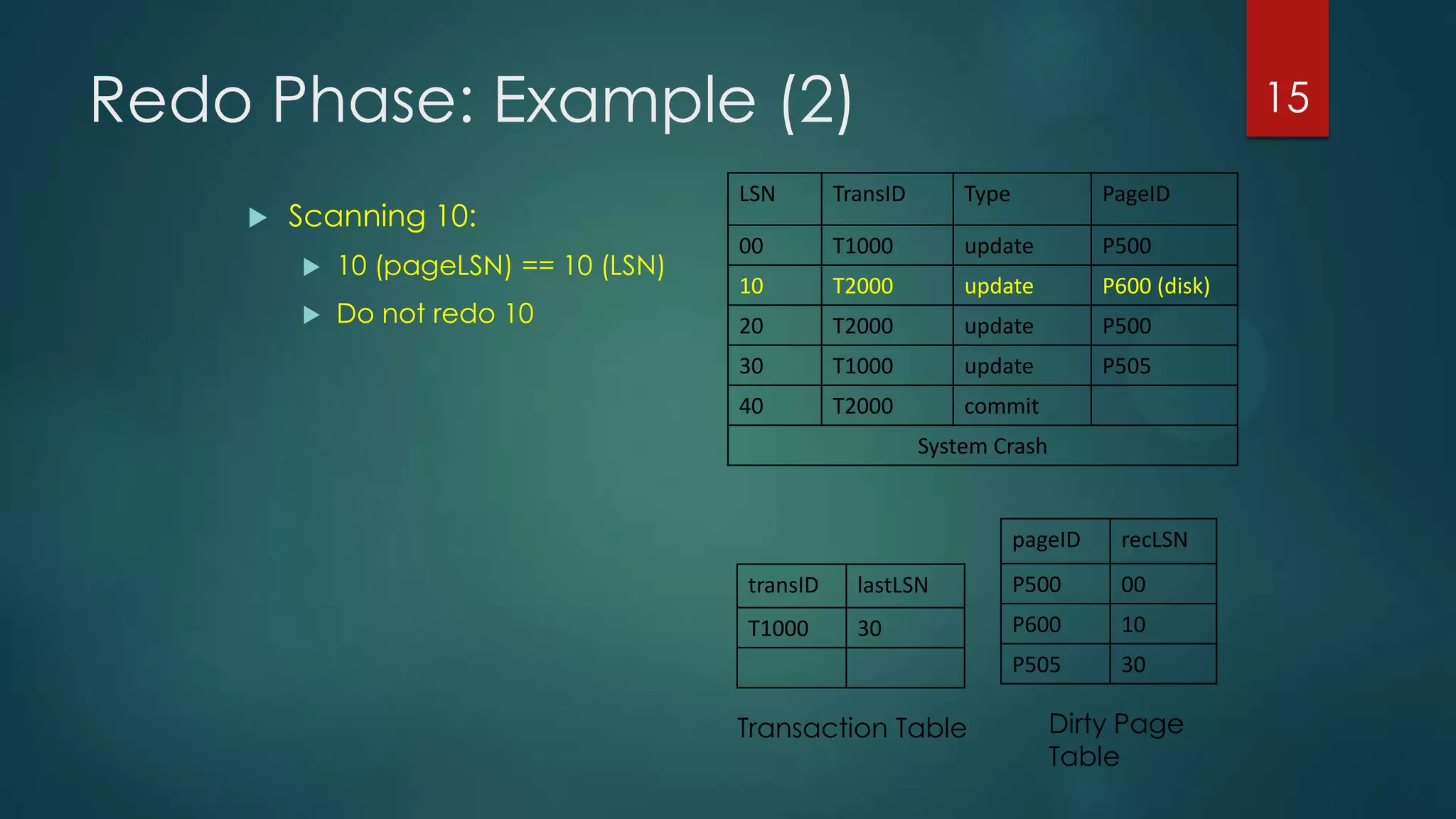
Redo Phase: Example (2)
LSN TransID Type PageID
00 T1000 update P500
10 T2000 update P600 (disk)
20 T2000 update P500
30 T1000 update P505
40 T2000 commit
System Crash
 Scanning 10:
 10 (pageLSN) == 10 (LSN)
 Do not redo 10
15
pageID recLSN
P500 00
P600 10
P505 30
transID lastLSN
T1000 30
Transaction Table Dirty Page
Table
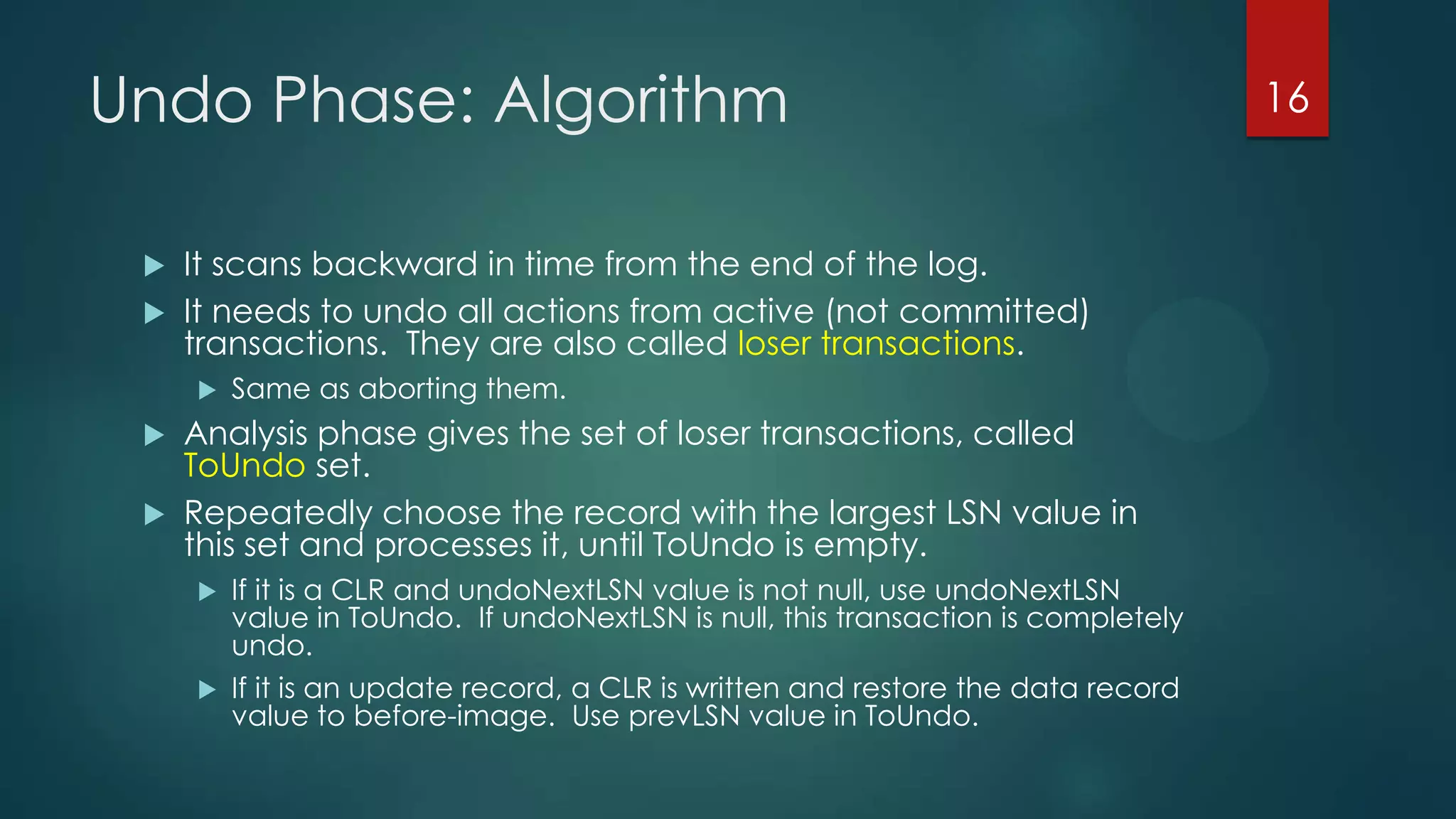
Undo Phase: Algorithm
 It scans backward in time from the end of the log.
 It needs to undo all actions from active (not committed)
transactions. They are also called loser transactions.
 Same as aborting them.
 Analysis phase gives the set of loser transactions, called
ToUndo set.
 Repeatedly choose the record with the largest LSN value in
this set and processes it, until ToUndo is empty.
 If it is a CLR and undoNextLSN value is not null, use undoNextLSN
value in ToUndo. If undoNextLSN is null, this transaction is completely
undo.
 If it is an update record, a CLR is written and restore the data record
value to before-image. Use prevLSN value in ToUndo.
16
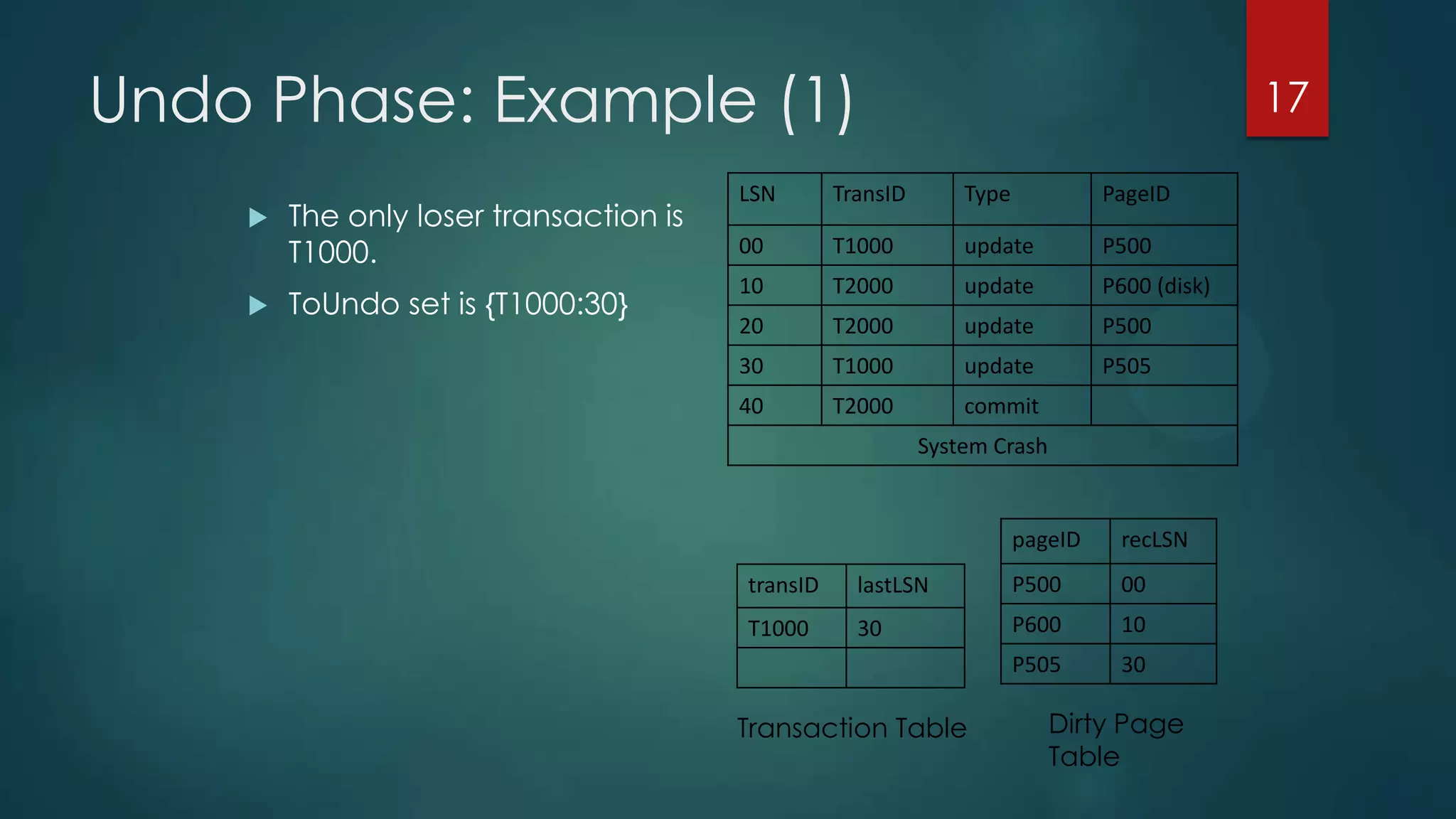
Undo Phase: Example (1)
LSN TransID Type PageID
00 T1000 update P500
10 T2000 update P600 (disk)
20 T2000 update P500
30 T1000 update P505
40 T2000 commit
System Crash
 The only loser transaction is
T1000.
 ToUndo set is {T1000:30}
17
pageID recLSN
P500 00
P600 10
P505 30
transID lastLSN
T1000 30
Transaction Table Dirty Page
Table
Undo Phase: Example (2)
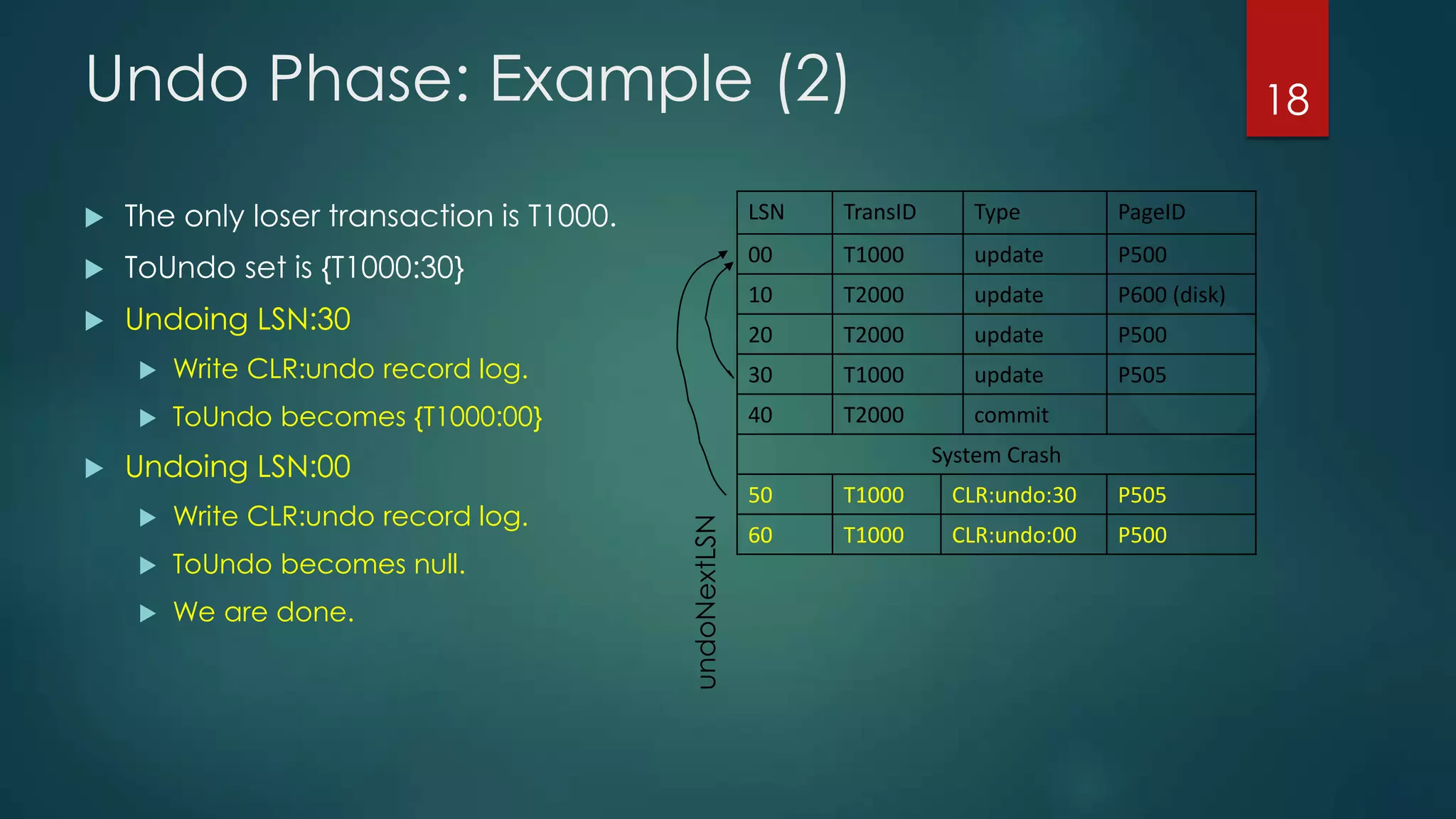
 The only loser transaction is T1000.
 ToUndo set is {T1000:30}
 Undoing LSN:30
 Write CLR:undo record log.
 ToUndo becomes {T1000:00}
 Undoing LSN:00
 Write CLR:undo record log.
 ToUndo becomes null.
 We are done.
LSN TransID Type PageID
00 T1000 update P500
10 T2000 update P600 (disk)
20 T2000 update P500
30 T1000 update P505
40 T2000 commit
System Crash
50 T1000 CLR:undo:30 P505
60 T1000 CLR:undo:00 P500
18
undoNextLSN
Crashes During Restart (1)
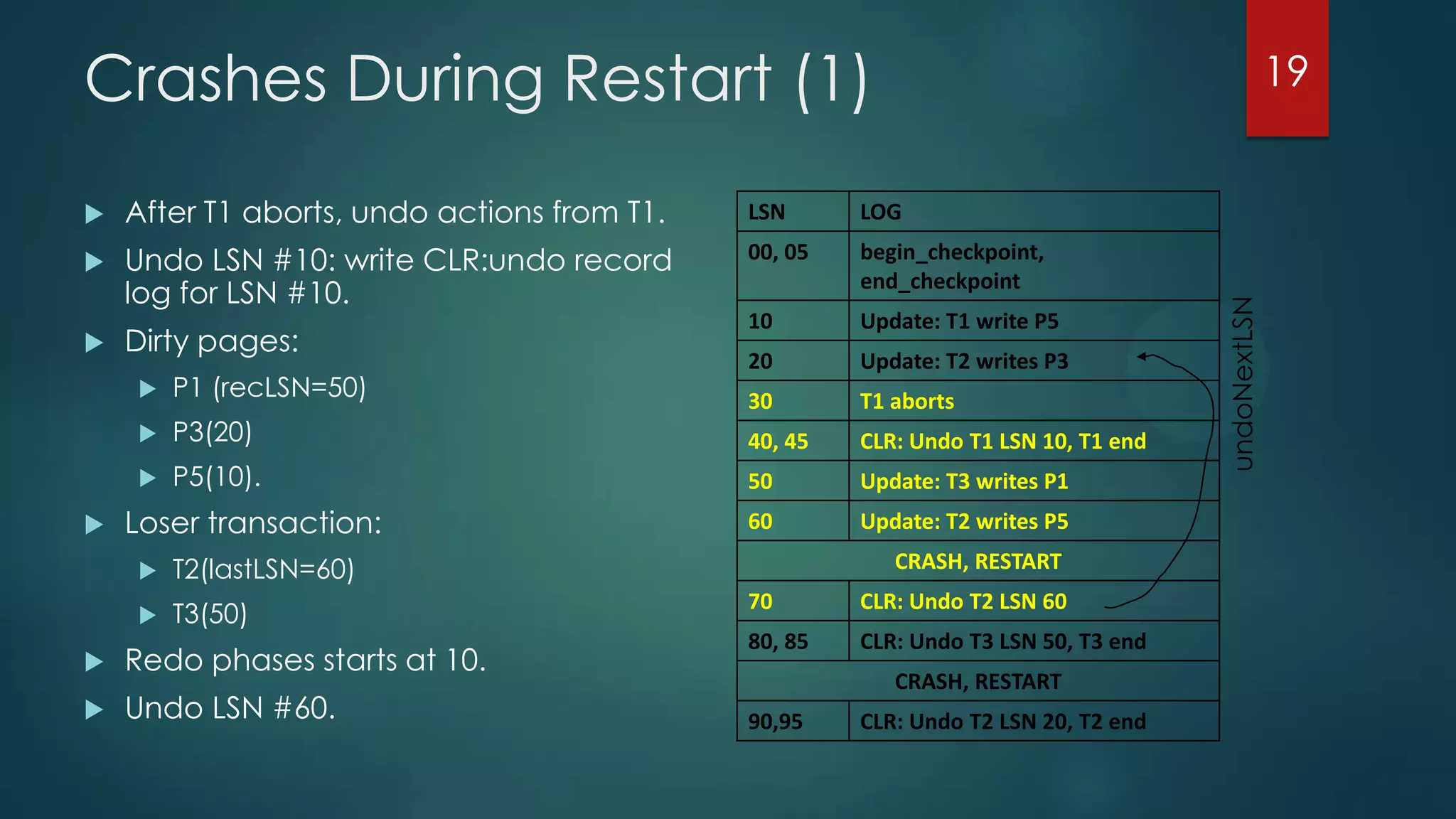
 After T1 aborts, undo actions from T1.
 Undo LSN #10: write CLR:undo record
log for LSN #10.
 Dirty pages:
 P1 (recLSN=50)
 P3(20)
 P5(10).
 Loser transaction:
 T2(lastLSN=60)
 T3(50)
 Redo phases starts at 10.
 Undo LSN #60.
LSN LOG
00, 05 begin_checkpoint,
end_checkpoint
10 Update: T1 write P5
20 Update: T2 writes P3
30 T1 aborts
40, 45 CLR: Undo T1 LSN 10, T1 end
50 Update: T3 writes P1
60 Update: T2 writes P5
CRASH, RESTART
70 CLR: Undo T2 LSN 60
80, 85 CLR: Undo T3 LSN 50, T3 end
CRASH, RESTART
90,95 CLR: Undo T2 LSN 20, T2 end
19
undoNextLSN
Crashes During Restart (2)
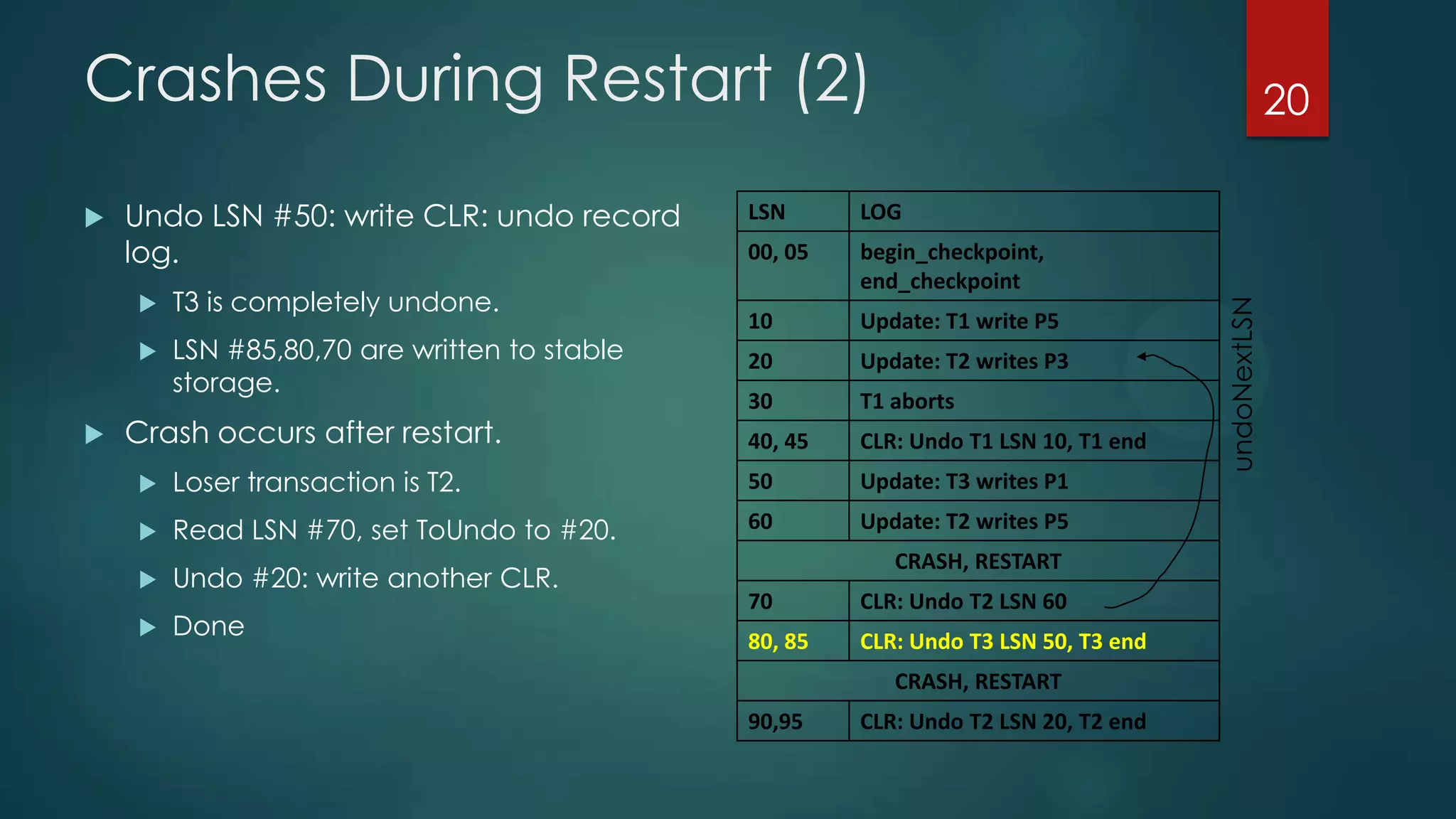
 Undo LSN #50: write CLR: undo record
log.
 T3 is completely undone.
 LSN #85,80,70 are written to stable
storage.
 Crash occurs after restart.
 Loser transaction is T2.
 Read LSN #70, set ToUndo to #20.
 Undo #20: write another CLR.
 Done
LSN LOG
00, 05 begin_checkpoint,
end_checkpoint
10 Update: T1 write P5
20 Update: T2 writes P3
30 T1 aborts
40, 45 CLR: Undo T1 LSN 10, T1 end
50 Update: T3 writes P1
60 Update: T2 writes P5
CRASH, RESTART
70 CLR: Undo T2 LSN 60
80, 85 CLR: Undo T3 LSN 50, T3 end
CRASH, RESTART
90,95 CLR: Undo T2 LSN 20, T2 end
20
undoNextLSN
Thank You ….
HAVE A NICE DAY….
21

Dbms recovering from a system crash

  • 1.
    Recovering from a SystemCrash BY- ABHISHEK KUMAR GUPTA 1PI12IS002 1
  • 2.
    ARIES Recovery Algorithm ARIESrecovery involves three passes  Analysis pass: Determines  Which transactions to undo  Which pages were dirty (disk version not up to date) at time of crash  RedoLSN: LSN from which redo should start  Redo pass:  Repeats history, redoing all actions from RedoLSN  RecLSN and PageLSNs are used to avoid redoing actions already reflected on page  Undo pass:  Rolls back all incomplete transactions  Transactions whose abort was complete earlier are not undone  Key idea: no need to undo these transactions: earlier undo actions were logged, and are redone as required 2
  • 3.
    Aries Recovery: 3Passes  Analysis, redo and undo passes  Analysis determines where redo should start  Undo has to go back till start of earliest incomplete transaction Last checkpoint Log Time End of Log Analysis pass Redo pass Undo pass 3
  • 4.
    Recovering from aSystem Crash  Recovering will use WAL & the most recent checkpoint  Write-ahead log  The most recent checkpoint  Compensation Log Records  undoNextLSN: the LSN of the next log record that is to be undone  Transaction table  active (not committed) transactions  lastLSNs: the LSN of the most recent log record for this transaction. (analysis)  Used for undo  Dirty page table  dirty (not written to disk) pages  recLSNs: LSN of the first log record that caused this page to become dirty  Used for redo 4
  • 5.
    Analysis Phase  Determinethree things:  A point in the log to start REDO.  Earliest update log that may not have been written to disk.  Dirty pages in the buffer pool at the time of crash -> restore the dirty page table to the time of crash.  Active transactions at time of crash for UNDO -> restore the transaction table to the time of crash. 5
  • 6.
    Analysis Phase: Algorithm 1.Find the most recent begin_checkpoint log record. 2. Initialize transaction & dirty page tables from the ones saved in the most recent checkpoint. 3. Scan forward the records from begin_checkpoint log record to the end of the log. For each log record LSN, update trans_tab and dirty_page_tab as follows:  If we see an end log record for T, remove T from trans_tab.  If we see a log record for T’ not in trans_tab, add T’ in trans_tab. If T’ is in the trans_tab, then set T’s lastLSN field to LSN.  If we see an update/CLR log record for page P and P is not in the dirty page table, add P in dirty page table and set its recLSN to LSN. 6
  • 7.
    Analysis Phase: Example(1) LSN TransID Type PageID 00 T1000 update P500 10 T2000 update P600 20 T2000 update P500 30 T1000 update P505 40 T2000 commit System Crash  After system crash, both table are lost.  No previous checkpointing, initialize tables to empty. 7 pageID recLSN Transaction Table Dirty Page Table transID lastLSN
  • 8.
    Analysis Phase: Example(2) LSN TransID Type PageID 00 T1000 update P500 10 T2000 update P600 20 T2000 update P500 30 T1000 update P505 40 T2000 commit System Crash  Scanning log 00:  Add T1000 to transaction table.  Add P500 to dirty page table. 8 pageID recLSN P500 00transID lastLSN T1000 00 Transaction Table Dirty Page Table
  • 9.
    Analysis Phase: Example(3) LSN TransID Type PageID 00 T1000 update P500 10 T2000 update P600 20 T2000 update P500 30 T1000 update P505 40 T2000 commit System Crash  Scanning log 10:  Add T2000 to transaction table.  Add P600 to dirty page table. 9 pageID recLSN P500 00 P600 10 transID lastLSN T1000 00 T2000 10 Transaction Table Dirty Page Table
  • 10.
    Analysis Phase: Example(4) LSN TransID Type PageID 00 T1000 update P500 10 T2000 update P600 20 T2000 update P500 30 T1000 update P505 40 T2000 commit System Crash  Scanning log 20:  Set lastLSN to 20 10 pageID recLSN P500 00 P600 10 transID lastLSN T1000 00 T2000 20 Transaction Table Dirty Page Table
  • 11.
    Analysis Phase: Example(5) LSN TransID Type PageID 00 T1000 update P500 10 T2000 update P600 20 T2000 update P500 30 T1000 update P505 40 T2000 commit System Crash  Scanning log 30:  Add P505 to dirty page table. 11 pageID recLSN P500 00 P600 10 P505 30 transID lastLSN T1000 30 T2000 20 Transaction Table Dirty Page Table
  • 12.
    Analysis Phase: Example(6) LSN TransID Type PageID 00 T1000 update P500 10 T2000 update P600 20 T2000 update P500 30 T1000 update P505 40 T2000 Commit System Crash  Scanning log 40:  Remove T2000 from transaction table.  We are done!  The redo point starts at 00.  Why?  P500 is the earliest log that may not have been written to disk before crash.  We have restored transaction table & dirty page table. 12 pageID recLSN P500 00 P600 10 P505 30 transID lastLSN T1000 30 T2000 10 Transaction Table Dirty Page Table
  • 13.
    Redo Phase: Algorithm Scan forward from the redo point (LSN 00).  For each update/CLR-undo log record LSN, perform redo unless one of the conditions holds:  The affected page is not in the dirty page table  It is not dirty. So no need to redo.  The affected page is in the dirty page table, but recLSN > LSN.  The page’s recLSN (oldest log record causing this page to be dirty) is after LSN.  pageLSN >= LSN  A later update on this page has been written (pageLSN = the most recent LSN to update the page on disk). 13
  • 14.
    Redo Phase: Example(1) LSN TransID Type PageID 00 T1000 update P500 10 T2000 update P600 (disk) 20 T2000 update P500 30 T1000 update P505 40 T2000 commit System Crash  Scan forward from the redo point (LSN 00).  Assume that P600 has been written to disk.  But it can still be in the dirty page table.  Scanning 00:  P500 is in the dirty page table.  00(recLSN) = 00 (LSN)  -10 (pageLSN) < 00 (LSN)  Redo 00  Scanning 10: 14 pageID recLSN P500 00 P600 10 P505 30 transID lastLSN T1000 30 Transaction Table Dirty Page Table
  • 15.
    Redo Phase: Example(2) LSN TransID Type PageID 00 T1000 update P500 10 T2000 update P600 (disk) 20 T2000 update P500 30 T1000 update P505 40 T2000 commit System Crash  Scanning 10:  10 (pageLSN) == 10 (LSN)  Do not redo 10 15 pageID recLSN P500 00 P600 10 P505 30 transID lastLSN T1000 30 Transaction Table Dirty Page Table
  • 16.
    Undo Phase: Algorithm It scans backward in time from the end of the log.  It needs to undo all actions from active (not committed) transactions. They are also called loser transactions.  Same as aborting them.  Analysis phase gives the set of loser transactions, called ToUndo set.  Repeatedly choose the record with the largest LSN value in this set and processes it, until ToUndo is empty.  If it is a CLR and undoNextLSN value is not null, use undoNextLSN value in ToUndo. If undoNextLSN is null, this transaction is completely undo.  If it is an update record, a CLR is written and restore the data record value to before-image. Use prevLSN value in ToUndo. 16
  • 17.
    Undo Phase: Example(1) LSN TransID Type PageID 00 T1000 update P500 10 T2000 update P600 (disk) 20 T2000 update P500 30 T1000 update P505 40 T2000 commit System Crash  The only loser transaction is T1000.  ToUndo set is {T1000:30} 17 pageID recLSN P500 00 P600 10 P505 30 transID lastLSN T1000 30 Transaction Table Dirty Page Table
  • 18.
    Undo Phase: Example(2)  The only loser transaction is T1000.  ToUndo set is {T1000:30}  Undoing LSN:30  Write CLR:undo record log.  ToUndo becomes {T1000:00}  Undoing LSN:00  Write CLR:undo record log.  ToUndo becomes null.  We are done. LSN TransID Type PageID 00 T1000 update P500 10 T2000 update P600 (disk) 20 T2000 update P500 30 T1000 update P505 40 T2000 commit System Crash 50 T1000 CLR:undo:30 P505 60 T1000 CLR:undo:00 P500 18 undoNextLSN
  • 19.
    Crashes During Restart(1)  After T1 aborts, undo actions from T1.  Undo LSN #10: write CLR:undo record log for LSN #10.  Dirty pages:  P1 (recLSN=50)  P3(20)  P5(10).  Loser transaction:  T2(lastLSN=60)  T3(50)  Redo phases starts at 10.  Undo LSN #60. LSN LOG 00, 05 begin_checkpoint, end_checkpoint 10 Update: T1 write P5 20 Update: T2 writes P3 30 T1 aborts 40, 45 CLR: Undo T1 LSN 10, T1 end 50 Update: T3 writes P1 60 Update: T2 writes P5 CRASH, RESTART 70 CLR: Undo T2 LSN 60 80, 85 CLR: Undo T3 LSN 50, T3 end CRASH, RESTART 90,95 CLR: Undo T2 LSN 20, T2 end 19 undoNextLSN
  • 20.
    Crashes During Restart(2)  Undo LSN #50: write CLR: undo record log.  T3 is completely undone.  LSN #85,80,70 are written to stable storage.  Crash occurs after restart.  Loser transaction is T2.  Read LSN #70, set ToUndo to #20.  Undo #20: write another CLR.  Done LSN LOG 00, 05 begin_checkpoint, end_checkpoint 10 Update: T1 write P5 20 Update: T2 writes P3 30 T1 aborts 40, 45 CLR: Undo T1 LSN 10, T1 end 50 Update: T3 writes P1 60 Update: T2 writes P5 CRASH, RESTART 70 CLR: Undo T2 LSN 60 80, 85 CLR: Undo T3 LSN 50, T3 end CRASH, RESTART 90,95 CLR: Undo T2 LSN 20, T2 end 20 undoNextLSN
  • 21.
    Thank You …. HAVEA NICE DAY…. 21