CDC Stream
Processing with
Apache Flink
Timo Walther
@twalthr
–
Current 2022
2022-10-05
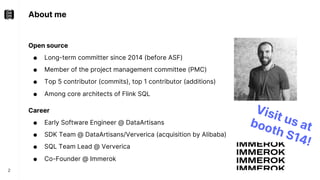
About me
Open source
● Long-term committer since 2014 (before ASF)
● Member of the project management committee (PMC)
● Top 5 contributor (commits), top 1 contributor (additions)
● Among core architects of Flink SQL
Career
● Early Software Engineer @ DataArtisans
● SDK Team @ DataArtisans/Ververica (acquisition by Alibaba)
● SQL Team Lead @ Ververica
● Co-Founder @ Immerok
2
Visit us at
booth S14!
What is Apache Flink?
3
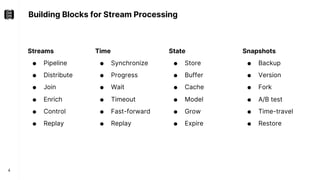
Building Blocks for Stream Processing
4
Time
● Synchronize
● Progress
● Wait
● Timeout
● Fast-forward
● Replay
State
● Store
● Buffer
● Cache
● Model
● Grow
● Expire
Streams
● Pipeline
● Distribute
● Join
● Enrich
● Control
● Replay
Snapshots
● Backup
● Version
● Fork
● A/B test
● Time-travel
● Restore
What is Apache Flink used for?
5
Transactions
Logs
IoT
Interactions
Events
…
Analytics
Event-driven
Applications
Data
Integration
ETL
Messaging
Systems
Files
Databases
Key/Value Stores
Applications
Messaging
Systems
Files
Databases
Key/Value Stores
Apache Flink’s APIs
6
API Stack
7
Dataflow Runtime
Low-Level Stream Operator API
Optimizer / Planner
Table / SQL API
DataStream API Stateful Functions
DataStream API
8
StreamExecutionEnvironment env =
StreamExecutionEnvironment.getExecutionEnvironment();
env.setRuntimeMode(STREAMING);
DataStream<Integer> stream = env.fromElements(1, 2, 3);
stream.executeAndCollect().forEachRemaining(System.out::println);
Properties
● Exposes the building blocks for stream processing
● Arbitrary operator topologies using map(), process(), connect(), ...
● Business logic is written in user-defined functions
● Arbitrary user-defined record types flow in-between
● Conceptually always an append-only / insert-only log!
1
2
3
Output
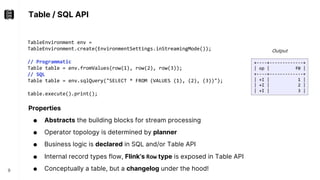
Table / SQL API
9
TableEnvironment env =
TableEnvironment.create(EnvironmentSettings.inStreamingMode());
// Programmatic
Table table = env.fromValues(row(1), row(2), row(3));
// SQL
Table table = env.sqlQuery("SELECT * FROM (VALUES (1), (2), (3))");
table.execute().print();
Properties
● Abstracts the building blocks for stream processing
● Operator topology is determined by planner
● Business logic is declared in SQL and/or Table API
● Internal record types flow, Flink’s Row type is exposed in Table API
● Conceptually a table, but a changelog under the hood!
+----+-------------+
| op | f0 |
+----+-------------+
| +I | 1 |
| +I | 2 |
| +I | 3 |
Output
DataStream API ↔Table / SQL API
10
StreamExecutionEnvironment env = StreamExecutionEnvironment.getExecutionEnvironment();
StreamTableEnvironment tableEnv = StreamTableEnvironment.create(env);
// Stream -> Table
DataStream<?> inStream1 = ...
Table appendOnlyTable = tableEnv.fromDataStream(inStream1)
DataStream<Row> inStream2 = ...
Table anyTable = tableEnv.fromChangelogStream(inStream2)
// Table -> Stream
DataStream<T> appendOnlyStream = tableEnv.toDataStream(insertOnlyTable, T.class)
DataStream<Row> changelogStream = tableEnv.toChangelogStream(anyTable)
Mix and match APIs!
Changelog Stream
Processing
11
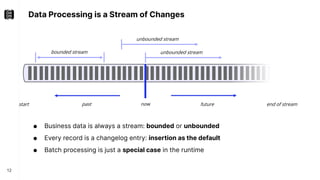
Data Processing is a Stream of Changes
12
● Business data is always a stream: bounded or unbounded
● Every record is a changelog entry: insertion as the default
● Batch processing is just a special case in the runtime
now
past future
start end of stream
bounded stream unbounded stream
unbounded stream
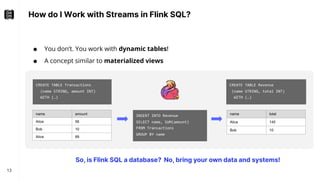
How do I Work with Streams in Flink SQL?
13
● You don’t. You work with dynamic tables!
● A concept similar to materialized views
CREATE TABLE Revenue
(name STRING, total INT)
WITH (…)
INSERT INTO Revenue
SELECT name, SUM(amount)
FROM Transactions
GROUP BY name
CREATE TABLE Transactions
(name STRING, amount INT)
WITH (…)
name amount
Alice 56
Bob 10
Alice 89
name total
Alice 145
Bob 10
So, is Flink SQL a database? No, bring your own data and systems!
Stream-Table Duality - Basics
14
● A stream is the changelog of a dynamic table
● Sources, operators, and sinks work on changelogs under the hood
● Each component declares the kind of changes it consumes/produces
only +I Appending/Insert-only
contains -… Updating
contains -U Retracting
never –U but +U Upserting
Short name Long name
+I Insertion Default for scans + output of bounded results.
-U Update Before Retracts a previously emitted result.
+U Update After Updates a previously emitted result.
Requires a primary key if -U is omitted for idempotent updates.
-D Delete Removes the last result.
Stream-Table Duality - Example
15
An applied changelog becomes a real (materialized) table.
name amount
Alice 56
Bob 10
Alice 89
name total
Alice 56
Bob 10
changelog
+I[Alice, 89] +I[Bob, 10] +I[Alice, 56] +U[Alice, 145] -U[Alice, 56] +I[Bob, 10] +I[Alice, 56]
145
materialization
CREATE TABLE Revenue
(name STRING, total INT)
WITH (…)
INSERT INTO Revenue
SELECT name, SUM(amount)
FROM Transactions
GROUP BY name
CREATE TABLE Transactions
(name STRING, amount INT)
WITH (…)
Stream-Table Duality - Example
16
An applied changelog becomes a real (materialized) table.
name amount
Alice 56
Bob 10
Alice 89
name total
Alice 56
Bob 10
+I[Alice, 89] +I[Bob, 10] +I[Alice, 56] +U[Alice, 145] -U[Alice, 56] +I[Bob, 10] +I[Alice, 56]
145
materialization
CREATE TABLE Revenue
(PRIMARY KEY(name) …)
WITH (…)
INSERT INTO Revenue
SELECT name, SUM(amount)
FROM Transactions
GROUP BY name
CREATE TABLE Transactions
(name STRING, amount INT)
WITH (…)
Save ~50% of traffic if downstream system supports upserting!
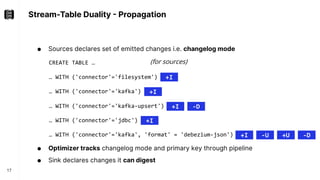
Stream-Table Duality - Propagation
17
● Sources declares set of emitted changes i.e. changelog mode
● Optimizer tracks changelog mode and primary key through pipeline
● Sink declares changes it can digest
CREATE TABLE …
… WITH ('connector'='filesystem')
… WITH ('connector'='kafka')
… WITH ('connector'='kafka-upsert')
… WITH ('connector'='jdbc')
… WITH ('connector'='kafka', 'format' = 'debezium-json')
+I
+I
+I -D
+I -U +U -D
+I
(for sources)
Retract vs. Upsert
18
Retract
● No primary key requirements
● Works for almost every external system
● Supports duplicate rows
● In distributed system often unavoidable
à most flexible changelog mode
à default mode
Upsert
● Traffic + computation optimization
● In-place updates (idempotency)
SELECT c, COUNT(*) FROM (
SELECT COUNT(*) AS c
FROM T
GROUP BY user
)
GROUP BY c
Count 1
Subtask 1
Count 2
Subtask 1
Subtask 2
+U[1]
+U[2]
+I[…]
1=>1
2=>1
Subtask 2
+I[…]
Changelog Insights – Append-only
19
CREATE TABLE Transaction (tid BIGINT, amount INT);
CREATE TABLE Payment (tid BIGINT, method STRING);
CREATE TABLE Result (tid BIGINT, …); // accepts all changes
INSERT INTO Result SELECT * FROM Transactions T JOIN Payments P ON T.tid = P.tid;
Sink(table=[Result], changelogMode=[NONE])
+- Join(leftInputSpec=[NoUniqueKey], rightInputSpec=[NoUniqueKey], changelogMode=[I])
:- Exchange(changelogMode=[I])
: +- TableSourceScan(table=[[Transaction]], changelogMode=[I])
+- Exchange(changelogMode=[I])
+- TableSourceScan(table=[[Payment]], changelogMode=[I])
Changelog Insights – Updating
20
CREATE TABLE Transaction (tid BIGINT, amount INT);
CREATE TABLE Payment (tid BIGINT, method STRING);
CREATE TABLE Result (tid BIGINT, …);
INSERT INTO Result SELECT * FROM Transactions T LEFT JOIN Payments P ON T.tid = P.tid;
Sink(table=[Result], changelogMode=[NONE])
+- Join(leftInputSpec=[NoUniqueKey], rightInputSpec=[NoUniqueKey], changelogMode=[I,UB,UA,D])
:- Exchange(changelogMode=[I])
: +- TableSourceScan(table=[[Transaction]], changelogMode=[I])
+- Exchange(changelogMode=[I])
+- TableSourceScan(table=[[Payment]], changelogMode=[I])
Changelog Insights – Updating with PK
21
CREATE TABLE Transaction (tid BIGINT, amount INT);
CREATE TABLE Payment (tid BIGINT, method STRING);
CREATE TABLE Result (tid BIGINT, …, PRIMARY KEY(tid) NOT ENFORCED);
INSERT INTO Result SELECT * FROM Transactions T LEFT JOIN Payments P ON T.tid = P.tid;
Sink(table=[Result], changelogMode=[NONE], upsertMaterialize=[true])
+- Join(leftInputSpec=[NoUniqueKey], rightInputSpec=[NoUniqueKey], changelogMode=[I,UB,UA,D])
:- Exchange(changelogMode=[I])
: +- TableSourceScan(table=[[Transaction]], changelogMode=[I])
+- Exchange(changelogMode=[I])
+- TableSourceScan(table=[[Payment]], changelogMode=[I])
Changelog Insights – Updating with PK
22
CREATE TABLE Transaction (tid BIGINT, …, PRIMARY KEY(tid) NOT ENFORCED);
CREATE TABLE Payment (tid BIGINT, …, PRIMARY KEY(tid) NOT ENFORCED);
CREATE TABLE Result (tid BIGINT, …, PRIMARY KEY(tid) NOT ENFORCED);
INSERT INTO Result SELECT * FROM Transactions T LEFT JOIN Payments P ON T.tid = P.tid;
Sink(table=[Result], changelogMode=[NONE])
+- Join(leftInputSpec=[UniqueKey], rightInputSpec=[UniqueKey], changelogMode=[I,UA,D])
:- Exchange(changelogMode=[I])
: +- TableSourceScan(table=[[Transaction]], changelogMode=[I])
+- Exchange(changelogMode=[I])
+- TableSourceScan(table=[[Payment]], changelogMode=[I])
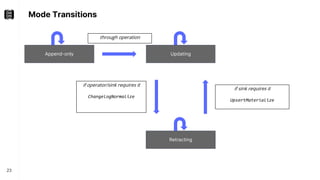
Mode Transitions
23
Append-only
Retracting
Updating
through operation
if operator/sink requires it
ChangelogNormalize
if sink requires it
UpsertMaterialize
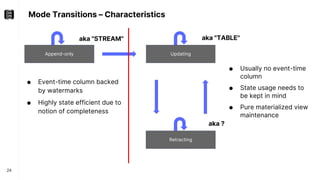
Mode Transitions – Characteristics
24
Append-only
● Event-time column backed
by watermarks
● Highly state efficient due to
notion of completeness
● Usually no event-time
column
● State usage needs to
be kept in mind
● Pure materialized view
maintenance
Retracting
Updating
aka "TABLE"
aka "STREAM"
aka ?
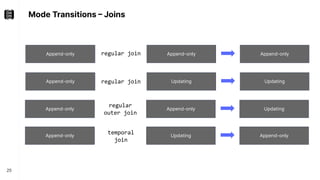
Mode Transitions – Joins
25
Append-only Append-only
regular join
Append-only Updating
Append-only
Updating
Append-only Append-only
regular
outer join
Updating
regular join
Append-only Updating
temporal
join
Append-only
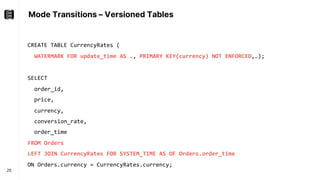
Mode Transitions – Versioned Tables
26
SELECT
order_id,
price,
currency,
conversion_rate,
order_time
FROM Orders
LEFT JOIN CurrencyRates FOR SYSTEM_TIME AS OF Orders.order_time
ON Orders.currency = CurrencyRates.currency;
CREATE TABLE CurrencyRates (
WATERMARK FOR update_time AS …, PRIMARY KEY(currency) NOT ENFORCED,…);
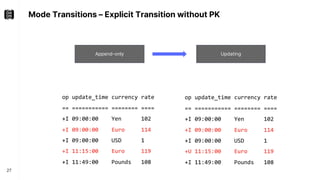
Mode Transitions – Explicit Transition without PK
27
Append-only Updating
op update_time currency rate
== =========== ======== ====
+I 09:00:00 Yen 102
+I 09:00:00 Euro 114
+I 09:00:00 USD 1
+I 11:15:00 Euro 119
+I 11:49:00 Pounds 108
op update_time currency rate
== =========== ======== ====
+I 09:00:00 Yen 102
+I 09:00:00 Euro 114
+I 09:00:00 USD 1
+U 11:15:00 Euro 119
+I 11:49:00 Pounds 108
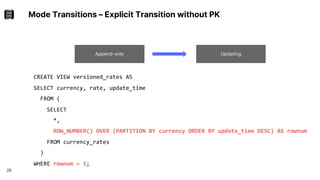
Mode Transitions – Explicit Transition without PK
28
Append-only Updating
CREATE VIEW versioned_rates AS
SELECT currency, rate, update_time
FROM (
SELECT
*,
ROW_NUMBER() OVER (PARTITION BY currency ORDER BY update_time DESC) AS rownum
FROM currency_rates
)
WHERE rownum = 1;
Demo
29
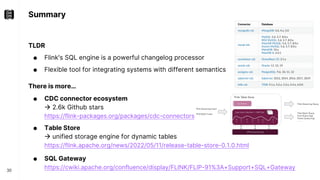
Summary
TLDR
● Flink's SQL engine is a powerful changelog processor
● Flexible tool for integrating systems with different semantics
There is more…
● CDC connector ecosystem
à 2.6k Github stars
https://flink-packages.org/packages/cdc-connectors
● Table Store
à unified storage engine for dynamic tables
https://flink.apache.org/news/2022/05/11/release-table-store-0.1.0.html
● SQL Gateway
https://cwiki.apache.org/confluence/display/FLINK/FLIP-91%3A+Support+SQL+Gateway
30
Thanks
Timo Walther
@twalthr
mrsql@immerok.com

CDC Stream Processing With Apache Flink With Timo Walther | Current 2022

  • 1.
    CDC Stream Processing with ApacheFlink Timo Walther @twalthr – Current 2022 2022-10-05
  • 2.
    About me Open source ●Long-term committer since 2014 (before ASF) ● Member of the project management committee (PMC) ● Top 5 contributor (commits), top 1 contributor (additions) ● Among core architects of Flink SQL Career ● Early Software Engineer @ DataArtisans ● SDK Team @ DataArtisans/Ververica (acquisition by Alibaba) ● SQL Team Lead @ Ververica ● Co-Founder @ Immerok 2 Visit us at booth S14!
  • 3.
  • 4.
    Building Blocks forStream Processing 4 Time ● Synchronize ● Progress ● Wait ● Timeout ● Fast-forward ● Replay State ● Store ● Buffer ● Cache ● Model ● Grow ● Expire Streams ● Pipeline ● Distribute ● Join ● Enrich ● Control ● Replay Snapshots ● Backup ● Version ● Fork ● A/B test ● Time-travel ● Restore
  • 5.
    What is ApacheFlink used for? 5 Transactions Logs IoT Interactions Events … Analytics Event-driven Applications Data Integration ETL Messaging Systems Files Databases Key/Value Stores Applications Messaging Systems Files Databases Key/Value Stores
  • 6.
  • 7.
    API Stack 7 Dataflow Runtime Low-LevelStream Operator API Optimizer / Planner Table / SQL API DataStream API Stateful Functions
  • 8.
    DataStream API 8 StreamExecutionEnvironment env= StreamExecutionEnvironment.getExecutionEnvironment(); env.setRuntimeMode(STREAMING); DataStream<Integer> stream = env.fromElements(1, 2, 3); stream.executeAndCollect().forEachRemaining(System.out::println); Properties ● Exposes the building blocks for stream processing ● Arbitrary operator topologies using map(), process(), connect(), ... ● Business logic is written in user-defined functions ● Arbitrary user-defined record types flow in-between ● Conceptually always an append-only / insert-only log! 1 2 3 Output
  • 9.
    Table / SQLAPI 9 TableEnvironment env = TableEnvironment.create(EnvironmentSettings.inStreamingMode()); // Programmatic Table table = env.fromValues(row(1), row(2), row(3)); // SQL Table table = env.sqlQuery("SELECT * FROM (VALUES (1), (2), (3))"); table.execute().print(); Properties ● Abstracts the building blocks for stream processing ● Operator topology is determined by planner ● Business logic is declared in SQL and/or Table API ● Internal record types flow, Flink’s Row type is exposed in Table API ● Conceptually a table, but a changelog under the hood! +----+-------------+ | op | f0 | +----+-------------+ | +I | 1 | | +I | 2 | | +I | 3 | Output
  • 10.
    DataStream API ↔Table/ SQL API 10 StreamExecutionEnvironment env = StreamExecutionEnvironment.getExecutionEnvironment(); StreamTableEnvironment tableEnv = StreamTableEnvironment.create(env); // Stream -> Table DataStream<?> inStream1 = ... Table appendOnlyTable = tableEnv.fromDataStream(inStream1) DataStream<Row> inStream2 = ... Table anyTable = tableEnv.fromChangelogStream(inStream2) // Table -> Stream DataStream<T> appendOnlyStream = tableEnv.toDataStream(insertOnlyTable, T.class) DataStream<Row> changelogStream = tableEnv.toChangelogStream(anyTable) Mix and match APIs!
  • 11.
  • 12.
    Data Processing isa Stream of Changes 12 ● Business data is always a stream: bounded or unbounded ● Every record is a changelog entry: insertion as the default ● Batch processing is just a special case in the runtime now past future start end of stream bounded stream unbounded stream unbounded stream
  • 13.
    How do IWork with Streams in Flink SQL? 13 ● You don’t. You work with dynamic tables! ● A concept similar to materialized views CREATE TABLE Revenue (name STRING, total INT) WITH (…) INSERT INTO Revenue SELECT name, SUM(amount) FROM Transactions GROUP BY name CREATE TABLE Transactions (name STRING, amount INT) WITH (…) name amount Alice 56 Bob 10 Alice 89 name total Alice 145 Bob 10 So, is Flink SQL a database? No, bring your own data and systems!
  • 14.
    Stream-Table Duality -Basics 14 ● A stream is the changelog of a dynamic table ● Sources, operators, and sinks work on changelogs under the hood ● Each component declares the kind of changes it consumes/produces only +I Appending/Insert-only contains -… Updating contains -U Retracting never –U but +U Upserting Short name Long name +I Insertion Default for scans + output of bounded results. -U Update Before Retracts a previously emitted result. +U Update After Updates a previously emitted result. Requires a primary key if -U is omitted for idempotent updates. -D Delete Removes the last result.
  • 15.
    Stream-Table Duality -Example 15 An applied changelog becomes a real (materialized) table. name amount Alice 56 Bob 10 Alice 89 name total Alice 56 Bob 10 changelog +I[Alice, 89] +I[Bob, 10] +I[Alice, 56] +U[Alice, 145] -U[Alice, 56] +I[Bob, 10] +I[Alice, 56] 145 materialization CREATE TABLE Revenue (name STRING, total INT) WITH (…) INSERT INTO Revenue SELECT name, SUM(amount) FROM Transactions GROUP BY name CREATE TABLE Transactions (name STRING, amount INT) WITH (…)
  • 16.
    Stream-Table Duality -Example 16 An applied changelog becomes a real (materialized) table. name amount Alice 56 Bob 10 Alice 89 name total Alice 56 Bob 10 +I[Alice, 89] +I[Bob, 10] +I[Alice, 56] +U[Alice, 145] -U[Alice, 56] +I[Bob, 10] +I[Alice, 56] 145 materialization CREATE TABLE Revenue (PRIMARY KEY(name) …) WITH (…) INSERT INTO Revenue SELECT name, SUM(amount) FROM Transactions GROUP BY name CREATE TABLE Transactions (name STRING, amount INT) WITH (…) Save ~50% of traffic if downstream system supports upserting!
  • 17.
    Stream-Table Duality -Propagation 17 ● Sources declares set of emitted changes i.e. changelog mode ● Optimizer tracks changelog mode and primary key through pipeline ● Sink declares changes it can digest CREATE TABLE … … WITH ('connector'='filesystem') … WITH ('connector'='kafka') … WITH ('connector'='kafka-upsert') … WITH ('connector'='jdbc') … WITH ('connector'='kafka', 'format' = 'debezium-json') +I +I +I -D +I -U +U -D +I (for sources)
  • 18.
    Retract vs. Upsert 18 Retract ●No primary key requirements ● Works for almost every external system ● Supports duplicate rows ● In distributed system often unavoidable à most flexible changelog mode à default mode Upsert ● Traffic + computation optimization ● In-place updates (idempotency) SELECT c, COUNT(*) FROM ( SELECT COUNT(*) AS c FROM T GROUP BY user ) GROUP BY c Count 1 Subtask 1 Count 2 Subtask 1 Subtask 2 +U[1] +U[2] +I[…] 1=>1 2=>1 Subtask 2 +I[…]
  • 19.
    Changelog Insights –Append-only 19 CREATE TABLE Transaction (tid BIGINT, amount INT); CREATE TABLE Payment (tid BIGINT, method STRING); CREATE TABLE Result (tid BIGINT, …); // accepts all changes INSERT INTO Result SELECT * FROM Transactions T JOIN Payments P ON T.tid = P.tid; Sink(table=[Result], changelogMode=[NONE]) +- Join(leftInputSpec=[NoUniqueKey], rightInputSpec=[NoUniqueKey], changelogMode=[I]) :- Exchange(changelogMode=[I]) : +- TableSourceScan(table=[[Transaction]], changelogMode=[I]) +- Exchange(changelogMode=[I]) +- TableSourceScan(table=[[Payment]], changelogMode=[I])
  • 20.
    Changelog Insights –Updating 20 CREATE TABLE Transaction (tid BIGINT, amount INT); CREATE TABLE Payment (tid BIGINT, method STRING); CREATE TABLE Result (tid BIGINT, …); INSERT INTO Result SELECT * FROM Transactions T LEFT JOIN Payments P ON T.tid = P.tid; Sink(table=[Result], changelogMode=[NONE]) +- Join(leftInputSpec=[NoUniqueKey], rightInputSpec=[NoUniqueKey], changelogMode=[I,UB,UA,D]) :- Exchange(changelogMode=[I]) : +- TableSourceScan(table=[[Transaction]], changelogMode=[I]) +- Exchange(changelogMode=[I]) +- TableSourceScan(table=[[Payment]], changelogMode=[I])
  • 21.
    Changelog Insights –Updating with PK 21 CREATE TABLE Transaction (tid BIGINT, amount INT); CREATE TABLE Payment (tid BIGINT, method STRING); CREATE TABLE Result (tid BIGINT, …, PRIMARY KEY(tid) NOT ENFORCED); INSERT INTO Result SELECT * FROM Transactions T LEFT JOIN Payments P ON T.tid = P.tid; Sink(table=[Result], changelogMode=[NONE], upsertMaterialize=[true]) +- Join(leftInputSpec=[NoUniqueKey], rightInputSpec=[NoUniqueKey], changelogMode=[I,UB,UA,D]) :- Exchange(changelogMode=[I]) : +- TableSourceScan(table=[[Transaction]], changelogMode=[I]) +- Exchange(changelogMode=[I]) +- TableSourceScan(table=[[Payment]], changelogMode=[I])
  • 22.
    Changelog Insights –Updating with PK 22 CREATE TABLE Transaction (tid BIGINT, …, PRIMARY KEY(tid) NOT ENFORCED); CREATE TABLE Payment (tid BIGINT, …, PRIMARY KEY(tid) NOT ENFORCED); CREATE TABLE Result (tid BIGINT, …, PRIMARY KEY(tid) NOT ENFORCED); INSERT INTO Result SELECT * FROM Transactions T LEFT JOIN Payments P ON T.tid = P.tid; Sink(table=[Result], changelogMode=[NONE]) +- Join(leftInputSpec=[UniqueKey], rightInputSpec=[UniqueKey], changelogMode=[I,UA,D]) :- Exchange(changelogMode=[I]) : +- TableSourceScan(table=[[Transaction]], changelogMode=[I]) +- Exchange(changelogMode=[I]) +- TableSourceScan(table=[[Payment]], changelogMode=[I])
  • 23.
    Mode Transitions 23 Append-only Retracting Updating through operation ifoperator/sink requires it ChangelogNormalize if sink requires it UpsertMaterialize
  • 24.
    Mode Transitions –Characteristics 24 Append-only ● Event-time column backed by watermarks ● Highly state efficient due to notion of completeness ● Usually no event-time column ● State usage needs to be kept in mind ● Pure materialized view maintenance Retracting Updating aka "TABLE" aka "STREAM" aka ?
  • 25.
    Mode Transitions –Joins 25 Append-only Append-only regular join Append-only Updating Append-only Updating Append-only Append-only regular outer join Updating regular join Append-only Updating temporal join Append-only
  • 26.
    Mode Transitions –Versioned Tables 26 SELECT order_id, price, currency, conversion_rate, order_time FROM Orders LEFT JOIN CurrencyRates FOR SYSTEM_TIME AS OF Orders.order_time ON Orders.currency = CurrencyRates.currency; CREATE TABLE CurrencyRates ( WATERMARK FOR update_time AS …, PRIMARY KEY(currency) NOT ENFORCED,…);
  • 27.
    Mode Transitions –Explicit Transition without PK 27 Append-only Updating op update_time currency rate == =========== ======== ==== +I 09:00:00 Yen 102 +I 09:00:00 Euro 114 +I 09:00:00 USD 1 +I 11:15:00 Euro 119 +I 11:49:00 Pounds 108 op update_time currency rate == =========== ======== ==== +I 09:00:00 Yen 102 +I 09:00:00 Euro 114 +I 09:00:00 USD 1 +U 11:15:00 Euro 119 +I 11:49:00 Pounds 108
  • 28.
    Mode Transitions –Explicit Transition without PK 28 Append-only Updating CREATE VIEW versioned_rates AS SELECT currency, rate, update_time FROM ( SELECT *, ROW_NUMBER() OVER (PARTITION BY currency ORDER BY update_time DESC) AS rownum FROM currency_rates ) WHERE rownum = 1;
  • 29.
  • 30.
    Summary TLDR ● Flink's SQLengine is a powerful changelog processor ● Flexible tool for integrating systems with different semantics There is more… ● CDC connector ecosystem à 2.6k Github stars https://flink-packages.org/packages/cdc-connectors ● Table Store à unified storage engine for dynamic tables https://flink.apache.org/news/2022/05/11/release-table-store-0.1.0.html ● SQL Gateway https://cwiki.apache.org/confluence/display/FLINK/FLIP-91%3A+Support+SQL+Gateway 30
  • 31.