









AVR
AVR
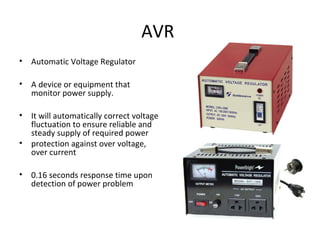
• Automatic Voltage Regulator
• A device or equipment that
monitor power supply.
• It will automatically correct voltage
fluctuation to ensure reliable and
steady supply of required power
• protection against over voltage,
over current
• 0.16 seconds response time upon
detection of power problem
UPS
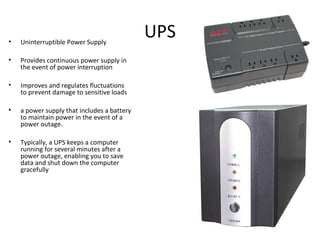
UPS• Uninterruptible Power Supply
• Provides continuous power supply in
the event of power interruption
• Improves and regulates fluctuations
to prevent damage to sensitive loads
• a power supply that includes a battery
to maintain power in the event of a
power outage.
• Typically, a UPS keeps a computer
running for several minutes after a
power outage, enabling you to save
data and shut down the computer
gracefully
Some Symptoms of Power Problem
• The computer “freezes up” with the cause not being
traced
• Random memory errors
• Lost data on the hard disk
• Damage chips on the circuit board
Steps in Power Protection
• Check that your outlets are wired correctly
• Check what else connected into your line
• Remove large motors, air conditioners, refrigerators,
heater and power tools near the PC
• Ensure common ground among devices
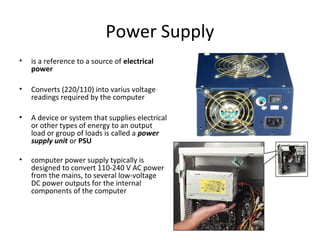
Power Supply
• is a reference to a source of electrical
power
• Converts (220/110) into varius voltage
readings required by the computer
• A device or system that supplies electrical
or other types of energy to an output
load or group of loads is called a power
supply unit or PSU
• computer power supply typically is
designed to convert 110-240 V AC power
from the mains, to several low-voltage
DC power outputs for the internal
components of the computer
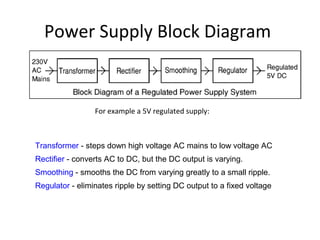
Power Supply Block Diagram
For example a 5V regulated supply:
Transformer - steps down high voltage AC mains to low voltage AC
Rectifier - converts AC to DC, but the DC output is varying.
Smoothing - smooths the DC from varying greatly to a small ripple.
Regulator - eliminates ripple by setting DC output to a fixed voltage
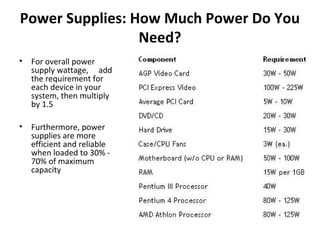
Power Supplies: How Much Power Do You
Need?
• For overall power
supply wattage, add
the requirement for
each device in your
system, then multiply
by 1.5
• Furthermore, power
supplies are more
efficient and reliable
when loaded to 30% -
70% of maximum
capacity
Types of Power Supply
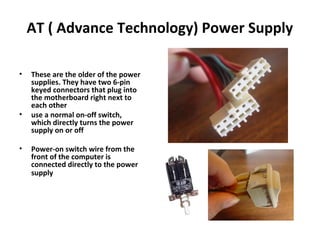
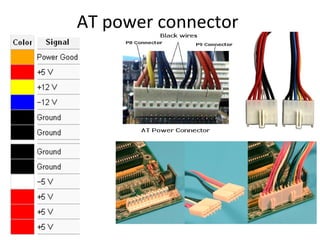
AT ( Advance Technology) Power Supply
• These are the older of the power
supplies. They have two 6-pin
keyed connectors that plug into
the motherboard right next to
each other
• use a normal on-off switch,
which directly turns the power
supply on or off
• Power-on switch wire from the
front of the computer is
connected directly to the power
supply
AT power connector
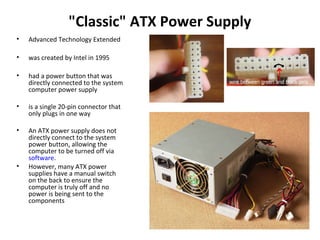
"Classic" ATX Power Supply
• Advanced Technology Extended
• was created by Intel in 1995
• had a power button that was
directly connected to the system
computer power supply
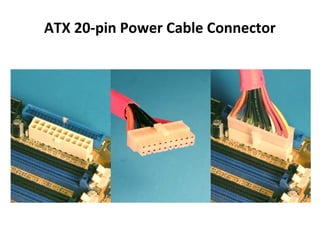
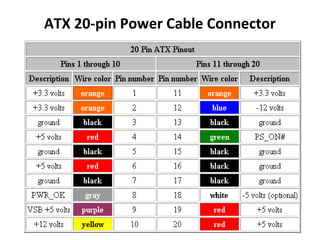
• is a single 20-pin connector that
only plugs in one way
• An ATX power supply does not
directly connect to the system
power button, allowing the
computer to be turned off via
software.
• However, many ATX power
supplies have a manual switch
on the back to ensure the
computer is truly off and no
power is being sent to the
components
ATX 20-pin Power Cable Connector
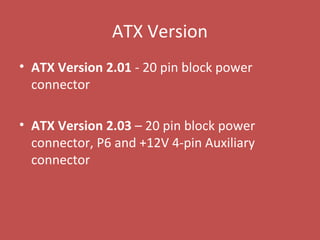
ATX Version
• ATX Version 2.01 - 20 pin block power
connector
• ATX Version 2.03 – 20 pin block power
connector, P6 and +12V 4-pin Auxiliary
connector
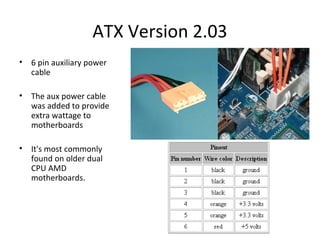
ATX Version 2.03
• 6 pin auxiliary power
cable
• The aux power cable
was added to provide
extra wattage to
motherboards
• It's most commonly
found on older dual
CPU AMD
motherboards.
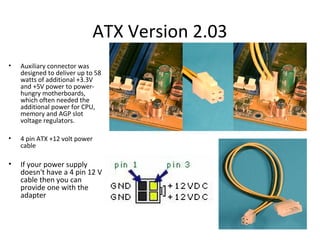
ATX Version 2.03
• Auxiliary connector was
designed to deliver up to 58
watts of additional +3.3V
and +5V power to power-
hungry motherboards,
which often needed the
additional power for CPU,
memory and AGP slot
voltage regulators.
• 4 pin ATX +12 volt power
cable
• If your power supply
doesn't have a 4 pin 12 V
cable then you can
provide one with the
adapter
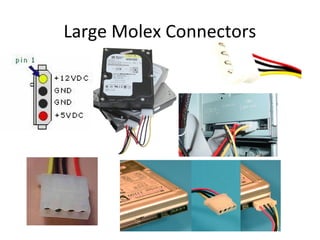
Large Molex Connectors
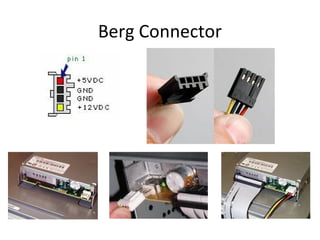
Berg Connector
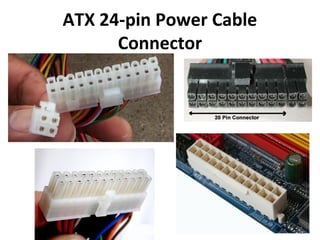
ATX 24-pin Power Cable
Connector
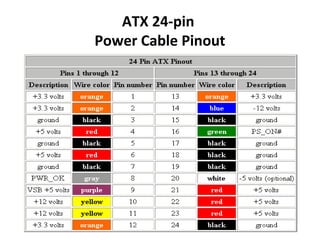
ATX 24-pin
Power Cable Pinout
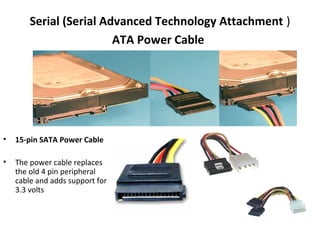
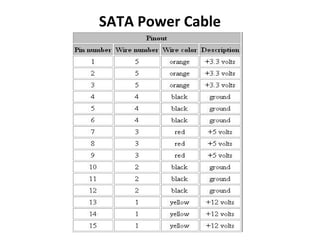
Serial (Serial Advanced Technology Attachment )
ATA Power Cable
• 15-pin SATA Power Cable
• The power cable replaces
the old 4 pin peripheral
cable and adds support for
3.3 volts
SATA Power Cable
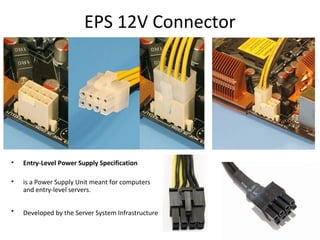
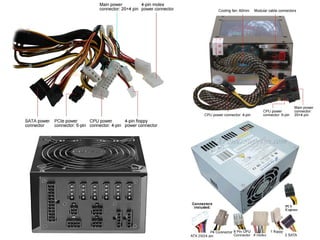
EPS 12V Connector
• Entry-Level Power Supply Specification
• is a Power Supply Unit meant for computers
and entry-level servers.
• Developed by the Server System Infrastructure
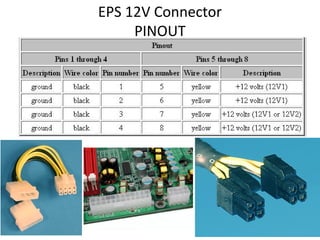
EPS 12V Connector
PINOUT
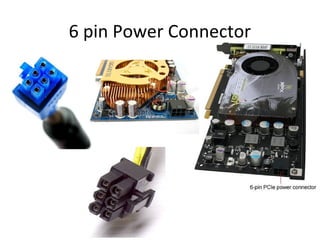
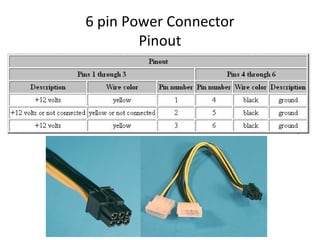
6 pin Power Connector
Pinout
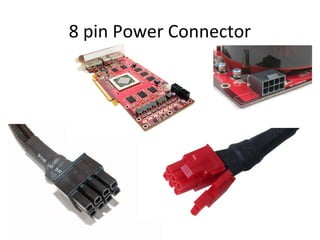
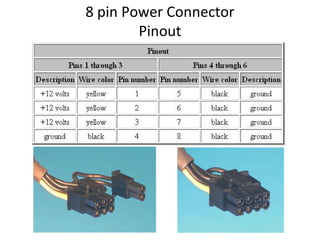
8 pin Power Connector
Pinout
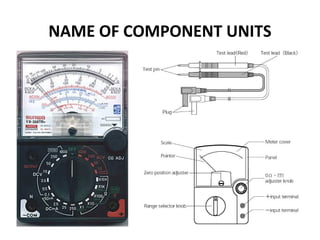
What is a Multitester:
• also known as a volt/ohm meter
or VOM
• is a tool that can be use to check
resistance, continuity, and voltage
• used to troubleshoot electrical
problems in a wide array of
industrial and household devices
such as batteries, motor controls,
appliances, power supplies, and
wiring systems
• Digital / Analog
NAME OF COMPONENT UNITS
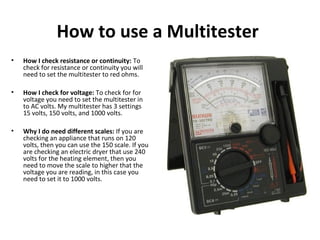
How to use a Multitester
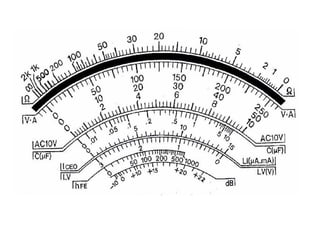
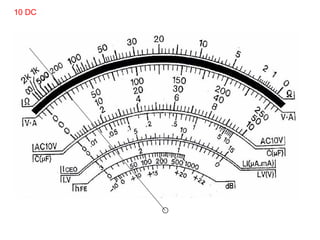
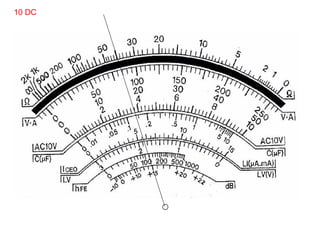
• How I check resistance or continuity: To
check for resistance or continuity you will
need to set the multitester to red ohms.
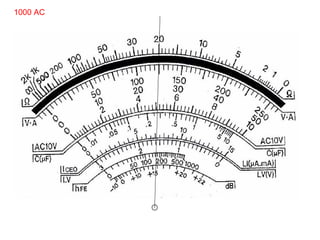
• How I check for voltage: To check for for
voltage you need to set the multitester in
to AC volts. My multitester has 3 settings
15 volts, 150 volts, and 1000 volts.
• Why I do need different scales: If you are
checking an appliance that runs on 120
volts, then you can use the 150 scale. If you
are checking an electric dryer that use 240
volts for the heating element, then you
need to move the scale to higher that the
voltage you are reading, in this case you
need to set it to 1000 volts.
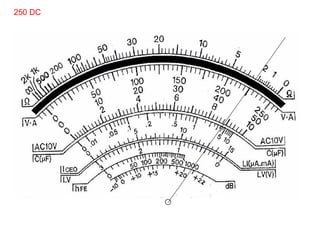
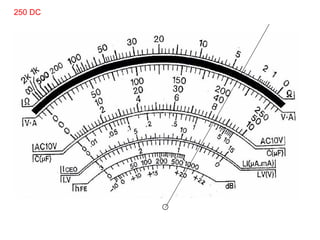
250 DC
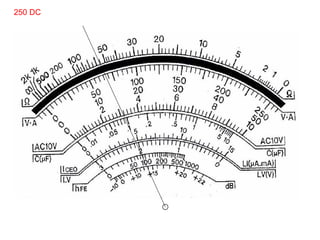
250 DC
250 DC
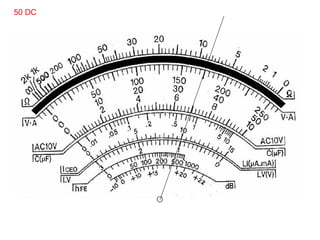
50 DC
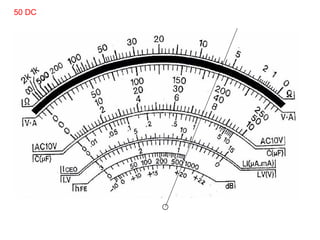
50 DC
10 DC
10 DC
1000 AC
DISASSEMBLING THE PC
OH&S (Occupational Health & Safety)
• Observe ESD (Electrostatic Discharge)
• Always use an anti-static wrist strap
• Document everything
• Switch off the computer
• Remove the cables from the back of the case
• Be sure to have a container to keep the screws
• Place all components when remove in anti-static bags or anti-static mat
• Make sure you have all the tools, resource material, drivers or software
that you need
• Do a full System Backup
• Use common sense
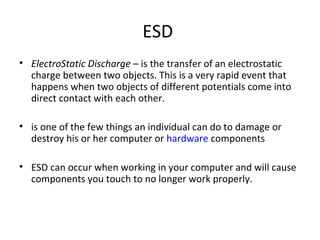
ESD
• ElectroStatic Discharge – is the transfer of an electrostatic
charge between two objects. This is a very rapid event that
happens when two objects of different potentials come into
direct contact with each other.
• is one of the few things an individual can do to damage or
destroy his or her computer or hardware components
• ESD can occur when working in your computer and will cause
components you touch to no longer work properly.
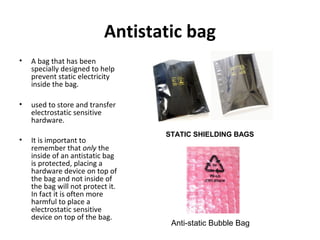
Antistatic bag
• A bag that has been
specially designed to help
prevent static electricity
inside the bag.
• used to store and transfer
electrostatic sensitive
hardware.
• It is important to
remember that only the
inside of an antistatic bag
is protected, placing a
hardware device on top of
the bag and not inside of
the bag will not protect it.
In fact it is often more
harmful to place a
electrostatic sensitive
device on top of the bag.
STATIC SHIELDING BAGS
Anti-static Bubble Bag
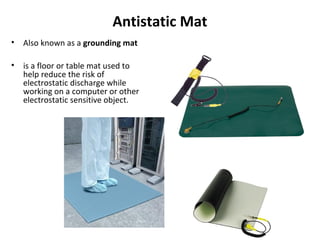
Antistatic Mat
• Also known as a grounding mat
• is a floor or table mat used to
help reduce the risk of
electrostatic discharge while
working on a computer or other
electrostatic sensitive object.
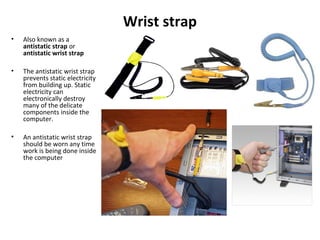
Wrist strap
• Also known as a
antistatic strap or
antistatic wrist strap
• The antistatic wrist strap
prevents static electricity
from building up. Static
electricity can
electronically destroy
many of the delicate
components inside the
computer.
• An antistatic wrist strap
should be worn any time
work is being done inside
the computer
How to help prevent ESD
• The best method of preventing ESD is to use an ESD wrist strap and/or use
a grounding mat. However, because most users do not have access to
such items,there are steps to help reduce the chances of ESD as much as
possible.
1. Zero Potential - Most importantly, make sure you and the computer are at Zero
Potential by continuously touching an un-painted metal surface of the chassis or the
computer power supply case.
2. Standing - It is also very important that you are standing at all times when working on
the computer. Setting on a chair can generated more electrostatic.
3. Cords - Make sure everything is removed from the back of the computer (power cord,
mouse, keyboard, etc).
4. Weather - Electrical storms can increase the ESD risk; unless absolutely necessary, try
not to work on a computer during an electrical storm.
5. Accessories - To help reduce ESD and help prevent other problem, it is also a good
idea to remove all jewelry.
MOTHERBOARD
MOTHERBOARD
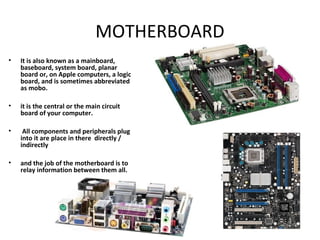
• It is also known as a mainboard,
baseboard, system board, planar
board or, on Apple computers, a logic
board, and is sometimes abbreviated
as mobo.
• it is the central or the main circuit
board of your computer.
• All components and peripherals plug
into it are place in there directly /
indirectly
• and the job of the motherboard is to
relay information between them all.
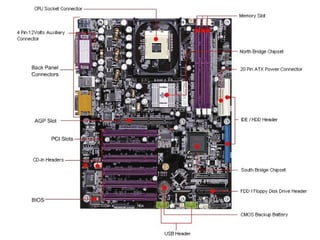
Parts of the Motherboard
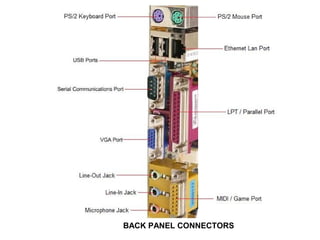
BACK PANEL CONNECTORS
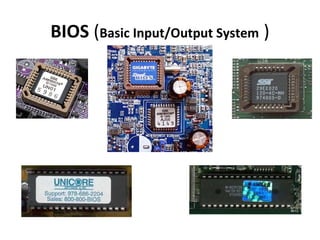
BIOS (Basic Input/Output System )
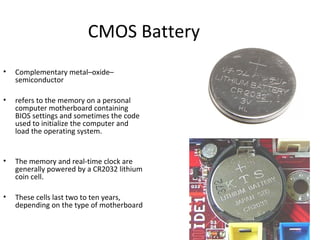
CMOS Battery
• Complementary metal–oxide–
semiconductor
• refers to the memory on a personal
computer motherboard containing
BIOS settings and sometimes the code
used to initialize the computer and
load the operating system.
• The memory and real-time clock are
generally powered by a CR2032 lithium
coin cell.
• These cells last two to ten years,
depending on the type of motherboard
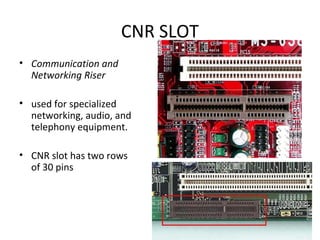
CNR SLOT
• Communication and
Networking Riser
• used for specialized
networking, audio, and
telephony equipment.
• CNR slot has two rows
of 30 pins
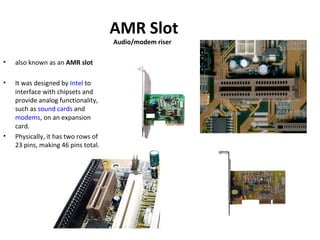
AMR Slot
Audio/modem riser
• also known as an AMR slot
• It was designed by Intel to
interface with chipsets and
provide analog functionality,
such as sound cards and
modems, on an expansion
card.
• Physically, it has two rows of
23 pins, making 46 pins total.
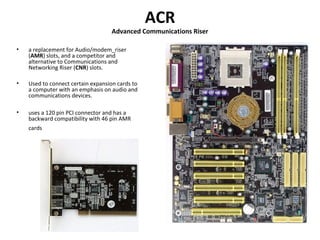
ACR
Advanced Communications Riser
• a replacement for Audio/modem_riser
(AMR) slots, and a competitor and
alternative to Communications and
Networking Riser (CNR) slots.
• Used to connect certain expansion cards to
a computer with an emphasis on audio and
communications devices.
• uses a 120 pin PCI connector and has a
backward compatibility with 46 pin AMR
cards
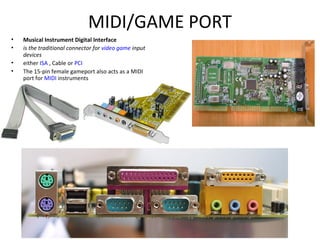
MIDI/GAME PORT
• Musical Instrument Digital Interface
• is the traditional connector for video game input
devices
• either ISA , Cable or PCI
• The 15-pin female gameport also acts as a MIDI
port for MIDI instruments
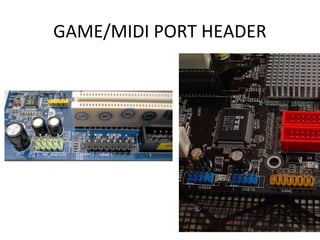
GAME/MIDI PORT HEADER
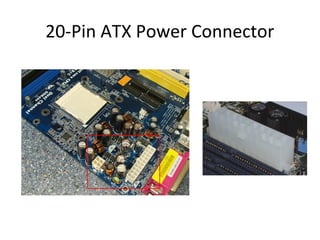
20-Pin ATX Power Connector
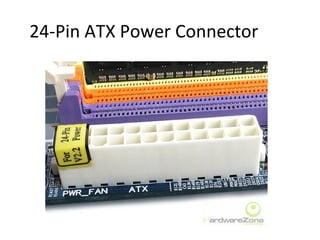
24-Pin ATX Power Connector
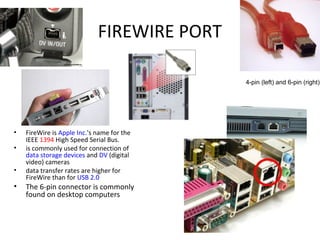
FIREWIRE PORT
• FireWire is Apple Inc.'s name for the
IEEE 1394 High Speed Serial Bus.
• is commonly used for connection of
data storage devices and DV (digital
video) cameras
• data transfer rates are higher for
FireWire than for USB 2.0
• The 6-pin connector is commonly
found on desktop computers
4-pin (left) and 6-pin (right)
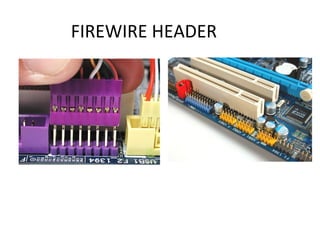
FIREWIRE HEADER
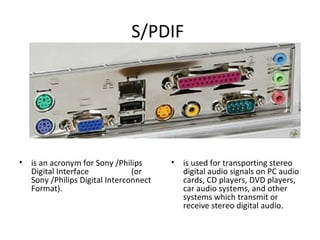
S/PDIF
• is an acronym for Sony /Philips
Digital Interface (or
Sony /Philips Digital Interconnect
Format).
• is used for transporting stereo
digital audio signals on PC audio
cards, CD players, DVD players,
car audio systems, and other
systems which transmit or
receive stereo digital audio.
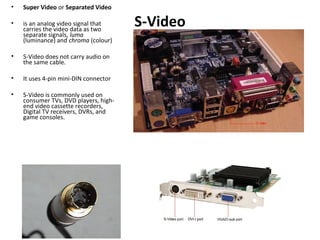
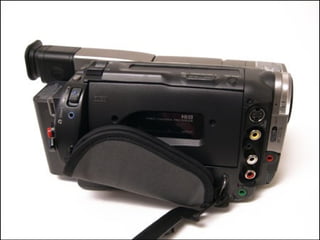
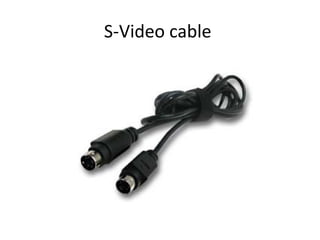
S-Video
• Super Video or Separated Video
• is an analog video signal that
carries the video data as two
separate signals, luma
(luminance) and chroma (colour)
• S-Video does not carry audio on
the same cable.
• It uses 4-pin mini-DIN connector
• S-Video is commonly used on
consumer TVs, DVD players, high-
end video cassette recorders,
Digital TV receivers, DVRs, and
game consoles.
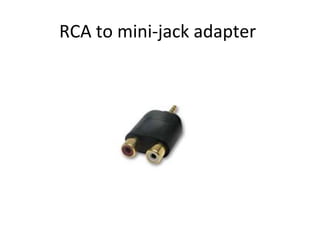
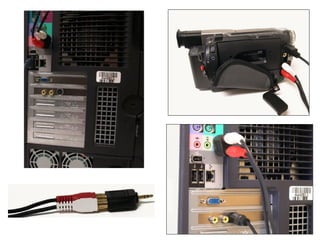
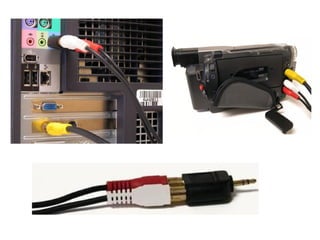
RCA to mini-jack adapter
S-Video cable
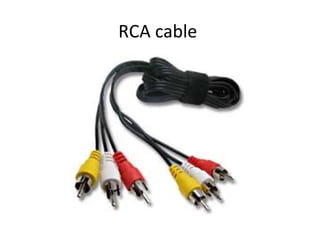
RCA cable
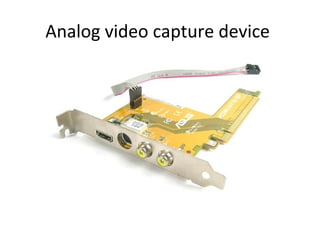
Analog video capture device
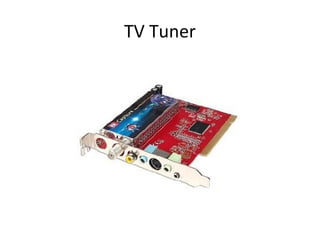
TV Tuner
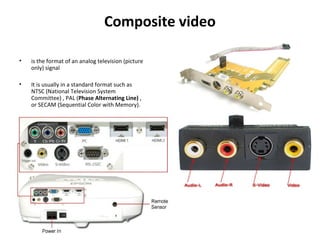
Composite video
• is the format of an analog television (picture
only) signal
• It is usually in a standard format such as
NTSC (National Television System
Committee) , PAL (Phase Alternating Line) ,
or SECAM (Sequential Color with Memory).
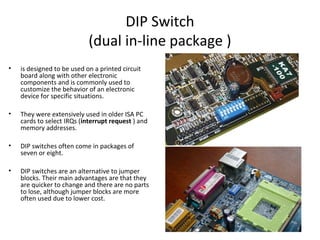
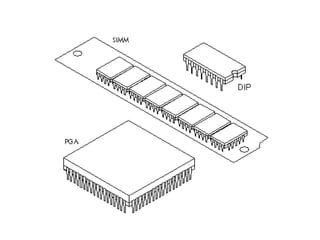
DIP Switch
(dual in-line package )
• is designed to be used on a printed circuit
board along with other electronic
components and is commonly used to
customize the behavior of an electronic
device for specific situations.
• They were extensively used in older ISA PC
cards to select IRQs (interrupt request ) and
memory addresses.
• DIP switches often come in packages of
seven or eight.
• DIP switches are an alternative to jumper
blocks. Their main advantages are that they
are quicker to change and there are no parts
to lose, although jumper blocks are more
often used due to lower cost.
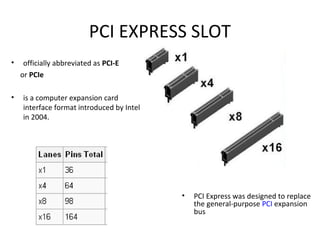
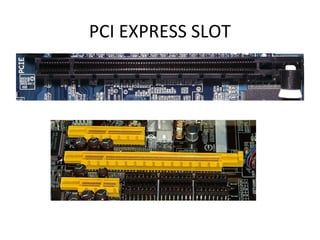
PCI EXPRESS SLOT
• officially abbreviated as PCI-E
or PCIe
• is a computer expansion card
interface format introduced by Intel
in 2004.
• PCI Express was designed to replace
the general-purpose PCI expansion
bus
PCI EXPRESS SLOT
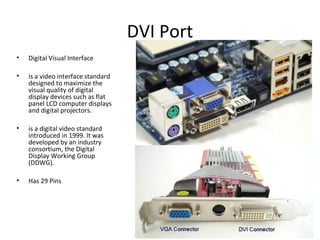
DVI Port
• Digital Visual Interface
• is a video interface standard
designed to maximize the
visual quality of digital
display devices such as flat
panel LCD computer displays
and digital projectors.
• is a digital video standard
introduced in 1999. It was
developed by an industry
consortium, the Digital
Display Working Group
(DDWG).
• Has 29 Pins
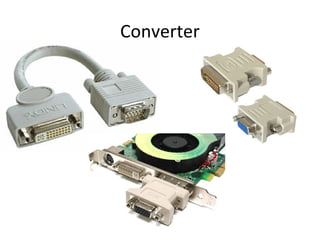
Converter
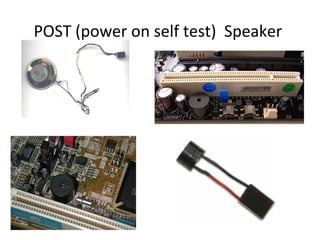
POST (power on self test) Speaker
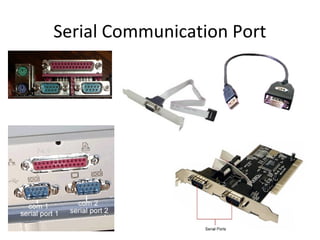
Serial Communication Port
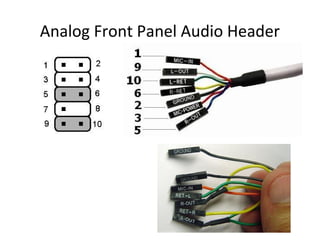
Analog Front Panel Audio Header
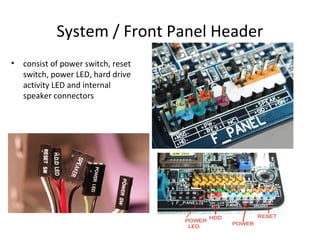
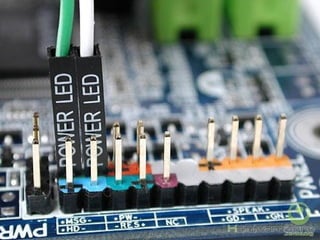
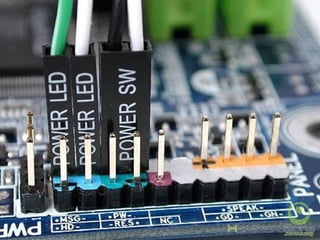
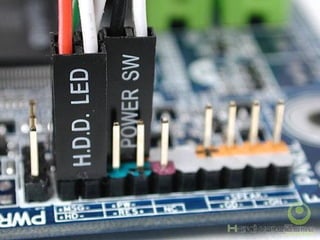
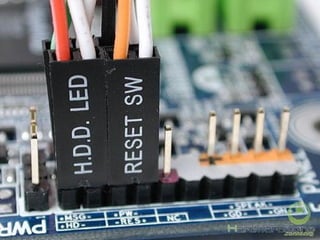
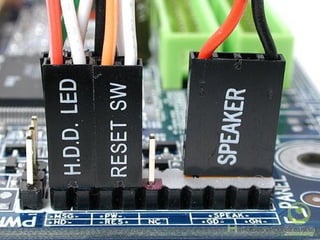
System / Front Panel Header
• consist of power switch, reset
switch, power LED, hard drive
activity LED and internal
speaker connectors
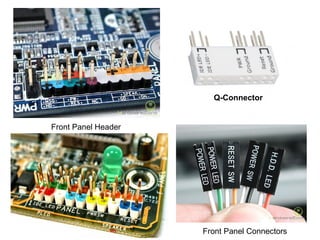
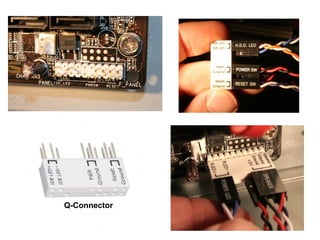
How to Install Front Panel Connectors?
Q-Connector
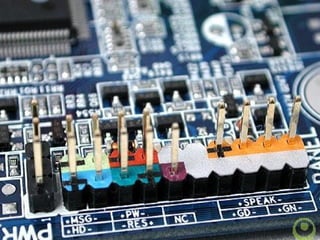
Front Panel Header
Front Panel Connectors
Q-Connector
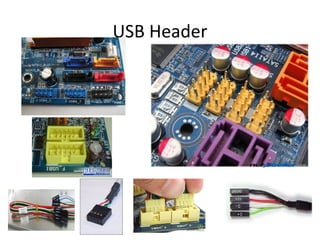
USB Header
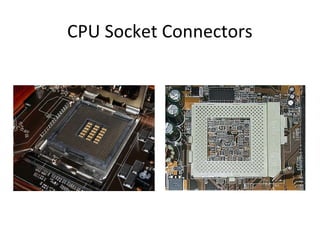
CPU Socket Connectors
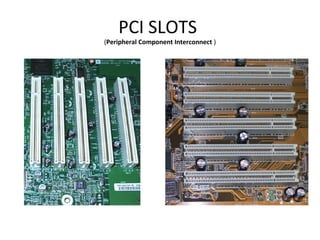
PCI SLOTS
(Peripheral Component Interconnect )
PCI DEVICES
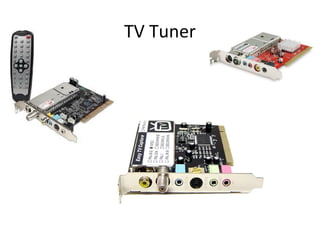
TV Tuner
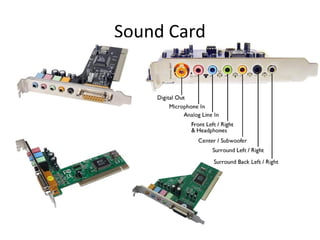
Sound Card
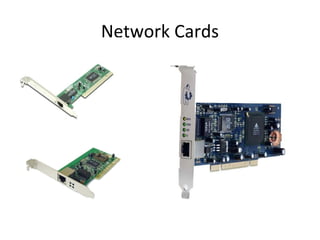
Network Cards
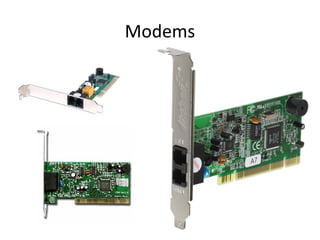
Modems
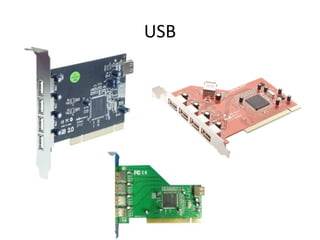
USB
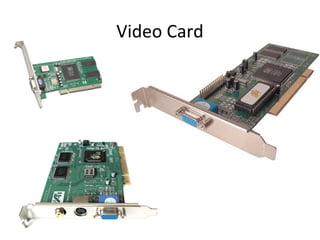
Video Card
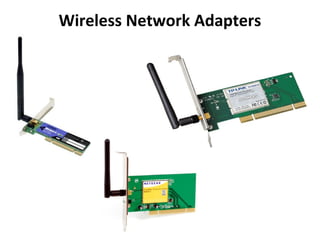
Wireless Network Adapters
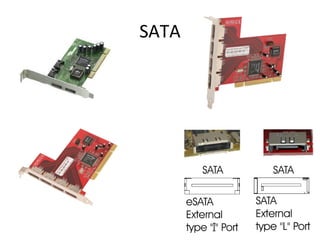
SATA
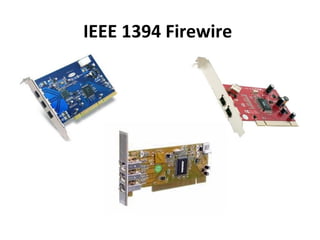
IEEE 1394 Firewire
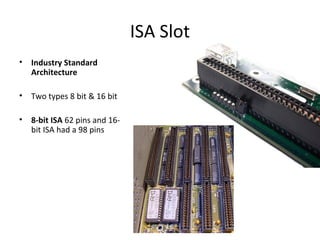
ISA Slot
• Industry Standard
Architecture
• Two types 8 bit & 16 bit
• 8-bit ISA 62 pins and 16-
bit ISA had a 98 pins
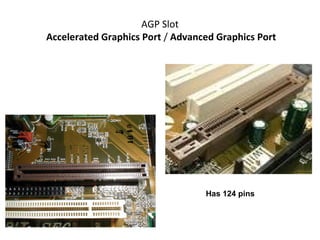
AGP Slot
Accelerated Graphics Port / Advanced Graphics Port
Has 124 pins
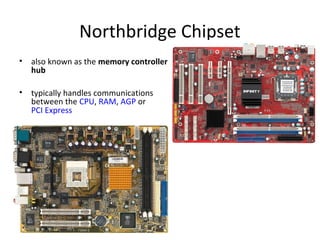
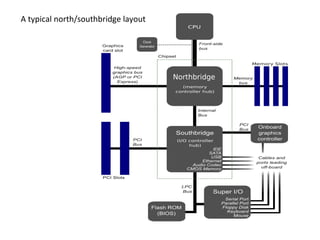
Northbridge Chipset
• also known as the memory controller
hub
• typically handles communications
between the CPU, RAM, AGP or
PCI Express
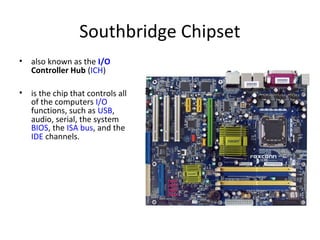
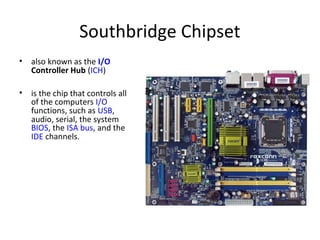
Southbridge Chipset
• also known as the I/O
Controller Hub (ICH)
• is the chip that controls all
of the computers I/O
functions, such as USB,
audio, serial, the system
BIOS, the ISA bus, and the
IDE channels.
FORM FACTOR
FORM FACTOR
• The form factor of a motherboard determines the
specifications for its general shape and size.
• It also specifies what type of case and power supply will be
supported, the placement of mounting holes, and the physical
layout and organization of the board.
• Form factor is especially important if you build your own
computer systems and need to ensure that you purchase the
correct case and components
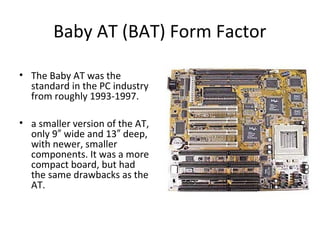
Baby AT (BAT) Form Factor
• The Baby AT was the
standard in the PC industry
from roughly 1993-1997.
• a smaller version of the AT,
only 9 wide and 13 deep,″ ″
with newer, smaller
components. It was a more
compact board, but had
the same drawbacks as the
AT.
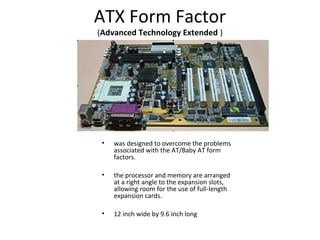
ATX Form Factor
(Advanced Technology Extended )
• was designed to overcome the problems
associated with the AT/Baby AT form
factors.
• the processor and memory are arranged
at a right angle to the expansion slots,
allowing room for the use of full-length
expansion cards.
• 12 inch wide by 9.6 inch long
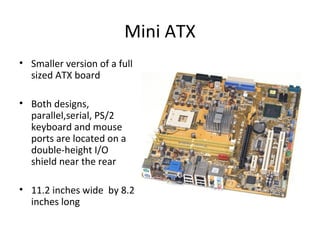
Mini ATX
• Smaller version of a full
sized ATX board
• Both designs,
parallel,serial, PS/2
keyboard and mouse
ports are located on a
double-height I/O
shield near the rear
• 11.2 inches wide by 8.2
inches long
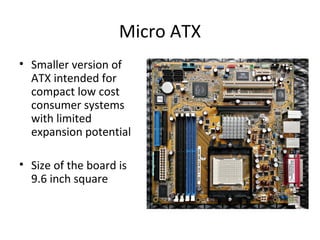
Micro ATX
• Smaller version of
ATX intended for
compact low cost
consumer systems
with limited
expansion potential
• Size of the board is
9.6 inch square
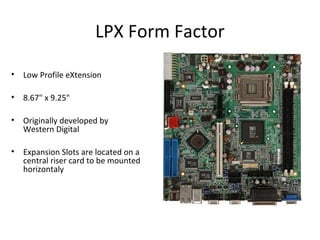
LPX Form Factor
• Low Profile eXtension
• 8.67" x 9.25"
• Originally developed by
Western Digital
• Expansion Slots are located on a
central riser card to be mounted
horizontaly
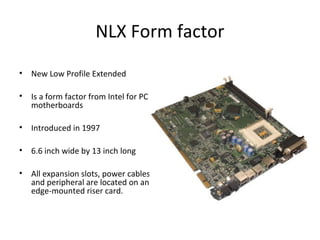
NLX Form factor
• New Low Profile Extended
• Is a form factor from Intel for PC
motherboards
• Introduced in 1997
• 6.6 inch wide by 13 inch long
• All expansion slots, power cables
and peripheral are located on an
edge-mounted riser card.
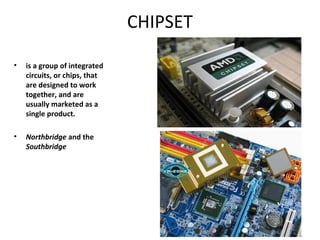
CHIPSET
CHIPSET
• is a group of integrated
circuits, or chips, that
are designed to work
together, and are
usually marketed as a
single product.
• Northbridge and the
Southbridge
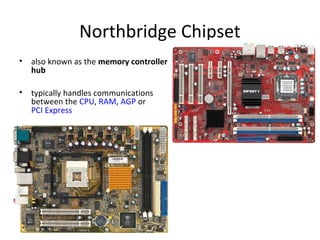
Northbridge Chipset
• also known as the memory controller
hub
• typically handles communications
between the CPU, RAM, AGP or
PCI Express
Southbridge Chipset
• also known as the I/O
Controller Hub (ICH)
• is the chip that controls all
of the computers I/O
functions, such as USB,
audio, serial, the system
BIOS, the ISA bus, and the
IDE channels.
A typical north/southbridge layout
Types of Motherboard Buses
• Processor Bus - connection between the
processor and its primary cache
• System Bus – the primary pathway between
the CPU, memory and the high speed
peripherals to which expansion buses such as
ISA,EISA, PCI and VL bus (VESA Local-BUS)
Video Electronics Standard Association can
connect
DUAL Independent Bus Architecture
• Front Side Bus - is the data transfer bus that carries information
between the CPU and the northbridge of the Motherboard
• Back side bus - is a computer bus used to connect the CPU to CPU cache
memory
• Local Bus - is a computer bus that connects directly, or almost directly,
from the CPU to one or more slots on the expansion bus.
• Expansion Bus - is made up of electronic pathways which move
information from your CPU and RAM to all of your other peripheral
devices such as a microphone, monitor, telephone line, and printer,
which all connect to ports on the back of your computer.
TYPES OF EXPANSION BUSES
• ISA
• MCA (Micro Channel Architecture)
• EISA (Extended Industry Standard Architecture)
• VESA
• PCI (Peripherals Component Inter Connect)
• PCI – Express
• AGP (Accelerated Graphics Port)
• USB (Universal Serial Bus)
• PCMCIA (Personal Computer Card International Assosciation)
• CMOS Battery
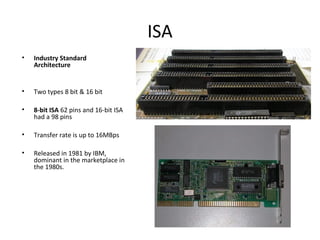
ISA
• Industry Standard
Architecture
• Two types 8 bit & 16 bit
• 8-bit ISA 62 pins and 16-bit ISA
had a 98 pins
• Transfer rate is up to 16MBps
• Released in 1981 by IBM,
dominant in the marketplace in
the 1980s.
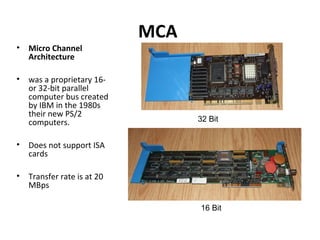
MCA
• Micro Channel
Architecture
• was a proprietary 16-
or 32-bit parallel
computer bus created
by IBM in the 1980s
their new PS/2
computers.
• Does not support ISA
cards
• Transfer rate is at 20
MBps
32 Bit
16 Bit
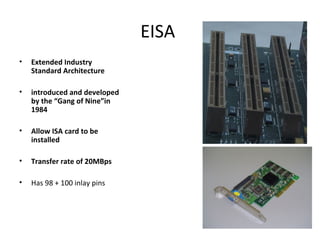
EISA
• Extended Industry
Standard Architecture
• introduced and developed
by the “Gang of Nine”in
1984
• Allow ISA card to be
installed
• Transfer rate of 20MBps
• Has 98 + 100 inlay pins
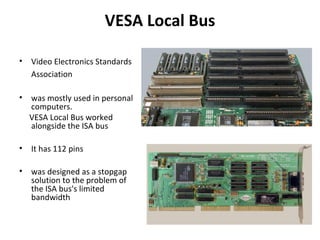
VESA Local Bus
• Video Electronics Standards
Association
• was mostly used in personal
computers.
VESA Local Bus worked
alongside the ISA bus
• It has 112 pins
• was designed as a stopgap
solution to the problem of
the ISA bus's limited
bandwidth
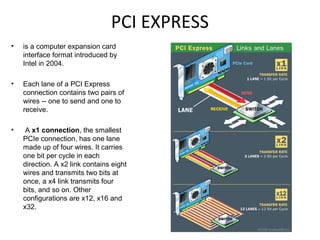
PCI EXPRESS
• is a computer expansion card
interface format introduced by
Intel in 2004.
• Each lane of a PCI Express
connection contains two pairs of
wires -- one to send and one to
receive.
• A x1 connection, the smallest
PCIe connection, has one lane
made up of four wires. It carries
one bit per cycle in each
direction. A x2 link contains eight
wires and transmits two bits at
once, a x4 link transmits four
bits, and so on. Other
configurations are x12, x16 and
x32.
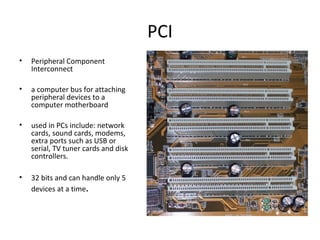
PCI
• Peripheral Component
Interconnect
• a computer bus for attaching
peripheral devices to a
computer motherboard
• used in PCs include: network
cards, sound cards, modems,
extra ports such as USB or
serial, TV tuner cards and disk
controllers.
• 32 bits and can handle only 5
devices at a time.
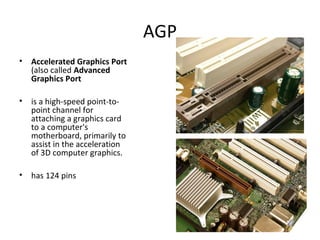
AGP
• Accelerated Graphics Port
(also called Advanced
Graphics Port
• is a high-speed point-to-
point channel for
attaching a graphics card
to a computer's
motherboard, primarily to
assist in the acceleration
of 3D computer graphics.
• has 124 pins
USB
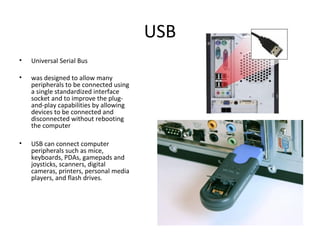
• Universal Serial Bus
• was designed to allow many
peripherals to be connected using
a single standardized interface
socket and to improve the plug-
and-play capabilities by allowing
devices to be connected and
disconnected without rebooting
the computer
• USB can connect computer
peripherals such as mice,
keyboards, PDAs, gamepads and
joysticks, scanners, digital
cameras, printers, personal media
players, and flash drives.
USB Version
Prereleases
• USB 0.7: Released in November 1994.
• USB 0.8: Released in December 1994.
• USB 0.9: Released in April 1995.
• USB 0.99: Released in August 1995.
• USB 1.0
• USB 1.0: Released in January 1996.
Specified data rates of 1.5 Mbit/s (Low-Speed) and 12 Mbit/s (Full-Speed).
• USB 1.1: Released in September 1998.
• USB 2.0: Released in April 2000.
Added higher maximum speed of 480 Mbit/s (now called Hi-Speed).
PCMCIA
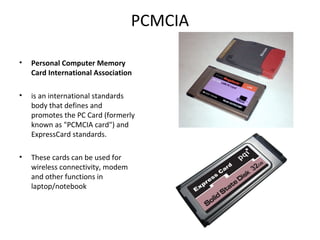
• Personal Computer Memory
Card International Association
• is an international standards
body that defines and
promotes the PC Card (formerly
known as "PCMCIA card") and
ExpressCard standards.
• These cards can be used for
wireless connectivity, modem
and other functions in
laptop/notebook
CMOS Battery
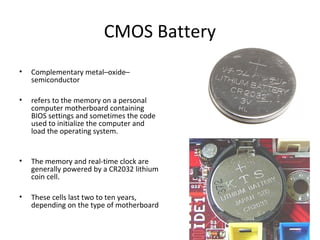
• Complementary metal–oxide–
semiconductor
• refers to the memory on a personal
computer motherboard containing
BIOS settings and sometimes the code
used to initialize the computer and
load the operating system.
• The memory and real-time clock are
generally powered by a CR2032 lithium
coin cell.
• These cells last two to ten years,
depending on the type of motherboard
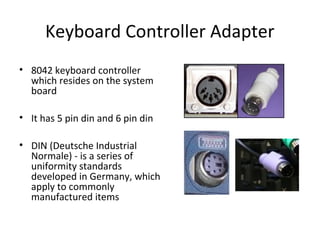
Keyboard Controller Adapter
• 8042 keyboard controller
which resides on the system
board
• It has 5 pin din and 6 pin din
• DIN (Deutsche Industrial
Normale) - is a series of
uniformity standards
developed in Germany, which
apply to commonly
manufactured items
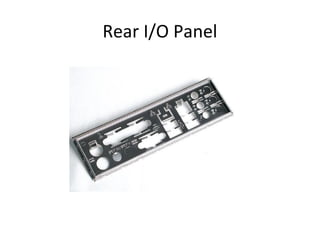
Rear I/O Panel
Types Of Screws

Day 2 HARDWARE

  • 1.
  • 2.
    AVR • Automatic VoltageRegulator • A device or equipment that monitor power supply. • It will automatically correct voltage fluctuation to ensure reliable and steady supply of required power • protection against over voltage, over current • 0.16 seconds response time upon detection of power problem
  • 3.
  • 4.
    UPS• Uninterruptible PowerSupply • Provides continuous power supply in the event of power interruption • Improves and regulates fluctuations to prevent damage to sensitive loads • a power supply that includes a battery to maintain power in the event of a power outage. • Typically, a UPS keeps a computer running for several minutes after a power outage, enabling you to save data and shut down the computer gracefully
  • 5.
    Some Symptoms ofPower Problem • The computer “freezes up” with the cause not being traced • Random memory errors • Lost data on the hard disk • Damage chips on the circuit board
  • 6.
    Steps in PowerProtection • Check that your outlets are wired correctly • Check what else connected into your line • Remove large motors, air conditioners, refrigerators, heater and power tools near the PC • Ensure common ground among devices
  • 7.
    Power Supply • isa reference to a source of electrical power • Converts (220/110) into varius voltage readings required by the computer • A device or system that supplies electrical or other types of energy to an output load or group of loads is called a power supply unit or PSU • computer power supply typically is designed to convert 110-240 V AC power from the mains, to several low-voltage DC power outputs for the internal components of the computer
  • 8.
    Power Supply BlockDiagram For example a 5V regulated supply: Transformer - steps down high voltage AC mains to low voltage AC Rectifier - converts AC to DC, but the DC output is varying. Smoothing - smooths the DC from varying greatly to a small ripple. Regulator - eliminates ripple by setting DC output to a fixed voltage
  • 9.
    Power Supplies: HowMuch Power Do You Need? • For overall power supply wattage, add the requirement for each device in your system, then multiply by 1.5 • Furthermore, power supplies are more efficient and reliable when loaded to 30% - 70% of maximum capacity
  • 10.
  • 11.
    AT ( AdvanceTechnology) Power Supply • These are the older of the power supplies. They have two 6-pin keyed connectors that plug into the motherboard right next to each other • use a normal on-off switch, which directly turns the power supply on or off • Power-on switch wire from the front of the computer is connected directly to the power supply
  • 12.
  • 13.
    "Classic" ATX PowerSupply • Advanced Technology Extended • was created by Intel in 1995 • had a power button that was directly connected to the system computer power supply • is a single 20-pin connector that only plugs in one way • An ATX power supply does not directly connect to the system power button, allowing the computer to be turned off via software. • However, many ATX power supplies have a manual switch on the back to ensure the computer is truly off and no power is being sent to the components
  • 14.
    ATX 20-pin PowerCable Connector
  • 15.
    ATX 20-pin PowerCable Connector
  • 16.
    ATX Version • ATXVersion 2.01 - 20 pin block power connector • ATX Version 2.03 – 20 pin block power connector, P6 and +12V 4-pin Auxiliary connector
  • 17.
    ATX Version 2.03 •6 pin auxiliary power cable • The aux power cable was added to provide extra wattage to motherboards • It's most commonly found on older dual CPU AMD motherboards.
  • 18.
    ATX Version 2.03 •Auxiliary connector was designed to deliver up to 58 watts of additional +3.3V and +5V power to power- hungry motherboards, which often needed the additional power for CPU, memory and AGP slot voltage regulators. • 4 pin ATX +12 volt power cable • If your power supply doesn't have a 4 pin 12 V cable then you can provide one with the adapter
  • 19.
  • 20.
  • 21.
    ATX 24-pin PowerCable Connector
  • 22.
  • 23.
    Serial (Serial AdvancedTechnology Attachment ) ATA Power Cable • 15-pin SATA Power Cable • The power cable replaces the old 4 pin peripheral cable and adds support for 3.3 volts
  • 24.
  • 25.
    EPS 12V Connector •Entry-Level Power Supply Specification • is a Power Supply Unit meant for computers and entry-level servers. • Developed by the Server System Infrastructure
  • 26.
  • 27.
    6 pin PowerConnector
  • 28.
    6 pin PowerConnector Pinout
  • 29.
    8 pin PowerConnector
  • 30.
    8 pin PowerConnector Pinout
  • 32.
    What is aMultitester: • also known as a volt/ohm meter or VOM • is a tool that can be use to check resistance, continuity, and voltage • used to troubleshoot electrical problems in a wide array of industrial and household devices such as batteries, motor controls, appliances, power supplies, and wiring systems • Digital / Analog
  • 33.
  • 34.
    How to usea Multitester • How I check resistance or continuity: To check for resistance or continuity you will need to set the multitester to red ohms. • How I check for voltage: To check for for voltage you need to set the multitester in to AC volts. My multitester has 3 settings 15 volts, 150 volts, and 1000 volts. • Why I do need different scales: If you are checking an appliance that runs on 120 volts, then you can use the 150 scale. If you are checking an electric dryer that use 240 volts for the heating element, then you need to move the scale to higher that the voltage you are reading, in this case you need to set it to 1000 volts.
  • 36.
  • 37.
  • 38.
  • 39.
  • 40.
  • 41.
  • 42.
  • 43.
  • 44.
  • 45.
    DISASSEMBLING THE PC OH&S(Occupational Health & Safety) • Observe ESD (Electrostatic Discharge) • Always use an anti-static wrist strap • Document everything • Switch off the computer • Remove the cables from the back of the case • Be sure to have a container to keep the screws • Place all components when remove in anti-static bags or anti-static mat • Make sure you have all the tools, resource material, drivers or software that you need • Do a full System Backup • Use common sense
  • 46.
    ESD • ElectroStatic Discharge– is the transfer of an electrostatic charge between two objects. This is a very rapid event that happens when two objects of different potentials come into direct contact with each other. • is one of the few things an individual can do to damage or destroy his or her computer or hardware components • ESD can occur when working in your computer and will cause components you touch to no longer work properly.
  • 47.
    Antistatic bag • Abag that has been specially designed to help prevent static electricity inside the bag. • used to store and transfer electrostatic sensitive hardware. • It is important to remember that only the inside of an antistatic bag is protected, placing a hardware device on top of the bag and not inside of the bag will not protect it. In fact it is often more harmful to place a electrostatic sensitive device on top of the bag. STATIC SHIELDING BAGS Anti-static Bubble Bag
  • 48.
    Antistatic Mat • Alsoknown as a grounding mat • is a floor or table mat used to help reduce the risk of electrostatic discharge while working on a computer or other electrostatic sensitive object.
  • 49.
    Wrist strap • Alsoknown as a antistatic strap or antistatic wrist strap • The antistatic wrist strap prevents static electricity from building up. Static electricity can electronically destroy many of the delicate components inside the computer. • An antistatic wrist strap should be worn any time work is being done inside the computer
  • 50.
    How to helpprevent ESD • The best method of preventing ESD is to use an ESD wrist strap and/or use a grounding mat. However, because most users do not have access to such items,there are steps to help reduce the chances of ESD as much as possible. 1. Zero Potential - Most importantly, make sure you and the computer are at Zero Potential by continuously touching an un-painted metal surface of the chassis or the computer power supply case. 2. Standing - It is also very important that you are standing at all times when working on the computer. Setting on a chair can generated more electrostatic. 3. Cords - Make sure everything is removed from the back of the computer (power cord, mouse, keyboard, etc). 4. Weather - Electrical storms can increase the ESD risk; unless absolutely necessary, try not to work on a computer during an electrical storm. 5. Accessories - To help reduce ESD and help prevent other problem, it is also a good idea to remove all jewelry.
  • 51.
  • 52.
    MOTHERBOARD • It isalso known as a mainboard, baseboard, system board, planar board or, on Apple computers, a logic board, and is sometimes abbreviated as mobo. • it is the central or the main circuit board of your computer. • All components and peripherals plug into it are place in there directly / indirectly • and the job of the motherboard is to relay information between them all.
  • 53.
    Parts of theMotherboard
  • 55.
  • 56.
  • 57.
    CMOS Battery • Complementarymetal–oxide– semiconductor • refers to the memory on a personal computer motherboard containing BIOS settings and sometimes the code used to initialize the computer and load the operating system. • The memory and real-time clock are generally powered by a CR2032 lithium coin cell. • These cells last two to ten years, depending on the type of motherboard
  • 58.
    CNR SLOT • Communicationand Networking Riser • used for specialized networking, audio, and telephony equipment. • CNR slot has two rows of 30 pins
  • 59.
    AMR Slot Audio/modem riser •also known as an AMR slot • It was designed by Intel to interface with chipsets and provide analog functionality, such as sound cards and modems, on an expansion card. • Physically, it has two rows of 23 pins, making 46 pins total.
  • 60.
    ACR Advanced Communications Riser •a replacement for Audio/modem_riser (AMR) slots, and a competitor and alternative to Communications and Networking Riser (CNR) slots. • Used to connect certain expansion cards to a computer with an emphasis on audio and communications devices. • uses a 120 pin PCI connector and has a backward compatibility with 46 pin AMR cards
  • 61.
    MIDI/GAME PORT • MusicalInstrument Digital Interface • is the traditional connector for video game input devices • either ISA , Cable or PCI • The 15-pin female gameport also acts as a MIDI port for MIDI instruments
  • 62.
  • 63.
  • 64.
  • 65.
    FIREWIRE PORT • FireWireis Apple Inc.'s name for the IEEE 1394 High Speed Serial Bus. • is commonly used for connection of data storage devices and DV (digital video) cameras • data transfer rates are higher for FireWire than for USB 2.0 • The 6-pin connector is commonly found on desktop computers 4-pin (left) and 6-pin (right)
  • 66.
  • 67.
    S/PDIF • is anacronym for Sony /Philips Digital Interface (or Sony /Philips Digital Interconnect Format). • is used for transporting stereo digital audio signals on PC audio cards, CD players, DVD players, car audio systems, and other systems which transmit or receive stereo digital audio.
  • 68.
    S-Video • Super Videoor Separated Video • is an analog video signal that carries the video data as two separate signals, luma (luminance) and chroma (colour) • S-Video does not carry audio on the same cable. • It uses 4-pin mini-DIN connector • S-Video is commonly used on consumer TVs, DVD players, high- end video cassette recorders, Digital TV receivers, DVRs, and game consoles.
  • 70.
  • 71.
  • 72.
  • 73.
  • 74.
  • 76.
    Composite video • isthe format of an analog television (picture only) signal • It is usually in a standard format such as NTSC (National Television System Committee) , PAL (Phase Alternating Line) , or SECAM (Sequential Color with Memory).
  • 78.
    DIP Switch (dual in-linepackage ) • is designed to be used on a printed circuit board along with other electronic components and is commonly used to customize the behavior of an electronic device for specific situations. • They were extensively used in older ISA PC cards to select IRQs (interrupt request ) and memory addresses. • DIP switches often come in packages of seven or eight. • DIP switches are an alternative to jumper blocks. Their main advantages are that they are quicker to change and there are no parts to lose, although jumper blocks are more often used due to lower cost.
  • 80.
    PCI EXPRESS SLOT •officially abbreviated as PCI-E or PCIe • is a computer expansion card interface format introduced by Intel in 2004. • PCI Express was designed to replace the general-purpose PCI expansion bus
  • 81.
  • 82.
    DVI Port • DigitalVisual Interface • is a video interface standard designed to maximize the visual quality of digital display devices such as flat panel LCD computer displays and digital projectors. • is a digital video standard introduced in 1999. It was developed by an industry consortium, the Digital Display Working Group (DDWG). • Has 29 Pins
  • 83.
  • 84.
    POST (power onself test) Speaker
  • 85.
  • 86.
    Analog Front PanelAudio Header
  • 87.
    System / FrontPanel Header • consist of power switch, reset switch, power LED, hard drive activity LED and internal speaker connectors
  • 88.
    How to InstallFront Panel Connectors?
  • 89.
  • 96.
  • 97.
  • 98.
  • 99.
  • 100.
  • 101.
  • 102.
  • 103.
  • 104.
  • 105.
  • 106.
  • 107.
  • 108.
  • 109.
  • 110.
    ISA Slot • IndustryStandard Architecture • Two types 8 bit & 16 bit • 8-bit ISA 62 pins and 16- bit ISA had a 98 pins
  • 111.
    AGP Slot Accelerated GraphicsPort / Advanced Graphics Port Has 124 pins
  • 112.
    Northbridge Chipset • alsoknown as the memory controller hub • typically handles communications between the CPU, RAM, AGP or PCI Express
  • 113.
    Southbridge Chipset • alsoknown as the I/O Controller Hub (ICH) • is the chip that controls all of the computers I/O functions, such as USB, audio, serial, the system BIOS, the ISA bus, and the IDE channels.
  • 114.
  • 115.
    FORM FACTOR • Theform factor of a motherboard determines the specifications for its general shape and size. • It also specifies what type of case and power supply will be supported, the placement of mounting holes, and the physical layout and organization of the board. • Form factor is especially important if you build your own computer systems and need to ensure that you purchase the correct case and components
  • 116.
    Baby AT (BAT)Form Factor • The Baby AT was the standard in the PC industry from roughly 1993-1997. • a smaller version of the AT, only 9 wide and 13 deep,″ ″ with newer, smaller components. It was a more compact board, but had the same drawbacks as the AT.
  • 117.
    ATX Form Factor (AdvancedTechnology Extended ) • was designed to overcome the problems associated with the AT/Baby AT form factors. • the processor and memory are arranged at a right angle to the expansion slots, allowing room for the use of full-length expansion cards. • 12 inch wide by 9.6 inch long
  • 118.
    Mini ATX • Smallerversion of a full sized ATX board • Both designs, parallel,serial, PS/2 keyboard and mouse ports are located on a double-height I/O shield near the rear • 11.2 inches wide by 8.2 inches long
  • 119.
    Micro ATX • Smallerversion of ATX intended for compact low cost consumer systems with limited expansion potential • Size of the board is 9.6 inch square
  • 120.
    LPX Form Factor •Low Profile eXtension • 8.67" x 9.25" • Originally developed by Western Digital • Expansion Slots are located on a central riser card to be mounted horizontaly
  • 121.
    NLX Form factor •New Low Profile Extended • Is a form factor from Intel for PC motherboards • Introduced in 1997 • 6.6 inch wide by 13 inch long • All expansion slots, power cables and peripheral are located on an edge-mounted riser card.
  • 122.
  • 123.
    CHIPSET • is agroup of integrated circuits, or chips, that are designed to work together, and are usually marketed as a single product. • Northbridge and the Southbridge
  • 124.
    Northbridge Chipset • alsoknown as the memory controller hub • typically handles communications between the CPU, RAM, AGP or PCI Express
  • 125.
    Southbridge Chipset • alsoknown as the I/O Controller Hub (ICH) • is the chip that controls all of the computers I/O functions, such as USB, audio, serial, the system BIOS, the ISA bus, and the IDE channels.
  • 126.
  • 127.
  • 128.
    • Processor Bus- connection between the processor and its primary cache • System Bus – the primary pathway between the CPU, memory and the high speed peripherals to which expansion buses such as ISA,EISA, PCI and VL bus (VESA Local-BUS) Video Electronics Standard Association can connect
  • 129.
    DUAL Independent BusArchitecture • Front Side Bus - is the data transfer bus that carries information between the CPU and the northbridge of the Motherboard • Back side bus - is a computer bus used to connect the CPU to CPU cache memory • Local Bus - is a computer bus that connects directly, or almost directly, from the CPU to one or more slots on the expansion bus. • Expansion Bus - is made up of electronic pathways which move information from your CPU and RAM to all of your other peripheral devices such as a microphone, monitor, telephone line, and printer, which all connect to ports on the back of your computer.
  • 130.
    TYPES OF EXPANSIONBUSES • ISA • MCA (Micro Channel Architecture) • EISA (Extended Industry Standard Architecture) • VESA • PCI (Peripherals Component Inter Connect) • PCI – Express • AGP (Accelerated Graphics Port) • USB (Universal Serial Bus) • PCMCIA (Personal Computer Card International Assosciation) • CMOS Battery
  • 131.
    ISA • Industry Standard Architecture •Two types 8 bit & 16 bit • 8-bit ISA 62 pins and 16-bit ISA had a 98 pins • Transfer rate is up to 16MBps • Released in 1981 by IBM, dominant in the marketplace in the 1980s.
  • 132.
    MCA • Micro Channel Architecture •was a proprietary 16- or 32-bit parallel computer bus created by IBM in the 1980s their new PS/2 computers. • Does not support ISA cards • Transfer rate is at 20 MBps 32 Bit 16 Bit
  • 133.
    EISA • Extended Industry StandardArchitecture • introduced and developed by the “Gang of Nine”in 1984 • Allow ISA card to be installed • Transfer rate of 20MBps • Has 98 + 100 inlay pins
  • 134.
    VESA Local Bus •Video Electronics Standards Association • was mostly used in personal computers. VESA Local Bus worked alongside the ISA bus • It has 112 pins • was designed as a stopgap solution to the problem of the ISA bus's limited bandwidth
  • 135.
    PCI EXPRESS • isa computer expansion card interface format introduced by Intel in 2004. • Each lane of a PCI Express connection contains two pairs of wires -- one to send and one to receive. • A x1 connection, the smallest PCIe connection, has one lane made up of four wires. It carries one bit per cycle in each direction. A x2 link contains eight wires and transmits two bits at once, a x4 link transmits four bits, and so on. Other configurations are x12, x16 and x32.
  • 136.
    PCI • Peripheral Component Interconnect •a computer bus for attaching peripheral devices to a computer motherboard • used in PCs include: network cards, sound cards, modems, extra ports such as USB or serial, TV tuner cards and disk controllers. • 32 bits and can handle only 5 devices at a time.
  • 137.
    AGP • Accelerated GraphicsPort (also called Advanced Graphics Port • is a high-speed point-to- point channel for attaching a graphics card to a computer's motherboard, primarily to assist in the acceleration of 3D computer graphics. • has 124 pins
  • 138.
    USB • Universal SerialBus • was designed to allow many peripherals to be connected using a single standardized interface socket and to improve the plug- and-play capabilities by allowing devices to be connected and disconnected without rebooting the computer • USB can connect computer peripherals such as mice, keyboards, PDAs, gamepads and joysticks, scanners, digital cameras, printers, personal media players, and flash drives.
  • 139.
    USB Version Prereleases • USB0.7: Released in November 1994. • USB 0.8: Released in December 1994. • USB 0.9: Released in April 1995. • USB 0.99: Released in August 1995. • USB 1.0 • USB 1.0: Released in January 1996. Specified data rates of 1.5 Mbit/s (Low-Speed) and 12 Mbit/s (Full-Speed). • USB 1.1: Released in September 1998. • USB 2.0: Released in April 2000. Added higher maximum speed of 480 Mbit/s (now called Hi-Speed).
  • 140.
    PCMCIA • Personal ComputerMemory Card International Association • is an international standards body that defines and promotes the PC Card (formerly known as "PCMCIA card") and ExpressCard standards. • These cards can be used for wireless connectivity, modem and other functions in laptop/notebook
  • 141.
    CMOS Battery • Complementarymetal–oxide– semiconductor • refers to the memory on a personal computer motherboard containing BIOS settings and sometimes the code used to initialize the computer and load the operating system. • The memory and real-time clock are generally powered by a CR2032 lithium coin cell. • These cells last two to ten years, depending on the type of motherboard
  • 142.
    Keyboard Controller Adapter •8042 keyboard controller which resides on the system board • It has 5 pin din and 6 pin din • DIN (Deutsche Industrial Normale) - is a series of uniformity standards developed in Germany, which apply to commonly manufactured items
  • 143.
  • 144.