
ELECTRICITY AND POWER SUPPLIES Chapter 5
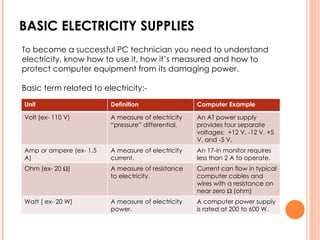
BASIC ELECTRICITY SUPPLIES To become a successful PC technician you need to understand electricity, know how to use it, how it’s measured and how to protect computer equipment from its damaging power.  Basic term related to electricity:- Unit  Definition Computer Example Volt (ex- 110 V) A measure of electricity “pressure” differential. An AT power supply provides four separate voltages:  +12 V, -12 V, +5 V, and -5 V. Amp or ampere (ex- 1.5 A) A measure of electricity current. An 17-in monitor requires less than 2 A to operate. Ohm (ex- 20   ) A measure of resistance to electricity. Current can flow in typical computer cables and wires with a resistance on near zero    (ohm) Watt ( ex- 20 W) A measure of electricity power. A computer power supply is rated at 200 to 600 W.
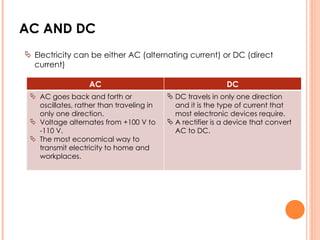
AC AND DC Electricity can be either AC (alternating current) or DC (direct current) AC DC AC goes back and forth or oscillates, rather than traveling in only one direction. Voltage alternates from +100 V to -110 V. The most economical way to transmit electricity to home and workplaces.  DC travels in only one direction and it is the type of current that most electronic devices require. A rectifier is a device that convert AC to DC.
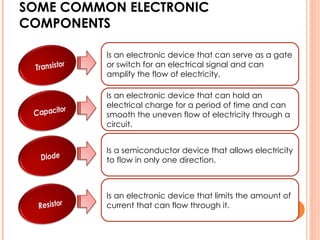
SOME COMMON ELECTRONIC COMPONENTS Is an electronic device that can serve as a gate or switch for an electrical signal and can amplify the flow of electricity. Is an electronic device that can hold an electrical charge for a period of time and can smooth the uneven flow of electricity through a circuit.  Is a semiconductor device that allows electricity to flow in only one direction. Is an electronic device that limits the amount of current that can flow through it.
TROUBLESHOOTING THE ELECTRICAL SYSTEM “ Your friend Sharon calls to ask you help with a computer problem. Her system has been working fine for ever a year, but now strange things are happening. Sometimes the system powers down while she is working for no apparent reason and  sometimes Windows locks up.
POSSIBLE SYMPTOMS OF A PROBLEM WITH THE ELECTRICAL SYSTEM ARE:- The PC appears “dead” – no light, no spinning drive or fan. The PC sometimes halts during booting. After several tries it boots successfully.  Error codes or beeps occur during booting but they come and go. You smell burnt parts or odors. ------------------------------------------------------------------------------------------------------------ CHECK THE SIMPLE THINGS:- Is everything connected and turned on? Are any cable connections loose? Is the computer plugged in? Are all the switches turned On? If the fan is not running, turn of the computer, open the case, and check the connections to the power supply. If you smell burn parts, turn off the system and carefully search for the source of the problem.
PROBLEM WITH THE POWER SUPPLY A brownout  of the house current. Loose connections inside the computer can cause a system to  appear dead or reboot itself. Problems with external power Problems with loose internal connections
PROBLEM WITH THE POWER SUPPLY The computer stops or hang, reboot itself. Memory errors appear intermittently. Data is written incorrectly to the hard drive. The keyboard stop working at odd times. The motherboard fails or is damaged. The power supply overheats and become hot to touch. The power supply fan becomes very noisy or stops. An improperly working fan can cause power supply problem. Don’t operate the PC if the fan does not work. Computer without cooling fans can quickly overheat and damage chips. Problems that come and go Problems with power supply fan
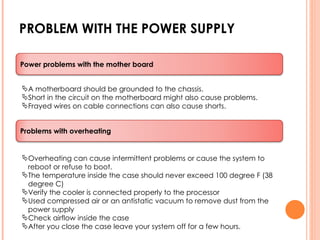
PROBLEM WITH THE POWER SUPPLY A motherboard should be grounded to the chassis. Short in the circuit on the motherboard might also cause problems. Frayed wires on cable connections can also cause shorts. Overheating can cause intermittent problems or cause the system to reboot or refuse to boot. The temperature inside the case should never exceed 100 degree F (38 degree C) Verify the cooler is connected properly to the processor Used compressed air or an antistatic vacuum to remove dust from the power supply Check airflow inside the case After you close the case leave your system off for a few hours. Power problems with the mother board Problems with overheating
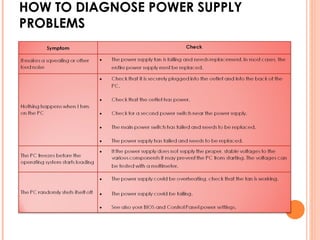
HOW TO DIAGNOSE POWER SUPPLY PROBLEMS
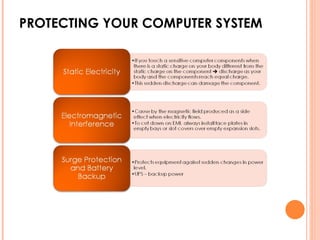
PROTECTING YOUR COMPUTER SYSTEM
DISCUSSION Finding PC Power Supply Facts Remove the cover from lab PC and answer the following questions. How many watts are supplied by your power supply? (the number is usually printed on the label on the top of power supply) How many cables are supplied by your power supply? Where does each cable lead? Does the back of the power supply have a switch that can be set for 220 volts or 110 volts?
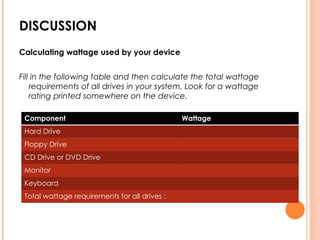
DISCUSSION Calculating wattage used by your device Fill in the following table and then calculate the total wattage requirements of all drives in your system. Look for a wattage rating printed somewhere on the device. Component Wattage Hard Drive Floppy Drive CD Drive or DVD Drive Monitor Keyboard Total wattage requirements for all drives :

IMD251-Chapter 5

  • 1.
    ELECTRICITY AND POWERSUPPLIES Chapter 5
  • 2.
    BASIC ELECTRICITY SUPPLIESTo become a successful PC technician you need to understand electricity, know how to use it, how it’s measured and how to protect computer equipment from its damaging power. Basic term related to electricity:- Unit Definition Computer Example Volt (ex- 110 V) A measure of electricity “pressure” differential. An AT power supply provides four separate voltages: +12 V, -12 V, +5 V, and -5 V. Amp or ampere (ex- 1.5 A) A measure of electricity current. An 17-in monitor requires less than 2 A to operate. Ohm (ex- 20  ) A measure of resistance to electricity. Current can flow in typical computer cables and wires with a resistance on near zero  (ohm) Watt ( ex- 20 W) A measure of electricity power. A computer power supply is rated at 200 to 600 W.
  • 3.
    AC AND DCElectricity can be either AC (alternating current) or DC (direct current) AC DC AC goes back and forth or oscillates, rather than traveling in only one direction. Voltage alternates from +100 V to -110 V. The most economical way to transmit electricity to home and workplaces. DC travels in only one direction and it is the type of current that most electronic devices require. A rectifier is a device that convert AC to DC.
  • 4.
    SOME COMMON ELECTRONICCOMPONENTS Is an electronic device that can serve as a gate or switch for an electrical signal and can amplify the flow of electricity. Is an electronic device that can hold an electrical charge for a period of time and can smooth the uneven flow of electricity through a circuit. Is a semiconductor device that allows electricity to flow in only one direction. Is an electronic device that limits the amount of current that can flow through it.
  • 5.
    TROUBLESHOOTING THE ELECTRICALSYSTEM “ Your friend Sharon calls to ask you help with a computer problem. Her system has been working fine for ever a year, but now strange things are happening. Sometimes the system powers down while she is working for no apparent reason and sometimes Windows locks up.
  • 6.
    POSSIBLE SYMPTOMS OFA PROBLEM WITH THE ELECTRICAL SYSTEM ARE:- The PC appears “dead” – no light, no spinning drive or fan. The PC sometimes halts during booting. After several tries it boots successfully. Error codes or beeps occur during booting but they come and go. You smell burnt parts or odors. ------------------------------------------------------------------------------------------------------------ CHECK THE SIMPLE THINGS:- Is everything connected and turned on? Are any cable connections loose? Is the computer plugged in? Are all the switches turned On? If the fan is not running, turn of the computer, open the case, and check the connections to the power supply. If you smell burn parts, turn off the system and carefully search for the source of the problem.
  • 7.
    PROBLEM WITH THEPOWER SUPPLY A brownout of the house current. Loose connections inside the computer can cause a system to appear dead or reboot itself. Problems with external power Problems with loose internal connections
  • 8.
    PROBLEM WITH THEPOWER SUPPLY The computer stops or hang, reboot itself. Memory errors appear intermittently. Data is written incorrectly to the hard drive. The keyboard stop working at odd times. The motherboard fails or is damaged. The power supply overheats and become hot to touch. The power supply fan becomes very noisy or stops. An improperly working fan can cause power supply problem. Don’t operate the PC if the fan does not work. Computer without cooling fans can quickly overheat and damage chips. Problems that come and go Problems with power supply fan
  • 9.
    PROBLEM WITH THEPOWER SUPPLY A motherboard should be grounded to the chassis. Short in the circuit on the motherboard might also cause problems. Frayed wires on cable connections can also cause shorts. Overheating can cause intermittent problems or cause the system to reboot or refuse to boot. The temperature inside the case should never exceed 100 degree F (38 degree C) Verify the cooler is connected properly to the processor Used compressed air or an antistatic vacuum to remove dust from the power supply Check airflow inside the case After you close the case leave your system off for a few hours. Power problems with the mother board Problems with overheating
  • 10.
    HOW TO DIAGNOSEPOWER SUPPLY PROBLEMS
  • 11.
  • 12.
    DISCUSSION Finding PCPower Supply Facts Remove the cover from lab PC and answer the following questions. How many watts are supplied by your power supply? (the number is usually printed on the label on the top of power supply) How many cables are supplied by your power supply? Where does each cable lead? Does the back of the power supply have a switch that can be set for 220 volts or 110 volts?
  • 13.
    DISCUSSION Calculating wattageused by your device Fill in the following table and then calculate the total wattage requirements of all drives in your system. Look for a wattage rating printed somewhere on the device. Component Wattage Hard Drive Floppy Drive CD Drive or DVD Drive Monitor Keyboard Total wattage requirements for all drives :