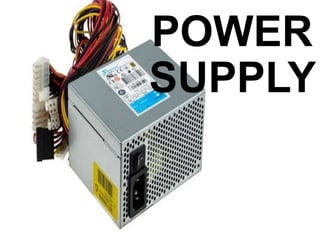
POWER
SUPPLY
What is Power Supply?
• A power supply is an electrical device that offers
electric power to an electrical load such as laptop,
computer, server, or other electronic devices.
Functions of Power Supply
• The main function of power supply is to convert
electric current from a source to the correct
voltage, current, and frequency to power the load.
• Each hardware component may require several
different DC voltages. A power supply is equipped
to provide the required voltages via cables which
simply plug directly into the parts (motherboard,
graphic card, etc.).
• Getting a device with too many features could cost
you more money than you need to spend, but if
you don’t get the features you require, you could
damage the devices you need to power.
Power Supplies change voltage
• Changing voltage is the prime use of power
supplies. The source of power has a steady output,
regardless of the type of device that must use it. To
prevent overload, power supplies step down the
voltage — or, conversely, step it up — to match the
requirements of the device.
• Too much power coming out of a power supply can
severely damage a device, but if the power supply
does not deliver enough voltage, the device will not
operate as it should. Energy changing is the main
task of power supplies, and the bulk of their
construction comes from the transformer used to
POWER SUPPLIES CONVERT
POWER
• Power conversion changes the incoming electricity
to a format that the electrical device can use. Two
types of power supplies exist, DC-DC and AC-
DC. DC-DC power supplies allow you to plug in
electrical devices into car outlets or similar sources
that supply direct current, or DC, power. These
power supplies are not the most commonly used,
though.
• While DC-DC power supplies exist, the most
common type is the AC-DC type. Electrical outlets
deliver alternating current, or AC, power. Most
electrical devices require direct current to function.
A power supply converts AC to DC. During this
conversion, the output may waver, occasionally
requiring regulation. However, for general use, you
may not need regulated power supplies.
POWER SUPPLIES REGULATE
POWER
• Most electronics require regulated power. When a
power supply changes the voltage and type of power,
the result is not always a steady output. Though it
does not turn on and off completely, fluctuations in
the outcoming voltage still occur without regulation.
An unregulated power supply can deliver more power
than expected. Such a surge fed to delicate
electronics like computers and televisions could cause
severe damage to the parts or even permanent harm
that could cause damage beyond repair.
• The added function of regulating power increases
the cost of the device, but it can save you the price
of having to purchase new electronics to replace
those ruined by unregulated voltage overwhelming
them. To save money while powering devices with
loads that closely match the power supply’s output,
use unregulated power supplies. But electronics
require regulated power. Don’t make the mistake of
selecting the wrong supply.
PARTS OF POWER
SUPPLIES AND THEIR
FUNCTIONS
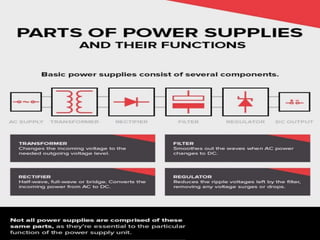
• Transformer: The transformer changes the
incoming voltage to the needed outgoing voltage
level. These devices may step up or step down the
voltage. Typically, the DC voltage required is much
less than the incoming AC voltage from the primary
power source.
• Rectifier: To convert the incoming power from AC
to DC, the power supply uses a rectifier, which may
be half-wave, full-wave, or bridge.
• Filter: When AC power changes to DC, it still has
distinct waves that need smoothing out. The filter
does not completely smooth out the waves to
nothing, but it does reduce them considerably. The
output from this part is unregulated power.
• Regulator: A voltage regulator reduces the ripple
voltages left by the filter, getting rid of any voltage
surges or drops that could damage devices plugged
into the power supply.
Power Supply Connectors
1. (20 + 4 Pin) ATX Power
Connector
• Also known as main power connector
2. (4 + 4 Pin) ATX 12V Power
Connector
• Also known as CPU power connector, P4 power
connector
3. SATA Power Connector
• Also known as SATA power cable, Serial-ATA power
cable
• Connects to: power connectors on SATA hard drives
and SATA optical drives
4. (4 Pin) Molex Connector
• Also known as peripheral connector
• Connects to: power connectors of IDE hard drives
and IDE optical drives
Molex to SATA Power Adapter
• Connects to: power connectors of SATA hard drives
and SATA optical drives
Molex to 3 Pin Fan Adapter
• Connects to: power connectors of computer case
fans
5. (6 Pin) PCI Express Connector
• Also known as PCI Express power cable, PCI-E
connector, PCIe connector
• Connects to: power connectors of PCI Express
graphics cards
6. (4 Pin) Floppy Drive Connector
• Also known as Floppy Disk Drive (FDD) connector
• Connects to: power connectors of floppy disk drives
6 Things to Know When
Buying a Power Supply
Unit (PSU)
1. Continuous Wattage Is Better
Than Peak Wattage
• Continuous Wattage and Peak Wattage are ratings
based on tests by the manufacturer. Continuous
Wattage indicates that it can deliver those 500W
continuously without fluctuations. Peak Wattage
indicates 500W is the maximum power it can
deliver, but probably only for a minute before
dropping down.
2. How Many Watts Do You Need?
• Not all PCs are built alike, so the amount of power
each one needs is different. A high-end gaming
PC will need more watts to run than a simple home
office PC. This is because powerful processors and
graphics cards require more power to run.
3. Save Energy With True Rated
PSUs
• With our society's need for constant energy, buying
eco-friendly electronics helps the planet. Even if
you don't care about nature, or you use a 100
percent green energy supplier, a true rated PSU will
still save you big bucks on your energy bill.
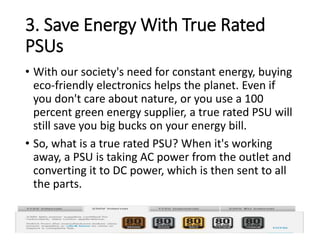
• So, what is a true rated PSU? When it's working
away, a PSU is taking AC power from the outlet and
converting it to DC power, which is then sent to all
the parts.
4. Figuring Out the Minor Details
• Everything up to now has just been about the bare
basics of PSUs. As with any technology, you can
geek out and get a lot more specific about what
you want or need, but if you are a beginner, the
aforementioned three aspects will matter the most
to you in your buying decision.
• That being said, there's some other jargon you
might encounter while shopping for a PSU. Some of
them don't matter much to people new to PSUs,
and some of them are very important; as such, it's
a good idea to learn what to ignore and what to
pay attention to.
5. Why You Shouldn't Cheap Out
• So why are we harping on about buying a quality
PSU instead of just going with whatever came
bundled with your PC case or a relatively unknown
brand's models?
• As we said above, your PSU affects every part of
your computer system and can end up frying
circuits in the case of a power fluctuation
6. Where to Find Reliable Reviews
• Manufacturers release new PSU models all the
time, and it's a relatively niche computer part for
tech reviewers. Here are a few well-known and
reputable brands to start you off: Corsair, Cooler
Master, Antec, Be Quiet, Seasonic, and XFX
What is the required
power supply needs?
WHAT IS THE USE OF A POWER
SUPPLY?
• When used for personal computers, power supplies
tend to be the part most prone to failure due to their
frequent temperature fluctuations and intense use. Of
course, electronics such as computers and televisions
require power supplies and require replacement of
these parts more often than compared to other
components. However, these are not the only uses of
power supplies.
• Power supplies do more than provide electricity for
electronics. These devices may be internal or external
and provide energy to appliances, lights, and more. If
you have a part that requires electricity, you probably
have a power supply in or connected to that device.
Power Supply Problems
• The PC power supply is probably the most failure-prone
item in a personal computer. It heats and cools each
time it is used and receives the first in-rush of AC
current when the PC is switched on. Typically, a stalled
cooling fan is a predictor of a power supply failure due
to subsequent overheated components. All devices in a
PC receive their DC power via the power supply.
• A typical failure of a PC power supply is often noticed
as a burning smell just before the computer shuts
down. Another problem could be the failure of the vital
cooling fan, which allows components in the power
supply to overheat. Failure symptoms include random
rebooting or failure in Windows for no apparent
reason.
WHO NEEDS POWER SUPPLIES?
• Anyone who uses electricity needs power supplies.
The types of supplies will depend on whether you
need AC-DC or DC-DC converters or if you require
regulated or unregulated power. High or low
voltage is another choice you will need to make. If
you need weather- or impact-resistant power
supplies, you will also need to add that to the list of
requirements.

POWER SUPPLY-WPS Office.pptx

  • 1.
  • 2.
    What is PowerSupply? • A power supply is an electrical device that offers electric power to an electrical load such as laptop, computer, server, or other electronic devices.
  • 3.
    Functions of PowerSupply • The main function of power supply is to convert electric current from a source to the correct voltage, current, and frequency to power the load. • Each hardware component may require several different DC voltages. A power supply is equipped to provide the required voltages via cables which simply plug directly into the parts (motherboard, graphic card, etc.).
  • 4.
    • Getting adevice with too many features could cost you more money than you need to spend, but if you don’t get the features you require, you could damage the devices you need to power.
  • 5.
    Power Supplies changevoltage • Changing voltage is the prime use of power supplies. The source of power has a steady output, regardless of the type of device that must use it. To prevent overload, power supplies step down the voltage — or, conversely, step it up — to match the requirements of the device. • Too much power coming out of a power supply can severely damage a device, but if the power supply does not deliver enough voltage, the device will not operate as it should. Energy changing is the main task of power supplies, and the bulk of their construction comes from the transformer used to
  • 6.
    POWER SUPPLIES CONVERT POWER •Power conversion changes the incoming electricity to a format that the electrical device can use. Two types of power supplies exist, DC-DC and AC- DC. DC-DC power supplies allow you to plug in electrical devices into car outlets or similar sources that supply direct current, or DC, power. These power supplies are not the most commonly used, though.
  • 7.
    • While DC-DCpower supplies exist, the most common type is the AC-DC type. Electrical outlets deliver alternating current, or AC, power. Most electrical devices require direct current to function. A power supply converts AC to DC. During this conversion, the output may waver, occasionally requiring regulation. However, for general use, you may not need regulated power supplies.
  • 8.
    POWER SUPPLIES REGULATE POWER •Most electronics require regulated power. When a power supply changes the voltage and type of power, the result is not always a steady output. Though it does not turn on and off completely, fluctuations in the outcoming voltage still occur without regulation. An unregulated power supply can deliver more power than expected. Such a surge fed to delicate electronics like computers and televisions could cause severe damage to the parts or even permanent harm that could cause damage beyond repair.
  • 9.
    • The addedfunction of regulating power increases the cost of the device, but it can save you the price of having to purchase new electronics to replace those ruined by unregulated voltage overwhelming them. To save money while powering devices with loads that closely match the power supply’s output, use unregulated power supplies. But electronics require regulated power. Don’t make the mistake of selecting the wrong supply.
  • 10.
    PARTS OF POWER SUPPLIESAND THEIR FUNCTIONS
  • 12.
    • Transformer: Thetransformer changes the incoming voltage to the needed outgoing voltage level. These devices may step up or step down the voltage. Typically, the DC voltage required is much less than the incoming AC voltage from the primary power source. • Rectifier: To convert the incoming power from AC to DC, the power supply uses a rectifier, which may be half-wave, full-wave, or bridge.
  • 13.
    • Filter: WhenAC power changes to DC, it still has distinct waves that need smoothing out. The filter does not completely smooth out the waves to nothing, but it does reduce them considerably. The output from this part is unregulated power. • Regulator: A voltage regulator reduces the ripple voltages left by the filter, getting rid of any voltage surges or drops that could damage devices plugged into the power supply.
  • 14.
  • 15.
    1. (20 +4 Pin) ATX Power Connector • Also known as main power connector
  • 16.
    2. (4 +4 Pin) ATX 12V Power Connector • Also known as CPU power connector, P4 power connector
  • 17.
    3. SATA PowerConnector • Also known as SATA power cable, Serial-ATA power cable • Connects to: power connectors on SATA hard drives and SATA optical drives
  • 18.
    4. (4 Pin)Molex Connector • Also known as peripheral connector • Connects to: power connectors of IDE hard drives and IDE optical drives
  • 19.
    Molex to SATAPower Adapter • Connects to: power connectors of SATA hard drives and SATA optical drives
  • 20.
    Molex to 3Pin Fan Adapter • Connects to: power connectors of computer case fans
  • 21.
    5. (6 Pin)PCI Express Connector • Also known as PCI Express power cable, PCI-E connector, PCIe connector • Connects to: power connectors of PCI Express graphics cards
  • 22.
    6. (4 Pin)Floppy Drive Connector • Also known as Floppy Disk Drive (FDD) connector • Connects to: power connectors of floppy disk drives
  • 23.
    6 Things toKnow When Buying a Power Supply Unit (PSU)
  • 24.
    1. Continuous WattageIs Better Than Peak Wattage • Continuous Wattage and Peak Wattage are ratings based on tests by the manufacturer. Continuous Wattage indicates that it can deliver those 500W continuously without fluctuations. Peak Wattage indicates 500W is the maximum power it can deliver, but probably only for a minute before dropping down.
  • 25.
    2. How ManyWatts Do You Need? • Not all PCs are built alike, so the amount of power each one needs is different. A high-end gaming PC will need more watts to run than a simple home office PC. This is because powerful processors and graphics cards require more power to run.
  • 26.
    3. Save EnergyWith True Rated PSUs • With our society's need for constant energy, buying eco-friendly electronics helps the planet. Even if you don't care about nature, or you use a 100 percent green energy supplier, a true rated PSU will still save you big bucks on your energy bill. • So, what is a true rated PSU? When it's working away, a PSU is taking AC power from the outlet and converting it to DC power, which is then sent to all the parts.
  • 27.
    4. Figuring Outthe Minor Details • Everything up to now has just been about the bare basics of PSUs. As with any technology, you can geek out and get a lot more specific about what you want or need, but if you are a beginner, the aforementioned three aspects will matter the most to you in your buying decision. • That being said, there's some other jargon you might encounter while shopping for a PSU. Some of them don't matter much to people new to PSUs, and some of them are very important; as such, it's a good idea to learn what to ignore and what to pay attention to.
  • 28.
    5. Why YouShouldn't Cheap Out • So why are we harping on about buying a quality PSU instead of just going with whatever came bundled with your PC case or a relatively unknown brand's models? • As we said above, your PSU affects every part of your computer system and can end up frying circuits in the case of a power fluctuation
  • 29.
    6. Where toFind Reliable Reviews • Manufacturers release new PSU models all the time, and it's a relatively niche computer part for tech reviewers. Here are a few well-known and reputable brands to start you off: Corsair, Cooler Master, Antec, Be Quiet, Seasonic, and XFX
  • 30.
    What is therequired power supply needs?
  • 31.
    WHAT IS THEUSE OF A POWER SUPPLY? • When used for personal computers, power supplies tend to be the part most prone to failure due to their frequent temperature fluctuations and intense use. Of course, electronics such as computers and televisions require power supplies and require replacement of these parts more often than compared to other components. However, these are not the only uses of power supplies. • Power supplies do more than provide electricity for electronics. These devices may be internal or external and provide energy to appliances, lights, and more. If you have a part that requires electricity, you probably have a power supply in or connected to that device.
  • 32.
    Power Supply Problems •The PC power supply is probably the most failure-prone item in a personal computer. It heats and cools each time it is used and receives the first in-rush of AC current when the PC is switched on. Typically, a stalled cooling fan is a predictor of a power supply failure due to subsequent overheated components. All devices in a PC receive their DC power via the power supply. • A typical failure of a PC power supply is often noticed as a burning smell just before the computer shuts down. Another problem could be the failure of the vital cooling fan, which allows components in the power supply to overheat. Failure symptoms include random rebooting or failure in Windows for no apparent reason.
  • 33.
    WHO NEEDS POWERSUPPLIES? • Anyone who uses electricity needs power supplies. The types of supplies will depend on whether you need AC-DC or DC-DC converters or if you require regulated or unregulated power. High or low voltage is another choice you will need to make. If you need weather- or impact-resistant power supplies, you will also need to add that to the list of requirements.