By Prof. Shitalkumar R
Sukhdeve
INTRODUCTION
INTRODUCTION
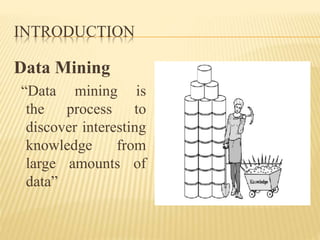
Data Mining
“Data mining is
the process to
discover interesting
knowledge from
large amounts of
data”
INTRODUCTION
Primary goals of data mining
1. Prediction involves using some variables or fields in the data
set to predict unknown or future values of other variables of
interest
2. Description on the other hand, focuses on finding patterns
describing the data that can be interpreted by humans.
Categories of Data mining
1. Predictive data mining- produces the model of the system
described by the given data set, or
2. Descriptive data mining- with produces new, nontrivial
information based on the available data set.
INTRODUCTION
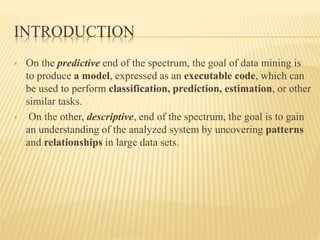
 On the predictive end of the spectrum, the goal of data mining is
to produce a model, expressed as an executable code, which can
be used to perform classification, prediction, estimation, or other
similar tasks.
 On the other, descriptive, end of the spectrum, the goal is to gain
an understanding of the analyzed system by uncovering patterns
and relationships in large data sets.
INTRODUCTION
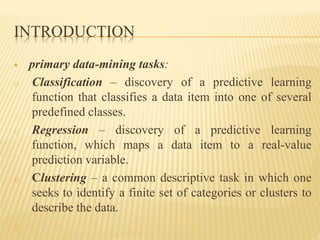
 primary data-mining tasks:
o Classification – discovery of a predictive learning
function that classifies a data item into one of several
predefined classes.
o Regression – discovery of a predictive learning
function, which maps a data item to a real-value
prediction variable.
o Clustering – a common descriptive task in which one
seeks to identify a finite set of categories or clusters to
describe the data.
o
INTRODUCTION
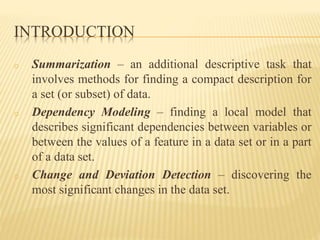
o Summarization – an additional descriptive task that
involves methods for finding a compact description for
a set (or subset) of data.
o Dependency Modeling – finding a local model that
describes significant dependencies between variables or
between the values of a feature in a data set or in a part
of a data set.
o Change and Deviation Detection – discovering the
most significant changes in the data set.
INTRODUCTION
R
 R [R Development Core Team, 2012] is a free software
environment for statistical computing and graphics.
 It provides a wide variety of statistical and graphical
techniques.
 R can be extended easily via packages.
 There are around 4000 packages available in the CRAN
package repository 3, as on August 1, 2012.
INTRODUCTION
THE R ENVIRONMENT
 R is an integrated suite of software facilities for data
manipulation, calculation and graphical display.
 It has an effective data handling and storage facility, a
suite of operators for calculations on arrays, in particular
matrices, a large, coherent, integrated collection of
intermediate tools for data analysis, graphical facilities
for data analysis and display either directly at the
computer or on hardcopy.
INTRODUCTION
 A well developed, simple and effective programming
language (called ‘S’) which includes conditionals, loops,
user defined recursive functions and input and output
facilities. (Indeed most of the system supplied functions
are themselves written in the S language.)
R COMMANDS, CASE SENSITIVITY
• R is an expression language with a very simple syntax
• It is case sensitive
• The set of symbols which can be used in R names
depends on the operating system and country within
which R is being run (technically on the locale in use).
• Normally all alphanumeric symbols are allowed 1 (and
in some countries this includes accented letters) plus ‘.’
and ‘_’, with the restriction that a name must start with
‘.’ or a letter,
R COMMANDS, CASE SENSITIVITY
• And if it starts with ‘.’ the second character must not be a
digit.
• Names are currently effectively unlimited, but were
limited to 256 bytes prior to R 2.13.0
• Elementary commands consist of either expressions or
assignments.
• If an expression is given as a command, it is evaluated,
printed (unless specifically made invisible), and the
value is lost.
R COMMANDS, CASE SENSITIVITY
• An assignment also evaluates an expression and passes
the value to a variable but the result is not automatically
printed.
• Commands are separated either by a semi-colon (‘;’), or
by a newline.
• Elementary commands can be grouped together into one
compound expression by braces (‘{’ and ‘}’).
• Comments can be put almost anywhere, starting with a
hash mark (‘#’), everything to the end of the line is a
comment.
R COMMANDS, CASE SENSITIVITY
• If a command is not complete at the end of a line, R will
give a different prompt, by default + on second and
subsequent lines and continue to read input until the
command is syntactically complete.
SIMPLE MANIPULATIONS (NUMBERS AND
VECTORS)
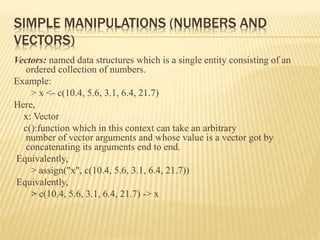
Vectors: named data structures which is a single entity consisting of an
ordered collection of numbers.
Example:
> x <- c(10.4, 5.6, 3.1, 6.4, 21.7)
Here,
x: Vector
c():function which in this context can take an arbitrary
number of vector arguments and whose value is a vector got by
concatenating its arguments end to end.
Equivalently,
> assign("x", c(10.4, 5.6, 3.1, 6.4, 21.7))
Equivalently,
> c(10.4, 5.6, 3.1, 6.4, 21.7) -> x
SIMPLE MANIPULATIONS (NUMBERS AND
VECTORS)
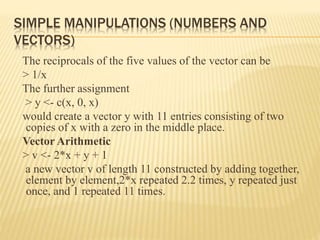
The reciprocals of the five values of the vector can be
> 1/x
The further assignment
> y <- c(x, 0, x)
would create a vector y with 11 entries consisting of two
copies of x with a zero in the middle place.
Vector Arithmetic
> v <- 2*x + y + 1
a new vector v of length 11 constructed by adding together,
element by element,2*x repeated 2.2 times, y repeated just
once, and 1 repeated 11 times.
SIMPLE MANIPULATIONS (NUMBERS AND
VECTORS)
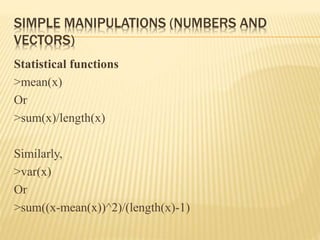
Statistical functions
>mean(x)
Or
>sum(x)/length(x)
Similarly,
>var(x)
Or
>sum((x-mean(x))^2)/(length(x)-1)
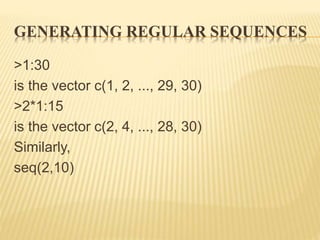
GENERATING REGULAR SEQUENCES
>1:30
is the vector c(1, 2, ..., 29, 30)
>2*1:15
is the vector c(2, 4, ..., 28, 30)
Similarly,
seq(2,10)
DATA IMPORT AND EXPORT
 Save and Load R Data
Data in R can be saved as .Rdata files with function
save().
> a <- 1:10
> save(a, file=“I:/dataset/Data.Rdata")
> rm(a)
> load(" I:/dataset/Data.Rdata ")
> print(a)
[1] 1 2 3 4 5 6 7 8 9 10
DATA IMPORT AND EXPORT
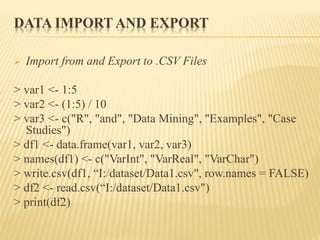
 Import from and Export to .CSV Files
> var1 <- 1:5
> var2 <- (1:5) / 10
> var3 <- c("R", "and", "Data Mining", "Examples", "Case
Studies")
> df1 <- data.frame(var1, var2, var3)
> names(df1) <- c("VarInt", "VarReal", "VarChar")
> write.csv(df1, “I:/dataset/Data1.csv", row.names = FALSE)
> df2 <- read.csv(“I:/dataset/Data1.csv")
> print(df2)

Datamining with R

  • 1.
  • 2.
  • 3.
    INTRODUCTION Data Mining “Data miningis the process to discover interesting knowledge from large amounts of data”
  • 4.
    INTRODUCTION Primary goals ofdata mining 1. Prediction involves using some variables or fields in the data set to predict unknown or future values of other variables of interest 2. Description on the other hand, focuses on finding patterns describing the data that can be interpreted by humans. Categories of Data mining 1. Predictive data mining- produces the model of the system described by the given data set, or 2. Descriptive data mining- with produces new, nontrivial information based on the available data set.
  • 5.
    INTRODUCTION  On thepredictive end of the spectrum, the goal of data mining is to produce a model, expressed as an executable code, which can be used to perform classification, prediction, estimation, or other similar tasks.  On the other, descriptive, end of the spectrum, the goal is to gain an understanding of the analyzed system by uncovering patterns and relationships in large data sets.
  • 6.
    INTRODUCTION  primary data-miningtasks: o Classification – discovery of a predictive learning function that classifies a data item into one of several predefined classes. o Regression – discovery of a predictive learning function, which maps a data item to a real-value prediction variable. o Clustering – a common descriptive task in which one seeks to identify a finite set of categories or clusters to describe the data. o
  • 7.
    INTRODUCTION o Summarization –an additional descriptive task that involves methods for finding a compact description for a set (or subset) of data. o Dependency Modeling – finding a local model that describes significant dependencies between variables or between the values of a feature in a data set or in a part of a data set. o Change and Deviation Detection – discovering the most significant changes in the data set.
  • 8.
    INTRODUCTION R  R [RDevelopment Core Team, 2012] is a free software environment for statistical computing and graphics.  It provides a wide variety of statistical and graphical techniques.  R can be extended easily via packages.  There are around 4000 packages available in the CRAN package repository 3, as on August 1, 2012.
  • 9.
    INTRODUCTION THE R ENVIRONMENT R is an integrated suite of software facilities for data manipulation, calculation and graphical display.  It has an effective data handling and storage facility, a suite of operators for calculations on arrays, in particular matrices, a large, coherent, integrated collection of intermediate tools for data analysis, graphical facilities for data analysis and display either directly at the computer or on hardcopy.
  • 10.
    INTRODUCTION  A welldeveloped, simple and effective programming language (called ‘S’) which includes conditionals, loops, user defined recursive functions and input and output facilities. (Indeed most of the system supplied functions are themselves written in the S language.)
  • 11.
    R COMMANDS, CASESENSITIVITY • R is an expression language with a very simple syntax • It is case sensitive • The set of symbols which can be used in R names depends on the operating system and country within which R is being run (technically on the locale in use). • Normally all alphanumeric symbols are allowed 1 (and in some countries this includes accented letters) plus ‘.’ and ‘_’, with the restriction that a name must start with ‘.’ or a letter,
  • 12.
    R COMMANDS, CASESENSITIVITY • And if it starts with ‘.’ the second character must not be a digit. • Names are currently effectively unlimited, but were limited to 256 bytes prior to R 2.13.0 • Elementary commands consist of either expressions or assignments. • If an expression is given as a command, it is evaluated, printed (unless specifically made invisible), and the value is lost.
  • 13.
    R COMMANDS, CASESENSITIVITY • An assignment also evaluates an expression and passes the value to a variable but the result is not automatically printed. • Commands are separated either by a semi-colon (‘;’), or by a newline. • Elementary commands can be grouped together into one compound expression by braces (‘{’ and ‘}’). • Comments can be put almost anywhere, starting with a hash mark (‘#’), everything to the end of the line is a comment.
  • 14.
    R COMMANDS, CASESENSITIVITY • If a command is not complete at the end of a line, R will give a different prompt, by default + on second and subsequent lines and continue to read input until the command is syntactically complete.
  • 15.
    SIMPLE MANIPULATIONS (NUMBERSAND VECTORS) Vectors: named data structures which is a single entity consisting of an ordered collection of numbers. Example: > x <- c(10.4, 5.6, 3.1, 6.4, 21.7) Here, x: Vector c():function which in this context can take an arbitrary number of vector arguments and whose value is a vector got by concatenating its arguments end to end. Equivalently, > assign("x", c(10.4, 5.6, 3.1, 6.4, 21.7)) Equivalently, > c(10.4, 5.6, 3.1, 6.4, 21.7) -> x
  • 16.
    SIMPLE MANIPULATIONS (NUMBERSAND VECTORS) The reciprocals of the five values of the vector can be > 1/x The further assignment > y <- c(x, 0, x) would create a vector y with 11 entries consisting of two copies of x with a zero in the middle place. Vector Arithmetic > v <- 2*x + y + 1 a new vector v of length 11 constructed by adding together, element by element,2*x repeated 2.2 times, y repeated just once, and 1 repeated 11 times.
  • 17.
    SIMPLE MANIPULATIONS (NUMBERSAND VECTORS) Statistical functions >mean(x) Or >sum(x)/length(x) Similarly, >var(x) Or >sum((x-mean(x))^2)/(length(x)-1)
  • 18.
    GENERATING REGULAR SEQUENCES >1:30 isthe vector c(1, 2, ..., 29, 30) >2*1:15 is the vector c(2, 4, ..., 28, 30) Similarly, seq(2,10)
  • 19.
    DATA IMPORT ANDEXPORT  Save and Load R Data Data in R can be saved as .Rdata files with function save(). > a <- 1:10 > save(a, file=“I:/dataset/Data.Rdata") > rm(a) > load(" I:/dataset/Data.Rdata ") > print(a) [1] 1 2 3 4 5 6 7 8 9 10
  • 20.
    DATA IMPORT ANDEXPORT  Import from and Export to .CSV Files > var1 <- 1:5 > var2 <- (1:5) / 10 > var3 <- c("R", "and", "Data Mining", "Examples", "Case Studies") > df1 <- data.frame(var1, var2, var3) > names(df1) <- c("VarInt", "VarReal", "VarChar") > write.csv(df1, “I:/dataset/Data1.csv", row.names = FALSE) > df2 <- read.csv(“I:/dataset/Data1.csv") > print(df2)