3
Introduction
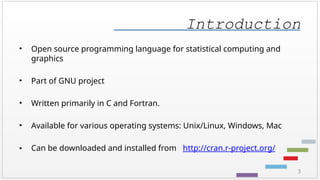
• Open sourceprogramming language for statistical computing and
graphics
• Part of GNU project
• Written primarily in C and Fortran.
• Available for various operating systems: Unix/Linux, Windows, Mac
• Can be downloaded and installed from http://cran.r-project.org/
4.
4
Advantages
• Easy toinstall. Ready to use in a few minutes.
• A few thousand supplemental packages
• Open source with a large support community: easy to find help!
• Many books, blogs, tutorials.
• Frequent updates
• More popular than major statistics packages (SAS, Stata, SPSS etc.)
5.
5
Getting Started
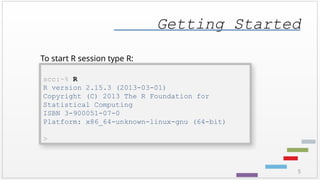
To startR session type R:
scc:~% R
R version 2.15.3 (2013-03-01)
Copyright (C) 2013 The R Foundation for
Statistical Computing
ISBN 3-900051-07-0
Platform: x86_64-unknown-linux-gnu (64-bit)
>
6.
6
> 7 +5 # arithmetic operations
[1] 12
R as a calculator
system prompt
User’s input Text following # sign is a
comment
Number of output elements
Answer
7.
7
> 7 -
+4
[1] 3
R as a calculator
system prompt
Incomplete expression
Plus sign appears to prompt for continuation of the input expression
answer
10
Logical operations
Symbol Meaning
!logical NOT
& logical AND
| logical OR
< less than
<= less than or equal to
> greater than
>= greater than or equal to
== logical equals
! = not equal
11.
11
Operations in R
#A few operations can be listed on one line.
# Use semicolon(;) to separate them
> cos(0); sqrt(2)
[1] 1
[1] 1.414214
12.
12
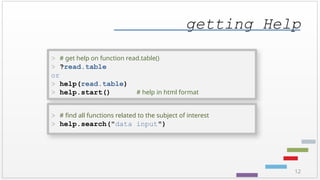
getting Help
> #get help on function read.table()
> ?read.table
or
> help(read.table)
> help.start() # help in html format
> # find all functions related to the subject of interest
> help.search("data input")
13.
13
getting Help
> #list all the function names that include the text matrix
> apropos("matrix")
> # see examples of function usage
> example(matrix)
> # see some demos
> demo(lm.glm) # lm() demo
> demo(graphics) # graphics examples
> demo(persp) # 3D plot examples
> demo(Hershey) # fonts, symbols, etc.
> demo(plotmath) # plotting Math functions
> demo() # list of demos
14.
14
variables
Assignment operator is<-
Equal sign ( = ) could be used instead, but <- operator is
preferred
> x <- 5 # assign value 5 to a variable
> x # print value of x
[1] 5
> x <- 4; y <- 3 # semicolon can be used as a
separator
> z <- x*x – y*y # assign the result to a new variable
15.
15
variables
Caution: Be carefulcomparing a variable with a negative number!
> x <- -5 # assign value -5 to a variable
> # Wrong evaluation :
> x <-3 # Desired : Is x less than -3
> x
[1] 3
16.
16
variables
Caution: Be carefulcomparing a variable with a negative number!
> x <- -5 # assign value -5 to a variable
> # Correct evaluation (use space!):
> x < -3 # Is x less than -3
[1] TRUE
> # Even better (use parenthesis):
> x <(-7) # Is x less than -7
[1] FALSE
17.
17
variables
-> can alsobe used as an assignment operator
Objects can take values Inf, -Inf, NaN (not a number)
and NA (not available) for missing data
> 5 -> a # assign value 5 to a variable
> a
[1] 5
> a <- NA # assign “missing data” value to a variable
> a
[1] NA
18.
18
variables
• Names ofthe objects may contain any combinations of letters, numbers and dots ( . )
> sept14.2012.num <- 1000 # correct!
>
19.
19
variables
• Names ofthe objects may contain any combinations of letters, numbers and dots ( . )
• Names of the objects may NOT start with a number
> 2012.sept14.num <- 1000 # wrong!
Error: unexpected symbol in " 2012.sept14.num"
20.
20
variables
• Names ofthe objects may contain any combinations of letters, numbers and dots ( . )
• Names of the objects may NOT start with a number
• Case sensitive
> a <- 5; A <- 7
> a
[1] 5
> A
[1] 7
21.
21
variables
• Names ofthe objects may contain any combinations of letters, numbers and dots ( . )
• Names of the objects may NOT start with a number
• Case sensitive
• Avoid renaming predefined R objects, constants and functions: c, q, s, t, C, D, F, I,
and T
> # examples of correct variable assignments
> b.total <- 21; b.average <- 3
> b.total
[1] 21
> b.average
[1] 3
22.
22
string variables
Strings aredelimited by " or by '.
> myName <- "Katia"
> myName
[1] "Katia"
> hisName <- 'Alex'
> hisName
[1] "Alex"
23.
23
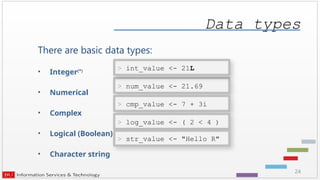
built-in constants
LETTERS: 26upper-case letters of the Roman alphabet
letters: 26 lower-case letters of the Roman alphabet
month.abb: 3 – letter abbreviations for month names
month.name: month names
pi: ratio of circle circumference to diameter
c, T, F, t built-in objects/functions (avoid using these as var. names)
25
Data types
mode() orclass():
Note: There is some differences between these functions. See
help for more information:
> mode( num_value )
[1] "numeric"
> class( str_value )
[1] "character"
> class( int_value )
[1] "integer"
> mode( int_value )
[1] "numeric"
26.
26
session commands
scc:~ %R # to start an R session in the current directory
> q() # end R session
Save workspace image? [y/n/c]:
# y – yes
# n – no (in most cases select this option to exit the workspace without saving)
# c – cancel
katana:~ %
27.
27
saving current session
>a <- 5
> b <- a + 3;
> myString <- "apple"
> # list all objects in the current session
> ls()
[1] "a" "b" "myString"
> # save contents of the current workspace into .RData
file
> save.image()
> # save contents to the file with a given name
> save.image(file = "myFile.Rdata")
> # save some objects to the file
> save(a,b, file = "ab.Rdata")
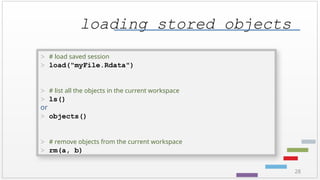
28.
28
loading stored objects
># load saved session
> load("myFile.Rdata")
> # list all the objects in the current workspace
> ls()
or
> objects()
> # remove objects from the current workspace
> rm(a, b)
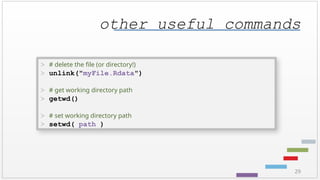
29.
29
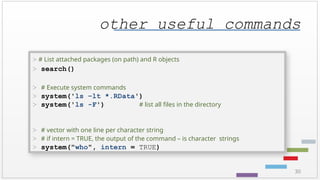
other useful commands
># delete the file (or directory!)
> unlink("myFile.Rdata")
> # get working directory path
> getwd()
> # set working directory path
> setwd( path )
30.
30
other useful commands
># List attached packages (on path) and R objects
> search()
> # Execute system commands
> system('ls –lt *.RData')
> system('ls -F') # list all files in the directory
> # vector with one line per character string
> # if intern = TRUE, the output of the command – is character strings
> system("who", intern = TRUE)
31.
31
Tips
• Use arrowkeys ( “up” and “down” ) to traverse through the history of commands.
• “Up arrow” – traverse backwards (older commands)
• “Down arrow” – traverse forward (newer commands)
32.
32
data objects overview
Vectors,matrices, data frames & lists
• Vector – a set of elements of the same type.
• Matrix - a set of elements of the same type organized in rows and columns.
• Data Frame - a set of elements organized in rows and columns, where
columns can be of different types.
• List - a collection of data objects (possibly of different types) – a generalization
of a vector.
33.
33
vectors
Vector : aset of elements of the same type.
2, 3, 7, 5, 1
TRUE, FALSE, FALSE, TRUE, FALSE
"Monday", "Tuesday", "Wednesday", "Thursday", "Friday"
34.
34
vectors
To create avector – use function “concatenate” : c( )
> myVec <- c( 1,6,9,2,5 )
> myVec
[1] 1 6 9 2 5
> # lets find out the type of myVec object
> mode(myVec)
[1] "numeric"
> # fill vector with consecutive numbers from 5 to 9 and print it
> print(a<- c( 5:9 ))
[1] 5 6 7 8 9
35.
35
vectors
We can alsouse function “sequence” : seq( )
> myVec <- seq( -1.1, 0.5, by=0.2 )
> myVec
[1] -1.1 -0.9 -0.7 -0.5 -0.3 -0.1 0.1 0.3 0.5
Or function “repeat” : rep( )
> myVec <- rep( 7, 3)
> myVec
[1] 7 7 7
36.
36
vectors
What can wedo with vectors?
> # create more vectors:
> a <- c( 1, 2, 4 )
> b <- c( 7, 3 )
> ab <- c( a, b )
> ab
[1] 1 2 4 7 3
> # append more values
> ab[6:10] <- c( 0, 6, 4, 1, 9)
37.
37
vectors
What can wedo with vectors?
> # access individual elements
> ab[3]
[1] 4 # notice: index starts with 1 (like in FORTRAN)
> # list all but 3rd
element
> ab[-3]
[1] 1 2 7 3 0 6 4 1 9
> # list 3 elements, starting from the second
> ab[2:4]
[1] 2 4 7
> # list a few elements
38.
38
vectors
Accessing vector data(partial list)
x[n] nth
element
x[-n] all but nth
element
x[1:n] first n elements
x[-(1:n)] elements starting from n+1
x[c(1,3,6)] specific elements
x[x>3 & x<7] all element greater than 3 and less than 7
x[x<3 | x>7] all element less than 3 or greater than 7
length(x) vector length
which(x == max(x)) which indices are largest
39.
39
vectors
Math with vectors(partial list)
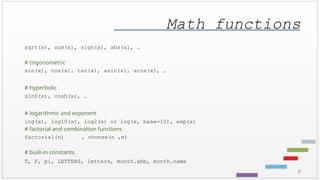
Any math function used for scalars:
sqrt, sin, cos, tan, asin, acos, atan, log, exp etc.
Standard vector functions:
max(x), min(x), range(x)
sum(x), prod(x) # sum and product of elements
mean(x) , median(x) # mean and median values of vector
var(x), sd (x) # variance and standard deviation
IQR(x) # interquartile range
41
vectors
Creating a compositionof operations:
> # define a vector that holds scores for a group of numbered athletes
> scores <- c(80,95,70,90,95,85,95,75)
> # how many athletes do we have?
> num <- length(scores)
> # get the vector that holds the number of each athlete
> id <- 1:num
> # what is the maximum score
> best <- max(scores)
> # which athletes got the maximum score
> id[scores == best]
> # we can do all this in just ONE powerful statement !
> (1:length(scores))[scores == max(scores)]
[1] 2 5 7
42.
42
vectors
Handling of missingdata:
> # Sometimes data are not available
> v <- c( 3, 2, NA, 7, 1, NA, 5)
> # in some cases we might want to replace them with some other value
> v[is.na(v)] <- 0 # replace missing data with zeros
> # the following will not work:
> v[ v == NA ] <- 0
> v == NA # v is unchanged because all the elements of v==NA evaluate to
NA
[1] NA NA NA NA NA NA NA
43.
43
vectors
Operations with 2vectors:
> x <- c(2, 4, 6, 8)
> y <- c(1, 2, 3, 4)
> print(r1 <- x + y) # print the result
[1] 3 6 9 12
> (r2 <- x – y) # another way to print the result
[1] 1 2 3 4
> (r3 <- x * y) # Note: multiplication is performed for
elements
[1] 2 8 18 32
> (r4 <- x / y)
44.
44
vectors
> x <-c(2, 4, 6, 8)
> y <- c(1, 2, 3, 4)
> x %*% y
[,1]
[1,] 60
If we would like to perform a “usual” - scalar - multiplication, we should use %*% :
45.
45
vectors
Operations with vectorsof different length:
> x <- c(2, 3, 4, 8)
> y <- c(1, 2, 3)
> r1 <- x + y
Warning message:
In x + y : longer object length is not a multiple
of shorter object length
> r1
[1] 3 5 7 9
46.
46
vectors
Example – findinga unit vector:
> x <- c(1, 4, 8)
> x2 <- x * x
> x2sum <- sum(x2)
> xmag <- sqrt(x2sum)
> x / xmag
[1] 0.1111111 0.4444444 0.8888889
# This can be done with just one line:
> x / sqrt(sum(x*x))
47.
47
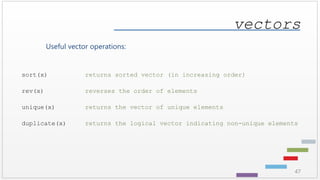
vectors
Useful vector operations:
sort(x)returns sorted vector (in increasing order)
rev(x) reverses the order of elements
unique(x) returns the vector of unique elements
duplicate(x) returns the logical vector indicating non-unique elements
48.
48
vectors
Useful vector operations:
which.max(x)returns index of the larges element
which.min(x) returns index of the smallest element
which(x == a) returns vector of indices i, for which x[i]==a
summary(x) summary statistics (mean, median, min, max, quartiles)
49.
49
vectors
Useful vector operations(handling of missing values) :
is.na(x) returns the logical vector indicating missing elements
na.omit(x) suppress observations with missing data
sum(is.na(x)) get the number of missing elements
which(is.na(x)) get indices of the missing elements in a vector
mean( x, na.rm=TRUE ) calculate mean of all non-missing elements
x[is.na(x)] <- 0 replace all missing elements with zeros
50.
50
vectors
Named vector elements:
# define a vector
> v <- c("Alex", "Johnson")
> v
[1] "Alex" "Johnson"
# provide names of vector’s elements
> names(v) <- c("first", "last")
> v
first last
[1] "Alex" "Johnson"
51.
51
vectors
Named vector elements:
# an alternative way to provide names to the vector elements
> v <- c(first = "Alex", last = "Johnson")
> v
first last
[1] "Alex" "Johnson"
# access vector elements using names
> v["first"]
[1] "Alex"
52.
52
matrices
Matrix : aset of elements of the same type organized in rows
and columns.
2 3 7 5 1 TRUE FALSE FALSE
7 9 1 4 0 FALSE TRUE FALSE
8 2 6 3 7 FALSE FALSE TRUE
53.
53
matrices
Matrices are verysimilar to vectors. The data (of the same type) organized in rows and columns.
There are a few way to create a matrix
Using matrix( data, nrow, ncol, byrow ) function:
> mat <- matrix(seq(1:21) ,nrow = 7)
> mat
[,1] [,2] [,3]
[1,] 1 8 15
[2,] 2 9 16
[3,] 3 10 17
[4,] 4 11 18
[5,] 5 12 19
[6,] 6 13 20
[7,] 7 14 21
54.
54
matrices
The byrow argumentspecifies how the matrix is to be filled. By default, R fills out the matrix column by column
( similar to FORTRAN and Matlab, and unlike C/C++ and WinBUGS).
If we prefer to fill in the matrix row-by-row, we must activate the byrow setting:
> mat <- matrix(seq(1:21) ,nrow=7, byrow=TRUE)
> mat
[,1] [,2] [,3]
[1,] 1 2 3
[2,] 4 5 6
[3,] 7 8 9
[4,] 10 11 12
[5,] 13 14 15
[6,] 16 17 18
[7,] 19 20 21
55.
55
matrices
To create anidentity matrix of size N x N, use diag() function:
> dmat <- diag(5)
> dmat
[,1] [,2] [,3] [,4] [,5]
[1,] 1 0 0 0 0
[2,] 0 1 0 0 0
[3,] 0 0 1 0 0
[4,] 0 0 0 1 0
[5,] 0 0 0 0 1
56.
56
matrices
To find dimensionsof a matrix, use dim() function:
> dmat <- diag(5)
> dim( dmat)
[1] 5 5
To find the number of rows and columns of a matrix, use nrow() and
ncol() respectfully:
> dmat <- matrix(seq(1:21) ,nrow = 7)
> nrow( dmat)
[1] 7
> ncol( dmat)
[1] 3
59
matrices
Other operations:
> #return diagonal elements
> diag(x)
[1] 1 5 9
> # row sum and means:
> rowSums(x)
[1] 12 15 18
> rowMeans(x)
[1] 4 5 6
> # column sum and means:
> colSums(x)
[1] 12 15 18
> colMeans(x)
[1] 2 5 8
! note: we used diag() before to
create an identity matrix
60.
60
matrices
Other operations:
> #determinant
> det(x)
[1] 0
> # inverse matrix:
> w <- matrix(c(1,0,0,2),2)
> solve(w)
[,1] [,2]
[1,] 1 0.0
[2,] 0 0.5
> # If the matrix is singular (not invertible), the error message is
displayed:
> solve(x)
Error in solve.default(x) :
Lapack routine dgesv: system is exactly singular
61.
61
matrices
Function solve( )canbe used to solve a system of linear equations:
> w <- matrix( c(1,0,0,2), 2 )
> v <- c(3, 8)
> solve(w, v)
[1] 3 4
62.
62
matrices
Accessing matrix data(partial list)
x[2,3] element in the 2nd
row, 3rd
column
x[2,] all elements of the 2nd
row (the result is a vector)
x[,3] all elements of the 3rd
column ( the result is a vector)
x[c(1,3,4),] all elements of the 1st
3rd
and 4th
columns
( the result is a matrix)
x[,-3] all elements but 3rd
column ( the result is a matrix)
Logical operations similar to the vector’s apply
63.
63
matrices
Naming matrix rowsand columns
rownames(x) set or retrieve row names of matrix
colnames(x) set or retrieve column names of matrix
dimnames(x) set or retrieve row and column names of matrix
> # define matrix
> x <- matrix(1:6, nrow = 2)
[,1] [,2] [,3]
[1,] 1 3 5
[2,] 2 4 6
> # specify column names:
> colnames(x) <- c("col1" , "col2", "col3")
> # specify both – row and column names:
> dimnames(x) <- list(c("col1" , "col2", "col3"),
+ c("row1" , "row2"))
64.
64
matrices
Combining vectors andmatrices:
> # To stuck 2 vectors or matrices, one below the other, use rbind()
> x <- rbind( c(1,2,3) , c(4,5,6) )
> x
[,1] [,2] [,3]
[1,] 1 2 3
[2,] 4 5 6
> # To stuck 2 vectors or matrices, next to each other, use cbind()
> x <- cbind( c(1,2,3) , c(4,5,6) )
> x
[,1] [,2]
[1,] 1 4
[2,] 2 5
[3,] 3 6
65.
65
data frames
• Dataframes are fundamental data type in R
• A data frame is a generalization of a matrix
• Different columns may have different types of data
• All elements of any column must have the same data type
Age Weight Height Gender
18 150 67 F
23 170 70 M
38 160 65 M
52 190 68 F
66.
66
data frames
We cancreate data on the fly:
> age <- c( 18, 23, 38, 52)
> weight <- c( 150, 170, 160, 190)
> height <- c( 67, 70, 65, 68)
> gender <- c("F", "M", "M", "F")
> data0 <- data.frame( Age = age, Weight = weight, Height = height,
+ Gender = gender)
> data0
Age Weight Height Gender
1 18 150 67 F
2 23 170 70 M
3 38 160 65 M
4 52 190 68 F
67.
67
data frames
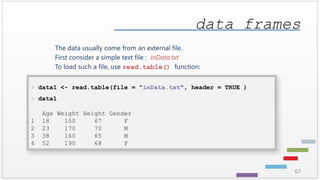
The datausually come from an external file.
First consider a simple text file : inData.txt
To load such a file, use read.table() function:
> data1 <- read.table(file = "inData.txt", header = TRUE )
> data1
Age Weight Height Gender
1 18 150 67 F
2 23 170 70 M
3 38 160 65 M
4 52 190 68 F
68.
68
data frames
Often datacome in a form of a spreadsheet. To read this into R, first save the data as a CSV file, for
example inData.csv.
To load such a file, use read.csv() function:
> data1 <- read.csv(file="inData.csv", header=TRUE, sep=",")
> data1
Age Weight Height Gender
1 18 150 67 F
2 23 170 70 M
3 38 160 65 M
4 52 190 68 F
69.
69
data frames
The contentsof the text file can be displayed using file.show() function.
> file.show("inData.csv")
Age,Weight,Height,Gender
18,150,67,F
23,170,70,M
38,160,65,M
52,190,68,F
70.
70
data frames
To explorethe data frame:
> # get column names
> names(data1)
[1] "Age" "Weight" "Height" "Gender"
> # get row names (sometimes each row is given some name)
> row.names(data1)
[1] "1" "2" "3" "4"
> # to set the rows the names use row.names function
> row.names(data1) <- c("Mary", "Paul", "Bob", "Judy")
> data1
Age Weight Height Gender
Mary 18 150 67 F
Paul 23 170 70 M
Bob 38 160 65 M
71.
71
data frames
> #access a single column
> data1$Height
or
> data1[,3]
or
> data1[, "Height"]
or
> data1[[3]] # access the object that is stored in the third list
element
[1] 67 70 65 68
To access the data in the data frame:
72.
72
data frames
Very convenientfunction to analyze the data set - summary() :
> summary(data1)
Age Weight Height Gender
Min. :18.00 Min. :150.0 Min. :65.0 F:2
1st Qu.:21.75 1st Qu.:157.5 1st Qu.:66.5 M:2
Median :30.50 Median :165.0 Median :67.5
Mean :32.75 Mean :167.5 Mean :67.5
3rd Qu.:41.50 3rd Qu.:175.0 3rd Qu.:68.5
Max. :52.00 Max. :190.0 Max. :70.0
73.
73
lists
List: a collectionof data objects (possibly of different types) – a
generalization of a vector.
4, TRUE , "John", 7, FALSE, "Mary"
74.
74
lists
A List isa generalized version of a vector. It is similar to struct in C.
> # create an empty list
> li <- list()
> li0 <- list("Alex", 120, 72, T)
> li0
[[1]]
[1] "Alex"
[[2]]
[1] 120
[[3]]
[1] 72
[[4]]
[1] TRUE
* Notice double brackets to access each element of the list
75.
75
lists
We can alsogive names to each element, i.e.:
> # create a list that stores data along with their names:
> li <- list(name = "Alex", weight = 120, height = 72, student = TRUE)
> li
$name
[1] "Alex"
$weight
[1] 120
$height
[1] 72
$student
[1] TRUE
76.
76
lists
We can accesselements in the list using the indices or their names:
> # access using names
> li$name
[1] "Alex"
> # the name of the element can be abbreviated as long as it does not cause ambiguity:
> li$na
[1] "Alex"
> # access using the index (notice – double brackets !)
> li[[2]]
[1] 120
77.
77
lists
We can addmore elements after the list has been created
> li$year <- "freshman"
> # check if the element got into the list:
> li
$name
[1] "Alex"
$weight
[1] 120
$height
[1] 72
$student
[1] TRUE
79
lists
Delete elements fromthe list, assigning NULL:
> li$year <- NULL
> li[[6]] <- NULL
> # check the length of the list
> length(li)
[1] 6
80.
80
Online Resources
Online Books:
"Anintroduction to R. Notes on R: A Programming Environment for Data Analysis and Graphics", by W. N. Venables, etc.
"Using R for Introductory Statistics ", by John Verzani.
"R for Beginners", by Emmanuel Paradis.
"The R Guide", W. J. Owen.
"Using R for Data Analysis and Graphics. Introduction, Code and Commentary", by J. H. Maindonald.
Official CRAN R language manuals:
http://cran.r-project.org/manuals.html
Free Online Courses & Code Examples:
http://www.codeschool.com/courses/try-r by Code School
http://www.ats.ucla.edu/stat/ Institute for Digital Research and Education
Many MOOCs courses!


![6
> 7 + 5 # arithmetic operations
[1] 12
R as a calculator
system prompt
User’s input Text following # sign is a
comment
Number of output elements
Answer](https://image.slidesharecdn.com/r1-intro-260107064754-e2fbb798/85/Introduction-to-Data-Analytics-with-R-Intro-pptx-6-320.jpg)
![7
> 7 -
+ 4
[1] 3
R as a calculator
system prompt
Incomplete expression
Plus sign appears to prompt for continuation of the input expression
answer](https://image.slidesharecdn.com/r1-intro-260107064754-e2fbb798/85/Introduction-to-Data-Analytics-with-R-Intro-pptx-7-320.jpg)
![8
R as a calculator
> 7 + 5 # arithmetic operations
[1] 12
> 6 – 3 * ( 8/2 – 1 )
[1] -3
> log(10) # commonly used functions
[1] 2.302585
> exp(7)
[1] 1096.633
> sqrt(2)
[1] 1.414214](https://image.slidesharecdn.com/r1-intro-260107064754-e2fbb798/85/Introduction-to-Data-Analytics-with-R-Intro-pptx-8-320.jpg)

![11
Operations in R
# A few operations can be listed on one line.
# Use semicolon(;) to separate them
> cos(0); sqrt(2)
[1] 1
[1] 1.414214](https://image.slidesharecdn.com/r1-intro-260107064754-e2fbb798/85/Introduction-to-Data-Analytics-with-R-Intro-pptx-11-320.jpg)

![14
variables
Assignment operator is <-
Equal sign ( = ) could be used instead, but <- operator is
preferred
> x <- 5 # assign value 5 to a variable
> x # print value of x
[1] 5
> x <- 4; y <- 3 # semicolon can be used as a
separator
> z <- x*x – y*y # assign the result to a new variable](https://image.slidesharecdn.com/r1-intro-260107064754-e2fbb798/85/Introduction-to-Data-Analytics-with-R-Intro-pptx-14-320.jpg)
![15
variables
Caution: Be careful comparing a variable with a negative number!
> x <- -5 # assign value -5 to a variable
> # Wrong evaluation :
> x <-3 # Desired : Is x less than -3
> x
[1] 3](https://image.slidesharecdn.com/r1-intro-260107064754-e2fbb798/85/Introduction-to-Data-Analytics-with-R-Intro-pptx-15-320.jpg)
![16
variables
Caution: Be careful comparing a variable with a negative number!
> x <- -5 # assign value -5 to a variable
> # Correct evaluation (use space!):
> x < -3 # Is x less than -3
[1] TRUE
> # Even better (use parenthesis):
> x <(-7) # Is x less than -7
[1] FALSE](https://image.slidesharecdn.com/r1-intro-260107064754-e2fbb798/85/Introduction-to-Data-Analytics-with-R-Intro-pptx-16-320.jpg)
![17
variables
-> can also be used as an assignment operator
Objects can take values Inf, -Inf, NaN (not a number)
and NA (not available) for missing data
> 5 -> a # assign value 5 to a variable
> a
[1] 5
> a <- NA # assign “missing data” value to a variable
> a
[1] NA](https://image.slidesharecdn.com/r1-intro-260107064754-e2fbb798/85/Introduction-to-Data-Analytics-with-R-Intro-pptx-17-320.jpg)


![20
variables
• Names of the objects may contain any combinations of letters, numbers and dots ( . )
• Names of the objects may NOT start with a number
• Case sensitive
> a <- 5; A <- 7
> a
[1] 5
> A
[1] 7](https://image.slidesharecdn.com/r1-intro-260107064754-e2fbb798/85/Introduction-to-Data-Analytics-with-R-Intro-pptx-20-320.jpg)
![21
variables
• Names of the objects may contain any combinations of letters, numbers and dots ( . )
• Names of the objects may NOT start with a number
• Case sensitive
• Avoid renaming predefined R objects, constants and functions: c, q, s, t, C, D, F, I,
and T
> # examples of correct variable assignments
> b.total <- 21; b.average <- 3
> b.total
[1] 21
> b.average
[1] 3](https://image.slidesharecdn.com/r1-intro-260107064754-e2fbb798/85/Introduction-to-Data-Analytics-with-R-Intro-pptx-21-320.jpg)
![22
string variables
Strings are delimited by " or by '.
> myName <- "Katia"
> myName
[1] "Katia"
> hisName <- 'Alex'
> hisName
[1] "Alex"](https://image.slidesharecdn.com/r1-intro-260107064754-e2fbb798/85/Introduction-to-Data-Analytics-with-R-Intro-pptx-22-320.jpg)

![25
Data types
mode() or class():
Note: There is some differences between these functions. See
help for more information:
> mode( num_value )
[1] "numeric"
> class( str_value )
[1] "character"
> class( int_value )
[1] "integer"
> mode( int_value )
[1] "numeric"](https://image.slidesharecdn.com/r1-intro-260107064754-e2fbb798/85/Introduction-to-Data-Analytics-with-R-Intro-pptx-25-320.jpg)
![26
session commands
scc:~ % R # to start an R session in the current directory
> q() # end R session
Save workspace image? [y/n/c]:
# y – yes
# n – no (in most cases select this option to exit the workspace without saving)
# c – cancel
katana:~ %](https://image.slidesharecdn.com/r1-intro-260107064754-e2fbb798/85/Introduction-to-Data-Analytics-with-R-Intro-pptx-26-320.jpg)
![27
saving current session
> a <- 5
> b <- a + 3;
> myString <- "apple"
> # list all objects in the current session
> ls()
[1] "a" "b" "myString"
> # save contents of the current workspace into .RData
file
> save.image()
> # save contents to the file with a given name
> save.image(file = "myFile.Rdata")
> # save some objects to the file
> save(a,b, file = "ab.Rdata")](https://image.slidesharecdn.com/r1-intro-260107064754-e2fbb798/85/Introduction-to-Data-Analytics-with-R-Intro-pptx-27-320.jpg)


![34
vectors
To create a vector – use function “concatenate” : c( )
> myVec <- c( 1,6,9,2,5 )
> myVec
[1] 1 6 9 2 5
> # lets find out the type of myVec object
> mode(myVec)
[1] "numeric"
> # fill vector with consecutive numbers from 5 to 9 and print it
> print(a<- c( 5:9 ))
[1] 5 6 7 8 9](https://image.slidesharecdn.com/r1-intro-260107064754-e2fbb798/85/Introduction-to-Data-Analytics-with-R-Intro-pptx-34-320.jpg)
![35
vectors
We can also use function “sequence” : seq( )
> myVec <- seq( -1.1, 0.5, by=0.2 )
> myVec
[1] -1.1 -0.9 -0.7 -0.5 -0.3 -0.1 0.1 0.3 0.5
Or function “repeat” : rep( )
> myVec <- rep( 7, 3)
> myVec
[1] 7 7 7](https://image.slidesharecdn.com/r1-intro-260107064754-e2fbb798/85/Introduction-to-Data-Analytics-with-R-Intro-pptx-35-320.jpg)
![36
vectors
What can we do with vectors?
> # create more vectors:
> a <- c( 1, 2, 4 )
> b <- c( 7, 3 )
> ab <- c( a, b )
> ab
[1] 1 2 4 7 3
> # append more values
> ab[6:10] <- c( 0, 6, 4, 1, 9)](https://image.slidesharecdn.com/r1-intro-260107064754-e2fbb798/85/Introduction-to-Data-Analytics-with-R-Intro-pptx-36-320.jpg)
![37
vectors
What can we do with vectors?
> # access individual elements
> ab[3]
[1] 4 # notice: index starts with 1 (like in FORTRAN)
> # list all but 3rd
element
> ab[-3]
[1] 1 2 7 3 0 6 4 1 9
> # list 3 elements, starting from the second
> ab[2:4]
[1] 2 4 7
> # list a few elements](https://image.slidesharecdn.com/r1-intro-260107064754-e2fbb798/85/Introduction-to-Data-Analytics-with-R-Intro-pptx-37-320.jpg)
![38
vectors
Accessing vector data (partial list)
x[n] nth
element
x[-n] all but nth
element
x[1:n] first n elements
x[-(1:n)] elements starting from n+1
x[c(1,3,6)] specific elements
x[x>3 & x<7] all element greater than 3 and less than 7
x[x<3 | x>7] all element less than 3 or greater than 7
length(x) vector length
which(x == max(x)) which indices are largest](https://image.slidesharecdn.com/r1-intro-260107064754-e2fbb798/85/Introduction-to-Data-Analytics-with-R-Intro-pptx-38-320.jpg)

![40
vectors
Additional functions of interest:
> # cumulative maximum and minimum
> x <- c( 12, 14, 11, 13, 15, 12, 10, 17, 13, 9, 19)
> cummax(x) # running (cumulative) maximum
[1] 12 14 14 14 15 15 15 17 17 17 19
> cummin(x) # running (cumulative) minimum
[1] 12 12 11 11 11 11 10 10 10 9 9
> # repetitions of a value
> rep("yes", 5 )
[1] "yes" "yes" "yes" "yes" "yes"
> gender <- c( rep("male", 3 ), rep("female",2) )](https://image.slidesharecdn.com/r1-intro-260107064754-e2fbb798/85/Introduction-to-Data-Analytics-with-R-Intro-pptx-40-320.jpg)
![41
vectors
Creating a composition of operations:
> # define a vector that holds scores for a group of numbered athletes
> scores <- c(80,95,70,90,95,85,95,75)
> # how many athletes do we have?
> num <- length(scores)
> # get the vector that holds the number of each athlete
> id <- 1:num
> # what is the maximum score
> best <- max(scores)
> # which athletes got the maximum score
> id[scores == best]
> # we can do all this in just ONE powerful statement !
> (1:length(scores))[scores == max(scores)]
[1] 2 5 7](https://image.slidesharecdn.com/r1-intro-260107064754-e2fbb798/85/Introduction-to-Data-Analytics-with-R-Intro-pptx-41-320.jpg)
![42
vectors
Handling of missing data:
> # Sometimes data are not available
> v <- c( 3, 2, NA, 7, 1, NA, 5)
> # in some cases we might want to replace them with some other value
> v[is.na(v)] <- 0 # replace missing data with zeros
> # the following will not work:
> v[ v == NA ] <- 0
> v == NA # v is unchanged because all the elements of v==NA evaluate to
NA
[1] NA NA NA NA NA NA NA](https://image.slidesharecdn.com/r1-intro-260107064754-e2fbb798/85/Introduction-to-Data-Analytics-with-R-Intro-pptx-42-320.jpg)
![43
vectors
Operations with 2 vectors:
> x <- c(2, 4, 6, 8)
> y <- c(1, 2, 3, 4)
> print(r1 <- x + y) # print the result
[1] 3 6 9 12
> (r2 <- x – y) # another way to print the result
[1] 1 2 3 4
> (r3 <- x * y) # Note: multiplication is performed for
elements
[1] 2 8 18 32
> (r4 <- x / y)](https://image.slidesharecdn.com/r1-intro-260107064754-e2fbb798/85/Introduction-to-Data-Analytics-with-R-Intro-pptx-43-320.jpg)
![44
vectors
> x <- c(2, 4, 6, 8)
> y <- c(1, 2, 3, 4)
> x %*% y
[,1]
[1,] 60
If we would like to perform a “usual” - scalar - multiplication, we should use %*% :](https://image.slidesharecdn.com/r1-intro-260107064754-e2fbb798/85/Introduction-to-Data-Analytics-with-R-Intro-pptx-44-320.jpg)
![45
vectors
Operations with vectors of different length:
> x <- c(2, 3, 4, 8)
> y <- c(1, 2, 3)
> r1 <- x + y
Warning message:
In x + y : longer object length is not a multiple
of shorter object length
> r1
[1] 3 5 7 9](https://image.slidesharecdn.com/r1-intro-260107064754-e2fbb798/85/Introduction-to-Data-Analytics-with-R-Intro-pptx-45-320.jpg)
![46
vectors
Example – finding a unit vector:
> x <- c(1, 4, 8)
> x2 <- x * x
> x2sum <- sum(x2)
> xmag <- sqrt(x2sum)
> x / xmag
[1] 0.1111111 0.4444444 0.8888889
# This can be done with just one line:
> x / sqrt(sum(x*x))](https://image.slidesharecdn.com/r1-intro-260107064754-e2fbb798/85/Introduction-to-Data-Analytics-with-R-Intro-pptx-46-320.jpg)
![48
vectors
Useful vector operations:
which.max(x) returns index of the larges element
which.min(x) returns index of the smallest element
which(x == a) returns vector of indices i, for which x[i]==a
summary(x) summary statistics (mean, median, min, max, quartiles)](https://image.slidesharecdn.com/r1-intro-260107064754-e2fbb798/85/Introduction-to-Data-Analytics-with-R-Intro-pptx-48-320.jpg)
![49
vectors
Useful vector operations (handling of missing values) :
is.na(x) returns the logical vector indicating missing elements
na.omit(x) suppress observations with missing data
sum(is.na(x)) get the number of missing elements
which(is.na(x)) get indices of the missing elements in a vector
mean( x, na.rm=TRUE ) calculate mean of all non-missing elements
x[is.na(x)] <- 0 replace all missing elements with zeros](https://image.slidesharecdn.com/r1-intro-260107064754-e2fbb798/85/Introduction-to-Data-Analytics-with-R-Intro-pptx-49-320.jpg)
![50
vectors
Named vector elements :
# define a vector
> v <- c("Alex", "Johnson")
> v
[1] "Alex" "Johnson"
# provide names of vector’s elements
> names(v) <- c("first", "last")
> v
first last
[1] "Alex" "Johnson"](https://image.slidesharecdn.com/r1-intro-260107064754-e2fbb798/85/Introduction-to-Data-Analytics-with-R-Intro-pptx-50-320.jpg)
![51
vectors
Named vector elements :
# an alternative way to provide names to the vector elements
> v <- c(first = "Alex", last = "Johnson")
> v
first last
[1] "Alex" "Johnson"
# access vector elements using names
> v["first"]
[1] "Alex"](https://image.slidesharecdn.com/r1-intro-260107064754-e2fbb798/85/Introduction-to-Data-Analytics-with-R-Intro-pptx-51-320.jpg)

![53
matrices
Matrices are very similar to vectors. The data (of the same type) organized in rows and columns.
There are a few way to create a matrix
Using matrix( data, nrow, ncol, byrow ) function:
> mat <- matrix(seq(1:21) ,nrow = 7)
> mat
[,1] [,2] [,3]
[1,] 1 8 15
[2,] 2 9 16
[3,] 3 10 17
[4,] 4 11 18
[5,] 5 12 19
[6,] 6 13 20
[7,] 7 14 21](https://image.slidesharecdn.com/r1-intro-260107064754-e2fbb798/85/Introduction-to-Data-Analytics-with-R-Intro-pptx-53-320.jpg)
![54
matrices
The byrow argument specifies how the matrix is to be filled. By default, R fills out the matrix column by column
( similar to FORTRAN and Matlab, and unlike C/C++ and WinBUGS).
If we prefer to fill in the matrix row-by-row, we must activate the byrow setting:
> mat <- matrix(seq(1:21) ,nrow=7, byrow=TRUE)
> mat
[,1] [,2] [,3]
[1,] 1 2 3
[2,] 4 5 6
[3,] 7 8 9
[4,] 10 11 12
[5,] 13 14 15
[6,] 16 17 18
[7,] 19 20 21](https://image.slidesharecdn.com/r1-intro-260107064754-e2fbb798/85/Introduction-to-Data-Analytics-with-R-Intro-pptx-54-320.jpg)
![55
matrices
To create an identity matrix of size N x N, use diag() function:
> dmat <- diag(5)
> dmat
[,1] [,2] [,3] [,4] [,5]
[1,] 1 0 0 0 0
[2,] 0 1 0 0 0
[3,] 0 0 1 0 0
[4,] 0 0 0 1 0
[5,] 0 0 0 0 1](https://image.slidesharecdn.com/r1-intro-260107064754-e2fbb798/85/Introduction-to-Data-Analytics-with-R-Intro-pptx-55-320.jpg)
![56
matrices
To find dimensions of a matrix, use dim() function:
> dmat <- diag(5)
> dim( dmat)
[1] 5 5
To find the number of rows and columns of a matrix, use nrow() and
ncol() respectfully:
> dmat <- matrix(seq(1:21) ,nrow = 7)
> nrow( dmat)
[1] 7
> ncol( dmat)
[1] 3](https://image.slidesharecdn.com/r1-intro-260107064754-e2fbb798/85/Introduction-to-Data-Analytics-with-R-Intro-pptx-56-320.jpg)
![57
matrices
Operations with matrices:
> # transpose
> mat <- t(mat)
> mat
[,1] [,2] [,3] [,4] [,5] [,6] [,7]
[1,] 1 4 7 10 13 16 19
[2,] 2 5 8 11 14 17 20
[3,] 3 6 9 12 15 18 21](https://image.slidesharecdn.com/r1-intro-260107064754-e2fbb798/85/Introduction-to-Data-Analytics-with-R-Intro-pptx-57-320.jpg)
![58
matrices
Matrix multiplication:
> # matrix’ elements multiplication
> x <- matrix( seq(1:9), nrow=3)
> y <- matrix( seq(1:9), nrow=3, byrow=TRUE)
> (x * y)
[,1] [,2] [,3]
[1,] 1 8 21
[2,] 8 25 48
[3,] 21 48 81
> # as with vectors, to perform usual matrix multiplication, use %*%
> (x %*% y)
[,1] [,2] [,3]
[1,] 66 78 90
[2,] 78 93 108
[3,] 90 108 126](https://image.slidesharecdn.com/r1-intro-260107064754-e2fbb798/85/Introduction-to-Data-Analytics-with-R-Intro-pptx-58-320.jpg)
![59
matrices
Other operations:
> # return diagonal elements
> diag(x)
[1] 1 5 9
> # row sum and means:
> rowSums(x)
[1] 12 15 18
> rowMeans(x)
[1] 4 5 6
> # column sum and means:
> colSums(x)
[1] 12 15 18
> colMeans(x)
[1] 2 5 8
! note: we used diag() before to
create an identity matrix](https://image.slidesharecdn.com/r1-intro-260107064754-e2fbb798/85/Introduction-to-Data-Analytics-with-R-Intro-pptx-59-320.jpg)
![60
matrices
Other operations:
> # determinant
> det(x)
[1] 0
> # inverse matrix:
> w <- matrix(c(1,0,0,2),2)
> solve(w)
[,1] [,2]
[1,] 1 0.0
[2,] 0 0.5
> # If the matrix is singular (not invertible), the error message is
displayed:
> solve(x)
Error in solve.default(x) :
Lapack routine dgesv: system is exactly singular](https://image.slidesharecdn.com/r1-intro-260107064754-e2fbb798/85/Introduction-to-Data-Analytics-with-R-Intro-pptx-60-320.jpg)
![61
matrices
Function solve( )can be used to solve a system of linear equations:
> w <- matrix( c(1,0,0,2), 2 )
> v <- c(3, 8)
> solve(w, v)
[1] 3 4](https://image.slidesharecdn.com/r1-intro-260107064754-e2fbb798/85/Introduction-to-Data-Analytics-with-R-Intro-pptx-61-320.jpg)
![62
matrices
Accessing matrix data (partial list)
x[2,3] element in the 2nd
row, 3rd
column
x[2,] all elements of the 2nd
row (the result is a vector)
x[,3] all elements of the 3rd
column ( the result is a vector)
x[c(1,3,4),] all elements of the 1st
3rd
and 4th
columns
( the result is a matrix)
x[,-3] all elements but 3rd
column ( the result is a matrix)
Logical operations similar to the vector’s apply](https://image.slidesharecdn.com/r1-intro-260107064754-e2fbb798/85/Introduction-to-Data-Analytics-with-R-Intro-pptx-62-320.jpg)
![63
matrices
Naming matrix rows and columns
rownames(x) set or retrieve row names of matrix
colnames(x) set or retrieve column names of matrix
dimnames(x) set or retrieve row and column names of matrix
> # define matrix
> x <- matrix(1:6, nrow = 2)
[,1] [,2] [,3]
[1,] 1 3 5
[2,] 2 4 6
> # specify column names:
> colnames(x) <- c("col1" , "col2", "col3")
> # specify both – row and column names:
> dimnames(x) <- list(c("col1" , "col2", "col3"),
+ c("row1" , "row2"))](https://image.slidesharecdn.com/r1-intro-260107064754-e2fbb798/85/Introduction-to-Data-Analytics-with-R-Intro-pptx-63-320.jpg)
![64
matrices
Combining vectors and matrices:
> # To stuck 2 vectors or matrices, one below the other, use rbind()
> x <- rbind( c(1,2,3) , c(4,5,6) )
> x
[,1] [,2] [,3]
[1,] 1 2 3
[2,] 4 5 6
> # To stuck 2 vectors or matrices, next to each other, use cbind()
> x <- cbind( c(1,2,3) , c(4,5,6) )
> x
[,1] [,2]
[1,] 1 4
[2,] 2 5
[3,] 3 6](https://image.slidesharecdn.com/r1-intro-260107064754-e2fbb798/85/Introduction-to-Data-Analytics-with-R-Intro-pptx-64-320.jpg)




![70
data frames
To explore the data frame:
> # get column names
> names(data1)
[1] "Age" "Weight" "Height" "Gender"
> # get row names (sometimes each row is given some name)
> row.names(data1)
[1] "1" "2" "3" "4"
> # to set the rows the names use row.names function
> row.names(data1) <- c("Mary", "Paul", "Bob", "Judy")
> data1
Age Weight Height Gender
Mary 18 150 67 F
Paul 23 170 70 M
Bob 38 160 65 M](https://image.slidesharecdn.com/r1-intro-260107064754-e2fbb798/85/Introduction-to-Data-Analytics-with-R-Intro-pptx-70-320.jpg)
![71
data frames
> # access a single column
> data1$Height
or
> data1[,3]
or
> data1[, "Height"]
or
> data1[[3]] # access the object that is stored in the third list
element
[1] 67 70 65 68
To access the data in the data frame:](https://image.slidesharecdn.com/r1-intro-260107064754-e2fbb798/85/Introduction-to-Data-Analytics-with-R-Intro-pptx-71-320.jpg)


![74
lists
A List is a generalized version of a vector. It is similar to struct in C.
> # create an empty list
> li <- list()
> li0 <- list("Alex", 120, 72, T)
> li0
[[1]]
[1] "Alex"
[[2]]
[1] 120
[[3]]
[1] 72
[[4]]
[1] TRUE
* Notice double brackets to access each element of the list](https://image.slidesharecdn.com/r1-intro-260107064754-e2fbb798/85/Introduction-to-Data-Analytics-with-R-Intro-pptx-74-320.jpg)
![75
lists
We can also give names to each element, i.e.:
> # create a list that stores data along with their names:
> li <- list(name = "Alex", weight = 120, height = 72, student = TRUE)
> li
$name
[1] "Alex"
$weight
[1] 120
$height
[1] 72
$student
[1] TRUE](https://image.slidesharecdn.com/r1-intro-260107064754-e2fbb798/85/Introduction-to-Data-Analytics-with-R-Intro-pptx-75-320.jpg)
![76
lists
We can access elements in the list using the indices or their names:
> # access using names
> li$name
[1] "Alex"
> # the name of the element can be abbreviated as long as it does not cause ambiguity:
> li$na
[1] "Alex"
> # access using the index (notice – double brackets !)
> li[[2]]
[1] 120](https://image.slidesharecdn.com/r1-intro-260107064754-e2fbb798/85/Introduction-to-Data-Analytics-with-R-Intro-pptx-76-320.jpg)
![77
lists
We can add more elements after the list has been created
> li$year <- "freshman"
> # check if the element got into the list:
> li
$name
[1] "Alex"
$weight
[1] 120
$height
[1] 72
$student
[1] TRUE](https://image.slidesharecdn.com/r1-intro-260107064754-e2fbb798/85/Introduction-to-Data-Analytics-with-R-Intro-pptx-77-320.jpg)
![78
lists
Elements can be added using indices:
> li[[6]] <- 3.75
> li[7:8] <- c(TRUE, FALSE)](https://image.slidesharecdn.com/r1-intro-260107064754-e2fbb798/85/Introduction-to-Data-Analytics-with-R-Intro-pptx-78-320.jpg)
![79
lists
Delete elements from the list, assigning NULL:
> li$year <- NULL
> li[[6]] <- NULL
> # check the length of the list
> length(li)
[1] 6](https://image.slidesharecdn.com/r1-intro-260107064754-e2fbb798/85/Introduction-to-Data-Analytics-with-R-Intro-pptx-79-320.jpg)


![[1062BPY12001] Data analysis with R / week 2](https://cdn.slidesharecdn.com/ss_thumbnails/dataanalyzer01-180307063046-thumbnail.jpg?width=640&height=640&fit=bounds)


