DFD, Decision Table, Decision Chart, 
Structure Charts
DFD(Data flow Diagram) 
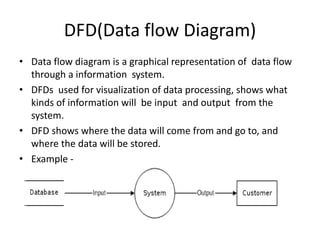
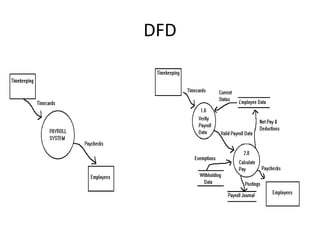
• Data flow diagram is a graphical representation of data flow 
through a information system. 
• DFDs used for visualization of data processing, shows what 
kinds of information will be input and output from the 
system. 
• DFD shows where the data will come from and go to, and 
where the data will be stored. 
• Example -
DFD 
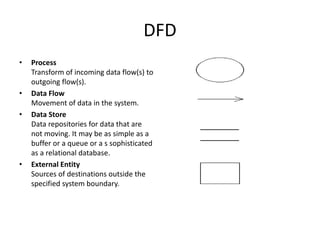
• Process 
Transform of incoming data flow(s) to 
outgoing flow(s). 
• Data Flow 
Movement of data in the system. 
• Data Store 
Data repositories for data that are 
not moving. It may be as simple as a 
buffer or a queue or a s sophisticated 
as a relational database. 
• External Entity 
Sources of destinations outside the 
specified system boundary.
Levels of DFD 
• The DFD may be used for any level of data 
abstraction. DFD can be partitioned into 
levels. Each level has more information flow 
and data functional details than the previous 
level. 
• Like level 0 DFD 
level 1 DFD.
DFD
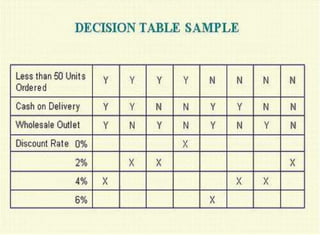
Decision Table 
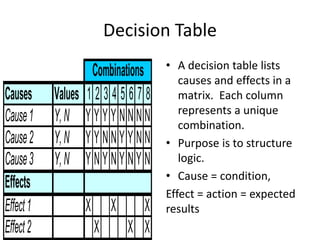
Combinations • A decision table lists 
Causes Values 1 2 3 4 5 6 7 8 
Cause 1 Y, N Y Y Y Y N N N N 
Cause 2 Y, N Y Y N N Y Y N N 
Cause 3 Y, N Y N Y N Y N Y N 
Effects 
Effect 1 X X X 
Effect 2 X X X 
causes and effects in a 
matrix. Each column 
represents a unique 
combination. 
• Purpose is to structure 
logic. 
• Cause = condition, 
Effect = action = expected 
results
Structure of Decision Table 
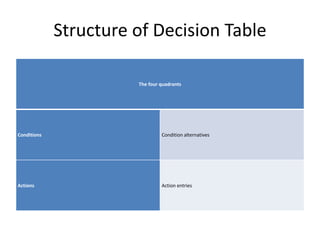
The four quadrants 
Conditions Condition alternatives 
Actions Action entries
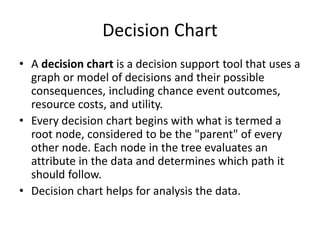
Decision Chart 
• A decision chart is a decision support tool that uses a 
graph or model of decisions and their possible 
consequences, including chance event outcomes, 
resource costs, and utility. 
• Every decision chart begins with what is termed a 
root node, considered to be the "parent" of every 
other node. Each node in the tree evaluates an 
attribute in the data and determines which path it 
should follow. 
• Decision chart helps for analysis the data.
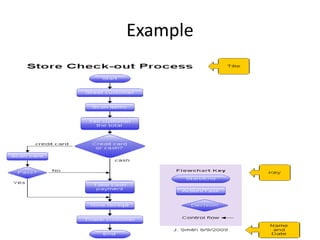
Example
Structure Chart 
• Describe functions and sub-functions of each part 
of system (in more detail than a DFD) 
• Show relationships between common and unique 
modules of a computer program 
• Hierarchical, Modular structure 
– Each layer in a program performs specific activities 
– Each module performs a specific function
Steps in drawing a structure chart 
• Review the DFDs and object models 
• Identify modules and relationships 
• Add couples, loops, and conditions 
• Analyze the structure chart, the DFDs, and the 
data dictionary
Structure Chart 
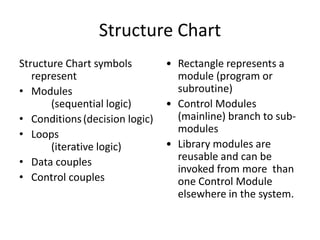
Structure Chart symbols 
represent 
• Modules 
(sequential logic) 
• Conditions (decision logic) 
• Loops 
(iterative logic) 
• Data couples 
• Control couples 
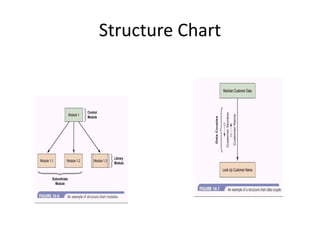
• Rectangle represents a 
module (program or 
subroutine) 
• Control Modules 
(mainline) branch to sub-modules 
• Library modules are 
reusable and can be 
invoked from more than 
one Control Module 
elsewhere in the system.
Structure Chart
Structure Chart - Condition 
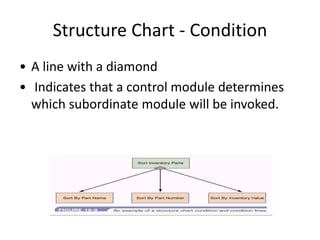
• A line with a diamond 
• Indicates that a control module determines 
which subordinate module will be invoked.
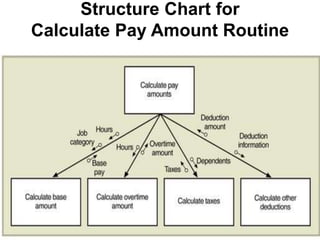
Structure Chart for 
Calculate Pay Amount Routine
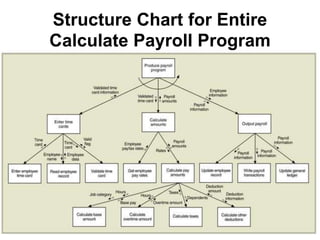
Structure Chart for Entire 
Calculate Payroll Program
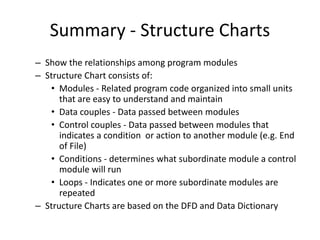
Summary - Structure Charts 
– Show the relationships among program modules 
– Structure Chart consists of: 
• Modules - Related program code organized into small units 
that are easy to understand and maintain 
• Data couples - Data passed between modules 
• Control couples - Data passed between modules that 
indicates a condition or action to another module (e.g. End 
of File) 
• Conditions - determines what subordinate module a control 
module will run 
• Loops - Indicates one or more subordinate modules are 
repeated 
– Structure Charts are based on the DFD and Data Dictionary

dataflowdiagram2 121005140736-phpapp01

  • 1.
    DFD, Decision Table,Decision Chart, Structure Charts
  • 2.
    DFD(Data flow Diagram) • Data flow diagram is a graphical representation of data flow through a information system. • DFDs used for visualization of data processing, shows what kinds of information will be input and output from the system. • DFD shows where the data will come from and go to, and where the data will be stored. • Example -
  • 3.
    DFD • Process Transform of incoming data flow(s) to outgoing flow(s). • Data Flow Movement of data in the system. • Data Store Data repositories for data that are not moving. It may be as simple as a buffer or a queue or a s sophisticated as a relational database. • External Entity Sources of destinations outside the specified system boundary.
  • 4.
    Levels of DFD • The DFD may be used for any level of data abstraction. DFD can be partitioned into levels. Each level has more information flow and data functional details than the previous level. • Like level 0 DFD level 1 DFD.
  • 5.
  • 6.
    Decision Table Combinations• A decision table lists Causes Values 1 2 3 4 5 6 7 8 Cause 1 Y, N Y Y Y Y N N N N Cause 2 Y, N Y Y N N Y Y N N Cause 3 Y, N Y N Y N Y N Y N Effects Effect 1 X X X Effect 2 X X X causes and effects in a matrix. Each column represents a unique combination. • Purpose is to structure logic. • Cause = condition, Effect = action = expected results
  • 7.
    Structure of DecisionTable The four quadrants Conditions Condition alternatives Actions Action entries
  • 9.
    Decision Chart •A decision chart is a decision support tool that uses a graph or model of decisions and their possible consequences, including chance event outcomes, resource costs, and utility. • Every decision chart begins with what is termed a root node, considered to be the "parent" of every other node. Each node in the tree evaluates an attribute in the data and determines which path it should follow. • Decision chart helps for analysis the data.
  • 10.
  • 11.
    Structure Chart •Describe functions and sub-functions of each part of system (in more detail than a DFD) • Show relationships between common and unique modules of a computer program • Hierarchical, Modular structure – Each layer in a program performs specific activities – Each module performs a specific function
  • 12.
    Steps in drawinga structure chart • Review the DFDs and object models • Identify modules and relationships • Add couples, loops, and conditions • Analyze the structure chart, the DFDs, and the data dictionary
  • 13.
    Structure Chart StructureChart symbols represent • Modules (sequential logic) • Conditions (decision logic) • Loops (iterative logic) • Data couples • Control couples • Rectangle represents a module (program or subroutine) • Control Modules (mainline) branch to sub-modules • Library modules are reusable and can be invoked from more than one Control Module elsewhere in the system.
  • 14.
  • 15.
    Structure Chart -Condition • A line with a diamond • Indicates that a control module determines which subordinate module will be invoked.
  • 16.
    Structure Chart for Calculate Pay Amount Routine
  • 17.
    Structure Chart forEntire Calculate Payroll Program
  • 18.
    Summary - StructureCharts – Show the relationships among program modules – Structure Chart consists of: • Modules - Related program code organized into small units that are easy to understand and maintain • Data couples - Data passed between modules • Control couples - Data passed between modules that indicates a condition or action to another module (e.g. End of File) • Conditions - determines what subordinate module a control module will run • Loops - Indicates one or more subordinate modules are repeated – Structure Charts are based on the DFD and Data Dictionary