Software Development Life Cycle (SDLC) “ You’ve got to be very careful if you don’t know where you’re going, because you might not get there.”
Capability Maturity Model (CMM) A bench-mark for measuring the maturity of an organization’s software process CMM defines 5 levels of process maturity based on certain Key Process Areas (KPA)
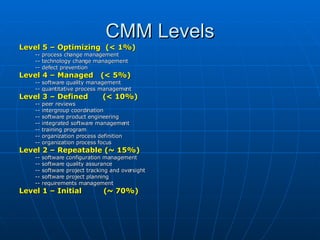
CMM Levels Level 5 – Optimizing  (< 1%) -- process change management -- technology change management -- defect prevention Level 4 – Managed  (< 5%) -- software quality management -- quantitative process management Level 3 – Defined  (< 10%)   -- peer reviews  -- intergroup coordination -- software product engineering -- integrated software management -- training program -- organization process definition -- organization process focus Level 2 – Repeatable (~ 15%) -- software configuration management -- software quality assurance  -- software project tracking and oversight -- software project planning -- requirements management Level 1 – Initial  (~ 70%)
SDLC Model A framework that describes the activities performed at each stage of a software development project.
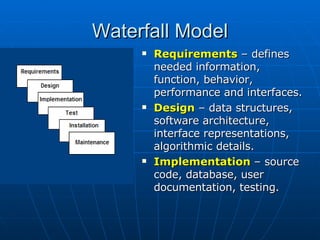
Waterfall Model Requirements   – defines needed information, function, behavior, performance and interfaces. Design  – data structures, software architecture, interface representations, algorithmic details. Implementation  – source code, database, user documentation, testing.
Waterfall Strengths Easy to understand , easy to use Provides structure  to inexperienced staff Milestones are well understood Sets  requirements stability Good for  management control  (plan, staff, track) Works well when  quality is more important  than cost or schedule
Waterfall Deficiencies All  requirements must be known  upfront Deliverables created for each phase are considered frozen –  inhibits flexibility Can give a  false impression of progress Does not reflect problem-solving nature  of software development – iterations of phases Integration is  one big bang at the end Little opportunity for customer  to preview the system (until it may be too late)
When to use the Waterfall Model Requirements are very  well known Product definition is  stable Technology is  understood New  version of an existing product Porting an existing product  to a new platform.
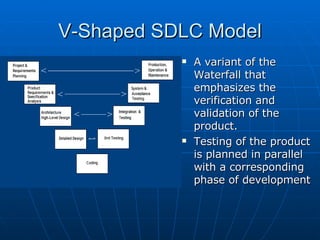
V-Shaped SDLC Model A variant of the Waterfall that emphasizes the verification and validation of the product. Testing of the product is planned in parallel with a corresponding phase of development
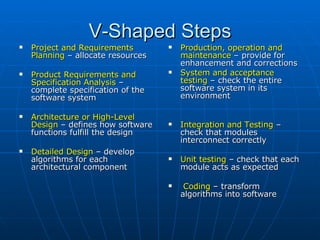
V-Shaped Steps Project and Requirements Planning  – allocate resources Product Requirements and Specification Analysis  – complete specification of the software system Architecture or High-Level Design  – defines how software functions fulfill the design Detailed Design  – develop algorithms for each architectural component Production, operation and maintenance  – provide for enhancement and corrections System and acceptance testing  – check the entire software system in its environment Integration and Testing  – check that modules  interconnect correctly Unit testing  – check that each module acts as expected Coding  – transform algorithms into software
V-Shaped Strengths Emphasize planning for  verification and validation  of the product in early stages of product development Each deliverable must be testable Project management can  track progress by milestones Easy to use
V-Shaped Weaknesses Does not easily handle  concurrent events Does not handle  iterations  or phases Does not easily handle  dynamic changes in requirements Does not contain  risk analysis  activities
When to use the V-Shaped Model Excellent choice for  systems requiring high reliability  – hospital patient control applications All requirements are known  up-front When it can be modified to  handle changing requirements beyond analysis phase  Solution and technology are known
Structured Evolutionary Prototyping Model Developers build a prototype  during the requirements phase Prototype is  evaluated by end users Users give  corrective feedback  Developers further  refine the prototype When the  user is satisfied , the prototype code is brought up to the standards needed for a final product.
Structured Evolutionary Prototyping Steps A  preliminary project plan  is developed An  partial high-level paper model  is created The model is source for a  partial requirements specification A  prototype is built with  basic and critical attributes The  designer builds  the database  user interface  algorithmic functions The designer  demonstrates the prototype , the user evaluates for problems and suggests improvements. This loop continues  until the user is satisfied
Structured Evolutionary Prototyping Strengths Customers can  “see” the system requirements  as they are being gathered Developers  learn from customers  A more  accurate end product Unexpected  requirements accommodated Allows for  flexible design  and development Steady,  visible signs  of progress produced Interaction with the prototype stimulates awareness of  additional needed functionality
Structured Evolutionary Prototyping Weaknesses Tendency to abandon structured program development for  “code-and-fix” development Bad reputation for “ quick-and-dirty ” methods Overall  maintainability may be overlooked The customer may  want the prototype delivered . Process may  continue forever  (scope creep)
When to use Structured Evolutionary Prototyping Requirements are unstable  or have to be clarified  As the  requirements clarification stage  of a waterfall model Develop  user interfaces Short-lived demonstrations  New,  original development With the analysis and design portions of  object-oriented development .
Rapid Application Model (RAD) Requirements planning phase  (a workshop utilizing structured discussion of business problems) User description phase  – automated tools capture information from users Construction phase  – productivity tools, such as code generators, screen generators, etc. inside a time-box. (“Do until done”) Cutover phase  -- installation of the system, user acceptance testing and user training
RAD Strengths Reduced cycle time  and improved productivity with fewer people means lower costs Time-box  approach mitigates cost and schedule risk Customer involved throughout  the complete cycle minimizes risk of not achieving customer satisfaction and business needs Focus moves from documentation to code ( WYSIWYG ). Uses modeling concepts  to capture information about business, data, and processes.
RAD Weaknesses Accelerated development process  must give quick responses  to the user Risk of  never achieving closure  Hard to use with  legacy systems Requires a system that can be  modularized Developers and customers must be  committed to rapid-fire activities  in an abbreviated time frame.
When to use RAD Reasonably  well-known requirements User involved  throughout the life cycle Project can be  time-boxed  Functionality delivered in  increments High performance not required Low technical risks  System  can be modularized
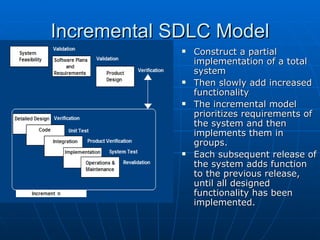
Incremental SDLC Model Construct a partial implementation of a total system  Then slowly add increased functionality The incremental model prioritizes requirements of the system and then implements them in groups. Each subsequent release of the system adds function to the previous release, until all designed functionality has been implemented.
Incremental Model Strengths  Develop high-risk or  major functions first Each release delivers an  operational product   Customer can  respond to each build Uses  “divide and conquer”  breakdown of tasks Lowers  initial delivery cost   Initial  product delivery is faster Customers get  important functionality early Risk of  changing requirements is reduced
Incremental Model Weaknesses  Requires  good planning and design Requires early definition of a complete and fully functional system  to allow for the definition of increments Well-defined module interfaces  are required (some will be developed long before others) Total cost of the complete system is  not lower
When to use the Incremental Model  Risk, funding, schedule, program complexity, or need for  early realization of benefits. Most of the requirements are known up-front but are expected to  evolve over time A need to  get basic functionality to the market early On projects which have  lengthy development schedules On a project with  new technology
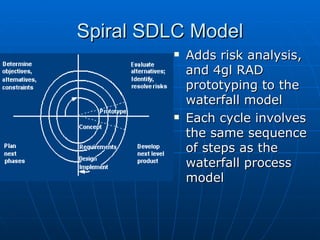
Spiral SDLC Model Adds risk analysis, and 4gl RAD prototyping to the waterfall model Each cycle involves the same sequence of steps as the waterfall process model
Spiral Quadrant Determine objectives, alternatives and constraints Objectives :  functionality, performance, hardware/software interface, critical success factors, etc. Alternatives : build, reuse, buy, sub-contract, etc. Constraints :  cost, schedule, interface, etc.
Spiral Quadrant Evaluate alternatives,  identify and resolve risks  Study alternatives  relative to objectives and constraints Identify risks  (lack of experience, new technology, tight schedules, poor process, etc. Resolve risks  (evaluate if money could be lost by continuing system development
Spiral Quadrant Develop next-level product Typical activites: Create a design Review design Develop code Inspect code Test product
Spiral Quadrant Plan next phase Typical activities Develop project plan Develop configuration management plan Develop a test plan Develop an installation plan
Spiral Model Strengths Provides early indication of insurmountable risks, without much cost Users see the system early because of rapid prototyping tools Critical high-risk functions are developed first The design does not have to be perfect  Users can be closely tied to all lifecycle steps Early and frequent feedback from users Cumulative costs assessed frequently
Spiral Model Weaknesses Time spent for evaluating risks too large for small or low-risk projects Time spent planning, resetting objectives, doing risk analysis and prototyping may  be excessive The model is complex  Risk assessment expertise is required Spiral may continue indefinitely Developers must be reassigned during non-development phase activities May be hard to define objective, verifiable milestones that indicate readiness to proceed through the next iteration
When to use Spiral Model When creation of a prototype is appropriate When costs and risk evaluation is important For medium to high-risk projects Long-term project commitment unwise because of potential changes to economic priorities Users are unsure of their needs Requirements are complex New product line  Significant changes are expected (research and exploration)
Agile SDLC’s Speed up or bypass one or more life cycle phases  Usually less formal and reduced scope Used for time-critical applications Used in organizations that employ disciplined methods
Some Agile Methods Adaptive Software Development (ASD)  Feature Driven Development (FDD)  Crystal Clear  Dynamic Software Development Method (DSDM)  Rapid Application Development (RAD) Scrum  Extreme Programming (XP)  Rational Unify Process (RUP)
Extreme Programming - XP For small-to-medium-sized teams developing software with vague or rapidly changing requirements Coding is the key activity throughout a software project Communication among teammates is done with code Life cycle and behavior of complex objects defined in test cases – again in code
XP Practices (1-6) Planning game  – determine scope of the next release by combining business priorities and technical estimates Small releases  – put a simple system into production, then release new versions in very short cycle Metaphor  – all development is guided by a simple shared story of how the whole system works Simple design  – system is designed as simply as possible (extra complexity removed as soon as found) Testing  – programmers continuously write unit tests; customers write tests for features Refactoring  – programmers continuously restructure the system without changing its behavior to remove duplication and simplify
XP Practices (7 – 12) Pair-programming  --  all production code is written with two programmers at one machine Collective ownership  – anyone can change any code anywhere in the system at any time. Continuous integration  – integrate and build the system many times a day – every time a task is completed. 40-hour week  – work no more than 40 hours a week as a rule On-site customer  – a user is on the team and available full-time to answer questions Coding standards  – programmers write all code in accordance with rules emphasizing communication through the code
XP is “extreme” because Commonsense practices taken to extreme levels If code reviews are good,  review code all the time  (pair programming) If testing is good, everybody will  test all the time If simplicity is good, keep the system in the simplest design that supports its current functionality. ( simplest thing that works ) If design is good, everybody will design daily ( refactoring ) If architecture is important, everybody will work at defining and refining the architecture ( metaphor ) If integration testing is important, build and  integrate test several times a day  (continuous integration) If short iterations are good,  make iterations really, really short  (hours rather than weeks)
XP References Online references to XP at  http:// www.extremeprogramming.org /   http://c2.com/cgi/wiki?ExtremeProgrammingRoadmap   http:// www.xprogramming.com /
Feature Driven Design (FDD) Five FDD process activities Develop an overall model  – Produce class and sequence diagrams from chief architect meeting with domain experts and developers.  Build a features list  – Identify all the features that support requirements.  The features are functionally decomposed into Business Activities steps within Subject Areas.  Features  are functions that can be developed in two weeks and expressed in client terms with the template:  <action> <result> <object>  i.e.  Calculate the total of a sale Plan by feature  --  the development staff plans the development sequence of features Design by feature  --  the team produces sequence diagrams for the selected features Build by feature  – the team writes and tests the code  http:// www.nebulon.com/articles/index.html
Dynamic Systems Development Method (DSDM) Applies a framework for RAD and short time frames Paradigm is the 80/20 rule  – majority of the requirements can be delivered in a relatively short amount of time.
DSDM Principles Active user involvement imperative (Ambassador users) DSDM teams empowered to make decisions Focus on frequent product delivery Product acceptance is fitness for business purpose Iterative and incremental development - to converge on a solution Requirements initially agreed at a high level All changes made during development are reversible Testing is integrated throughout the life cycle Collaborative and co-operative approach among all stakeholders essential
DSDM Lifecycle  Feasibility study Business study – prioritized requirements Functional model iteration risk analysis Time-box plan Design and build iteration Implementation
Adaptive SDLC Combines RAD with software engineering best practices  Project initiation Adaptive cycle planning Concurrent component engineering Quality review Final QA and release
Adaptive Steps Project initialization – determine intent of project Determine the project time-box (estimation duration of the project) Determine the optimal number of cycles and the time-box for each Write an objective statement for each cycle Assign primary components to each cycle Develop a project task list Review the success of a cycle Plan the next cycle
Tailored SDLC Models Any one model does not fit all projects If there is nothing that fits a particular project, pick a model that comes close and modify it for your needs. Project should consider risk but complete spiral too much – start with spiral & pare it done Project delivered in increments but there are serious reliability issues – combine incremental model with the V-shaped model Each team must pick or customize a SDLC model to fit its project
Agile Web references DePaul web site has links to many Agile references http:// se.cs.depaul.edu/ise/agile.htm
Quality – the degree to which the software satisfies stated and implied requirements Absence of system crashes Correspondence between the software and the users’ expectations Performance to specified requirements Quality must be controlled because it lowers production speed, increases maintenance costs and can adversely affect business
Quality Assurance Plan The plan for quality assurance activities should be in writing  Decide if a separate group should perform the quality assurance activities Some elements that should be considered by the plan are: defect tracking, unit testing, source-code tracking, technical reviews, integration testing and system testing.
Quality Assurance Plan Defect tracing  – keeps track of each defect found, its source, when it was detected, when it was resolved, how it was resolved, etc Unit testing  – each individual module is tested Source code tracing  – step through source code line by line Technical reviews  – completed work is reviewed by peers Integration testing  --  exercise new code in combination with code that already has been integrated System testing  – execution of the software for the purpose of finding defects.

Software Devlopment Life Cycle

  • 1.
    Software Development LifeCycle (SDLC) “ You’ve got to be very careful if you don’t know where you’re going, because you might not get there.”
  • 2.
    Capability Maturity Model(CMM) A bench-mark for measuring the maturity of an organization’s software process CMM defines 5 levels of process maturity based on certain Key Process Areas (KPA)
  • 3.
    CMM Levels Level5 – Optimizing (< 1%) -- process change management -- technology change management -- defect prevention Level 4 – Managed (< 5%) -- software quality management -- quantitative process management Level 3 – Defined (< 10%) -- peer reviews -- intergroup coordination -- software product engineering -- integrated software management -- training program -- organization process definition -- organization process focus Level 2 – Repeatable (~ 15%) -- software configuration management -- software quality assurance -- software project tracking and oversight -- software project planning -- requirements management Level 1 – Initial (~ 70%)
  • 4.
    SDLC Model Aframework that describes the activities performed at each stage of a software development project.
  • 5.
    Waterfall Model Requirements – defines needed information, function, behavior, performance and interfaces. Design – data structures, software architecture, interface representations, algorithmic details. Implementation – source code, database, user documentation, testing.
  • 6.
    Waterfall Strengths Easyto understand , easy to use Provides structure to inexperienced staff Milestones are well understood Sets requirements stability Good for management control (plan, staff, track) Works well when quality is more important than cost or schedule
  • 7.
    Waterfall Deficiencies All requirements must be known upfront Deliverables created for each phase are considered frozen – inhibits flexibility Can give a false impression of progress Does not reflect problem-solving nature of software development – iterations of phases Integration is one big bang at the end Little opportunity for customer to preview the system (until it may be too late)
  • 8.
    When to usethe Waterfall Model Requirements are very well known Product definition is stable Technology is understood New version of an existing product Porting an existing product to a new platform.
  • 9.
    V-Shaped SDLC ModelA variant of the Waterfall that emphasizes the verification and validation of the product. Testing of the product is planned in parallel with a corresponding phase of development
  • 10.
    V-Shaped Steps Projectand Requirements Planning – allocate resources Product Requirements and Specification Analysis – complete specification of the software system Architecture or High-Level Design – defines how software functions fulfill the design Detailed Design – develop algorithms for each architectural component Production, operation and maintenance – provide for enhancement and corrections System and acceptance testing – check the entire software system in its environment Integration and Testing – check that modules interconnect correctly Unit testing – check that each module acts as expected Coding – transform algorithms into software
  • 11.
    V-Shaped Strengths Emphasizeplanning for verification and validation of the product in early stages of product development Each deliverable must be testable Project management can track progress by milestones Easy to use
  • 12.
    V-Shaped Weaknesses Doesnot easily handle concurrent events Does not handle iterations or phases Does not easily handle dynamic changes in requirements Does not contain risk analysis activities
  • 13.
    When to usethe V-Shaped Model Excellent choice for systems requiring high reliability – hospital patient control applications All requirements are known up-front When it can be modified to handle changing requirements beyond analysis phase Solution and technology are known
  • 14.
    Structured Evolutionary PrototypingModel Developers build a prototype during the requirements phase Prototype is evaluated by end users Users give corrective feedback Developers further refine the prototype When the user is satisfied , the prototype code is brought up to the standards needed for a final product.
  • 15.
    Structured Evolutionary PrototypingSteps A preliminary project plan is developed An partial high-level paper model is created The model is source for a partial requirements specification A prototype is built with basic and critical attributes The designer builds the database user interface algorithmic functions The designer demonstrates the prototype , the user evaluates for problems and suggests improvements. This loop continues until the user is satisfied
  • 16.
    Structured Evolutionary PrototypingStrengths Customers can “see” the system requirements as they are being gathered Developers learn from customers A more accurate end product Unexpected requirements accommodated Allows for flexible design and development Steady, visible signs of progress produced Interaction with the prototype stimulates awareness of additional needed functionality
  • 17.
    Structured Evolutionary PrototypingWeaknesses Tendency to abandon structured program development for “code-and-fix” development Bad reputation for “ quick-and-dirty ” methods Overall maintainability may be overlooked The customer may want the prototype delivered . Process may continue forever (scope creep)
  • 18.
    When to useStructured Evolutionary Prototyping Requirements are unstable or have to be clarified As the requirements clarification stage of a waterfall model Develop user interfaces Short-lived demonstrations New, original development With the analysis and design portions of object-oriented development .
  • 19.
    Rapid Application Model(RAD) Requirements planning phase (a workshop utilizing structured discussion of business problems) User description phase – automated tools capture information from users Construction phase – productivity tools, such as code generators, screen generators, etc. inside a time-box. (“Do until done”) Cutover phase -- installation of the system, user acceptance testing and user training
  • 20.
    RAD Strengths Reducedcycle time and improved productivity with fewer people means lower costs Time-box approach mitigates cost and schedule risk Customer involved throughout the complete cycle minimizes risk of not achieving customer satisfaction and business needs Focus moves from documentation to code ( WYSIWYG ). Uses modeling concepts to capture information about business, data, and processes.
  • 21.
    RAD Weaknesses Accelerateddevelopment process must give quick responses to the user Risk of never achieving closure Hard to use with legacy systems Requires a system that can be modularized Developers and customers must be committed to rapid-fire activities in an abbreviated time frame.
  • 22.
    When to useRAD Reasonably well-known requirements User involved throughout the life cycle Project can be time-boxed Functionality delivered in increments High performance not required Low technical risks System can be modularized
  • 23.
    Incremental SDLC ModelConstruct a partial implementation of a total system Then slowly add increased functionality The incremental model prioritizes requirements of the system and then implements them in groups. Each subsequent release of the system adds function to the previous release, until all designed functionality has been implemented.
  • 24.
    Incremental Model Strengths Develop high-risk or major functions first Each release delivers an operational product Customer can respond to each build Uses “divide and conquer” breakdown of tasks Lowers initial delivery cost Initial product delivery is faster Customers get important functionality early Risk of changing requirements is reduced
  • 25.
    Incremental Model Weaknesses Requires good planning and design Requires early definition of a complete and fully functional system to allow for the definition of increments Well-defined module interfaces are required (some will be developed long before others) Total cost of the complete system is not lower
  • 26.
    When to usethe Incremental Model Risk, funding, schedule, program complexity, or need for early realization of benefits. Most of the requirements are known up-front but are expected to evolve over time A need to get basic functionality to the market early On projects which have lengthy development schedules On a project with new technology
  • 27.
    Spiral SDLC ModelAdds risk analysis, and 4gl RAD prototyping to the waterfall model Each cycle involves the same sequence of steps as the waterfall process model
  • 28.
    Spiral Quadrant Determineobjectives, alternatives and constraints Objectives : functionality, performance, hardware/software interface, critical success factors, etc. Alternatives : build, reuse, buy, sub-contract, etc. Constraints : cost, schedule, interface, etc.
  • 29.
    Spiral Quadrant Evaluatealternatives, identify and resolve risks Study alternatives relative to objectives and constraints Identify risks (lack of experience, new technology, tight schedules, poor process, etc. Resolve risks (evaluate if money could be lost by continuing system development
  • 30.
    Spiral Quadrant Developnext-level product Typical activites: Create a design Review design Develop code Inspect code Test product
  • 31.
    Spiral Quadrant Plannext phase Typical activities Develop project plan Develop configuration management plan Develop a test plan Develop an installation plan
  • 32.
    Spiral Model StrengthsProvides early indication of insurmountable risks, without much cost Users see the system early because of rapid prototyping tools Critical high-risk functions are developed first The design does not have to be perfect Users can be closely tied to all lifecycle steps Early and frequent feedback from users Cumulative costs assessed frequently
  • 33.
    Spiral Model WeaknessesTime spent for evaluating risks too large for small or low-risk projects Time spent planning, resetting objectives, doing risk analysis and prototyping may be excessive The model is complex Risk assessment expertise is required Spiral may continue indefinitely Developers must be reassigned during non-development phase activities May be hard to define objective, verifiable milestones that indicate readiness to proceed through the next iteration
  • 34.
    When to useSpiral Model When creation of a prototype is appropriate When costs and risk evaluation is important For medium to high-risk projects Long-term project commitment unwise because of potential changes to economic priorities Users are unsure of their needs Requirements are complex New product line Significant changes are expected (research and exploration)
  • 35.
    Agile SDLC’s Speedup or bypass one or more life cycle phases Usually less formal and reduced scope Used for time-critical applications Used in organizations that employ disciplined methods
  • 36.
    Some Agile MethodsAdaptive Software Development (ASD) Feature Driven Development (FDD) Crystal Clear Dynamic Software Development Method (DSDM) Rapid Application Development (RAD) Scrum Extreme Programming (XP) Rational Unify Process (RUP)
  • 37.
    Extreme Programming -XP For small-to-medium-sized teams developing software with vague or rapidly changing requirements Coding is the key activity throughout a software project Communication among teammates is done with code Life cycle and behavior of complex objects defined in test cases – again in code
  • 38.
    XP Practices (1-6)Planning game – determine scope of the next release by combining business priorities and technical estimates Small releases – put a simple system into production, then release new versions in very short cycle Metaphor – all development is guided by a simple shared story of how the whole system works Simple design – system is designed as simply as possible (extra complexity removed as soon as found) Testing – programmers continuously write unit tests; customers write tests for features Refactoring – programmers continuously restructure the system without changing its behavior to remove duplication and simplify
  • 39.
    XP Practices (7– 12) Pair-programming -- all production code is written with two programmers at one machine Collective ownership – anyone can change any code anywhere in the system at any time. Continuous integration – integrate and build the system many times a day – every time a task is completed. 40-hour week – work no more than 40 hours a week as a rule On-site customer – a user is on the team and available full-time to answer questions Coding standards – programmers write all code in accordance with rules emphasizing communication through the code
  • 40.
    XP is “extreme”because Commonsense practices taken to extreme levels If code reviews are good, review code all the time (pair programming) If testing is good, everybody will test all the time If simplicity is good, keep the system in the simplest design that supports its current functionality. ( simplest thing that works ) If design is good, everybody will design daily ( refactoring ) If architecture is important, everybody will work at defining and refining the architecture ( metaphor ) If integration testing is important, build and integrate test several times a day (continuous integration) If short iterations are good, make iterations really, really short (hours rather than weeks)
  • 41.
    XP References Onlinereferences to XP at http:// www.extremeprogramming.org / http://c2.com/cgi/wiki?ExtremeProgrammingRoadmap http:// www.xprogramming.com /
  • 42.
    Feature Driven Design(FDD) Five FDD process activities Develop an overall model – Produce class and sequence diagrams from chief architect meeting with domain experts and developers. Build a features list – Identify all the features that support requirements. The features are functionally decomposed into Business Activities steps within Subject Areas. Features are functions that can be developed in two weeks and expressed in client terms with the template: <action> <result> <object> i.e. Calculate the total of a sale Plan by feature -- the development staff plans the development sequence of features Design by feature -- the team produces sequence diagrams for the selected features Build by feature – the team writes and tests the code http:// www.nebulon.com/articles/index.html
  • 43.
    Dynamic Systems DevelopmentMethod (DSDM) Applies a framework for RAD and short time frames Paradigm is the 80/20 rule – majority of the requirements can be delivered in a relatively short amount of time.
  • 44.
    DSDM Principles Activeuser involvement imperative (Ambassador users) DSDM teams empowered to make decisions Focus on frequent product delivery Product acceptance is fitness for business purpose Iterative and incremental development - to converge on a solution Requirements initially agreed at a high level All changes made during development are reversible Testing is integrated throughout the life cycle Collaborative and co-operative approach among all stakeholders essential
  • 45.
    DSDM Lifecycle Feasibility study Business study – prioritized requirements Functional model iteration risk analysis Time-box plan Design and build iteration Implementation
  • 46.
    Adaptive SDLC CombinesRAD with software engineering best practices Project initiation Adaptive cycle planning Concurrent component engineering Quality review Final QA and release
  • 47.
    Adaptive Steps Projectinitialization – determine intent of project Determine the project time-box (estimation duration of the project) Determine the optimal number of cycles and the time-box for each Write an objective statement for each cycle Assign primary components to each cycle Develop a project task list Review the success of a cycle Plan the next cycle
  • 48.
    Tailored SDLC ModelsAny one model does not fit all projects If there is nothing that fits a particular project, pick a model that comes close and modify it for your needs. Project should consider risk but complete spiral too much – start with spiral & pare it done Project delivered in increments but there are serious reliability issues – combine incremental model with the V-shaped model Each team must pick or customize a SDLC model to fit its project
  • 49.
    Agile Web referencesDePaul web site has links to many Agile references http:// se.cs.depaul.edu/ise/agile.htm
  • 50.
    Quality – thedegree to which the software satisfies stated and implied requirements Absence of system crashes Correspondence between the software and the users’ expectations Performance to specified requirements Quality must be controlled because it lowers production speed, increases maintenance costs and can adversely affect business
  • 51.
    Quality Assurance PlanThe plan for quality assurance activities should be in writing Decide if a separate group should perform the quality assurance activities Some elements that should be considered by the plan are: defect tracking, unit testing, source-code tracking, technical reviews, integration testing and system testing.
  • 52.
    Quality Assurance PlanDefect tracing – keeps track of each defect found, its source, when it was detected, when it was resolved, how it was resolved, etc Unit testing – each individual module is tested Source code tracing – step through source code line by line Technical reviews – completed work is reviewed by peers Integration testing -- exercise new code in combination with code that already has been integrated System testing – execution of the software for the purpose of finding defects.