Database Management
Systems
Data Modelling
By Nickkisha Farrell, BSc IT, Dip Ed
February 2014
IN THIS PRESENTATION
What is data modelling?
Types of data Models
Creating a Data Model
Entities, Attributes, Relationships and Cardinality
How to draw Entity Relationship Diagrams
ERD: Problem and Solution

2
INTRODUCTION
• In order ultimately to design databases to support an
organization, one should have:
• a clear understanding of how the organization is
structured
• how it functions
• understand its components, what they do and how they
relate to each other.
• There must be a way of recording (diagramming) the
business

• This is the principle of DATA MODELING.

3
DATA MODELLING
• Process used to define and analyze data requirements
needed to support the business processes, so that
anomalies and inconsistencies may be eliminated
during the physical database design.

• Therefore, the process of data modeling involves
professional data modelers working closely with
business stakeholders, as well as potential users of
the information system.

4
DATA MODELLING
The analysis of data objects and their relationships to
other data objects.

• Types of data models:
1. Conceptual: describes WHAT the system contains
2. Logical: describes HOW the system will be
implemented, regardless of the DBMS
3. Physical: describes HOW the system will be
implemented using a specific DBMS

5
TYPES OF DATA MODELS
• Entity-Relationship (E-R) Models
• The most common method for database modelling
• Only addresses data and relationships
• Classic, simplest
• Best for deriving a sound table design

• Basis for most other modeling approaches

• UML (unified modeling language)
• Class models
• Goes beyond data, also models behaviors

6
ENTITY RELATIONSHIP DIAGRAMS
• a graphical representation of the logical structure of a
database
• identifies the concepts or entities that exist in a system
and the relationships between those entities
• help the database analyst/designer gains a better
understanding of the information to be contained in the
database.
• facilitate documentation of the database design lifecycle.
• used to communicate the logical structure of the database
to users .

7
ENTITY
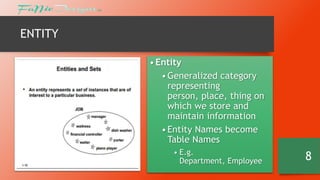
• Entity
• Generalized category
representing
person, place, thing on
which we store and
maintain information
• Entity Names become
Table Names
• E.g.
Department, Employee

8
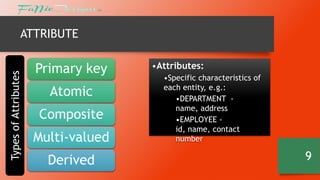
Types of Attributes

ATTRIBUTE

Primary key

Atomic
Composite
Multi-valued
Derived

•Attributes:
•Specific characteristics of
each entity, e.g.:
•DEPARTMENT name, address
•EMPLOYEE id, name, contact
number

9
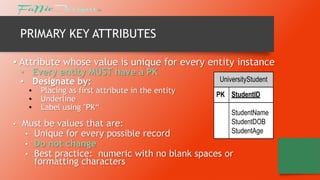
PRIMARY KEY ATTRIBUTES
• Attribute whose value is unique for every entity instance
• Every entity MUST have a PK
• Designate by:
•
•
•

•

Placing as first attribute in the entity
Underline
Label using "PK“

UniversityStudent
PK StudentID
StudentName
StudentDOB
StudentAge

Must be values that are:
• Unique for every possible record
• Do not change
• Best practice: numeric with no blank spaces or
formatting characters
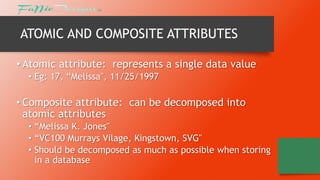
ATOMIC AND COMPOSITE ATTRIBUTES
• Atomic attribute: represents a single data value
• Eg: 17, “Melissa", 11/25/1997

• Composite attribute: can be decomposed into
atomic attributes
• “Melissa K. Jones"
• “VC100 Murrays Vilage, Kingstown, SVG"
• Should be decomposed as much as possible when storing
in a database
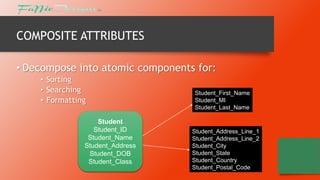
COMPOSITE ATTRIBUTES
• Decompose into atomic components for:
• Sorting
• Searching
• Formatting
Student
Student_ID
Student_Name
Student_Address
Student_DOB
Student_Class

Student_First_Name
Student_MI
Student_Last_Name

Student_Address_Line_1
Student_Address_Line_2
Student_City
Student_State
Student_Country
Student_Postal_Code
MULTI-VALUED ATTRIBUTES
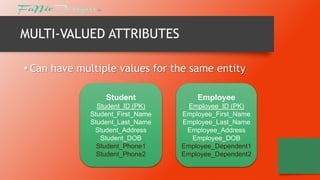
• Can have multiple values for the same entity
Student

Employee

Student_ID (PK)
Student_First_Name
Student_Last_Name
Student_Address
Student_DOB
Student_Phone1
Student_Phone2

Employee_ID (PK)
Employee_First_Name
Employee_Last_Name
Employee_Address
Employee_DOB
Employee_Dependent1
Employee_Dependent2
HANDLING MULTI-VALUED ATTRIBUTES
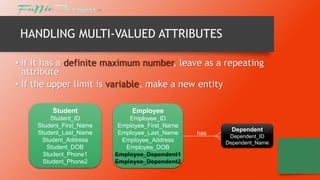
• If it has a definite maximum number, leave as a repeating
attribute
• If the upper limit is variable, make a new entity
Student

Employee

Student_ID
Student_First_Name
Student_Last_Name
Student_Address
Student_DOB
Student_Phone1
Student_Phone2

Employee_ID
Employee_First_Name
Employee_Last_Name
Employee_Address
Employee_DOB
Employee_Dependent1
Employee_Dependent2

has

Dependent
Dependent_ID
Dependent_Name
DERIVED ATTRIBUTES
• Value that can be derived from other attributes
• Student_Age = 17 (DOB = 04/26/1997, current date is
04/30/2014)

• Store the underlying data values from which you can derive
the attribute value …
• Examples:
• DOB => Age

• … unless the underlying values can change!
• PRODUCT_PRICE, COURSE_CREDITS
RELATIONSHIPS
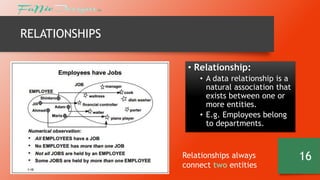
• Relationship:
• A data relationship is a
natural association that
exists between one or
more entities.
• E.g. Employees belong
to departments.

Relationships always
connect two entities

16
CARDINALITY
• Cardinality:
• Defines the number of occurrences of one entity for a single
occurrence of the related entity.
• E.g. a department may have one or more employees, but an
employee can belong to only one department.
• Ordinality :
• Closely linked to cardinality.
• Describes the relationship as either mandatory or optional.
• Specifies the absolute minimum number of relationships.
• When the minimum number is = zero, relationship is optional
• When the minimum number is > than zero , relationship is mandatory

17
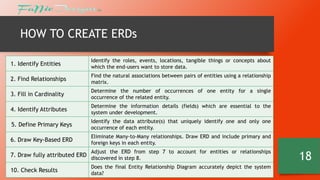
HOW TO CREATE ERDs
1. Identify Entities

Identify the roles, events, locations, tangible things or concepts about
which the end-users want to store data.

2. Find Relationships

Find the natural associations between pairs of entities using a relationship
matrix.

3. Fill in Cardinality

Determine the number of occurrences of one entity for a single
occurrence of the related entity.

4. Identify Attributes

Determine the information details (fields) which are essential to the
system under development.

5. Define Primary Keys

Identify the data attribute(s) that uniquely identify one and only one
occurrence of each entity.

6. Draw Key-Based ERD

Eliminate Many-to-Many relationships. Draw ERD and include primary and
foreign keys in each entity.
Adjust the ERD from step 7 to account for entities or relationships

7. Draw fully attributed ERD discovered in step 8.
10. Check Results

Does the final Entity Relationship Diagram accurately depict the system
data?

18
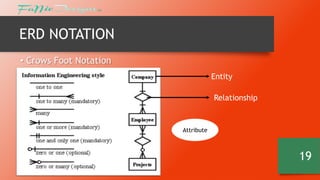
ERD NOTATION
• Crows Foot Notation
Entity
Relationship

Attribute

19
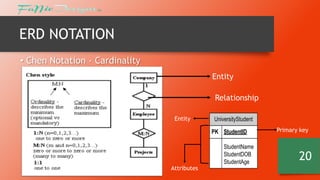
ERD NOTATION
• Chen Notation - Cardinality
Entity
Relationship
Entity

UniversityStudent
PK StudentID

Attributes

StudentName
StudentDOB
StudentAge

Primary key

20
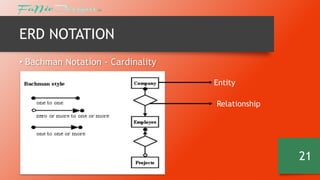
ERD NOTATION
• Bachman Notation - Cardinality
Entity
Relationship

21
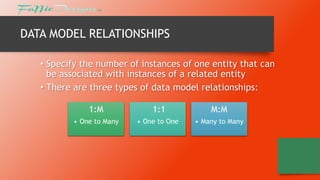
DATA MODEL RELATIONSHIPS
• Specify the number of instances of one entity that can
be associated with instances of a related entity
• There are three types of data model relationships:
1:M

1:1

M:M

• One to Many

• One to One

• Many to Many
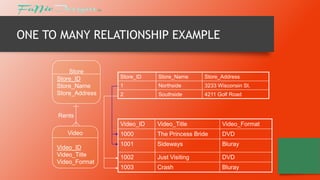
ONE TO MANY RELATIONSHIP EXAMPLE
Store
Store_ID
Store_Name
Store_Address

Store_ID

Store_Name

Store_Address

1

Northside

3233 Wisconsin St.

2

Southside

4211 Golf Road

Video_ID

Video_Title

Video_Format

1000

The Princess Bride

DVD

1001

Sideways

Bluray

1002

Just Visiting

DVD

1003

Crash

Bluray

Rents
Video

Video_ID
Video_Title
Video_Format
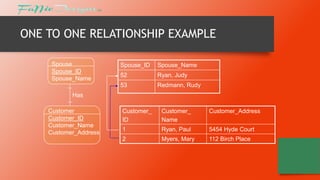
ONE TO ONE RELATIONSHIP EXAMPLE
Spouse
Spouse_ID
Spouse_Name

Spouse_ID

Spouse_Name

52

Ryan, Judy

53

Redmann, Rudy

Has
Customer
Customer_ID
Customer_Name
Customer_Address

Customer_
ID

Customer_
Name

Customer_Address

1

Ryan, Paul

5454 Hyde Court

2

Myers, Mary

112 Birch Place
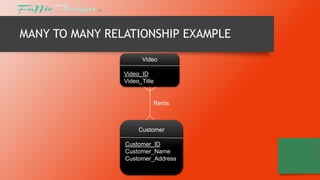
MANY TO MANY RELATIONSHIP EXAMPLE
Video
Video_ID
Video_Title

Rents

Customer
Customer_ID
Customer_Name
Customer_Address
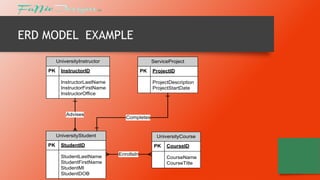
ERD MODEL EXAMPLE
UniversityInstructor
PK

ServiceProject

InstructorID

PK

InstructorLastName
InstructorFirstName
InstructorOffice

Advises

ProjectDescription
ProjectStartDate

Completes

UniversityStudent
PK

UniversityCourse

StudentID
StudentLastName
StudentFirstName
StudentMI
StudentDOB

ProjectID

PK
EnrollsIn

CourseID
CourseName
CourseTitle
NOW ITS YOUR TURN

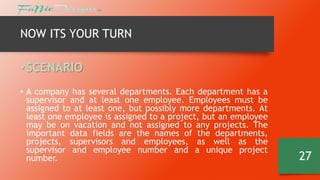
• SCENARIO
• A company has several departments. Each department has a
supervisor and at least one employee. Employees must be
assigned to at least one, but possibly more departments. At
least one employee is assigned to a project, but an employee
may be on vacation and not assigned to any projects. The
important data fields are the names of the departments,
projects, supervisors and employees, as well as the
supervisor and employee number and a unique project
number.

27
SOLVING THE PROBLEM
1. Identify Entities
• The entities in this system are Department, Employee, Supervisor and
Project. One is tempted to make Company an entity, but it is a false entity
because it has only one instance in this problem. True entities must have
more than one instance.
2. Find Relationships

We construct the following Entity Relationship Matrix:
Department
Employee
Supervisor
Project

Department Employee
is assigned
belongs to
runs
uses

Supervisor
run by

Project

works on

28
SOLVING THE PROBLEM
3. Fill in Cardinality
From the description of the problem we see that:
•Each department has exactly one supervisor.
•A supervisor is in charge of one and only one department.
•Each department is assigned at least one employee.
•Each employee works for at least one department.
•Each project has at least one employee working on it.
•An employee is assigned to 0 or more projects.

29
SOLVING THE PROBLEM
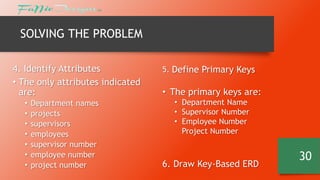
4. Identify Attributes
• The only attributes indicated
are:
•
•
•
•
•
•
•

Department names
projects
supervisors
employees
supervisor number
employee number
project number

5. Define Primary Keys

• The primary keys are:
• Department Name
• Supervisor Number
• Employee Number
Project Number

6. Draw Key-Based ERD

30
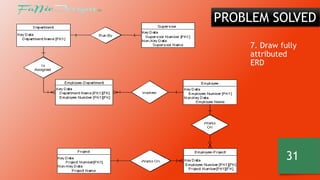
PROBLEM SOLVED
7. Draw fully
attributed
ERD

31
SUMMARY
• ER Modeling models information conceptually
• Based on functional business needs
• “What”, not “How”
• Diagrams provide easy means of communication for both analyst and user
• When creating ERD the most important steps are:
• Define entities
• Define attributes
• Define relationships
• Identify relationship cardinality (1:1, 1:M, M:M)

32
REFERENCES
• Gillenson, Mark L.,2012, Fundamentals of Database
Management Systems / Mark L. Gillenson.—2nd ed., John
Wiley and sons inc
• http://users.csc.calpoly.edu/~jdalbey/308/Lectures/HOWTO
-ERD.html

• http://www.darkopetrovic.com/pdf/Data-Modeling-andRelational-Database-Design.pdf

33

Database management systems 3 - Data Modelling

  • 1.
    Database Management Systems Data Modelling ByNickkisha Farrell, BSc IT, Dip Ed February 2014
  • 2.
    IN THIS PRESENTATION Whatis data modelling? Types of data Models Creating a Data Model Entities, Attributes, Relationships and Cardinality How to draw Entity Relationship Diagrams ERD: Problem and Solution 2
  • 3.
    INTRODUCTION • In orderultimately to design databases to support an organization, one should have: • a clear understanding of how the organization is structured • how it functions • understand its components, what they do and how they relate to each other. • There must be a way of recording (diagramming) the business • This is the principle of DATA MODELING. 3
  • 4.
    DATA MODELLING • Processused to define and analyze data requirements needed to support the business processes, so that anomalies and inconsistencies may be eliminated during the physical database design. • Therefore, the process of data modeling involves professional data modelers working closely with business stakeholders, as well as potential users of the information system. 4
  • 5.
    DATA MODELLING The analysisof data objects and their relationships to other data objects. • Types of data models: 1. Conceptual: describes WHAT the system contains 2. Logical: describes HOW the system will be implemented, regardless of the DBMS 3. Physical: describes HOW the system will be implemented using a specific DBMS 5
  • 6.
    TYPES OF DATAMODELS • Entity-Relationship (E-R) Models • The most common method for database modelling • Only addresses data and relationships • Classic, simplest • Best for deriving a sound table design • Basis for most other modeling approaches • UML (unified modeling language) • Class models • Goes beyond data, also models behaviors 6
  • 7.
    ENTITY RELATIONSHIP DIAGRAMS •a graphical representation of the logical structure of a database • identifies the concepts or entities that exist in a system and the relationships between those entities • help the database analyst/designer gains a better understanding of the information to be contained in the database. • facilitate documentation of the database design lifecycle. • used to communicate the logical structure of the database to users . 7
  • 8.
    ENTITY • Entity • Generalizedcategory representing person, place, thing on which we store and maintain information • Entity Names become Table Names • E.g. Department, Employee 8
  • 9.
    Types of Attributes ATTRIBUTE Primarykey Atomic Composite Multi-valued Derived •Attributes: •Specific characteristics of each entity, e.g.: •DEPARTMENT name, address •EMPLOYEE id, name, contact number 9
  • 10.
    PRIMARY KEY ATTRIBUTES •Attribute whose value is unique for every entity instance • Every entity MUST have a PK • Designate by: • • • • Placing as first attribute in the entity Underline Label using "PK“ UniversityStudent PK StudentID StudentName StudentDOB StudentAge Must be values that are: • Unique for every possible record • Do not change • Best practice: numeric with no blank spaces or formatting characters
  • 11.
    ATOMIC AND COMPOSITEATTRIBUTES • Atomic attribute: represents a single data value • Eg: 17, “Melissa", 11/25/1997 • Composite attribute: can be decomposed into atomic attributes • “Melissa K. Jones" • “VC100 Murrays Vilage, Kingstown, SVG" • Should be decomposed as much as possible when storing in a database
  • 12.
    COMPOSITE ATTRIBUTES • Decomposeinto atomic components for: • Sorting • Searching • Formatting Student Student_ID Student_Name Student_Address Student_DOB Student_Class Student_First_Name Student_MI Student_Last_Name Student_Address_Line_1 Student_Address_Line_2 Student_City Student_State Student_Country Student_Postal_Code
  • 13.
    MULTI-VALUED ATTRIBUTES • Canhave multiple values for the same entity Student Employee Student_ID (PK) Student_First_Name Student_Last_Name Student_Address Student_DOB Student_Phone1 Student_Phone2 Employee_ID (PK) Employee_First_Name Employee_Last_Name Employee_Address Employee_DOB Employee_Dependent1 Employee_Dependent2
  • 14.
    HANDLING MULTI-VALUED ATTRIBUTES •If it has a definite maximum number, leave as a repeating attribute • If the upper limit is variable, make a new entity Student Employee Student_ID Student_First_Name Student_Last_Name Student_Address Student_DOB Student_Phone1 Student_Phone2 Employee_ID Employee_First_Name Employee_Last_Name Employee_Address Employee_DOB Employee_Dependent1 Employee_Dependent2 has Dependent Dependent_ID Dependent_Name
  • 15.
    DERIVED ATTRIBUTES • Valuethat can be derived from other attributes • Student_Age = 17 (DOB = 04/26/1997, current date is 04/30/2014) • Store the underlying data values from which you can derive the attribute value … • Examples: • DOB => Age • … unless the underlying values can change! • PRODUCT_PRICE, COURSE_CREDITS
  • 16.
    RELATIONSHIPS • Relationship: • Adata relationship is a natural association that exists between one or more entities. • E.g. Employees belong to departments. Relationships always connect two entities 16
  • 17.
    CARDINALITY • Cardinality: • Definesthe number of occurrences of one entity for a single occurrence of the related entity. • E.g. a department may have one or more employees, but an employee can belong to only one department. • Ordinality : • Closely linked to cardinality. • Describes the relationship as either mandatory or optional. • Specifies the absolute minimum number of relationships. • When the minimum number is = zero, relationship is optional • When the minimum number is > than zero , relationship is mandatory 17
  • 18.
    HOW TO CREATEERDs 1. Identify Entities Identify the roles, events, locations, tangible things or concepts about which the end-users want to store data. 2. Find Relationships Find the natural associations between pairs of entities using a relationship matrix. 3. Fill in Cardinality Determine the number of occurrences of one entity for a single occurrence of the related entity. 4. Identify Attributes Determine the information details (fields) which are essential to the system under development. 5. Define Primary Keys Identify the data attribute(s) that uniquely identify one and only one occurrence of each entity. 6. Draw Key-Based ERD Eliminate Many-to-Many relationships. Draw ERD and include primary and foreign keys in each entity. Adjust the ERD from step 7 to account for entities or relationships 7. Draw fully attributed ERD discovered in step 8. 10. Check Results Does the final Entity Relationship Diagram accurately depict the system data? 18
  • 19.
    ERD NOTATION • CrowsFoot Notation Entity Relationship Attribute 19
  • 20.
    ERD NOTATION • ChenNotation - Cardinality Entity Relationship Entity UniversityStudent PK StudentID Attributes StudentName StudentDOB StudentAge Primary key 20
  • 21.
    ERD NOTATION • BachmanNotation - Cardinality Entity Relationship 21
  • 22.
    DATA MODEL RELATIONSHIPS •Specify the number of instances of one entity that can be associated with instances of a related entity • There are three types of data model relationships: 1:M 1:1 M:M • One to Many • One to One • Many to Many
  • 23.
    ONE TO MANYRELATIONSHIP EXAMPLE Store Store_ID Store_Name Store_Address Store_ID Store_Name Store_Address 1 Northside 3233 Wisconsin St. 2 Southside 4211 Golf Road Video_ID Video_Title Video_Format 1000 The Princess Bride DVD 1001 Sideways Bluray 1002 Just Visiting DVD 1003 Crash Bluray Rents Video Video_ID Video_Title Video_Format
  • 24.
    ONE TO ONERELATIONSHIP EXAMPLE Spouse Spouse_ID Spouse_Name Spouse_ID Spouse_Name 52 Ryan, Judy 53 Redmann, Rudy Has Customer Customer_ID Customer_Name Customer_Address Customer_ ID Customer_ Name Customer_Address 1 Ryan, Paul 5454 Hyde Court 2 Myers, Mary 112 Birch Place
  • 25.
    MANY TO MANYRELATIONSHIP EXAMPLE Video Video_ID Video_Title Rents Customer Customer_ID Customer_Name Customer_Address
  • 26.
  • 27.
    NOW ITS YOURTURN • SCENARIO • A company has several departments. Each department has a supervisor and at least one employee. Employees must be assigned to at least one, but possibly more departments. At least one employee is assigned to a project, but an employee may be on vacation and not assigned to any projects. The important data fields are the names of the departments, projects, supervisors and employees, as well as the supervisor and employee number and a unique project number. 27
  • 28.
    SOLVING THE PROBLEM 1.Identify Entities • The entities in this system are Department, Employee, Supervisor and Project. One is tempted to make Company an entity, but it is a false entity because it has only one instance in this problem. True entities must have more than one instance. 2. Find Relationships We construct the following Entity Relationship Matrix: Department Employee Supervisor Project Department Employee is assigned belongs to runs uses Supervisor run by Project works on 28
  • 29.
    SOLVING THE PROBLEM 3.Fill in Cardinality From the description of the problem we see that: •Each department has exactly one supervisor. •A supervisor is in charge of one and only one department. •Each department is assigned at least one employee. •Each employee works for at least one department. •Each project has at least one employee working on it. •An employee is assigned to 0 or more projects. 29
  • 30.
    SOLVING THE PROBLEM 4.Identify Attributes • The only attributes indicated are: • • • • • • • Department names projects supervisors employees supervisor number employee number project number 5. Define Primary Keys • The primary keys are: • Department Name • Supervisor Number • Employee Number Project Number 6. Draw Key-Based ERD 30
  • 31.
    PROBLEM SOLVED 7. Drawfully attributed ERD 31
  • 32.
    SUMMARY • ER Modelingmodels information conceptually • Based on functional business needs • “What”, not “How” • Diagrams provide easy means of communication for both analyst and user • When creating ERD the most important steps are: • Define entities • Define attributes • Define relationships • Identify relationship cardinality (1:1, 1:M, M:M) 32
  • 33.
    REFERENCES • Gillenson, MarkL.,2012, Fundamentals of Database Management Systems / Mark L. Gillenson.—2nd ed., John Wiley and sons inc • http://users.csc.calpoly.edu/~jdalbey/308/Lectures/HOWTO -ERD.html • http://www.darkopetrovic.com/pdf/Data-Modeling-andRelational-Database-Design.pdf 33