ER Modeling
Part # 2
2
Study Objectives
 Understand concepts of data modeling and its
purpose
 Learn how relationships between entities are
defined and refined, and how such relationships
are incorporated into the database design process
 Learn how ERD components affect database design
and implementation
 Learn how to interpret the modeling symbols
Part # 2
Data Model
 Model: an abstraction of a real-world object
or event
 Useful in understanding complexities of the real-
world environment
 Data model
 A diagram that displays a set of tables and the
relationships between them
 Next Slide: “Restaurant” Access data model
using Entity Relationship Diagram (ERD)
Part # 2
Access Data Model using ERD
4
Part # 2
What is an Entity Relationship
Diagram (ERD)?
 ERD is a data modeling technique used in
software engineering to produce a conceptual
data model of an information system.
 So, ERDs illustrate the logical structure of
databases.
 ERD development using a CASE tool
 Powerdesigner by SAP
 Data Modeler by Orcale
5
Part # 2
The Importance of Data Model
 Blue print: official documentation
 Blue print of house
 Employee’s w/o DB knowledge can understand
 a data model diagram vs. a list of tables
 Used as an effective Communication Tool
 Improve interaction among the managers, the
designers, and the end users
 Independence from a particular DBMS
 Network DB, Object-oriented DB, etc.
Part # 2
7
 The data modeling revolves around discovering
and analyzing organizational and users data
requirements.
 Requirements based on policies, meetings,
procedures, system specifications, etc.
 Identify what data is important
 Identify what data should be maintained
Data Model (con’t)
Part # 2
8
 The major activity of this phase is identifying
entities, attributes, and their relationships to
construct model using the Entity Relationship
Diagram.
 Entity  table
 Attribute  column
 Relationship  line
 Basics of Data Modeling Video
 Until business rules # 3 (9:20)
ERD
Part # 2
9
How to find entities?
 Entity:
 "...anything (people, places, objects, events, etc.)
about which we store information (e.g. supplier,
machine tool, employee, utility pole, airline seat,
etc.).”
 Tangible: customer, product
 Intangible: order, accounting receivable
 Look for singular nouns (beginner)
 BUT a proper noun is not a good candidate….
Part # 2
10
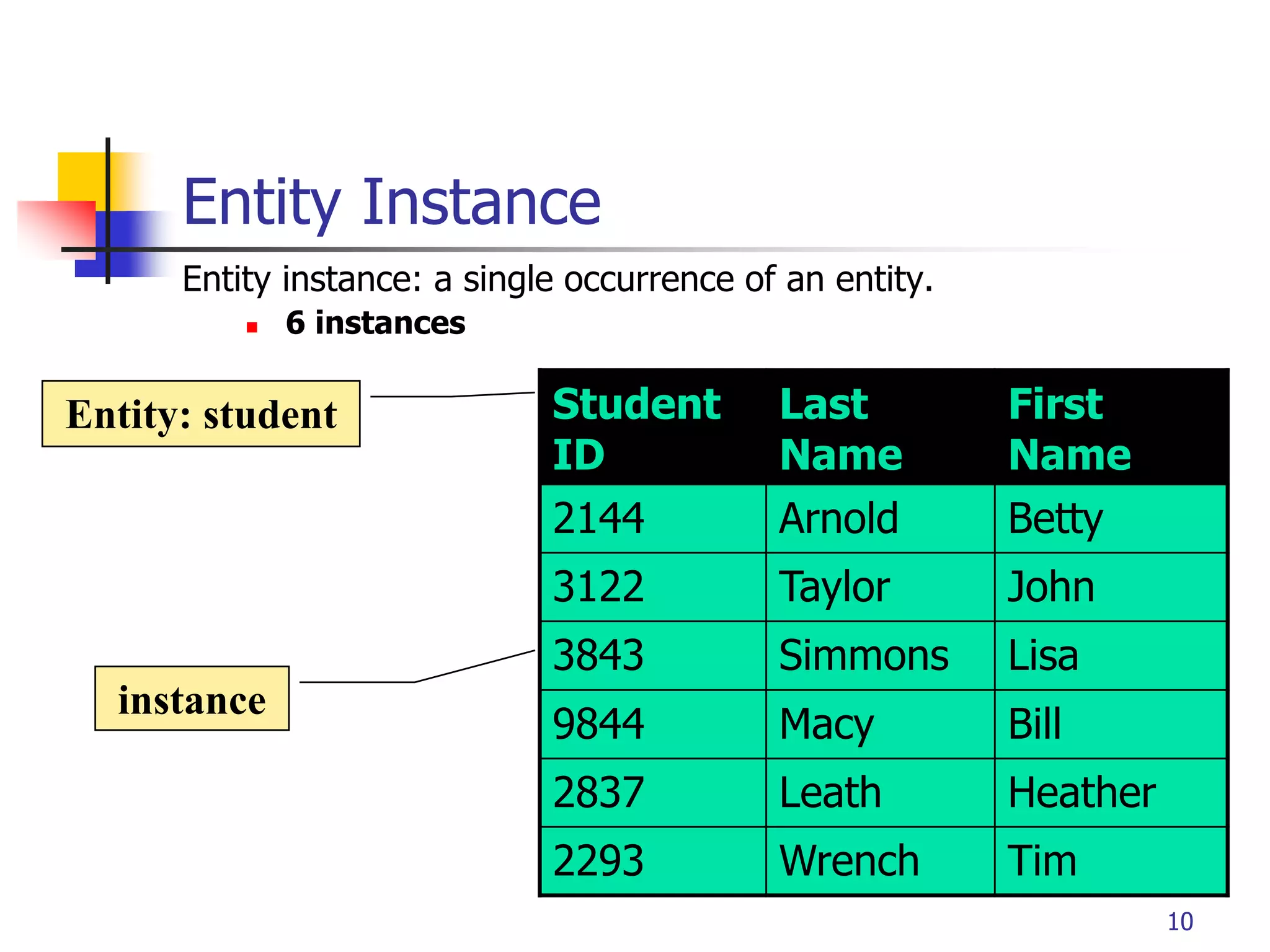
Entity Instance
Entity instance: a single occurrence of an entity.
 6 instances
Student
ID
Last
Name
First
Name
2144 Arnold Betty
3122 Taylor John
3843 Simmons Lisa
9844 Macy Bill
2837 Leath Heather
2293 Wrench Tim
Entity: student
instance
Part # 2
11
How to find attributes?
 Attribute:
 Attributes are data objects that either identify or
describe entities (property of an entity).
 In other words, it is a descriptor whose values are
associated with individual entities of a specific entity
type
 The process for identifying attributes is similar except now
you want to look for and extract those names that appear
to be descriptive noun phrases.
Part # 2
12
How to find relationships?
 Relationship:
 Relationships are associations between entities.
 Typically, a relationship is indicated by a verb
connecting two or more entities.
 Employees are assigned to projects
 Relationships should be classified in terms of
cardinality.
 One-to-one, one-to-many, etc.
Part # 2
13
How to find cardinalities?
 Cardinality:
 The cardinality is the number of occurrences in one
entity which are associated to the number of
occurrences in another.
 There are three basic cardinalities (degrees of
relationship).
 one-to-one (1:1), one-to-many (1:M), and many-to-
many (M:N)
Part # 2
14
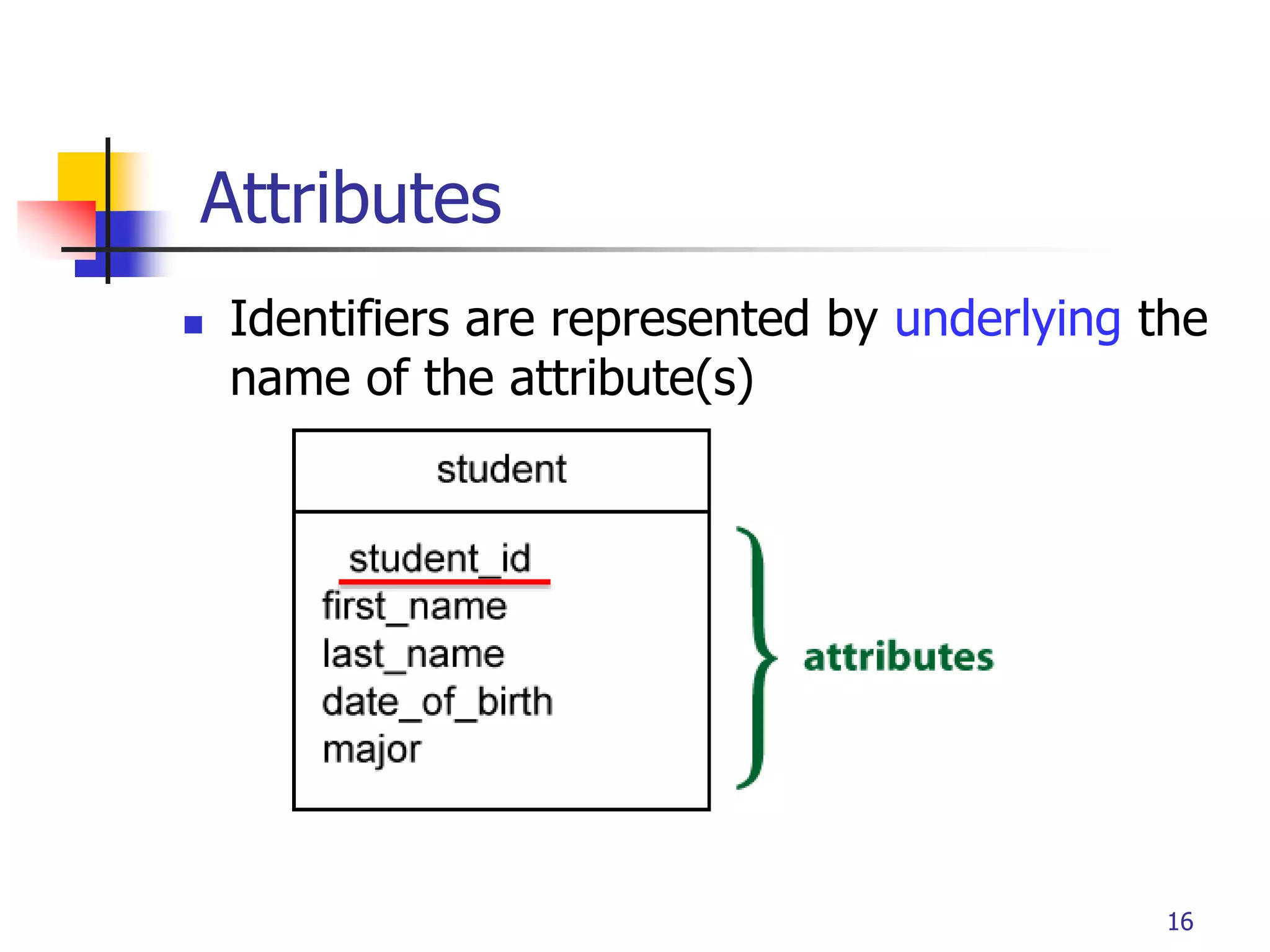
“attributes that uniquely identify entity instances”
 Becomes a PK in RDS
 Composite identifiers are identifiers that consist
of two or more attributes
 Identifiers are represented by underlying the
name of the attribute(s)
 Employee (Employee_ID), student (Student_ID)
Identifier
Part # 2
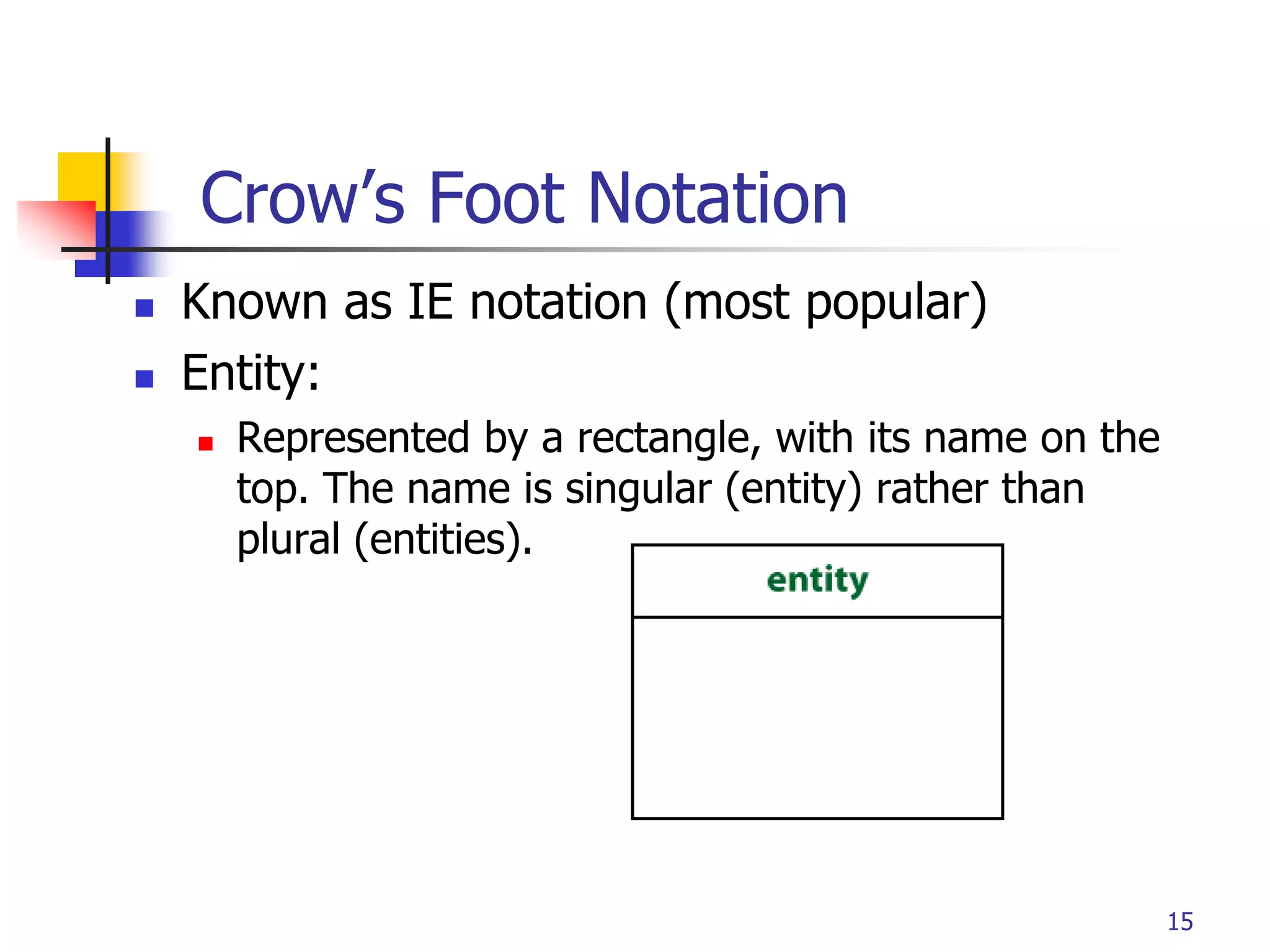
Crow’s Foot Notation
 Known as IE notation (most popular)
 Entity:
 Represented by a rectangle, with its name on the
top. The name is singular (entity) rather than
plural (entities).
15
Part # 2
Attributes
 Identifiers are represented by underlying the
name of the attribute(s)
16
Part # 2
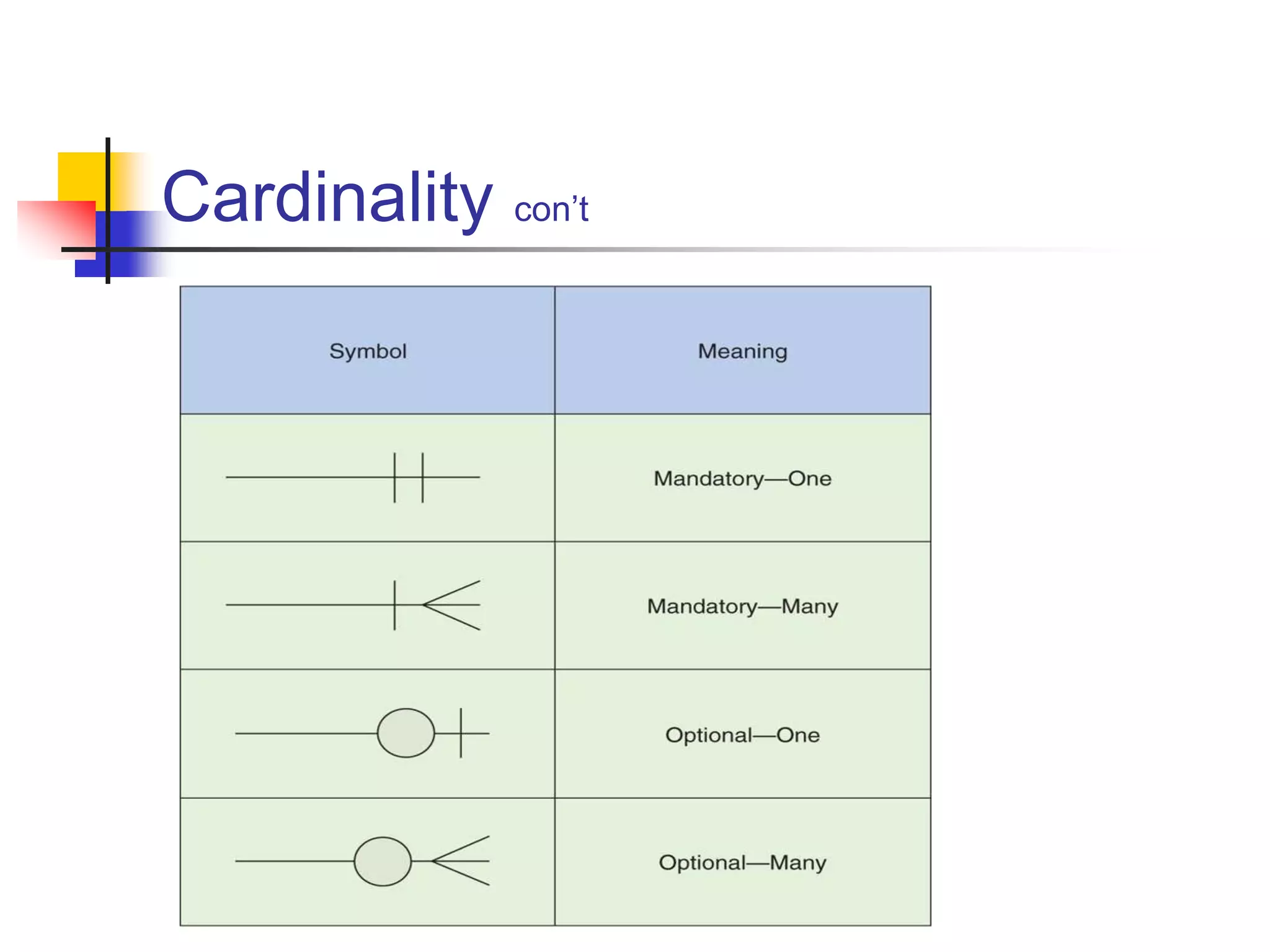
Basic Cardinality Type
 1-to-1 relationship
 1-to-M relationship
 M-to-N relationship
Part # 2
Cardinality con’t
Part # 2
19
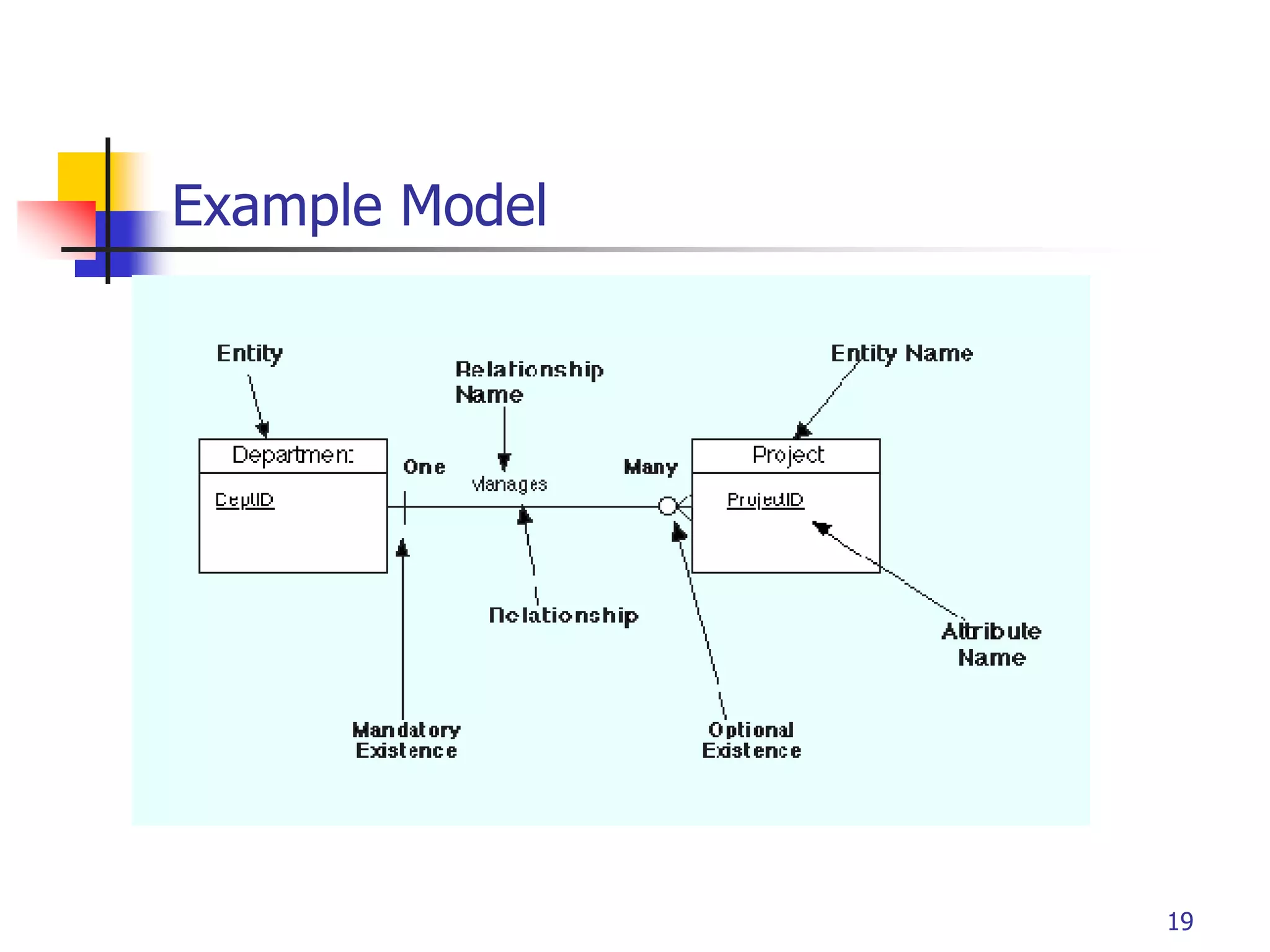
Example Model
Part # 2
Data Model by Peter Chen’ Notation
(first - original)
Part # 2
Business Rule Example 1
 Finalized business rules must be
bi-directional.
 Draft: one sentence
 Finalized: two sentences
 A professor advises many
students (professor to student).
Each student is advised by one
professor (student to professor).
 A professor must teach many
classes. Each class must be
taught by one professor.
21
Part # 2
Business Rule 1
 Business Rules are used to define entities, attributes,
relationships and constraints.
 Usually though they are used for the organization
that stores or uses data to be an explanation of a
policy, procedure, or principle.
 The data can be considered significant only after
business rules are defined.
 W/o them it cannot be considered as data for RDS but just
records.
22
Part # 2
Business Rule 2
 When creating business rules, keep them simple,
easy to understand, and keep them broad.
 so that everyone can have a similar understanding and
interpretation.
 Sources of business rules:
 Direct interviews with internal & external stakeholders
 Site visitations (collect data) and observation of the work
process or procedure
 Review and study of documents (Policies, Procedures,
Forms, Operation manuals, etc..)
23
Part # 2
Discovering Business Rules
 Real world example on the class website
 After reviewing and studying the interview and
various forms, develop a draft business rules -
does not need to be bi-directional and less precise
wording…
 Keep on going until “optimized”
 Then, finalize Business Rules: bi-directional.
Part # 2
Business Rule Example 2
 A sales representative must write
many invoices. Each invoice has to
be written by one sales
representative.
 Each sales representative must be
assigned to many department.
Each department has only one
sales representative.
 A customer has to generate many
invoices. An invoice is generated
by only one customer.
25
Part # 2
26
“Describe detail information about an entity ”
 Entity: Employee
 Attributes:
 Employee-Name
 Address (composite)
 Phone Extension
 Date-Of-Hire
 Job-Skill-Code
 Salary
Attributes
Part # 2
27
Classes of attributes
 Simple attribute
 Composite attribute
 Derived attributes
 Single-valued attribute
 Multi-valued attribute
Part # 2
28
 A simple attribute cannot be subdivided.
 Examples: Age, Gender, and Marital status
 A composite attribute can be further
subdivided to yield additional attributes.
 Examples:
 ADDRESS -- Street, City, State, Zip
 PHONE NUMBER -- Area code, Exchange number
Simple/Composite attribute
Part # 2
29
 is not physically stored within the database
 instead, it is derived by using an algorithm.
 Example 1: Late Charge of 2%
 MS Access: InvoiceAmt * 0.02
 Example 2: AGE can be derived from the date of
birth and the current date.
 MS Access: int(Date() – Emp_Dob)/365)
Derived attribute
Part # 2
30
 can have only a single (atomic) value.
 Examples:
 A person can have only one social security number.
 A manufactured part can have only one serial number.
 A single-valued attribute is not necessarily a
simple attribute.
 Part No: CA-08-02-189935
 Location: CA, Factory#:08, shift#: 02, part#: 189935
Single-valued attribute
Part # 2
31
 can have many values.
 Examples:
 A person may have several college degrees.
 A household may have several phones with
different numbers
 A car color
Multi-valued attributes
Part # 2
32
Example - “Movie Database”
 Entity:
 Movie Star
 Attributes:
 SS#: “123-45-6789” (single-valued)
 Cell Phone: “(661)123-4567, (661)234-5678”
(multi-valued)
 Name: “Harrison Ford” (composite)
 Address: “123 Main Str., LA, CA” (composite)
 Gender: “Female” (simple)
 Age: 24 (derived)
Part # 2
Procedure of ERD
 Relatively simple representations of complex
real-world data structures
 Data modeling is iterative process.
 “complete” and “100% error free” model is
not possible!
 Only “Optimized” model is possible….
33
Part # 2
ER Model Basics
 Entity: Real-world object distinguishable from
other objects. An entity is described (in DB)
using a set of attributes.
 Entity Set: A collection of similar entities. E.g.,
all employees.
 All entities in an entity set have the same set of
attributes. (Until we consider ISA hierarchies,
anyway!)
 Each entity set has a key.
 Each attribute has a domain.
Employees
ssn
name
lot
Part # 2
ER Model Basics (Contd.)
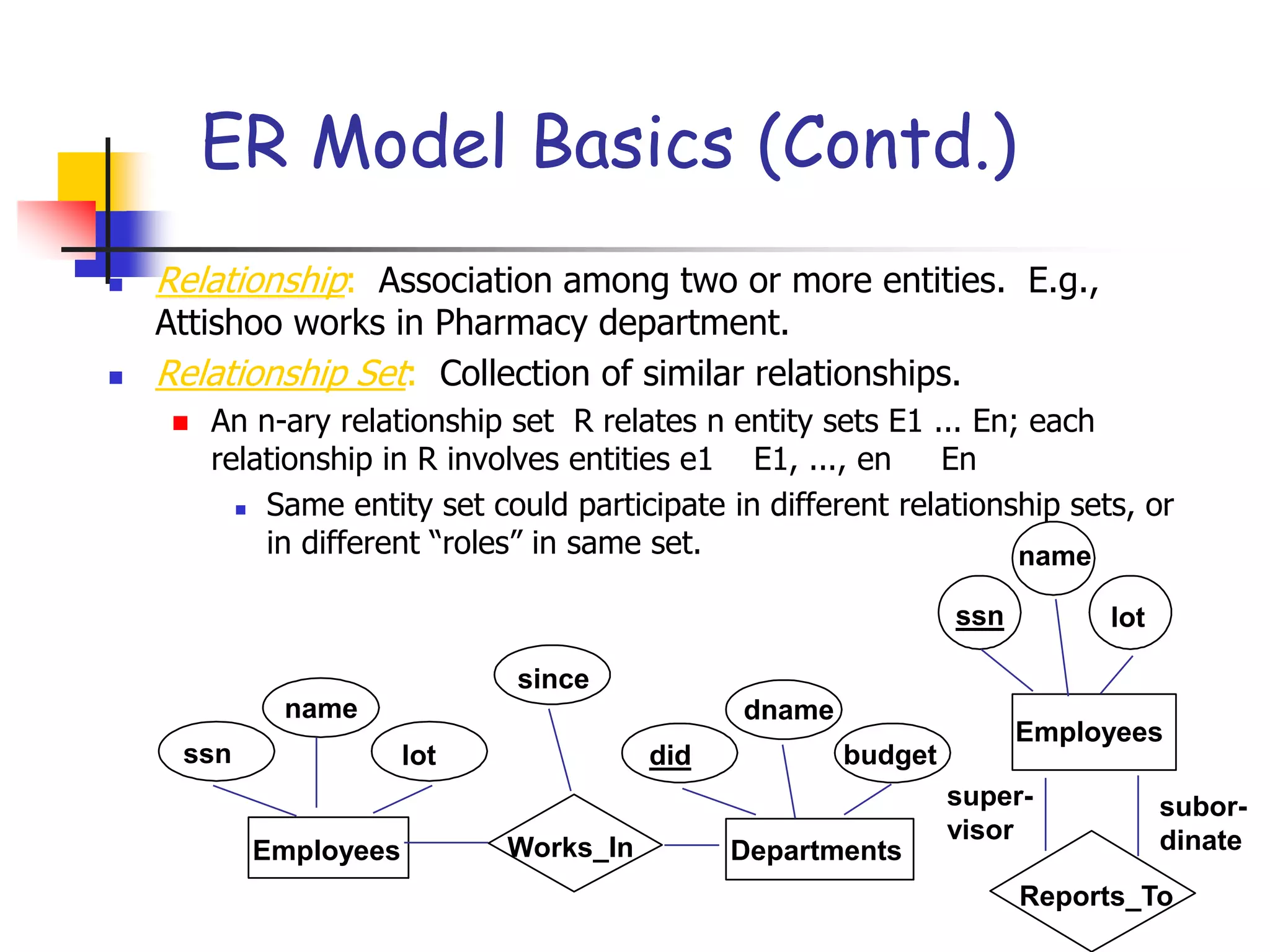
 Relationship: Association among two or more entities. E.g.,
Attishoo works in Pharmacy department.
 Relationship Set: Collection of similar relationships.
 An n-ary relationship set R relates n entity sets E1 ... En; each
relationship in R involves entities e1 E1, ..., en En
 Same entity set could participate in different relationship sets, or
in different “roles” in same set.
lot
dname
budget
did
since
name
Works_In Departments
Employees
ssn
Reports_To
lot
name
Employees
subor-
dinate
super-
visor
ssn
Part # 2
Participation Constraints
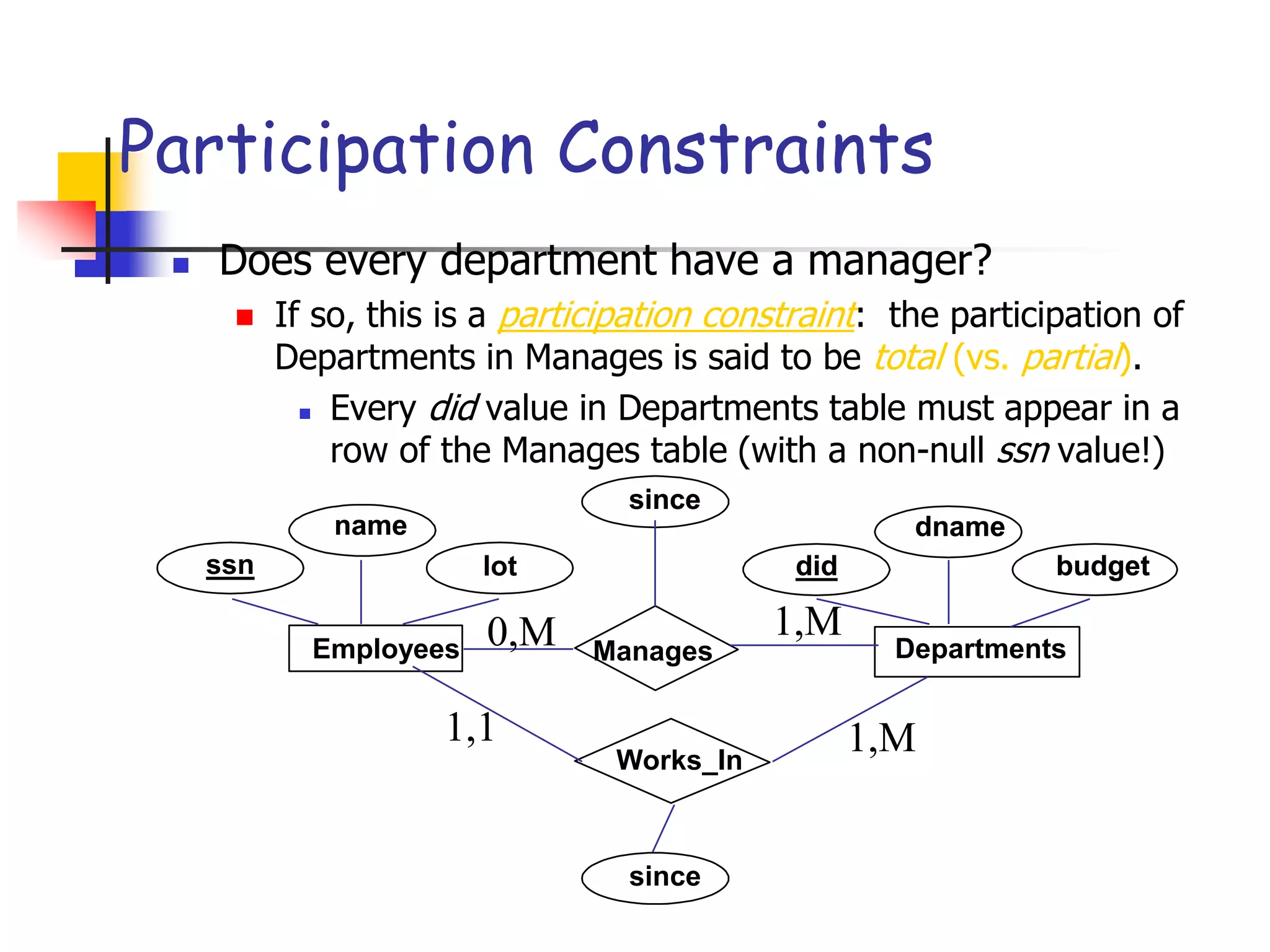
 Does every department have a manager?
 If so, this is a participation constraint: the participation of
Departments in Manages is said to be total (vs. partial).
 Every did value in Departments table must appear in a
row of the Manages table (with a non-null ssn value!)
lot
name dname
budget
did
since
name dname
budget
did
since
Manages
since
Departments
Employees
ssn
Works_In
0,M 1,M
1,1 1,M
Part # 2
Structural Constraints
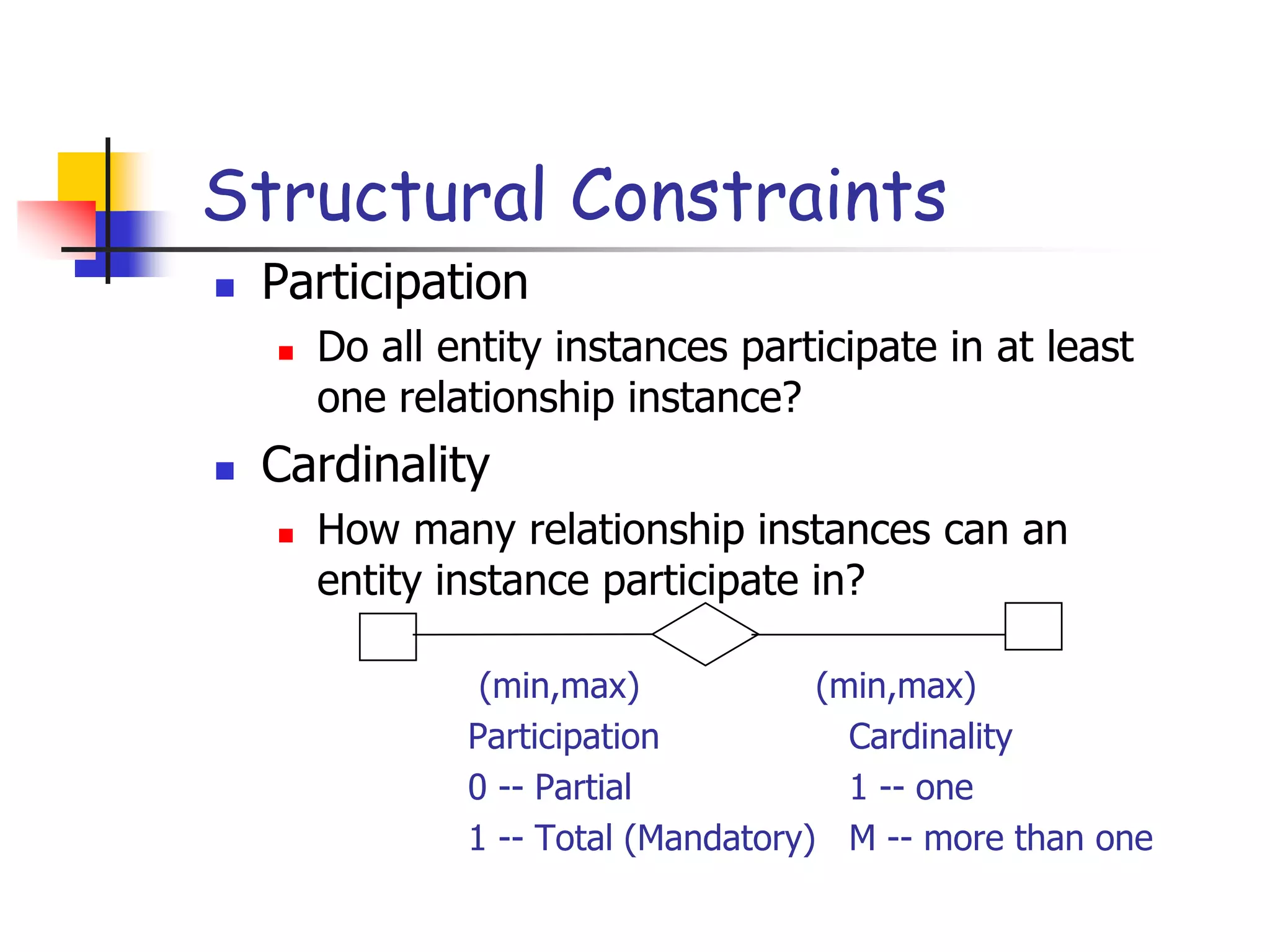
 Participation
 Do all entity instances participate in at least
one relationship instance?
 Cardinality
 How many relationship instances can an
entity instance participate in?
(min,max) (min,max)
Participation Cardinality
0 -- Partial 1 -- one
1 -- Total (Mandatory) M -- more than one
Part # 2
Weak Entities
 A weak entity can be identified uniquely only by
considering the primary key of another (owner) entity.
 Owner entity set and weak entity set must participate in a
one-to-many relationship set (one owner, many weak
entities).
 Weak entity set must have total participation in this
identifying relationship set.
lot
name
age
pname
Dependents
Employees
ssn
Policy
cost
Part # 2
ISA (`is a’) Hierarchies
Contract_Emps
name
ssn
Employees
lot
hourly_wages
Hourly_Emps
contractid
hours_worked
As in C++, or other
PLs, attributes are
inherited.
If we declare A ISA
B, every A entity is
also considered to be a
B entity.
 Overlap constraints: Can Joe be an Hourly_Emps as well as a
Contract_Emps entity? (Allowed/disallowed)
 Covering constraints: Does every Employees entity also have
to be an Hourly_Emps or a Contract_Emps entity? (Yes/no)
 Reasons for using ISA:
 To add descriptive attributes specific to a subclass.
 To identify entitities that participate in a relationship.
Part # 2
Conceptual Design Using the ER
Model
 Design choices:
 Should a concept be modeled as an entity or an attribute?
 Should a concept be modeled as an entity or a relationship?
 Identifying relationships: Binary or ternary? Aggregation?
 Constraints in the ER Model:
 A lot of data semantics can (and should) be captured.
 But some constraints cannot be captured in ER diagrams.
Part # 2
Entity vs. Attribute
 Should address be an attribute of Employees or an
entity (connected to Employees by a relationship)?
 Depends upon the use we want to make of address
information, and the semantics of the data:
 If we have several addresses per employee,
address must be an entity (since attributes cannot
be set-valued).
 If the structure (city, street, etc.) is important,
e.g., we want to retrieve employees in a given
city, address must be modeled as an entity (since
attribute values are atomic).
Part # 2
Converting model to design
 Many-to-many relationships
 Each entity becomes a table
 The relationship becomes a table
 PKs of entities becomes FKs in the
relationship
 Student( )
 Course( )
 Takes( )
takes
Student Course
StudentID
Name
Class
Major
Courseno
Coursename
Credits
semester
0:M 0:M
Part # 2
Model to design (contd.)
 1-Many relationships
 Entities become tables
 Copy PK of multi-participant to single
participant
 Copy attributes of relationship to single
participant (why?)
includes
Computer Part
ComputerID
Make
Model
Year
Partno
Type
Make
installdate
1:M 0:1
Part # 2
Model to design (contd.)
 1-1 relationships
 Entities can be merged, or
 copy PK of any entity to the other
 Generalization
 Copy PK of parent entity to child entity
 Weak entities
 Copy PK of controlling entity to weak entity

ER Modeling.ppt

  • 1.
  • 2.
    Part # 2 2 StudyObjectives  Understand concepts of data modeling and its purpose  Learn how relationships between entities are defined and refined, and how such relationships are incorporated into the database design process  Learn how ERD components affect database design and implementation  Learn how to interpret the modeling symbols
  • 3.
    Part # 2 DataModel  Model: an abstraction of a real-world object or event  Useful in understanding complexities of the real- world environment  Data model  A diagram that displays a set of tables and the relationships between them  Next Slide: “Restaurant” Access data model using Entity Relationship Diagram (ERD)
  • 4.
    Part # 2 AccessData Model using ERD 4
  • 5.
    Part # 2 Whatis an Entity Relationship Diagram (ERD)?  ERD is a data modeling technique used in software engineering to produce a conceptual data model of an information system.  So, ERDs illustrate the logical structure of databases.  ERD development using a CASE tool  Powerdesigner by SAP  Data Modeler by Orcale 5
  • 6.
    Part # 2 TheImportance of Data Model  Blue print: official documentation  Blue print of house  Employee’s w/o DB knowledge can understand  a data model diagram vs. a list of tables  Used as an effective Communication Tool  Improve interaction among the managers, the designers, and the end users  Independence from a particular DBMS  Network DB, Object-oriented DB, etc.
  • 7.
    Part # 2 7 The data modeling revolves around discovering and analyzing organizational and users data requirements.  Requirements based on policies, meetings, procedures, system specifications, etc.  Identify what data is important  Identify what data should be maintained Data Model (con’t)
  • 8.
    Part # 2 8 The major activity of this phase is identifying entities, attributes, and their relationships to construct model using the Entity Relationship Diagram.  Entity  table  Attribute  column  Relationship  line  Basics of Data Modeling Video  Until business rules # 3 (9:20) ERD
  • 9.
    Part # 2 9 Howto find entities?  Entity:  "...anything (people, places, objects, events, etc.) about which we store information (e.g. supplier, machine tool, employee, utility pole, airline seat, etc.).”  Tangible: customer, product  Intangible: order, accounting receivable  Look for singular nouns (beginner)  BUT a proper noun is not a good candidate….
  • 10.
    Part # 2 10 EntityInstance Entity instance: a single occurrence of an entity.  6 instances Student ID Last Name First Name 2144 Arnold Betty 3122 Taylor John 3843 Simmons Lisa 9844 Macy Bill 2837 Leath Heather 2293 Wrench Tim Entity: student instance
  • 11.
    Part # 2 11 Howto find attributes?  Attribute:  Attributes are data objects that either identify or describe entities (property of an entity).  In other words, it is a descriptor whose values are associated with individual entities of a specific entity type  The process for identifying attributes is similar except now you want to look for and extract those names that appear to be descriptive noun phrases.
  • 12.
    Part # 2 12 Howto find relationships?  Relationship:  Relationships are associations between entities.  Typically, a relationship is indicated by a verb connecting two or more entities.  Employees are assigned to projects  Relationships should be classified in terms of cardinality.  One-to-one, one-to-many, etc.
  • 13.
    Part # 2 13 Howto find cardinalities?  Cardinality:  The cardinality is the number of occurrences in one entity which are associated to the number of occurrences in another.  There are three basic cardinalities (degrees of relationship).  one-to-one (1:1), one-to-many (1:M), and many-to- many (M:N)
  • 14.
    Part # 2 14 “attributesthat uniquely identify entity instances”  Becomes a PK in RDS  Composite identifiers are identifiers that consist of two or more attributes  Identifiers are represented by underlying the name of the attribute(s)  Employee (Employee_ID), student (Student_ID) Identifier
  • 15.
    Part # 2 Crow’sFoot Notation  Known as IE notation (most popular)  Entity:  Represented by a rectangle, with its name on the top. The name is singular (entity) rather than plural (entities). 15
  • 16.
    Part # 2 Attributes Identifiers are represented by underlying the name of the attribute(s) 16
  • 17.
    Part # 2 BasicCardinality Type  1-to-1 relationship  1-to-M relationship  M-to-N relationship
  • 18.
  • 19.
  • 20.
    Part # 2 DataModel by Peter Chen’ Notation (first - original)
  • 21.
    Part # 2 BusinessRule Example 1  Finalized business rules must be bi-directional.  Draft: one sentence  Finalized: two sentences  A professor advises many students (professor to student). Each student is advised by one professor (student to professor).  A professor must teach many classes. Each class must be taught by one professor. 21
  • 22.
    Part # 2 BusinessRule 1  Business Rules are used to define entities, attributes, relationships and constraints.  Usually though they are used for the organization that stores or uses data to be an explanation of a policy, procedure, or principle.  The data can be considered significant only after business rules are defined.  W/o them it cannot be considered as data for RDS but just records. 22
  • 23.
    Part # 2 BusinessRule 2  When creating business rules, keep them simple, easy to understand, and keep them broad.  so that everyone can have a similar understanding and interpretation.  Sources of business rules:  Direct interviews with internal & external stakeholders  Site visitations (collect data) and observation of the work process or procedure  Review and study of documents (Policies, Procedures, Forms, Operation manuals, etc..) 23
  • 24.
    Part # 2 DiscoveringBusiness Rules  Real world example on the class website  After reviewing and studying the interview and various forms, develop a draft business rules - does not need to be bi-directional and less precise wording…  Keep on going until “optimized”  Then, finalize Business Rules: bi-directional.
  • 25.
    Part # 2 BusinessRule Example 2  A sales representative must write many invoices. Each invoice has to be written by one sales representative.  Each sales representative must be assigned to many department. Each department has only one sales representative.  A customer has to generate many invoices. An invoice is generated by only one customer. 25
  • 26.
    Part # 2 26 “Describedetail information about an entity ”  Entity: Employee  Attributes:  Employee-Name  Address (composite)  Phone Extension  Date-Of-Hire  Job-Skill-Code  Salary Attributes
  • 27.
    Part # 2 27 Classesof attributes  Simple attribute  Composite attribute  Derived attributes  Single-valued attribute  Multi-valued attribute
  • 28.
    Part # 2 28 A simple attribute cannot be subdivided.  Examples: Age, Gender, and Marital status  A composite attribute can be further subdivided to yield additional attributes.  Examples:  ADDRESS -- Street, City, State, Zip  PHONE NUMBER -- Area code, Exchange number Simple/Composite attribute
  • 29.
    Part # 2 29 is not physically stored within the database  instead, it is derived by using an algorithm.  Example 1: Late Charge of 2%  MS Access: InvoiceAmt * 0.02  Example 2: AGE can be derived from the date of birth and the current date.  MS Access: int(Date() – Emp_Dob)/365) Derived attribute
  • 30.
    Part # 2 30 can have only a single (atomic) value.  Examples:  A person can have only one social security number.  A manufactured part can have only one serial number.  A single-valued attribute is not necessarily a simple attribute.  Part No: CA-08-02-189935  Location: CA, Factory#:08, shift#: 02, part#: 189935 Single-valued attribute
  • 31.
    Part # 2 31 can have many values.  Examples:  A person may have several college degrees.  A household may have several phones with different numbers  A car color Multi-valued attributes
  • 32.
    Part # 2 32 Example- “Movie Database”  Entity:  Movie Star  Attributes:  SS#: “123-45-6789” (single-valued)  Cell Phone: “(661)123-4567, (661)234-5678” (multi-valued)  Name: “Harrison Ford” (composite)  Address: “123 Main Str., LA, CA” (composite)  Gender: “Female” (simple)  Age: 24 (derived)
  • 33.
    Part # 2 Procedureof ERD  Relatively simple representations of complex real-world data structures  Data modeling is iterative process.  “complete” and “100% error free” model is not possible!  Only “Optimized” model is possible…. 33
  • 34.
    Part # 2 ERModel Basics  Entity: Real-world object distinguishable from other objects. An entity is described (in DB) using a set of attributes.  Entity Set: A collection of similar entities. E.g., all employees.  All entities in an entity set have the same set of attributes. (Until we consider ISA hierarchies, anyway!)  Each entity set has a key.  Each attribute has a domain. Employees ssn name lot
  • 35.
    Part # 2 ERModel Basics (Contd.)  Relationship: Association among two or more entities. E.g., Attishoo works in Pharmacy department.  Relationship Set: Collection of similar relationships.  An n-ary relationship set R relates n entity sets E1 ... En; each relationship in R involves entities e1 E1, ..., en En  Same entity set could participate in different relationship sets, or in different “roles” in same set. lot dname budget did since name Works_In Departments Employees ssn Reports_To lot name Employees subor- dinate super- visor ssn
  • 36.
    Part # 2 ParticipationConstraints  Does every department have a manager?  If so, this is a participation constraint: the participation of Departments in Manages is said to be total (vs. partial).  Every did value in Departments table must appear in a row of the Manages table (with a non-null ssn value!) lot name dname budget did since name dname budget did since Manages since Departments Employees ssn Works_In 0,M 1,M 1,1 1,M
  • 37.
    Part # 2 StructuralConstraints  Participation  Do all entity instances participate in at least one relationship instance?  Cardinality  How many relationship instances can an entity instance participate in? (min,max) (min,max) Participation Cardinality 0 -- Partial 1 -- one 1 -- Total (Mandatory) M -- more than one
  • 38.
    Part # 2 WeakEntities  A weak entity can be identified uniquely only by considering the primary key of another (owner) entity.  Owner entity set and weak entity set must participate in a one-to-many relationship set (one owner, many weak entities).  Weak entity set must have total participation in this identifying relationship set. lot name age pname Dependents Employees ssn Policy cost
  • 39.
    Part # 2 ISA(`is a’) Hierarchies Contract_Emps name ssn Employees lot hourly_wages Hourly_Emps contractid hours_worked As in C++, or other PLs, attributes are inherited. If we declare A ISA B, every A entity is also considered to be a B entity.  Overlap constraints: Can Joe be an Hourly_Emps as well as a Contract_Emps entity? (Allowed/disallowed)  Covering constraints: Does every Employees entity also have to be an Hourly_Emps or a Contract_Emps entity? (Yes/no)  Reasons for using ISA:  To add descriptive attributes specific to a subclass.  To identify entitities that participate in a relationship.
  • 40.
    Part # 2 ConceptualDesign Using the ER Model  Design choices:  Should a concept be modeled as an entity or an attribute?  Should a concept be modeled as an entity or a relationship?  Identifying relationships: Binary or ternary? Aggregation?  Constraints in the ER Model:  A lot of data semantics can (and should) be captured.  But some constraints cannot be captured in ER diagrams.
  • 41.
    Part # 2 Entityvs. Attribute  Should address be an attribute of Employees or an entity (connected to Employees by a relationship)?  Depends upon the use we want to make of address information, and the semantics of the data:  If we have several addresses per employee, address must be an entity (since attributes cannot be set-valued).  If the structure (city, street, etc.) is important, e.g., we want to retrieve employees in a given city, address must be modeled as an entity (since attribute values are atomic).
  • 42.
    Part # 2 Convertingmodel to design  Many-to-many relationships  Each entity becomes a table  The relationship becomes a table  PKs of entities becomes FKs in the relationship  Student( )  Course( )  Takes( ) takes Student Course StudentID Name Class Major Courseno Coursename Credits semester 0:M 0:M
  • 43.
    Part # 2 Modelto design (contd.)  1-Many relationships  Entities become tables  Copy PK of multi-participant to single participant  Copy attributes of relationship to single participant (why?) includes Computer Part ComputerID Make Model Year Partno Type Make installdate 1:M 0:1
  • 44.
    Part # 2 Modelto design (contd.)  1-1 relationships  Entities can be merged, or  copy PK of any entity to the other  Generalization  Copy PK of parent entity to child entity  Weak entities  Copy PK of controlling entity to weak entity