Sabato 30 settembre 2023
Marco Pozzan
• Consulente e formatore in ambito business intelligence
• Nel 2020 Fondatore e CTO start-up per analisi dati e per
insurance data analytics per le compagnie assicurative
Dal 2017 mi occupo di architetture big Data e in generale di tutta
la proposizione data platform di Microsoft.
• Docente all'Università di Pordenone per i corsi IFTS di analisi
Big Data
• Community Lead di 1nn0va (www.innovazionefvg.net)
• MCP,MCSA,MCSE dal 2017 MCT e dal 2014 MVP per SQL Server e
relatore in diverse conferenze sul tema.
• marco.pozzan@regolofarm.com
• @marcopozzan.it
• www.marcopozzan.it
• http://www.scoop.it/u/marco-pozzan
• http://paper.li/marcopozzan/1422524394
Data Warehouse with Fabric
on data lakehouse
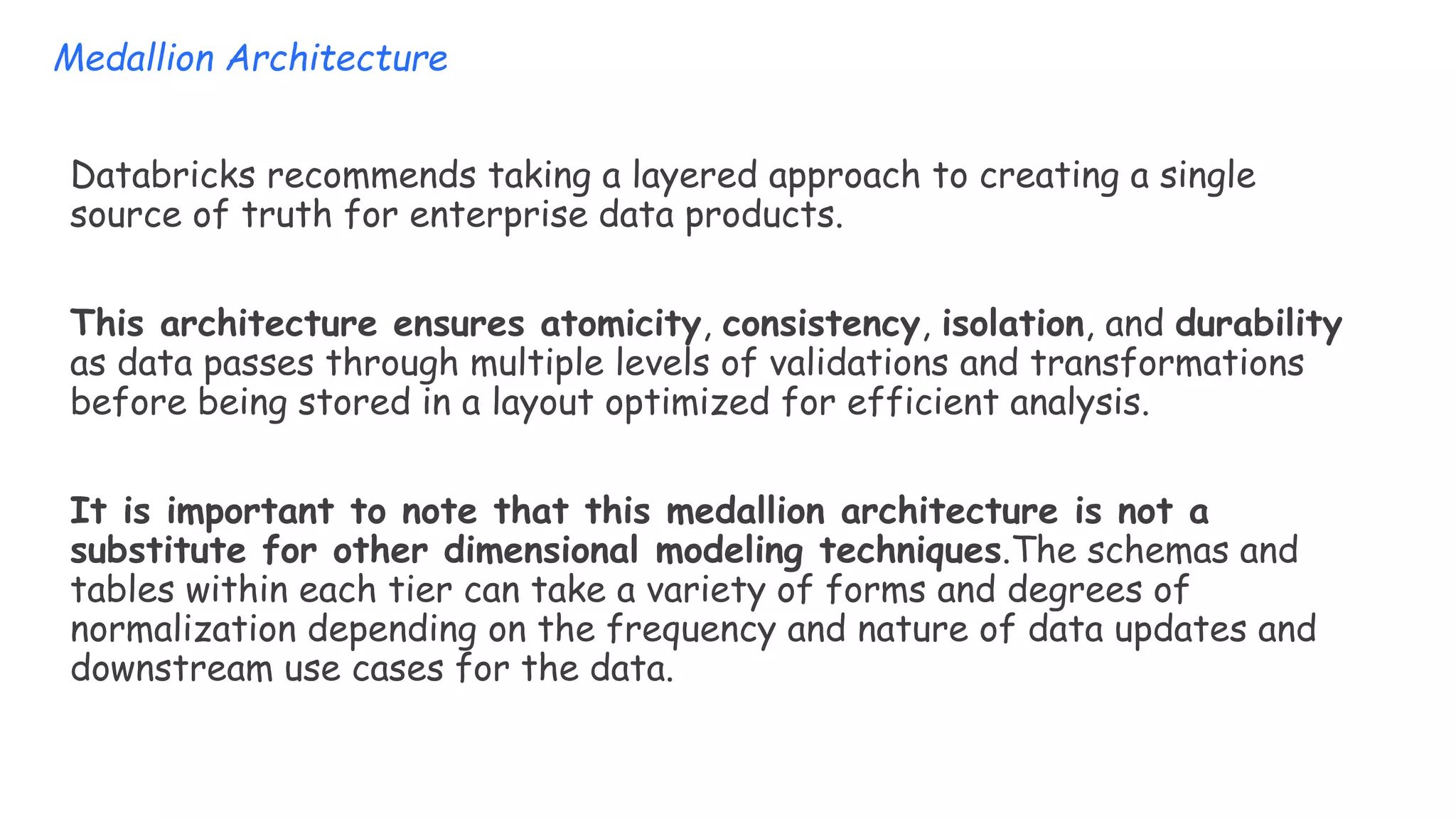
Databricks recommends taking a layered approach to creating a single
source of truth for enterprise data products.
This architecture ensures atomicity, consistency, isolation, and durability
as data passes through multiple levels of validations and transformations
before being stored in a layout optimized for efficient analysis.
It is important to note that this medallion architecture is not a
substitute for other dimensional modeling techniques.The schemas and
tables within each tier can take a variety of forms and degrees of
normalization depending on the frequency and nature of data updates and
downstream use cases for the data.
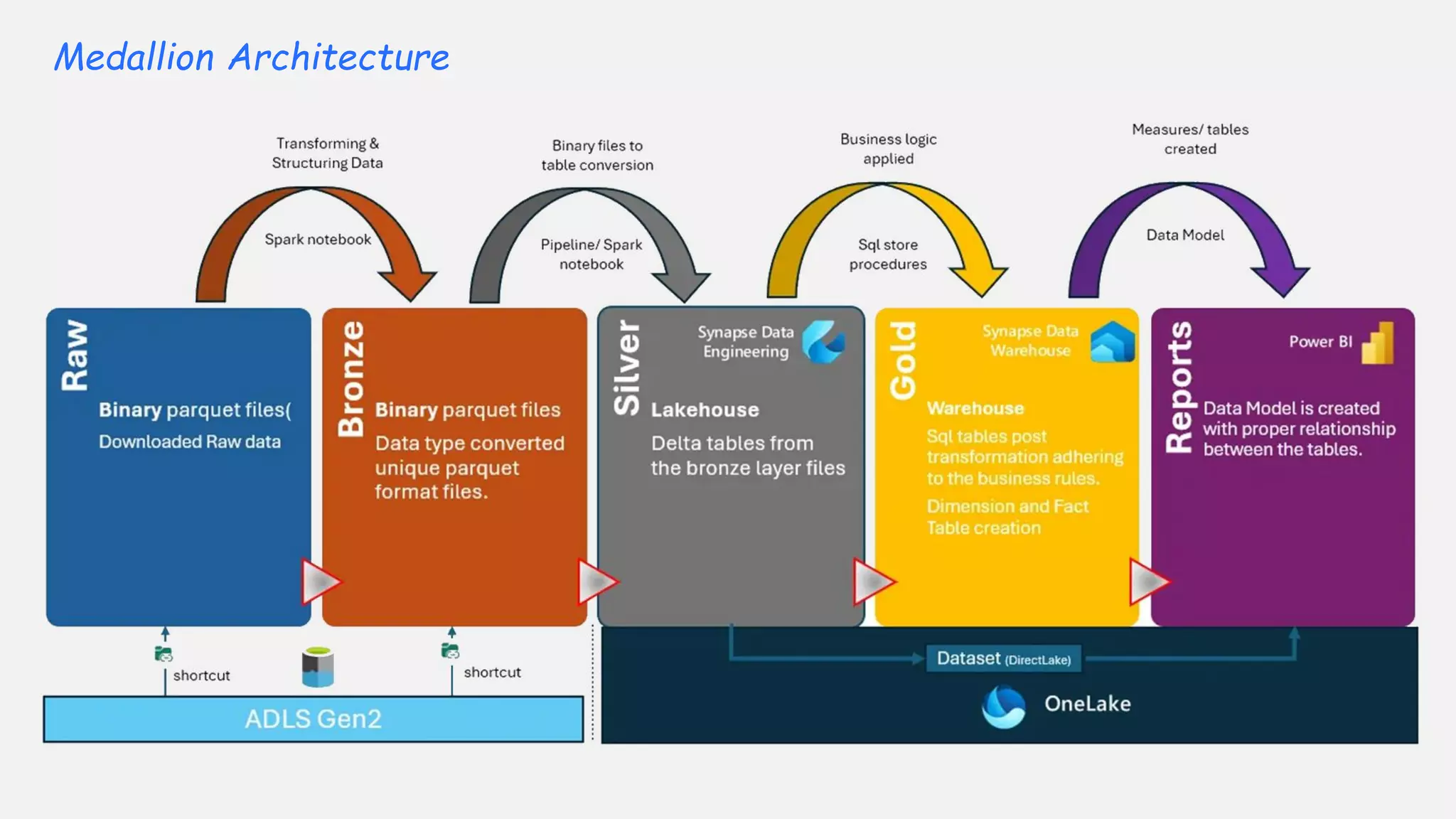
Medallion Architecture
I termini bronzo (grezzo), argento (convalidato) e oro (arricchito) descrivono la qualità
dei dati in ciascuno di questi livelli.
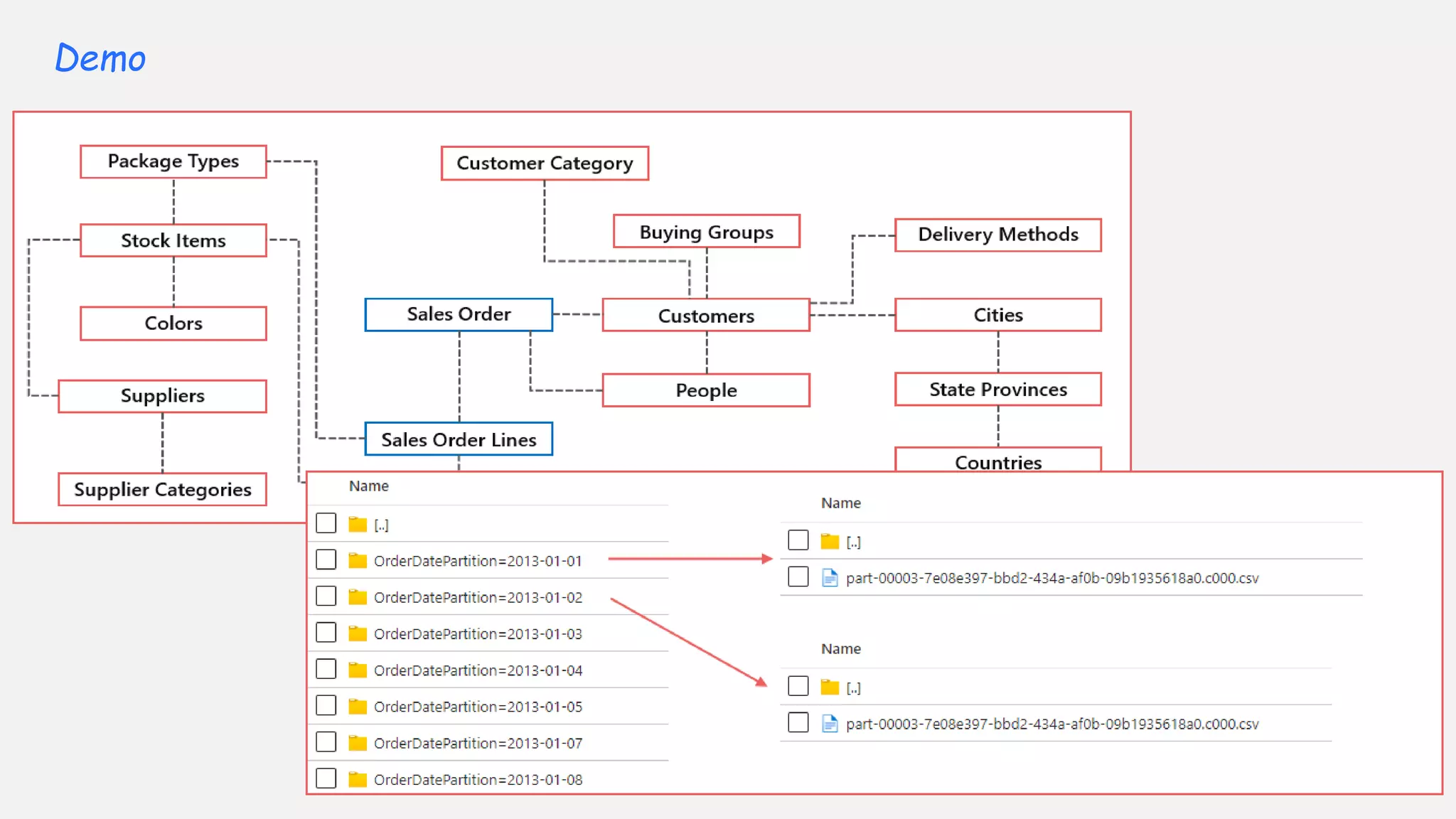
Demo
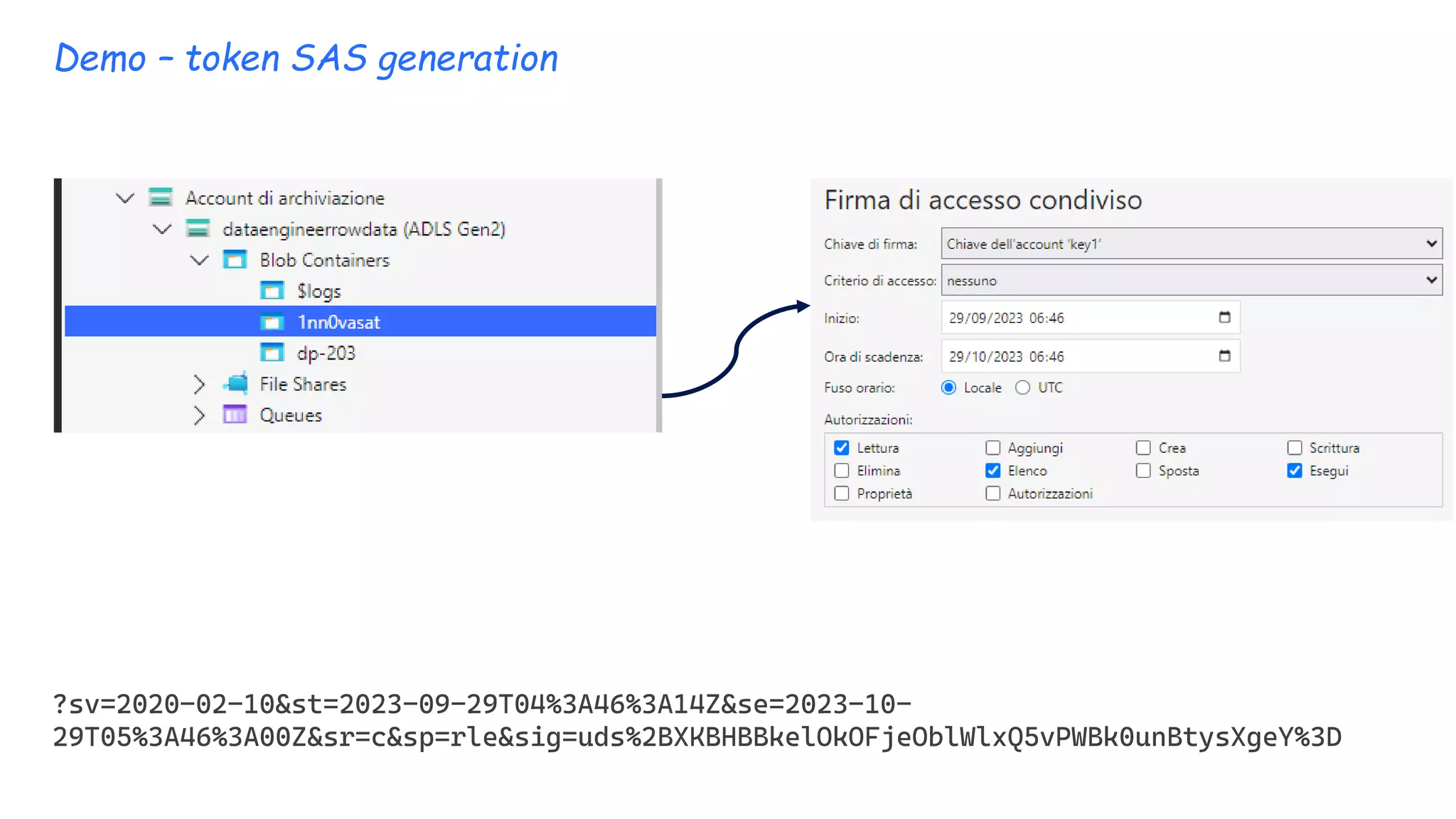
Demo – token SAS generation
?sv=2020-02-10&st=2023-09-29T04%3A46%3A14Z&se=2023-10-
29T05%3A46%3A00Z&sr=c&sp=rle&sig=uds%2BXKBHBBkelOkOFjeOblWlxQ5vPWBk0unBtysXgeY%3D
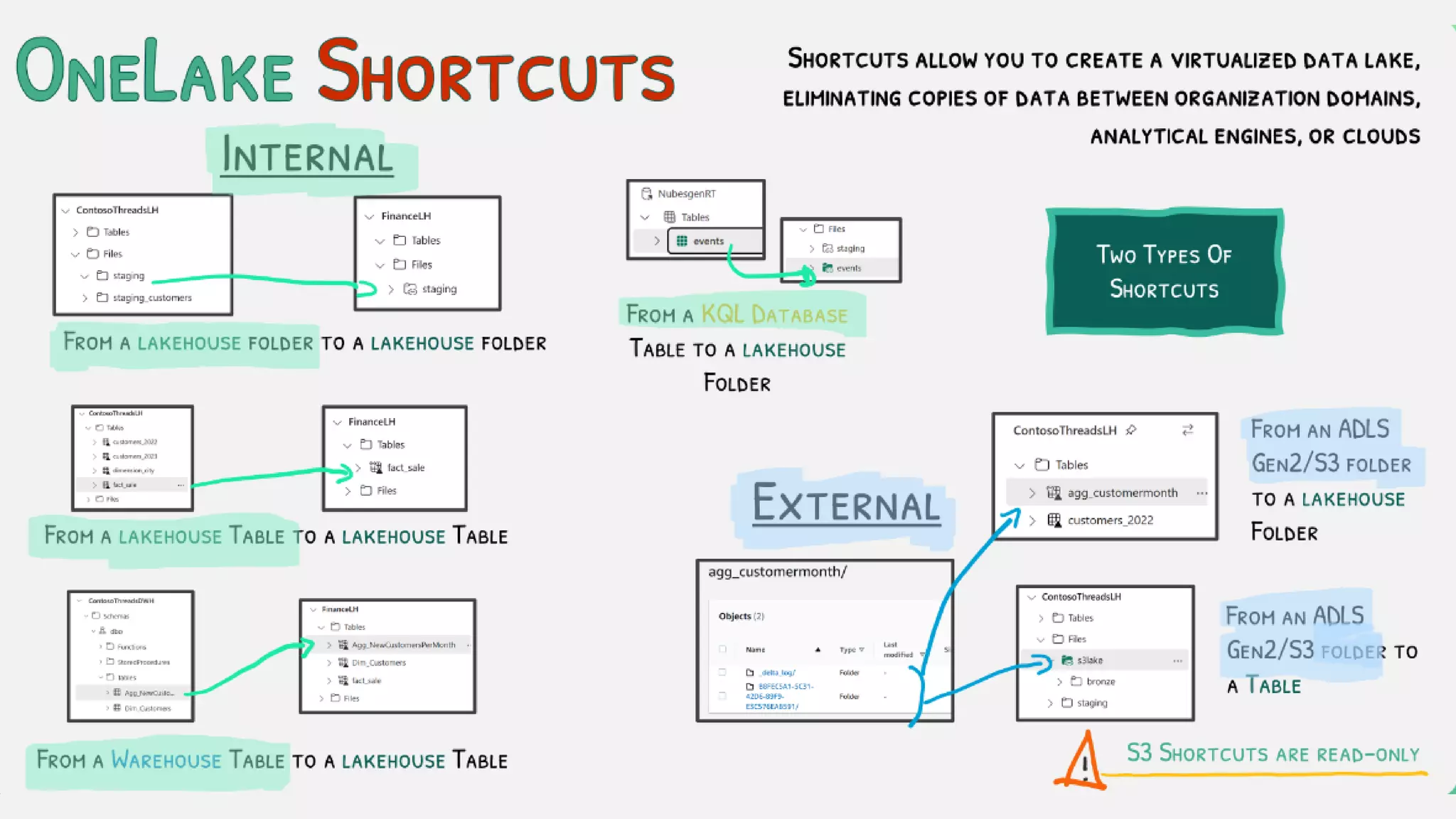
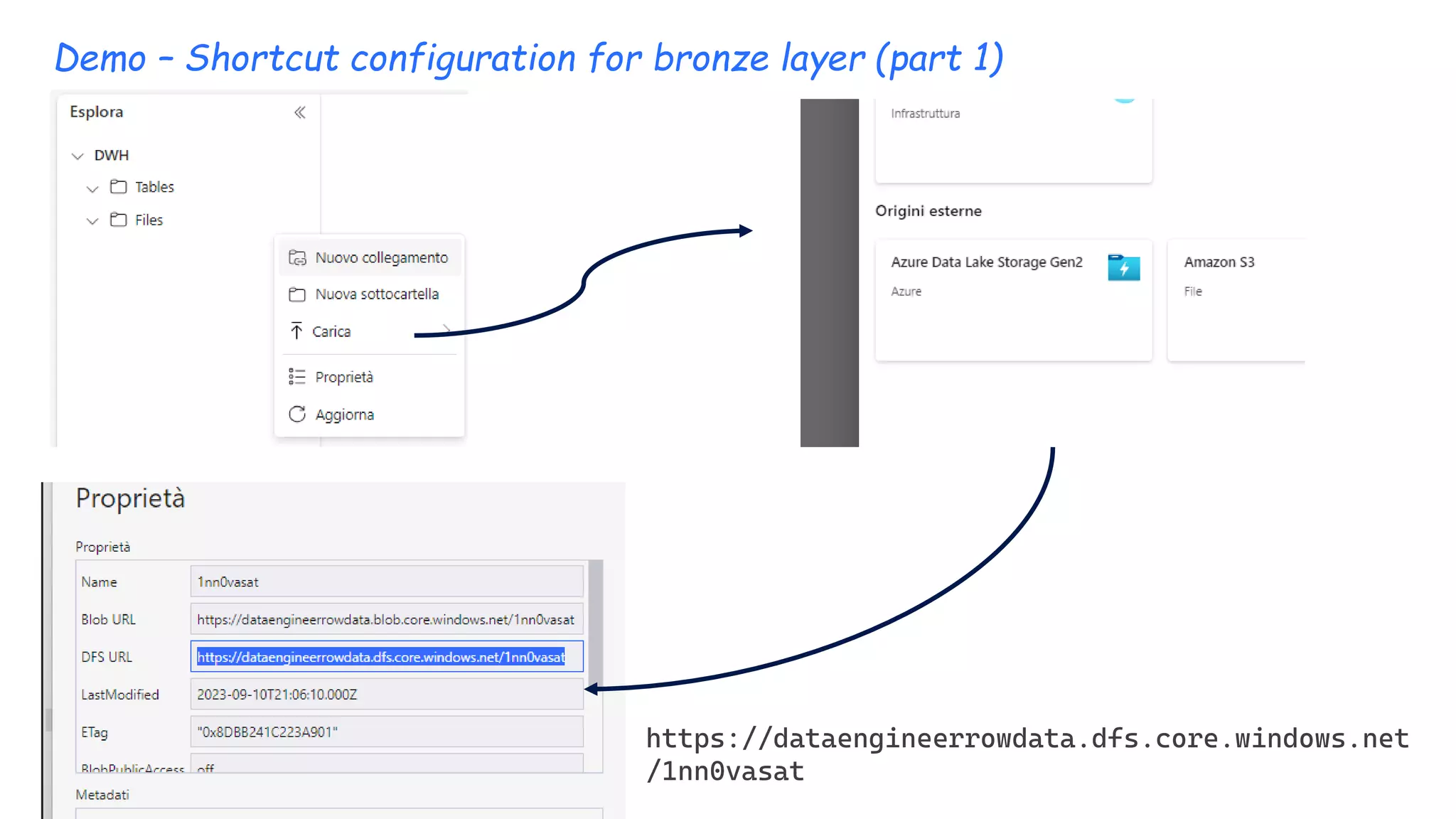
Demo – Shortcut configuration for bronze layer (part 1)
https://dataengineerrowdata.dfs.core.windows.net
/1nn0vasat
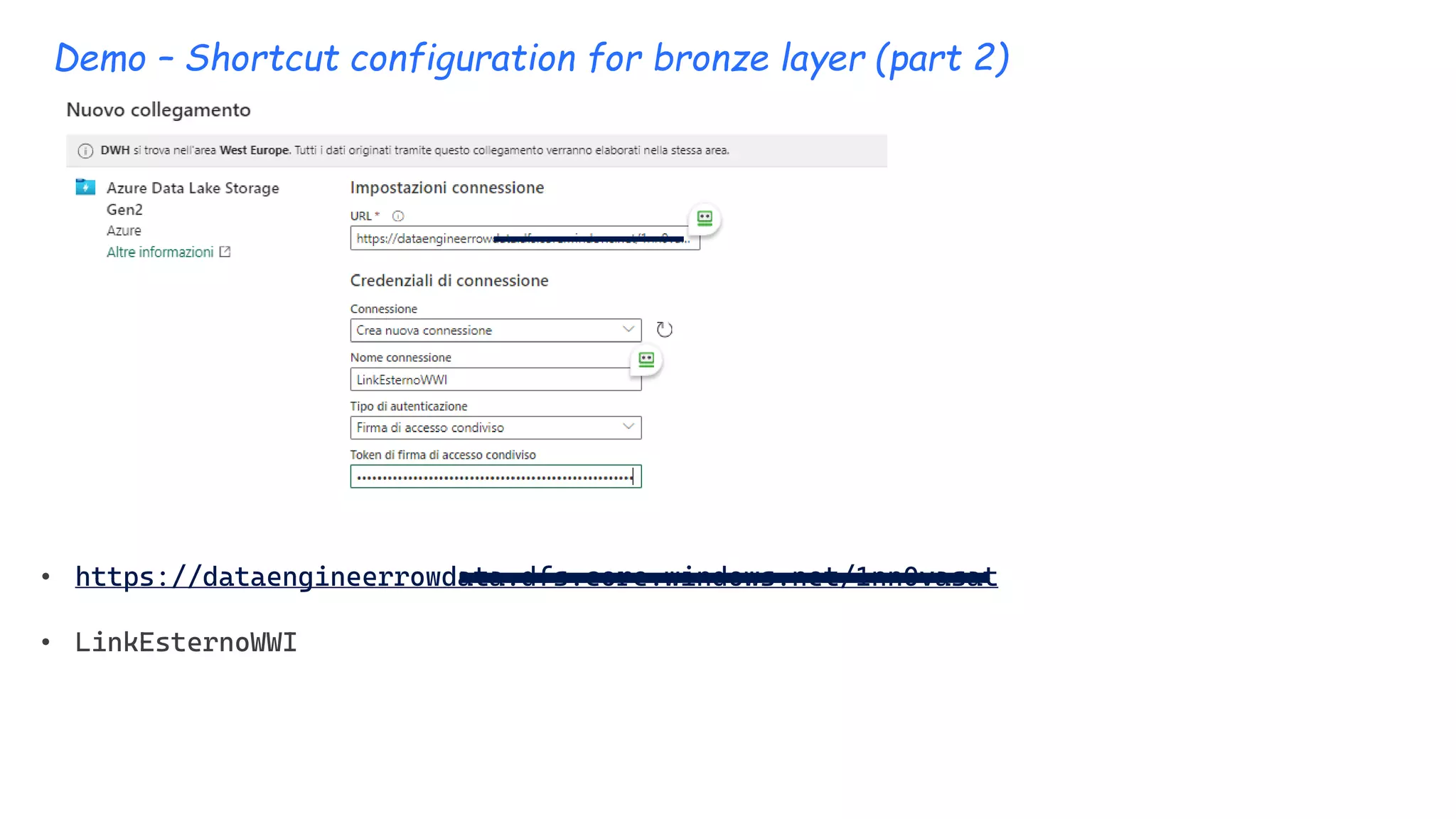
Demo – Shortcut configuration for bronze layer (part 2)
• https://dataengineerrowdata.dfs.core.windows.net/1nn0vasat
• LinkEsternoWWI
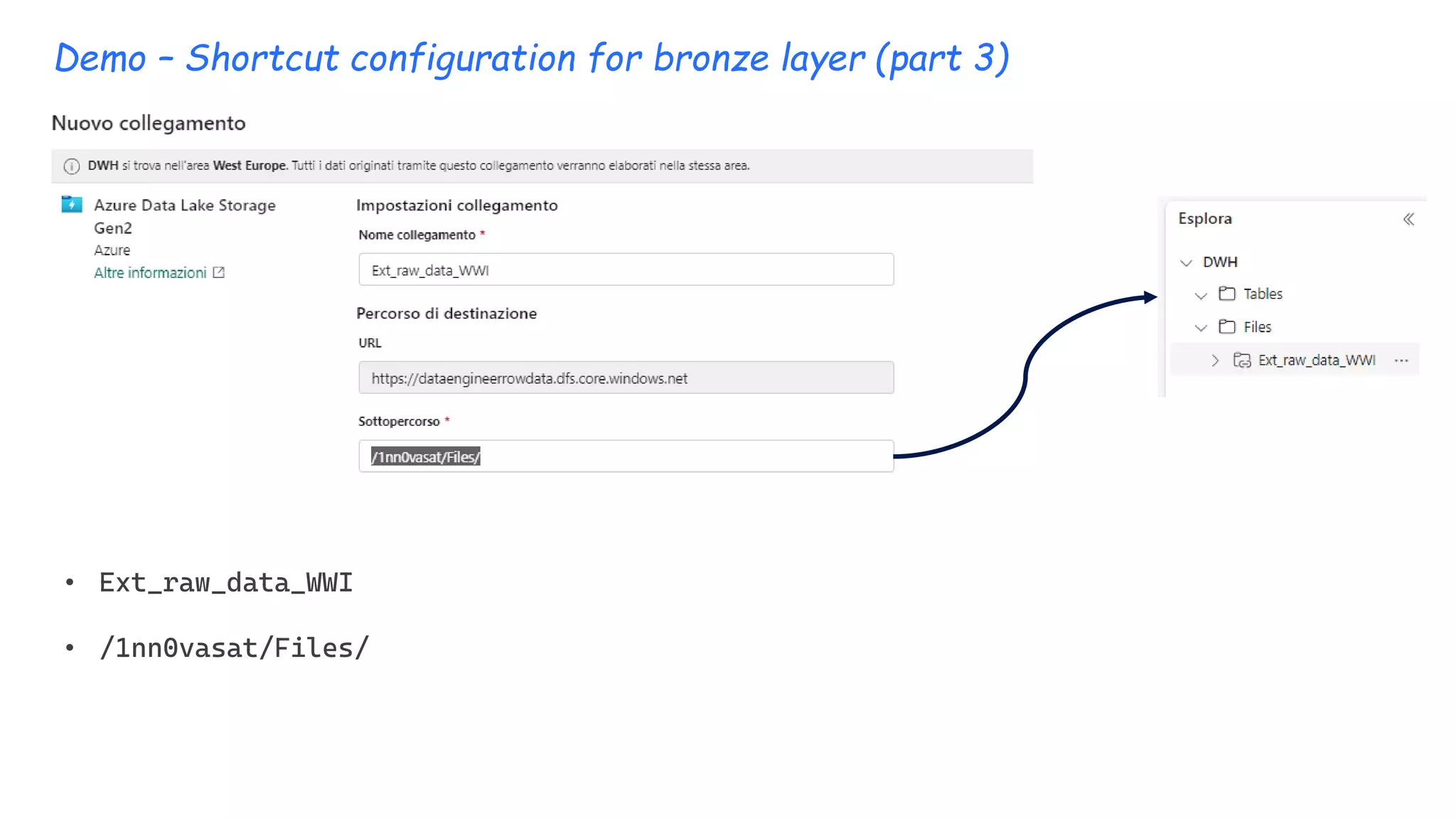
Demo – Shortcut configuration for bronze layer (part 3)
• Ext_raw_data_WWI
• /1nn0vasat/Files/
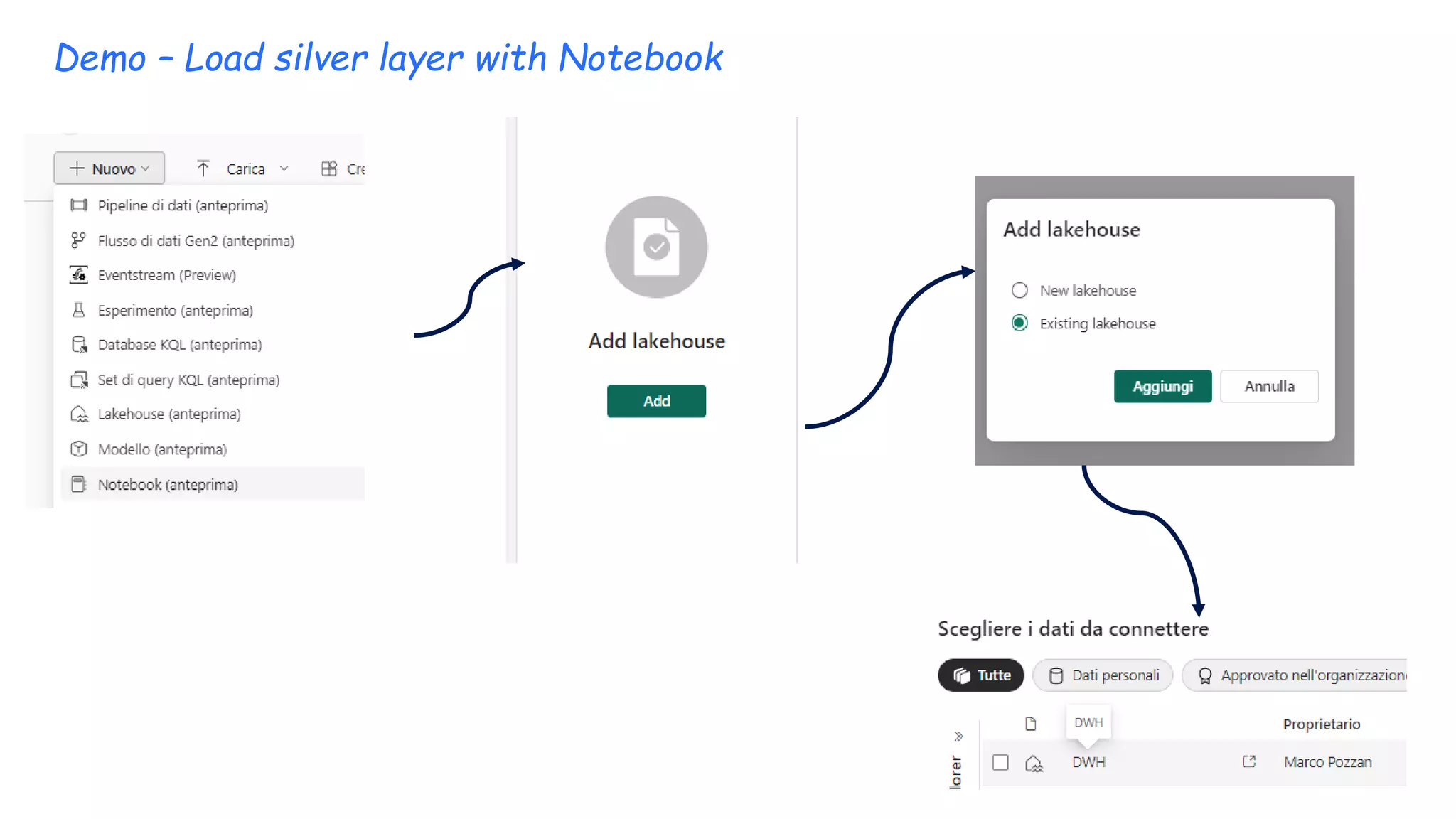
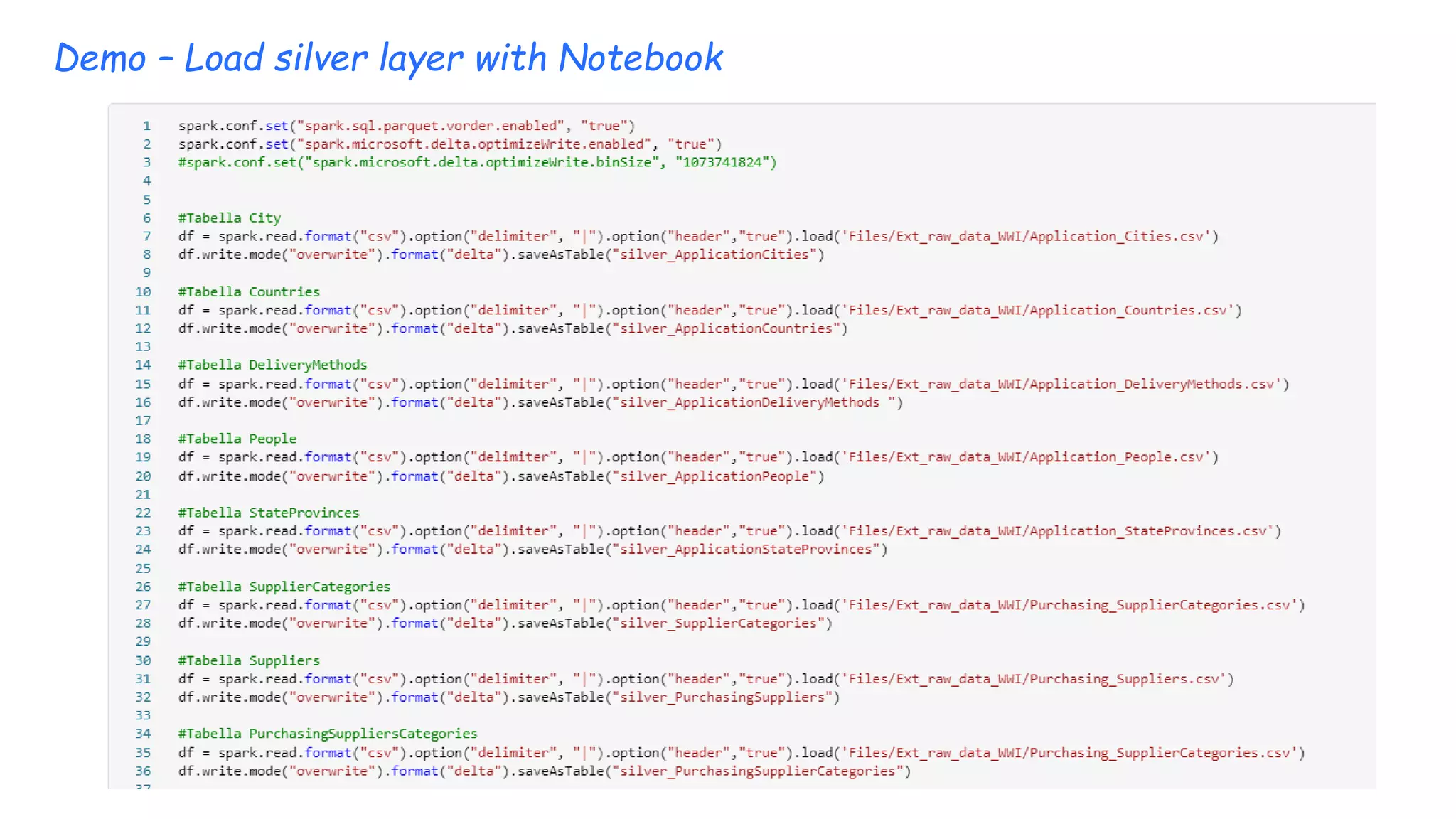
Demo – Load silver layer with Notebook
Demo – Test table
SELECT YEAR(SO.OrderDate) AS OrderDateYear,
COUNT(SO.OrderDate) AS TotalOrderCount
FROM [DWH].[dbo].[silver_salesorder] SO
GROUP BY YEAR(SO.OrderDate);
SELECT ISNULL(C.ColorName,'No Colour') AS ColourName,
SUM(cast(SOL.Quantity as int)) AS TotalOrderLineQuantity,
SUM(cast(SOL.UnitPrice as numeric)) AS TotalOrderLineUnitPrice
FROM [DWH].[dbo].[silver_salesorderline] SOL
INNER JOIN [DWH].[dbo].[silver_stockitems] SI ON SI.StockItemID = SOL.StockItemID
LEFT JOIN [DWH].[dbo].[silver_colors] C ON C.ColorID = SI.ColorID
GROUP BY ISNULL(C.ColorName,'No Colour’);
SELECT
YEAR(SO.OrderDate) AS OrderDateYear,
SC.SupplierCategoryName,
SUM(cast(SOL.Quantity as int)) AS TotalOrderLineQuantity,
SUM(cast(SOL.UnitPrice as numeric)) AS TotalOrderLineUnitPrice
FROM [DWH].[dbo].[silver_salesorderline] SOL
INNER JOIN [DWH].[dbo].[silver_salesorder] SO ON SO.OrderID = SOL.OrderID
INNER JOIN [DWH].[dbo].[silver_stockitems] SI ON SI.StockItemID = SOL.StockItemID
INNER JOIN [DWH].[dbo].[silver_suppliers] S ON SI.SupplierID = S.SupplierID
INNER JOIN [DWH].[dbo].[silver_categories] SC ON SC.SupplierCategoryID = S.SupplierCategoryID
GROUP BY YEAR(SO.OrderDate),
SC.SupplierCategoryName;
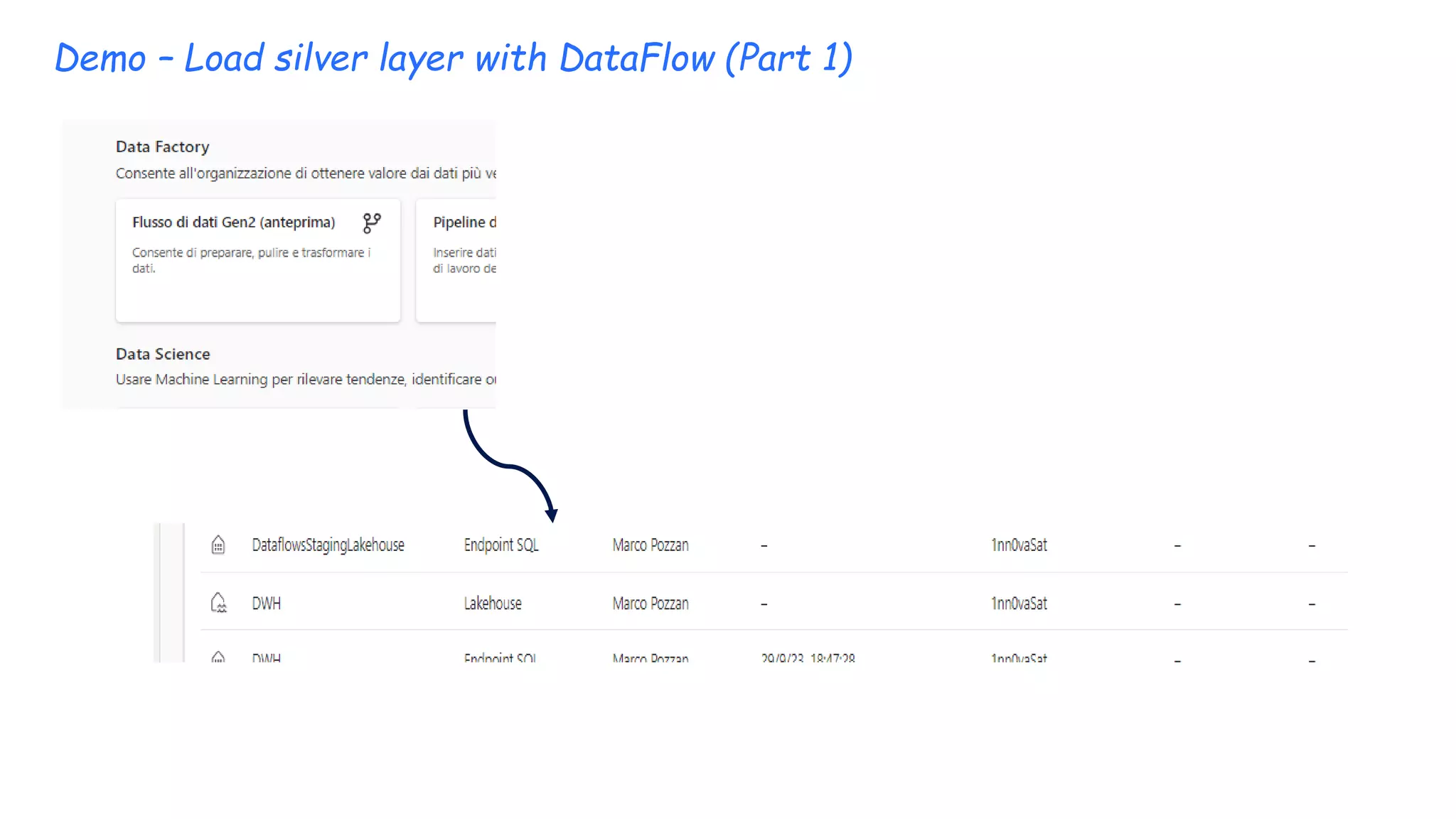
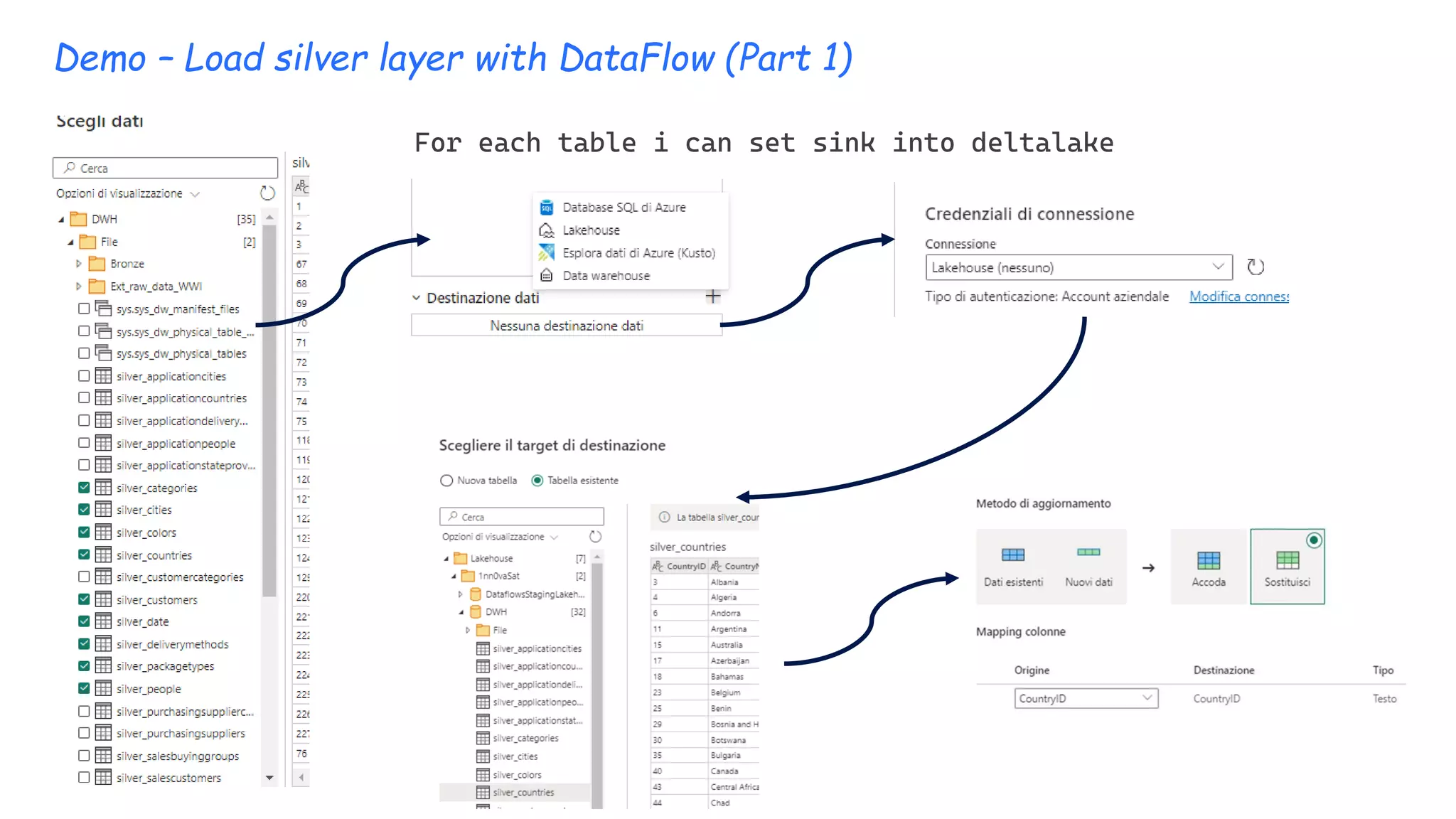
Demo – Load silver layer with DataFlow (Part 1)
For each table i can set sink into deltalake
Demo – Load silver layer with Pipeline (Part 1 define variables)
["Countries","DeliveryMethods","People","StateProvince
s","SupplierCategories","Suppliers","BuyingGroups","Cu
stomerCategories","Customers","Colors","PackageTypes",
"StockItems","Cities","Date"]
Set variables with this array
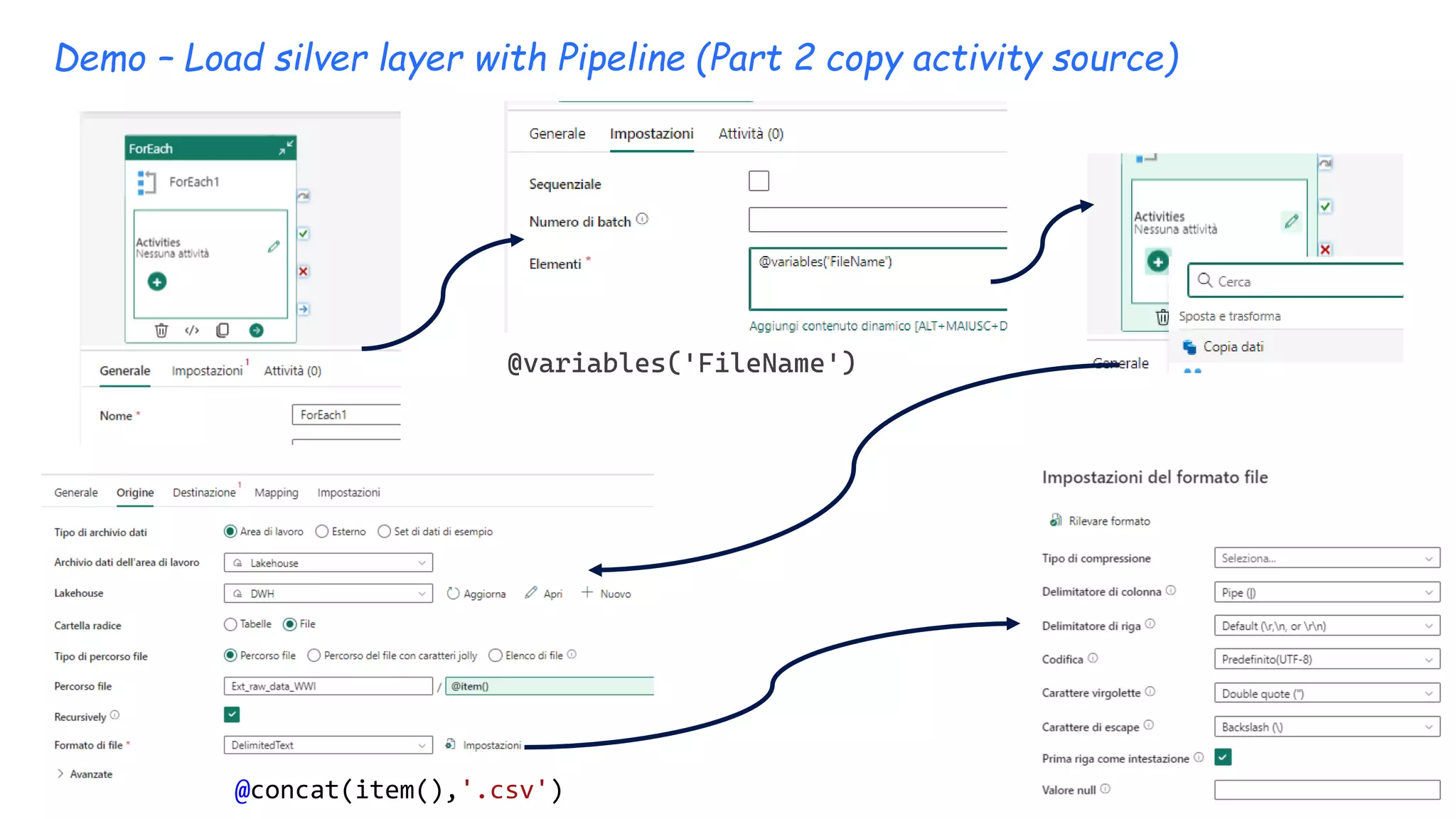
Demo – Load silver layer with Pipeline (Part 2 copy activity source)
@variables('FileName')
@concat(item(),'.csv')
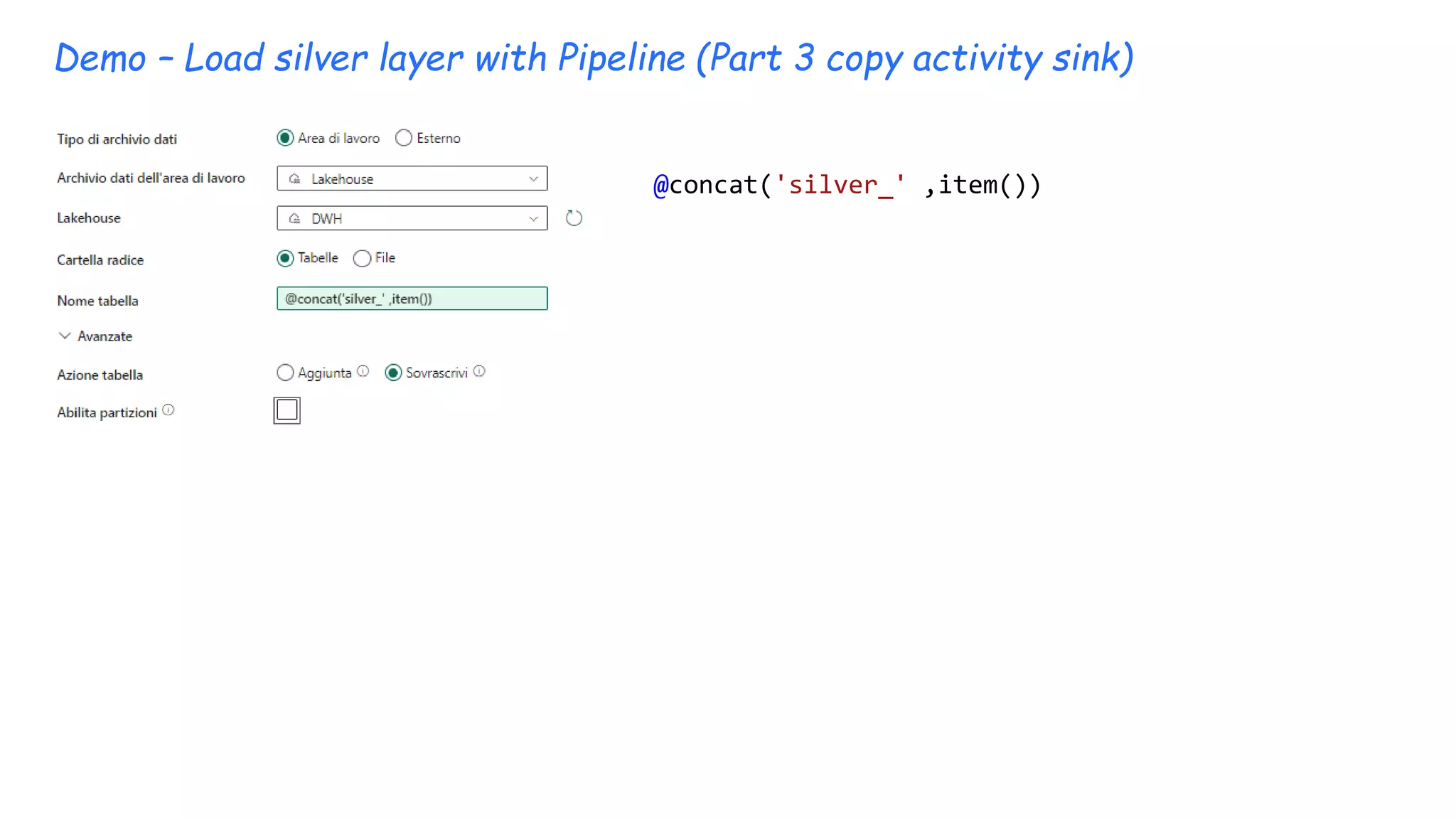
Demo – Load silver layer with Pipeline (Part 3 copy activity sink)
@concat('silver_' ,item())
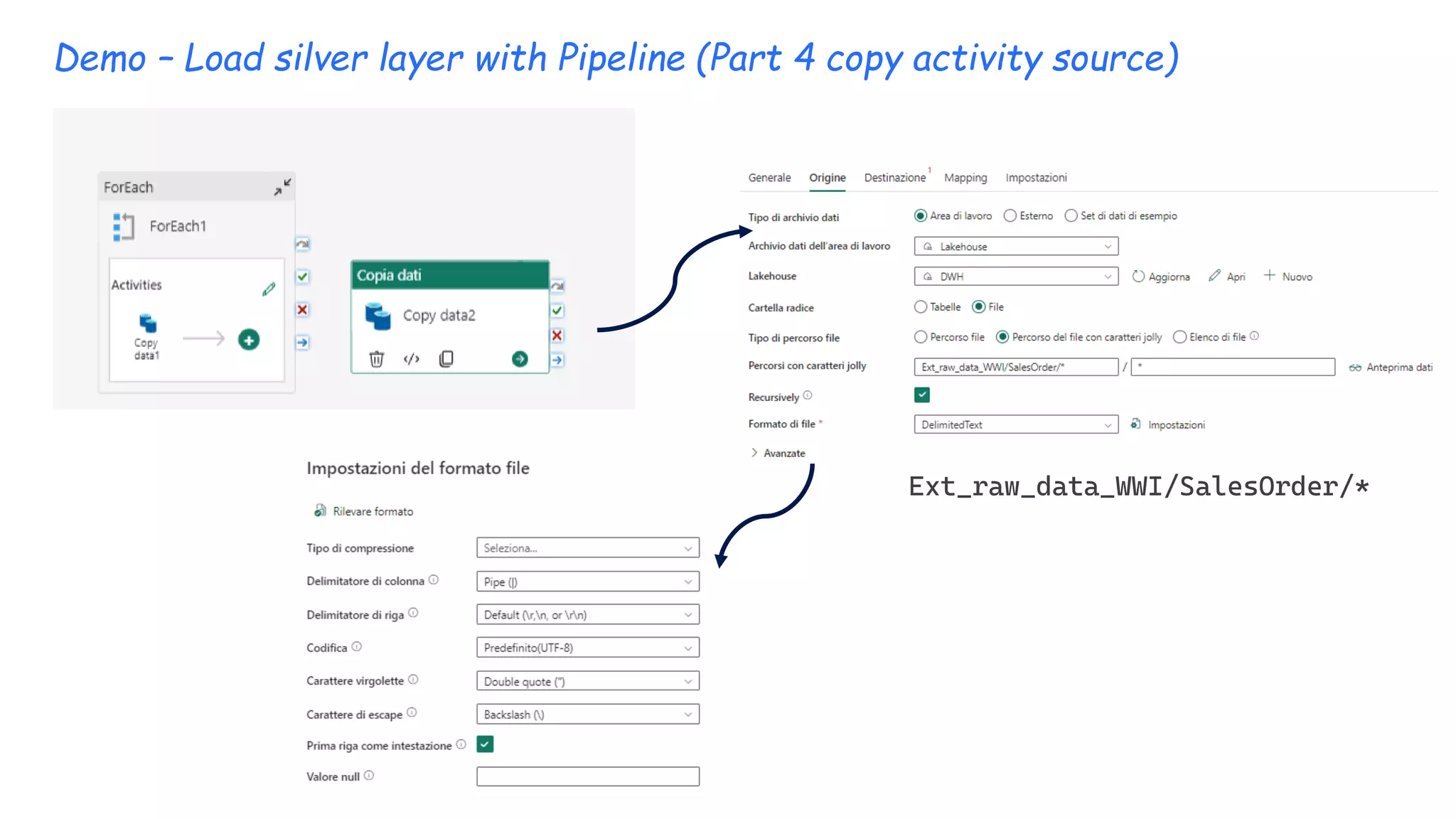
Demo – Load silver layer with Pipeline (Part 4 copy activity source)
Ext_raw_data_WWI/SalesOrder/*
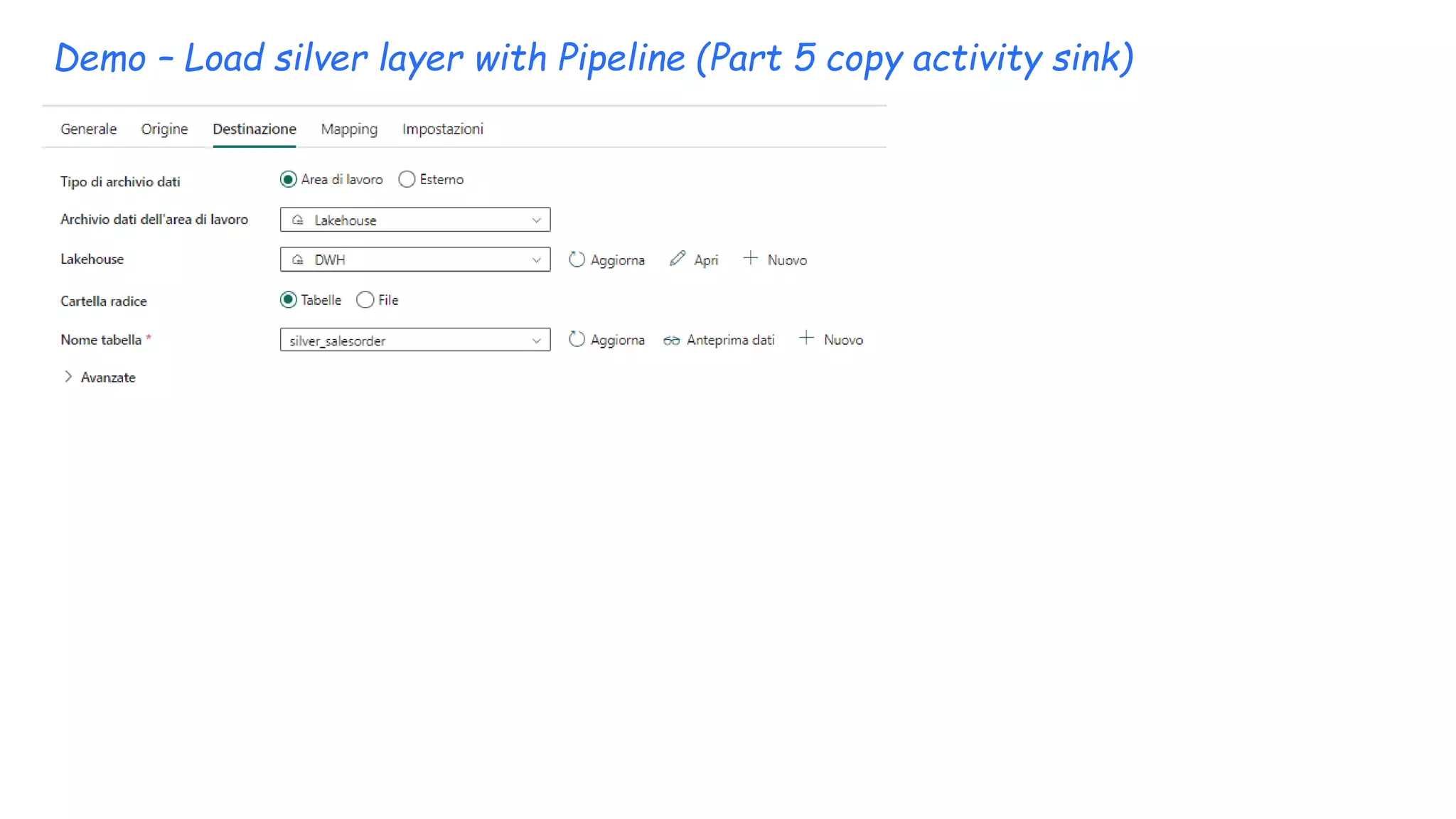
Demo – Load silver layer with Pipeline (Part 5 copy activity sink)
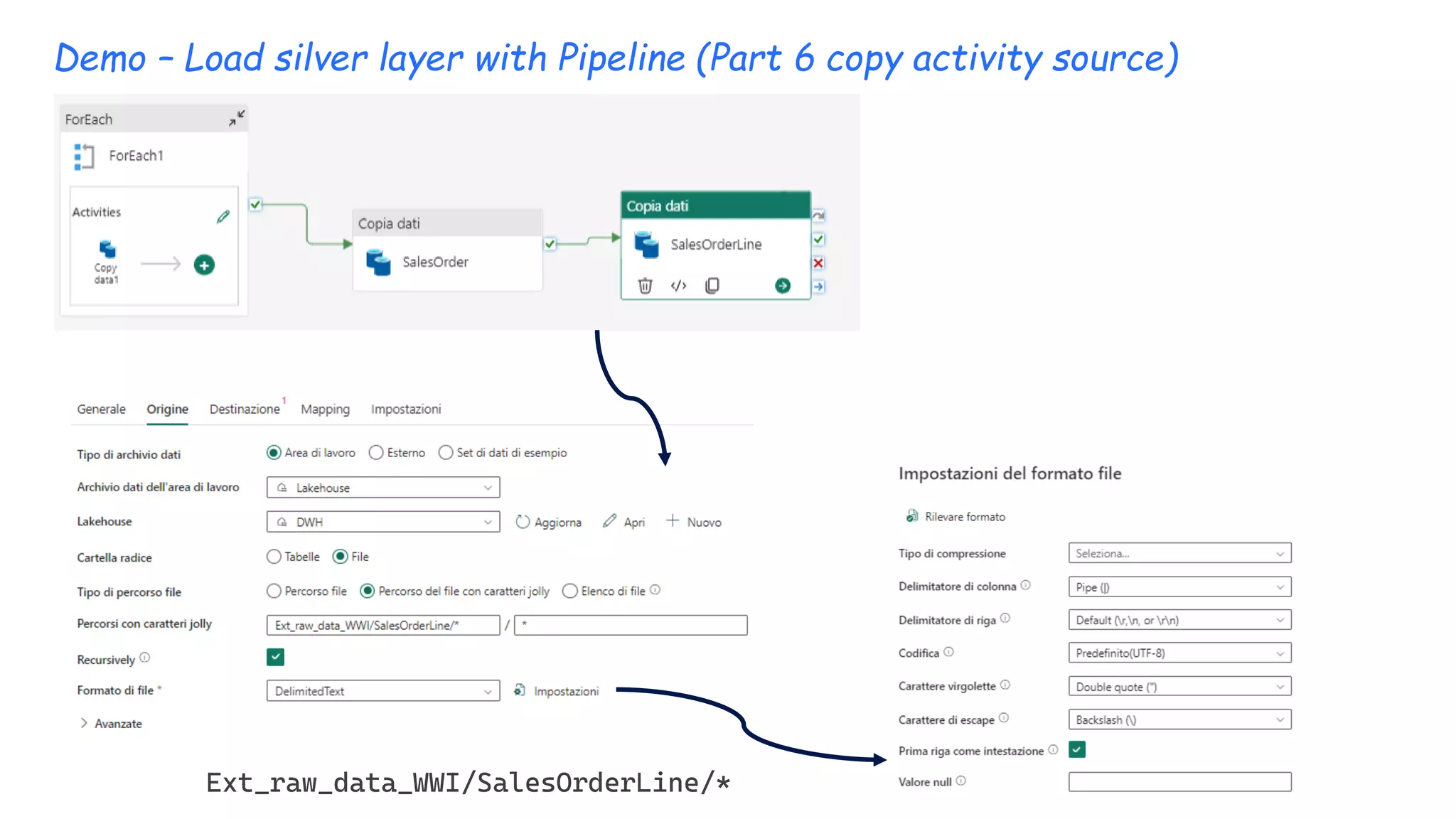
Demo – Load silver layer with Pipeline (Part 6 copy activity source)
Ext_raw_data_WWI/SalesOrderLine/*
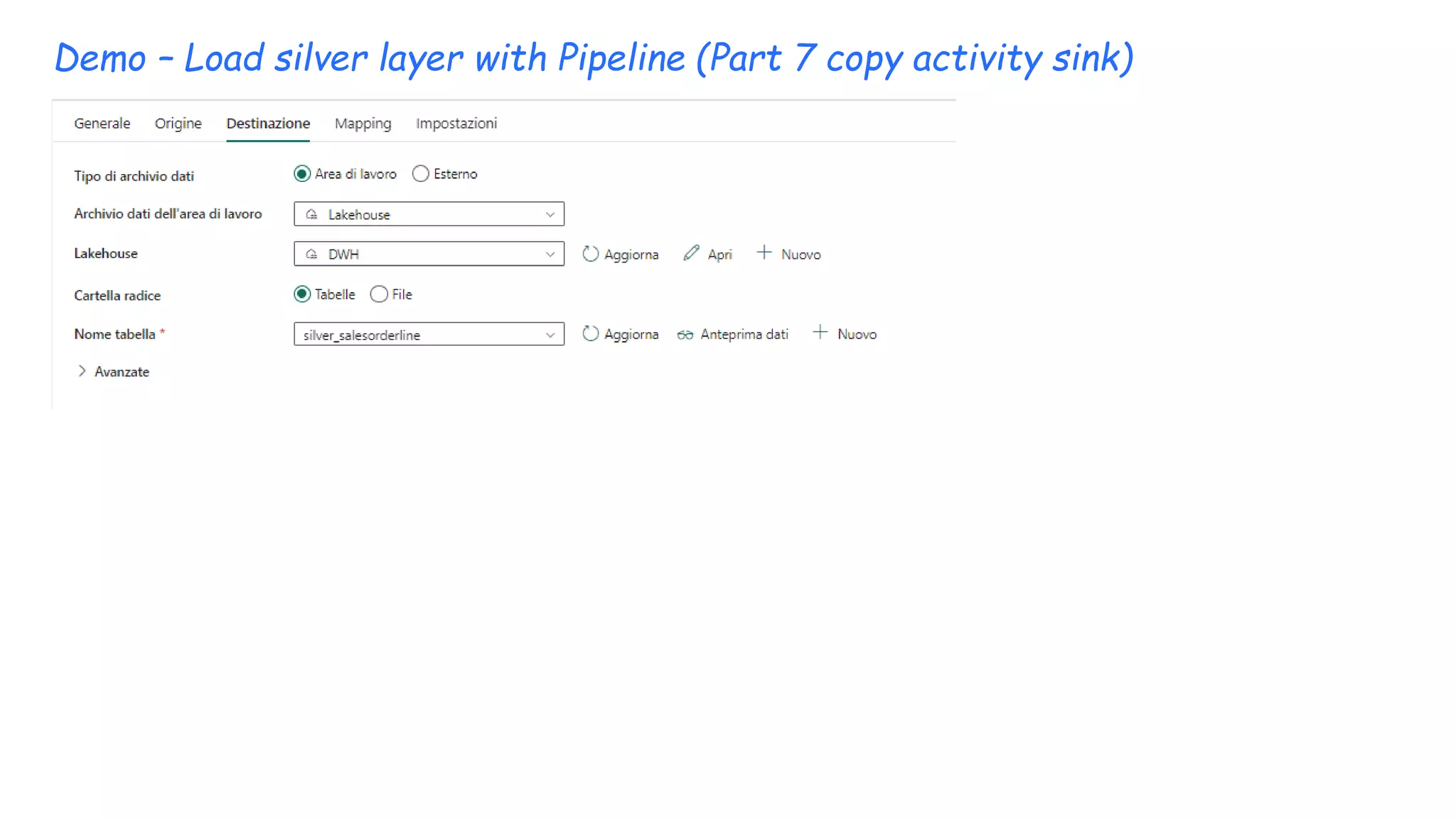
Demo – Load silver layer with Pipeline (Part 7 copy activity sink)
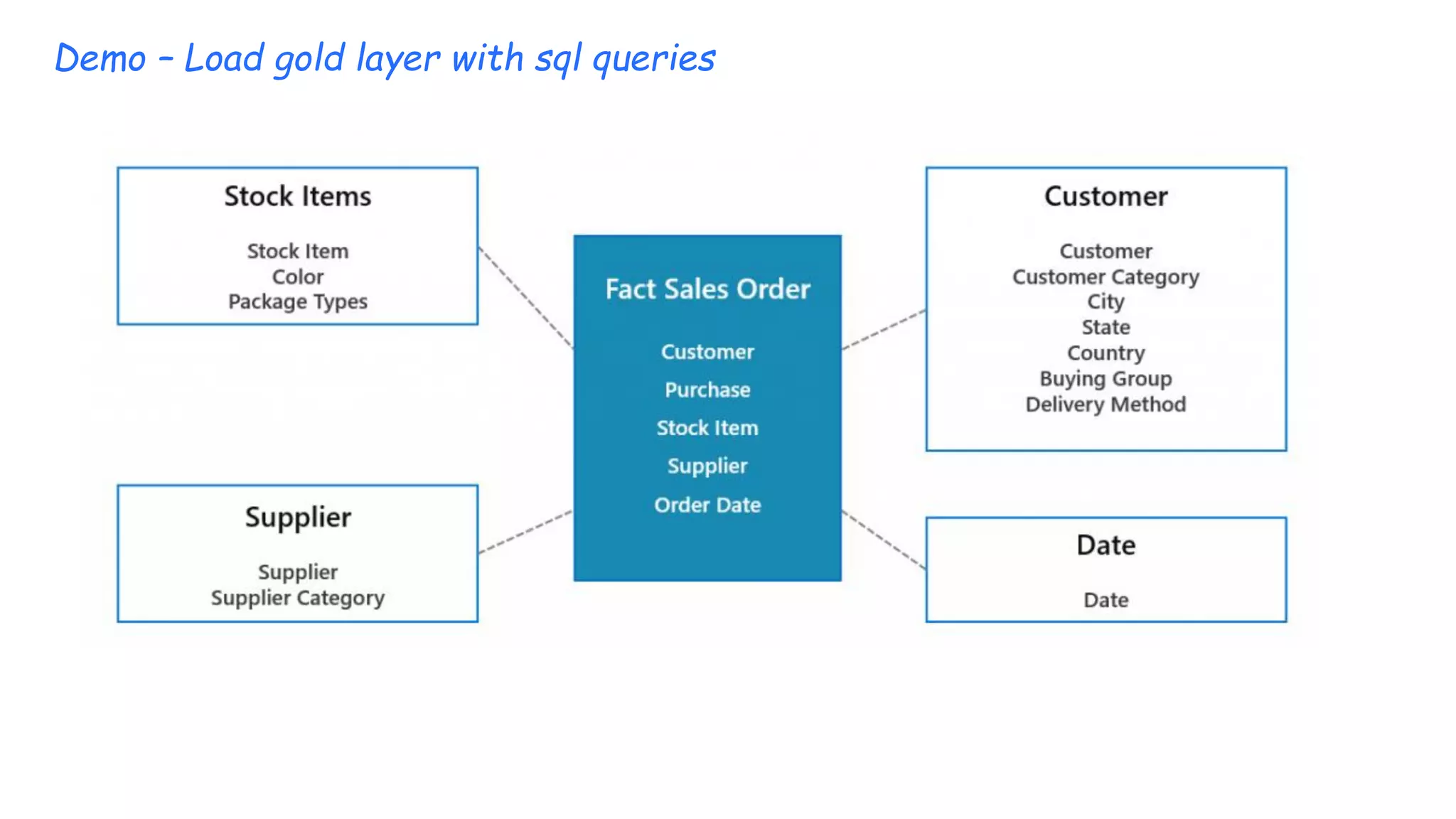
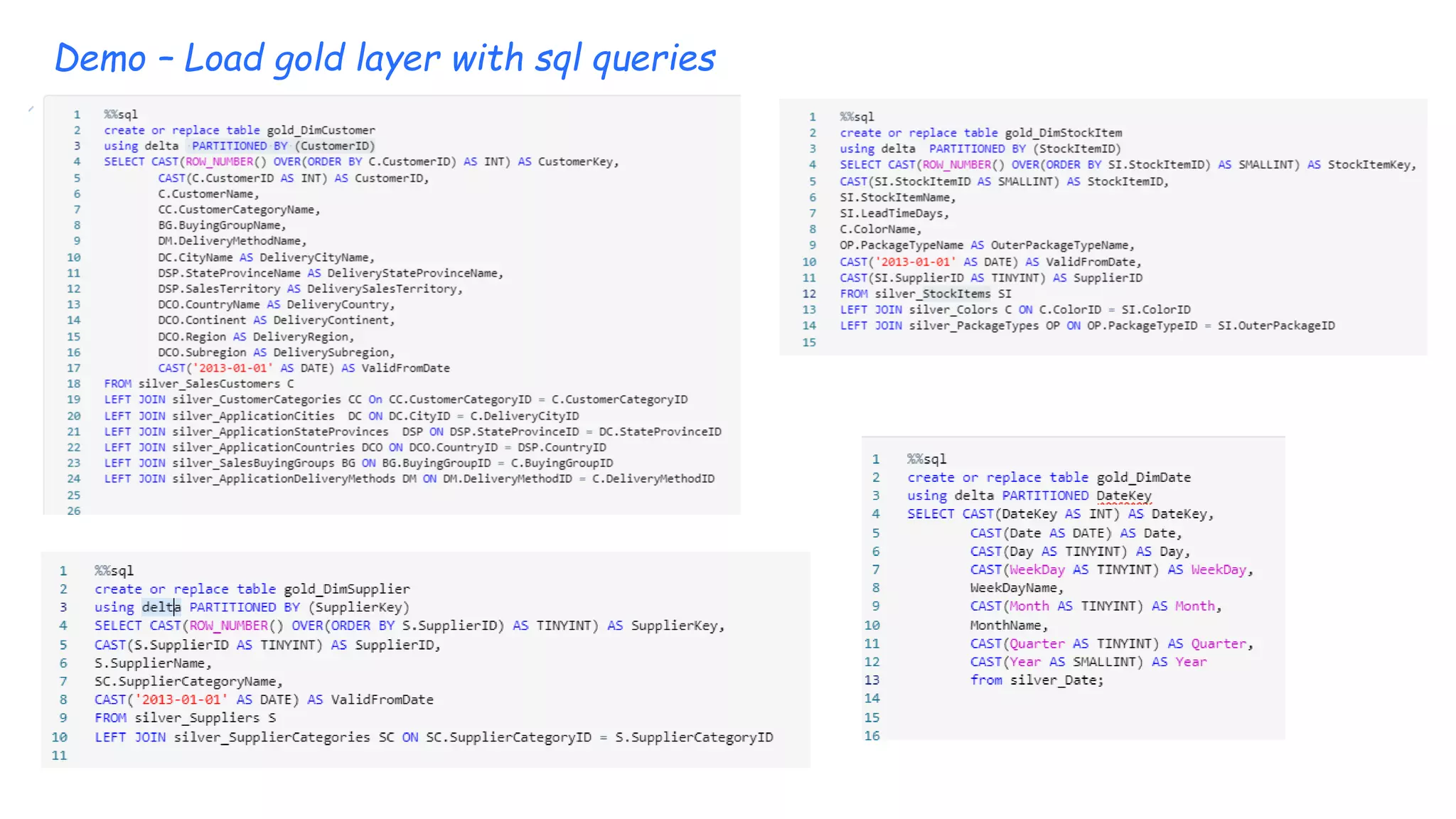
Demo – Load gold layer with sql queries
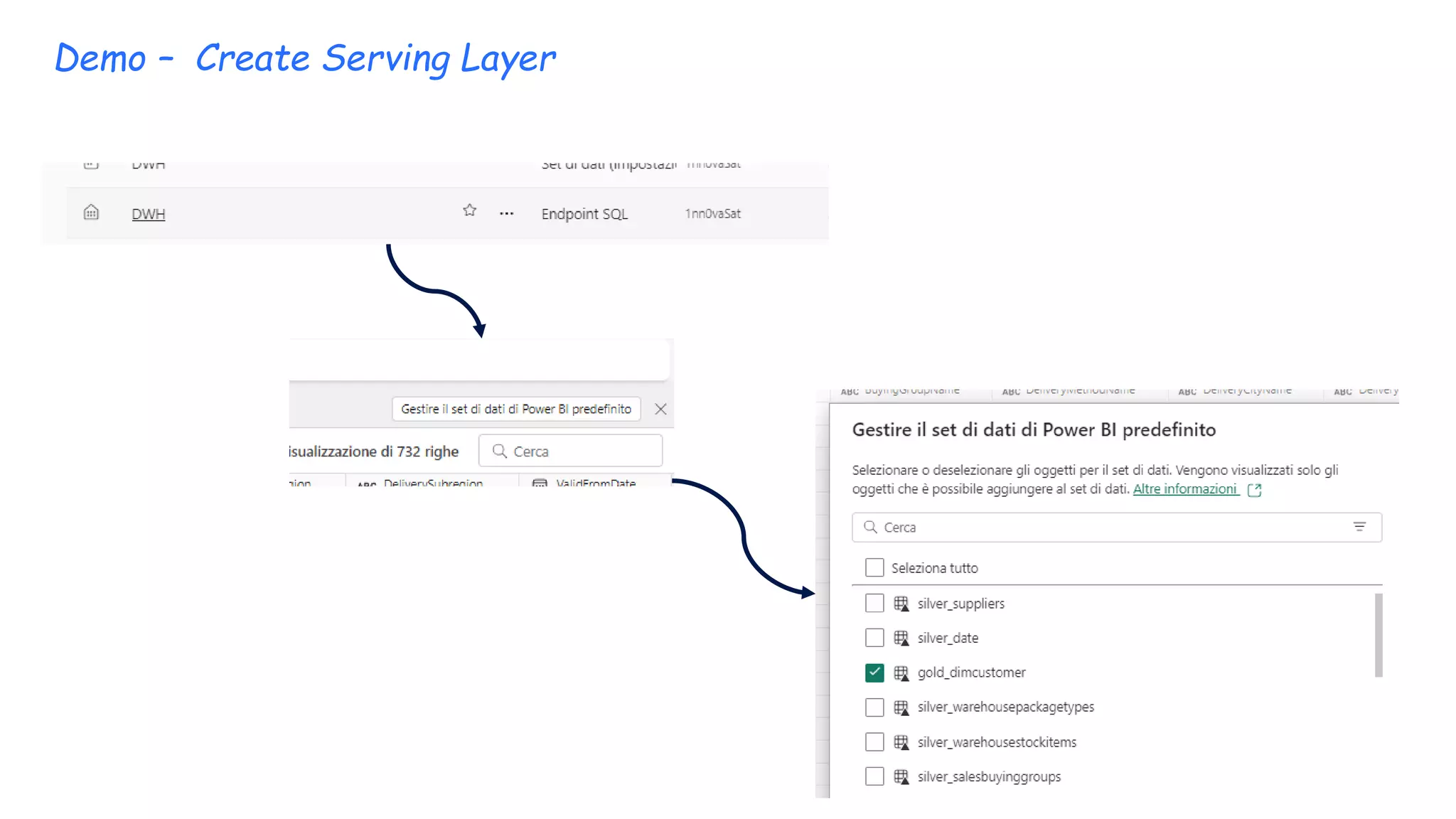
Demo – Create Serving Layer

Data Warehouse with Fabric on data lakehouse

  • 1.
  • 2.
    Marco Pozzan • Consulentee formatore in ambito business intelligence • Nel 2020 Fondatore e CTO start-up per analisi dati e per insurance data analytics per le compagnie assicurative Dal 2017 mi occupo di architetture big Data e in generale di tutta la proposizione data platform di Microsoft. • Docente all'Università di Pordenone per i corsi IFTS di analisi Big Data • Community Lead di 1nn0va (www.innovazionefvg.net) • MCP,MCSA,MCSE dal 2017 MCT e dal 2014 MVP per SQL Server e relatore in diverse conferenze sul tema. • marco.pozzan@regolofarm.com • @marcopozzan.it • www.marcopozzan.it • http://www.scoop.it/u/marco-pozzan • http://paper.li/marcopozzan/1422524394
  • 3.
    Data Warehouse withFabric on data lakehouse
  • 12.
    Databricks recommends takinga layered approach to creating a single source of truth for enterprise data products. This architecture ensures atomicity, consistency, isolation, and durability as data passes through multiple levels of validations and transformations before being stored in a layout optimized for efficient analysis. It is important to note that this medallion architecture is not a substitute for other dimensional modeling techniques.The schemas and tables within each tier can take a variety of forms and degrees of normalization depending on the frequency and nature of data updates and downstream use cases for the data. Medallion Architecture
  • 13.
    Medallion Architecture I terminibronzo (grezzo), argento (convalidato) e oro (arricchito) descrivono la qualità dei dati in ciascuno di questi livelli.
  • 14.
  • 15.
    Demo – tokenSAS generation ?sv=2020-02-10&st=2023-09-29T04%3A46%3A14Z&se=2023-10- 29T05%3A46%3A00Z&sr=c&sp=rle&sig=uds%2BXKBHBBkelOkOFjeOblWlxQ5vPWBk0unBtysXgeY%3D
  • 16.
    Demo – Shortcutconfiguration for bronze layer (part 1) https://dataengineerrowdata.dfs.core.windows.net /1nn0vasat
  • 17.
    Demo – Shortcutconfiguration for bronze layer (part 2) • https://dataengineerrowdata.dfs.core.windows.net/1nn0vasat • LinkEsternoWWI
  • 18.
    Demo – Shortcutconfiguration for bronze layer (part 3) • Ext_raw_data_WWI • /1nn0vasat/Files/
  • 19.
    Demo – Loadsilver layer with Notebook
  • 20.
    Demo – Loadsilver layer with Notebook
  • 21.
    Demo – Testtable SELECT YEAR(SO.OrderDate) AS OrderDateYear, COUNT(SO.OrderDate) AS TotalOrderCount FROM [DWH].[dbo].[silver_salesorder] SO GROUP BY YEAR(SO.OrderDate); SELECT ISNULL(C.ColorName,'No Colour') AS ColourName, SUM(cast(SOL.Quantity as int)) AS TotalOrderLineQuantity, SUM(cast(SOL.UnitPrice as numeric)) AS TotalOrderLineUnitPrice FROM [DWH].[dbo].[silver_salesorderline] SOL INNER JOIN [DWH].[dbo].[silver_stockitems] SI ON SI.StockItemID = SOL.StockItemID LEFT JOIN [DWH].[dbo].[silver_colors] C ON C.ColorID = SI.ColorID GROUP BY ISNULL(C.ColorName,'No Colour’); SELECT YEAR(SO.OrderDate) AS OrderDateYear, SC.SupplierCategoryName, SUM(cast(SOL.Quantity as int)) AS TotalOrderLineQuantity, SUM(cast(SOL.UnitPrice as numeric)) AS TotalOrderLineUnitPrice FROM [DWH].[dbo].[silver_salesorderline] SOL INNER JOIN [DWH].[dbo].[silver_salesorder] SO ON SO.OrderID = SOL.OrderID INNER JOIN [DWH].[dbo].[silver_stockitems] SI ON SI.StockItemID = SOL.StockItemID INNER JOIN [DWH].[dbo].[silver_suppliers] S ON SI.SupplierID = S.SupplierID INNER JOIN [DWH].[dbo].[silver_categories] SC ON SC.SupplierCategoryID = S.SupplierCategoryID GROUP BY YEAR(SO.OrderDate), SC.SupplierCategoryName;
  • 22.
    Demo – Loadsilver layer with DataFlow (Part 1)
  • 23.
    Demo – Loadsilver layer with DataFlow (Part 1) For each table i can set sink into deltalake
  • 24.
    Demo – Loadsilver layer with Pipeline (Part 1 define variables) ["Countries","DeliveryMethods","People","StateProvince s","SupplierCategories","Suppliers","BuyingGroups","Cu stomerCategories","Customers","Colors","PackageTypes", "StockItems","Cities","Date"] Set variables with this array
  • 25.
    Demo – Loadsilver layer with Pipeline (Part 2 copy activity source) @variables('FileName') @concat(item(),'.csv')
  • 26.
    Demo – Loadsilver layer with Pipeline (Part 3 copy activity sink) @concat('silver_' ,item())
  • 27.
    Demo – Loadsilver layer with Pipeline (Part 4 copy activity source) Ext_raw_data_WWI/SalesOrder/*
  • 28.
    Demo – Loadsilver layer with Pipeline (Part 5 copy activity sink)
  • 29.
    Demo – Loadsilver layer with Pipeline (Part 6 copy activity source) Ext_raw_data_WWI/SalesOrderLine/*
  • 30.
    Demo – Loadsilver layer with Pipeline (Part 7 copy activity sink)
  • 31.
    Demo – Loadgold layer with sql queries
  • 32.
    Demo – Loadgold layer with sql queries
  • 33.
    Demo – CreateServing Layer