







#azuresatpn
Real-time dashboard + what-
if analysis
#azuresatpn
About me
• Consultant and trainer in business intelligence, business analytics and data mining in
Méthode www.methode.it
• Since 2002, the main activities are related to the design of relational data warehouse and
multidimensional design with Microsoft tools.
• Teacher at the University of Pordenone in the course of data analysis and Big Data.
• Community Lead of 1nn0va (www.innovazionefvg.net)
• MCP, MCSA, MCSE, MCT and MVP Reconnect since 2014 for SQL Server.
• Speaker in several conferences on the topic info@marcopozzan.it
• @marcopozzan.it
• www.marcopozzan.it
• http://www.scoop.it/u/marco-pozzan
• http://paper.li/marcopozzan/1422524394
#azuresatpn
Agenda
• Real time on Power BI
• Dataset type
• Pushing data method
• Best Practices
• Case Study
• Real-time dataset
• Gateway
• Power Apps
#azuresatpn
Real Time on Power BI
• There is three type of real-time in Power BI
• Push
• Streaming
• PUbNub
#azuresatpn
Push Type
• Power BI Service automatically creates a new DB;
• Dashboard tile refresh triggered whenever data is
pushed in;
• Enabled to create reports;
• Enabled to use all Power BI report features, such as
custom visuals, data alerts and pinned dashboard tiles;
• Pinning an entire report will not result in the data
automatically refreshed;
• Q&A to ask question when a visual is pinned to a
dashboard;
#azuresatpn
Push Type
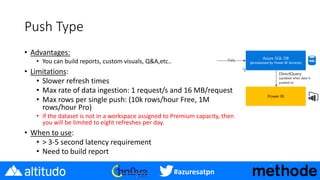
• Advantages:
• You can build reports, custom visuals, Q&A,etc..
• Limitations:
• Slower refresh times
• Max rate of data ingestion: 1 request/s and 16 MB/request
• Max rows per single push: (10k rows/hour Free, 1M
rows/hour Pro)
• if the dataset is not in a workspace assigned to Premium capacity, then
you will be limited to eight refreshes per day.
• When to use:
• > 3-5 second latency requirement
• Need to build report
#azuresatpn
Streaming Type
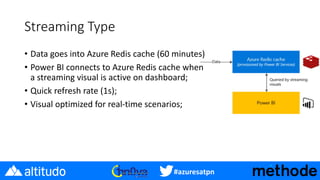
• Data goes into Azure Redis cache (60 minutes)
• Power BI connects to Azure Redis cache when
a streaming visual is active on dashboard;
• Quick refresh rate (1s);
• Visual optimized for real-time scenarios;
#azuresatpn
Streaming Type
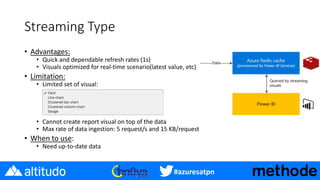
• Advantages:
• Quick and dependable refresh rates (1s)
• Visuals optimized for real-time scenario(latest value, etc)
• Limitation:
• Limited set of visual:
• Cannot create report visual on top of the data
• Max rate of data ingestion: 5 request/s and 15 KB/request
• When to use:
• Need up-to-date data
#azuresatpn
PubNub Type
• Data stream subscription:
• Quick refresh rate (1s);
• Visual optimized for real-time scenarios;
• SDK Platform:
• JavaScript
• .NET
• iOS
• Android
#azuresatpn
PubNub Type
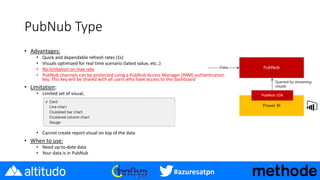
• Advantages:
• Quick and dependable refresh rates (1s)
• Visuals optimized for real time scenario (latest value, etc..)
• No limitation on max rate
• PubNub channels can be protected using a PubNub Access Manager (PAM) authentication
key. This key will be shared with all users who have access to the dashboard
• Limitation:
• Limited set of visual;
• Cannot create report visual on top of the data
• When to use:
• Need up-to-date data
• Your data is in PubNub
#azuresatpn
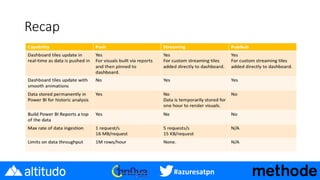
Recap
#azuresatpn
Pushing data
• REST APIs
• Azure Stream Analytics
• Flow
• PubNub
#azuresatpn
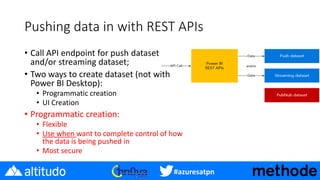
Pushing data in with REST APIs
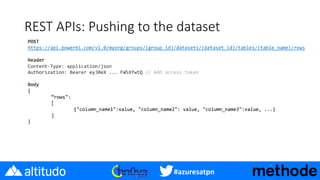
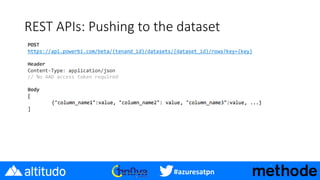
• Call API endpoint for push dataset
and/or streaming dataset;
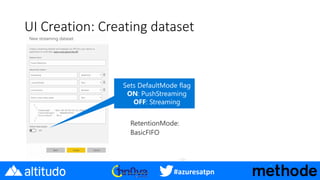
• Two ways to create dataset (not with
Power BI Desktop):
• Programmatic creation
• UI Creation
• Programmatic creation:
• Flexible
• Use when want to complete control of how
the data is being pushed in
• Most secure
#azuresatpn
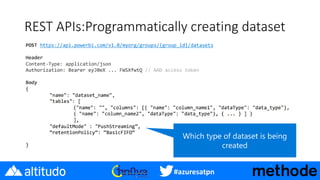
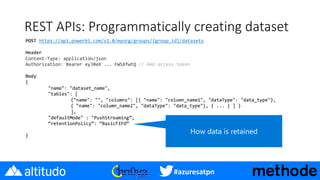
REST APIs:Programmatically creating dataset
#azuresatpn
REST APIs: Programmatically creating dataset
#azuresatpn
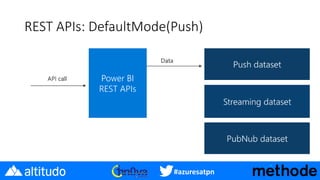
REST APIs: DefaultMode(Push)
#azuresatpn
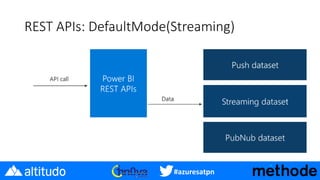
REST APIs: DefaultMode(Streaming)
#azuresatpn
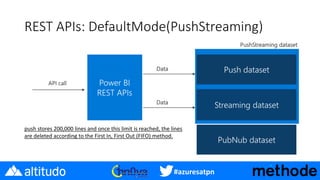
REST APIs: DefaultMode(PushStreaming)
push stores 200,000 lines and once this limit is reached, the lines
are deleted according to the First In, First Out (FIFO) method.
#azuresatpn
REST APIs: Pushing to the dataset
#azuresatpn
UI Creation: Creating dataset
#azuresatpn
REST APIs: Pushing to the dataset
#azuresatpn
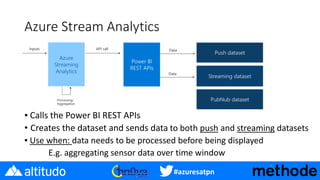
Azure Stream Analytics
▪ Calls the Power BI REST APIs
• Creates the dataset and sends data to both push and streaming datasets
▪ Use when: data needs to be processed before being displayed
E.g. aggregating sensor data over time window
#azuresatpn
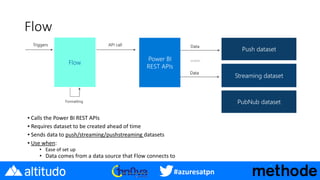
Flow
▪ Calls the Power BI REST APIs
▪ Requires dataset to be created ahead of time
▪ Sends data to push/streaming/pushstreaming datasets
▪ Use when:
• Ease of set up
• Data comes from a data source that Flow connects to
#azuresatpn
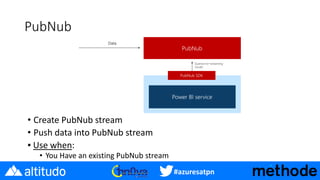
PubNub
• Create PubNub stream
• Push data into PubNub stream
▪ Use when:
• You Have an existing PubNub stream
#azuresatpn
Best Practices: Reduce Data Volume
• Reduce data volume down to only what you need to display in Power BI
• For deeper analysis, send to a database, and connect Power BI to that via
import/live connection
• Be aware of data volume limits
#azuresatpn
Case study
Objectives
• Create a dashboard available to customer services
and warehouse operators where they can highlight
in real time if the workload can be processed in
time or not.
Data sources
• repository that contain a delivery data
• repository that contain shifts work
#azuresatpn
Case study: Data source Microsoft e non
Microsoft
Da Microsoft ignite
SAP HANA (In-Memory Data Platform)
Harness the power of your data and accelerate trusted
outcome-driven innovation by developing intelligent and
live solutions for real-time decisions and actions on a
single data copy. Support next-generation transactional
and analytical processing with a broad set of advanced
analytics – run securely across hybrid and multicloud
environments.
Bill McDermott, SAP CEO
#azuresatpn
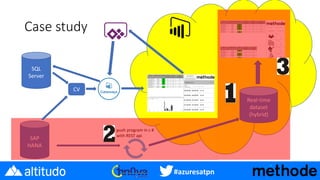
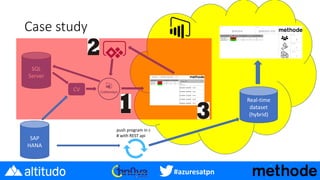
Case study
SAP
HANA
SQL
Server
Real-time
dataset
(hybrid)
CV
push program in c #
with REST api
#azuresatpn
Case study (part 1): How to create a streaming
data set
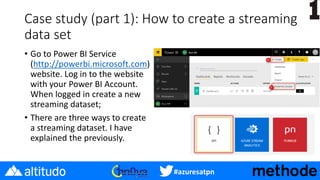
• Go to Power BI Service
(http://powerbi.microsoft.com)
website. Log in to the website
with your Power BI Account.
When logged in create a new
streaming dataset;
• There are three ways to create
a streaming dataset. I have
explained the previously.
#azuresatpn
Case study (part 1): How to save streaming
dataset’s data
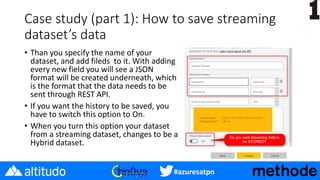
• Than you specify the name of your
dataset, and add fileds to it. With adding
every new field you will see a JSON
format will be created underneath, which
is the format that the data needs to be
sent through REST API.
• If you want the history to be saved, you
have to switch this option to On.
• When you turn this option your dataset
from a streaming dataset, changes to be a
Hybrid dataset.
#azuresatpn
Case study (part 1): Power BI API workflow
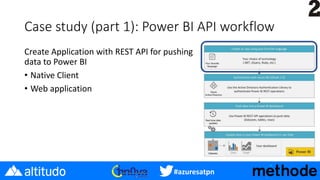
Create Application with REST API for pushing
data to Power BI
• Native Client
• Web application
#azuresatpn
Case study (part 1): Power BI API workflow
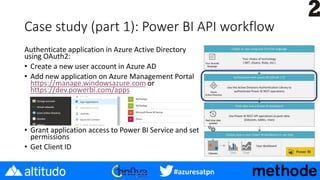
Authenticate application in Azure Active Directory
using OAuth2:
• Create a new user account in Azure AD
• Add new application on Azure Management Portal
https://manage.windowsazure.com or
https://dev.powerbi.com/apps
• Grant application access to Power BI Service and set
permissions
• Get Client ID
#azuresatpn
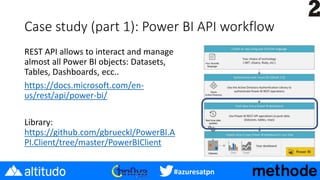
Case study (part 1): Power BI API workflow
REST API allows to interact and manage
almost all Power BI objects: Datasets,
Tables, Dashboards, ecc..
https://docs.microsoft.com/en-
us/rest/api/power-bi/
Library:
https://github.com/gbrueckl/PowerBI.A
PI.Client/tree/master/PowerBIClient
#azuresatpn
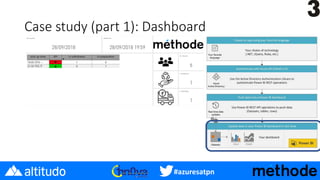
Case study (part 1): Dashboard
#azuresatpn
Case study
SAP
HANA
SQL
Server
Real-time
dataset
(hybrid)
CV
push program in c
# with REST api
#azuresatpn
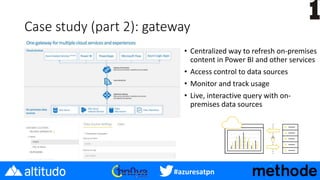
Case study (part 2): gateway
• Centralized way to refresh on-premises
content in Power BI and other services
• Access control to data sources
• Monitor and track usage
• Live, interactive query with on-
premises data sources
#azuresatpn
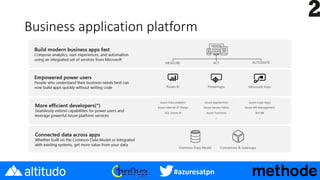
Business application platform
#azuresatpn
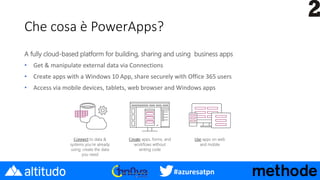
Che cosa è PowerApps?
A fully cloud-based platform for building, sharing and using business apps
• Get & manipulate external data via Connections
• Create apps with a Windows 10 App, share securely with Office 365 users
• Access via mobile devices, tablets, web browser and Windows apps
#azuresatpn
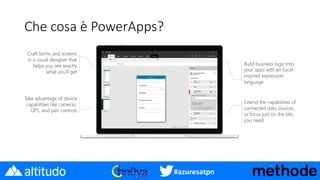
Che cosa è PowerApps?
#azuresatpn
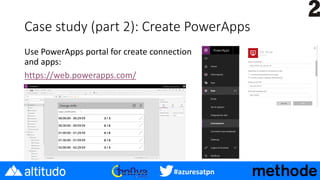
Case study (part 2): Create PowerApps
Use PowerApps portal for create connection
and apps:
https://web.powerapps.com/
#azuresatpn
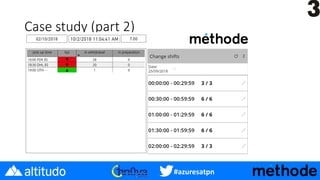
Case study (part 2)
#azuresatpn
Additional resources
• Real-time streaming documentation
• Tutorial: building real-time IoT dashboard with streaming datasets
• Documentation: connecting Azure Stream Analytics to Power BI
• Tutorial: adding PubNub stream from Power BI
• Real-time streaming GA announcement
#azuresatpn
Grazie

Azure saturday pn 2018

  • 1.
  • 2.
    #azuresatpn About me • Consultantand trainer in business intelligence, business analytics and data mining in Méthode www.methode.it • Since 2002, the main activities are related to the design of relational data warehouse and multidimensional design with Microsoft tools. • Teacher at the University of Pordenone in the course of data analysis and Big Data. • Community Lead of 1nn0va (www.innovazionefvg.net) • MCP, MCSA, MCSE, MCT and MVP Reconnect since 2014 for SQL Server. • Speaker in several conferences on the topic info@marcopozzan.it • @marcopozzan.it • www.marcopozzan.it • http://www.scoop.it/u/marco-pozzan • http://paper.li/marcopozzan/1422524394
  • 3.
    #azuresatpn Agenda • Real timeon Power BI • Dataset type • Pushing data method • Best Practices • Case Study • Real-time dataset • Gateway • Power Apps
  • 4.
    #azuresatpn Real Time onPower BI • There is three type of real-time in Power BI • Push • Streaming • PUbNub
  • 5.
    #azuresatpn Push Type • PowerBI Service automatically creates a new DB; • Dashboard tile refresh triggered whenever data is pushed in; • Enabled to create reports; • Enabled to use all Power BI report features, such as custom visuals, data alerts and pinned dashboard tiles; • Pinning an entire report will not result in the data automatically refreshed; • Q&A to ask question when a visual is pinned to a dashboard;
  • 6.
    #azuresatpn Push Type • Advantages: •You can build reports, custom visuals, Q&A,etc.. • Limitations: • Slower refresh times • Max rate of data ingestion: 1 request/s and 16 MB/request • Max rows per single push: (10k rows/hour Free, 1M rows/hour Pro) • if the dataset is not in a workspace assigned to Premium capacity, then you will be limited to eight refreshes per day. • When to use: • > 3-5 second latency requirement • Need to build report
  • 7.
    #azuresatpn Streaming Type • Datagoes into Azure Redis cache (60 minutes) • Power BI connects to Azure Redis cache when a streaming visual is active on dashboard; • Quick refresh rate (1s); • Visual optimized for real-time scenarios;
  • 8.
    #azuresatpn Streaming Type • Advantages: •Quick and dependable refresh rates (1s) • Visuals optimized for real-time scenario(latest value, etc) • Limitation: • Limited set of visual: • Cannot create report visual on top of the data • Max rate of data ingestion: 5 request/s and 15 KB/request • When to use: • Need up-to-date data
  • 9.
    #azuresatpn PubNub Type • Datastream subscription: • Quick refresh rate (1s); • Visual optimized for real-time scenarios; • SDK Platform: • JavaScript • .NET • iOS • Android
  • 10.
    #azuresatpn PubNub Type • Advantages: •Quick and dependable refresh rates (1s) • Visuals optimized for real time scenario (latest value, etc..) • No limitation on max rate • PubNub channels can be protected using a PubNub Access Manager (PAM) authentication key. This key will be shared with all users who have access to the dashboard • Limitation: • Limited set of visual; • Cannot create report visual on top of the data • When to use: • Need up-to-date data • Your data is in PubNub
  • 11.
  • 12.
    #azuresatpn Pushing data • RESTAPIs • Azure Stream Analytics • Flow • PubNub
  • 13.
    #azuresatpn Pushing data inwith REST APIs • Call API endpoint for push dataset and/or streaming dataset; • Two ways to create dataset (not with Power BI Desktop): • Programmatic creation • UI Creation • Programmatic creation: • Flexible • Use when want to complete control of how the data is being pushed in • Most secure
  • 14.
  • 15.
  • 16.
  • 17.
  • 18.
    #azuresatpn REST APIs: DefaultMode(PushStreaming) pushstores 200,000 lines and once this limit is reached, the lines are deleted according to the First In, First Out (FIFO) method.
  • 19.
  • 20.
  • 21.
  • 22.
    #azuresatpn Azure Stream Analytics ▪Calls the Power BI REST APIs • Creates the dataset and sends data to both push and streaming datasets ▪ Use when: data needs to be processed before being displayed E.g. aggregating sensor data over time window
  • 23.
    #azuresatpn Flow ▪ Calls thePower BI REST APIs ▪ Requires dataset to be created ahead of time ▪ Sends data to push/streaming/pushstreaming datasets ▪ Use when: • Ease of set up • Data comes from a data source that Flow connects to
  • 24.
    #azuresatpn PubNub • Create PubNubstream • Push data into PubNub stream ▪ Use when: • You Have an existing PubNub stream
  • 25.
    #azuresatpn Best Practices: ReduceData Volume • Reduce data volume down to only what you need to display in Power BI • For deeper analysis, send to a database, and connect Power BI to that via import/live connection • Be aware of data volume limits
  • 26.
    #azuresatpn Case study Objectives • Createa dashboard available to customer services and warehouse operators where they can highlight in real time if the workload can be processed in time or not. Data sources • repository that contain a delivery data • repository that contain shifts work
  • 27.
    #azuresatpn Case study: Datasource Microsoft e non Microsoft Da Microsoft ignite SAP HANA (In-Memory Data Platform) Harness the power of your data and accelerate trusted outcome-driven innovation by developing intelligent and live solutions for real-time decisions and actions on a single data copy. Support next-generation transactional and analytical processing with a broad set of advanced analytics – run securely across hybrid and multicloud environments. Bill McDermott, SAP CEO
  • 28.
  • 29.
    #azuresatpn Case study (part1): How to create a streaming data set • Go to Power BI Service (http://powerbi.microsoft.com) website. Log in to the website with your Power BI Account. When logged in create a new streaming dataset; • There are three ways to create a streaming dataset. I have explained the previously.
  • 30.
    #azuresatpn Case study (part1): How to save streaming dataset’s data • Than you specify the name of your dataset, and add fileds to it. With adding every new field you will see a JSON format will be created underneath, which is the format that the data needs to be sent through REST API. • If you want the history to be saved, you have to switch this option to On. • When you turn this option your dataset from a streaming dataset, changes to be a Hybrid dataset.
  • 31.
    #azuresatpn Case study (part1): Power BI API workflow Create Application with REST API for pushing data to Power BI • Native Client • Web application
  • 32.
    #azuresatpn Case study (part1): Power BI API workflow Authenticate application in Azure Active Directory using OAuth2: • Create a new user account in Azure AD • Add new application on Azure Management Portal https://manage.windowsazure.com or https://dev.powerbi.com/apps • Grant application access to Power BI Service and set permissions • Get Client ID
  • 33.
    #azuresatpn Case study (part1): Power BI API workflow REST API allows to interact and manage almost all Power BI objects: Datasets, Tables, Dashboards, ecc.. https://docs.microsoft.com/en- us/rest/api/power-bi/ Library: https://github.com/gbrueckl/PowerBI.A PI.Client/tree/master/PowerBIClient
  • 34.
  • 35.
  • 36.
    #azuresatpn Case study (part2): gateway • Centralized way to refresh on-premises content in Power BI and other services • Access control to data sources • Monitor and track usage • Live, interactive query with on- premises data sources
  • 37.
  • 38.
    #azuresatpn Che cosa èPowerApps? A fully cloud-based platform for building, sharing and using business apps • Get & manipulate external data via Connections • Create apps with a Windows 10 App, share securely with Office 365 users • Access via mobile devices, tablets, web browser and Windows apps
  • 39.
  • 40.
    #azuresatpn Case study (part2): Create PowerApps Use PowerApps portal for create connection and apps: https://web.powerapps.com/
  • 41.
  • 42.
    #azuresatpn Additional resources • Real-timestreaming documentation • Tutorial: building real-time IoT dashboard with streaming datasets • Documentation: connecting Azure Stream Analytics to Power BI • Tutorial: adding PubNub stream from Power BI • Real-time streaming GA announcement
  • 43.