Azure Data Factory v2
Passcamp 2017
Stefan Kirner
1. Target Scenarios
2. Current State
3. Intro Data Factory v2
4. Triggers
5. Control Flow
6. SSIS in ADFv2
7. Pricing
8. Roadmap & Q+A
Agenda
3
Stefan Kirner
Teamleiter Business Intelligence Solutions
bei der inovex GmbH
› 15+ Jahre Erfahrung mit dem Microsoft Business Intelligence Toolset
› Microsoft Certified Systems Expert (MCSE) Data Management & Analytics
› Microsoft Certified Systems Associate (MCSA) Cloud Platform
› Microsoft P-TSP Data Platform
› Leitung SQL PASS e.V. Community Gruppe Karlsruhe
› Sprecher bei Konferenzen und User Groups zu BI- und Cloud-Themen
› Mail: stefan.kirner@inovex.de
Twitter: @KirnerKa
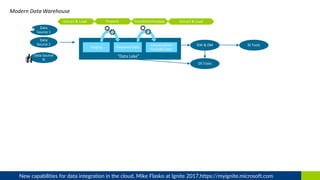
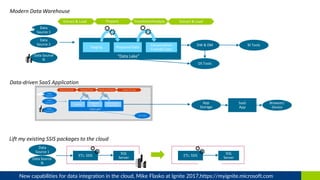
“Data Lake”
Extract & Load Prepare Transform/Analyze Extract & Load
New capabilities for data integration in the cloud, Mike Flasko at Ignite 2017,https://myignite.microsoft.com
“Data Lake”
Extract & Load Prepare Transform/Analyze Extract & Load
New capabilities for data integration in the cloud, Mike Flasko at Ignite 2017,https://myignite.microsoft.com
“Data Lake”
Extract & Load Prepare Transform/Analyze Extract & Load
New capabilities for data integration in the cloud, Mike Flasko at Ignite 2017,https://myignite.microsoft.com
9
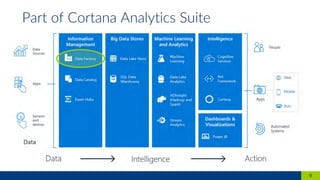
Part of Cortana Analytics Suite
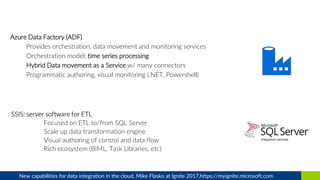
Azure Data Factory (ADF)
Provides orchestration, data movement and monitoring services
Orchestration model: time series processing
Hybrid Data movement as a Service w/ many connectors
Programmatic authoring, visual monitoring (.NET, Powershell)
New capabilities for data integration in the cloud, Mike Flasko at Ignite 2017,https://myignite.microsoft.com
12
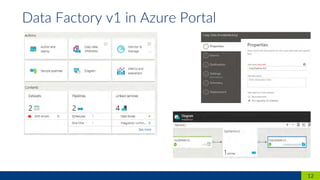
Data Factory v1 in Azure Portal
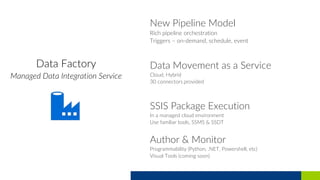
New Pipeline Model
Rich pipeline orchestration
Triggers – on-demand, schedule, event
Data Movement as a Service
Cloud, Hybrid
30 connectors provided
SSIS Package Execution
In a managed cloud environment
Use familiar tools, SSMS & SSDT
Author & Monitor
Programmability (Python, .NET, Powershell, etc)
Visual Tools (coming soon)
15
Data Factory v2 in Azure Portal
16
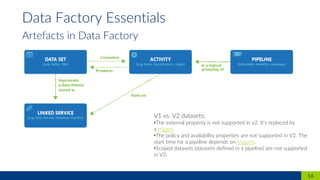
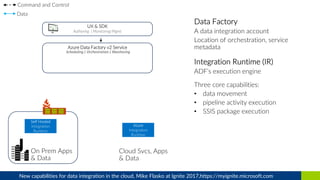
Data Factory Essentials
Artefacts in Data Factory
V1 vs. V2 datasets:
•The external property is not supported in v2. It's replaced by
a trigger.
•The policy and availability properties are not supported in V2. The
start time for a pipeline depends on triggers.
•Scoped datasets (datasets defined in a pipeline) are not supported
in V2.
New capabilities for data integration in the cloud, Mike Flasko at Ignite 2017,https://myignite.microsoft.com
SSIS
Package
Pipeline
New capabilities for data integration in the cloud, Mike Flasko at Ignite 2017,https://myignite.microsoft.com
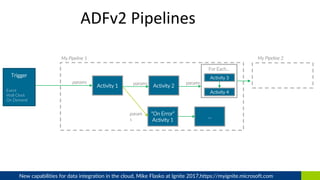
ADFv2 Pipelines
Activity 1 Activity 2
Activity 3
“On Error”
Activity 1
params
param
s
My Pipeline 1
…
My Pipeline 2
For Each…
Activity 4
params
Trigger
Event
Wall Clock
On Demand
params
New capabilities for data integration in the cloud, Mike Flasko at Ignite 2017,https://myignite.microsoft.com
ADFv2 Pipelines
Activity 1 Data Flow
Activity 3
“On Error”
Activity 1
params
param
s
My Pipeline 1
…
My Pipeline 2
For Each…
Activity 4
params
Trigger
Event
Wall Clock
On Demand
params
New capabilities for data integration in the cloud, Mike Flasko at Ignite 2017,https://myignite.microsoft.com
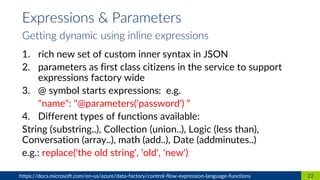
1. rich new set of custom inner syntax in JSON
2. parameters as first class citizens in the service to support
expressions factory wide
3. @ symbol starts expressions: e.g.
"name": "@parameters('password') “
4. Different types of functions available:
String (substring..), Collection (union..), Logic (less than),
Conversation (array..), math (add..), Date (addminutes..)
e.g.: replace('the old string', 'old', 'new')
22https://docs.microsoft.com/en-us/azure/data-factory/control-flow-expression-language-functions
Expressions & Parameters
Getting dynamic using inline expressions
1. Variables could be used in expressions, 2 scopes:
• Pipeline Scoped:
e.g. @pipeline().RunId shows the ID of the specific pipeline
run
• Trigger Scoped:
e.g. trigger().startTime shows the time when the trigger
actually fired to invoke the pipeline run
23https://docs.microsoft.com/en-us/azure/data-factory/control-flow-system-variables
System variables
Scalable
per job elasticity (cloud data movement units)
Up to 1 GB/s
Set parallelism of threads used in source and target
Simple
Visually author or via code (Python, .Net, etc)
Serverless, no infrastructure to manage
Staged copy (compress/decompress in hybrid scenarios, SQL DW load
using polybase, bypass firewall restrictions)
Access all your data
30+ connectors provided and growing (cloud, on premises, SaaS)
Data Movement as a Service: 17 points of presence world wide
Self-hostable Integration Runtime for hybrid movement
Data Movement
aka
“Copy Activity”
New capabilities for data integration in the cloud, Mike Flasko at Ignite 2017,https://myignite.microsoft.com
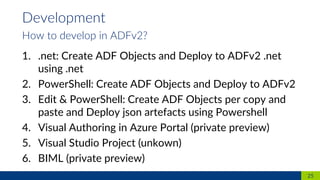
1. .net: Create ADF Objects and Deploy to ADFv2 .net
using .net
2. PowerShell: Create ADF Objects and Deploy to ADFv2
3. Edit & PowerShell: Create ADF Objects per copy and
paste and Deploy json artefacts using Powershell
4. Visual Authoring in Azure Portal (private preview)
5. Visual Studio Project (unkown)
6. BIML (private preview)
25
Development
How to develop in ADFv2?
26
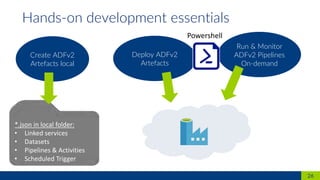
Hands-on development essentials
*.json in local folder:
• Linked services
• Datasets
• Pipelines & Activities
• Scheduled Trigger
Create ADFv2
Artefacts local
Deploy ADFv2
Artefacts
Run & Monitor
ADFv2 Pipelines
On-demand
Powershell
Demo ADFv2
Data Movement: Copy Activity
27
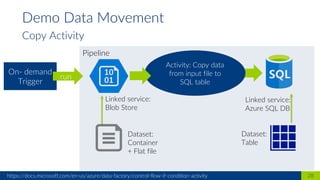
Pipeline
28https://docs.microsoft.com/en-us/azure/data-factory/control-flow-if-condition-activity
Demo Data Movement
Copy Activity
Activity: Copy data
from input file to
SQL table
On- demand
Trigger
run
Linked service:
Blob Store
Linked service:
Azure SQL DB
Dataset:
Container
+ Flat file
Dataset:
Table
Hands-on HOL1
Data Movement: Copy Activity
29
Achtung: Powershell Modul updaten auf den Passcamp Maschinen:
ISE im Admin mode
Install-Module AzureRM.DataFactoryV2 –AllowClobber
Bestätigen dass du Trusted
1. on-demand
2. Wall-clock Schedule
3. Tumbling Window (aka time-slices in v1)
4. Event (not yet available)
31
Triggers
How do pipelines get started
1. Power Shell:
Invoke-AzureRmDataFactoryV2Pipeline + Parameters
2. Rest API:
https://management.azure.com/subscriptions/mySubId/resourceGroups/myResou
rceGroup/providers/Microsoft.DataFactory/factories/{yourDataFactory}/pipelines
/{yourPipeline}/createRun?api-version=2017-03-01-preview
3. .NET:
client.Pipelines.CreateRunWithHttpMessagesAsync(+ parameters)
4. Azure Portal
Not possible (state 9.11.2017)
32https://docs.microsoft.com/en-us/azure/data-factory/concepts-pipeline-execution-triggers
Run pipeline on-demand
33
Run pipeline by schedule
Structure of Scheduler Trigger Sample Scheduler Trigger
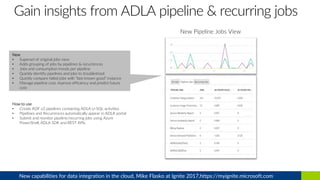
New Pipeline Jobs View
New
• Superset of original jobs view
• Adds grouping of jobs by pipelines & recurrences
• Jobs and consumption trends per pipeline
• Quickly identify pipelines and jobs to troubleshoot
• Quickly compare failed jobs with “last known good” instance
• Manage pipeline cost, improve efficiency and predict future
cost
How to use
• Create ADF v2 pipelines containing ADLA U-SQL activities
• Pipelines and Recurrences automatically appear in ADLA portal
• Submit and monitor pipeline/recurring jobs using Azure
PowerShell, ADLA SDK and REST APIs
New capabilities for data integration in the cloud, Mike Flasko at Ignite 2017,https://myignite.microsoft.com
Demo ADFv2
Scheduler Trigger
35
36https://docs.microsoft.com/en-us/azure/data-factory/concepts-pipeline-execution-triggers
Demo Scheduler Trigger
Scheduled Trigger for Copy Activity
1. Start pipeline every 2 minutes
2. …
"frequency": „minute",
"interval": 2,
…
1. Deployment Trigger via Powershell
2. Start Trigger via Powershell to „activate“, default is
stopped
HOL ADFv2
Scheduler Trigger
37
38https://docs.microsoft.com/en-us/azure/data-factory/concepts-pipeline-execution-triggers
HOL Scheduler Trigger
Scheduler Trigger for Copy Activity
1. Start pipeline every day at 8am, 12am, 5pm until end of
year
2. Deployment Trigger via Powershell
3. Start Trigger via Powershell to „activate“, default is
stopped
4. Check for Trigger Information via Powershell
40
Activities
Known from v1 - Data Transformation Activities
Data transformation activity Compute environment
Hive HDInsight [Hadoop]
Pig HDInsight [Hadoop]
MapReduce HDInsight [Hadoop]
Hadoop Streaming HDInsight [Hadoop]
Spark HDInsight [Hadoop]
Machine Learning activities: Batch Execution and
Update Resource
Azure VM
Stored Procedure Azure SQL, Azure SQL Data Warehouse, or SQL
Server
U-SQL Azure Data Lake Analytics
41https://docs.microsoft.com/en-us/azure/data-factory/control-flow-if-condition-activity and others in How-To > Control
Activities
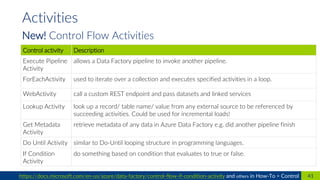
New! Control Flow Activities
Control activity Description
Execute Pipeline
Activity
allows a Data Factory pipeline to invoke another pipeline.
ForEachActivity used to iterate over a collection and executes specified activities in a loop.
WebActivity call a custom REST endpoint and pass datasets and linked services
Lookup Activity look up a record/ table name/ value from any external source to be referenced by
succeeding activities. Could be used for incremental loads!
Get Metadata
Activity
retrieve metadata of any data in Azure Data Factory e.g. did another pipeline finish
Do Until Activity similar to Do-Until looping structure in programming languages.
If Condition
Activity
do something based on condition that evaluates to true or false.
42https://www.purplefrogsystems.com/paul/2017/09/whats-new-in-azure-data-factory-version-2-adfv2/
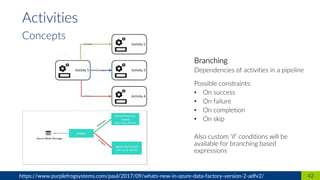
Activities
Concepts
1. Control Flow
2. Data Flow Column Mapping
3. Manage IR Runtimes (later more)
43
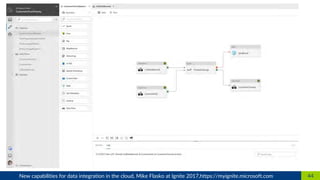
Visual authoring experience
(only private preview)
44New capabilities for data integration in the cloud, Mike Flasko at Ignite 2017,https://myignite.microsoft.com
45New capabilities for data integration in the cloud, Mike Flasko at Ignite 2017,https://myignite.microsoft.com
Pipeline
46https://docs.microsoft.com/en-us/azure/data-factory/control-flow-for-each-activity
Demos Control Flow
For Each Activity
Activity: For each
sink Path
Activity: Copy
On- demand
Trigger
run
Parameters:
mySourcePath
mySinkPath[el1,el2..]
exec
Activity: Copy
Activity: Copy
data from input
folder to folder
outputFalse
exec
exec
Hands-on Control Flow
If Condition Activity
47
Pipeline
48https://docs.microsoft.com/en-us/azure/data-factory/control-flow-if-condition-activity
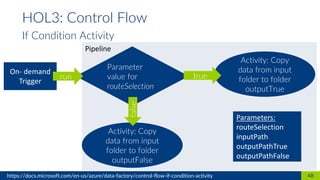
HOL3: Control Flow
If Condition Activity
Parameter
value for
routeSelection
Activity: Copy
data from input
folder to folder
outputTrue
true
Activity: Copy
data from input
folder to folder
outputFalse
false
On- demand
Trigger
run
Parameters:
routeSelection
inputPath
outputPathTrue
outputPathFalse
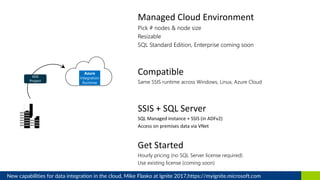
Managed Cloud Environment
Pick # nodes & node size
Resizable
SQL Standard Edition, Enterprise coming soon
Compatible
Same SSIS runtime across Windows, Linux, Azure Cloud
SSIS + SQL Server
SQL Managed instance + SSIS (in ADFv2)
Access on premises data via VNet
Get Started
Hourly pricing (no SQL Server license required)
Use existing license (coming soon)
Integration Runtime
for SSIS
New capabilities for data integration in the cloud, Mike Flasko at Ignite 2017,https://myignite.microsoft.com
1. Data Movement
Move data between data stores, built-in connectors, format
conversion, column mapping, and performant and scalable data
transfer
2. Activity Dispatch
Dispatch and monitor transformation activities (e.g. Stored Proc on
SQL Server, Hive on HD Insight..)
3. SSIS package execution
Execute SSIS packages
51
Integration runtime
Different capabilities
52https://docs.microsoft.com/en-us/azure/data-factory/concepts-integration-runtime
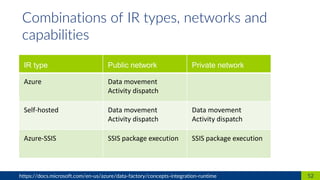
Combinations of IR types, networks and
capabilities
IR type Public network Private network
Azure Data movement
Activity dispatch
Self-hosted Data movement
Activity dispatch
Data movement
Activity dispatch
Azure-SSIS SSIS package execution SSIS package execution
• move data between cloud data stores
• fully managed
• serverless compute service (PaaS) on Azure
• cost will occur only for time of duration
• user could define data movement units
• compute size auto scaled for copy jobs
53
Integration runtimes
1. Azure Integration Runtime
• perform data integration securely in a private network
environment w/o direct line-of-sight from the public cloud
environment
• Installed on-premises in your environment
• Supports copy activity between a cloud data stores and a
data store in private network
• Supports dispatching the transform activities
• Works in your corporate network or virtual private network
• Only Outbound http based connections to open internet
• Scale out supported
54
Integration runtimes
2. Self-hosted Integration Runtime
• fully managed cluster of Azure VMs for native execution
of SSIS packages.
• Access to on-premises data access using Vnet (classic in
preview)
• SSIS Catalog on Azure SQL DB or SQL Managed
Instance
• scale up: set node size
• scale out: number of nodes
• reduce costs by start/stop of service
55
Integration runtimes
3. Azure-SSIS Integration Runtime
56https://docs.microsoft.com/en-us/azure/data-factory/media/concepts-integration-runtime/different-integration-runtimes.png
• IR is referenced as linked service in the data factory
• Transformation Activity: target compute needs linked
service
• Copy Activity: source and sink need linked service, the
computation is determined automatically (see details on
msdn)
• Integration runtime locations can differ from its Data
Factory location which uses it
57https://docs.microsoft.com/en-us/azure/data-factory/concepts-integration-runtime
Determining which IR to use
58
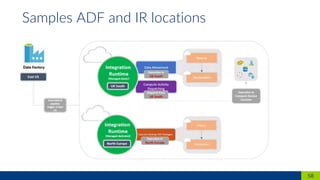
Samples ADF and IR locations
1. Configurable number of nodes on which SSIS is executed
$AzureSSISNodeSize = "Standard_A4_v2" # minimum size, others avail.
2. Configurable size of nodes
$AzureSSISNodeNumber = 2 #between 1 and 10 nodes*
3. Configurable maximum parallel executions per node
$AzureSSISMaxParallelExecutionsPerNode = 2 # between 1-8*
Im Powershell CommandLet: Set-AzureRmDataFactoryV2IntegrationRuntime
60* Maximum values for public preview
Scaleable Integration Services
How to scale up/out using 3 Settings on Azure SSIS IR
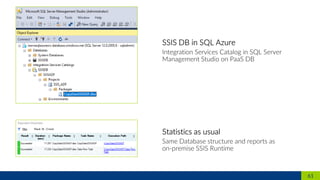
61
1. Connect in SSMS directly to the DB SSISDB to see SSIS
Catalog
2. Deploy from Visual Studio only in Project Deployment
Mode, workaround SSMS Import
3. In Preview no SSIS 3rd Party components supported (e.g.
Theobald for SAP, cozyroc..)
4. V2 IR supports only V2 pipelines and V1 IR supports only
V1. Both cannot be used interchangeably. Even though it is
the same installer
5. Use same location for Azure-SSIS IR and the used (SQL
Azure) DB for SSIS Catalog
62
Notes from the field
Execution Methods
1. SSIS packages can be executed via SSMS
2. SSIS packages can be executed via CLI
› Run dtexec.exe from the command prompt (TBD)
3. SSIS packages can be executed via custom code/PSH using SSIS MOM .NET
SDK/API
› Microsoft.SqlServer.Management.IntegrationServices.dll is installed in .NET GAC
with SQL Server/SSMS installation
4. SSIS packages can be executed via T-SQL scripts executing SSISDB sprocs
› Execute SSISDB sprocs [catalog].[create_execution] +
[catalog].[set_execution_parameter_value] + [catalog].[start_execution]
Scheduling Methods
1. SSIS package executions can be directly/explicitly scheduled via ADFv2 App (Work in
Progress)
› For now, SSIS package executions can be indirectly/implicitly scheduled via ADFv1/v2 Sproc
Activity
2. If you use Azure SQL MI server to host SSISDB
› SSIS package executions can also be scheduled via Azure SQL MI Agent (Extended Private
Preview)
3. If you use Azure SQL DB server to host SSISDB
› SSIS package executions can also be scheduled via Elastic Jobs (Private Preview)
4. If you keep on-prem SQL Server
› SSIS package executions can also be scheduled via on-prem SQL Server Agent
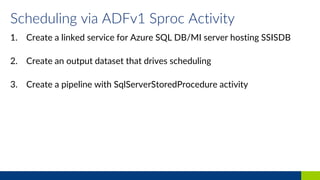
Scheduling via ADFv1 Sproc Activity
1. Create a linked service for Azure SQL DB/MI server hosting SSISDB
2. Create an output dataset that drives scheduling
3. Create a pipeline with SqlServerStoredProcedure activity
Demo
Integration Services in ADFv2
66
67
SSIS Demo
*.dtsx in Visual Studio
Project with connections
Create SSIS
Artefacts local
Setup
environment
ADFv2
Run & Monitor
per SSMS on
demand
(Later per
Trigger)
Powershell
Setup and manage environment, deploy packages
• Azure Data Factory
• SSIS Catalog DB on Azure SQL
• SSIS Runtime
1. Number of activities run
2. Volume of data moved
3. SQL Server Integration Services (SSIS) compute hours
4. Whether a pipeline is active or not
69https://azure.microsoft.com/en-gb/pricing/details/data-factory/v2/
Pricing
Different factors for billing
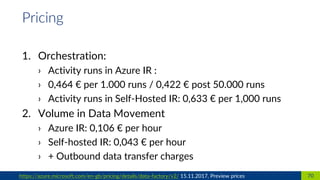
1. Orchestration:
› Activity runs in Azure IR :
› 0,464 € per 1.000 runs / 0,422 € post 50.000 runs
› Activity runs in Self-Hosted IR: 0,633 € per 1,000 runs
2. Volume in Data Movement
› Azure IR: 0,106 € per hour
› Self-hosted IR: 0,043 € per hour
› + Outbound data transfer charges
70https://azure.microsoft.com/en-gb/pricing/details/data-factory/v2/ 15.11.2017, Preview prices
Pricing
3. Azure-SSIS Integration Runtime:
› SSIS usage is charged by the hour
› Depends on VM size
› Min: ”SSIS A4 v2“ 260 €/ month (4 cores, 8 GB RAM, 40 GB
temp storage)
› Max: “SSIS D4 v2“ 740 €/month (8 cores, 28 GB RAM, 400 GB
temp storage)
› + SQL Azure DB costs for SSIS catalogue (Basic 4,2 €/month..)
4. Inactive pipelines
› Pipelines not triggered and zero runs for a week
› 0,338 € per month
71https://azure.microsoft.com/en-gb/pricing/details/data-factory/v2/
Pricing
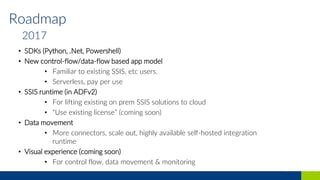
Roadmap
• SDKs (Python, .Net, Powershell)
• New control-flow/data-flow based app model
• Familiar to existing SSIS, etc users.
• Serverless, pay per use
• SSIS runtime (in ADFv2)
• For lifting existing on prem SSIS solutions to cloud
• “Use existing license” (coming soon)
• Data movement
• More connectors, scale out, highly available self-hosted integration
runtime
• Visual experience (coming soon)
• For control flow, data movement & monitoring
2017
Roadmap
• Visual experiences (data transform)
• Data movement (connectivity, scale, … )
• Further SSIS integration
• Data Discovery
2018
Open ADFv2
App
MS Ignite 2017, Deep dive into SSIS 2017 and beyond, BRK3358, https://myignite.microsoft.com
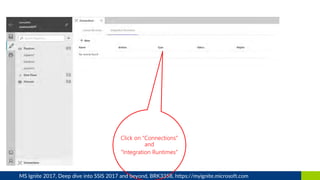
Click on “Connections”
and
”Integration Runtimes”
MS Ignite 2017, Deep dive into SSIS 2017 and beyond, BRK3358, https://myignite.microsoft.com
Click on “+ New” and
”Lift-and-Shift…”
MS Ignite 2017, Deep dive into SSIS 2017 and beyond, BRK3358, https://myignite.microsoft.com
1. Microsoft documentation:
https://docs.microsoft.com/en-us/azure/data-factory/
2. Powershell cmdlets for ADF and ADFv2 for v5.0.0
https://docs.microsoft.com/en-
us/powershell/module/azurerm.datafactories/?view=azurermps-
5.0.0&viewFallbackFrom=azurermps-5.0.0#data_factories
3. Very good blog article about Azure Data Factory V2:
https://www.purplefrogsystems.com/paul/2017/09/whats-new-in-azure-
data-factory-version-2-adfv2/
4. MS Ignite Sessions:
https://myignite.microsoft.com/videos/55421
https://myignite.microsoft.com/sessions/55271?source=sessions
78
Links and further informatoin
79
inovex ist ein IT-Projekthaus
mit dem Schwerpunkt „Digitale Transformation“:
Product Ownership · Datenprodukte
Web · Apps · Smart Devices · BI
Big Data · Data Science · Search
Replatforming · Cloud · DevOps
Data Center Automation & Hosting
Trainings · Coachings
Wir nutzen Technologien,
um unsere Kunden glücklich zu machen.
Und uns selbst.
inovex gibt es in Karlsruhe · Pforzheim ·
Stuttgart · München · Köln · Hamburg
Und natürlich unter www.inovex.de

Azure Data Factory v2

  • 1.
    Azure Data Factoryv2 Passcamp 2017 Stefan Kirner
  • 2.
    1. Target Scenarios 2.Current State 3. Intro Data Factory v2 4. Triggers 5. Control Flow 6. SSIS in ADFv2 7. Pricing 8. Roadmap & Q+A Agenda
  • 3.
    3 Stefan Kirner Teamleiter BusinessIntelligence Solutions bei der inovex GmbH › 15+ Jahre Erfahrung mit dem Microsoft Business Intelligence Toolset › Microsoft Certified Systems Expert (MCSE) Data Management & Analytics › Microsoft Certified Systems Associate (MCSA) Cloud Platform › Microsoft P-TSP Data Platform › Leitung SQL PASS e.V. Community Gruppe Karlsruhe › Sprecher bei Konferenzen und User Groups zu BI- und Cloud-Themen › Mail: stefan.kirner@inovex.de Twitter: @KirnerKa
  • 5.
    “Data Lake” Extract &Load Prepare Transform/Analyze Extract & Load New capabilities for data integration in the cloud, Mike Flasko at Ignite 2017,https://myignite.microsoft.com
  • 6.
    “Data Lake” Extract &Load Prepare Transform/Analyze Extract & Load New capabilities for data integration in the cloud, Mike Flasko at Ignite 2017,https://myignite.microsoft.com
  • 7.
    “Data Lake” Extract &Load Prepare Transform/Analyze Extract & Load New capabilities for data integration in the cloud, Mike Flasko at Ignite 2017,https://myignite.microsoft.com
  • 9.
    9 Part of CortanaAnalytics Suite
  • 10.
    Azure Data Factory(ADF) Provides orchestration, data movement and monitoring services Orchestration model: time series processing Hybrid Data movement as a Service w/ many connectors Programmatic authoring, visual monitoring (.NET, Powershell) New capabilities for data integration in the cloud, Mike Flasko at Ignite 2017,https://myignite.microsoft.com
  • 11.
    New capabilities fordata integration in the cloud, Mike Flasko at Ignite 2017,https://myignite.microsoft.com
  • 12.
    12 Data Factory v1in Azure Portal
  • 14.
    New Pipeline Model Richpipeline orchestration Triggers – on-demand, schedule, event Data Movement as a Service Cloud, Hybrid 30 connectors provided SSIS Package Execution In a managed cloud environment Use familiar tools, SSMS & SSDT Author & Monitor Programmability (Python, .NET, Powershell, etc) Visual Tools (coming soon)
  • 15.
    15 Data Factory v2in Azure Portal
  • 16.
    16 Data Factory Essentials Artefactsin Data Factory V1 vs. V2 datasets: •The external property is not supported in v2. It's replaced by a trigger. •The policy and availability properties are not supported in V2. The start time for a pipeline depends on triggers. •Scoped datasets (datasets defined in a pipeline) are not supported in V2.
  • 17.
    New capabilities fordata integration in the cloud, Mike Flasko at Ignite 2017,https://myignite.microsoft.com
  • 18.
    New capabilities fordata integration in the cloud, Mike Flasko at Ignite 2017,https://myignite.microsoft.com
  • 19.
    SSIS Package Pipeline New capabilities fordata integration in the cloud, Mike Flasko at Ignite 2017,https://myignite.microsoft.com
  • 20.
    ADFv2 Pipelines Activity 1Activity 2 Activity 3 “On Error” Activity 1 params param s My Pipeline 1 … My Pipeline 2 For Each… Activity 4 params Trigger Event Wall Clock On Demand params New capabilities for data integration in the cloud, Mike Flasko at Ignite 2017,https://myignite.microsoft.com
  • 21.
    ADFv2 Pipelines Activity 1Data Flow Activity 3 “On Error” Activity 1 params param s My Pipeline 1 … My Pipeline 2 For Each… Activity 4 params Trigger Event Wall Clock On Demand params New capabilities for data integration in the cloud, Mike Flasko at Ignite 2017,https://myignite.microsoft.com
  • 22.
    1. rich newset of custom inner syntax in JSON 2. parameters as first class citizens in the service to support expressions factory wide 3. @ symbol starts expressions: e.g. "name": "@parameters('password') “ 4. Different types of functions available: String (substring..), Collection (union..), Logic (less than), Conversation (array..), math (add..), Date (addminutes..) e.g.: replace('the old string', 'old', 'new') 22https://docs.microsoft.com/en-us/azure/data-factory/control-flow-expression-language-functions Expressions & Parameters Getting dynamic using inline expressions
  • 23.
    1. Variables couldbe used in expressions, 2 scopes: • Pipeline Scoped: e.g. @pipeline().RunId shows the ID of the specific pipeline run • Trigger Scoped: e.g. trigger().startTime shows the time when the trigger actually fired to invoke the pipeline run 23https://docs.microsoft.com/en-us/azure/data-factory/control-flow-system-variables System variables
  • 24.
    Scalable per job elasticity(cloud data movement units) Up to 1 GB/s Set parallelism of threads used in source and target Simple Visually author or via code (Python, .Net, etc) Serverless, no infrastructure to manage Staged copy (compress/decompress in hybrid scenarios, SQL DW load using polybase, bypass firewall restrictions) Access all your data 30+ connectors provided and growing (cloud, on premises, SaaS) Data Movement as a Service: 17 points of presence world wide Self-hostable Integration Runtime for hybrid movement Data Movement aka “Copy Activity” New capabilities for data integration in the cloud, Mike Flasko at Ignite 2017,https://myignite.microsoft.com
  • 25.
    1. .net: CreateADF Objects and Deploy to ADFv2 .net using .net 2. PowerShell: Create ADF Objects and Deploy to ADFv2 3. Edit & PowerShell: Create ADF Objects per copy and paste and Deploy json artefacts using Powershell 4. Visual Authoring in Azure Portal (private preview) 5. Visual Studio Project (unkown) 6. BIML (private preview) 25 Development How to develop in ADFv2?
  • 26.
    26 Hands-on development essentials *.jsonin local folder: • Linked services • Datasets • Pipelines & Activities • Scheduled Trigger Create ADFv2 Artefacts local Deploy ADFv2 Artefacts Run & Monitor ADFv2 Pipelines On-demand Powershell
  • 27.
    Demo ADFv2 Data Movement:Copy Activity 27
  • 28.
    Pipeline 28https://docs.microsoft.com/en-us/azure/data-factory/control-flow-if-condition-activity Demo Data Movement CopyActivity Activity: Copy data from input file to SQL table On- demand Trigger run Linked service: Blob Store Linked service: Azure SQL DB Dataset: Container + Flat file Dataset: Table
  • 29.
    Hands-on HOL1 Data Movement:Copy Activity 29 Achtung: Powershell Modul updaten auf den Passcamp Maschinen: ISE im Admin mode Install-Module AzureRM.DataFactoryV2 –AllowClobber Bestätigen dass du Trusted
  • 31.
    1. on-demand 2. Wall-clockSchedule 3. Tumbling Window (aka time-slices in v1) 4. Event (not yet available) 31 Triggers How do pipelines get started
  • 32.
    1. Power Shell: Invoke-AzureRmDataFactoryV2Pipeline+ Parameters 2. Rest API: https://management.azure.com/subscriptions/mySubId/resourceGroups/myResou rceGroup/providers/Microsoft.DataFactory/factories/{yourDataFactory}/pipelines /{yourPipeline}/createRun?api-version=2017-03-01-preview 3. .NET: client.Pipelines.CreateRunWithHttpMessagesAsync(+ parameters) 4. Azure Portal Not possible (state 9.11.2017) 32https://docs.microsoft.com/en-us/azure/data-factory/concepts-pipeline-execution-triggers Run pipeline on-demand
  • 33.
    33 Run pipeline byschedule Structure of Scheduler Trigger Sample Scheduler Trigger
  • 34.
    New Pipeline JobsView New • Superset of original jobs view • Adds grouping of jobs by pipelines & recurrences • Jobs and consumption trends per pipeline • Quickly identify pipelines and jobs to troubleshoot • Quickly compare failed jobs with “last known good” instance • Manage pipeline cost, improve efficiency and predict future cost How to use • Create ADF v2 pipelines containing ADLA U-SQL activities • Pipelines and Recurrences automatically appear in ADLA portal • Submit and monitor pipeline/recurring jobs using Azure PowerShell, ADLA SDK and REST APIs New capabilities for data integration in the cloud, Mike Flasko at Ignite 2017,https://myignite.microsoft.com
  • 35.
  • 36.
    36https://docs.microsoft.com/en-us/azure/data-factory/concepts-pipeline-execution-triggers Demo Scheduler Trigger ScheduledTrigger for Copy Activity 1. Start pipeline every 2 minutes 2. … "frequency": „minute", "interval": 2, … 1. Deployment Trigger via Powershell 2. Start Trigger via Powershell to „activate“, default is stopped
  • 37.
  • 38.
    38https://docs.microsoft.com/en-us/azure/data-factory/concepts-pipeline-execution-triggers HOL Scheduler Trigger SchedulerTrigger for Copy Activity 1. Start pipeline every day at 8am, 12am, 5pm until end of year 2. Deployment Trigger via Powershell 3. Start Trigger via Powershell to „activate“, default is stopped 4. Check for Trigger Information via Powershell
  • 40.
    40 Activities Known from v1- Data Transformation Activities Data transformation activity Compute environment Hive HDInsight [Hadoop] Pig HDInsight [Hadoop] MapReduce HDInsight [Hadoop] Hadoop Streaming HDInsight [Hadoop] Spark HDInsight [Hadoop] Machine Learning activities: Batch Execution and Update Resource Azure VM Stored Procedure Azure SQL, Azure SQL Data Warehouse, or SQL Server U-SQL Azure Data Lake Analytics
  • 41.
    41https://docs.microsoft.com/en-us/azure/data-factory/control-flow-if-condition-activity and othersin How-To > Control Activities New! Control Flow Activities Control activity Description Execute Pipeline Activity allows a Data Factory pipeline to invoke another pipeline. ForEachActivity used to iterate over a collection and executes specified activities in a loop. WebActivity call a custom REST endpoint and pass datasets and linked services Lookup Activity look up a record/ table name/ value from any external source to be referenced by succeeding activities. Could be used for incremental loads! Get Metadata Activity retrieve metadata of any data in Azure Data Factory e.g. did another pipeline finish Do Until Activity similar to Do-Until looping structure in programming languages. If Condition Activity do something based on condition that evaluates to true or false.
  • 42.
  • 43.
    1. Control Flow 2.Data Flow Column Mapping 3. Manage IR Runtimes (later more) 43 Visual authoring experience (only private preview)
  • 44.
    44New capabilities fordata integration in the cloud, Mike Flasko at Ignite 2017,https://myignite.microsoft.com
  • 45.
    45New capabilities fordata integration in the cloud, Mike Flasko at Ignite 2017,https://myignite.microsoft.com
  • 46.
    Pipeline 46https://docs.microsoft.com/en-us/azure/data-factory/control-flow-for-each-activity Demos Control Flow ForEach Activity Activity: For each sink Path Activity: Copy On- demand Trigger run Parameters: mySourcePath mySinkPath[el1,el2..] exec Activity: Copy Activity: Copy data from input folder to folder outputFalse exec exec
  • 47.
    Hands-on Control Flow IfCondition Activity 47
  • 48.
    Pipeline 48https://docs.microsoft.com/en-us/azure/data-factory/control-flow-if-condition-activity HOL3: Control Flow IfCondition Activity Parameter value for routeSelection Activity: Copy data from input folder to folder outputTrue true Activity: Copy data from input folder to folder outputFalse false On- demand Trigger run Parameters: routeSelection inputPath outputPathTrue outputPathFalse
  • 50.
    Managed Cloud Environment Pick# nodes & node size Resizable SQL Standard Edition, Enterprise coming soon Compatible Same SSIS runtime across Windows, Linux, Azure Cloud SSIS + SQL Server SQL Managed instance + SSIS (in ADFv2) Access on premises data via VNet Get Started Hourly pricing (no SQL Server license required) Use existing license (coming soon) Integration Runtime for SSIS New capabilities for data integration in the cloud, Mike Flasko at Ignite 2017,https://myignite.microsoft.com
  • 51.
    1. Data Movement Movedata between data stores, built-in connectors, format conversion, column mapping, and performant and scalable data transfer 2. Activity Dispatch Dispatch and monitor transformation activities (e.g. Stored Proc on SQL Server, Hive on HD Insight..) 3. SSIS package execution Execute SSIS packages 51 Integration runtime Different capabilities
  • 52.
    52https://docs.microsoft.com/en-us/azure/data-factory/concepts-integration-runtime Combinations of IRtypes, networks and capabilities IR type Public network Private network Azure Data movement Activity dispatch Self-hosted Data movement Activity dispatch Data movement Activity dispatch Azure-SSIS SSIS package execution SSIS package execution
  • 53.
    • move databetween cloud data stores • fully managed • serverless compute service (PaaS) on Azure • cost will occur only for time of duration • user could define data movement units • compute size auto scaled for copy jobs 53 Integration runtimes 1. Azure Integration Runtime
  • 54.
    • perform dataintegration securely in a private network environment w/o direct line-of-sight from the public cloud environment • Installed on-premises in your environment • Supports copy activity between a cloud data stores and a data store in private network • Supports dispatching the transform activities • Works in your corporate network or virtual private network • Only Outbound http based connections to open internet • Scale out supported 54 Integration runtimes 2. Self-hosted Integration Runtime
  • 55.
    • fully managedcluster of Azure VMs for native execution of SSIS packages. • Access to on-premises data access using Vnet (classic in preview) • SSIS Catalog on Azure SQL DB or SQL Managed Instance • scale up: set node size • scale out: number of nodes • reduce costs by start/stop of service 55 Integration runtimes 3. Azure-SSIS Integration Runtime
  • 56.
  • 57.
    • IR isreferenced as linked service in the data factory • Transformation Activity: target compute needs linked service • Copy Activity: source and sink need linked service, the computation is determined automatically (see details on msdn) • Integration runtime locations can differ from its Data Factory location which uses it 57https://docs.microsoft.com/en-us/azure/data-factory/concepts-integration-runtime Determining which IR to use
  • 58.
    58 Samples ADF andIR locations
  • 59.
    1. Configurable numberof nodes on which SSIS is executed $AzureSSISNodeSize = "Standard_A4_v2" # minimum size, others avail. 2. Configurable size of nodes $AzureSSISNodeNumber = 2 #between 1 and 10 nodes* 3. Configurable maximum parallel executions per node $AzureSSISMaxParallelExecutionsPerNode = 2 # between 1-8* Im Powershell CommandLet: Set-AzureRmDataFactoryV2IntegrationRuntime 60* Maximum values for public preview Scaleable Integration Services How to scale up/out using 3 Settings on Azure SSIS IR
  • 60.
  • 61.
    1. Connect inSSMS directly to the DB SSISDB to see SSIS Catalog 2. Deploy from Visual Studio only in Project Deployment Mode, workaround SSMS Import 3. In Preview no SSIS 3rd Party components supported (e.g. Theobald for SAP, cozyroc..) 4. V2 IR supports only V2 pipelines and V1 IR supports only V1. Both cannot be used interchangeably. Even though it is the same installer 5. Use same location for Azure-SSIS IR and the used (SQL Azure) DB for SSIS Catalog 62 Notes from the field
  • 62.
    Execution Methods 1. SSISpackages can be executed via SSMS 2. SSIS packages can be executed via CLI › Run dtexec.exe from the command prompt (TBD) 3. SSIS packages can be executed via custom code/PSH using SSIS MOM .NET SDK/API › Microsoft.SqlServer.Management.IntegrationServices.dll is installed in .NET GAC with SQL Server/SSMS installation 4. SSIS packages can be executed via T-SQL scripts executing SSISDB sprocs › Execute SSISDB sprocs [catalog].[create_execution] + [catalog].[set_execution_parameter_value] + [catalog].[start_execution]
  • 63.
    Scheduling Methods 1. SSISpackage executions can be directly/explicitly scheduled via ADFv2 App (Work in Progress) › For now, SSIS package executions can be indirectly/implicitly scheduled via ADFv1/v2 Sproc Activity 2. If you use Azure SQL MI server to host SSISDB › SSIS package executions can also be scheduled via Azure SQL MI Agent (Extended Private Preview) 3. If you use Azure SQL DB server to host SSISDB › SSIS package executions can also be scheduled via Elastic Jobs (Private Preview) 4. If you keep on-prem SQL Server › SSIS package executions can also be scheduled via on-prem SQL Server Agent
  • 64.
    Scheduling via ADFv1Sproc Activity 1. Create a linked service for Azure SQL DB/MI server hosting SSISDB 2. Create an output dataset that drives scheduling 3. Create a pipeline with SqlServerStoredProcedure activity
  • 65.
  • 66.
    67 SSIS Demo *.dtsx inVisual Studio Project with connections Create SSIS Artefacts local Setup environment ADFv2 Run & Monitor per SSMS on demand (Later per Trigger) Powershell Setup and manage environment, deploy packages • Azure Data Factory • SSIS Catalog DB on Azure SQL • SSIS Runtime
  • 68.
    1. Number ofactivities run 2. Volume of data moved 3. SQL Server Integration Services (SSIS) compute hours 4. Whether a pipeline is active or not 69https://azure.microsoft.com/en-gb/pricing/details/data-factory/v2/ Pricing Different factors for billing
  • 69.
    1. Orchestration: › Activityruns in Azure IR : › 0,464 € per 1.000 runs / 0,422 € post 50.000 runs › Activity runs in Self-Hosted IR: 0,633 € per 1,000 runs 2. Volume in Data Movement › Azure IR: 0,106 € per hour › Self-hosted IR: 0,043 € per hour › + Outbound data transfer charges 70https://azure.microsoft.com/en-gb/pricing/details/data-factory/v2/ 15.11.2017, Preview prices Pricing
  • 70.
    3. Azure-SSIS IntegrationRuntime: › SSIS usage is charged by the hour › Depends on VM size › Min: ”SSIS A4 v2“ 260 €/ month (4 cores, 8 GB RAM, 40 GB temp storage) › Max: “SSIS D4 v2“ 740 €/month (8 cores, 28 GB RAM, 400 GB temp storage) › + SQL Azure DB costs for SSIS catalogue (Basic 4,2 €/month..) 4. Inactive pipelines › Pipelines not triggered and zero runs for a week › 0,338 € per month 71https://azure.microsoft.com/en-gb/pricing/details/data-factory/v2/ Pricing
  • 72.
    Roadmap • SDKs (Python,.Net, Powershell) • New control-flow/data-flow based app model • Familiar to existing SSIS, etc users. • Serverless, pay per use • SSIS runtime (in ADFv2) • For lifting existing on prem SSIS solutions to cloud • “Use existing license” (coming soon) • Data movement • More connectors, scale out, highly available self-hosted integration runtime • Visual experience (coming soon) • For control flow, data movement & monitoring 2017
  • 73.
    Roadmap • Visual experiences(data transform) • Data movement (connectivity, scale, … ) • Further SSIS integration • Data Discovery 2018
  • 74.
    Open ADFv2 App MS Ignite2017, Deep dive into SSIS 2017 and beyond, BRK3358, https://myignite.microsoft.com
  • 75.
    Click on “Connections” and ”IntegrationRuntimes” MS Ignite 2017, Deep dive into SSIS 2017 and beyond, BRK3358, https://myignite.microsoft.com
  • 76.
    Click on “+New” and ”Lift-and-Shift…” MS Ignite 2017, Deep dive into SSIS 2017 and beyond, BRK3358, https://myignite.microsoft.com
  • 77.
    1. Microsoft documentation: https://docs.microsoft.com/en-us/azure/data-factory/ 2.Powershell cmdlets for ADF and ADFv2 for v5.0.0 https://docs.microsoft.com/en- us/powershell/module/azurerm.datafactories/?view=azurermps- 5.0.0&viewFallbackFrom=azurermps-5.0.0#data_factories 3. Very good blog article about Azure Data Factory V2: https://www.purplefrogsystems.com/paul/2017/09/whats-new-in-azure- data-factory-version-2-adfv2/ 4. MS Ignite Sessions: https://myignite.microsoft.com/videos/55421 https://myignite.microsoft.com/sessions/55271?source=sessions 78 Links and further informatoin
  • 78.
    79 inovex ist einIT-Projekthaus mit dem Schwerpunkt „Digitale Transformation“: Product Ownership · Datenprodukte Web · Apps · Smart Devices · BI Big Data · Data Science · Search Replatforming · Cloud · DevOps Data Center Automation & Hosting Trainings · Coachings Wir nutzen Technologien, um unsere Kunden glücklich zu machen. Und uns selbst. inovex gibt es in Karlsruhe · Pforzheim · Stuttgart · München · Köln · Hamburg Und natürlich unter www.inovex.de