Unleash the power of
Azure Data Factory
Sergio Zenatti Filho,
Associate Director Data & Analytics,
Satalyst
Sergio Zenatti Filho
Associate Director Data &Analytics at Satalyst
I am Data and Analytics Director with over 16 years
experience in the delivery of Business Intelligence and
Analytics Solutions. I worked internationally around
Australia, New Zealand and Brazil, in sectors that include
Mining, Oil & Gas, Government, Healthcare, Financial
Services, Telecom, Automotive and dairy. I enjoy learning
new technology and help people to learn.
• MCSE: Data Management and Analytics
• MCSE: Business Intelligence
• MCSA: Cloud Platform
• Perth SQL Server User Group Leader
P lace your
photo here
/sergiozenatti @SergioZenatti https://zenatti.net/
Session objectives
Azure Data Factory
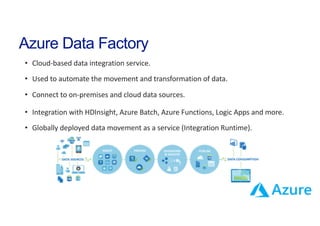
• Cloud-based data integration service.
• Used to automate the movement and transformation of data.
• Connect to on-premises and cloud data sources.
• Integration with HDInsight, Azure Batch, Azure Functions, Logic Apps and more.
• Globally deployed data movement as a service (Integration Runtime).
ADF v1, v2 and new Features
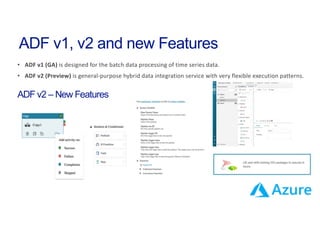
• ADF v1 (GA) is designed for the batch data processing of time series data.
• ADF v2 (Preview) is general-purpose hybrid data integration service with very flexible execution patterns.
ADF v2 – New Features
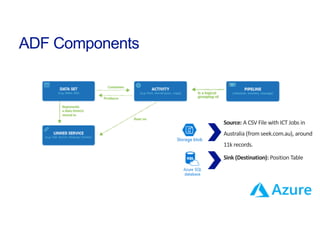
ADF Components
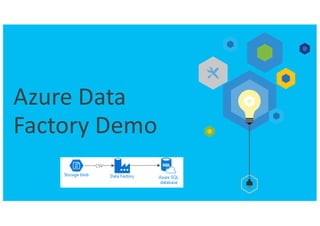
Source: A CSV File with ICT Jobs in
Australia (from seek.com.au), around
11k records.
Sink (Destination): Position Table
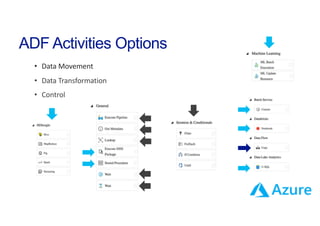
ADF Activities Options
• Data Movement
• Data Transformation
• Control
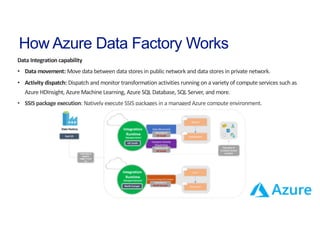
How Azure Data Factory Works
Data Integration capability
• Data movement: Move data between data stores in public network and data stores in private network.
• Activity dispatch: Dispatch and monitor transformation activities running on a variety of compute services such as
Azure HDInsight, Azure Machine Learning, Azure SQL Database, SQL Server, and more.
• SSIS package execution: Natively execute SSIS packages in a managed Azure compute environment.
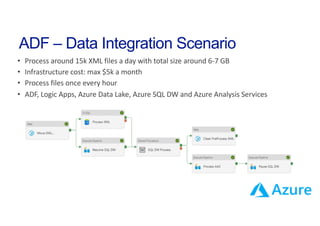
ADF – Data Integration Scenario
• Process around 15k XML files a day with total size around 6-7 GB
• Infrastructure cost: max $5k a month
• Process files once every hour
• ADF, Logic Apps, Azure Data Lake, Azure SQL DW and Azure Analysis Services
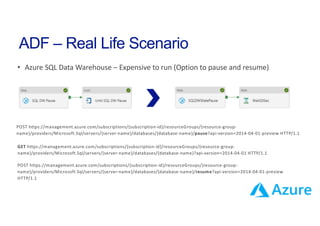
ADF – Real Life Scenario
• Azure SQL Data Warehouse – Expensive to run (Option to pause and resume)
POST https://management.azure.com/subscriptions/{subscription-id}/resourceGroups/{resource-group-
name}/providers/Microsoft.Sql/servers/{server-name}/databases/{database-name}/pause?api-version=2014-04-01-preview HTTP/1.1
GET https://management.azure.com/subscriptions/{subscription-id}/resourceGroups/{resource-group-
name}/providers/Microsoft.Sql/servers/{server-name}/databases/{database-name}?api-version=2014-04-01 HTTP/1.1
POST https://management.azure.com/subscriptions/{subscription-id}/resourceGroups/{resource-group-
name}/providers/Microsoft.Sql/servers/{server-name}/databases/{database-name}/resume?api-version=2014-04-01-preview
HTTP/1.1
ADF – Real Life Scenario
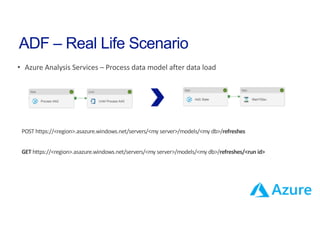
• Azure Analysis Services – Process data model after data load
POST https://<region>.asazure.windows.net/servers/<my server>/models/<my db>/refreshes
GET https://<region>.asazure.windows.net/servers/<my server>/models/<my db>/refreshes/<run id>
ADF – Learning
New Azure Data Factory self-paced hands-on lab for UI
Orchestrating Big Data with Azure Data Factory V1
https://www.edx.org/course/orchestrating-big-data-azure-data-microsoft-dat223-3x-3
https://azure.microsoft.com/en-us/blog/new-azure-data-factory-self-paced-hands-on-lab-for-ui/
https://azure.microsoft.com/en-us/documentation/learning-paths/data-factory/
Learning path for Azure Data Factory V1 and V2
Q&A
Thank you
for your time!
Sergio Zenatti Filho
Data & Analytics Architect
sergiozenatti @ S ergioZenatti zenatti.net

Azure Data Factory v2

  • 1.
    Unleash the powerof Azure Data Factory Sergio Zenatti Filho, Associate Director Data & Analytics, Satalyst
  • 2.
    Sergio Zenatti Filho AssociateDirector Data &Analytics at Satalyst I am Data and Analytics Director with over 16 years experience in the delivery of Business Intelligence and Analytics Solutions. I worked internationally around Australia, New Zealand and Brazil, in sectors that include Mining, Oil & Gas, Government, Healthcare, Financial Services, Telecom, Automotive and dairy. I enjoy learning new technology and help people to learn. • MCSE: Data Management and Analytics • MCSE: Business Intelligence • MCSA: Cloud Platform • Perth SQL Server User Group Leader P lace your photo here /sergiozenatti @SergioZenatti https://zenatti.net/
  • 3.
  • 4.
    Azure Data Factory •Cloud-based data integration service. • Used to automate the movement and transformation of data. • Connect to on-premises and cloud data sources. • Integration with HDInsight, Azure Batch, Azure Functions, Logic Apps and more. • Globally deployed data movement as a service (Integration Runtime).
  • 5.
    ADF v1, v2and new Features • ADF v1 (GA) is designed for the batch data processing of time series data. • ADF v2 (Preview) is general-purpose hybrid data integration service with very flexible execution patterns. ADF v2 – New Features
  • 6.
    ADF Components Source: ACSV File with ICT Jobs in Australia (from seek.com.au), around 11k records. Sink (Destination): Position Table
  • 7.
    ADF Activities Options •Data Movement • Data Transformation • Control
  • 8.
    How Azure DataFactory Works Data Integration capability • Data movement: Move data between data stores in public network and data stores in private network. • Activity dispatch: Dispatch and monitor transformation activities running on a variety of compute services such as Azure HDInsight, Azure Machine Learning, Azure SQL Database, SQL Server, and more. • SSIS package execution: Natively execute SSIS packages in a managed Azure compute environment.
  • 10.
    ADF – DataIntegration Scenario • Process around 15k XML files a day with total size around 6-7 GB • Infrastructure cost: max $5k a month • Process files once every hour • ADF, Logic Apps, Azure Data Lake, Azure SQL DW and Azure Analysis Services
  • 11.
    ADF – RealLife Scenario • Azure SQL Data Warehouse – Expensive to run (Option to pause and resume) POST https://management.azure.com/subscriptions/{subscription-id}/resourceGroups/{resource-group- name}/providers/Microsoft.Sql/servers/{server-name}/databases/{database-name}/pause?api-version=2014-04-01-preview HTTP/1.1 GET https://management.azure.com/subscriptions/{subscription-id}/resourceGroups/{resource-group- name}/providers/Microsoft.Sql/servers/{server-name}/databases/{database-name}?api-version=2014-04-01 HTTP/1.1 POST https://management.azure.com/subscriptions/{subscription-id}/resourceGroups/{resource-group- name}/providers/Microsoft.Sql/servers/{server-name}/databases/{database-name}/resume?api-version=2014-04-01-preview HTTP/1.1
  • 12.
    ADF – RealLife Scenario • Azure Analysis Services – Process data model after data load POST https://<region>.asazure.windows.net/servers/<my server>/models/<my db>/refreshes GET https://<region>.asazure.windows.net/servers/<my server>/models/<my db>/refreshes/<run id>
  • 13.
    ADF – Learning NewAzure Data Factory self-paced hands-on lab for UI Orchestrating Big Data with Azure Data Factory V1 https://www.edx.org/course/orchestrating-big-data-azure-data-microsoft-dat223-3x-3 https://azure.microsoft.com/en-us/blog/new-azure-data-factory-self-paced-hands-on-lab-for-ui/ https://azure.microsoft.com/en-us/documentation/learning-paths/data-factory/ Learning path for Azure Data Factory V1 and V2
  • 14.
  • 15.
    Thank you for yourtime! Sergio Zenatti Filho Data & Analytics Architect sergiozenatti @ S ergioZenatti zenatti.net