James Serra – Data Warehouse/BI/MDM Architect
JamesSerra3@gmail.com
JamesSerra.com
•
•

•
•
•
•

•
•
Agenda
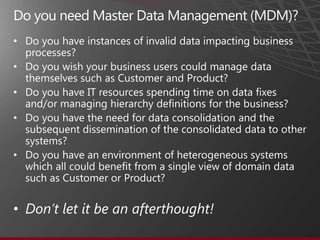
   Do you need Master Data Management (MDM)?
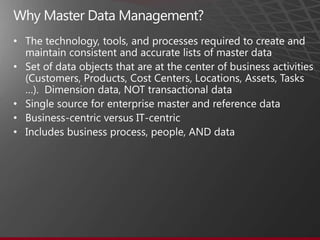
   Why Master Data Management?
   MDM Scenarios & MDM Hub Architecture Styles
   Why Microsoft Data Services (MDS)?
   MDS Benefits and Key Features
   MDS UI and MDS Add-in for Excel
   Why Profisee Master Data Maestro?
   Demo
   QA
•

•

•

•


•


•
•

• Set of data objects that are at the center of business activities
  (Customers, Products, Cost Centers, Locations, Assets, Tasks
  …). Dimension data, NOT transactional data
• Single source for enterprise master and reference data
• Business-centric versus IT-centric
• Includes business process, people, AND data
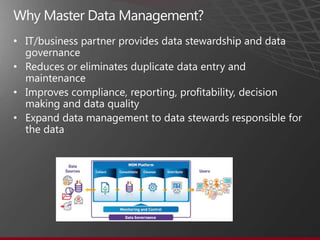
• IT/business partner provides data stewardship and data
  governance
• Reduces or eliminates duplicate data entry and
  maintenance
• Improves compliance, reporting, profitability, decision
  making and data quality
• Expand data management to data stewards responsible for
  the data
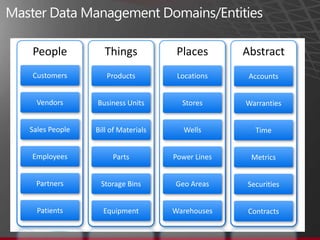
People            Things            Places       Abstract
Customers         Products          Locations     Accounts


  Vendors      Business Units        Stores      Warranties


Sales People   Bill of Materials      Wells         Time


Employees           Parts          Power Lines    Metrics


 Partners       Storage Bins       Geo Areas     Securities


  Patients       Equipment         Warehouses     Contracts
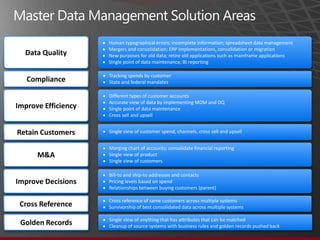
Human typographical errors; incomplete information; spreadsheet data management
                     Mergers and consolidation; ERP implementations, consolidation or migration
  Data Quality       New purposes for old data; retire old applications such as mainframe applications
                     Single point of data maintenance; BI reporting

                     Tracking spends by customer
   Compliance        State and federal mandates

                     Different types of customer accounts
                     Accurate view of data by implementing MDM and DQ
Improve Efficiency   Single point of data maintenance
                     Cross sell and upsell


Retain Customers     Single view of customer spend, channels, cross sell and upsell


                     Merging chart of accounts; consolidate financial reporting
      M&A            Single view of product
                     Single view of customers

                     Bill-to and ship-to addresses and contacts
Improve Decisions    Pricing levels based on spend
                     Relationships between buying customers (parent)

                     Cross reference of same customers across multiple systems
 Cross Reference     Survivorship of best consolidated data across multiple systems

                     Single view of anything that has attributes that can be matched
 Golden Records      Cleanup of source systems with business rules and golden records pushed back
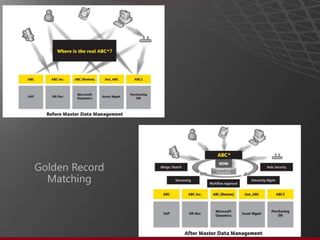
Golden Record
  Matching
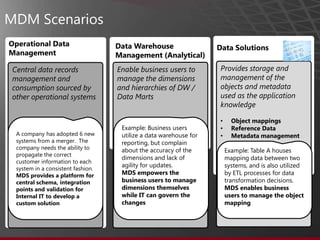
MDM Scenarios
Operational Data                    Data Warehouse                  Data Solutions
Management                          Management (Analytical)
 Central data records               Enable business users to         Provides storage and
 management and                     manage the dimensions            management of the
 consumption sourced by             and hierarchies of DW /          objects and metadata
 other operational systems          Data Marts                       used as the application
                                                                     knowledge

                                                                     •     Object mappings
                                     Example: Business users         •     Reference Data
  A company has adopted 6 new        utilize a data warehouse for    •     Metadata management
  systems from a merger. The         reporting, but complain
  company needs the ability to       about the accuracy of the           Example: Table A houses
  propagate the correct
                                     dimensions and lack of              mapping data between two
  customer information to each
                                     agility for updates.                systems, and is also utilized
  system in a consistent fashion.
  MDS provides a platform for        MDS empowers the                    by ETL processes for data
  central schema, integration        business users to manage            transformation decisions.
  points and validation for          dimensions themselves               MDS enables business
  Internal IT to develop a           while IT can govern the             users to manage the object
  custom solution                    changes                             mapping
•


•


•


•


•
•

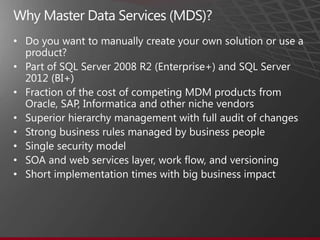
• Part of SQL Server 2008 R2 (Enterprise+) and SQL Server
  2012 (BI+)
• Fraction of the cost of competing MDM products from
  Oracle, SAP, Informatica and other niche vendors
• Superior hierarchy management with full audit of changes
• Strong business rules managed by business people
• Single security model
• SOA and web services layer, work flow, and versioning
• Short implementation times with big business impact
•
    −
    −
    −
•
    −
    −

    −
    −
•
    −
    −
    −
    −
•

•

•
•

•

•

•
•
•
•
•
•


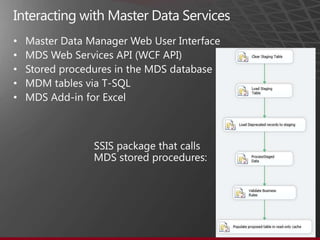
    SSIS package that calls
    MDS stored procedures:
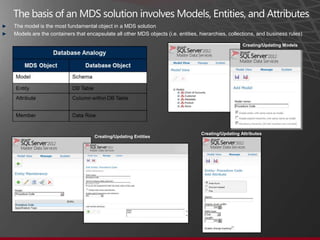
►   The model is the most fundamental object in a MDS solution
►   Models are the containers that encapsulate all other MDS objects (i.e. entities, hierarchies, collections, and business rules)

                                                                                                        Creating/Updating Models


                                                                                     Creating/Updating Attributes
                                       Creating/Updating Entities
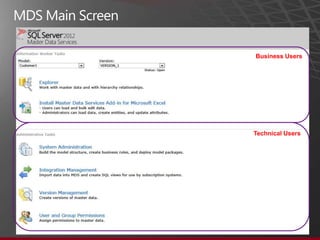
Business Users


Technical Users
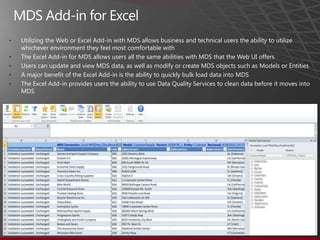
•   Utilizing the Web or Excel Add-in with MDS allows business and technical users the ability to utilize
    whichever environment they feel most comfortable with
•   The Excel Add-in for MDS allows users all the same abilities with MDS that the Web UI offers
•   Users can update and view MDS data, as well as modify or create MDS objects such as Models or Entities
•   A major benefit of the Excel Add-in is the ability to quickly bulk load data into MDS
•   The Excel Add-in provides users the ability to use Data Quality Services to clean data before it moves into
    MDS
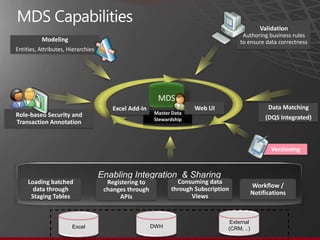
Validation
                                                                                     Authoring business rules
          Modeling                                                                  to ensure data correctness
Entities, Attributes, Hierarchies


                                                        MDS
                                        Excel Add-In                 Web UI                       Data Matching
Role-based Security and                                Master Data
                                                       Stewardship                               (DQS Integrated)
Transaction Annotation


                                                                                                   Versioning


                                    Enabling Integration & Sharing
     Loading batched                  Registering to           Consuming data
                                                                                            Workflow /
       data through                  changes through         through Subscription
                                                                                            Notifications
      Staging Tables                      APIs                      Views


                                                                                 External
                       Excel                           DWH                      (CRM, ..)
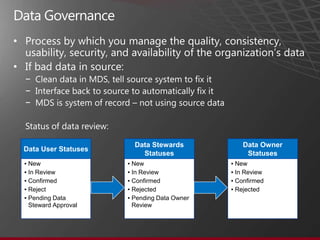
• Process by which you manage the quality, consistency,
  usability, security, and availability of the organization’s data
• If bad data in source:
  −
  −
  −


                           Data Stewards             Data Owner
  Data User Statuses
                             Statuses                 Statuses
  ▪ New                  ▪ New                   ▪ New
  ▪ In Review            ▪ In Review             ▪ In Review
  ▪ Confirmed            ▪ Confirmed             ▪ Confirmed
  ▪ Reject               ▪ Rejected              ▪ Rejected
  ▪ Pending Data         ▪ Pending Data Owner
    Steward Approval       Review
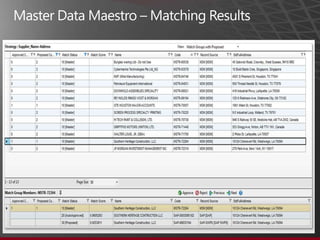
Why Profisee Master Data Maestro?
• Original developers of MDS as Stratature
• Took over Microsoft roadmap of MDS
•
•
•
•
•
•
•
•
•
•
•
•
•
•
Master Data Services


James Serra
JamesSerra3@gmail.com
JamesSerra.com
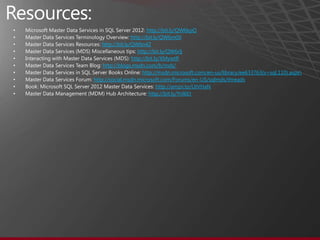
•                            http://bit.ly/QW6kpQ
•                     http://bit.ly/QW6m0X
•       http://bit.ly/QW6n4Z
•                        http://bit.ly/QW6rlj
•                     http://bit.ly/XMywtR
•       http://blogs.msdn.com/b/mds/
•                          http://msdn.microsoft.com/en-us/library/ee633763(v=sql.110).aspx
•   http://social.msdn.microsoft.com/Forums/en-US/sqlmds/threads
•                                 http://amzn.to/UtVHaN
•                             http://bit.ly/Ynl6Et

Introduction to Microsoft’s Master Data Services (MDS)

  • 1.
    James Serra –Data Warehouse/BI/MDM Architect JamesSerra3@gmail.com JamesSerra.com
  • 2.
  • 3.
    Agenda  Do you need Master Data Management (MDM)?  Why Master Data Management?  MDM Scenarios & MDM Hub Architecture Styles  Why Microsoft Data Services (MDS)?  MDS Benefits and Key Features  MDS UI and MDS Add-in for Excel  Why Profisee Master Data Maestro?  Demo  QA
  • 4.
  • 5.
    • • Set ofdata objects that are at the center of business activities (Customers, Products, Cost Centers, Locations, Assets, Tasks …). Dimension data, NOT transactional data • Single source for enterprise master and reference data • Business-centric versus IT-centric • Includes business process, people, AND data
  • 6.
    • IT/business partnerprovides data stewardship and data governance • Reduces or eliminates duplicate data entry and maintenance • Improves compliance, reporting, profitability, decision making and data quality • Expand data management to data stewards responsible for the data
  • 7.
    People Things Places Abstract Customers Products Locations Accounts Vendors Business Units Stores Warranties Sales People Bill of Materials Wells Time Employees Parts Power Lines Metrics Partners Storage Bins Geo Areas Securities Patients Equipment Warehouses Contracts
  • 8.
    Human typographical errors;incomplete information; spreadsheet data management Mergers and consolidation; ERP implementations, consolidation or migration Data Quality New purposes for old data; retire old applications such as mainframe applications Single point of data maintenance; BI reporting Tracking spends by customer Compliance State and federal mandates Different types of customer accounts Accurate view of data by implementing MDM and DQ Improve Efficiency Single point of data maintenance Cross sell and upsell Retain Customers Single view of customer spend, channels, cross sell and upsell Merging chart of accounts; consolidate financial reporting M&A Single view of product Single view of customers Bill-to and ship-to addresses and contacts Improve Decisions Pricing levels based on spend Relationships between buying customers (parent) Cross reference of same customers across multiple systems Cross Reference Survivorship of best consolidated data across multiple systems Single view of anything that has attributes that can be matched Golden Records Cleanup of source systems with business rules and golden records pushed back
  • 9.
  • 10.
    MDM Scenarios Operational Data Data Warehouse Data Solutions Management Management (Analytical) Central data records Enable business users to Provides storage and management and manage the dimensions management of the consumption sourced by and hierarchies of DW / objects and metadata other operational systems Data Marts used as the application knowledge • Object mappings Example: Business users • Reference Data A company has adopted 6 new utilize a data warehouse for • Metadata management systems from a merger. The reporting, but complain company needs the ability to about the accuracy of the Example: Table A houses propagate the correct dimensions and lack of mapping data between two customer information to each agility for updates. systems, and is also utilized system in a consistent fashion. MDS provides a platform for MDS empowers the by ETL processes for data central schema, integration business users to manage transformation decisions. points and validation for dimensions themselves MDS enables business Internal IT to develop a while IT can govern the users to manage the object custom solution changes mapping
  • 12.
  • 15.
    • • Part ofSQL Server 2008 R2 (Enterprise+) and SQL Server 2012 (BI+) • Fraction of the cost of competing MDM products from Oracle, SAP, Informatica and other niche vendors • Superior hierarchy management with full audit of changes • Strong business rules managed by business people • Single security model • SOA and web services layer, work flow, and versioning • Short implementation times with big business impact
  • 16.
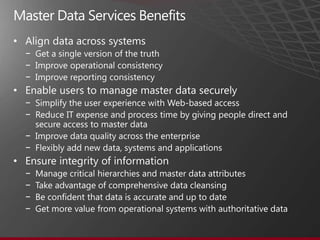
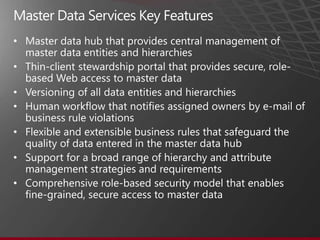
    − − − • − − − − • − − − −
  • 17.
  • 18.
    • • • • • SSIS package that calls MDS stored procedures:
  • 19.
    The model is the most fundamental object in a MDS solution ► Models are the containers that encapsulate all other MDS objects (i.e. entities, hierarchies, collections, and business rules) Creating/Updating Models Creating/Updating Attributes Creating/Updating Entities
  • 20.
  • 21.
    Utilizing the Web or Excel Add-in with MDS allows business and technical users the ability to utilize whichever environment they feel most comfortable with • The Excel Add-in for MDS allows users all the same abilities with MDS that the Web UI offers • Users can update and view MDS data, as well as modify or create MDS objects such as Models or Entities • A major benefit of the Excel Add-in is the ability to quickly bulk load data into MDS • The Excel Add-in provides users the ability to use Data Quality Services to clean data before it moves into MDS
  • 22.
    Validation Authoring business rules Modeling to ensure data correctness Entities, Attributes, Hierarchies MDS Excel Add-In Web UI Data Matching Role-based Security and Master Data Stewardship (DQS Integrated) Transaction Annotation Versioning Enabling Integration & Sharing Loading batched Registering to Consuming data Workflow / data through changes through through Subscription Notifications Staging Tables APIs Views External Excel DWH (CRM, ..)
  • 24.
    • Process bywhich you manage the quality, consistency, usability, security, and availability of the organization’s data • If bad data in source: − − − Data Stewards Data Owner Data User Statuses Statuses Statuses ▪ New ▪ New ▪ New ▪ In Review ▪ In Review ▪ In Review ▪ Confirmed ▪ Confirmed ▪ Confirmed ▪ Reject ▪ Rejected ▪ Rejected ▪ Pending Data ▪ Pending Data Owner Steward Approval Review
  • 25.
    Why Profisee MasterData Maestro? • Original developers of MDS as Stratature • Took over Microsoft roadmap of MDS • • • • • • • • • •
  • 27.
  • 28.
    Master Data Services JamesSerra JamesSerra3@gmail.com JamesSerra.com
  • 29.
    http://bit.ly/QW6kpQ • http://bit.ly/QW6m0X • http://bit.ly/QW6n4Z • http://bit.ly/QW6rlj • http://bit.ly/XMywtR • http://blogs.msdn.com/b/mds/ • http://msdn.microsoft.com/en-us/library/ee633763(v=sql.110).aspx • http://social.msdn.microsoft.com/Forums/en-US/sqlmds/threads • http://amzn.to/UtVHaN • http://bit.ly/Ynl6Et

Editor's Notes

  • #2 Companies struggle with consolidating the same set of data from multiple systems to accurately report on critical business information.  For example, having customer lists in multiple systems that often have the same customer in more than one list, sometimes with a different spelling.  Master Data Services is bundled with SQL Server 2012 to help resolve many of the Master Data Management issues that companies are faced with when integrating data.  In this session, James will show an overview of Master Data Services 2012, including the out of the box Web UI, the highly developed Excel Add-in, and how to get started with loading MDS with your data.
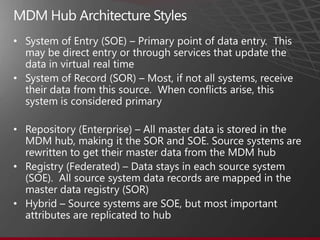
  • #11 Operational Data Management – Central data records management and consumption sourced by other operational systems.  For example, propagating a correct customer master to many internal systems all from different vendors.  The main purpose of Operational Data Management is pushing data out from MDS.Data Warehouse / Data Marts Management, or Analytical Management – Enable business users to manage the dimensions and hierarchies of DW / Data Marts (BI scenarios) for use in generating reports.  For example, building a customer dimension in the data warehouse that uses as its source many customer lists from multiple internal sources (i.e. ERP, CRM, etc).  All these separate systems usually can’t import a master list.  So they use their own lists and updates are fed into MDS.  The main purpose of Data Warehouse / Data Marts Management is pulling data into MDS.Data Solutions – Provides storage and management of the objects and metadata used as the application knowledge (Object mappings, Reference Data / managed object files, Metadata management / data dictionary).  For example, managing a table containing information on mapping objects between different systems that is used by an ETL process to make transformation decisions.
  • #28 SSIS package to stage data into MDSMDS Web UIMDS Add-in for ExcelMaster Data Maestro