Presentation on Backup
    Group members
    Aneela Maqboool
      Saira Nisar
       Tehmina
         Rabia
Outline
•   What is backup
•   Backup strategy
•   Recovery procedures
•   Factors in recovery procedures
•   Backup purposes
•   Types of backup
•   Backup architecture and process
•   Backup topologies
•   Backup technology options
•   Features
•   Installation of Acronis
What is a Backup?

• Backup is an additional copy of data that
  can be used for restore and recovery
  purposes
• This Backup copy can be created by:
  – Simply coping data (there can be one or more
    copies)
  – Mirroring data (the copy is always updated
    with whatever is written to the primary
Backup Strategy

 A backup is put in place to avoid
 permanent data loss to ensure the
 integrity of stored data i.e. can get
 back to a previous version and
 build up the data correctly if current
 data found to be in error.
Recovery Procedures

• A backup strategy needs a well
 documented and tested recovery
 procedure to ensure backup data is
 restored properly
Factors in recovery
procedure:
• A well documented procedure that allocates
    roles and responsibilities to staff.
•   Availability of alternative hardware and
    accommodation if the originals have been
    destroyed.
•   Availability of original software such as the
    customised operating system and application
    programs!
•   That up-to-date backup data is readily available
Backup purposes
 – Disaster Recovery
    • Restores production data to an operational state
      after disaster
 – Operational
    • Restore data in the event of data loss or logical
      corruptions that may occur during routine
      processing
 – Archival
    • Preserve transaction records, email, and other
      business work products for regulatory compliance
Types of backups

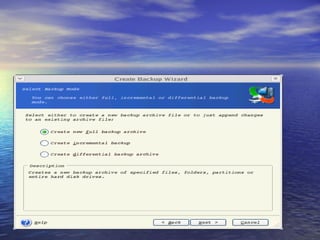
•   Three basic types of backups:
•   Full backups
•   Differential backups
•   Incremental backups
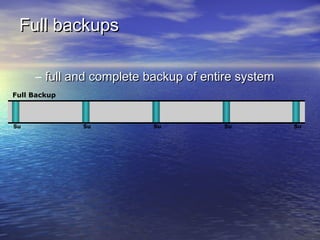
Full backups

     – full and complete backup of entire system
Full Backup


Su            Su          Su          Su           Su
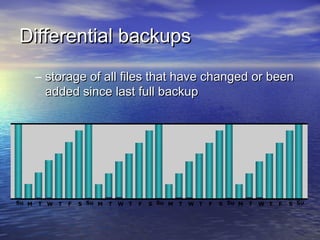
Differential backups
       – storage of all files that have changed or been
         added since last full backup


Su M   T W   T   F   S Su M   T   W T   F   S Su M   T   W T   F   S Su M   T   W T   F   S Su
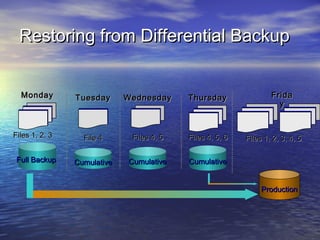
Restoring from Differential Backup


  Monday        Tuesday      Wednesday     Thursday                Frida
                                                                     y


Files 1, 2, 3     File 4      Files 4, 5   Files 4, 5, 6   Files 1, 2, 3, 4, 5

 Full Backup    Cumulative   Cumulative    Cumulative


                                                                Production
Key Features of Differential
backups

  – More files to be backed up, therefore it takes
    more time to backup
    and uses more storage space
  – Much faster restore because only the last full
    and the last cumulative
    backup must be applied
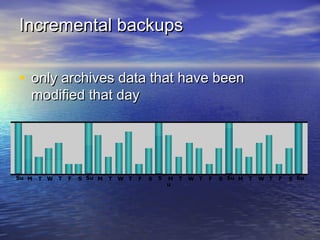
Incremental backups

• only archives data that have been
   modified that day


Su M   T W   T   F   S Su M   T   W T   F   S   S   M   T   W T   F   S Su M   T   W T   F   S Su
                                                    u
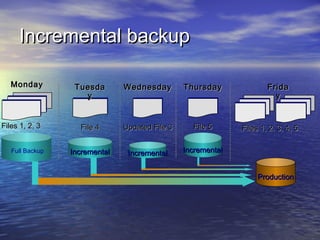
Incremental backup

   Monday         Tuesda       Wednesday        Thursday              Frida
                    y                                                   y


Files 1, 2, 3      File 4      Updated File 3     File 5      Files 1, 2, 3, 4, 5

   Full Backup   Incremental    Incremental     Incremental


                                                                   Production
Key Features of Incremental
backups


 – Files that have changed since the last backup
   are backed up
 – Fewest amount of files to be backed up,
   therefore faster backup and less
Backup Architecture and
Process
• Backup client
  – Sends backup data to backup server or
    storage node
• Backup server
  – Manages backup operations and maintains
    backup catalog
• Storage node
  – Responsible for writing data to backup device
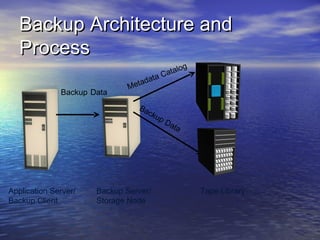
Backup Architecture and
   Process
                                             og
                                        Catal
                                  adata
                              Met
              Backup Data
                                 Ba
                                    cku
                                       pD
                                         ata


Application Server/   Backup Server/              Tape Library
Backup Client         Storage Node
Backup Operation
                     Application Server and Backup Clients


       3b
                     4


 1                                        5
                3a


 2

                6
 7


                         Storage Node         Backup Device
Backup Server
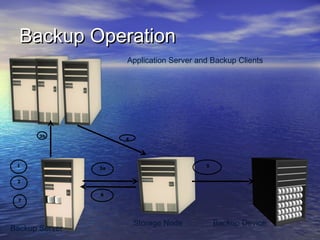
Backup Operation
• Start the scheduled backup process
• Backup data retrieves backup related information from
    backup catalog
•   Backup server instructs storage node to local backup
    media in backup device
•   Backup server instruct backup clients to send its
    metadata to the backup server and data to be backup to
    storage mode.
•   Backup clients send data to storage node
•   Storage node sends data to backup device
•   Storage node sends media information to backup
    servers
•   Backup server update and records the status
Restore Operation
                     Application Server and Backup Clients


       3b
                     4


 1                                        5
                3a


 2

                6
 7


                         Storage Node         Backup Device
Backup Server
Restore Operation

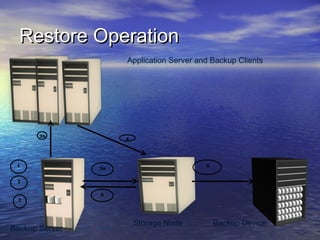
• Backup server scans backup catalog to identify
    the data to be restore and the client that will
    receive data.
•   Backup servers instructs storage node to load
    backup media in backup device.
•   Data is read and send to backup client.
•   Storage node sends restore metadata to backup
    server.
•   Backup server updates catalog.
Backup Topologies

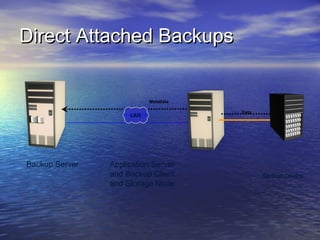
• There are 3 basic backup topologies:
  –   Direct Attached Based Backup
  –   LAN Based Backup
  –   SAN Based Backup
Direct Attached Backups


                           Metadata

                                      Data
                     LAN


Backup Server   Application Server
                and Backup Client            Backup Device
                and Storage Node
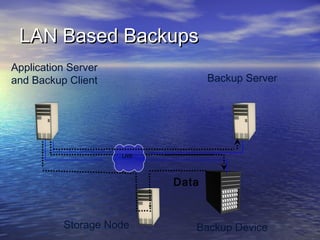
LAN Based Backups
Application Server
and Backup Client                 Backup Server


                     LAN


                           Data


          Storage Node        Backup Device
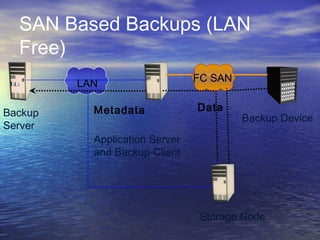
SAN Based Backups (LAN
  Free)
                                FC SAN
         LAN

           Metadata             Data
Backup                                   Backup Device
Server
           Application Server
           and Backup Client


                                 Storage Node
Backup Technology options

• Backup to Tape
 Physical Tape library
• Backup to tape
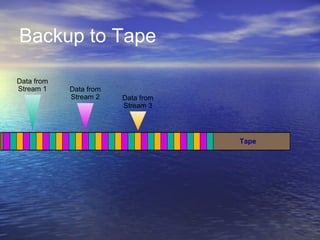
Backup to Tape

•   Traditional destination for backup
•   Low cost option
•   Sequential / Linear Access
•   Multiple streaming
    – Backup streams from multiple clients to a
      single backup device
Backup to Tape

Data from
Stream 1    Data from
            Stream 2    Data from
                        Stream 3


                                    Tape
Tape Limitations

• Reliability
• Sequential Access
• Cannot be accessed by multiple host
  simultaneously
• Control environment for tape storage
• Wear and tear of tape
Backup to Disk

•   Ease of implementation
•   Fast access
•   More reliable
•   Random access
•   Multiple host access
•   Enhanced overall back and recovery
    performance
New Features

• File backup and restore
 Simple and automatic protection
 Complete PC™ backup and restore
 Block-level image
 Entire computer
 Server backup
 Files, folders, disks, common workloads
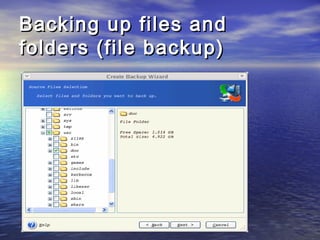
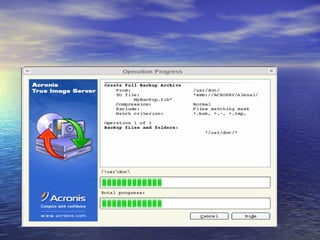
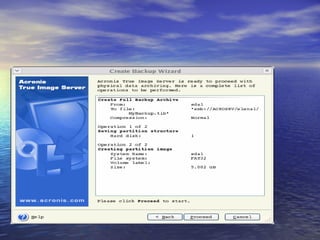
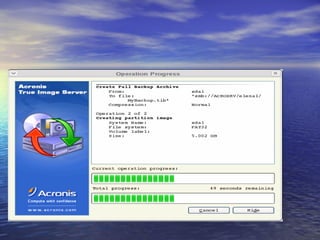
Backing up files and
folders (file backup)
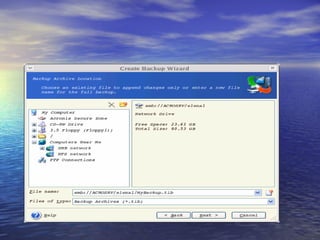
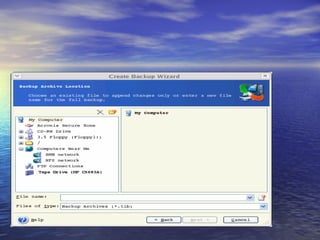
• If you are going to create a full backup,
 type the file name in the File Name line,
 or use the file name generator (a button to
 the right of the line). If you select an
 existing archive, it will be overwritten.
Presentation on backup and recoveryyyyyyyyyyyyy

Presentation on backup and recoveryyyyyyyyyyyyy

  • 1.
    Presentation on Backup Group members Aneela Maqboool Saira Nisar Tehmina Rabia
  • 2.
    Outline • What is backup • Backup strategy • Recovery procedures • Factors in recovery procedures • Backup purposes • Types of backup • Backup architecture and process • Backup topologies • Backup technology options • Features • Installation of Acronis
  • 3.
    What is aBackup? • Backup is an additional copy of data that can be used for restore and recovery purposes • This Backup copy can be created by: – Simply coping data (there can be one or more copies) – Mirroring data (the copy is always updated with whatever is written to the primary
  • 4.
    Backup Strategy Abackup is put in place to avoid permanent data loss to ensure the integrity of stored data i.e. can get back to a previous version and build up the data correctly if current data found to be in error.
  • 5.
    Recovery Procedures • Abackup strategy needs a well documented and tested recovery procedure to ensure backup data is restored properly
  • 6.
    Factors in recovery procedure: •A well documented procedure that allocates roles and responsibilities to staff. • Availability of alternative hardware and accommodation if the originals have been destroyed. • Availability of original software such as the customised operating system and application programs! • That up-to-date backup data is readily available
  • 7.
    Backup purposes –Disaster Recovery • Restores production data to an operational state after disaster – Operational • Restore data in the event of data loss or logical corruptions that may occur during routine processing – Archival • Preserve transaction records, email, and other business work products for regulatory compliance
  • 8.
    Types of backups • Three basic types of backups: • Full backups • Differential backups • Incremental backups
  • 9.
    Full backups – full and complete backup of entire system Full Backup Su Su Su Su Su
  • 10.
    Differential backups – storage of all files that have changed or been added since last full backup Su M T W T F S Su M T W T F S Su M T W T F S Su M T W T F S Su
  • 11.
    Restoring from DifferentialBackup Monday Tuesday Wednesday Thursday Frida y Files 1, 2, 3 File 4 Files 4, 5 Files 4, 5, 6 Files 1, 2, 3, 4, 5 Full Backup Cumulative Cumulative Cumulative Production
  • 12.
    Key Features ofDifferential backups – More files to be backed up, therefore it takes more time to backup and uses more storage space – Much faster restore because only the last full and the last cumulative backup must be applied
  • 13.
    Incremental backups • onlyarchives data that have been modified that day Su M T W T F S Su M T W T F S S M T W T F S Su M T W T F S Su u
  • 14.
    Incremental backup Monday Tuesda Wednesday Thursday Frida y y Files 1, 2, 3 File 4 Updated File 3 File 5 Files 1, 2, 3, 4, 5 Full Backup Incremental Incremental Incremental Production
  • 15.
    Key Features ofIncremental backups – Files that have changed since the last backup are backed up – Fewest amount of files to be backed up, therefore faster backup and less
  • 16.
    Backup Architecture and Process •Backup client – Sends backup data to backup server or storage node • Backup server – Manages backup operations and maintains backup catalog • Storage node – Responsible for writing data to backup device
  • 17.
    Backup Architecture and Process og Catal adata Met Backup Data Ba cku pD ata Application Server/ Backup Server/ Tape Library Backup Client Storage Node
  • 18.
    Backup Operation Application Server and Backup Clients 3b 4 1 5 3a 2 6 7 Storage Node Backup Device Backup Server
  • 19.
    Backup Operation • Startthe scheduled backup process • Backup data retrieves backup related information from backup catalog • Backup server instructs storage node to local backup media in backup device • Backup server instruct backup clients to send its metadata to the backup server and data to be backup to storage mode. • Backup clients send data to storage node • Storage node sends data to backup device • Storage node sends media information to backup servers • Backup server update and records the status
  • 20.
    Restore Operation Application Server and Backup Clients 3b 4 1 5 3a 2 6 7 Storage Node Backup Device Backup Server
  • 21.
    Restore Operation • Backupserver scans backup catalog to identify the data to be restore and the client that will receive data. • Backup servers instructs storage node to load backup media in backup device. • Data is read and send to backup client. • Storage node sends restore metadata to backup server. • Backup server updates catalog.
  • 22.
    Backup Topologies • Thereare 3 basic backup topologies: – Direct Attached Based Backup – LAN Based Backup – SAN Based Backup
  • 23.
    Direct Attached Backups Metadata Data LAN Backup Server Application Server and Backup Client Backup Device and Storage Node
  • 24.
    LAN Based Backups ApplicationServer and Backup Client Backup Server LAN Data Storage Node Backup Device
  • 25.
    SAN Based Backups(LAN Free) FC SAN LAN Metadata Data Backup Backup Device Server Application Server and Backup Client Storage Node
  • 26.
    Backup Technology options •Backup to Tape  Physical Tape library • Backup to tape
  • 27.
    Backup to Tape • Traditional destination for backup • Low cost option • Sequential / Linear Access • Multiple streaming – Backup streams from multiple clients to a single backup device
  • 28.
    Backup to Tape Datafrom Stream 1 Data from Stream 2 Data from Stream 3 Tape
  • 29.
    Tape Limitations • Reliability •Sequential Access • Cannot be accessed by multiple host simultaneously • Control environment for tape storage • Wear and tear of tape
  • 30.
    Backup to Disk • Ease of implementation • Fast access • More reliable • Random access • Multiple host access • Enhanced overall back and recovery performance
  • 31.
    New Features • Filebackup and restore Simple and automatic protection Complete PC™ backup and restore Block-level image Entire computer Server backup Files, folders, disks, common workloads
  • 32.
    Backing up filesand folders (file backup)
  • 33.
    • If youare going to create a full backup, type the file name in the File Name line, or use the file name generator (a button to the right of the line). If you select an existing archive, it will be overwritten.