Venn Consulting Office 365 Intranet
Adam Krueger & Chris Poteet
© 2011 All rights reserved. www.portalsolutions.net 2
Background
» Venn Consulting is a 70 person company (1o of
them contractors) located in Washington D.C.
» Venn specializes in assisting agencies seeking to
acquire and maintain ISO compliance through
their processes.
» Their average project size is ~$65k.
» Their core team for this project includes their
CIO, their KM lead, a project manager, and head
of IT services.
© 2011 All rights reserved. www.portalsolutions.net 3
Business Objectives Workshop
» The goal in this exercise is to establish, with the
stakeholders, what the main, guiding goals and
principles are from an organizational
perspective.
» These objectives assist in framing the UX
research scripts and sessions.
» The workshop takes between 1-1.5 hours.
© 2011 All rights reserved. www.portalsolutions.net 4
Business Objectives
» Reduce the barriers to effective digital
collaboration focused on project execution and
estimation.
» Provide a forum to communicate organizational
news, needs, events, etc.
» Empower “self-services” including things like
benefits management and IT support.
» Facilitate the introduction of a new technological
platform that will eventually include Lync,
Exchange, etc.
» Reduce employee on-boarding due to project
turnover.
© 2011 All rights reserved. www.portalsolutions.net 5
Audience Definition Workshop
» First, PS needs to understand the types of
people to cover during research and design.
» A 1.5 hour session is facilitated between a
consultant and the stakeholder team.
» The stakeholder team comes to the meeting
with “homework” provided by PS in the form of
a blank XLS with instructions.
» During the meeting the audiences are refined.
© 2011 All rights reserved. www.portalsolutions.net 6
Create Interview Scripts
» Due to the scope of this envision, we will take
some existing stock script questions and
contextualize them based on our known
business objectives.
» After creating the script, choose no more than
two people from your audience and interview.
– If you have lots of audiences, either seek to merge
audiences, or include other types of people in your
interviews.
© 2011 All rights reserved. www.portalsolutions.net 7
Sample Interview Script
» An interview script is written to facilitate the
conversation.
» Ask questions with a emphasis on
understanding goals, barriers, tasks,
motivations, priorities, habits, relationships,
tools, and environment.
» Interview stakeholders first to allow them to be
comfortable with the process and refine your
script.
» Have enough questions to fill about an hour.
© 2011 All rights reserved. www.portalsolutions.net 8
Contextual Inquiry
» Even though the interview findings give us insight,
they can’t give us a full picture of the breadth of
how these employees work.
» We pick one person from our sales team and
another from our project delivery team to
“shadow” in a contextual inquiry session.
» We choose Mary who is a project manager for the
ISO projects, and we also decide to shadow James a
brand new employee.
– We want to see more in practice of how Mary handles
the day-to-day of project collaboration.
– James will give us insight into self-service needs and
company communication.
© 2011 All rights reserved. www.portalsolutions.net 9
Contextual Inquiry Findings
» Mary
– We see that Mary’s “work domain” encompasses several
different locations due to working with other team members.
This makes work consistency difficult.
– Mary has filled her desktop with shortcuts to documents on
file shares. She also has a post-it note on her monitor with
important links.
– Obtaining sign off for project deliverables is an extremely
manual process.
» James
– James was given a folder with a list of on-boarding tasks. He
was told by other employees to ignore it since it’s old, and he
was just emailed by another employee all the docs he needs.
– He was unable to locate any of the necessary HR forms to
enroll in his benefits.
© 2011 All rights reserved. www.portalsolutions.net 10
Interview Findings
» Document duplication has become a problem—
both in file share folders and e-mailing. No
“single source of truth.”
» Inability to manage company records, forms,
templates effectively.
» Traversing the file share hierarchy is painful and
almost impossible.
» Managing permissions on folders is difficult.
© 2011 All rights reserved. www.portalsolutions.net 11
Interview Findings
» The ability to search is not robust enough.
» Receiving information about the company’s
initiatives, plans, etc. is only found in mass
emails which get lost easily.
» Also interested down the road of redoing the
public website and possibly using SharePoint to
do so.
© 2011 All rights reserved. www.portalsolutions.net 12
Research Findings Presentation
» After completing all our research we compiled
all the data.
» Then we organized into categories such as
goals, barriers, tasks, etc.
» From there we prioritized all of our findings and
generated a presentation organized by high-
level theme to share our findings.
© 2011 All rights reserved. www.portalsolutions.net 13
Usage Scenarios
» Usage scenarios are one way to demonstrate
that we understand the needs of the
organization through research and analysis.
» Other options include use cases, scenarios, user
stories, etc.
» The scenarios are matched with an audience,
business objective, and given a UX description.
© 2011 All rights reserved. www.portalsolutions.net 14
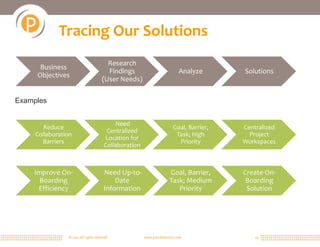
Tracing Our Solutions
Business
Objectives
Research
Findings
(User Needs)
Analyze Solutions
Reduce
Collaboration
Barriers
Need
Centralized
Location for
Collaboration
Goal, Barrier,
Task; High
Priority
Centralized
Project
Workspaces
Examples
Improve On-
Boarding
Efficiency
Need Up-to-
Date
Information
Goal, Barrier,
Task; Medium
Priority
Create On-
Boarding
Solution
© 2011 All rights reserved. www.portalsolutions.net 15
Tracing Our Solutions
» Another example that shows necessary
relationship between user research and obj.
– Hopefully contextual inquiry
© 2011 All rights reserved. www.portalsolutions.net 16
Content Audit
» Before starting to build the Venn intranet, we
need to understand the amount of and kind of
content that currently exists.
» We also need to know, from what we can,
future information needs.
» It is a intense, time-consuming, tedious, but very
important process.
» Venn Consulting has the bulk of their
information stored on file shares, and that is
reflected in our audit spreadsheet.
© 2011 All rights reserved. www.portalsolutions.net 17
Card Sort
» Card sorting allows us to understand how users think
about information and how it should be categorized.
» We will organize an open card sort to determine labels
for our navigational schemes and how to group them.
– These “cards” come from our user research and content
audit.
– They should be validated with the team before doing the
test.
» Using a tool like Optimal Workshop allows us to test
many users quickly, and it gives us tools for analysis.
– https://portalsolutions.optimalworkshop.com/optimalsort/ve
nnconsultingopencardsort
© 2011 All rights reserved. www.portalsolutions.net 18
Sample Labels/Sitemap
» After doing our card sort analysis, we can
present the Venn team our suggested hierarchy
and labels for their navigation.
» This helps validate our direction, allows us to do
usability testing, and will shape any CMS-specific
information architecture.
© 2011 All rights reserved. www.portalsolutions.net 19
Wireframes
» A user interface inventory helps the process of UI
design. It involves surveying existing interfaces and
noticing trends and opportunities.
» Armed with a UI and content audit we can start to
make decisions on the user interface.
» Using all of our research we can make intelligent
decisions about our interfaces.
– Page layout strategy gives them insight into our thought
process.
– Home page wireframe can provide easy entry into
employee resources, company news, and project sites.
– Project sites provide a centralized place for all delivery
collaboration.
© 2011 All rights reserved. www.portalsolutions.net 20
Usability Testing
» Usability testing is the best way to ensure that
our design decisions are meeting business and
user needs.
» There are many types of usability testing, due to
short Venn engagement, we will do a Treejack
test to ensure our navigation works.
» We could also do more full-scale, moderated
usability testing to do further validation on the
user interface.
© 2011 All rights reserved. www.portalsolutions.net 21
Design Comps & Style Guide
» See further examples in the related
documentation.

Venn Consulting Project

  • 1.
    Venn Consulting Office365 Intranet Adam Krueger & Chris Poteet
  • 2.
    © 2011 Allrights reserved. www.portalsolutions.net 2 Background » Venn Consulting is a 70 person company (1o of them contractors) located in Washington D.C. » Venn specializes in assisting agencies seeking to acquire and maintain ISO compliance through their processes. » Their average project size is ~$65k. » Their core team for this project includes their CIO, their KM lead, a project manager, and head of IT services.
  • 3.
    © 2011 Allrights reserved. www.portalsolutions.net 3 Business Objectives Workshop » The goal in this exercise is to establish, with the stakeholders, what the main, guiding goals and principles are from an organizational perspective. » These objectives assist in framing the UX research scripts and sessions. » The workshop takes between 1-1.5 hours.
  • 4.
    © 2011 Allrights reserved. www.portalsolutions.net 4 Business Objectives » Reduce the barriers to effective digital collaboration focused on project execution and estimation. » Provide a forum to communicate organizational news, needs, events, etc. » Empower “self-services” including things like benefits management and IT support. » Facilitate the introduction of a new technological platform that will eventually include Lync, Exchange, etc. » Reduce employee on-boarding due to project turnover.
  • 5.
    © 2011 Allrights reserved. www.portalsolutions.net 5 Audience Definition Workshop » First, PS needs to understand the types of people to cover during research and design. » A 1.5 hour session is facilitated between a consultant and the stakeholder team. » The stakeholder team comes to the meeting with “homework” provided by PS in the form of a blank XLS with instructions. » During the meeting the audiences are refined.
  • 6.
    © 2011 Allrights reserved. www.portalsolutions.net 6 Create Interview Scripts » Due to the scope of this envision, we will take some existing stock script questions and contextualize them based on our known business objectives. » After creating the script, choose no more than two people from your audience and interview. – If you have lots of audiences, either seek to merge audiences, or include other types of people in your interviews.
  • 7.
    © 2011 Allrights reserved. www.portalsolutions.net 7 Sample Interview Script » An interview script is written to facilitate the conversation. » Ask questions with a emphasis on understanding goals, barriers, tasks, motivations, priorities, habits, relationships, tools, and environment. » Interview stakeholders first to allow them to be comfortable with the process and refine your script. » Have enough questions to fill about an hour.
  • 8.
    © 2011 Allrights reserved. www.portalsolutions.net 8 Contextual Inquiry » Even though the interview findings give us insight, they can’t give us a full picture of the breadth of how these employees work. » We pick one person from our sales team and another from our project delivery team to “shadow” in a contextual inquiry session. » We choose Mary who is a project manager for the ISO projects, and we also decide to shadow James a brand new employee. – We want to see more in practice of how Mary handles the day-to-day of project collaboration. – James will give us insight into self-service needs and company communication.
  • 9.
    © 2011 Allrights reserved. www.portalsolutions.net 9 Contextual Inquiry Findings » Mary – We see that Mary’s “work domain” encompasses several different locations due to working with other team members. This makes work consistency difficult. – Mary has filled her desktop with shortcuts to documents on file shares. She also has a post-it note on her monitor with important links. – Obtaining sign off for project deliverables is an extremely manual process. » James – James was given a folder with a list of on-boarding tasks. He was told by other employees to ignore it since it’s old, and he was just emailed by another employee all the docs he needs. – He was unable to locate any of the necessary HR forms to enroll in his benefits.
  • 10.
    © 2011 Allrights reserved. www.portalsolutions.net 10 Interview Findings » Document duplication has become a problem— both in file share folders and e-mailing. No “single source of truth.” » Inability to manage company records, forms, templates effectively. » Traversing the file share hierarchy is painful and almost impossible. » Managing permissions on folders is difficult.
  • 11.
    © 2011 Allrights reserved. www.portalsolutions.net 11 Interview Findings » The ability to search is not robust enough. » Receiving information about the company’s initiatives, plans, etc. is only found in mass emails which get lost easily. » Also interested down the road of redoing the public website and possibly using SharePoint to do so.
  • 12.
    © 2011 Allrights reserved. www.portalsolutions.net 12 Research Findings Presentation » After completing all our research we compiled all the data. » Then we organized into categories such as goals, barriers, tasks, etc. » From there we prioritized all of our findings and generated a presentation organized by high- level theme to share our findings.
  • 13.
    © 2011 Allrights reserved. www.portalsolutions.net 13 Usage Scenarios » Usage scenarios are one way to demonstrate that we understand the needs of the organization through research and analysis. » Other options include use cases, scenarios, user stories, etc. » The scenarios are matched with an audience, business objective, and given a UX description.
  • 14.
    © 2011 Allrights reserved. www.portalsolutions.net 14 Tracing Our Solutions Business Objectives Research Findings (User Needs) Analyze Solutions Reduce Collaboration Barriers Need Centralized Location for Collaboration Goal, Barrier, Task; High Priority Centralized Project Workspaces Examples Improve On- Boarding Efficiency Need Up-to- Date Information Goal, Barrier, Task; Medium Priority Create On- Boarding Solution
  • 15.
    © 2011 Allrights reserved. www.portalsolutions.net 15 Tracing Our Solutions » Another example that shows necessary relationship between user research and obj. – Hopefully contextual inquiry
  • 16.
    © 2011 Allrights reserved. www.portalsolutions.net 16 Content Audit » Before starting to build the Venn intranet, we need to understand the amount of and kind of content that currently exists. » We also need to know, from what we can, future information needs. » It is a intense, time-consuming, tedious, but very important process. » Venn Consulting has the bulk of their information stored on file shares, and that is reflected in our audit spreadsheet.
  • 17.
    © 2011 Allrights reserved. www.portalsolutions.net 17 Card Sort » Card sorting allows us to understand how users think about information and how it should be categorized. » We will organize an open card sort to determine labels for our navigational schemes and how to group them. – These “cards” come from our user research and content audit. – They should be validated with the team before doing the test. » Using a tool like Optimal Workshop allows us to test many users quickly, and it gives us tools for analysis. – https://portalsolutions.optimalworkshop.com/optimalsort/ve nnconsultingopencardsort
  • 18.
    © 2011 Allrights reserved. www.portalsolutions.net 18 Sample Labels/Sitemap » After doing our card sort analysis, we can present the Venn team our suggested hierarchy and labels for their navigation. » This helps validate our direction, allows us to do usability testing, and will shape any CMS-specific information architecture.
  • 19.
    © 2011 Allrights reserved. www.portalsolutions.net 19 Wireframes » A user interface inventory helps the process of UI design. It involves surveying existing interfaces and noticing trends and opportunities. » Armed with a UI and content audit we can start to make decisions on the user interface. » Using all of our research we can make intelligent decisions about our interfaces. – Page layout strategy gives them insight into our thought process. – Home page wireframe can provide easy entry into employee resources, company news, and project sites. – Project sites provide a centralized place for all delivery collaboration.
  • 20.
    © 2011 Allrights reserved. www.portalsolutions.net 20 Usability Testing » Usability testing is the best way to ensure that our design decisions are meeting business and user needs. » There are many types of usability testing, due to short Venn engagement, we will do a Treejack test to ensure our navigation works. » We could also do more full-scale, moderated usability testing to do further validation on the user interface.
  • 21.
    © 2011 Allrights reserved. www.portalsolutions.net 21 Design Comps & Style Guide » See further examples in the related documentation.