Linux Tips: Files, Users & Permissions

Fabio Emilio Costa

http://plus.google.com/+FabioEmilioCosta
http://twitter.com/HufflepuffBR
http://www.facebook.com/fabiocosta0305
http://www.reddit.com/u/HufflepuffBR
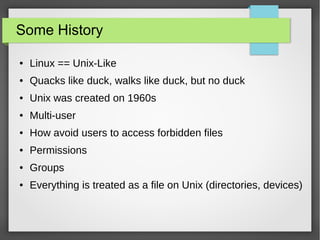
Some History
●

Linux == Unix-Like

●

Quacks like duck, walks like duck, but no duck

●

Unix was created on 1960s

●

Multi-user

●

How avoid users to access forbidden files

●

Permissions

●

Groups

●

Everything is treated as a file on Unix (directories, devices)
Permissions
●

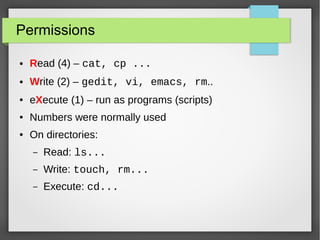
Read (4) – cat, cp ...

●

Write (2) – gedit, vi, emacs, rm..

●

eXecute (1) – run as programs (scripts)

●

Numbers were normally used

●

On directories:
–

Read: ls...

–

Write: touch, rm...

–

Execute: cd...
Users
●

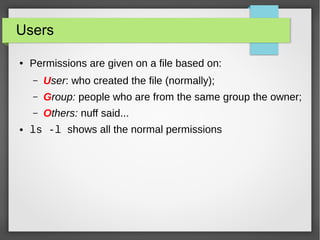
Permissions are given on a file based on:
–
–

Group: people who are from the same group the owner;

–
●

User: who created the file (normally);
Others: nuff said...

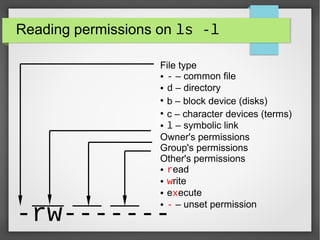
ls -l shows all the normal permissions
Reading permissions on ls -l
File type
● - – common file
● d – directory
●
b – block device (disks)
●
c – character devices (terms)
● l – symbolic link
Owner's permissions
Group's permissions
Other's permissions
● read
● write
● execute
● - – unset permission

-rw-------
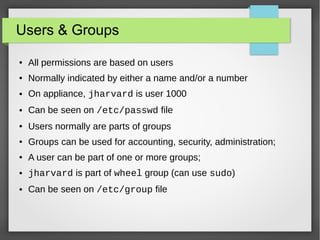
Users & Groups
●

All permissions are based on users

●

Normally indicated by either a name and/or a number

●

On appliance, jharvard is user 1000

●

Can be seen on /etc/passwd file

●

Users normally are parts of groups

●

Groups can be used for accounting, security, administration;

●

A user can be part of one or more groups;

●

jharvard is part of wheel group (can use sudo)

●

Can be seen on /etc/group file
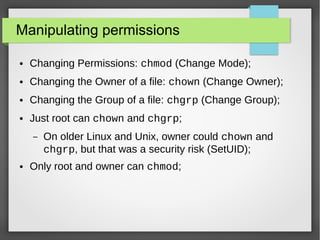
Manipulating permissions
●

Changing Permissions: chmod (Change Mode);

●

Changing the Owner of a file: chown (Change Owner);

●

Changing the Group of a file: chgrp (Change Group);

●

Just root can chown and chgrp;
–

●

On older Linux and Unix, owner could chown and
chgrp, but that was a security risk (SetUID);

Only root and owner can chmod;
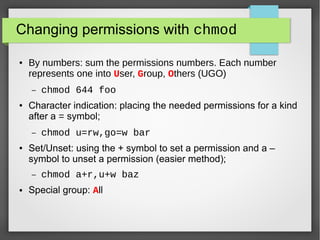
Changing permissions with chmod
●

By numbers: sum the permissions numbers. Each number
represents one into User, Group, Others (UGO)
–

●

Character indication: placing the needed permissions for a kind
after a = symbol;
–

●

chmod u=rw,go=w bar

Set/Unset: using the + symbol to set a permission and a –
symbol to unset a permission (easier method);
–

●

chmod 644 foo

chmod a+r,u+w baz

Special group: All
The root
●

Special user

●

Can do ANYTHING with a system...

●

… including break it

●

Has a special ID of 0

●

Many commands can be done just by root...

●

… or users that can use sudo, from wheel group …

●

… and jharvard is from wheel group
"With great power comes great
responsibility"
(PARKER, Ben)
Want to see Linux being broken?

Running rm -rf / on Linux

http://www.youtube.com/watch?v=D4fzInly
Don't try this at home!!!!!
Scripts
●

On Windows, files are opened based on extension;

●

.exe, .com, .bat – programs/scripts;

●

On Unix, needs eXecution permission to run as a script;

●

Any file with eXecution permission will be executed (if
possible);
THIS IS CS50

CS50x Permissions, Files, Users

  • 1.
    Linux Tips: Files,Users & Permissions Fabio Emilio Costa http://plus.google.com/+FabioEmilioCosta http://twitter.com/HufflepuffBR http://www.facebook.com/fabiocosta0305 http://www.reddit.com/u/HufflepuffBR
  • 2.
    Some History ● Linux ==Unix-Like ● Quacks like duck, walks like duck, but no duck ● Unix was created on 1960s ● Multi-user ● How avoid users to access forbidden files ● Permissions ● Groups ● Everything is treated as a file on Unix (directories, devices)
  • 3.
    Permissions ● Read (4) –cat, cp ... ● Write (2) – gedit, vi, emacs, rm.. ● eXecute (1) – run as programs (scripts) ● Numbers were normally used ● On directories: – Read: ls... – Write: touch, rm... – Execute: cd...
  • 4.
    Users ● Permissions are givenon a file based on: – – Group: people who are from the same group the owner; – ● User: who created the file (normally); Others: nuff said... ls -l shows all the normal permissions
  • 5.
    Reading permissions onls -l File type ● - – common file ● d – directory ● b – block device (disks) ● c – character devices (terms) ● l – symbolic link Owner's permissions Group's permissions Other's permissions ● read ● write ● execute ● - – unset permission -rw-------
  • 6.
    Users & Groups ● Allpermissions are based on users ● Normally indicated by either a name and/or a number ● On appliance, jharvard is user 1000 ● Can be seen on /etc/passwd file ● Users normally are parts of groups ● Groups can be used for accounting, security, administration; ● A user can be part of one or more groups; ● jharvard is part of wheel group (can use sudo) ● Can be seen on /etc/group file
  • 7.
    Manipulating permissions ● Changing Permissions:chmod (Change Mode); ● Changing the Owner of a file: chown (Change Owner); ● Changing the Group of a file: chgrp (Change Group); ● Just root can chown and chgrp; – ● On older Linux and Unix, owner could chown and chgrp, but that was a security risk (SetUID); Only root and owner can chmod;
  • 8.
    Changing permissions withchmod ● By numbers: sum the permissions numbers. Each number represents one into User, Group, Others (UGO) – ● Character indication: placing the needed permissions for a kind after a = symbol; – ● chmod u=rw,go=w bar Set/Unset: using the + symbol to set a permission and a – symbol to unset a permission (easier method); – ● chmod 644 foo chmod a+r,u+w baz Special group: All
  • 9.
    The root ● Special user ● Cando ANYTHING with a system... ● … including break it ● Has a special ID of 0 ● Many commands can be done just by root... ● … or users that can use sudo, from wheel group … ● … and jharvard is from wheel group
  • 10.
    "With great powercomes great responsibility" (PARKER, Ben)
  • 11.
    Want to seeLinux being broken? Running rm -rf / on Linux http://www.youtube.com/watch?v=D4fzInly Don't try this at home!!!!!
  • 12.
    Scripts ● On Windows, filesare opened based on extension; ● .exe, .com, .bat – programs/scripts; ● On Unix, needs eXecution permission to run as a script; ● Any file with eXecution permission will be executed (if possible);
  • 13.