Progression Of My Cover Page
Final Draft
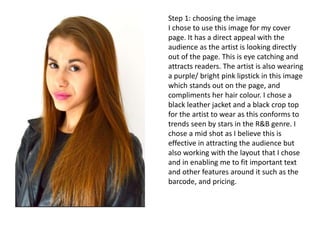
Step 1: choosing the image
I chose to use this image for my cover
page. It has a direct appeal with the
audience as the artist is looking directly
out of the page. This is eye catching and
attracts readers. The artist is also wearing
a purple/ bright pink lipstick in this image
which stands out on the page, and
compliments her hair colour. I chose a
black leather jacket and a black crop top
for the artist to wear as this conforms to
trends seen by stars in the R&B genre. I
chose a mid shot as I believe this is
effective in attracting the audience but
also working with the layout that I chose
and in enabling me to fit important text
and other features around it such as the
barcode, and pricing.
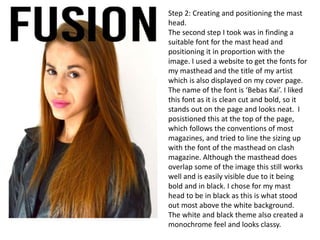
Step 2: Creating and positioning the mast
head.
The second step I took was in finding a
suitable font for the mast head and
positioning it in proportion with the
image. I used a website to get the fonts for
my masthead and the title of my artist
which is also displayed on my cover page.
The name of the font is ‘Bebas Kai’. I liked
this font as it is clean cut and bold, so it
stands out on the page and looks neat. I
posistioned this at the top of the page,
which follows the conventions of most
magazines, and tried to line the sizing up
with the font of the masthead on clash
magazine. Although the masthead does
overlap some of the image this still works
well and is easily visible due to it being
bold and in black. I chose for my mast
head to be in black as this is what stood
out most above the white background.
The white and black theme also created a
monochrome feel and looks classy.
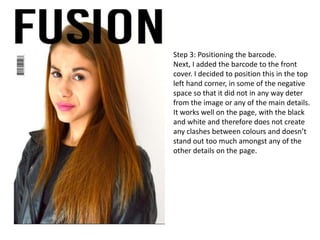
Step 3: Positioning the barcode.
Next, I added the barcode to the front
cover. I decided to position this in the top
left hand corner, in some of the negative
space so that it did not in any way deter
from the image or any of the main details.
It works well on the page, with the black
and white and therefore does not create
any clashes between colours and doesn’t
stand out too much amongst any of the
other details on the page.
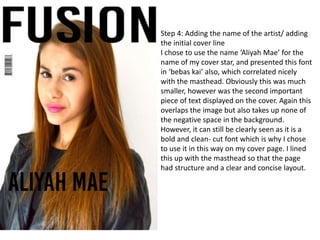
Step 4: Adding the name of the artist/ adding
the initial cover line
I chose to use the name ‘Aliyah Mae’ for the
name of my cover star, and presented this font
in ‘bebas kai’ also, which correlated nicely
with the masthead. Obviously this was much
smaller, however was the second important
piece of text displayed on the cover. Again this
overlaps the image but also takes up none of
the negative space in the background.
However, it can still be clearly seen as it is a
bold and clean- cut font which is why I chose
to use it in this way on my cover page. I lined
this up with the masthead so that the page
had structure and a clear and concise layout.
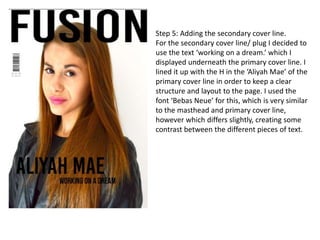
Step 5: Adding the secondary cover line.
For the secondary cover line/ plug I decided to
use the text ‘working on a dream.’ which I
displayed underneath the primary cover line. I
lined it up with the H in the ‘Aliyah Mae’ of the
primary cover line in order to keep a clear
structure and layout to the page. I used the
font ‘Bebas Neue’ for this, which is very similar
to the masthead and primary cover line,
however which differs slightly, creating some
contrast between the different pieces of text.
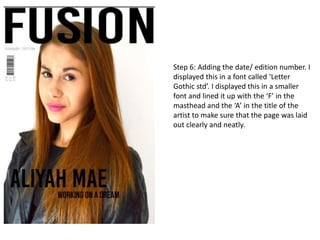
Step 6: Adding the date/ edition number. I
displayed this in a font called ‘Letter
Gothic std’. I displayed this in a smaller
font and lined it up with the ‘F’ in the
masthead and the ‘A’ in the title of the
artist to make sure that the page was laid
out clearly and neatly.
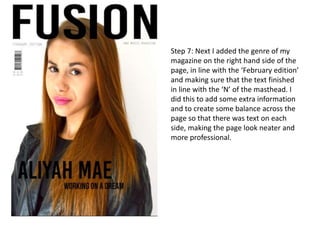
Step 7: Next I added the genre of my
magazine on the right hand side of the
page, in line with the ‘February edition’
and making sure that the text finished
in line with the ‘N’ of the masthead. I
did this to add some extra information
and to create some balance across the
page so that there was text on each
side, making the page look neater and
more professional.
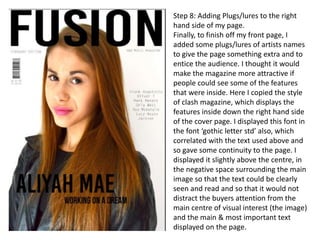
Step 8: Adding Plugs/lures to the right
hand side of my page.
Finally, to finish off my front page, I
added some plugs/lures of artists names
to give the page something extra and to
entice the audience. I thought it would
make the magazine more attractive if
people could see some of the features
that were inside. Here I copied the style
of clash magazine, which displays the
features inside down the right hand side
of the cover page. I displayed this font in
the font ‘gothic letter std’ also, which
correlated with the text used above and
so gave some continuity to the page. I
displayed it slightly above the centre, in
the negative space surrounding the main
image so that the text could be clearly
seen and read and so that it would not
distract the buyers attention from the
main centre of visual interest (the image)
and the main & most important text
displayed on the page.
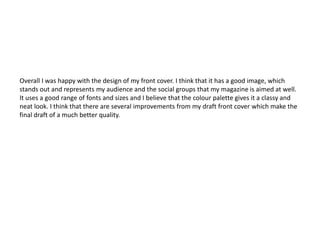
Overall I was happy with the design of my front cover. I think that it has a good image, which
stands out and represents my audience and the social groups that my magazine is aimed at well.
It uses a good range of fonts and sizes and I believe that the colour palette gives it a classy and
neat look. I think that there are several improvements from my draft front cover which make the
final draft of a much better quality.

Cover page progression

  • 1.
    Progression Of MyCover Page Final Draft
  • 2.
    Step 1: choosingthe image I chose to use this image for my cover page. It has a direct appeal with the audience as the artist is looking directly out of the page. This is eye catching and attracts readers. The artist is also wearing a purple/ bright pink lipstick in this image which stands out on the page, and compliments her hair colour. I chose a black leather jacket and a black crop top for the artist to wear as this conforms to trends seen by stars in the R&B genre. I chose a mid shot as I believe this is effective in attracting the audience but also working with the layout that I chose and in enabling me to fit important text and other features around it such as the barcode, and pricing.
  • 3.
    Step 2: Creatingand positioning the mast head. The second step I took was in finding a suitable font for the mast head and positioning it in proportion with the image. I used a website to get the fonts for my masthead and the title of my artist which is also displayed on my cover page. The name of the font is ‘Bebas Kai’. I liked this font as it is clean cut and bold, so it stands out on the page and looks neat. I posistioned this at the top of the page, which follows the conventions of most magazines, and tried to line the sizing up with the font of the masthead on clash magazine. Although the masthead does overlap some of the image this still works well and is easily visible due to it being bold and in black. I chose for my mast head to be in black as this is what stood out most above the white background. The white and black theme also created a monochrome feel and looks classy.
  • 4.
    Step 3: Positioningthe barcode. Next, I added the barcode to the front cover. I decided to position this in the top left hand corner, in some of the negative space so that it did not in any way deter from the image or any of the main details. It works well on the page, with the black and white and therefore does not create any clashes between colours and doesn’t stand out too much amongst any of the other details on the page.
  • 5.
    Step 4: Addingthe name of the artist/ adding the initial cover line I chose to use the name ‘Aliyah Mae’ for the name of my cover star, and presented this font in ‘bebas kai’ also, which correlated nicely with the masthead. Obviously this was much smaller, however was the second important piece of text displayed on the cover. Again this overlaps the image but also takes up none of the negative space in the background. However, it can still be clearly seen as it is a bold and clean- cut font which is why I chose to use it in this way on my cover page. I lined this up with the masthead so that the page had structure and a clear and concise layout.
  • 6.
    Step 5: Addingthe secondary cover line. For the secondary cover line/ plug I decided to use the text ‘working on a dream.’ which I displayed underneath the primary cover line. I lined it up with the H in the ‘Aliyah Mae’ of the primary cover line in order to keep a clear structure and layout to the page. I used the font ‘Bebas Neue’ for this, which is very similar to the masthead and primary cover line, however which differs slightly, creating some contrast between the different pieces of text.
  • 7.
    Step 6: Addingthe date/ edition number. I displayed this in a font called ‘Letter Gothic std’. I displayed this in a smaller font and lined it up with the ‘F’ in the masthead and the ‘A’ in the title of the artist to make sure that the page was laid out clearly and neatly.
  • 8.
    Step 7: NextI added the genre of my magazine on the right hand side of the page, in line with the ‘February edition’ and making sure that the text finished in line with the ‘N’ of the masthead. I did this to add some extra information and to create some balance across the page so that there was text on each side, making the page look neater and more professional.
  • 9.
    Step 8: AddingPlugs/lures to the right hand side of my page. Finally, to finish off my front page, I added some plugs/lures of artists names to give the page something extra and to entice the audience. I thought it would make the magazine more attractive if people could see some of the features that were inside. Here I copied the style of clash magazine, which displays the features inside down the right hand side of the cover page. I displayed this font in the font ‘gothic letter std’ also, which correlated with the text used above and so gave some continuity to the page. I displayed it slightly above the centre, in the negative space surrounding the main image so that the text could be clearly seen and read and so that it would not distract the buyers attention from the main centre of visual interest (the image) and the main & most important text displayed on the page.
  • 10.
    Overall I washappy with the design of my front cover. I think that it has a good image, which stands out and represents my audience and the social groups that my magazine is aimed at well. It uses a good range of fonts and sizes and I believe that the colour palette gives it a classy and neat look. I think that there are several improvements from my draft front cover which make the final draft of a much better quality.