To start creating my contents page I chose a base colour. The reason I didn’t stick with white is because I wanted so show as little blank space as possible to make the page more full and interesting. From the other magazines I researched I have found that the contents page doesn’t always stick with the colour themes- They stand mainly for the Front cover. The reason for this is so the existing audience can recognise the magazine from a gimps in the shops –That’s also the reason for the masthead and why it should remain the same throughout the life span of the magazine. I chose grey as a natural colour (like white) which I can develop on top of without making everything too bright and distracting with the content which will be placed on the page. The darker grey band I have placed at the bottom the page is to place other detail which I may feel important to include. I didn’t include all information on the front cover such as Address and E-mail as this would take up unnecessary space also making the cover look unattractive filled with too much writing rather than imagery.
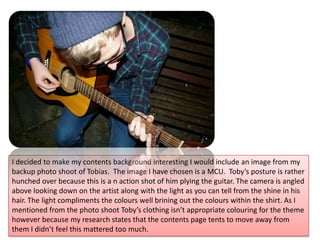
I decided to make my contents background interesting I would include an image from my backup photo shoot of Tobias.  The image I have chosen is a MCU.  Toby’s posture is rather hunched over because this is a n action shot of him plying the guitar. The camera is angled above looking down on the artist along with the light as you can tell from the shine in his hair. The light compliments the colours well brining out the colours within the shirt. As I mentioned from the photo shoot Toby’s clothing isn’t appropriate colouring for the theme however because my research states that the contents page tents to move away from them I didn’t feel this mattered too much.
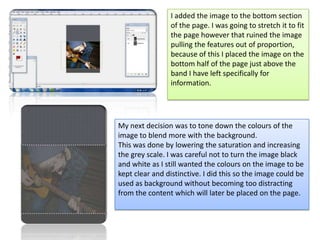
I added the image to the bottom section of the page. I was going to stretch it to fit the page however that ruined the image pulling the features out of proportion, because of this I placed the image on the bottom half of the page just above the band I have left specifically for information. My next decision was to tone down the colours of the image to blend more with the background. This was done by lowering the saturation and increasing the grey scale. I was careful not to turn the image black and white as I still wanted the colours on the image to be kept clear and distinctive. I did this so the image could be used as background without becoming too distracting from the content which will later be placed on the page.
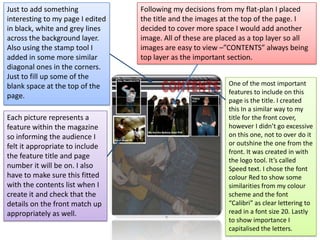
Following my decisions from my flat-plan I placed the title and the images at the top of the page. I decided to cover more space I would add another image. All of these are placed as a top layer so all images are easy to view –”CONTENTS” always being top layer as the important section. Just to add something interesting to my page I edited in black, white and grey lines across the background layer. Also using the stamp tool I added in some more similar diagonal ones in the corners. Just to fill up some of the blank space at the top of the page. One of the most important features to include on this page is the title. I created this In a similar way to my title for the front cover, however I didn’t go excessive on this one, not to over do it or outshine the one from the front. It was created in with the logo tool. It’s called Speed text. I chose the font colour Red to show some similarities from my colour scheme and the font “Calibri” as clear lettering to read in a font size 20. Lastly to show importance I capitalised the letters.  Each picture represents a feature within the magazine so informing the audience I felt it appropriate to include the feature title and page number it will be on. I also have to make sure this fitted with the contents list when I create it and check that the details on the front match up appropriately as well.
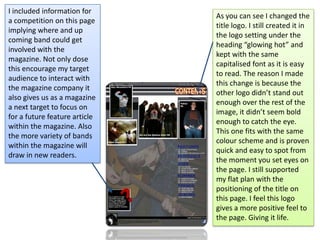
I included information for a competition on this page implying where and up coming band could get involved with the magazine. Not only dose this encourage my target audience to interact with the magazine company it also gives us as a magazine a next target to focus on for a future feature article within the magazine. Also the more variety of bands within the magazine will draw in new readers.As you can see I changed the title logo. I still created it in the logo setting under the heading “glowing hot” and kept with the same capitalised font as it is easy to read. The reason I made this change is because the other logo didn’t stand out enough over the rest of the image, it didn’t seem bold enough to catch the eye. This one fits with the same colour scheme and is proven quick and easy to spot from the moment you set eyes on the page. I still supported my flat plan with the positioning of the title on this page. I feel this logo gives a more positive feel to the page. Giving it life.

Contents construction

  • 1.
    To start creatingmy contents page I chose a base colour. The reason I didn’t stick with white is because I wanted so show as little blank space as possible to make the page more full and interesting. From the other magazines I researched I have found that the contents page doesn’t always stick with the colour themes- They stand mainly for the Front cover. The reason for this is so the existing audience can recognise the magazine from a gimps in the shops –That’s also the reason for the masthead and why it should remain the same throughout the life span of the magazine. I chose grey as a natural colour (like white) which I can develop on top of without making everything too bright and distracting with the content which will be placed on the page. The darker grey band I have placed at the bottom the page is to place other detail which I may feel important to include. I didn’t include all information on the front cover such as Address and E-mail as this would take up unnecessary space also making the cover look unattractive filled with too much writing rather than imagery.
  • 2.
    I decided tomake my contents background interesting I would include an image from my backup photo shoot of Tobias. The image I have chosen is a MCU. Toby’s posture is rather hunched over because this is a n action shot of him plying the guitar. The camera is angled above looking down on the artist along with the light as you can tell from the shine in his hair. The light compliments the colours well brining out the colours within the shirt. As I mentioned from the photo shoot Toby’s clothing isn’t appropriate colouring for the theme however because my research states that the contents page tents to move away from them I didn’t feel this mattered too much.
  • 3.
    I added theimage to the bottom section of the page. I was going to stretch it to fit the page however that ruined the image pulling the features out of proportion, because of this I placed the image on the bottom half of the page just above the band I have left specifically for information. My next decision was to tone down the colours of the image to blend more with the background. This was done by lowering the saturation and increasing the grey scale. I was careful not to turn the image black and white as I still wanted the colours on the image to be kept clear and distinctive. I did this so the image could be used as background without becoming too distracting from the content which will later be placed on the page.
  • 4.
    Following my decisionsfrom my flat-plan I placed the title and the images at the top of the page. I decided to cover more space I would add another image. All of these are placed as a top layer so all images are easy to view –”CONTENTS” always being top layer as the important section. Just to add something interesting to my page I edited in black, white and grey lines across the background layer. Also using the stamp tool I added in some more similar diagonal ones in the corners. Just to fill up some of the blank space at the top of the page. One of the most important features to include on this page is the title. I created this In a similar way to my title for the front cover, however I didn’t go excessive on this one, not to over do it or outshine the one from the front. It was created in with the logo tool. It’s called Speed text. I chose the font colour Red to show some similarities from my colour scheme and the font “Calibri” as clear lettering to read in a font size 20. Lastly to show importance I capitalised the letters. Each picture represents a feature within the magazine so informing the audience I felt it appropriate to include the feature title and page number it will be on. I also have to make sure this fitted with the contents list when I create it and check that the details on the front match up appropriately as well.
  • 5.
    I included informationfor a competition on this page implying where and up coming band could get involved with the magazine. Not only dose this encourage my target audience to interact with the magazine company it also gives us as a magazine a next target to focus on for a future feature article within the magazine. Also the more variety of bands within the magazine will draw in new readers.As you can see I changed the title logo. I still created it in the logo setting under the heading “glowing hot” and kept with the same capitalised font as it is easy to read. The reason I made this change is because the other logo didn’t stand out enough over the rest of the image, it didn’t seem bold enough to catch the eye. This one fits with the same colour scheme and is proven quick and easy to spot from the moment you set eyes on the page. I still supported my flat plan with the positioning of the title on this page. I feel this logo gives a more positive feel to the page. Giving it life.