Download & Install
Google Chrome

Diving into Digital Lessons
with Discovery Education
Jennifer Gingerich
AGENDA

• Digital Assignment

– What is Text
– Examining Common Core Assessments

• Discovery New Features & Review
– Explore DE Common Core Model Lessons
– Review & Build My Classrooms
– New Student Board Builder Tool

• Lunch
• Create a Digital Assignment
–
–
–
–
–

Identify ELA CCSS Learning Targets
Gather “text” sources in My Content Folder
Plan for student engagement and accountability with sources
Plan for short writing response with Writing Prompt Builder
Assigning sources with Assignment Builder

• Wrap Up
WHAT IS TEXT?
In small groups write a definition. Be ready to share!

Open Your Assignment in Chrome
URL: assignments.discoveryeducation.com
Code: T99B9-43A9
WHAT IS TEXT?
Writing Prompt Results
ELEMENTS IN PERFORMANCE TASK
• Whole group activity
• Sources:
– Articles
– Audio
– Video
– Images

• Short answer questions
• Long written response (Article, Story, Letter…)
TECH SKILLS

LITERACY SKILLS
GRADE 4 READING PASSAGE – VOCAB & DETAILS
GRADE 4 – AUDIO & CHART
GRADE 5 – AUDIO & SHORT ANSWER
COMMON CORE STANDARDS TRIVIA
Which word appears in the ELA standards
122 times?

Evidence
Sources: 61 times
Research: 57 times
COMMON CORE STANDARDS TRIVIA
The words
“technology” “digital”
and
“multimedia”
appear in the Core Standards approximately
107
____ times.
ONE SMALL BITE OF THE CORE
Which grade? Kindergarten
With guidance and support from adults,
explore a variety of digital tools to produce
and publish writing, including in collaboration
with peers.
ANCHOR STANDARD
New technologies have broadened and expanded the
role that speaking and listening play in acquiring and
sharing knowledge and have tightened their link to
other forms of communication. Digital texts confront
students with the potential for continually updated
content and dynamically changing combinations of
words, graphics, images, hyperlinks, and embedded
video and audio.
College and Career Readiness Anchor Standards
Speaking and Listening Standards for English Language Arts/Literacy K–5 | 26
COMMON CORE MODEL LESSONS
•
•
•
•
•
•

Log out of Student
Login to Discovery with your Teacher Account
Hover over the MY DE Services Home Button
Pull down to Streaming Plus.
Select Common Core Tab and then choose
content area, grade, strand, standard cluster,
standard.
Look fors: learning goals, “text” resources,
engagement & accountability, written response
MY CLASSROOMS REVIEW
•
•
•
•

This Year’s Class Built
Login as a student
Working with Board Builder
Finding Student Results
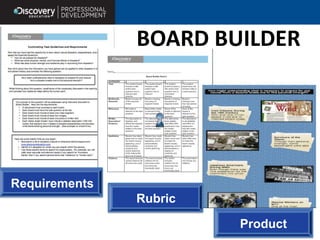
BOARD BUILDER

Requirements
Rubric
Product
ELEMENTS OF A DIGITAL LESSON
1. Student learning literacy targets
2. Gathered "text” resources
3. Engagement, purpose, accountability

4. Written response – short answer & long piece
CREATE A DIGITAL ASSIGNMENT
1.
2.
3.
4.
5.
•
•
•
•

Gather “text” sources in My Content Folder
Identify & state learning targets
Brainstorm plans for student engagement and
accountability
Create a new writing prompt for short answer
Create a new assignment with sections
Learning Objective
Whole Group Engagement Activity
Further Exploration of Resources
Writing Prompt
Learning Objective
(kid friendly)
Whole Group
Engagement Activity
(graphic organizer,
vocab, discussion)
Further Exploration
of Resources (same
or new)
Writing Prompt
(for short answer)
NOW WHAT?
DIGITAL ASSIGNMENT
•
•
•
•
•

Share in My District
Assign to Students
Schedule the Lesson
Teach the Lesson
Reflect on the Lesson
WRAP UP
Session ID: 137433
Check In & Take Survey
Specialist: Jennifer Gingerich
Type: Other

Corona Discovery Training Fall 2013

  • 1.
    Download & Install GoogleChrome Diving into Digital Lessons with Discovery Education Jennifer Gingerich
  • 2.
    AGENDA • Digital Assignment –What is Text – Examining Common Core Assessments • Discovery New Features & Review – Explore DE Common Core Model Lessons – Review & Build My Classrooms – New Student Board Builder Tool • Lunch • Create a Digital Assignment – – – – – Identify ELA CCSS Learning Targets Gather “text” sources in My Content Folder Plan for student engagement and accountability with sources Plan for short writing response with Writing Prompt Builder Assigning sources with Assignment Builder • Wrap Up
  • 3.
    WHAT IS TEXT? Insmall groups write a definition. Be ready to share! Open Your Assignment in Chrome URL: assignments.discoveryeducation.com Code: T99B9-43A9
  • 5.
    WHAT IS TEXT? WritingPrompt Results
  • 6.
    ELEMENTS IN PERFORMANCETASK • Whole group activity • Sources: – Articles – Audio – Video – Images • Short answer questions • Long written response (Article, Story, Letter…)
  • 7.
  • 8.
    GRADE 4 READINGPASSAGE – VOCAB & DETAILS
  • 9.
    GRADE 4 –AUDIO & CHART
  • 10.
    GRADE 5 –AUDIO & SHORT ANSWER
  • 11.
    COMMON CORE STANDARDSTRIVIA Which word appears in the ELA standards 122 times? Evidence Sources: 61 times Research: 57 times
  • 12.
    COMMON CORE STANDARDSTRIVIA The words “technology” “digital” and “multimedia” appear in the Core Standards approximately 107 ____ times.
  • 13.
    ONE SMALL BITEOF THE CORE Which grade? Kindergarten With guidance and support from adults, explore a variety of digital tools to produce and publish writing, including in collaboration with peers.
  • 14.
    ANCHOR STANDARD New technologieshave broadened and expanded the role that speaking and listening play in acquiring and sharing knowledge and have tightened their link to other forms of communication. Digital texts confront students with the potential for continually updated content and dynamically changing combinations of words, graphics, images, hyperlinks, and embedded video and audio. College and Career Readiness Anchor Standards Speaking and Listening Standards for English Language Arts/Literacy K–5 | 26
  • 15.
    COMMON CORE MODELLESSONS • • • • • • Log out of Student Login to Discovery with your Teacher Account Hover over the MY DE Services Home Button Pull down to Streaming Plus. Select Common Core Tab and then choose content area, grade, strand, standard cluster, standard. Look fors: learning goals, “text” resources, engagement & accountability, written response
  • 16.
    MY CLASSROOMS REVIEW • • • • ThisYear’s Class Built Login as a student Working with Board Builder Finding Student Results
  • 17.
  • 18.
    ELEMENTS OF ADIGITAL LESSON 1. Student learning literacy targets 2. Gathered "text” resources 3. Engagement, purpose, accountability 4. Written response – short answer & long piece
  • 19.
    CREATE A DIGITALASSIGNMENT 1. 2. 3. 4. 5. • • • • Gather “text” sources in My Content Folder Identify & state learning targets Brainstorm plans for student engagement and accountability Create a new writing prompt for short answer Create a new assignment with sections Learning Objective Whole Group Engagement Activity Further Exploration of Resources Writing Prompt
  • 20.
    Learning Objective (kid friendly) WholeGroup Engagement Activity (graphic organizer, vocab, discussion) Further Exploration of Resources (same or new) Writing Prompt (for short answer)
  • 21.
    NOW WHAT? DIGITAL ASSIGNMENT • • • • • Sharein My District Assign to Students Schedule the Lesson Teach the Lesson Reflect on the Lesson
  • 22.
    WRAP UP Session ID:137433 Check In & Take Survey Specialist: Jennifer Gingerich Type: Other

Editor's Notes

  • #2 The hyperlink is linked to Day 3 of the wiki. Remind participants that today’s materials can be found here.
  • #7 http://sbac.portal.airast.org/wp-content/uploads/2013/07/G5ELA_ClassroomActivity_Service_Animals.pdf
  • #17 http://app.discoveryeducation.com/builders/boards/assetGuid/038E27BF-CBAC-8AFD-AC1B-ACEAA829A94C
  • #18 http://app.discoveryeducation.com/builders/boards/assetGuid/038E27BF-CBAC-8AFD-AC1B-ACEAA829A94C
  • #19 http://app.discoveryeducation.com/builders/boards/assetGuid/038E27BF-CBAC-8AFD-AC1B-ACEAA829A94C
  • #20 http://app.discoveryeducation.com/builders/boards/assetGuid/038E27BF-CBAC-8AFD-AC1B-ACEAA829A94C
  • #21 http://app.discoveryeducation.com/builders/boards/assetGuid/038E27BF-CBAC-8AFD-AC1B-ACEAA829A94C
  • #22 http://app.discoveryeducation.com/builders/boards/assetGuid/038E27BF-CBAC-8AFD-AC1B-ACEAA829A94C
  • #23 http://app.discoveryeducation.com/builders/boards/assetGuid/038E27BF-CBAC-8AFD-AC1B-ACEAA829A94C