Technology Integration
Common Core

Rita Sorrentino
PhilWP: CoWL
11/2/13
Welcome
 Introductions
 Name
 Your role/grade level/content area

 Guiding Question: What level of
access/support do you and/or your students
have/need for implementation of CCSS with
technology?
Navigating the Core
 Implementing the Common Core State
Standardshttp://www.corestandards.org/

 Achieve the Core http://www.achievethecore.org/
 Pennsylvania Department of Education: Standards Aligned
System http://www.pdesas.org/standard/commoncore

 CAIU CCSS to PA Standards
 Engage New York provides Common Core-aligned lessons and videos.
 Apps on Mobile Devices
Common Core Standards in
Kid Friendly Format and Language!

 http://www.thecurriculumcorner.com/
 “I Can CC” statements for K-3, 4-6

 Checklists for K-6
 Still Needed 7-12
Worth the Surf
 LearnZillionlearning platform that combines video

lessons, assessments, and progress reporting.
Each lesson highlights a Common Core
standard
 PowerMyLearning – various resources-can be

searched by CCSS
 ReadWorks.org(K-8) for reading comprehension

aligned to CCSS
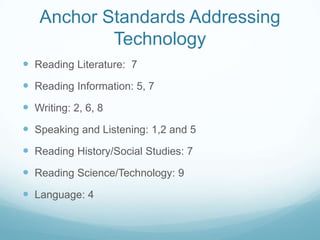
Anchor Standards Addressing
Technology
 Reading Literature: 7

 Reading Information: 5, 7
 Writing: 2, 6, 8
 Speaking and Listening: 1,2 and 5
 Reading History/Social Studies: 7
 Reading Science/Technology: 9

 Language: 4
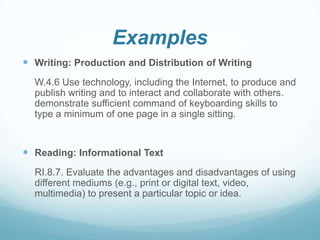
Examples
 Writing: Production and Distribution of Writing
W.4.6 Use technology, including the Internet, to produce and
publish writing and to interact and collaborate with others.
demonstrate sufficient command of keyboarding skills to
type a minimum of one page in a single sitting.

 Reading: Informational Text
RI.8.7. Evaluate the advantages and disadvantages of using
different mediums (e.g., print or digital text, video,
multimedia) to present a particular topic or idea.
Tools for Teaching & Learning
 What’s in your toolbox?
 Top 100 Tool
(annotated)http://c4lpt.co.uk/top100tools/

 Website Creation
Weebly

weebly.com

Wix wix.com
Yola yola.com
Free Resources to Enhance
Teaching and Learning
 MIT Highlights for High School

 Project Gutenberg (complete texts that
are both free of charge and free of usage
restrictions)

 HippoCampus (Middle and High
School)
Resources
 Livebinders (slow to load but worth the
wait)
http://www.livebinders.com/play/play?id=12
7467

 OneLook (http://www.onelook.com)
Search variations of key words and terms

 The Big6 (kid friendly writing & research
strategies and handouts)
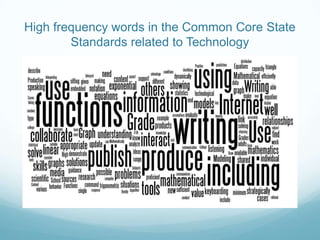
High frequency words in the Common Core State
Standards related to Technology
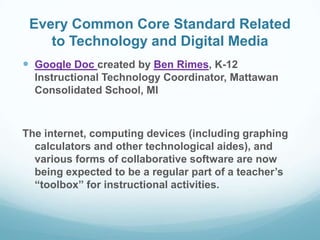
Every Common Core Standard Related
to Technology and Digital Media
 Google Doc created by Ben Rimes, K-12
Instructional Technology Coordinator, Mattawan
Consolidated School, MI

The internet, computing devices (including graphing
calculators and other technological aides), and
various forms of collaborative software are now
being expected to be a regular part of a teacher’s
“toolbox” for instructional activities.
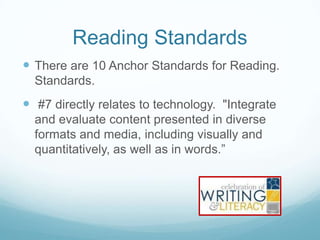
Reading Standards
 There are 10 Anchor Standards for Reading.
Standards.

 #7 directly relates to technology. "Integrate
and evaluate content presented in diverse
formats and media, including visually and
quantitatively, as well as in words.”
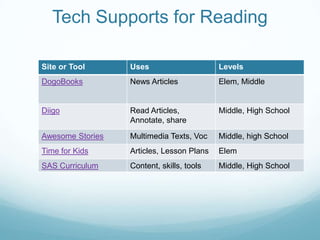
Tech Supports for Reading
Site or Tool

Uses

Levels

DogoBooks

News Articles

Elem, Middle

Diigo

Read Articles,
Annotate, share

Middle, High School

Awesome Stories

Multimedia Texts, Voc

Middle, high School

Time for Kids

Articles, Lesson Plans

Elem

SAS Curriculum

Content, skills, tools

Middle, High School
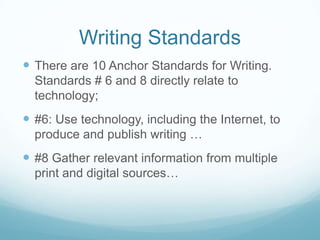
Writing Standards
 There are 10 Anchor Standards for Writing.
Standards # 6 and 8 directly relate to
technology;

 #6: Use technology, including the Internet, to
produce and publish writing …

 #8 Gather relevant information from multiple
print and digital sources…
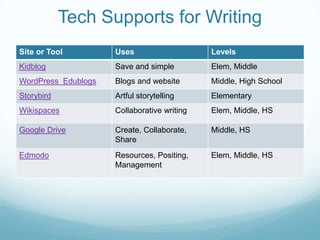
Tech Supports for Writing
Site or Tool

Uses

Levels

Kidblog

Save and simple

Elem, Middle

WordPress Edublogs

Blogs and website

Middle, High School

Storybird

Artful storytelling

Elementary

Wikispaces

Collaborative writing

Elem, Middle, HS

Google Drive

Create, Collaborate,
Share

Middle, HS

Edmodo

Resources, Positing,
Management

Elem, Middle, HS
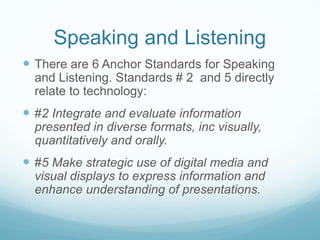
Speaking and Listening
 There are 6 Anchor Standards for Speaking
and Listening. Standards # 2 and 5 directly
relate to technology:

 #2 Integrate and evaluate information
presented in diverse formats, inc visually,
quantitatively and orally.

 #5 Make strategic use of digital media and
visual displays to express information and
enhance understanding of presentations.
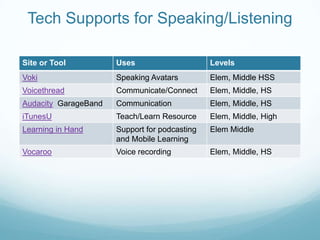
Tech Supports for Speaking/Listening
Site or Tool

Uses

Levels

Voki

Speaking Avatars

Elem, Middle HSS

Voicethread

Communicate/Connect

Elem, Middle, HS

Audacity GarageBand

Communication

Elem, Middle, HS

iTunesU

Teach/Learn Resource

Elem, Middle, High

Learning in Hand

Support for podcasting
and Mobile Learning

Elem Middle

Vocaroo

Voice recording

Elem, Middle, HS
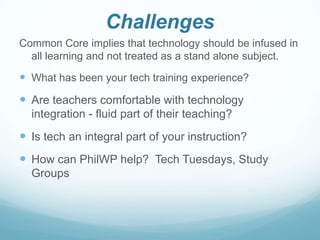
Challenges
Common Core implies that technology should be infused in
all learning and not treated as a stand alone subject.

 What has been your tech training experience?

 Are teachers comfortable with technology
integration - fluid part of their teaching?

 Is tech an integral part of your instruction?

 How can PhilWP help? Tech Tuesdays, Study
Groups
Finally
 One new thing at a time

Don’t overwhelm yourself or your students

Stay connected
 ritasorrentino@comcast.net
 @ritaas
 Tech Tuesdays at PhilWP
 PhilWP list serve


PhilWP: CoLW

  • 1.
    Technology Integration Common Core RitaSorrentino PhilWP: CoWL 11/2/13
  • 2.
    Welcome  Introductions  Name Your role/grade level/content area  Guiding Question: What level of access/support do you and/or your students have/need for implementation of CCSS with technology?
  • 3.
    Navigating the Core Implementing the Common Core State Standardshttp://www.corestandards.org/  Achieve the Core http://www.achievethecore.org/  Pennsylvania Department of Education: Standards Aligned System http://www.pdesas.org/standard/commoncore  CAIU CCSS to PA Standards  Engage New York provides Common Core-aligned lessons and videos.  Apps on Mobile Devices
  • 4.
    Common Core Standardsin Kid Friendly Format and Language!  http://www.thecurriculumcorner.com/  “I Can CC” statements for K-3, 4-6  Checklists for K-6  Still Needed 7-12
  • 5.
    Worth the Surf LearnZillionlearning platform that combines video lessons, assessments, and progress reporting. Each lesson highlights a Common Core standard  PowerMyLearning – various resources-can be searched by CCSS  ReadWorks.org(K-8) for reading comprehension aligned to CCSS
  • 6.
    Anchor Standards Addressing Technology Reading Literature: 7  Reading Information: 5, 7  Writing: 2, 6, 8  Speaking and Listening: 1,2 and 5  Reading History/Social Studies: 7  Reading Science/Technology: 9  Language: 4
  • 7.
    Examples  Writing: Productionand Distribution of Writing W.4.6 Use technology, including the Internet, to produce and publish writing and to interact and collaborate with others. demonstrate sufficient command of keyboarding skills to type a minimum of one page in a single sitting.  Reading: Informational Text RI.8.7. Evaluate the advantages and disadvantages of using different mediums (e.g., print or digital text, video, multimedia) to present a particular topic or idea.
  • 8.
    Tools for Teaching& Learning  What’s in your toolbox?  Top 100 Tool (annotated)http://c4lpt.co.uk/top100tools/  Website Creation Weebly weebly.com Wix wix.com Yola yola.com
  • 9.
    Free Resources toEnhance Teaching and Learning  MIT Highlights for High School  Project Gutenberg (complete texts that are both free of charge and free of usage restrictions)  HippoCampus (Middle and High School)
  • 10.
    Resources  Livebinders (slowto load but worth the wait) http://www.livebinders.com/play/play?id=12 7467  OneLook (http://www.onelook.com) Search variations of key words and terms  The Big6 (kid friendly writing & research strategies and handouts)
  • 11.
    High frequency wordsin the Common Core State Standards related to Technology
  • 12.
    Every Common CoreStandard Related to Technology and Digital Media  Google Doc created by Ben Rimes, K-12 Instructional Technology Coordinator, Mattawan Consolidated School, MI The internet, computing devices (including graphing calculators and other technological aides), and various forms of collaborative software are now being expected to be a regular part of a teacher’s “toolbox” for instructional activities.
  • 13.
    Reading Standards  Thereare 10 Anchor Standards for Reading. Standards.  #7 directly relates to technology. "Integrate and evaluate content presented in diverse formats and media, including visually and quantitatively, as well as in words.”
  • 14.
    Tech Supports forReading Site or Tool Uses Levels DogoBooks News Articles Elem, Middle Diigo Read Articles, Annotate, share Middle, High School Awesome Stories Multimedia Texts, Voc Middle, high School Time for Kids Articles, Lesson Plans Elem SAS Curriculum Content, skills, tools Middle, High School
  • 15.
    Writing Standards  Thereare 10 Anchor Standards for Writing. Standards # 6 and 8 directly relate to technology;  #6: Use technology, including the Internet, to produce and publish writing …  #8 Gather relevant information from multiple print and digital sources…
  • 16.
    Tech Supports forWriting Site or Tool Uses Levels Kidblog Save and simple Elem, Middle WordPress Edublogs Blogs and website Middle, High School Storybird Artful storytelling Elementary Wikispaces Collaborative writing Elem, Middle, HS Google Drive Create, Collaborate, Share Middle, HS Edmodo Resources, Positing, Management Elem, Middle, HS
  • 17.
    Speaking and Listening There are 6 Anchor Standards for Speaking and Listening. Standards # 2 and 5 directly relate to technology:  #2 Integrate and evaluate information presented in diverse formats, inc visually, quantitatively and orally.  #5 Make strategic use of digital media and visual displays to express information and enhance understanding of presentations.
  • 18.
    Tech Supports forSpeaking/Listening Site or Tool Uses Levels Voki Speaking Avatars Elem, Middle HSS Voicethread Communicate/Connect Elem, Middle, HS Audacity GarageBand Communication Elem, Middle, HS iTunesU Teach/Learn Resource Elem, Middle, High Learning in Hand Support for podcasting and Mobile Learning Elem Middle Vocaroo Voice recording Elem, Middle, HS
  • 19.
    Challenges Common Core impliesthat technology should be infused in all learning and not treated as a stand alone subject.  What has been your tech training experience?  Are teachers comfortable with technology integration - fluid part of their teaching?  Is tech an integral part of your instruction?  How can PhilWP help? Tech Tuesdays, Study Groups
  • 20.
    Finally  One newthing at a time Don’t overwhelm yourself or your students Stay connected  ritasorrentino@comcast.net  @ritaas  Tech Tuesdays at PhilWP  PhilWP list serve 

Editor's Notes

  • #10 Quality educational resources don't have to be expensive. Here we spotlight three academic gems that can help teachers either enhance instruction in the classroom or extend learning into students' homes, all without any out-of-pocket expenses.Read more at http://thejournal.com/Articles/2011/04/06/3-Free-Resources-To-Enhance-Teaching-and-Learning.aspx#uwZzSbu08RDIgyui.99
  • #14 Intothebook rita00350
  • #16 Notetaking – easy bib
  • #19 Ideas: • I minute lecture to teach an idea or answer question. • Vocabulary – word of day • Record reading/poetry for fluency • Newsletter – Reports