Talk Of The Day
Topic:
Classification of digital computers
We will Discuss
 Digital computer
 Types of digital computer
 Use of different types of digital computers
 Application of different types of digital computers.
• A digital computer works with digits .
• A digital computer is used to process digital
data. It is a discrete data and having only two
possible values(0,1).
• Digital computer provide accurate result but
are slower than analog computer.
• Digital computers can store more information
than analog computers.
Digital computers
Super Computer:
• Super computer are the largest, fastest, most
powerful and most expensive computers.
• Super computers can be accessed by many
individuals at the same time.
• Super computers are used for scientific
applications, having mathematical
calculations.
• The first super computer was built in the
1960s for the united States department of
Defence.
Super Computer:
10
• High processing speed
• High capacity memory
• Computes data processing in short time
• Solving highly sophisticated problems
• Cost varies from 1 million to 5 million
Uses:
• Used for weather prediction
• Weapon design and atomic research
• Used for heavy scientific and
mathematical calculations
Key features
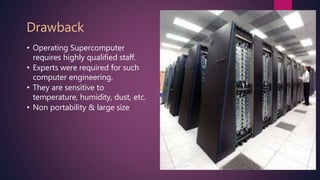
• Operating Supercomputer
requires highly qualified staff.
• Experts were required for such
computer engineering.
• They are sensitive to
temperature, humidity, dust, etc.
• Non portability & large size
Drawback
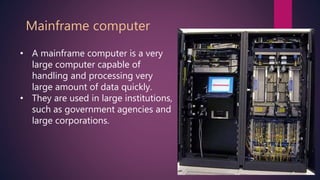
• A mainframe computer is a very
large computer capable of
handling and processing very
large amount of data quickly.
• They are used in large institutions,
such as government agencies and
large corporations.
Mainframe computer
Cont.
13
14
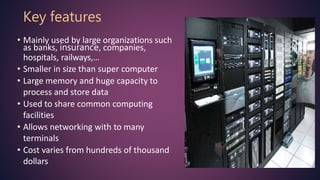
• Mainly used by large organizations such
as banks, insurance, companies,
hospitals, railways,…
• Smaller in size than super computer
• Large memory and huge capacity to
process and store data
• Used to share common computing
facilities
• Allows networking with to many
terminals
• Cost varies from hundreds of thousand
dollars
Key features
• Experts and highly qualified
professionals were required to
operate it
• Sophisticated technology
required for manufacturing &
assembling the computer
Draw backs
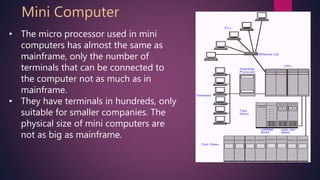
• The micro processor used in mini
computers has almost the same as
mainframe, only the number of
terminals that can be connected to
the computer not as much as in
mainframe.
• They have terminals in hundreds, only
suitable for smaller companies. The
physical size of mini computers are
not as big as mainframe.
Mini Computer
17
• Higher processing speed but
slower than super computer &
Mainframe computer
• Portable computers because of
smaller size
• Provide
• Greater processing power
• Large storage capacity
• Better graphic display
Key features
• Computer aided design
• Multimedia applications
• Simulation and visualization
• Usually uses Unix based
multiuser operating systems
Used for
Micro computer
Micro computer
• Portable computers used by those who need computing
resources wherever they go
• Smaller size and can fit in a briefcase
• Wight around 2 or more kg
• Comfortable computers and can be placed on lap, so they are
called laptop
• Designed to operate with chargeable batteries
• Used to consume little power and suspended whenever not used
Handheld computers
21
22
• Portable , general purpose
computers
• Designed to meet personal
computing needs
• Generally used by one person
at a time but supports multi
tasking
Common types of PC
• Desktop computer
• Laptop computer
• Smart phones and tablet
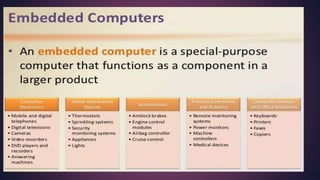
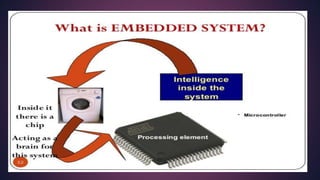
• Embedded computers
Key feature:
23
Handheld computers
• Devices that can be hold
in hand
• Types are
• Tablet
• Pocket PC
• Smart phone
Computers by size
Computers by size
Computers by size
Computers by size

Computers by size

  • 2.
  • 3.
  • 4.
    We will Discuss Digital computer  Types of digital computer  Use of different types of digital computers  Application of different types of digital computers.
  • 5.
    • A digitalcomputer works with digits . • A digital computer is used to process digital data. It is a discrete data and having only two possible values(0,1). • Digital computer provide accurate result but are slower than analog computer. • Digital computers can store more information than analog computers. Digital computers
  • 8.
  • 9.
    • Super computerare the largest, fastest, most powerful and most expensive computers. • Super computers can be accessed by many individuals at the same time. • Super computers are used for scientific applications, having mathematical calculations. • The first super computer was built in the 1960s for the united States department of Defence. Super Computer:
  • 10.
    10 • High processingspeed • High capacity memory • Computes data processing in short time • Solving highly sophisticated problems • Cost varies from 1 million to 5 million Uses: • Used for weather prediction • Weapon design and atomic research • Used for heavy scientific and mathematical calculations Key features
  • 11.
    • Operating Supercomputer requireshighly qualified staff. • Experts were required for such computer engineering. • They are sensitive to temperature, humidity, dust, etc. • Non portability & large size Drawback
  • 12.
    • A mainframecomputer is a very large computer capable of handling and processing very large amount of data quickly. • They are used in large institutions, such as government agencies and large corporations. Mainframe computer
  • 13.
  • 14.
    14 • Mainly usedby large organizations such as banks, insurance, companies, hospitals, railways,… • Smaller in size than super computer • Large memory and huge capacity to process and store data • Used to share common computing facilities • Allows networking with to many terminals • Cost varies from hundreds of thousand dollars Key features
  • 15.
    • Experts andhighly qualified professionals were required to operate it • Sophisticated technology required for manufacturing & assembling the computer Draw backs
  • 16.
    • The microprocessor used in mini computers has almost the same as mainframe, only the number of terminals that can be connected to the computer not as much as in mainframe. • They have terminals in hundreds, only suitable for smaller companies. The physical size of mini computers are not as big as mainframe. Mini Computer
  • 17.
    17 • Higher processingspeed but slower than super computer & Mainframe computer • Portable computers because of smaller size • Provide • Greater processing power • Large storage capacity • Better graphic display Key features
  • 18.
    • Computer aideddesign • Multimedia applications • Simulation and visualization • Usually uses Unix based multiuser operating systems Used for
  • 19.
  • 20.
    Micro computer • Portablecomputers used by those who need computing resources wherever they go • Smaller size and can fit in a briefcase • Wight around 2 or more kg • Comfortable computers and can be placed on lap, so they are called laptop • Designed to operate with chargeable batteries • Used to consume little power and suspended whenever not used
  • 21.
  • 22.
    22 • Portable ,general purpose computers • Designed to meet personal computing needs • Generally used by one person at a time but supports multi tasking Common types of PC • Desktop computer • Laptop computer • Smart phones and tablet • Embedded computers Key feature:
  • 23.
    23 Handheld computers • Devicesthat can be hold in hand • Types are • Tablet • Pocket PC • Smart phone