Program / Software
A program is a sequence of instructions to solve a
problem, which directs a computer to perform certain
functions.
A computer system consists of a large number of hardware
components. Software allows the user to access and use
those components efficiently and in an ordered way to
perform various tasks.
Software activities
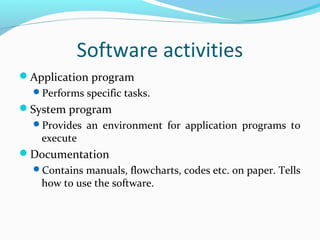
Application program
Performs specific tasks.
System program
Provides an environment for application programs to
execute
Documentation
Contains manuals, flowcharts, codes etc. on paper. Tells
how to use the software.
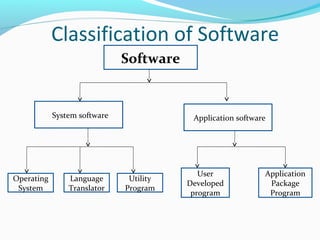
Classification of Software
Software
/System software /Application software
Operating
System
Language
Translator
Utility
Program
User
Developed
program
Application
Package
Program
System Software
Designed to control the operation and extend the
processing capability of a computer system.
Supports the development and execution of other
application software.
Monitors the effective use of various hardware
resources, such as CPU, memory, peripherals etc.
Types of System Software
Operating system
It takes care of the effective and efficient utilization of
all the hardware and software components of the
computer system.
Programming language translators
It transforms the instructions prepared by
programmers in a programming language, into a form,
which can be interpreted and executed by a computer
system.
Types of System Software
Utility programs
There are a set of programs, which help users in system
maintenance tasks and in performing tasks of routine
nature.
 Formatting hard disks or floppy disks
 Backup of files etc.
Application Software
Application software is a set of one or more
programs designed to solve a specific problem or
to do a specific task.
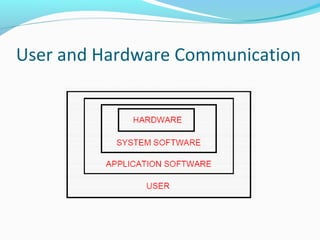
User and Hardware Communication
Types of Application Software
Horizontal Applications
General purpose program that address the needs of
many people, such as word processing, spreadsheets.
Three types:
Personal productivity programs
Multimedia and graphics programs
Internet programs
Types of Application Software
Vertical Applications
Generally designed for a particular line of business or
for a division in a company, such as restaurant
management program, school management program
etc.
Customer Specific.
Costly.
Software
Commercial Software
Copyrighted and one must pay before using it.
Shareware Software
Copyrighted software that one can use on a “try before buy”
basis. User must pay after specified trial period.
Freeware
Copyrighted software distributed free, with the
understanding that one can not sell it for profit.
Firmware
The programs which are made available on hardware, are
known as firmware.
Application Package Programs
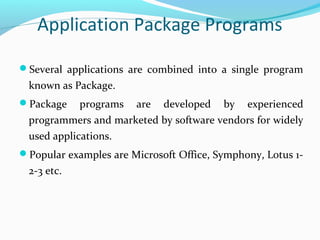
Several applications are combined into a single program
known as Package.
Package programs are developed by experienced
programmers and marketed by software vendors for widely
used applications.
Popular examples are Microsoft Office, Symphony, Lotus 1-
2-3 etc.
Application Package Programs
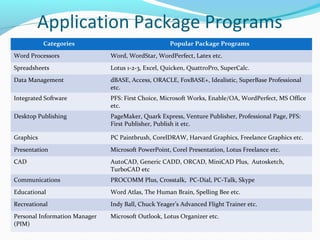
Categories Popular Package Programs
Word Processors Word, WordStar, WordPerfect, Latex etc.
Spreadsheets Lotus 1-2-3, Excel, Quicken, QuattroPro, SuperCalc.
Data Management dBASE, Access, ORACLE, FoxBASE+, Idealistic, SuperBase Professional
etc.
Integrated Software PFS: First Choice, Microsoft Works, Enable/OA, WordPerfect, MS Office
etc.
Desktop Publishing PageMaker, Quark Express, Venture Publisher, Professional Page, PFS:
First Publisher, Publish it etc.
Graphics PC Paintbrush, CorelDRAW, Harvard Graphics, Freelance Graphics etc.
Presentation Microsoft PowerPoint, Corel Presentation, Lotus Freelance etc.
CAD AutoCAD, Generic CADD, ORCAD, MiniCAD Plus, Autosketch,
TurboCAD etc
Communications PROCOMM Plus, Crosstalk, PC-Dial, PC-Talk, Skype
Educational Word Atlas, The Human Brain, Spelling Bee etc.
Recreational Indy Ball, Chuck Yeager’s Advanced Flight Trainer etc.
Personal Information Manager
(PIM)
Microsoft Outlook, Lotus Organizer etc.
Application Package Programs
Self Study:
Advantages of Package Programs
Popular Package Programs
Computer System

Computer System

  • 2.
    Program / Software Aprogram is a sequence of instructions to solve a problem, which directs a computer to perform certain functions. A computer system consists of a large number of hardware components. Software allows the user to access and use those components efficiently and in an ordered way to perform various tasks.
  • 3.
    Software activities Application program Performsspecific tasks. System program Provides an environment for application programs to execute Documentation Contains manuals, flowcharts, codes etc. on paper. Tells how to use the software.
  • 4.
    Classification of Software Software /Systemsoftware /Application software Operating System Language Translator Utility Program User Developed program Application Package Program
  • 5.
    System Software Designed tocontrol the operation and extend the processing capability of a computer system. Supports the development and execution of other application software. Monitors the effective use of various hardware resources, such as CPU, memory, peripherals etc.
  • 6.
    Types of SystemSoftware Operating system It takes care of the effective and efficient utilization of all the hardware and software components of the computer system. Programming language translators It transforms the instructions prepared by programmers in a programming language, into a form, which can be interpreted and executed by a computer system.
  • 7.
    Types of SystemSoftware Utility programs There are a set of programs, which help users in system maintenance tasks and in performing tasks of routine nature.  Formatting hard disks or floppy disks  Backup of files etc.
  • 8.
    Application Software Application softwareis a set of one or more programs designed to solve a specific problem or to do a specific task.
  • 9.
    User and HardwareCommunication
  • 10.
    Types of ApplicationSoftware Horizontal Applications General purpose program that address the needs of many people, such as word processing, spreadsheets. Three types: Personal productivity programs Multimedia and graphics programs Internet programs
  • 11.
    Types of ApplicationSoftware Vertical Applications Generally designed for a particular line of business or for a division in a company, such as restaurant management program, school management program etc. Customer Specific. Costly.
  • 12.
    Software Commercial Software Copyrighted andone must pay before using it. Shareware Software Copyrighted software that one can use on a “try before buy” basis. User must pay after specified trial period. Freeware Copyrighted software distributed free, with the understanding that one can not sell it for profit. Firmware The programs which are made available on hardware, are known as firmware.
  • 13.
    Application Package Programs Severalapplications are combined into a single program known as Package. Package programs are developed by experienced programmers and marketed by software vendors for widely used applications. Popular examples are Microsoft Office, Symphony, Lotus 1- 2-3 etc.
  • 14.
    Application Package Programs CategoriesPopular Package Programs Word Processors Word, WordStar, WordPerfect, Latex etc. Spreadsheets Lotus 1-2-3, Excel, Quicken, QuattroPro, SuperCalc. Data Management dBASE, Access, ORACLE, FoxBASE+, Idealistic, SuperBase Professional etc. Integrated Software PFS: First Choice, Microsoft Works, Enable/OA, WordPerfect, MS Office etc. Desktop Publishing PageMaker, Quark Express, Venture Publisher, Professional Page, PFS: First Publisher, Publish it etc. Graphics PC Paintbrush, CorelDRAW, Harvard Graphics, Freelance Graphics etc. Presentation Microsoft PowerPoint, Corel Presentation, Lotus Freelance etc. CAD AutoCAD, Generic CADD, ORCAD, MiniCAD Plus, Autosketch, TurboCAD etc Communications PROCOMM Plus, Crosstalk, PC-Dial, PC-Talk, Skype Educational Word Atlas, The Human Brain, Spelling Bee etc. Recreational Indy Ball, Chuck Yeager’s Advanced Flight Trainer etc. Personal Information Manager (PIM) Microsoft Outlook, Lotus Organizer etc.
  • 15.
    Application Package Programs SelfStudy: Advantages of Package Programs Popular Package Programs