RUSTAMJI INSTITUTE OF
TECHNOLOGY
Submitted by:
Anup Pandey
Contents :
 Computer Network
 Transmission Modes
 Types of Network
 Protocols
 Models (OSI and TCP/IP)
 Comparison between models
 Network Topologies
Computer Network
 Computer network
is a number of computers (also
Known as Nodes) connected by some communication lines.
 Uses of Computer Network:
 Exchange of information between them
 Interconnected small computers in place of large computers
 For direct communication e g: voice , video.
Modes of Communication
 Point to point
 Broadcasting
 Multicasting
it is between the point to point and broadcasting
Dedicated (Simplex, half duplex, full duplex).
Shared (Multiplexing).
 Dedicated (Channel level- one way)
 Shared (Multiple access)
shared between multiple access and some
protocols are used that how they are using.
 Communication to the specified group but not to others.
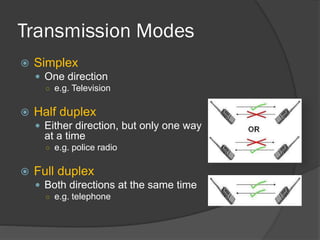
Transmission Modes
 Simplex
 One direction
○ e.g. Television
 Half duplex
 Either direction, but only one way
at a time
○ e.g. police radio
 Full duplex
 Both directions at the same time
○ e.g. telephone
Types of Networks
 LAN (Local Area Network)
 MAN (Metropolitan Area Network)
 Privately Owned (Main feature)
 Contains printers, servers and computers
 Systems are close to each other
 Limited to a building
 For bigger sizes (City, State etc.)
 Access issues : How to connect each one of them
because each of them are geographically distributed.
 A network provider sells time.
 WAN (Wide Area Network)
 Costly
 For more then 1000 of Km.
 Networks of Networks (LAN +LAN +…)
 Typically use public or leased lines
 The Internet is a WAN
Protocols :
 These are the rules and regulations that how
communication takes place.
 These are the building blocks of a Network.
 Each protocol object has two interfaces.
1. Service Interface: Defines operation on this Protocols
2. Peer to Peer interface: Defines messages exchanged with peer.
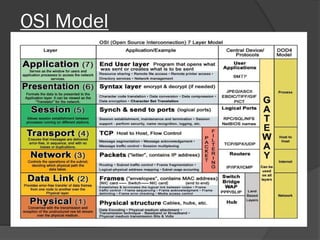
OSI Model
Working of each layers of OSI Model
 Physical Layer : How to Transmit Bits
 Data Link Layer : How to Transmit Frames
 Responsible for transmission of bits
 Always implemented through hardware
 Encompasses mechanical, electrical, and
functional interfaces
 Error Detection
 Responsible for error-free, reliable transmission of data,
Error correction, Access control.
 Line Discipline
• ENQ / ACK (for Peer to Peer)
• POLL / SELECT( for establishment of proper communication
in primary and secondary device)
 Flow Control
• STOP & WAIT
• SLIDING WINDOW
 Network Layer : How to route packets to the node
 Transport Layer : How to send packets to the
application
 Responsible for routing of messages through network
 Concerned with type of switching used (circuit v.
packet)
 Handles routing between networks, as well as through
packet-switching networks
 Concerned with reliable transfer of information
between applications
 Includes aspects like flow control and error
checking
 Breaks down message size
 Isolates messages from lower and upper layers
 Session Layer : Manage connections
 Presentation Layer : Encode/ Decode
message security
 Application Layer :
 Establishes logical connections between systems
 Terminates connection at end of session
 Manages log-ons, password exchange, log-offs
 Provides format and code conversion services
 Provides access to network for end-user
 User’s capabilities are determined by what
items are available on this layer
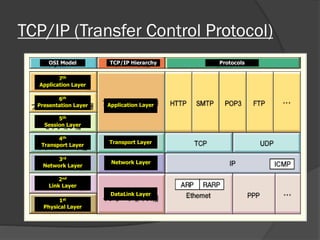
TCP/IP (Transfer Control Protocol)
OSI Model TCP/IP Hierarchy Protocols
7th
Application Layer
6th
Presentation Layer
5th
Session Layer
4th
Transport Layer
3rd
Network Layer
2nd
Link Layer
1st
Physical Layer
Application Layer
Transport Layer
Network Layer
DataLink Layer
 Application Layer :
 The application layer is equivalent to the combined OSI
Session, Presentation and Application Layers.
 All the functions Handled by these 3 layers in OSI
model are handled by the Application layer of TCP/IP
model.
 This Layer contains all the higher Layer Protocols.
• FTP (File Transfer Protocol)- Basic file transfer between
Hosts ( computers)
• SMTP ( Simple Mail Transfer Protocol)-Used for Email.
• HTTP (Hyper text Transfer Protocol)- For web Browsing
 Data unit created at this layer is called Message.
 Transport Layer :
 This Layer is represented by 2 protocols TCP and UDP
1. TCP ( Transmission Control Protocol)
• TCP is reliable connection Oriented Protocol
• Allows Error Free Transmission
• At the receiving end TCP reassembles the message to
an output stream
• TCP also Handles Flow control.
2. UDP (User Datagram Protocol)
Datagram: A self contained message unit which
contains sufficient information to allow it to be routed from
the source to the destination
• UDP is simpler but used when Reliability and security
are less important the size and speed such as speech,
video.
 Network Layer :
 Also referred to as network Layer or internetwork Layer
 No error Checking
 Datagrams are discarded due to time Out Layers.
Comparison of OSI and TCP/IP models
 OSI model has 7 Layers while the TCP/IP has 5 Layers.
 Both have Network , Transport and application Layers
but the other Layers are different.
 OSI model supports both Connectionless and
Connection Oriented Communication.
 TCP/IP supports only Connectionless communication.
Network Topology
 Logical layout of wires and equipment.
 Choice affects
 Types of Topologies:
• BUS topology
• STAR topology
• RING topology
• MESH topology
• TREE topology
• Network performance
• Network size
• Network collision detection
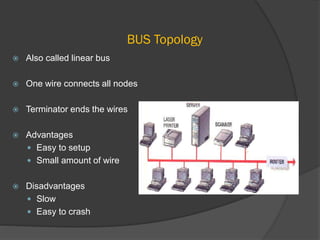
BUS Topology
 Also called linear bus
 One wire connects all nodes
 Terminator ends the wires
 Advantages
 Easy to setup
 Small amount of wire
 Disadvantages
 Slow
 Easy to crash
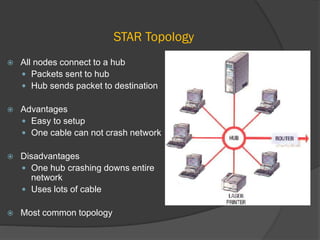
STAR Topology
 All nodes connect to a hub
 Packets sent to hub
 Hub sends packet to destination
 Advantages
 Easy to setup
 One cable can not crash network
 Disadvantages
 One hub crashing downs entire
network
 Uses lots of cable
 Most common topology
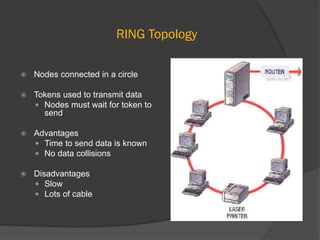
RING Topology
 Nodes connected in a circle
 Tokens used to transmit data
 Nodes must wait for token to
send
 Advantages
 Time to send data is known
 No data collisions
 Disadvantages
 Slow
 Lots of cable
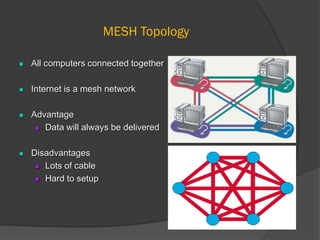
MESH Topology
 All computers connected together
 Internet is a mesh network
 Advantage
 Data will always be delivered
 Disadvantages
 Lots of cable
 Hard to setup
TREE Topology
 Hierarchal Model
 Advantages
 Scaleable
 Easy Implementation
 Easy Troubleshooting
Thank You

Computer network : models and topologies

  • 1.
  • 2.
    Contents :  ComputerNetwork  Transmission Modes  Types of Network  Protocols  Models (OSI and TCP/IP)  Comparison between models  Network Topologies
  • 3.
    Computer Network  Computernetwork is a number of computers (also Known as Nodes) connected by some communication lines.  Uses of Computer Network:  Exchange of information between them  Interconnected small computers in place of large computers  For direct communication e g: voice , video.
  • 4.
    Modes of Communication Point to point  Broadcasting  Multicasting it is between the point to point and broadcasting Dedicated (Simplex, half duplex, full duplex). Shared (Multiplexing).  Dedicated (Channel level- one way)  Shared (Multiple access) shared between multiple access and some protocols are used that how they are using.  Communication to the specified group but not to others.
  • 5.
    Transmission Modes  Simplex One direction ○ e.g. Television  Half duplex  Either direction, but only one way at a time ○ e.g. police radio  Full duplex  Both directions at the same time ○ e.g. telephone
  • 6.
    Types of Networks LAN (Local Area Network)  MAN (Metropolitan Area Network)  Privately Owned (Main feature)  Contains printers, servers and computers  Systems are close to each other  Limited to a building  For bigger sizes (City, State etc.)  Access issues : How to connect each one of them because each of them are geographically distributed.  A network provider sells time.
  • 7.
     WAN (WideArea Network)  Costly  For more then 1000 of Km.  Networks of Networks (LAN +LAN +…)  Typically use public or leased lines  The Internet is a WAN
  • 8.
    Protocols :  Theseare the rules and regulations that how communication takes place.  These are the building blocks of a Network.  Each protocol object has two interfaces. 1. Service Interface: Defines operation on this Protocols 2. Peer to Peer interface: Defines messages exchanged with peer.
  • 9.
  • 10.
    Working of eachlayers of OSI Model  Physical Layer : How to Transmit Bits  Data Link Layer : How to Transmit Frames  Responsible for transmission of bits  Always implemented through hardware  Encompasses mechanical, electrical, and functional interfaces  Error Detection  Responsible for error-free, reliable transmission of data, Error correction, Access control.  Line Discipline • ENQ / ACK (for Peer to Peer) • POLL / SELECT( for establishment of proper communication in primary and secondary device)  Flow Control • STOP & WAIT • SLIDING WINDOW
  • 11.
     Network Layer: How to route packets to the node  Transport Layer : How to send packets to the application  Responsible for routing of messages through network  Concerned with type of switching used (circuit v. packet)  Handles routing between networks, as well as through packet-switching networks  Concerned with reliable transfer of information between applications  Includes aspects like flow control and error checking  Breaks down message size  Isolates messages from lower and upper layers
  • 12.
     Session Layer: Manage connections  Presentation Layer : Encode/ Decode message security  Application Layer :  Establishes logical connections between systems  Terminates connection at end of session  Manages log-ons, password exchange, log-offs  Provides format and code conversion services  Provides access to network for end-user  User’s capabilities are determined by what items are available on this layer
  • 13.
    TCP/IP (Transfer ControlProtocol) OSI Model TCP/IP Hierarchy Protocols 7th Application Layer 6th Presentation Layer 5th Session Layer 4th Transport Layer 3rd Network Layer 2nd Link Layer 1st Physical Layer Application Layer Transport Layer Network Layer DataLink Layer
  • 14.
     Application Layer:  The application layer is equivalent to the combined OSI Session, Presentation and Application Layers.  All the functions Handled by these 3 layers in OSI model are handled by the Application layer of TCP/IP model.  This Layer contains all the higher Layer Protocols. • FTP (File Transfer Protocol)- Basic file transfer between Hosts ( computers) • SMTP ( Simple Mail Transfer Protocol)-Used for Email. • HTTP (Hyper text Transfer Protocol)- For web Browsing  Data unit created at this layer is called Message.
  • 15.
     Transport Layer:  This Layer is represented by 2 protocols TCP and UDP 1. TCP ( Transmission Control Protocol) • TCP is reliable connection Oriented Protocol • Allows Error Free Transmission • At the receiving end TCP reassembles the message to an output stream • TCP also Handles Flow control. 2. UDP (User Datagram Protocol) Datagram: A self contained message unit which contains sufficient information to allow it to be routed from the source to the destination • UDP is simpler but used when Reliability and security are less important the size and speed such as speech, video.
  • 16.
     Network Layer:  Also referred to as network Layer or internetwork Layer  No error Checking  Datagrams are discarded due to time Out Layers. Comparison of OSI and TCP/IP models  OSI model has 7 Layers while the TCP/IP has 5 Layers.  Both have Network , Transport and application Layers but the other Layers are different.  OSI model supports both Connectionless and Connection Oriented Communication.  TCP/IP supports only Connectionless communication.
  • 17.
    Network Topology  Logicallayout of wires and equipment.  Choice affects  Types of Topologies: • BUS topology • STAR topology • RING topology • MESH topology • TREE topology • Network performance • Network size • Network collision detection
  • 18.
    BUS Topology  Alsocalled linear bus  One wire connects all nodes  Terminator ends the wires  Advantages  Easy to setup  Small amount of wire  Disadvantages  Slow  Easy to crash
  • 19.
    STAR Topology  Allnodes connect to a hub  Packets sent to hub  Hub sends packet to destination  Advantages  Easy to setup  One cable can not crash network  Disadvantages  One hub crashing downs entire network  Uses lots of cable  Most common topology
  • 20.
    RING Topology  Nodesconnected in a circle  Tokens used to transmit data  Nodes must wait for token to send  Advantages  Time to send data is known  No data collisions  Disadvantages  Slow  Lots of cable
  • 21.
    MESH Topology  Allcomputers connected together  Internet is a mesh network  Advantage  Data will always be delivered  Disadvantages  Lots of cable  Hard to setup
  • 22.
    TREE Topology  HierarchalModel  Advantages  Scaleable  Easy Implementation  Easy Troubleshooting
  • 23.