NETWORK TOPOLOGIES
Nafizul Islam
nafizulislam2@gmail.com
Abstract
This is about different typers network topologies with network
topologies figure advantages nad disadvantage
Topology
What is Topology?
Topology defines the structure of the network of how all the
components are interconnected to each other.
Types of Networking Topologies
Two main types of networking topologies are
 Physical topology.
 Logical topology.
 Physical : The physical network topology refers to the actual
connections (wires, cables, etc.) of how the network is arranged.
Setup, maintenance, and provisioning tasks require insight into the
physical network.
 Logical : The logical network topology is a higher-level idea of how
the network is set up, including which nodes connect to each other
and in which ways, as well as how data is transmitted through the
network.
Different types of Physical
Topologies are:
 Point to Point Topology.
 Bus Topology.
 Ring Topology.
 Star Topology.
 Tree Topology.
 Mesh Topology.
 Hybrid Topology.
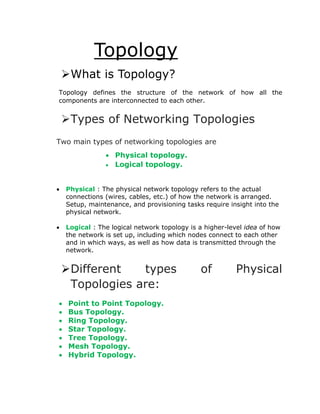
Point to point topology: Point to point topology is the easiest of all
the network topologies. In this method, the network consists of a
direct link between two computers.
 Advantages:
 This is faster and highly reliable than other types of connections
since there is a direct connection.
 No need for a network operating system
 Does not need an expensive server as individual workstations are
used to access the files
 Disadvantages:
 The biggest drawback is that it only be used for small areas where
computers are in close proximity.
 You can't back up files and folders centrally
 There is no security besides the permissions. Users often do not
require to log onto their workstations.
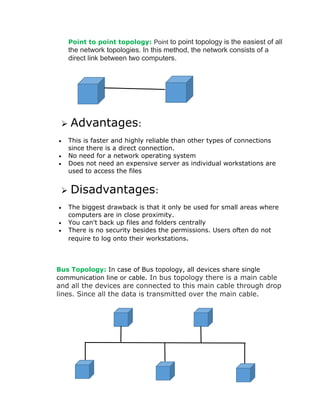
Bus Topology: In case of Bus topology, all devices share single
communication line or cable. In bus topology there is a main cable
and all the devices are connected to this main cable through drop
lines. Since all the data is transmitted over the main cable.
Advantages
 Easy installation, each cable needs to be connected with
backbone cable.
 Less cables required than Mesh and star topology.
Disadvantages
 Difficultly in fault detection.
 there is a limit of how many nodes you can connect with backbone
cable.
 May have problem while multiple hosts sending data at the same
time
Ring Topology: In a ring network, every device has exactly two
neighboring devices for communication purpose. It is called a ring topology
as its formation is like a ring. In this topology, every computer is connected
to another computer. Here, the last node is combined with a first one.
Advantages
 Easy to install.
 Managing is easier as to add or remove a device from the
topology only two links are required to be changed.
Disadvantages
 A link failure can fail the entire network as the signal will
not travel forward due to failure.
 Data traffic issues, since all the data is circulating in a ring.
Star Topology: In the star topology, all the computers
connect with the help of a hub. This cable is called a central node,
and all other nodes are connected using this central node. It is most
popular on LAN networks as they are inexpensive and easy to
install.
H
U
B
Advantages:
 Easy to set up, and modify.
 Only those nodes are affected, that has failed. Other nodes still
work.
 Fast performance with few nodes and very low network traffic.
 In Star topology, addition, deletion, and moving of the devices
are easy.
Disadvantages:
 If the hub or concentrator fails, attached nodes are disabled.
 Cost of installation of star topology is costly.
 Heavy network traffic can sometimes slow the bus
considerably.
 Performance depends on the hub's capacity
 A damaged cable or lack of proper termination may bring the
network down.
Tree Topology: Tree topologies have a root node, and all
other nodes are connected which form a hierarchy. So it is also
known as hierarchical topology. This topology integrates various
star topologies together in a single bus, so it is known as a Star Bus
topology. Tree topology is a very common network which is similar
to a bus and star topology.
Advantages:
 Failure of one node never affects the rest of the
network.
 Node expansion is fast and easy.
 Detection of error is an easy process
 It is easy to manage and maintain
Disadvantages:
 It is heavily cabled topology
 If more nodes are added, then its maintenance is
difficult
 If the hub or concentrator fails, attached nodes are also
disabled.
Mesh Topology: The mesh topology has a unique network
design in which each computer on the network connects to every
other. It is develops a P2P (point-to-point) connection between all
the devices of the network. It offers a high level of redundancy, so
even if one network cable fails, still data has an alternative path to
reach its destination.
Advantages
 No data traffic issues as there is a dedicated link between
two devices which means the link is only available for
those two devices.
 Mesh topology is reliable and robust as failure of one link
doesn’t affect other links and the communication between
other devices on the network.
 Mesh topology is secure because there is a point to point
link thus unauthorized access is not possible.
 Fault detection is easy.
Disadvantages
 Amount of wires required to connected each system is
tedious and headache.
 Since each device needs to be connected with other
devices, number of I/O ports required must be huge.
 Scalability issues because a device cannot be connected
with large number of devices with a dedicated point to
point link.
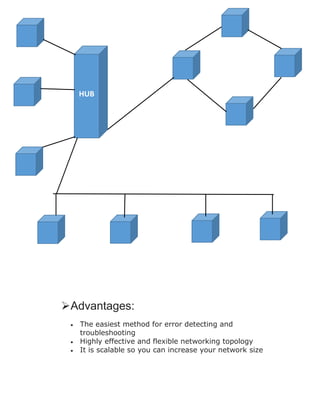
Hybrid Topology: A combination of two or more topology is known
as hybrid topology. For example: a combination of star and mesh
topology is known as hybrid topology.
Advantages:
 The easiest method for error detecting and
troubleshooting
 Highly effective and flexible networking topology
 It is scalable so you can increase your network size
HUB
Disadvantages:
 The design of hybrid topology is complex
 It is one of the costliest processes

Network topology

  • 1.
    NETWORK TOPOLOGIES Nafizul Islam nafizulislam2@gmail.com Abstract Thisis about different typers network topologies with network topologies figure advantages nad disadvantage
  • 2.
    Topology What is Topology? Topologydefines the structure of the network of how all the components are interconnected to each other. Types of Networking Topologies Two main types of networking topologies are  Physical topology.  Logical topology.  Physical : The physical network topology refers to the actual connections (wires, cables, etc.) of how the network is arranged. Setup, maintenance, and provisioning tasks require insight into the physical network.  Logical : The logical network topology is a higher-level idea of how the network is set up, including which nodes connect to each other and in which ways, as well as how data is transmitted through the network. Different types of Physical Topologies are:  Point to Point Topology.  Bus Topology.  Ring Topology.  Star Topology.  Tree Topology.  Mesh Topology.  Hybrid Topology.
  • 3.
    Point to pointtopology: Point to point topology is the easiest of all the network topologies. In this method, the network consists of a direct link between two computers.  Advantages:  This is faster and highly reliable than other types of connections since there is a direct connection.  No need for a network operating system  Does not need an expensive server as individual workstations are used to access the files  Disadvantages:  The biggest drawback is that it only be used for small areas where computers are in close proximity.  You can't back up files and folders centrally  There is no security besides the permissions. Users often do not require to log onto their workstations. Bus Topology: In case of Bus topology, all devices share single communication line or cable. In bus topology there is a main cable and all the devices are connected to this main cable through drop lines. Since all the data is transmitted over the main cable.
  • 4.
    Advantages  Easy installation,each cable needs to be connected with backbone cable.  Less cables required than Mesh and star topology. Disadvantages  Difficultly in fault detection.  there is a limit of how many nodes you can connect with backbone cable.  May have problem while multiple hosts sending data at the same time Ring Topology: In a ring network, every device has exactly two neighboring devices for communication purpose. It is called a ring topology as its formation is like a ring. In this topology, every computer is connected to another computer. Here, the last node is combined with a first one. Advantages
  • 5.
     Easy toinstall.  Managing is easier as to add or remove a device from the topology only two links are required to be changed. Disadvantages  A link failure can fail the entire network as the signal will not travel forward due to failure.  Data traffic issues, since all the data is circulating in a ring. Star Topology: In the star topology, all the computers connect with the help of a hub. This cable is called a central node, and all other nodes are connected using this central node. It is most popular on LAN networks as they are inexpensive and easy to install. H U B
  • 6.
    Advantages:  Easy toset up, and modify.  Only those nodes are affected, that has failed. Other nodes still work.  Fast performance with few nodes and very low network traffic.  In Star topology, addition, deletion, and moving of the devices are easy. Disadvantages:  If the hub or concentrator fails, attached nodes are disabled.  Cost of installation of star topology is costly.  Heavy network traffic can sometimes slow the bus considerably.  Performance depends on the hub's capacity  A damaged cable or lack of proper termination may bring the network down. Tree Topology: Tree topologies have a root node, and all other nodes are connected which form a hierarchy. So it is also known as hierarchical topology. This topology integrates various star topologies together in a single bus, so it is known as a Star Bus topology. Tree topology is a very common network which is similar to a bus and star topology.
  • 7.
    Advantages:  Failure ofone node never affects the rest of the network.  Node expansion is fast and easy.  Detection of error is an easy process  It is easy to manage and maintain Disadvantages:  It is heavily cabled topology  If more nodes are added, then its maintenance is difficult  If the hub or concentrator fails, attached nodes are also disabled. Mesh Topology: The mesh topology has a unique network design in which each computer on the network connects to every other. It is develops a P2P (point-to-point) connection between all the devices of the network. It offers a high level of redundancy, so even if one network cable fails, still data has an alternative path to reach its destination.
  • 8.
    Advantages  No datatraffic issues as there is a dedicated link between two devices which means the link is only available for those two devices.  Mesh topology is reliable and robust as failure of one link doesn’t affect other links and the communication between other devices on the network.  Mesh topology is secure because there is a point to point link thus unauthorized access is not possible.  Fault detection is easy. Disadvantages  Amount of wires required to connected each system is tedious and headache.  Since each device needs to be connected with other devices, number of I/O ports required must be huge.  Scalability issues because a device cannot be connected with large number of devices with a dedicated point to point link. Hybrid Topology: A combination of two or more topology is known as hybrid topology. For example: a combination of star and mesh topology is known as hybrid topology.
  • 9.
    Advantages:  The easiestmethod for error detecting and troubleshooting  Highly effective and flexible networking topology  It is scalable so you can increase your network size HUB
  • 10.
    Disadvantages:  The designof hybrid topology is complex  It is one of the costliest processes