Lecture No. 6: Operating System
Lecturer: Dr. Mazin Alkathiri
Department of Computer Science,
Faculty of Applied Science,
Seiyun University
2023
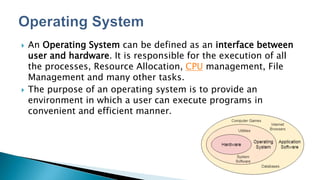
 An Operating System can be defined as an interface between
user and hardware. It is responsible for the execution of all
the processes, Resource Allocation, CPU management, File
Management and many other tasks.
 The purpose of an operating system is to provide an
environment in which a user can execute programs in
convenient and efficient manner.
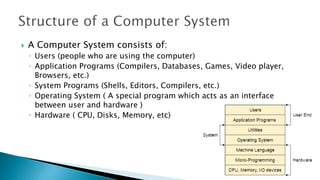
 A Computer System consists of:
◦ Users (people who are using the computer)
◦ Application Programs (Compilers, Databases, Games, Video player,
Browsers, etc.)
◦ System Programs (Shells, Editors, Compilers, etc.)
◦ Operating System ( A special program which acts as an interface
between user and hardware )
◦ Hardware ( CPU, Disks, Memory, etc)
 An operating system is the fundamental basis of all other application
programs. Operating system is an intermediary between the users and the
hardware.
◦ Operating system controls and coordinates the use of hardware among application
programs.
 Following are the major types of operating system −
 Disk Operating System (DOS)
 Windows Operating System
 Unix Operating System
 MS-DOS is one of the oldest and widely used operating system.
DOS It is a set of computer programs,
◦ the major functions of which are
 file management,
 allocation of system resources,
 providing essential features to control hardware devices.
 Following are the significant features of DOS −
 It is a single user system.
 It controls program.
 It is machine independence.
 It manages (computer) files.
 It manages input and output system.
 It manages (computer) memory.
 It provides command processing facilities.
 It operates with Assembler.
 Following are the major types of DOS Command
 Internal Commands − Commands such as DEL, COPY, TYPE, etc. are
the internal commands that remain stored in computer memory.
 External Commands − Commands like FORMAT, DISKCOPY, etc. are the
external commands and remain stored on the disk.
DOS commands can be typed in either upper case or lower case.
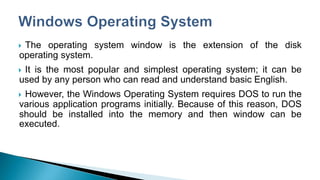
 The operating system window is the extension of the disk
operating system.
 It is the most popular and simplest operating system; it can be
used by any person who can read and understand basic English.
 However, the Windows Operating System requires DOS to run the
various application programs initially. Because of this reason, DOS
should be installed into the memory and then window can be
executed.
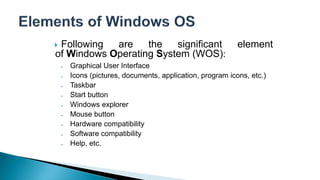
 Following are the significant element
of Windows Operating System (WOS):
 Graphical User Interface
 Icons (pictures, documents, application, program icons, etc.)
 Taskbar
 Start button
 Windows explorer
 Mouse button
 Hardware compatibility
 Software compatibility
 Help, etc.
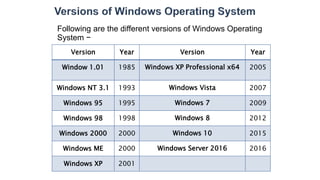
Following are the different versions of Windows Operating
System −
Version Year Version Year
Window 1.01 1985 Windows XP Professional x64 2005
Windows NT 3.1 1993 Windows Vista 2007
Windows 95 1995 Windows 7 2009
Windows 98 1998 Windows 8 2012
Windows 2000 2000 Windows 10 2015
Windows ME 2000 Windows Server 2016 2016
Windows XP 2001
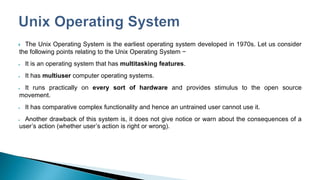
 The Unix Operating System is the earliest operating system developed in 1970s. Let us consider
the following points relating to the Unix Operating System −
 It is an operating system that has multitasking features.
 It has multiuser computer operating systems.
 It runs practically on every sort of hardware and provides stimulus to the open source
movement.
 It has comparative complex functionality and hence an untrained user cannot use it.
 Another drawback of this system is, it does not give notice or warn about the consequences of a
user’s action (whether user’s action is right or wrong).
 is accountable for the formation and deletion of files and
directories.
 manages the process of deletion, suspension, resumption, and
synchronization.
 manages memory space by allocation and de-allocation.
 stores, organizes, names and protects the existing files.
 manages all the components and devices of the computers
system including modems, printers, plotters, etc.
 In case, if any device fails, the operating system detects and
notify.
 protects from destruction as well as from unauthorized use.
 facilitates the interface to user and hardware.

Computer Introduction-Lecture06

  • 1.
    Lecture No. 6:Operating System Lecturer: Dr. Mazin Alkathiri Department of Computer Science, Faculty of Applied Science, Seiyun University 2023
  • 2.
     An OperatingSystem can be defined as an interface between user and hardware. It is responsible for the execution of all the processes, Resource Allocation, CPU management, File Management and many other tasks.  The purpose of an operating system is to provide an environment in which a user can execute programs in convenient and efficient manner.
  • 3.
     A ComputerSystem consists of: ◦ Users (people who are using the computer) ◦ Application Programs (Compilers, Databases, Games, Video player, Browsers, etc.) ◦ System Programs (Shells, Editors, Compilers, etc.) ◦ Operating System ( A special program which acts as an interface between user and hardware ) ◦ Hardware ( CPU, Disks, Memory, etc)
  • 4.
     An operatingsystem is the fundamental basis of all other application programs. Operating system is an intermediary between the users and the hardware. ◦ Operating system controls and coordinates the use of hardware among application programs.  Following are the major types of operating system −  Disk Operating System (DOS)  Windows Operating System  Unix Operating System
  • 5.
     MS-DOS isone of the oldest and widely used operating system. DOS It is a set of computer programs, ◦ the major functions of which are  file management,  allocation of system resources,  providing essential features to control hardware devices.
  • 6.
     Following arethe significant features of DOS −  It is a single user system.  It controls program.  It is machine independence.  It manages (computer) files.  It manages input and output system.  It manages (computer) memory.  It provides command processing facilities.  It operates with Assembler.
  • 7.
     Following arethe major types of DOS Command  Internal Commands − Commands such as DEL, COPY, TYPE, etc. are the internal commands that remain stored in computer memory.  External Commands − Commands like FORMAT, DISKCOPY, etc. are the external commands and remain stored on the disk. DOS commands can be typed in either upper case or lower case.
  • 8.
     The operatingsystem window is the extension of the disk operating system.  It is the most popular and simplest operating system; it can be used by any person who can read and understand basic English.  However, the Windows Operating System requires DOS to run the various application programs initially. Because of this reason, DOS should be installed into the memory and then window can be executed.
  • 9.
     Following arethe significant element of Windows Operating System (WOS):  Graphical User Interface  Icons (pictures, documents, application, program icons, etc.)  Taskbar  Start button  Windows explorer  Mouse button  Hardware compatibility  Software compatibility  Help, etc.
  • 10.
    Following are thedifferent versions of Windows Operating System − Version Year Version Year Window 1.01 1985 Windows XP Professional x64 2005 Windows NT 3.1 1993 Windows Vista 2007 Windows 95 1995 Windows 7 2009 Windows 98 1998 Windows 8 2012 Windows 2000 2000 Windows 10 2015 Windows ME 2000 Windows Server 2016 2016 Windows XP 2001
  • 11.
     The UnixOperating System is the earliest operating system developed in 1970s. Let us consider the following points relating to the Unix Operating System −  It is an operating system that has multitasking features.  It has multiuser computer operating systems.  It runs practically on every sort of hardware and provides stimulus to the open source movement.  It has comparative complex functionality and hence an untrained user cannot use it.  Another drawback of this system is, it does not give notice or warn about the consequences of a user’s action (whether user’s action is right or wrong).
  • 12.
     is accountablefor the formation and deletion of files and directories.  manages the process of deletion, suspension, resumption, and synchronization.  manages memory space by allocation and de-allocation.  stores, organizes, names and protects the existing files.  manages all the components and devices of the computers system including modems, printers, plotters, etc.  In case, if any device fails, the operating system detects and notify.  protects from destruction as well as from unauthorized use.  facilitates the interface to user and hardware.