1. History ofOperating
System:
•The First Generation of Computer
•The Second Generation of
Computer
•The Third Generation of Computer
•The Fourth Generation of
Computer
1.2 Operating System
Concept:
• Real-Time & Time Sharing
• Mainframe Operating System
1.3 Operating System
Structure:
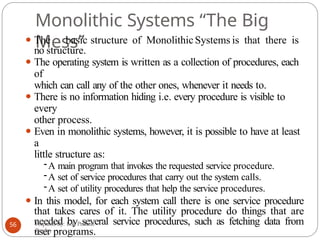
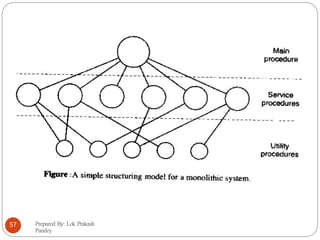
• Monolithic Systems
• Layered Systems
• Personal Computer (PC) Operating System • Virtual Machines
• Introduction To System Calls • Client-Server
Model
•The Shell
1
Unit 1. Introduction
2.
What is anOperating System
(OS)?
⚫An operating system is a system software that runs on
every general purpose computer. It is not just a single
program but a collection of programs (i.e. integrated
software).
⚫Operating system performs basic tasks such as
recognizing input from the keyboard, sending output
to the display screen, keeping track of files and directories
on the disk, and controlling peripheral devices
such as disk drives and printers.
Prepared By: Lok Prakash
Pandey
2
3.
What is anOperating System (OS)?...
⚫A computer must have an operating system to run
other programs. An operating system after being
initially loaded into the computer by a ‘boot
prograe’ manages all the other programs in
computer. The other programs are called
applications or application programs. The
application programs make use of the operating
system by making requests for service (APIs). In
addition, users can interact directly with the operating
system through a user interface such as command
language or a graphical user interface (GUI).
Prepared By: Lok Prakash
Pandey
3
4.
What is anOperating System (OS)?...
⚫For large systems, the operating system has even greater
responsibilities and powers. It is like a traffic cop – it
makes sure that different programs and users running at
the same time do not interfere with each other. The
operating system is also responsible for security,
ensuring that unauthorized users do not access the
system.
⚫Some of the most popular operating systems are DOS,
Windows 95/98/Me/XP/7, Linux, Mac OS, etc.
Prepared By: Lok Prakash
Pandey
4
5.
History of Operating
Systems
5
⚫Operating systems are closely tied to the architecture of the computers
on which they run.
⚫ So we need to see successive generations of computers to see what
their
operating systems were like.
⚫ The first true digital computer was designed by the English
mathematician: Charles Babbage. The analytical engine that Babbage
had designed (not developed) was purely mechanical and did
not have an operating system. However, when Babbage realized
that he would need a software for his analytical engine, he hired a
young woman named Ada Lovelace as the world’s first
programmer.The programming language Ada is named after her.
⚫ The First Generation of Computer (1945-55)
⚫ VacuumTubes were used for building machine.
⚫ A single group of people designed, built, programmed, operated, and maintained each
machine.
⚫ All programming was done in absolute machine code.
⚫ Programming Languages (even Assembly Language) and Operating system was unknown.
⚫ Typical numerical calculations such as producing tables of sines, cosines and logarithms
were done.
6.
History of OperatingSystems
⚫ The Second Generation of Computer (1955-65)
⚫ Transistors were used to build machines (mainframes).
⚫ Batch systems were used: A number of jobs were collected in punched cards and
they were read onto tape via one machine, then they were processed one after the
other in sequence and the output were collected in magnetic tapes in another
machine, and finally the tapes were printed in yet another machine.
⚫ Used mostly for scientific and engineering calculations such as solving
partial
differential equations.
⚫ Programs were written in FORTRAN and assembly language.
⚫ Typical operating systems were FMS (FORTRAN Monitor System) and IBSYS
(IBM’s
operating system).
⚫ The Third Generation of Computer (1965-1980)
⚫ ICs were used to build machines (minicomputers).
⚫ Multiprogramming came into existence (by partitioning the memory and
keeping different jobs in each partition of the memory) so that processors can be
kept busy 100 percent of the time.
⚫ Operating systems: OS/360, MULTICS (MULTiplexed Information and
Computing
Service), CTSS (CompatibleTime Sharing System), etc.
Prepared By: Lok Prakash
Pandey
6
7.
History of OperatingSystems
⚫ The Fourth Generation of Computer (1980-Present)
⚫ LSIs and VLSIs were used to build machine.
⚫ Microcomputers came into existence.
⚫ IBM PC: Operating system was MS-DOS
⚫ IBM PC/AT: Operating system was MS-DOS
⚫ Apple Macintosh: Operating system was Macintosh (had GUI components)
⚫ Introduction to Windows: Because of the influence of the success of
Macintosh, Microsoft decided to build a GUI-based system which originally ran on
top of MS- DOS and named it Windows. The first versions of Windows were just
like a shell than a true operating system. In 1995, the Windows 95 came into
existence which incorporated many operating system features into it as it required
MS-DOS only for booting purposes. The 1998-launched Windows 98 was also
similar to Windows 95 both containing 16-bit Intel assembly language. Windows NT
(New Technology) was a later version of Windows with a 32-bit operating
system. The version 5 of the Windows NT was called Windows 2000. Later
another version of Windows called Windows Me (Millennium edition) came into
existence.
Prepared By: Lok Prakash
Pandey
7
Mainframe Operating Systems
⚫The operating systems used in mainframe computers (or mainframes)are
called
mainframe operating computers.
⚫ The mainframes have very high I/O capacity (a mainframe with 1000 disks
and
thousands of gigabytes of data is not unusual).
⚫ The mainframe operating systems are heavily oriented towards processing many jobs
at once, most of which need huge amounts of I/O.
⚫ They provide the following three types of services: batch, transaction processing
and
timesharing.
⚫ A batch system is one that performs routine jobs without any interactive user present,
for
example, sales reporting for a chain of stores.
⚫ Transaction processing systems handle large numbers of small requests, for
example,
check processing at a bank.
⚫ Timesharing systems allow multiple remote users to run jobs on the computers at
once, for example, querying a big database.
⚫ Example: OS/390
⚫ Note: Mainfraee operating systees are designed priearily to optieize utilization
of hardware i.e. efficiency is the eain focus.
Prepared By: Lok Prakash
Pandey
9
10.
Server Operating
Systems
⚫The operatingsystems which run on servers, which
are either very large personal computers, workstations
or even mainframes, are called server operating
systems.
⚫They serve multiple users at once over a network and
allow the users to share hardware and software resources.
⚫They provide services like print service, file service or
web service.
⚫Internet providers run many server machines to
support their customers and websites use servers
to store the web pages and handle the incoming
requests.
⚫Example: Linux,Windows 2000, etc.
Prepared By: Lok Prakash
Pandey
10
11.
Multiprocessor Operating
Systems
⚫By connectingmultiple CPUs into a single system, we
can get a heavy computing power out of the machine.
⚫Depending upon precisely how they are connected and
what is shared, these systems are called parallel
computers, multicomputers or multiprocessors.
⚫The operating systems that are used in these computers
are called multiprocessor operating systems.
Prepared By: Lok Prakash
Pandey
11
12.
Personal Computer Operating
Systems
⚫Theoperating systems typically used in personal
computers are called personal computer operating
systems.
⚫They have comparatively less processing power and
memory than mainframes.
⚫Their main job is to provide a good interface to a single
user.
⚫They are widely used for word processing, spreadsheets
and Internet access.
⚫Examples:Windows 7, Macintosh, Linux, etc.
⚫Note: Personal coeputer operating systees are
designed priearily to be convenient to the user.
Prepared By: Lok Prakash
Pandey
12
13.
Real-time Operating
Systems
⚫Real-time operatingsystems have time as the key
parameter.
⚫There are two kinds of real-time systems:
⚫Hard real-time systems: If a certain action must be
performed at a certain time (or within a certain range), we
have a hard real-time system, i.e. there are hard deadlines
that must be met. For example, in industrial control systems,
real-time computers have to collect data about the
production process and use it to control machines in the
factory.
⚫Soft real-time systems: When there may be occasional misses
on a deadline, it is called a soft real-time system. Digital
audio or multimedia systems fall in this category.
⚫Example: QNX, RTLinux, etc.
Prepared By: Lok Prakash
Pandey
13
14.
(Q)Define the essentialproperties of the following types of operating
systems:
a. Batch
b.Interactive
c.Time sharing
d.Real time
Answer:
⚫ a. Batch: In batch system, jobs with similar needs are
collected together and run through the computer as a group by
an operator or an automatic job sequencer. Batch systems
are used for executing large jobs that need no interaction and
their output can be picked up later.
⚫ b. Interactive. The interactive system is composed of many
short transactions where the results of the next transaction
may be unpredictable. The response time needs to be short
(seconds) since the user submits and waits for the result.
Prepared By: Lok Prakash
Pandey
14
15.
⚫c. Time sharing:In time-sharing systems, the CPU
executes multiple jobs by switching among them,
but the switches occurs so frequently that the user
can interact with each program while it is running.
Time-sharing systems improve user’s response time.
⚫d. Real time: Often used in a dedicated application,
this system reads information from sensors and must
respond within a fixed amount of time to
ensure correct performance.
Prepared By: Lok Prakash
Pandey
15
16.
TU Exam Question2066
⚫What is an operatingsystem?Differentiatebetween
time sharing and real time operating system.
Prepared By: Lok Prakash
Pandey
16
17.
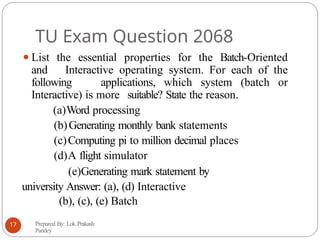
TU Exam Question2068
⚫List the essential properties for the Batch-Oriented
and Interactive operating system. For each of the
following applications, which system (batch or
Interactive) is more suitable? State the reason.
(a)Word processing
(b)Generating monthly bank statements
(c)Computing pi to million decimal places
(d)A flight simulator
(e)Generating mark statement by
university Answer: (a), (d) Interactive
(b), (c), (e) Batch
Prepared By: Lok Prakash
Pandey
17
18.
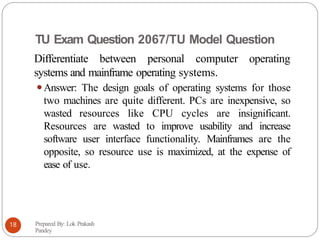
TU Exam Question2067/TU Model Question
Differentiate between personal computer operating
systems and mainframe operating systems.
⚫Answer: The design goals of operating systems for those
two machines are quite different. PCs are inexpensive, so
wasted resources like CPU cycles are insignificant.
Resources are wasted to improve usability and increase
software user interface functionality. Mainframes are the
opposite, so resource use is maximized, at the expense of
ease of use.
Prepared By: Lok Prakash
Pandey
18
19.
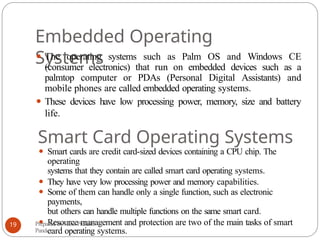
Embedded Operating
Systems
⚫ Theoperating systems such as Palm OS and Windows CE
(consumer electronics) that run on embedded devices such as a
palmtop computer or PDAs (Personal Digital Assistants) and
mobile phones are called embedded operating systems.
⚫ These devices have low processing power, memory, size and battery
life.
Smart Card Operating Systems
⚫ Smart cards are credit card-sized devices containing a CPU chip. The
operating
systems that they contain are called smart card operating systems.
⚫ They have very low processing power and memory capabilities.
⚫ Some of them can handle only a single function, such as electronic
payments,
but others can handle multiple functions on the same smart card.
⚫ Resource management and protection are two of the main tasks of smart
card operating systems.
Prepared By: Lok Prakash
Pandey
19
20.
Explain “Spooling” indetail.
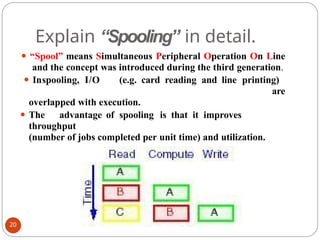
⚫ “Spool” means Simultaneous Peripheral Operation On Line
and the concept was introduced during the third generation.
⚫ Inspooling, I/O (e.g. card reading and line printing)
are
overlapped with execution.
⚫ The advantage of spooling is that it improves
throughput
(number of jobs completed per unit time) and utilization.
20
21.
Explain “Multiprogramming” in
detail.
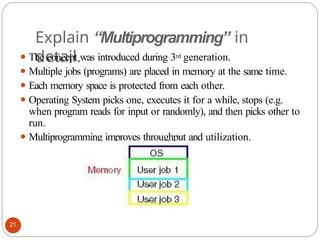
⚫The concept was introduced during 3rd generation.
⚫ Multiple jobs (programs) are placed in memory at the same time.
⚫ Each memory space is protected from each other.
⚫ Operating System picks one, executes it for a while, stops (e.g.
when program reads for input or randomly), and then picks other to
run.
⚫ Multiprogramming improves throughput and utilization.
21
22.
Two main functionsof an OS
⚫OS as an Extended
Machine
⚫OS as a Resource
Manager
Prepared By: Lok Prakash
Pandey
22
23.
OS as anextended machine
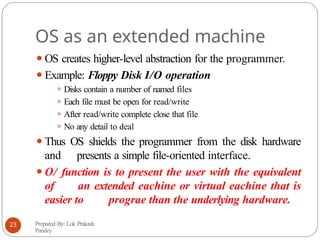
⚫OS creates higher-level abstraction for the programmer.
⚫Example: Floppy Disk I/O operation
⚫ Disks contain a number of named files
⚫ Each file must be open for read/write
⚫ After read/write complete close that file
⚫ No any detail to deal
⚫Thus OS shields the programmer from the disk hardware
and presents a simple file-oriented interface.
⚫O/ function is to present the user with the equivalent
of an extended eachine or virtual eachine that is
easier to prograe than the underlying hardware.
Prepared By: Lok Prakash
Pandey
23
24.
OS as aresource manager
⚫There are various resources in a computer such as
CPU,
memory, printer, etc.
⚫The OS function is to manage all pieces of a complex
system
such that no conflict arises.
⚫For example: If three programs try to print their output on
the same printer at the same time, the OS must manage
resources to them.
Prepared By: Lok Prakash
Pandey
24
25.
Assignment#1
1. What arethe three main purposes of an operating system?
2. What is the main advantage of multiprogramming?
3. What are the main differences between operating systems
for mainframe computers and PCs?
4. What are the tradeoffs inherent in handheld computers?
5. Consider the various definitions of operating system.
Consider whether the operating system should include
applications such as web browsers and mail programs.
Argue both pro and con positions, and support your
answers.
Hint: Go to blogs for answers and write answers in your own words.
Prepared By: Lok Prakash
Pandey
25
26.
Computer System
Operation
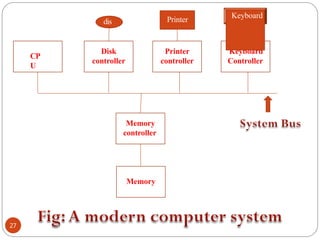
⚫A modern,general-purpose computer system consists of
a CPU and a number of device controllers that are
connected through a common bus (for
communication) that provides access to shared
memory.
⚫Each device controller is in charge of a specific type of
device (for example, disk drives, audio devices, and video
displays).
⚫The CPU and the device controllers can execute
concurrently, competing for memory cycles.
⚫To ensure orderly access to the shared memory, a
memory controller is provided whose function is
to synchronize access to the memory.
Prepared By: Lok Prakash
Pandey
26
Computer System
Operation…
⚫ Whena computer is powered up or rebooted, it runs an initial program
called bootstrap prograe from the read-only memory (ROM) such as
firmware or EEPROM within the computer hardware.
⚫ The bootstrap prograe loads into memory the operating system kernel
and then starts executing the first process, such as “init”, and waits for
some event to occur.
⚫ The occurrence of an event is usually signaled by an interrupt from either
the hardware or the software. Hardware triggers an interrupt by
sending a signal to the CPU via system bus while software triggers an
interrupt via error or systee calls. The software-generated interrupt
is called a trap. The interrupt must transfer control to the
appropriate interrupt service routine.
⚫ The interrupt vector (array) in the memory holds the addresses of
the interrupt service routines for the various devices. This array of
addresses is indexed by a unique device number, given with the
interrupt request, to provide the address of the interrupt service
routine for the interrupting device.
⚫ Note: Modern operating systems are interrupt driven.
Prepared By: Lok Prakash
Pandey
28
29.
(Q) What doesthe CPU do
when there are no programs to
run?
⚫Modern operating systems are interrupt driven. If there
are no processes to execute, no I/O devices to
service, and no users to respond, an operating
system sits quietly, waiting for some event to
happen. The events are always signaled by the
occurrence of an interrupt or a trap. However, the CPU
will always do processing. Even though there are no
application programs running, the operating system is
still running and the CPU will still have to process
many system processes during the operation of the
computer.
Prepared By: Lok Prakash
Pandey
29
30.
TU Exam
2068
30
What mustuser program be prohibited from writing to the
memory locations containing the interrupt vector?
Answer: An interrupt vector is the memory address of an interrupt
handler (interrupt service routine). When an interrupt is generated,
the operating system saves its execution state via a context switch,
and begins execution of the interrupt handler. An interrupt handler
is a callback subroutine in operating system whose execution is
triggered by the reception of an interrupt. These handlers are
initiated by either hardware interrupts or interrupt instructions in
software, and are used for servicing hardware devices, errors and
system calls.
If some user program accesses and writes onto the memory
locations used by interrupt vector, then some interrupts may be
disturbed or missed. The aftermath of this is that the interrupt
handling mechanism will be corrupted and will be completely
unknown to operating the system so that the system may function
abnormally or go into crash (the interrupt-handling mechanism is
compromised here so that system protection is bypassed).
Therefore, user programs must be restricted from writing to the
memory locations containing the interrupt vector.
31.
TU Exam
2068
What arethe differences between a trap and an interrupt? What is the
use of each function?
Answer: Modern operating systems are interrupt driven. What this means is that
the occurrence of an event in computer is signaled by an interrupt from either
the hardware or the software. Hardware such as I/O devices trigger an
interrupt by sending a signal to the CPU via system bus. When the CPU is
interrupted, it stops what it is doing and immediately transfers execution to an
appropriate interrupt service routine. After the interrupt service routine completes
its execution, the CPU resumes the interrupted computation. For example, a
serial device may assert the interrupt line and then place an interrupt vector
number on the data bus. The CPU uses this to get the serial device interrupt
service routine, which it then executes as above.
A trap (or an exception) is a software-generated interrupt caused either by
an error (for example, division by zero or invalid memory access) or by a specific
request from a user program that an operating-system service be performed
(systee call). Whenever the trap condition occurs (for example, on arithmetic
overflow), the CPU stops what it is doing, saves the context, jumps to the
appropriate trap routine, completes it, restores the context, and continues
execution. For example, if overflow traps are enabled, adding two very large
integers would cause the overflow bit to be set and the overflow trap service
routine to be initiated.
Prepared By: Lok Prakash
Pandey
31
32.
Computer System Operation…
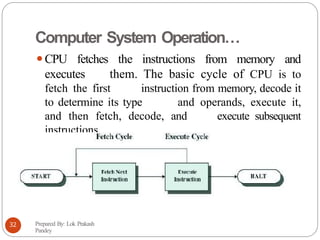
⚫CPUfetches the instructions from memory and
executes them. The basic cycle of CPU is to
fetch the first instruction from memory, decode it
to determine its type and operands, execute it,
and then fetch, decode, and execute subsequent
instructions.
Prepared By: Lok Prakash
Pandey
32
33.
Computer System
Operation… addressof next
Prepared By: Lok Prakash
Pandey
33
⚫ Registers are used to hold variables and temporary
results.
⚫ Program counter – contains the
memory
instruction to be fetched.
⚫ Instruction register – holds the actual instruction.
⚫ The instruction is decoded to determine what action to be performed.
The action is specified by instruction’s opcode bits.
⚫ The PSW (Program Status Word) - contains the condition code bits,
which are set by comparison instruction, the CPU priority,
the modes ( user or kernel), and various other control bits.
⚫ In timesharing system, OS stops a running program to start another one.
When stopping a program, the OS saves all registers, so that they can
be restored when the program runs later.
⚫ Device controller informs CPU that it has finished its operation by causing
an
interrupt (Signal generated by hardware such as I/O).
⚫ A trap is a software generated interrupt caused either by an error (e.g.,
division by 0 or invalid memory access) or by user (such as by calling
/ystee Calls). The CPU responds to the trap and interrupt by
saving the current value of program counter.
34.
Computer System
Operation…
⚫/tack Pointer(/P):The /P points to the current stack in
memory. The stack in memory contains one frame for
each procedure that has been entered but not yet
exited. A procedure’s stack frame contains input
parameters, local variables and temporary variables
that are not kept in registers.
Prepared By: Lok Prakash
Pandey
34
Hardware Protection
⚫The operatingsystem must ensure that an incorrect
program (error in a program) can not cause
other programs to execute incorrectly, and must
terminate such erroneous program.
⚫The following methods (utilizing hardware) are used by
the operating system in such cases:
⚫ Dual-Mode Protection
⚫ I/O Protection
⚫ Memory Protection
⚫ CPU Protection
Prepared By: Lok Prakash
Pandey
36
37.
Dual-Mode
Operation
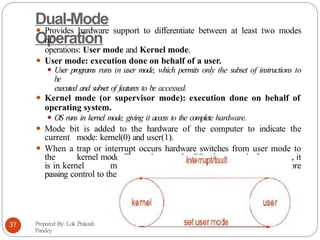
⚫ Provides hardwaresupport to differentiate between at least two modes
of
operations: User mode and Kernel mode.
⚫ User mode: execution done on behalf of a user.
⚫ User programs runs in user mode, which permits only the subset of instructions to
be
executed and subset of features to be accessed.
⚫ Kernel mode (or supervisor mode): execution done on behalf of
operating system.
⚫ OS runs in kernel mode, giving it access to the complete hardware.
⚫ Mode bit is added to the hardware of the computer to indicate the
current mode: kernel(0) and user(1).
⚫ When a trap or interrupt occurs hardware switches from user mode to
the kernel mode. Thus, whenever the OS gains control of computer, it
is in kernel mode. The system always switches to user mode before
passing control to the user program.
Prepared By: Lok Prakash
Pandey
37
38.
I/O Protection
⚫A userprogram may disrupt the normal operation of the system
by issuing illegal I/O operation, by accessing memory
locations within
Prepared By: Lok Prakash
Pandey
38
the operating system
itself.
HOW??
?
⚫T
o prevent users from performing illegal I/O operations, an
operating system must define all I/O instructions to be
privileged instructions. (Privileged instructions can be issued only
in kernel Eode).
⚫Thus, users cannot issue I/O instructions directly; they must do
it through the operating system.
⚫For I/O protection to be complete, we must be sure that a
user program can never gain control of the computer in
Eonitor (kernel) Eode. If it could, I/O protection
could be compromised.
39.
Memory Protection
⚫ Anoperating system must provide memory protection at least for
the interrupt vector and the interrupt service routines of the
operating system.
⚫ In general, an operating system should be protected from access by
user
programs, and the user programs from one another.
⚫ To separate each program’s memory space, we need the ability to
determine the range of legal addresses that the program may access,
and to protect the memory outside that space.
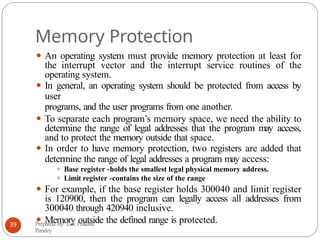
⚫ In order to have memory protection, two registers are added that
determine the range of legal addresses a program may access:
⚫ Base register -holds the smallest legal physical memory address.
⚫ Limit register -contains the size of the range
⚫ For example, if the base register holds 300040 and limit register
is 120900, then the program can legally access all addresses from
300040 through 420940 inclusive.
⚫ Memory outside the defined range is protected.
Prepared By: Lok Prakash
Pandey
39
40.
CPU Protection
⚫ Inaddition to protecting I/O and memory, it must be ensured that the operating
system
maintains control.
⚫ A user program must be prevented from getting stuck in an infinite loop or not
calling
system services,and never returning control to the operating system.
⚫ T
o accomplish this task, timer is used.
⚫ The operating system sets the tiEer. Before turning over control to the user
, the
operating
system ensures that the tiEer is set to interrupt.
⚫ TiEer interrupts the coEputer after the specified period to ensure
that
operating systeE Eaintains control.
–Timer is decremented every clock tick.
–When timer reaches the value 0, an interrupt occurs.
⚫ If the timer interrupts, control transfers automatically to the OS, which may treat
the
interrupt as a fatal error or may give the program more time.
⚫ Timer is commonly used to implement time sharing, where a N
Prepared By: Lok Prakash
Pandey
40
41.
Homework
Prepared By: LokPrakash
Pandey
41
(Q)Which of the following instructions should be
allowed only in kernel mode?
a. Disable all interrupts
b. Read the time-of-day clock
c. Set the time-of-day clock
d. Change the memory map
42.
Common Operating SystemConcepts
⚫Process Management
⚫Main-Memory
Management
⚫File Management
⚫I/O Management
Prepared By: Lok Prakash
Pandey
42
43.
Process Management
⚫A processis a program in execution.
⚫A process needs certain resources - including CPU time, memory,
files, and I/O devices - to accomplish its task.
⚫The operating system is responsible for the
following activities in connection with process
management:
⚫Process creation and deletion
⚫Process suspension and resumption
⚫Provision of mechanisms for:
- process synchronization
- process communication
- deadlock handling
Prepared By: Lok Prakash
Pandey
43
44.
Main-Memory Management
⚫Main memoryis a large array of words or bytes, ranging in size
from hundreds of thousands to billions. Each word or byte
has its own address. It is a repository of quickly accessible
data shared by the CPU and I/O devices.
⚫The operating system is responsible for the following
activities in connections with memory management:
– Keep track of which parts of memory are currently
being used and by whom.
– Decide which processes to load when memory space
becomes
available.
–Allocate and deallocate memory space as needed.
Prepared By: Lok Prakash
Pandey
44
45.
File Management
⚫A fileis a collection of related information defined by its
creator
. Commonly, files represent programs (both source and
object forms) and data.
⚫The operating system is responsible for the following
activities in connections with file management:
–File creation and deletion.
– Directory creation and deletion.
–Support of primitives for manipulating files and directories.
– Mapping files onto secondary storage.
– File backup on stable (nonvolatile) storage media.
Prepared By: Lok Prakash
Pandey
45
46.
I/O Management
⚫All computershave physicaldevices for acquiringinput
and producing output.
⚫The I/O system consists of:
– A memory management component that includes
buffering,
caching, and spooling.
–A general device-driver interface.
– Drivers for specific hardware devices.
– Disk management.
Prepared By: Lok Prakash
Pandey
46
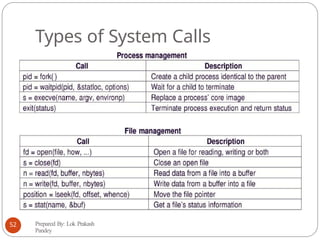
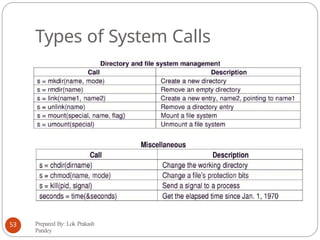
47.
Introduction to SystemCalls
⚫ System calls provide the interface between a process (i.e.
user
program) and the operating system.
⚫ They are generally available as assembly language
instructions, however languages like C that are defined to
replace assembly language for systems programming allow
system calls to be made directly via procedure calls.
⚫ If a process is running a user program in user mode and needs
a system service such as reading data from a file, it has to
execute a trap or system call instruction to transfer control to
the operating system. The operating system then figures out
what the calling process wants by inspecting the parameters
of the call. Then it carries out the call and returns
control to the instruction following the system call.
Prepared By: Lok Prakash
Pandey
47
48.
Introduction to SystemCalls…
⚫ T
o make the system call mechanism clear, let us look at the read
system call. It has three parameters: the first parameter specifies the
file, the second parameter points to the buffer, and the third
parameter gives the number of bytes to read. Like all system calls, it
is invoked from a C program by calling a library procedure with
the same name as the system call: read. A call from a C program
looks like:
count = read(fd, buffer, nbytes);
⚫ The system call (and the library procedure) returns the number of
bytes actually read in count. This value is normally the same as
nbytes, but may be smaller if end of file is encountered while reading.
⚫ If the system call cannot be carried out, either due to an invalid
parameter or a disk error, count is set to -1. Programs should
always check the results of a system call to see if an error occurred.
Prepared By: Lok Prakash
Pandey
48
Introduction to System
Calls…
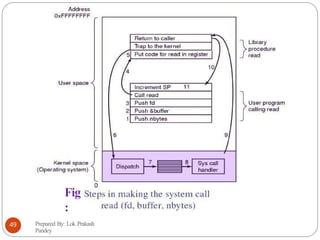
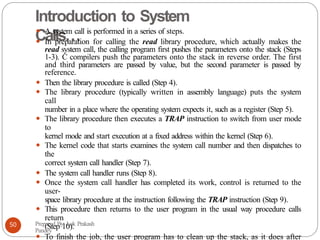
⚫A system call is performed in a series of steps.
⚫ In preparation for calling the read library procedure, which actually makes the
read system call, the calling program first pushes the parameters onto the stack (Steps
1-3). C compilers push the parameters onto the stack in reverse order. The first
and third parameters are passed by value, but the second parameter is passed by
reference.
⚫ Then the library procedure is called (Step 4).
⚫ The library procedure (typically written in assembly language) puts the system
call
number in a place where the operating system expects it, such as a register (Step 5).
⚫ The library procedure then executes a TRAP instruction to switch from user mode
to
kernel mode and start execution at a fixed address within the kernel (Step 6).
⚫ The kernel code that starts examines the system call number and then dispatches to
the
correct system call handler (Step 7).
⚫ The system call handler runs (Step 8).
⚫ Once the system call handler has completed its work, control is returned to the
user-
space library procedure at the instruction following the TRAP instruction (Step 9).
⚫ This procedure then returns to the user program in the usual way procedure calls
return
(Step 10).
⚫ To finish the job, the user program has to clean up the stack, as it does after
Prepared By: Lok Prakash
Pandey
50
51.
TU Exam Question2067/TU Model Question
⚫What is System Call? Explain the system call flow with
the help of a block diagram.
Prepared By: Lok Prakash
Pandey
51
shel
l
⚫ Both theShell and the Kernel are the Parts of the
Operating System (though some refer only kernel to be the
part of the operating system).
⚫ An operating system shell is a software component
that presents a user interface to various operating system
functions and services. Thus, it is nearly synonymous with
“operating system user interface”. The shell is so called
because it is an outer layer of interface between the user and
the innards of the operating system (the kernel).
⚫ Most operating system shells fall into one of two
categories: command-line and graphical. Command line
shells provide a command-line interface (CLI) to the
operating system, while graphical shells provide a graphical
user interface (GUI). The GUI is also referred as “desktop
environment”.
Prepared By: Lok Prakash
Pandey
54
55.
Operating System Structure
⚫Thestructure of an operating system defines how it
is structured or designed.
⚫There are various approaches in operating system structure.
Prepared By: Lok Prakash
Pandey
55
56.
Monolithic Systems “TheBig
Mess”
⚫ The basic structure of MonolithicSystems is that there is
no structure.
⚫ The operating system is written as a collection of procedures, each
of
which can call any of the other ones, whenever it needs to.
⚫ There is no information hiding i.e. every procedure is visible to
every
other process.
⚫ Even in monolithic systems, however, it is possible to have at least
a
little structure as:
-A main program that invokes the requested service procedure.
-A set of service procedures that carry out the system calls.
-A set of utility procedures that help the service procedures.
⚫ In this model, for each system call there is one service procedure
that takes cares of it. The utility procedure do things that are
needed by several service procedures, such as fetching data from
user programs.
Prepared By: Lok Prakash
Pandey
56
Layered
Systems
58
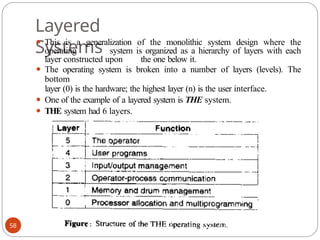
⚫ This isa generalization of the monolithic system design where the
operating system is organized as a hierarchy of layers with each
layer constructed upon the one below it.
⚫ The operating system is broken into a number of layers (levels). The
bottom
layer (0) is the hardware; the highest layer (n) is the user interface.
⚫ One of the example of a layered system is THE system.
⚫ THE system had 6 layers.
59.
Layered
Systems
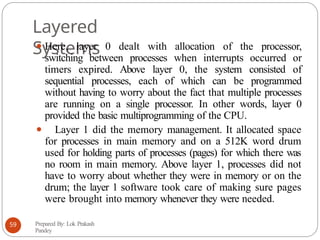
⚫ Here, layer0 dealt with allocation of the processor,
switching between processes when interrupts occurred or
timers expired. Above layer 0, the system consisted of
sequential processes, each of which can be programmed
without having to worry about the fact that multiple processes
are running on a single processor. In other words, layer 0
provided the basic multiprogramming of the CPU.
⚫ Layer 1 did the memory management. It allocated space
for processes in main memory and on a 512K word drum
used for holding parts of processes (pages) for which there was
no room in main memory. Above layer 1, processes did not
have to worry about whether they were in memory or on the
drum; the layer 1 software took care of making sure pages
were brought into memory whenever they were needed.
Prepared By: Lok Prakash
Pandey
59
60.
Layered
Systems
⚫Layer 2 handledcommunication between each process
and the operator console. Above this layer each
process had its own operator console.
⚫Layer 3 took care of managing the I/O devices and
buffering the information streams to and from them.
Above layer 3 each process could deal with abstract
I/O devices.
⚫Layer 4 was where the user programs were found. They
did not have to worry about process, memory, console
or I/O management.
⚫The system operator process was located in layer 5.
⚫More recent examples (further generalization of the
layering concept )are: UNIX, MULTICS, etc.
Prepared By: Lok Prakash
Pandey
60
61.
Virtual Machines
⚫ Thefundamental idea behind the virtual machine is to abstract
the hardware of a single computer into several execution
environments. i.e. creating an illusion that each separate execution
environment is using its own private computer.
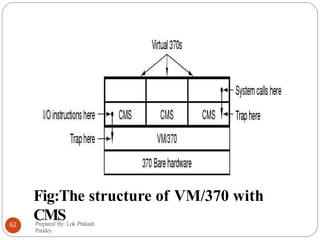
⚫ Example: With VM/370, each user process gets an exact copy of
the actual computer. The heart of the system is called virtual
machine monitor, runs on bare hardware and does multiprogramming,
providing not one but several machines to the next layer up.
However unlike all other operating systems, these virtual
machines are not extended machines, instead they are exact copies
of bare hardware including the kernel/user mode, interrupts, I/O and
everything else the real machine has.
⚫ Because each virtual machine is identical to true hardware, each one
can run any operating system that will run directly on bare
hardware. VM/370 and CMS (Conversational Monitor System)
are separate operating systems here.
Prepared By: Lok Prakash
Pandey
61
Client-Server Systems
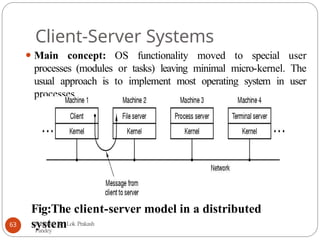
⚫ Mainconcept: OS functionality moved to special user
processes (modules or tasks) leaving minimal micro-kernel. The
usual approach is to implement most operating system in user
processes.
Fig:The client-server model in a distributed
system
Prepared By: Lok Prakash
Pandey
63
64.
Client-Server Systems…
⚫ Inthis model, to request a service, such as reading a block of a
file, a user process (now known as client process) sends
request to server process, which then does the work and
sense back the answer.
⚫ Here kernel handles the communication between client
and servers. By splitting up OS into parts, each of which only
handles one facet of the system, such as file service, process
service etc.
⚫ Furthermore, because all the servers run as user-mode
processes, and not in kernel mode, they don’t have direct access
to hardware, so any bug triggered in file server will not
bring the whole machine down, though file service may crash.
⚫ Another benefit is its adaptability in distributed system.
Prepared By: Lok Prakash
Pandey
64