Buffering
A process of storing data in memory is called buffers while data
is being transferred between two devices or between a device
and an application
Buffer is a region of memory used to temporarily hold data while
it is being moved from one place to another. These and many
other reasons make it a need for operating systems to have
Buffers or Temporary memory locations it can use. For
example imagine that there are two different processes.
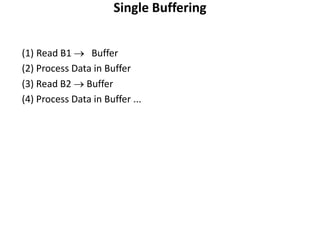
Single Buffering
(1) Read B1  Buffer
(2) Process Data in Buffer
(3) Read B2  Buffer
(4) Process Data in Buffer ...
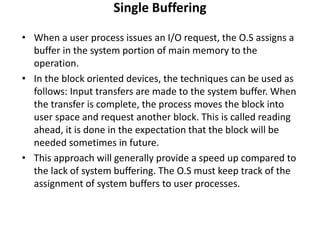
Single Buffering
• When a user process issues an I/O request, the O.S assigns a
buffer in the system portion of main memory to the
operation.
• In the block oriented devices, the techniques can be used as
follows: Input transfers are made to the system buffer. When
the transfer is complete, the process moves the block into
user space and request another block. This is called reading
ahead, it is done in the expectation that the block will be
needed sometimes in future.
• This approach will generally provide a speed up compared to
the lack of system buffering. The O.S must keep track of the
assignment of system buffers to user processes.
Single Buffering
• Similar considerations apply to block oriented output. When
data are being transmitted to a device, they are first copied
from user space into the system buffer, from which they will
ultimately be written. The requesting process is now free to
continue.
• Suppose T is the time required to input one block and C is the
computation time required for input request.
– Without buffering: Execution time is T+C.
– Without buffering: Execution time is max [C,T]+M, where
M is time required to move the data from system buffer to
user memory.
Single Buffering
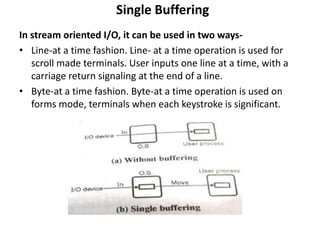
In stream oriented I/O, it can be used in two ways-
• Line-at a time fashion. Line- at a time operation is used for
scroll made terminals. User inputs one line at a time, with a
carriage return signaling at the end of a line.
• Byte-at a time fashion. Byte-at a time operation is used on
forms mode, terminals when each keystroke is significant.
Double Buffering
There is a File
» Sequence of Blocks B1, B2
Have a Program
» Process B1
» Process B2
» Process B3
Double Buffering
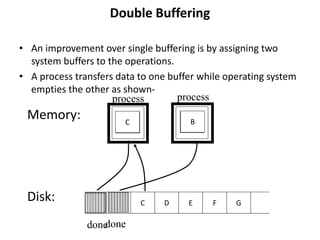
• An improvement over single buffering is by assigning two
system buffers to the operations.
• A process transfers data to one buffer while operating system
empties the other as shown-
Memory:
Disk: A B C D G
E F
A B
done
process
A
C
process
B
done
Double Buffering
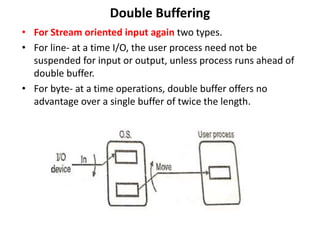
• For Stream oriented input again two types.
• For line- at a time I/O, the user process need not be
suspended for input or output, unless process runs ahead of
double buffer.
• For byte- at a time operations, double buffer offers no
advantage over a single buffer of twice the length.
Double Buffering
• For block oriented transfer execution time is Max[C,T]. It is
possible to keep the block oriented device going at full speed.
– If C<=T, i.e. computation time is less than the time required
to input one block.
– If C>T, i.e. computation time is greater than the time
required to input one block, then double buffering ensures
that the process will not have to wait on I/O.
Circular Buffering
• Double buffering may be inadequate, if the process performs
rapid burst of I/O. When two or more buffers are used.
• The collection of buffers is called as a circular buffer, with
each buffer being one unit in the circular buffer.
Block Buffering
Buffering of Blocks
• When several blocks need to be transferred from disk to
main memory and all the block addresses are known,
several buffers can be reserved in main memory to speed
up the transfer. While one buffer is being read or written,
the CPU can process data in the other buffer because an
independent disk I/O processor (controller) exists that,
once started, can proceed to transfer a data block between
memory and disk independent of and in parallel to CPU
processing.
Block Buffering
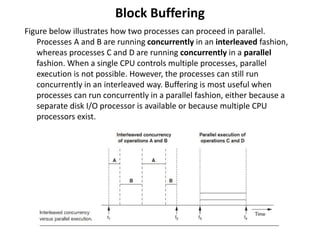
Figure below illustrates how two processes can proceed in parallel.
Processes A and B are running concurrently in an interleaved fashion,
whereas processes C and D are running concurrently in a parallel
fashion. When a single CPU controls multiple processes, parallel
execution is not possible. However, the processes can still run
concurrently in an interleaved way. Buffering is most useful when
processes can run concurrently in a parallel fashion, either because a
separate disk I/O processor is available or because multiple CPU
processors exist.
Block Buffering
Figure below illustrates how reading and processing can proceed in
parallel when the time required to process a disk block in memory is
less than the time required to read the next block and fill a buffer. The
CPU can start processing a block once its transfer to main memory is
completed; at the same time, the disk I/O processor can be reading
and transferring the next block into a different buffer. This technique is
called double buffering and can also be used to read a continuous
stream of blocks from disk to memory. Double buffering permits
continuous reading or writing of data on consecutive disk blocks,
which eliminates the seek time and rotational delay for all but the first
block transfer. Moreover, data is kept ready for processing, thus
reducing the waiting time in the programs.
Block Buffering

Buffering.pptx

  • 1.
    Buffering A process ofstoring data in memory is called buffers while data is being transferred between two devices or between a device and an application Buffer is a region of memory used to temporarily hold data while it is being moved from one place to another. These and many other reasons make it a need for operating systems to have Buffers or Temporary memory locations it can use. For example imagine that there are two different processes.
  • 2.
    Single Buffering (1) ReadB1  Buffer (2) Process Data in Buffer (3) Read B2  Buffer (4) Process Data in Buffer ...
  • 3.
    Single Buffering • Whena user process issues an I/O request, the O.S assigns a buffer in the system portion of main memory to the operation. • In the block oriented devices, the techniques can be used as follows: Input transfers are made to the system buffer. When the transfer is complete, the process moves the block into user space and request another block. This is called reading ahead, it is done in the expectation that the block will be needed sometimes in future. • This approach will generally provide a speed up compared to the lack of system buffering. The O.S must keep track of the assignment of system buffers to user processes.
  • 4.
    Single Buffering • Similarconsiderations apply to block oriented output. When data are being transmitted to a device, they are first copied from user space into the system buffer, from which they will ultimately be written. The requesting process is now free to continue. • Suppose T is the time required to input one block and C is the computation time required for input request. – Without buffering: Execution time is T+C. – Without buffering: Execution time is max [C,T]+M, where M is time required to move the data from system buffer to user memory.
  • 5.
    Single Buffering In streamoriented I/O, it can be used in two ways- • Line-at a time fashion. Line- at a time operation is used for scroll made terminals. User inputs one line at a time, with a carriage return signaling at the end of a line. • Byte-at a time fashion. Byte-at a time operation is used on forms mode, terminals when each keystroke is significant.
  • 6.
    Double Buffering There isa File » Sequence of Blocks B1, B2 Have a Program » Process B1 » Process B2 » Process B3
  • 7.
    Double Buffering • Animprovement over single buffering is by assigning two system buffers to the operations. • A process transfers data to one buffer while operating system empties the other as shown- Memory: Disk: A B C D G E F A B done process A C process B done
  • 8.
    Double Buffering • ForStream oriented input again two types. • For line- at a time I/O, the user process need not be suspended for input or output, unless process runs ahead of double buffer. • For byte- at a time operations, double buffer offers no advantage over a single buffer of twice the length.
  • 9.
    Double Buffering • Forblock oriented transfer execution time is Max[C,T]. It is possible to keep the block oriented device going at full speed. – If C<=T, i.e. computation time is less than the time required to input one block. – If C>T, i.e. computation time is greater than the time required to input one block, then double buffering ensures that the process will not have to wait on I/O.
  • 10.
    Circular Buffering • Doublebuffering may be inadequate, if the process performs rapid burst of I/O. When two or more buffers are used. • The collection of buffers is called as a circular buffer, with each buffer being one unit in the circular buffer.
  • 11.
    Block Buffering Buffering ofBlocks • When several blocks need to be transferred from disk to main memory and all the block addresses are known, several buffers can be reserved in main memory to speed up the transfer. While one buffer is being read or written, the CPU can process data in the other buffer because an independent disk I/O processor (controller) exists that, once started, can proceed to transfer a data block between memory and disk independent of and in parallel to CPU processing.
  • 12.
    Block Buffering Figure belowillustrates how two processes can proceed in parallel. Processes A and B are running concurrently in an interleaved fashion, whereas processes C and D are running concurrently in a parallel fashion. When a single CPU controls multiple processes, parallel execution is not possible. However, the processes can still run concurrently in an interleaved way. Buffering is most useful when processes can run concurrently in a parallel fashion, either because a separate disk I/O processor is available or because multiple CPU processors exist.
  • 13.
    Block Buffering Figure belowillustrates how reading and processing can proceed in parallel when the time required to process a disk block in memory is less than the time required to read the next block and fill a buffer. The CPU can start processing a block once its transfer to main memory is completed; at the same time, the disk I/O processor can be reading and transferring the next block into a different buffer. This technique is called double buffering and can also be used to read a continuous stream of blocks from disk to memory. Double buffering permits continuous reading or writing of data on consecutive disk blocks, which eliminates the seek time and rotational delay for all but the first block transfer. Moreover, data is kept ready for processing, thus reducing the waiting time in the programs.
  • 14.