GRADE 11
COMPUTER SCIENCEWITH PYTHON
UNIT – 1
COMPUTER SYSTEM OVERVIEW
1. COMPUTER COMPONENTS & BASIC COMPUTER ORGANISATION
-COMPUTER ORGANISATION, IO UNITS, THE CPU, THE MEMORY, CACHE MEMORY, THE
STORAGE UNIT, THE SYSTEM BUS
2. MOBILE SYSTEM ORGANIZATION
3. TYPES OF SOFTWARE – SYSTEM SOFTWARE, APPLICATION SOFTWARE AND SOFTWARE
LIBRARIES
UNIT 1 TEACHING-LEARNING MATERIAL
2.
INTRODUCTION, HARDWARE &SOFTWARE
• Discuss – How computers have revolutionised the world?
• Is the way we live around 25-30 years back the same now?
• We see that computers play a vital role in our lives directly or indirectly…
• The diligent work of computers is possible because of the wonderful combination of
the HARDWARE & the SOFTWARE….SO WHAT ARE THEY?
HARDWARE SOFTWARE
The physical electronic components of a computer are
called Hardware. E.g. Keyboard, CPU, Monitor, Printer
etc.
They are recorded instructions and programs that govern
the working of a computer.
Recall: Program is a set of instructions to carry out a
specific task or achieve a special work goal.
3.
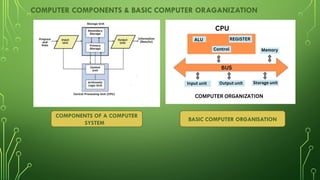
COMPUTER COMPONENTS &BASIC COMPUTER ORAGANIZATION
COMPONENTS OF A COMPUTER
SYSTEM
BASIC COMPUTER ORGANISATION
4.
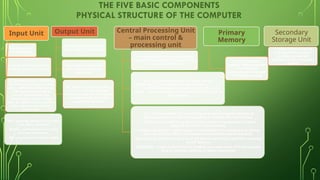
THE FIVE BASICCOMPONENTS
PHYSICAL STRUCTURE OF THE COMPUTER
Input Unit
Takes input for
the computer
Input devices attached to the
computer makes the Input unit
Eg. Keyboard, mouse, MICR(Mag
Ink Char Recog in cheques 9 digit
code) , OMR(Optical Mark recog),
OCR (Optical Char recog) to
convert editable data from
scanned paper records of docs
taken by digital camera, joystick –
takes input and converts into
binary code
KB – typewriter like device that types
letter, digits, commands
Mouse – pointing device uses roller
and laser mechanism
Mic – sound input into digital audio
Output Unit
Produces information as
output for the computer
Output devices attached to
the computer makes the
Output Unit
Eg. Monitors or screens, printers,
speaker – converts the output
coming from the CPU into human
readable form like characters,
graphical or AV form.
Central Processing Unit
– main control &
processing unit
It is responsible for processing the
data and instructions It consist of the
ALU and Control Unit
ALU - It is responsible for carrying out the
arithmetic(+,-,*,/) and logical operations (>, <, =, <=,
>=,!=), after the operation/comparison is done, the
result – the numerical or bool value (T/F, 0/1) is put in
the memory
CU – It is responsible for controlling and supervising the process of
interpretation, flow and manipulation of all data and information.
- The CU sends control signals until the required operations are done
properly by the ALU and memory.
-Program execution – gets program instructions from memory and carries
out one after the other, instructions are decoded and interpreted.
-Also controls the flow of data from I/P devices to memory and from memory
to O/P devices.
REGISTERS – small units of CPU for holding data where the CPU stores some
data or memory address or some instruction
Primary
Memory
It is the internal
volatile memory where
the data and
instructions are stored
during processing
Secondary
Storage Unit
It refers to the external
storage devices which
provide permanent
memory to the computer
system
5.
COMPUTER ORGANISATION
LOGICAL STRUCTUREOF A COMPUTER
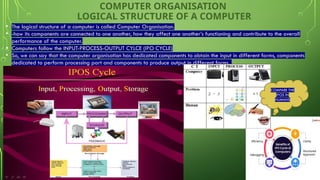
• The logical structure of a computer is called Computer Organisation.
• -how its components are connected to one another, how they affect one another’s functioning and contribute to the overall
performance of the computer.
• Computers follow the INPUT-PROCESS-OUTPUT CYLCE (IPO CYCLE)
• So, we can say that the computer organisation has dedicated components to obtain the input in different forms, components
dedicated to perform processing part and components to produce output in different forms.
COMPARE THE
IPOS IN
HUMANS
6.
THE MEMORY –[MAIN/PRIMARY MEMORY-RAM/ROM]
• Internal workspace of the computer where data and instructions are held during processing.
• Memory location has unique memory address. During a task, it clears the memory and space
is available for the next task.
• The memory cell is the fundamental building block of computer memory. The memory cell is an electronic circuit that stores
one bit of binary information and it must be set to store a logic 1 (high voltage level) and reset to store a logic 0 (low voltage
level). Its value is maintained/stored until it is changed by the set/reset process.
• Layout for the silicon implementation of a six transistor SRAM memory cell -Memory cell (computing) - Wikipedia
1Bit is the elementary unit of memory
8 Bits = 1 Byte – smallest unit which
can represent a data or a character.
Other units of memory – KB, MB, GB,
TB etc.
7.
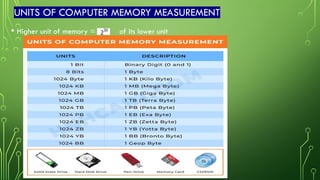
UNITS OF COMPUTERMEMORY MEASUREMENT
• Higher unit of memory = of its lower unit
8.
PARTS OF THEMAIN MEMORY/PRIMARY MEMORY – RAM AND ROM
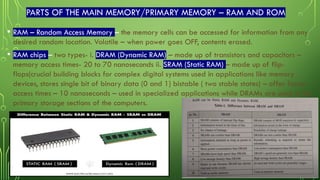
• RAM – Random Access Memory – the memory cells can be accessed for information from any
desired random location. Volatile – when power goes OFF, contents erased.
• RAM chips – two types- i. DRAM (Dynamic RAM) – made up of transistors and capacitors –
memory access times- 20 to 70 nanoseconds ii. SRAM (Static RAM) – made up of flip-
flops(crucial building blocks for complex digital systems used in applications like memory
devices, stores single bit of binary data (0 and 1) bistable ( two stable states) – offer faster
access times – 10 nanoseconds – used in specialized applications while DRAMs are used in the
primary storage sections of the computers.
MOS field-effect transistors (MOSFETs)
9.
PARTS OF THEMAIN MEMORY/PRIMARY MEMORY – RAM AND ROM
• ROM – Read Only Memory – A memory that performs the read operations only. We
cannot alter or write what is stored in ROM – is made permanent during the hardware
production of the unit – non-volatile – slower than RAM.
• PROM – OTP – One Time Programmable – User programmable memory in which
information is burnt (write) using special equipment called ROM burner
• EPROM – Erasable Programmable ROM – program the memory chip using mechanisms
like UV-radiations and erase it many times as needed. 20 mins to erase EPROM contents
• EEPROM – Electrically Erasable Programmable ROM – EPROM is erased electrically
faster – selective bytes can be erased unlike EPROM where it is fully erased.
• Flash EEPROM – very fast- erased in less than a second – fully and not selectively
• Mask ROM – contents are programmed by the IC manufacturers – not a user
programmable ROM
10.
CACHE MEMORY
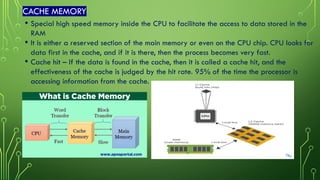
• Specialhigh speed memory inside the CPU to facilitate the access to data stored in the
RAM
• It is either a reserved section of the main memory or even on the CPU chip. CPU looks for
data first in the cache, and if it is there, then the process becomes very fast.
• Cache hit – If the data is found in the cache, then it is called a cache hit, and the
effectiveness of the cache is judged by the hit rate. 95% of the time the processor is
accessing information from the cache.
11.
CACHE MEMORY
Key Concepts:
•Purpose:
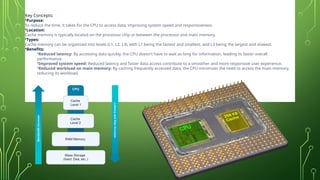
Toreduce the time, it takes for the CPU to access data, improving system speed and responsiveness.
•Location:
Cache memory is typically located on the processor chip or between the processor and main memory.
•Types:
Cache memory can be organized into levels (L1, L2, L3), with L1 being the fastest and smallest, and L3 being the largest and slowest.
•Benefits:
•Reduced latency: By accessing data quickly, the CPU doesn't have to wait as long for information, leading to faster overall
performance.
•Improved system speed: Reduced latency and faster data access contribute to a smoother and more responsive user experience.
•Reduced workload on main memory: By caching frequently accessed data, the CPU minimizes the need to access the main memory,
reducing its workload.
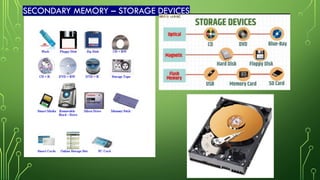
SECONDARY MEMORY –STORAGE DEVICES
• Needed for storing large amount of data permanently. Primary storage has limited storage
capacity and is temporary. Same units of memory for secondary storage units.
• Hard disk –circular platters coated with magnetic material stacked with space between them;
info recorded as magnetic spots on the disks. Storage – GBs to TBs.
• Compact disk – optical media – store up to 700 MB.
• DVDs – optical storage – 15 times more storage than CDs and 20 times more fast than CD-
ROM; SD (Super Density Disk) cab store up to 17 GBs or 4 hrs of movie on a side.
• Flash memory – small, ultra-portable storage device with a ‘solid state’ memory- similar to
RAM, but data retained even if power is OFF; not like magnetic or optical storage devices.
256 MBs – 128 GBs and beyond.
• Blu Ray Disk (BD) – optical storage media; uses high HD video and data storage; uses blue-
violet laser; shorter wavelength focuses laser spot with larger precision. Larger packing of
data up to 128 GB.
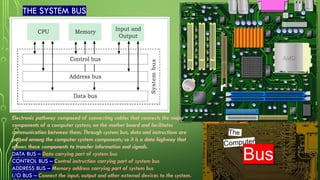
THE SYSTEM BUS
Electronicpathway composed of connecting cables that connects the major
components of a computer system, on the mother board and facilitates
communication between them. Through system bus, data and instructions are
passed among the computer system components; so it is a data highway that
allows these components to transfer information and signals.
DATA BUS – Data carrying part of system bus
CONTROL BUS – Control instruction carrying part of system bus
ADDRESS BUS – Memory address carrying part of system bus
I/O BUS – Connect the input, output and other external devices to the system.
16.
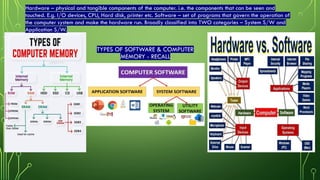
TYPES OF SOFTWARE& COMPUTER
MEMORY - RECALL
Hardware – physical and tangible components of the computer. i.e. the components that can be seen and
touched. E.g. I/O devices, CPU, Hard disk, printer etc. Software – set of programs that govern the operation of
the computer system and make the hardware run. Broadly classified into TWO categories – System S/W and
Application S/W.
17.
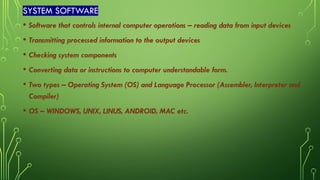
SYSTEM SOFTWARE
• Softwarethat controls internal computer operations – reading data from input devices
• Transmitting processed information to the output devices
• Checking system components
• Converting data or instructions to computer understandable form.
• Two types – Operating System (OS) and Language Processor (Assembler, Interpreter and
Compiler)
• OS – WINDOWS, UNIX, LINUS, ANDROID, MAC etc.
18.
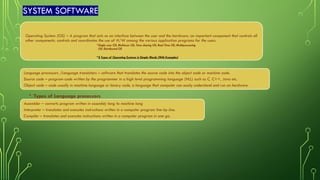
SYSTEM SOFTWARE
Operating System(OS) – A program that acts as an interface between the user and the hardware; an important component that controls all
other components; controls and coordinates the use of H/W among the various application programs for the users.
•Single user OS, Multiuser OS, Time sharing OS, Real Time OS, Multiprocessing
OS, Distributed OS
•8 Types of Operating Systems in Simple Words (With Examples)
Language processors /Language translators – software that translates the source code into the object code or machine code.
Source code – program-code written by the programmer in a high level programming language (HLL) such as C, C++, Java etc.
Object code – code usually in machine language or binary code, a language that computer can easily understand and run on hardware.
• Types of Language processors
Assembler – converts program written in assembly lang to machine lang
Interpreter – translates and executes instructions written in a computer program line-by-line.
Compiler – translates and executes instructions written in a computer program in one go.
19.
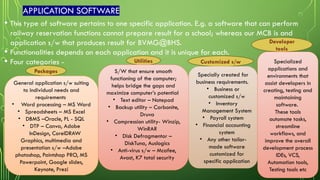
APPLICATION SOFTWARE
• Thistype of software pertains to one specific application. E.g. a software that can perform
railway reservation functions cannot prepare result for a school; whereas our MCB is and
application s/w that produces result for BVMG@BHS.
• Functionalities depends on each application and it is unique for each.
• Four categories - Utilities Customized s/w
Developer
tools
Packages
General application s/w suiting
to individual needs and
requirements
• Word processing – MS Word
• Spreadsheets – MS Excel
• DBMS –Oracle, PL - SQL
• DTP – Canva, Adobe
InDesign, CorelDRAW
Graphics, multimedia and
presentation s/w –Adobe
photoshop, Paintshop PRO, MS
Powerpoint, Google slides,
Keynote, Prezi
S/W that ensure smooth
functioning of the computer;
helps bridge the gaps and
maximize computer’s potential
• Text editor – Notepad
• Backup utility – Carbonite,
Druva
• Compression utility- Winzip,
WinRAR
• Disk Defragmentor –
DiskTuna, Auslogics
• Anti-virus s/w – Mcafee,
Avast, K7 total security
Specially created for
business requirements.
• Business or
customized s/w
• Inventory
Management System
• Payroll system
• Financial accounting
system
• Any other tailor-
made software
customized for
specific application
Specialized
applications and
environments that
assist developers in
creating, testing and
maintaining
software.
These tools
automate tasks,
streamline
workflows, and
improve the overall
development process
IDEs, VCS,
Automation tools,
Testing tools etc
20.
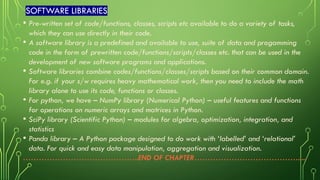
SOFTWARE LIBRARIES
• Pre-writtenset of code/functions, classes, scripts etc available to do a variety of tasks,
which they can use directly in their code.
• A software library is a predefined and available to use, suite of data and progamming
code in the form of prewritten code/functions/scripts/classes etc. that can be used in the
development of new software programs and applications.
• Software libraries combine codes/functions/classes/scripts based on their common domain.
For e.g. if your s/w requires heavy mathematical work, then you need to include the math
library alone to use its code, functions or classes.
• For python, we have – NumPy library (Numerical Python) – useful features and functions
for operations on numeric arrays and matrices in Python.
• SciPy library (Scientific Python) – modules for algebra, optimization, integration, and
statistics
• Panda library – A Python package designed to do work with ‘labelled’ and ‘relational’
data. For quick and easy data manipulation, aggregation and visualization.
……………………………………..END OF CHAPTER………………………………….....
![THE MEMORY – [MAIN/PRIMARY MEMORY-RAM/ROM]
• Internal workspace of the computer where data and instructions are held during processing.
• Memory location has unique memory address. During a task, it clears the memory and space
is available for the next task.
• The memory cell is the fundamental building block of computer memory. The memory cell is an electronic circuit that stores
one bit of binary information and it must be set to store a logic 1 (high voltage level) and reset to store a logic 0 (low voltage
level). Its value is maintained/stored until it is changed by the set/reset process.
• Layout for the silicon implementation of a six transistor SRAM memory cell -Memory cell (computing) - Wikipedia
1Bit is the elementary unit of memory
8 Bits = 1 Byte – smallest unit which
can represent a data or a character.
Other units of memory – KB, MB, GB,
TB etc.](https://image.slidesharecdn.com/computersystemoverview-chapter1-250911160041-c554b237/85/COMPUTER-SYSTEM-OVERVIEW-CHAPTER-1-pptx-6-320.jpg)


![20260201 [FOSDEM] gomodjail - library sandboxing for Go modules.pdf](https://cdn.slidesharecdn.com/ss_thumbnails/20260201fosdemgomodjail-librarysandboxingforgomodules-260201225659-76609ec4-thumbnail.jpg?width=640&height=640&fit=bounds)


