COMPUTER INTEGRATED
MANUFACTURING
1
Computer Integrated
Manufacturing
• Computer Integrated Manufacturing,
known as CIM, is the phrase used to describe the
complete automation of a manufacturing plant,
with all processes functioning under computer
control and digital information tying them
together.
CIM
• It was promoted by machine tool manufacturers in
the 1980's and the Society for Manufacturing
Engineers (CASA/SME). Quite often it was
mistaken for the concept of a "lights out" factory. It
includes
• CAD/CAM, computer-aided design/computer-aided
manufacturing,
• CAPP, computer-aided process planning,
• CNC, computer numerical control machine tools,
DNC, direct numerical control machine tools,
• The heart of computer integrated manufacturing is
CAD/CAM. Computer-aided design (CAD) and
computer-aided manufacturing (CAM) systems are
essential to reducing cycle times in the organization.
• CAD/CAM is a high technology integrating tool
between design and manufacturing.
• CAD techniques make use of group technology to
create similar geometries for quick retrieval.
Electronic files replace drawing rooms.
CAD/CAM
• CAD/CAM integrated systems provide
design/drafting, planning and scheduling, and
fabrication capabilities. CAD provides the
electronic part images, and CAM provides the
facility for toolpath cutters to take on the raw
piece.
CAD/CAM
• The computer graphics that CAD provides allows
designers to create electronic images which can be
portrayed in two dimensions, or as a three
dimensional solid component or assembly which can
be rotated as it is viewed.
• Advanced software programs can analyze and test
designs before a prototype is made. Finite element
analysis programs allow engineers to predict stress
points on a part, and the effects of loading.
CAD/CAM
• Once a part has been designed, the graphics can be
used to program the tool path to machine the part.
When integrated with an NC postprocessor, the NC
program that can be used in a CNC machine is
produced.
• The design graphics can also be used to design tools
and fixtures, and for inspections by coordinate
measuring machines. The more downstream use
that is made of CAD, the more time that is saved in
the overall process.
CAD/CAM
8
COMPUTER INTEGRATED
MANUFACTURING
NUMERICAL CONTROL
9
A Definition:Numerical Control
Numerical Control is a system in which
actions are controlled by the direct insertion
of numerical data at some point. The
system must automatically interpret at least
some portion of the data
10
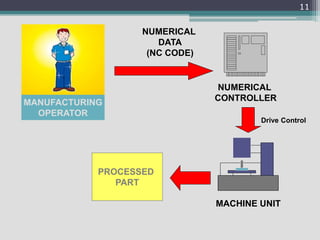
MACHINE UNIT
NUMERICAL
CONTROLLER
NUMERICAL
DATA
(NC CODE)
MANUFACTURING
OPERATOR
PROCESSED
PART
Drive Control
11
Types of Numerical Control
• Conventional Numerical Control (NC)
• Direct Numerical Control (DNC)
• Computer Numerical Control (CNC)
12
Conventional Numerical
Control (NC)
Data is sent to the machine tool by means of
punch cards or tapes. The reader at the
machine performs no calculations or
interpolations.
13
Direct Numeric Control (DNC)
Is a method where a single computer
controls many numerical control machine
tools. These machine tools may or may not
be of a similar nature
14
Computer Numerical Control
(CNC)
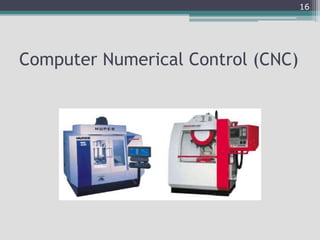
The idea of computer numerical control is
to position a computer right at the
machine tool. Most, if not all machine tools
that are numericaly controlled are CNC
machine tools.
15
Computer Numerical Control (CNC)
16
Advantages
o Reduces time for
delivery of part
Reduces scrap rate of
material
o Reduces tooling
costs
o Reduces layout time
o Increases machine
and tool life
o Reduces storage
problems
o Less setup time
o Reduces actual
machining time
Allows rapid design
changes in part Less
jigs and fixtures are
needed
17
NC Programming Fundamentals
or how to put the “GO” in your G-codes
18
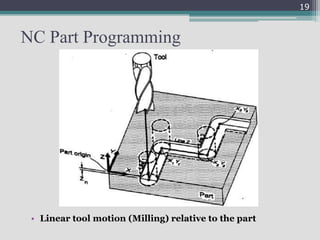
NC Part Programming
• Linear tool motion (Milling) relative to the part
19
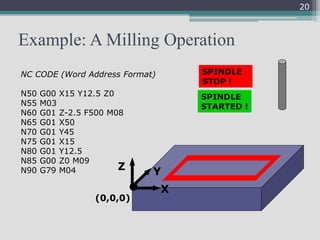
Example: A Milling Operation
X
Z Y
(0,0,0)
NC CODE (Word Address Format)
N50 G00 X15 Y12.5 Z0
N55 M03
N60 G01 Z-2.5 F500 M08
N65 G01 X50
N70 G01 Y45
N75 G01 X15
N80 G01 Y12.5
N85 G00 Z0 M09
N90 G79 M04
SPINDLE
STARTED !
SPINDLE
STOP !
20
Basics of NC Part Programming
• it is always assumed that the tool moves relative to
the work piece no matter what the real situation is.
• The position of the tool is described by using a
Cartesian coordinate system.
• If (0,0,0) position can be described by the operator,
then it is called floating zero.
21
Preparatory Functions (G Codes)
G-codes
ß Tool motion
ß Rapid traverse G00
ß Positioning command
ß Moves the tool at a rapid feed rate to a specific XYZ
coordinate
ß Takes the shortest route to reach the specified point
ß Format
ß G00 Xx Yy Zz
22
G-codes
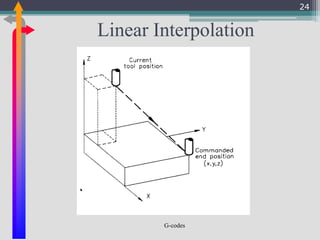
Linear Interpolation
ß Moves the tool from its current position to a
specific XYZ coordinate at a specified feed
rate
ß Format
ß G01 Xx Yy Zz ff
23
G-codes
Linear Interpolation
24
G-codes
Circular Interpolations
ß Moves a tool around a circular arc to a
specific XYZ coordinate
ß Requires 5 pieces of information
ß Plane selection
ß Arc start point
ß Rotation direction
ß Arc end point
ß Arc center or arc radius
25
G-codes
Circular Interpolations
ß G02 circular interpolation clockwise around
an arc G03 circular interpolation counter
clockwise around an arc
26
G-codes
How You Tell Directions
ß The direction for G02 can be determined
by rotating from the positive axes
towards the negative axes. The direction
for a G03 is exactly opposite
27
G-codes
Still Going in Circles
ß basic methods
ß Radius method
ß (G02,G03) Xx Yy Rr Ff (on the XY plane)
28
G-codes
Radius Method
ß Requires two entry parameters in the
command the XYZ end point of the arc and
the radius R
ß G02/G03 Xx Yy Zz Rr
29
G-codes
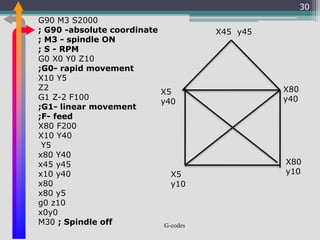
30
G90 M3 S2000
; G90 -absolute coordinate
; M3 - spindle ON
; S - RPM
G0 X0 Y0 Z10
;G0- rapid movement
X10 Y5
Z2
G1 Z-2 F100
;G1- linear movement
;F- feed
X80 F200
X10 Y40
Y5
x80 Y40
x45 y45
x10 y40
x80
x80 y5
g0 z10
x0y0
M30 ; Spindle off
X5
y10
X80
y10
X80
y40
X45 y45
X5
y40
G-codes
31
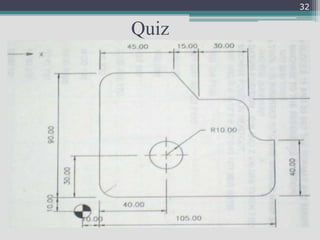
32
Quiz
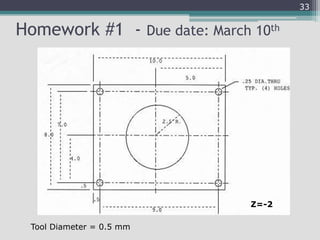
Homework #1 - Due date: March 10th
33
Z=-2
Tool Diameter = 0.5 mm
CNC Pro-Light 1000 Machine
34
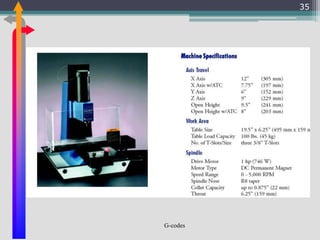
G-codes
35
36
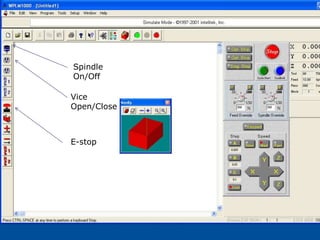
Spindle
On/Off
Vice
Open/Close
E-stop
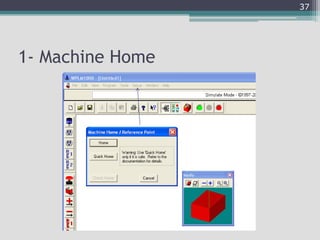
1- Machine Home
37
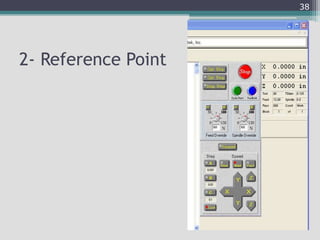
2- Reference Point
38
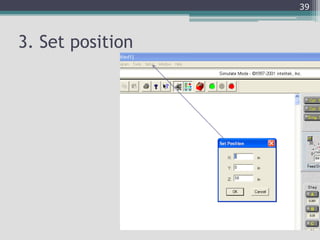
3. Set position
39
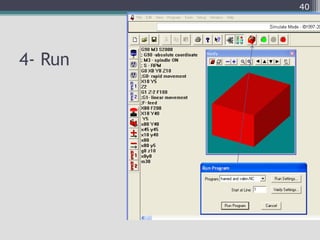
4- Run
40

COMPUTER ADDED MANUFACTURING

  • 1.
  • 2.
    Computer Integrated Manufacturing • ComputerIntegrated Manufacturing, known as CIM, is the phrase used to describe the complete automation of a manufacturing plant, with all processes functioning under computer control and digital information tying them together.
  • 3.
    CIM • It waspromoted by machine tool manufacturers in the 1980's and the Society for Manufacturing Engineers (CASA/SME). Quite often it was mistaken for the concept of a "lights out" factory. It includes • CAD/CAM, computer-aided design/computer-aided manufacturing, • CAPP, computer-aided process planning, • CNC, computer numerical control machine tools, DNC, direct numerical control machine tools,
  • 4.
    • The heartof computer integrated manufacturing is CAD/CAM. Computer-aided design (CAD) and computer-aided manufacturing (CAM) systems are essential to reducing cycle times in the organization. • CAD/CAM is a high technology integrating tool between design and manufacturing. • CAD techniques make use of group technology to create similar geometries for quick retrieval. Electronic files replace drawing rooms. CAD/CAM
  • 5.
    • CAD/CAM integratedsystems provide design/drafting, planning and scheduling, and fabrication capabilities. CAD provides the electronic part images, and CAM provides the facility for toolpath cutters to take on the raw piece. CAD/CAM
  • 6.
    • The computergraphics that CAD provides allows designers to create electronic images which can be portrayed in two dimensions, or as a three dimensional solid component or assembly which can be rotated as it is viewed. • Advanced software programs can analyze and test designs before a prototype is made. Finite element analysis programs allow engineers to predict stress points on a part, and the effects of loading. CAD/CAM
  • 7.
    • Once apart has been designed, the graphics can be used to program the tool path to machine the part. When integrated with an NC postprocessor, the NC program that can be used in a CNC machine is produced. • The design graphics can also be used to design tools and fixtures, and for inspections by coordinate measuring machines. The more downstream use that is made of CAD, the more time that is saved in the overall process. CAD/CAM
  • 8.
  • 9.
  • 10.
    A Definition:Numerical Control NumericalControl is a system in which actions are controlled by the direct insertion of numerical data at some point. The system must automatically interpret at least some portion of the data 10
  • 11.
  • 12.
    Types of NumericalControl • Conventional Numerical Control (NC) • Direct Numerical Control (DNC) • Computer Numerical Control (CNC) 12
  • 13.
    Conventional Numerical Control (NC) Datais sent to the machine tool by means of punch cards or tapes. The reader at the machine performs no calculations or interpolations. 13
  • 14.
    Direct Numeric Control(DNC) Is a method where a single computer controls many numerical control machine tools. These machine tools may or may not be of a similar nature 14
  • 15.
    Computer Numerical Control (CNC) Theidea of computer numerical control is to position a computer right at the machine tool. Most, if not all machine tools that are numericaly controlled are CNC machine tools. 15
  • 16.
  • 17.
    Advantages o Reduces timefor delivery of part Reduces scrap rate of material o Reduces tooling costs o Reduces layout time o Increases machine and tool life o Reduces storage problems o Less setup time o Reduces actual machining time Allows rapid design changes in part Less jigs and fixtures are needed 17
  • 18.
    NC Programming Fundamentals orhow to put the “GO” in your G-codes 18
  • 19.
    NC Part Programming •Linear tool motion (Milling) relative to the part 19
  • 20.
    Example: A MillingOperation X Z Y (0,0,0) NC CODE (Word Address Format) N50 G00 X15 Y12.5 Z0 N55 M03 N60 G01 Z-2.5 F500 M08 N65 G01 X50 N70 G01 Y45 N75 G01 X15 N80 G01 Y12.5 N85 G00 Z0 M09 N90 G79 M04 SPINDLE STARTED ! SPINDLE STOP ! 20
  • 21.
    Basics of NCPart Programming • it is always assumed that the tool moves relative to the work piece no matter what the real situation is. • The position of the tool is described by using a Cartesian coordinate system. • If (0,0,0) position can be described by the operator, then it is called floating zero. 21
  • 22.
    Preparatory Functions (GCodes) G-codes ß Tool motion ß Rapid traverse G00 ß Positioning command ß Moves the tool at a rapid feed rate to a specific XYZ coordinate ß Takes the shortest route to reach the specified point ß Format ß G00 Xx Yy Zz 22
  • 23.
    G-codes Linear Interpolation ß Movesthe tool from its current position to a specific XYZ coordinate at a specified feed rate ß Format ß G01 Xx Yy Zz ff 23
  • 24.
  • 25.
    G-codes Circular Interpolations ß Movesa tool around a circular arc to a specific XYZ coordinate ß Requires 5 pieces of information ß Plane selection ß Arc start point ß Rotation direction ß Arc end point ß Arc center or arc radius 25
  • 26.
    G-codes Circular Interpolations ß G02circular interpolation clockwise around an arc G03 circular interpolation counter clockwise around an arc 26
  • 27.
    G-codes How You TellDirections ß The direction for G02 can be determined by rotating from the positive axes towards the negative axes. The direction for a G03 is exactly opposite 27
  • 28.
    G-codes Still Going inCircles ß basic methods ß Radius method ß (G02,G03) Xx Yy Rr Ff (on the XY plane) 28
  • 29.
    G-codes Radius Method ß Requirestwo entry parameters in the command the XYZ end point of the arc and the radius R ß G02/G03 Xx Yy Zz Rr 29
  • 30.
    G-codes 30 G90 M3 S2000 ;G90 -absolute coordinate ; M3 - spindle ON ; S - RPM G0 X0 Y0 Z10 ;G0- rapid movement X10 Y5 Z2 G1 Z-2 F100 ;G1- linear movement ;F- feed X80 F200 X10 Y40 Y5 x80 Y40 x45 y45 x10 y40 x80 x80 y5 g0 z10 x0y0 M30 ; Spindle off X5 y10 X80 y10 X80 y40 X45 y45 X5 y40
  • 31.
  • 32.
  • 33.
    Homework #1 -Due date: March 10th 33 Z=-2 Tool Diameter = 0.5 mm
  • 34.
  • 35.
  • 36.
  • 37.
  • 38.
  • 39.
  • 40.