© Professor Alan Hedge, September, 2000


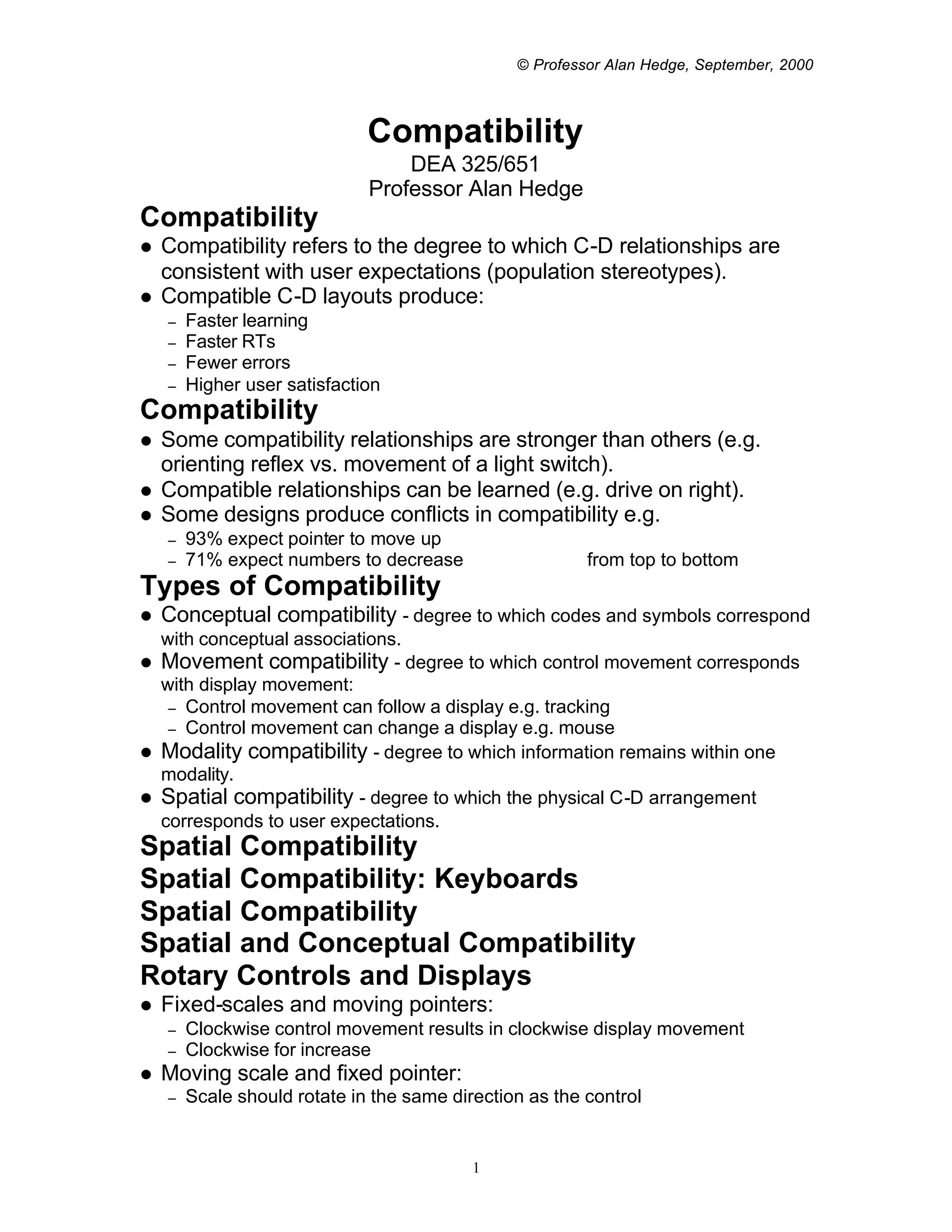
                              Compatibility
                                  DEA 325/651
                              Professor Alan Hedge
Compatibility
l   Compatibility refers to the degree to which C-D relationships are
    consistent with user expectations (population stereotypes).
l   Compatible C-D layouts produce:
    –   Faster learning
    –   Faster RTs
    –   Fewer errors
    –   Higher user satisfaction
Compatibility
l   Some compatibility relationships are stronger than others (e.g.
    orienting reflex vs. movement of a light switch).
l   Compatible relationships can be learned (e.g. drive on right).
l   Some designs produce conflicts in compatibility e.g.
    –   93% expect pointer to move up
    –   71% expect numbers to decrease                   from top to bottom
Types of Compatibility
l   Conceptual compatibility - degree to which codes and symbols correspond
  with conceptual associations.
l Movement compatibility - degree to which control movement corresponds
  with display movement:
   – Control movement can follow a display e.g. tracking
   – Control movement can change a display e.g. mouse
l Modality compatibility - degree to which information remains within one
  modality.
l Spatial compatibility - degree to which the physical C-D arrangement
  corresponds to user expectations.
Spatial Compatibility
Spatial Compatibility: Keyboards
Spatial Compatibility
Spatial and Conceptual Compatibility
Rotary Controls and Displays
l   Fixed-scales and moving pointers:
    –   Clockwise control movement results in clockwise display movement
    –   Clockwise for increase
l   Moving scale and fixed pointer:
    –   Scale should rotate in the same direction as the control


                                           1
© Professor Alan Hedge, September, 2000


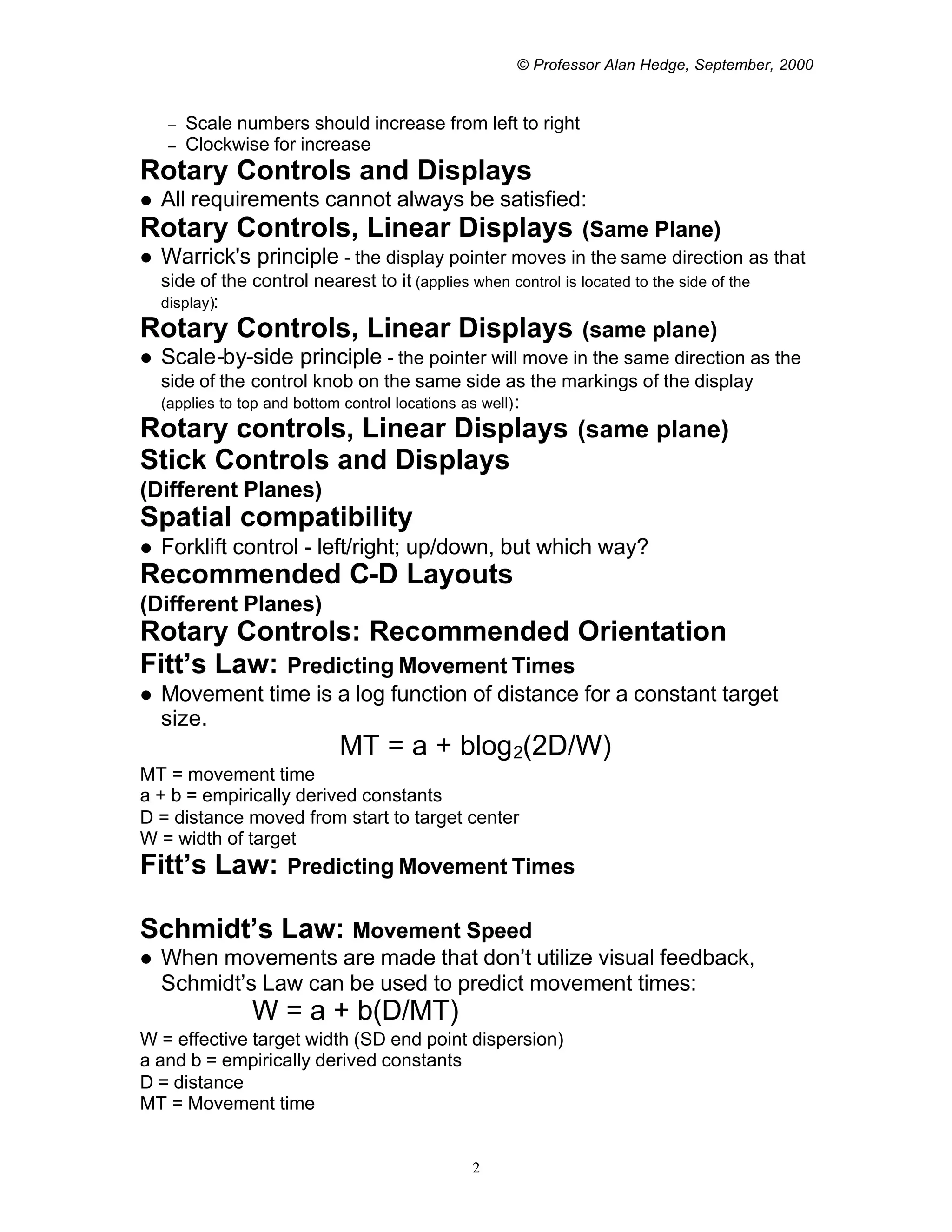
     –   Scale numbers should increase from left to right
     –   Clockwise for increase
Rotary Controls and Displays
l All requirements cannot always be satisfied:
Rotary Controls, Linear Displays (Same Plane)
l Warrick's principle - the display pointer moves in the same direction as that
    side of the control nearest to it (applies when control is located to the side of the
    display):
Rotary Controls, Linear Displays                                (same plane)
l   Scale-by-side principle - the pointer will move in the same direction as the
    side of the control knob on the same side as the markings of the display
    (applies to top and bottom control locations as well) :
Rotary controls, Linear Displays (same plane)
Stick Controls and Displays
(Different Planes)
Spatial compatibility
l   Forklift control - left/right; up/down, but which way?
Recommended C-D Layouts
(Different Planes)
Rotary Controls: Recommended Orientation
Fitt’s Law: Predicting Movement Times
l   Movement time is a log function of distance for a constant target
    size.
                             MT = a + blog 2(2D/W)
MT = movement time
a + b = empirically derived constants
D = distance moved from start to target center
W = width of target
Fitt’s Law:           Predicting Movement Times

Schmidt’s Law: Movement Speed
l   When movements are made that don’t utilize visual feedback,
    Schmidt’s Law can be used to predict movement times:
                 W = a + b(D/MT)
W = effective target width (SD end point dispersion)
a and b = empirically derived constants
D = distance
MT = Movement time


                                                2
© Professor Alan Hedge, September, 2000


l   Describes accuracy for movements between 140-200 ms and up to
    12 inches distance.


                                 3

Compatibility

  • 1.
    © Professor AlanHedge, September, 2000 Compatibility DEA 325/651 Professor Alan Hedge Compatibility l Compatibility refers to the degree to which C-D relationships are consistent with user expectations (population stereotypes). l Compatible C-D layouts produce: – Faster learning – Faster RTs – Fewer errors – Higher user satisfaction Compatibility l Some compatibility relationships are stronger than others (e.g. orienting reflex vs. movement of a light switch). l Compatible relationships can be learned (e.g. drive on right). l Some designs produce conflicts in compatibility e.g. – 93% expect pointer to move up – 71% expect numbers to decrease from top to bottom Types of Compatibility l Conceptual compatibility - degree to which codes and symbols correspond with conceptual associations. l Movement compatibility - degree to which control movement corresponds with display movement: – Control movement can follow a display e.g. tracking – Control movement can change a display e.g. mouse l Modality compatibility - degree to which information remains within one modality. l Spatial compatibility - degree to which the physical C-D arrangement corresponds to user expectations. Spatial Compatibility Spatial Compatibility: Keyboards Spatial Compatibility Spatial and Conceptual Compatibility Rotary Controls and Displays l Fixed-scales and moving pointers: – Clockwise control movement results in clockwise display movement – Clockwise for increase l Moving scale and fixed pointer: – Scale should rotate in the same direction as the control 1
  • 2.
    © Professor AlanHedge, September, 2000 – Scale numbers should increase from left to right – Clockwise for increase Rotary Controls and Displays l All requirements cannot always be satisfied: Rotary Controls, Linear Displays (Same Plane) l Warrick's principle - the display pointer moves in the same direction as that side of the control nearest to it (applies when control is located to the side of the display): Rotary Controls, Linear Displays (same plane) l Scale-by-side principle - the pointer will move in the same direction as the side of the control knob on the same side as the markings of the display (applies to top and bottom control locations as well) : Rotary controls, Linear Displays (same plane) Stick Controls and Displays (Different Planes) Spatial compatibility l Forklift control - left/right; up/down, but which way? Recommended C-D Layouts (Different Planes) Rotary Controls: Recommended Orientation Fitt’s Law: Predicting Movement Times l Movement time is a log function of distance for a constant target size. MT = a + blog 2(2D/W) MT = movement time a + b = empirically derived constants D = distance moved from start to target center W = width of target Fitt’s Law: Predicting Movement Times Schmidt’s Law: Movement Speed l When movements are made that don’t utilize visual feedback, Schmidt’s Law can be used to predict movement times: W = a + b(D/MT) W = effective target width (SD end point dispersion) a and b = empirically derived constants D = distance MT = Movement time 2
  • 3.
    © Professor AlanHedge, September, 2000 l Describes accuracy for movements between 140-200 ms and up to 12 inches distance. 3