Shi~Kia Carter 
Presents 
Collaborative Learning 
Community: Student 
Reflective Assessment
Abstract 
Every teacher’s goal is for their students to 
succeed. Assessments measure success in 
concept understanding. Therefore, teachers 
need to prepare their students for these 
assessments. Issues may arise around question 
language or question format. The teachers must 
help the students overcome these roadblocks 
without compromising purposeful instruction 
(Greene & Melton 2007). The following 
presentation examines two areas of assessments 
that teachers can utilize when integrating 
technology-based learning.
Introduction 
• With the vast push for technology integration in our schools 
systems, multiple perspectives have emerged. 
• The Blue Team researched the effectiveness of several 
formative and summative technology-based assessment 
tools on the front lines of engaging the students and create 
higher level learning in the classroom 
• The following presentation will cover: 
– Whether the tool is Computer-based or Web-based 
– Tool cost 
– What data the tool produces 
– How can it drives instruction 
– How the tool Integrates Differentiate Instruction
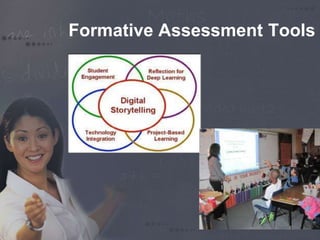
Formative Assessment Tools
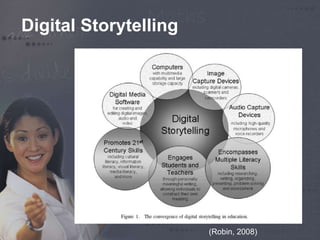
Digital Storytelling 
(Robin, 2008)
Digital Storytelling 
• Short form of a Digital film-making that allows 
people to share aspect of their lives. 
• Users become creative storytellers through 
writing a script and developing an interesting 
story. 
• Various types of multimedia utilized during this 
process; including, 
• computer-based graphics, recorded audio, 
computer-generated text, video clips, and music 
so that it can be played on a computer, uploaded 
on a web site, or burned on a DVD (Robin, 
2008).
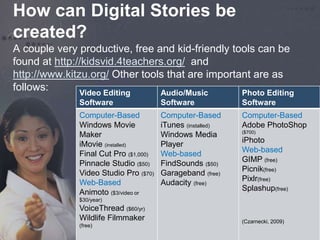
How can Digital Stories be 
created? 
A couple very productive, free and kid-friendly tools can be 
found at http://kidsvid.4teachers.org/ and 
http://www.kitzu.org/ Other tools that are important are as 
follows: 
Video Editing 
Software 
Audio/Music 
Software 
Photo Editing 
Software 
Computer-Based 
Windows Movie 
Maker 
iMovie (installed) 
Final Cut Pro ($1,000) 
Pinnacle Studio ($50) 
Video Studio Pro ($70) 
Web-Based 
Animoto ($3/video or 
$30/year) 
VoiceThread ($60/yr) 
Wildlife Filmmaker 
(free) 
Computer-Based 
iTunes (installed) 
Windows Media 
Player 
Web-based 
FindSounds ($50) 
Garageband (free) 
Audacity (free) 
Computer-Based 
Adobe PhotoShop 
($700) 
iPhoto 
Web-based 
GIMP (free) 
Picnik(free) 
Pixlr(free) 
Splashup(free) 
(Czarnecki, 2009)
Results of Storytelling can Drive 
and differentiate instruction 
• Rubrics set the values of the expectations in a 
student’s digital story 
• Because the student is given access to a rubric 
from the beginning of the lesson, the teacher’s 
instruction should be driven by these goals. 
• Based on the results from her story tellers, the 
teacher must decide to re-teach, enhance or 
pull-out a small group for further guidance. 
• Differentiation: Because expectations can be 
accomplished in different ways through story 
telling, students are given the opportunity to 
represent their learning according to their 
learning style (Sadik, 2008).
Activotes 
Learner Response 
System
What are ActiVotes 
• Quick response assessment tool. 
• Provides instant feedback from teacher 
• Empower students to engaged in classroom 
discussion and build self-confidence 
• Promotes differentiated instructions through peer 
collaborating 
• It stimulate discussions, enhances interactive 
learning, and lively responses. 
• Creates a spontaneous, but focused learning 
environment. 
• Engages creative thinking via polling and solid 
debates in understanding of key concepts.
What data does the tool 
produce? 
•Versatile—Use ActiVote with or without an 
ActivBoard and view assessment results in a wide 
range of intuitive formats, such as graphs, pie 
charts and Excel spreadsheets. 
•Wire-free technology—ActiVote integrates 
seamlessly with all of Promethean’s interactive 
solutions without awkward cables.
Activotes 
student response system 
Is the tool computer-based or Web-based? 
• Operation and use of the ActiVote devices 
requires ActivInspire software, Promethean 
• ActivOffice and/or ActivHub (all included). 
Importing ExamView® and XML files, 
exporting 
• questions and answers to Excel® requires 
ActivInspire Professional Edition (included) or 
• Promethean ActivOffice (included). User 
with administrator/privileged access rights 
required for software installation
Research - ActiVotes 
• In a study involving several classes of varying 
disciplines, Abrahamson (1999) found that 
students had a better understanding for the 
subject matter, enjoyed the classes more, and did 
more thinking in classes where student response 
systems were used. 
• When using the ActiVotes, the teacher and the 
students are able to get immediate feedback 
(Promethean, n.d.), with it being “almost like you 
are one-on-one with each child at the same time” 
(Johnson & McLeod, 2004-2005, p. 19). The 
opportunity that the interactive whiteboard offers 
for continuous assessment and immediate 
feedback is an asset to this form of technology.
Data Driven and Differentiated 
instruction summary... 
• ActiVote encourages students to engage, 
interact with and contribute to lessons, resulting 
in stimulating discussions and lively, insightful 
debates. 
• Streamline instructional management—Instantly 
gauge student comprehension and identify 
student achievement trends. 
• Enhance classroom efficiency—Self-evaluation 
helps increase student confidence and 
productivity 
• Make learning fun—Engage students and 
enliven classrooms by encouraging active, 
hands-on participation.
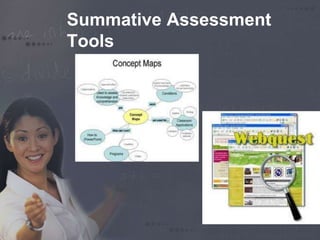
Summative Assessment 
Tools
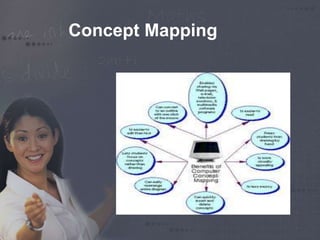
Concept Mapping
Concept Mapping 
(What Are Concept Mapping?) 
– Graphical tools for organizing and 
representing knowledge 
– Circular links that connects two or 
more concept or phrase. 
– Shows relationship between two 
concept links
Concept Mapping 
(Location) 
• Free downloadable software 
• Easy access online 
• Free version to use with ease 
• Paid version for more features 
Free websites are: 
www.mindmeister.com 
www.xmind.net 
www.inspiration.com/inspiration 
http://freemind.sourceforge.net/wiki/index.php/ma 
in.page
Research – Concept mapping 
- They are more effective in promoting 
knowledge retention (Poole & Davis, 2006) 
- They influence concentration and overall test 
performance. 
- They promote interaction and engagement 
between students and material (Hall & 
O’Donnell, 1996). 
- Powerful evaluation tool 
- Encourages students to use meaningful 
learning patterns 
- Effective in identifying valid and invalid ideas.
Concept Mapping (Summary) 
• Concept maps offer instructors the 
opportunity to assess what links students can 
make between concept. The students can 
add their own prior knowledge to what has 
been taught and expand their knowledge 
base. 
• The instructor can have a parking lot of terms 
that the students must have included in their 
maps and chart the missing concepts. The 
missing concepts could be re-taught.
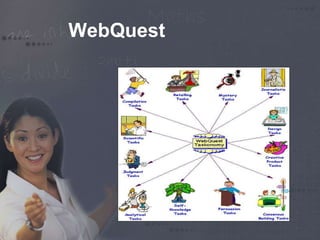
WebQuest
What is a WebQuest? 
• An inquiry-adapted online tool for learning 
• Based on inquiry and constructivism 
• Students can complete in the classroom or at 
home. 
• Most or all of the information that are discover 
and evaluate comes from the internet. 
• It help builds a solid foundation that prepares 
students for the future. 
• Enables cooperative and collaborative learning
WebQuest - Research 
WebQuest was developed in the spring of 
1995, by Dr. Bernie Dodge. 
Dr. Dodge, a professor of educational 
technology at San Diego State University, 
developed and identified the concept of 
WebQuest while teaching an in-service 
class to teachers. He wanted to give his 
student-teachers a format for online lessons 
that would make the best use of student 
time while fostering higher-level thinking 
skills.
Online Authoring Tool 
(Cost) 
Several different sites to choose from: 
• Fila mentality – fill-in-the-blank tool that guide you 
through picking a topic. (free) 
• zWebQuest – instant software for creating 
WebQuest in a short time. (free) 
• PHPWebQuest – a generator that allows teachers 
to create webquests without the need of writing 
any HTML code or using web page editors. (free) 
• TeacherWeb - Online tool for creating simple 
WebQuests, especially appropriate for younger 
elementary students. ($27 a year)
Data Produce 
Students must follow a series of information to 
accomplish the quest to produce data. 
These are; 
• Introduction - provides background information 
and motivational scenarios like giving students 
roles to play. 
• Task - a detailed description of what students 
will have accomplished by the end of the 
WebQuest. 
• Process - the procedural steps learners should 
go through in accomplishing the task, with 
links embedded in each step.
Data Produce Con’t… 
• Resources - a list of the resources (bookmarked 
web sites, print resources, etc.) that the students 
will need to complete the task. 
• Evaluation - a rubric for evaluating students' work. 
The standards should be fair, clear, consistent, 
and explicit to the given tasks.
Summary 
WebQuest, an interactive web activity, tailored to 
specific subject-area content or topic and enables 
students to accomplish a task or solve a problem. In 
addition, it promotes higher-order thinking to 
process information, employs collaborative learning 
rather than basic information searching and recall. 
Problem solving helps students to learn information 
processing in an interactive manner with peers, 
rather than alienation.
References 
Czarnecki, K. (2009). Software for Digital Storytelling. 
Library Technology Reports, 45(7), 31-36. 
Green, A., Melton, G. (2007). Teaching with the test, 
not to the test. Education Week. 26(45). 
Johnson, D. & McLeod, S. (2004-2005). Get answers 
using student response systems to see students’ 
thinking. Learning and Leading with Technology, 
32(4), 18-23. 
Robin, B. R. (2008). Digital Storytelling: A Powerful 
Technology Tool for the 21st Century Classroom. 
Theory Into Practice, 47(3), 220-228. 
doi:10.1080/00405840802153916
References…. 
Sadik, A. (2008). Digital storytelling: a meaningful 
technology-integrated approach for engaged 
student learning. Educational Technology 
Research & Development, 56(4), 487-506. 
doi:10.1007/s11423-008-9091-8 
https://http://www.prometheanworld.com/en-us/ 
education/products/learner-response-systems/ 
activote/~luckie/ctools 
http://www.kent.k12.wa.us/curriculum/assessment/te 
sting_ABCs/Standards-basedTests.html
References Con’t 
www.webquest.org 
Concepts to Classroom: 
http://www.thirteen.org/edonline/concept2c 
lass/webquests/index.html
Conclusion 
When researching technology-based 
assessment tools, the teachers’ focus 
should be on the content not on the 
question language or format. If teachers 
can help prepare students for these two 
areas, and write quality assessments, the 
students will have a major component for 
success.
The End!

Collaborative learning presentation

  • 1.
    Shi~Kia Carter Presents Collaborative Learning Community: Student Reflective Assessment
  • 2.
    Abstract Every teacher’sgoal is for their students to succeed. Assessments measure success in concept understanding. Therefore, teachers need to prepare their students for these assessments. Issues may arise around question language or question format. The teachers must help the students overcome these roadblocks without compromising purposeful instruction (Greene & Melton 2007). The following presentation examines two areas of assessments that teachers can utilize when integrating technology-based learning.
  • 3.
    Introduction • Withthe vast push for technology integration in our schools systems, multiple perspectives have emerged. • The Blue Team researched the effectiveness of several formative and summative technology-based assessment tools on the front lines of engaging the students and create higher level learning in the classroom • The following presentation will cover: – Whether the tool is Computer-based or Web-based – Tool cost – What data the tool produces – How can it drives instruction – How the tool Integrates Differentiate Instruction
  • 4.
  • 5.
  • 6.
    Digital Storytelling •Short form of a Digital film-making that allows people to share aspect of their lives. • Users become creative storytellers through writing a script and developing an interesting story. • Various types of multimedia utilized during this process; including, • computer-based graphics, recorded audio, computer-generated text, video clips, and music so that it can be played on a computer, uploaded on a web site, or burned on a DVD (Robin, 2008).
  • 7.
    How can DigitalStories be created? A couple very productive, free and kid-friendly tools can be found at http://kidsvid.4teachers.org/ and http://www.kitzu.org/ Other tools that are important are as follows: Video Editing Software Audio/Music Software Photo Editing Software Computer-Based Windows Movie Maker iMovie (installed) Final Cut Pro ($1,000) Pinnacle Studio ($50) Video Studio Pro ($70) Web-Based Animoto ($3/video or $30/year) VoiceThread ($60/yr) Wildlife Filmmaker (free) Computer-Based iTunes (installed) Windows Media Player Web-based FindSounds ($50) Garageband (free) Audacity (free) Computer-Based Adobe PhotoShop ($700) iPhoto Web-based GIMP (free) Picnik(free) Pixlr(free) Splashup(free) (Czarnecki, 2009)
  • 8.
    Results of Storytellingcan Drive and differentiate instruction • Rubrics set the values of the expectations in a student’s digital story • Because the student is given access to a rubric from the beginning of the lesson, the teacher’s instruction should be driven by these goals. • Based on the results from her story tellers, the teacher must decide to re-teach, enhance or pull-out a small group for further guidance. • Differentiation: Because expectations can be accomplished in different ways through story telling, students are given the opportunity to represent their learning according to their learning style (Sadik, 2008).
  • 9.
  • 10.
    What are ActiVotes • Quick response assessment tool. • Provides instant feedback from teacher • Empower students to engaged in classroom discussion and build self-confidence • Promotes differentiated instructions through peer collaborating • It stimulate discussions, enhances interactive learning, and lively responses. • Creates a spontaneous, but focused learning environment. • Engages creative thinking via polling and solid debates in understanding of key concepts.
  • 11.
    What data doesthe tool produce? •Versatile—Use ActiVote with or without an ActivBoard and view assessment results in a wide range of intuitive formats, such as graphs, pie charts and Excel spreadsheets. •Wire-free technology—ActiVote integrates seamlessly with all of Promethean’s interactive solutions without awkward cables.
  • 12.
    Activotes student responsesystem Is the tool computer-based or Web-based? • Operation and use of the ActiVote devices requires ActivInspire software, Promethean • ActivOffice and/or ActivHub (all included). Importing ExamView® and XML files, exporting • questions and answers to Excel® requires ActivInspire Professional Edition (included) or • Promethean ActivOffice (included). User with administrator/privileged access rights required for software installation
  • 13.
    Research - ActiVotes • In a study involving several classes of varying disciplines, Abrahamson (1999) found that students had a better understanding for the subject matter, enjoyed the classes more, and did more thinking in classes where student response systems were used. • When using the ActiVotes, the teacher and the students are able to get immediate feedback (Promethean, n.d.), with it being “almost like you are one-on-one with each child at the same time” (Johnson & McLeod, 2004-2005, p. 19). The opportunity that the interactive whiteboard offers for continuous assessment and immediate feedback is an asset to this form of technology.
  • 14.
    Data Driven andDifferentiated instruction summary... • ActiVote encourages students to engage, interact with and contribute to lessons, resulting in stimulating discussions and lively, insightful debates. • Streamline instructional management—Instantly gauge student comprehension and identify student achievement trends. • Enhance classroom efficiency—Self-evaluation helps increase student confidence and productivity • Make learning fun—Engage students and enliven classrooms by encouraging active, hands-on participation.
  • 15.
  • 16.
  • 17.
    Concept Mapping (WhatAre Concept Mapping?) – Graphical tools for organizing and representing knowledge – Circular links that connects two or more concept or phrase. – Shows relationship between two concept links
  • 18.
    Concept Mapping (Location) • Free downloadable software • Easy access online • Free version to use with ease • Paid version for more features Free websites are: www.mindmeister.com www.xmind.net www.inspiration.com/inspiration http://freemind.sourceforge.net/wiki/index.php/ma in.page
  • 19.
    Research – Conceptmapping - They are more effective in promoting knowledge retention (Poole & Davis, 2006) - They influence concentration and overall test performance. - They promote interaction and engagement between students and material (Hall & O’Donnell, 1996). - Powerful evaluation tool - Encourages students to use meaningful learning patterns - Effective in identifying valid and invalid ideas.
  • 20.
    Concept Mapping (Summary) • Concept maps offer instructors the opportunity to assess what links students can make between concept. The students can add their own prior knowledge to what has been taught and expand their knowledge base. • The instructor can have a parking lot of terms that the students must have included in their maps and chart the missing concepts. The missing concepts could be re-taught.
  • 21.
  • 22.
    What is aWebQuest? • An inquiry-adapted online tool for learning • Based on inquiry and constructivism • Students can complete in the classroom or at home. • Most or all of the information that are discover and evaluate comes from the internet. • It help builds a solid foundation that prepares students for the future. • Enables cooperative and collaborative learning
  • 23.
    WebQuest - Research WebQuest was developed in the spring of 1995, by Dr. Bernie Dodge. Dr. Dodge, a professor of educational technology at San Diego State University, developed and identified the concept of WebQuest while teaching an in-service class to teachers. He wanted to give his student-teachers a format for online lessons that would make the best use of student time while fostering higher-level thinking skills.
  • 24.
    Online Authoring Tool (Cost) Several different sites to choose from: • Fila mentality – fill-in-the-blank tool that guide you through picking a topic. (free) • zWebQuest – instant software for creating WebQuest in a short time. (free) • PHPWebQuest – a generator that allows teachers to create webquests without the need of writing any HTML code or using web page editors. (free) • TeacherWeb - Online tool for creating simple WebQuests, especially appropriate for younger elementary students. ($27 a year)
  • 25.
    Data Produce Studentsmust follow a series of information to accomplish the quest to produce data. These are; • Introduction - provides background information and motivational scenarios like giving students roles to play. • Task - a detailed description of what students will have accomplished by the end of the WebQuest. • Process - the procedural steps learners should go through in accomplishing the task, with links embedded in each step.
  • 26.
    Data Produce Con’t… • Resources - a list of the resources (bookmarked web sites, print resources, etc.) that the students will need to complete the task. • Evaluation - a rubric for evaluating students' work. The standards should be fair, clear, consistent, and explicit to the given tasks.
  • 27.
    Summary WebQuest, aninteractive web activity, tailored to specific subject-area content or topic and enables students to accomplish a task or solve a problem. In addition, it promotes higher-order thinking to process information, employs collaborative learning rather than basic information searching and recall. Problem solving helps students to learn information processing in an interactive manner with peers, rather than alienation.
  • 28.
    References Czarnecki, K.(2009). Software for Digital Storytelling. Library Technology Reports, 45(7), 31-36. Green, A., Melton, G. (2007). Teaching with the test, not to the test. Education Week. 26(45). Johnson, D. & McLeod, S. (2004-2005). Get answers using student response systems to see students’ thinking. Learning and Leading with Technology, 32(4), 18-23. Robin, B. R. (2008). Digital Storytelling: A Powerful Technology Tool for the 21st Century Classroom. Theory Into Practice, 47(3), 220-228. doi:10.1080/00405840802153916
  • 29.
    References…. Sadik, A.(2008). Digital storytelling: a meaningful technology-integrated approach for engaged student learning. Educational Technology Research & Development, 56(4), 487-506. doi:10.1007/s11423-008-9091-8 https://http://www.prometheanworld.com/en-us/ education/products/learner-response-systems/ activote/~luckie/ctools http://www.kent.k12.wa.us/curriculum/assessment/te sting_ABCs/Standards-basedTests.html
  • 30.
    References Con’t www.webquest.org Concepts to Classroom: http://www.thirteen.org/edonline/concept2c lass/webquests/index.html
  • 31.
    Conclusion When researchingtechnology-based assessment tools, the teachers’ focus should be on the content not on the question language or format. If teachers can help prepare students for these two areas, and write quality assessments, the students will have a major component for success.
  • 32.