Cloud Computing - Basics
R|B|A Course 1 in cloud computing
1
Course 1
Richard B ANTAL is an IT consultant with 12+ years of experience in Systems
and Database administration, who worked for large European Mobile
Telecommunication companies in the late 1990’s and early 2000’s (Telecom
Italia Mobile revenue €19.7 billion, T-Mobile revenue €2,08 billion, Wind
Telecom, Revenue: €4,428 billion), moved to Australia in 2006, since 2011
working as Senior Business Analyst and accumulated 5+ years experience in
Business Analysis.
Richard is currently working on a Cloud Migration programme in a mid-sized
organization. While coordinating server migration waves to a managed IaaS
Cloud (full migration of servers in IT) Richard spent time to study how Cloud
Computing started, who the biggest player are, which the key characteristics
of Cloud Computing are and decided to share this knowledge.
Please enjoy the slides!
2
About the author
R|B|A Cloud Computing basics
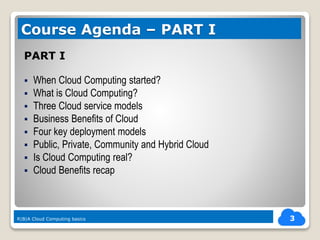
PART I
ď‚§ When Cloud Computing started?
ď‚§ What is Cloud Computing?
ď‚§ Three Cloud service models
ď‚§ Business Benefits of Cloud
ď‚§ Four key deployment models
ď‚§ Public, Private, Community and Hybrid Cloud
ď‚§ Is Cloud Computing real?
ď‚§ Cloud Benefits recap
3
Course Agenda – PART I
R|B|A Cloud Computing basics
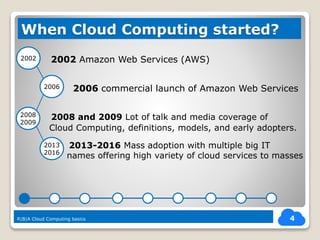
ď‚— 2002 Amazon Web Services (AWS)
2006 commercial launch of Amazon Web Services
R|B|A Cloud Computing basics 4
When Cloud Computing started?
2002
2006
2008
2009
2013
2016
2008 and 2009 Lot of talk and media coverage of
Cloud Computing, definitions, models, and early adopters.
2013-2016 Mass adoption with multiple big IT
names offering high variety of cloud services to masses
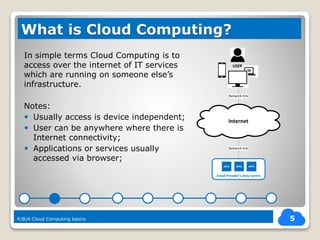
In simple terms Cloud Computing is to
access over the internet of IT services
which are running on someone else’s
infrastructure.
Notes:
ď‚— Usually access is device independent;
ď‚— User can be anywhere where there is
Internet connectivity;
ď‚— Applications or services usually
accessed via browser;
5
What is Cloud Computing?
R|B|A Cloud Computing basics
Internet
Cloud Provider’s Data Centre
Network link
APPL APPLAPPL
USER
Network link
6
Three Cloud service models
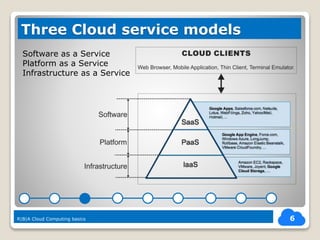
Software as a Service
Platform as a Service
Infrastructure as a Service
R|B|A Cloud Computing basics
7
Business Benefits of Cloud
R|B|A Cloud Computing basics
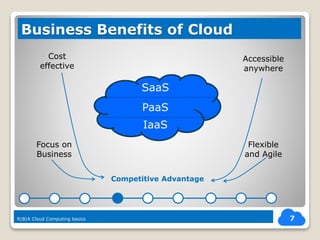
Accessible
anywhere
Flexible
and Agile
Focus on
Business
Cost
effective
IaaS
PaaS
SaaS
Competitive Advantage
8
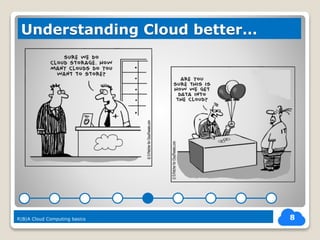
Understanding Cloud better…
R|B|A Cloud Computing basics
9
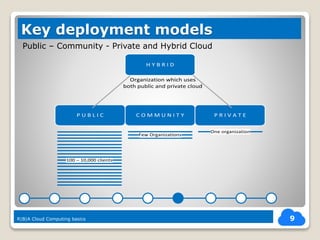
Key deployment models
R|B|A Cloud Computing basics
Public – Community - Private and Hybrid Cloud
P U B L I C P R I V A T EC O M M U N I T Y
Few Organizations
One organization
100 – 10,000 clients
Organization which uses
both public and private cloud
H Y B R I D
10
More on deployment models
R|B|A Cloud Computing basics
Public – Private – Hybrid – Community Cloud
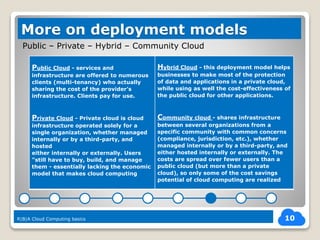
Public Cloud - services and
infrastructure are offered to numerous
clients (multi-tenancy) who actually
sharing the cost of the provider’s
infrastructure. Clients pay for use.
Private Cloud - Private cloud is cloud
infrastructure operated solely for a
single organization, whether managed
internally or by a third-party, and
hosted
either internally or externally. Users
"still have to buy, build, and manage
them - essentially lacking the economic
model that makes cloud computing
Hybrid Cloud - this deployment model helps
businesses to make most of the protection
of data and applications in a private cloud,
while using as well the cost-effectiveness of
the public cloud for other applications.
Community cloud - shares infrastructure
between several organizations from a
specific community with common concerns
(compliance, jurisdiction, etc.), whether
managed internally or by a third-party, and
either hosted internally or externally. The
costs are spread over fewer users than a
public cloud (but more than a private
cloud), so only some of the cost savings
potential of cloud computing are realized
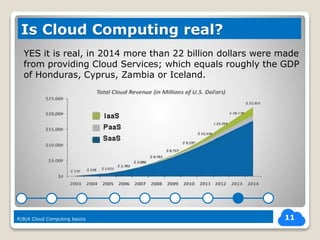
YES it is real, in 2014 more than 22 billion dollars were made
from providing Cloud Services; which equals roughly the GDP
of Honduras, Cyprus, Zambia or Iceland.
11
Is Cloud Computing real?
R|B|A Cloud Computing basics
12
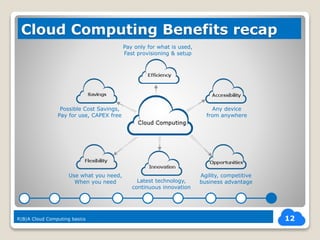
Cloud Computing Benefits recap
R|B|A Cloud Computing basics
Possible Cost Savings,
Pay for use, CAPEX free
Use what you need,
When you need Latest technology,
continuous innovation
Pay only for what is used,
Fast provisioning & setup
Any device
from anywhere
Agility, competitive
business advantage
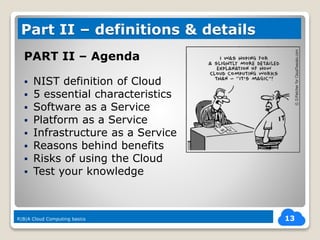
PART II – Agenda
ď‚§ NIST definition of Cloud
ď‚§ 5 essential characteristics
ď‚§ Software as a Service
ď‚§ Platform as a Service
ď‚§ Infrastructure as a Service
ď‚§ Reasons behind benefits
ď‚§ Risks of using the Cloud
ď‚§ Test your knowledge
13
Part II – definitions & details
R|B|A Cloud Computing basics
NIST (National Institute of Standards and Technology US)
definition of Cloud Computing is much more technical and
reveals a lot more about Cloud:
14
Cloud Computing definition
“Cloud computing is a model for enabling
convenient, on-demand network access to a
shared pool of configurable computing resources
(e.g., networks, servers, storage, applications)
that can be rapidly provisioned and released with
minimal effort or service provider interaction.”
R|B|A Cloud Computing basics
NIST defines 5 essential cloud characteristics:
1) On-demand self-service – automatic provisioning;
2) Broad network access – accessible from any device;
3) Resource pooling – resources dynamically assigned
to clients depending on their needs;
4) Rapid elasticity – quick or automatic scaling
up/down without human interaction from the
provider = fast turnaround times ;
5) Measured Service – metered use and monitoring.
R|B|A Cloud Computing basics
15
Five essential Cloud characteristic
R|B|A Cloud Computing basics
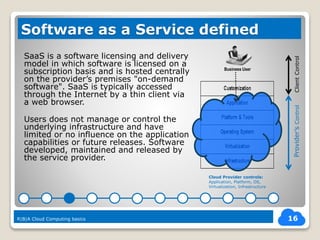
SaaS is a software licensing and delivery
model in which software is licensed on a
subscription basis and is hosted centrally
on the provider’s premises "on-demand
software". SaaS is typically accessed
through the Internet by a thin client via
a web browser.
Users does not manage or control the
underlying infrastructure and have
limited or no influence on the application
capabilities or future releases. Software
developed, maintained and released by
the service provider.
16
Software as a Service defined
R|B|A Cloud Computing basics
Business User
Cloud Provider controls:
Application, Platform, OS,
Virtualization, Infrastructure
ClientControlProvider’sControl
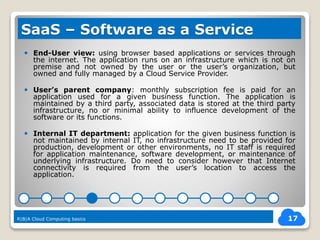
ď‚— End-User view: using browser based applications or services through
the internet. The application runs on an infrastructure which is not on
premise and not owned by the user or the user’s organization, but
owned and fully managed by a Cloud Service Provider.
 User’s parent company: monthly subscription fee is paid for an
application used for a given business function. The application is
maintained by a third party, associated data is stored at the third party
infrastructure, no or minimal ability to influence development of the
software or its functions.
ď‚— Internal IT department: application for the given business function is
not maintained by internal IT, no infrastructure need to be provided for
production, development or other environments, no IT staff is required
for application maintenance, software development, or maintenance of
underlying infrastructure. Do need to consider however that Internet
connectivity is required from the user’s location to access the
application.
17
SaaS – Software as a Service
R|B|A Cloud Computing basics
18
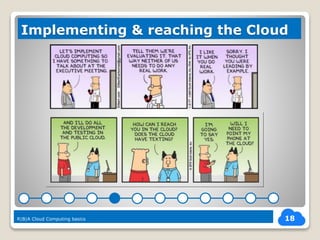
Implementing & reaching the Cloud
R|B|A Cloud Computing basics
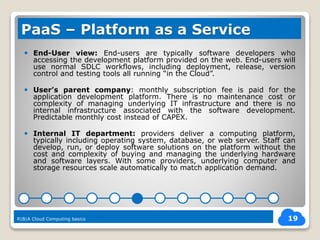
ď‚— End-User view: End-users are typically software developers who
accessing the development platform provided on the web. End-users will
use normal SDLC workflows, including deployment, release, version
control and testing tools all running “in the Cloud”.
 User’s parent company: monthly subscription fee is paid for the
application development platform. There is no maintenance cost or
complexity of managing underlying IT infrastructure and there is no
internal infrastructure associated with the software development.
Predictable monthly cost instead of CAPEX.
ď‚— Internal IT department: providers deliver a computing platform,
typically including operating system, database, or web server. Staff can
develop, run, or deploy software solutions on the platform without the
cost and complexity of buying and managing the underlying hardware
and software layers. With some providers, underlying computer and
storage resources scale automatically to match application demand.
19
PaaS – Platform as a Service
R|B|A Cloud Computing basics
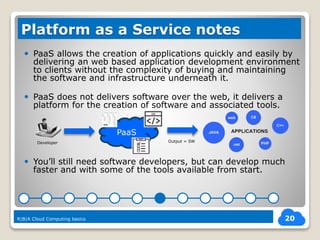
ď‚— PaaS allows the creation of applications quickly and easily by
delivering an web based application development environment
to clients without the complexity of buying and maintaining
the software and infrastructure underneath it.
ď‚— PaaS does not delivers software over the web, it delivers a
platform for the creation of software and associated tools.
 You’ll still need software developers, but can develop much
faster and with some of the tools available from start.
20
Platform as a Service notes
R|B|A Cloud Computing basics
PaaS
Developer Output = SW
ď‚— End-User view: end users does still need to engage internal IT to get
applications and databases installed and to maintain these. However
experience faster provisioning turnaround, known price for services,
know exactly what they consumed and might realize performance
benefits from automatic scaling. No need to design for peak load.
 User’s parent company: utility based pricing for IT infrastructure,
agility to scale up and down, OPEX type of spending for IT. Slightly more
business focus as no need to manage all the infrastructure, but still need
IT staff to configure, install and operate applications and servers.
 Internal IT department: don’t need to maintain or refresh IT
infrastructure, no CAPEX. IT “hires” or “subscribe” the required amount
of compute capacity, can simply scale it up or down and pay only for the
used capacity. As usually only the infrastructure is hired IT still need to
have personnel to install software, maintain databases and servers, and
to manage the OS. License fees need to be paid for software.
21
IaaS – Infrastructure as a Service
R|B|A Cloud Computing basics
Cost effective because: multiple clients sharing the
infrastructure costs of the provider, the infrastructure is
highly utilized, provider can negotiate better supply side
prices because of scale (support, license fees, electricity…)
Agile & flexible because: as clients have different usage
profiles resources can be allocated to those clients who
actually need them, automation allows service provisioning
in minutes or in hours instead of weeks.
More focus on business: no need to manage IT or there is
considerable reduction of managing IT. It is someone else’s
problem. More resources are available for business roles.
22
Reasons behind Cloud Benefits
R|B|A Cloud Computing basics
 Security breach (external) – provider’s information security
systems fail and client data compromised, stolen or destroyed.
 Data Protection risks: provider’s backup systems or policies fail
and may cause loss of data.
 Security breach (internal) – as information is accessible through
internet former employees may continue to have access, traffic
could be observed, access credentials stolen.
ď‚— Vendor lock-in: customer tied to a given cloud provider;
ď‚— Vendor failure: if cloud provider fails there is a potential loss of IT
services or client’s data and unexpected costs may occur.
23
Risks of using Cloud services
R|B|A Cloud Computing basics
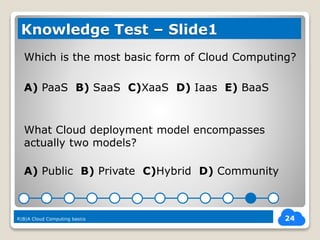
Which is the most basic form of Cloud Computing?
A) PaaS B) SaaS C)XaaS D) Iaas E) BaaS
What Cloud deployment model encompasses
actually two models?
A) Public B) Private C)Hybrid D) Community
24
Knowledge Test – Slide1
R|B|A Cloud Computing basics
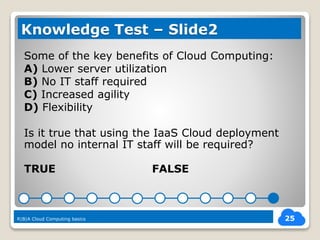
Some of the key benefits of Cloud Computing:
A) Lower server utilization
B) No IT staff required
C) Increased agility
D) Flexibility
Is it true that using the IaaS Cloud deployment
model no internal IT staff will be required?
TRUE FALSE
25
Knowledge Test – Slide2
R|B|A Cloud Computing basics
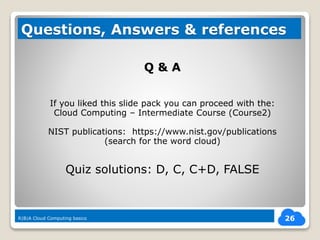
Q & A
If you liked this slide pack you can proceed with the:
Cloud Computing – Intermediate Course (Course2)
NIST publications: https://www.nist.gov/publications
(search for the word cloud)
Quiz solutions: D, C, C+D, FALSE
26
Questions, Answers & references
R|B|A Cloud Computing basics

Cloud computing basics (course1)

  • 1.
    Cloud Computing -Basics R|B|A Course 1 in cloud computing 1 Course 1
  • 2.
    Richard B ANTALis an IT consultant with 12+ years of experience in Systems and Database administration, who worked for large European Mobile Telecommunication companies in the late 1990’s and early 2000’s (Telecom Italia Mobile revenue €19.7 billion, T-Mobile revenue €2,08 billion, Wind Telecom, Revenue: €4,428 billion), moved to Australia in 2006, since 2011 working as Senior Business Analyst and accumulated 5+ years experience in Business Analysis. Richard is currently working on a Cloud Migration programme in a mid-sized organization. While coordinating server migration waves to a managed IaaS Cloud (full migration of servers in IT) Richard spent time to study how Cloud Computing started, who the biggest player are, which the key characteristics of Cloud Computing are and decided to share this knowledge. Please enjoy the slides! 2 About the author R|B|A Cloud Computing basics
  • 3.
    PART I  WhenCloud Computing started?  What is Cloud Computing?  Three Cloud service models  Business Benefits of Cloud  Four key deployment models  Public, Private, Community and Hybrid Cloud  Is Cloud Computing real?  Cloud Benefits recap 3 Course Agenda – PART I R|B|A Cloud Computing basics
  • 4.
    ď‚— 2002 AmazonWeb Services (AWS) 2006 commercial launch of Amazon Web Services R|B|A Cloud Computing basics 4 When Cloud Computing started? 2002 2006 2008 2009 2013 2016 2008 and 2009 Lot of talk and media coverage of Cloud Computing, definitions, models, and early adopters. 2013-2016 Mass adoption with multiple big IT names offering high variety of cloud services to masses
  • 5.
    In simple termsCloud Computing is to access over the internet of IT services which are running on someone else’s infrastructure. Notes:  Usually access is device independent;  User can be anywhere where there is Internet connectivity;  Applications or services usually accessed via browser; 5 What is Cloud Computing? R|B|A Cloud Computing basics Internet Cloud Provider’s Data Centre Network link APPL APPLAPPL USER Network link
  • 6.
    6 Three Cloud servicemodels Software as a Service Platform as a Service Infrastructure as a Service R|B|A Cloud Computing basics
  • 7.
    7 Business Benefits ofCloud R|B|A Cloud Computing basics Accessible anywhere Flexible and Agile Focus on Business Cost effective IaaS PaaS SaaS Competitive Advantage
  • 8.
  • 9.
    9 Key deployment models R|B|ACloud Computing basics Public – Community - Private and Hybrid Cloud P U B L I C P R I V A T EC O M M U N I T Y Few Organizations One organization 100 – 10,000 clients Organization which uses both public and private cloud H Y B R I D
  • 10.
    10 More on deploymentmodels R|B|A Cloud Computing basics Public – Private – Hybrid – Community Cloud Public Cloud - services and infrastructure are offered to numerous clients (multi-tenancy) who actually sharing the cost of the provider’s infrastructure. Clients pay for use. Private Cloud - Private cloud is cloud infrastructure operated solely for a single organization, whether managed internally or by a third-party, and hosted either internally or externally. Users "still have to buy, build, and manage them - essentially lacking the economic model that makes cloud computing Hybrid Cloud - this deployment model helps businesses to make most of the protection of data and applications in a private cloud, while using as well the cost-effectiveness of the public cloud for other applications. Community cloud - shares infrastructure between several organizations from a specific community with common concerns (compliance, jurisdiction, etc.), whether managed internally or by a third-party, and either hosted internally or externally. The costs are spread over fewer users than a public cloud (but more than a private cloud), so only some of the cost savings potential of cloud computing are realized
  • 11.
    YES it isreal, in 2014 more than 22 billion dollars were made from providing Cloud Services; which equals roughly the GDP of Honduras, Cyprus, Zambia or Iceland. 11 Is Cloud Computing real? R|B|A Cloud Computing basics
  • 12.
    12 Cloud Computing Benefitsrecap R|B|A Cloud Computing basics Possible Cost Savings, Pay for use, CAPEX free Use what you need, When you need Latest technology, continuous innovation Pay only for what is used, Fast provisioning & setup Any device from anywhere Agility, competitive business advantage
  • 13.
    PART II –Agenda  NIST definition of Cloud  5 essential characteristics  Software as a Service  Platform as a Service  Infrastructure as a Service  Reasons behind benefits  Risks of using the Cloud  Test your knowledge 13 Part II – definitions & details R|B|A Cloud Computing basics
  • 14.
    NIST (National Instituteof Standards and Technology US) definition of Cloud Computing is much more technical and reveals a lot more about Cloud: 14 Cloud Computing definition “Cloud computing is a model for enabling convenient, on-demand network access to a shared pool of configurable computing resources (e.g., networks, servers, storage, applications) that can be rapidly provisioned and released with minimal effort or service provider interaction.” R|B|A Cloud Computing basics
  • 15.
    NIST defines 5essential cloud characteristics: 1) On-demand self-service – automatic provisioning; 2) Broad network access – accessible from any device; 3) Resource pooling – resources dynamically assigned to clients depending on their needs; 4) Rapid elasticity – quick or automatic scaling up/down without human interaction from the provider = fast turnaround times ; 5) Measured Service – metered use and monitoring. R|B|A Cloud Computing basics 15 Five essential Cloud characteristic R|B|A Cloud Computing basics
  • 16.
    SaaS is asoftware licensing and delivery model in which software is licensed on a subscription basis and is hosted centrally on the provider’s premises "on-demand software". SaaS is typically accessed through the Internet by a thin client via a web browser. Users does not manage or control the underlying infrastructure and have limited or no influence on the application capabilities or future releases. Software developed, maintained and released by the service provider. 16 Software as a Service defined R|B|A Cloud Computing basics Business User Cloud Provider controls: Application, Platform, OS, Virtualization, Infrastructure ClientControlProvider’sControl
  • 17.
     End-User view:using browser based applications or services through the internet. The application runs on an infrastructure which is not on premise and not owned by the user or the user’s organization, but owned and fully managed by a Cloud Service Provider.  User’s parent company: monthly subscription fee is paid for an application used for a given business function. The application is maintained by a third party, associated data is stored at the third party infrastructure, no or minimal ability to influence development of the software or its functions.  Internal IT department: application for the given business function is not maintained by internal IT, no infrastructure need to be provided for production, development or other environments, no IT staff is required for application maintenance, software development, or maintenance of underlying infrastructure. Do need to consider however that Internet connectivity is required from the user’s location to access the application. 17 SaaS – Software as a Service R|B|A Cloud Computing basics
  • 18.
    18 Implementing & reachingthe Cloud R|B|A Cloud Computing basics
  • 19.
     End-User view:End-users are typically software developers who accessing the development platform provided on the web. End-users will use normal SDLC workflows, including deployment, release, version control and testing tools all running “in the Cloud”.  User’s parent company: monthly subscription fee is paid for the application development platform. There is no maintenance cost or complexity of managing underlying IT infrastructure and there is no internal infrastructure associated with the software development. Predictable monthly cost instead of CAPEX.  Internal IT department: providers deliver a computing platform, typically including operating system, database, or web server. Staff can develop, run, or deploy software solutions on the platform without the cost and complexity of buying and managing the underlying hardware and software layers. With some providers, underlying computer and storage resources scale automatically to match application demand. 19 PaaS – Platform as a Service R|B|A Cloud Computing basics
  • 20.
     PaaS allowsthe creation of applications quickly and easily by delivering an web based application development environment to clients without the complexity of buying and maintaining the software and infrastructure underneath it.  PaaS does not delivers software over the web, it delivers a platform for the creation of software and associated tools.  You’ll still need software developers, but can develop much faster and with some of the tools available from start. 20 Platform as a Service notes R|B|A Cloud Computing basics PaaS Developer Output = SW
  • 21.
     End-User view:end users does still need to engage internal IT to get applications and databases installed and to maintain these. However experience faster provisioning turnaround, known price for services, know exactly what they consumed and might realize performance benefits from automatic scaling. No need to design for peak load.  User’s parent company: utility based pricing for IT infrastructure, agility to scale up and down, OPEX type of spending for IT. Slightly more business focus as no need to manage all the infrastructure, but still need IT staff to configure, install and operate applications and servers.  Internal IT department: don’t need to maintain or refresh IT infrastructure, no CAPEX. IT “hires” or “subscribe” the required amount of compute capacity, can simply scale it up or down and pay only for the used capacity. As usually only the infrastructure is hired IT still need to have personnel to install software, maintain databases and servers, and to manage the OS. License fees need to be paid for software. 21 IaaS – Infrastructure as a Service R|B|A Cloud Computing basics
  • 22.
    Cost effective because:multiple clients sharing the infrastructure costs of the provider, the infrastructure is highly utilized, provider can negotiate better supply side prices because of scale (support, license fees, electricity…) Agile & flexible because: as clients have different usage profiles resources can be allocated to those clients who actually need them, automation allows service provisioning in minutes or in hours instead of weeks. More focus on business: no need to manage IT or there is considerable reduction of managing IT. It is someone else’s problem. More resources are available for business roles. 22 Reasons behind Cloud Benefits R|B|A Cloud Computing basics
  • 23.
     Security breach(external) – provider’s information security systems fail and client data compromised, stolen or destroyed.  Data Protection risks: provider’s backup systems or policies fail and may cause loss of data.  Security breach (internal) – as information is accessible through internet former employees may continue to have access, traffic could be observed, access credentials stolen.  Vendor lock-in: customer tied to a given cloud provider;  Vendor failure: if cloud provider fails there is a potential loss of IT services or client’s data and unexpected costs may occur. 23 Risks of using Cloud services R|B|A Cloud Computing basics
  • 24.
    Which is themost basic form of Cloud Computing? A) PaaS B) SaaS C)XaaS D) Iaas E) BaaS What Cloud deployment model encompasses actually two models? A) Public B) Private C)Hybrid D) Community 24 Knowledge Test – Slide1 R|B|A Cloud Computing basics
  • 25.
    Some of thekey benefits of Cloud Computing: A) Lower server utilization B) No IT staff required C) Increased agility D) Flexibility Is it true that using the IaaS Cloud deployment model no internal IT staff will be required? TRUE FALSE 25 Knowledge Test – Slide2 R|B|A Cloud Computing basics
  • 26.
    Q & A Ifyou liked this slide pack you can proceed with the: Cloud Computing – Intermediate Course (Course2) NIST publications: https://www.nist.gov/publications (search for the word cloud) Quiz solutions: D, C, C+D, FALSE 26 Questions, Answers & references R|B|A Cloud Computing basics