Md. Nazrul Islam Roxy (143-15-4480)
What is Cloud?What is Cloud?
The term Cloud refers to a Network or Internet. In other words, we
can say that Cloud is something, which is present at remote location.
Cloud can provide services over network on public networks or on
private networks, WAN, LAN or VPN.
Applications such as e-mail, web conferencing, customer relationship
management (CRM) all run in cloud.
What is Cloud Computing?What is Cloud Computing?
Cloud Computing refers to manipulating, configuring, and
accessing the applications online. It offers online data storage,
infrastructure and application.
Cloud Computing is both a combination of software and hardware
based computing resources delivered as a network service.
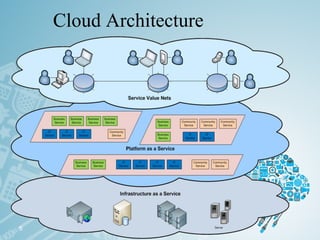
Cloud Architecture
5
Brief history of cloud Computing?
• Utility Computing: 1961
• Time Sharing: 1970s
• Large Distributed Data Centers 1980s-1990s
•Internet Computing 2000-Present
• What is new in cloud computing today?
– Faster data communication
– Faster and more reliable computing
– Denser and cheaper storage
– Newer Programming paradigms
Basic ConceptsBasic Concepts
There are certain services and models working behind the scene
making the cloud computing feasible and accessible to end users.
Following are the working models for cloud computing:
1. Deployment Models1. Deployment Models
 
2.2. Service ModelsService Models
 
Deployment ModelsDeployment Models
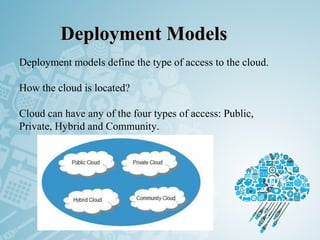
 Deployment models define the type of access to the cloud.
How the cloud is located?
Cloud can have any of the four types of access: Public,
Private, Hybrid and Community.
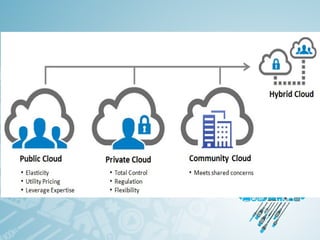
PUBLIC CLOUDPUBLIC CLOUD : The Public Cloud allows systems
and services to be easily accessible to the general public.
Public cloud may be less secure because of its open, e-mail.
PRIVATE CLOUDPRIVATE CLOUD : The Private Cloud allows systems
and services to be accessible within an organization. It offers
increased security because of its private nature.
.
COMMUNITY CLOUD : The Community Cloud allows
systems and services to be accessible by group organizations.
 
HYBRID CLOUD : The Hybrid Cloud is mixture of public
and private cloud. However, the critical activities are performed
using private cloud while the non-critical activities are
performed using public cloud
Service ModelsService Models
 
Service Models are the reference models on which the
Cloud Computing is based. These can be categorized
into three basic service models as listed below:
1. Infrastructure as a Service (IaaS)
2. Platform as a Service (PaaS)
3. Software as a Service (SaaS)
Infrastructure as a Service (IaaS)Infrastructure as a Service (IaaS)
IaaS is the delivery of technology infrastructure as
an on demand scalable service . IaaS provides access
to fundamental resources such as physical machines,
virtual machines, virtual storage, etc.
Usually billed based on usage
Usually multi tenant virtualized environment
Managed Services for OS and application support
IaaS ExamplesIaaS Examples
Platform as a Service (PaaS)Platform as a Service (PaaS)
PaaS provides the runtime environment for applications,
development & deployment tools, etc.
PaaS provides all of the facilities required to support the complete
life cycle of building and delivering web applications and services
entirely from the Internet.
Typically applications must be developed with a particular
platform in mind
•Multi tenant environments
•Highly scalable multi tier architecture
PaaS ExamplesPaaS Examples
Software as a Service (SaaS)Software as a Service (SaaS)
SaaS model allows to use software applications as a service
to end users.
SaaS is a software delivery methodology that provides
licensed multi-tenant access to software and its functions
remotely as a Web-based service.
• Usually billed based on usage
• Usually multi tenant environment
• Highly scalable architecture
SaaS ExamplesSaaS Examples
Do you Use the Cloud?Do you Use the Cloud?
Opportunities and Challenges
•The use of the cloud provides a number of opportunities:
• It enables services to be used without any understanding of
their infrastructure.
• Cloud computing works using economies of scale:
• It potentially lowers the outlay expense for start up companies,
as they would no longer need to buy their own software or servers.
• Cost would be by on-demand pricing.
• Vendors and Service providers claim costs by establishing an
ongoing revenue stream.
• Data and services are stored remotely but accessible
from “anywhere”.
20
Opportunities and Challenges
•In parallel there has been backlash against cloud
computing:
• Use of cloud computing means dependence on others and that
could possibly limit flexibility and innovation:
• The others are likely become the bigger Internet companies like
Google and IBM, who may monopolise the market.
• Some argue that this use of supercomputers is a return to the time
of mainframe computing that the PC was a reaction against.
• Security could prove to be a big issue:
• It is still unclear how safe out-sourced data is and when using these
services ownership of data is not always clear.
• There are also issues relating to policy and access:
• If your data is stored abroad whose policy do you adhere to?
• What happens if the remote server goes down?
• How will you then access files?
• There have been cases of users being locked out of accounts and
losing access to data.
21
Cloud Security
Cloud Security is security principles applied to
protect data, applications and infrastructure
associated within the Cloud Computing
technology.
Why is Cloud Security Important
• Increasing Usage of Cloud Services in Non-traditional
Sectors
• Growing Adoption of Cloud Services in Government
Departments
• Rise in Cloud Service-specific Attacks
• Growing Usage of Cloud Services for Critical Data Storage
• Rise in Employee Mobility
AdvantagesAdvantages
 Lower computer costs
 Improved performance:
 Reduced software costs
 Instant software updates
 Improved document format compatibility
 Unlimited storage capacity
 Increased data reliability
 Universal document access
 Latest version availability
 Easier group collaboration
 Device independence
DisadvantagesDisadvantages
 Requires a constant Internet connection
 Does not work well with low-speed connections
 Features might be limited
 Can be slow
 Stored data can be lost
 Stored data might not be secure
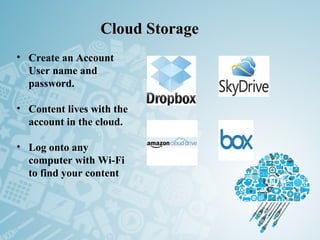
Cloud StorageCloud Storage
• Create an Account
User name and
password.
• Content lives with the
account in the cloud.
• Log onto any
computer with Wi-Fi
to find your content
The Future
• Many of the activities loosely grouped together under cloud
computing have already been happening and centralised
computing activity is not a new phenomena
• Grid Computing was the last research-led centralised
approach
• However there are concerns that the mainstream adoption of
cloud computing could cause many problems for users
• Many new open source systems appearing that you can
install and run on your local cluster
• should be able to run a variety of applications on these
systems
27
ThankThank
you…you…

Introduction Of Cloud Computing

  • 2.
    Md. Nazrul IslamRoxy (143-15-4480)
  • 3.
    What is Cloud?Whatis Cloud? The term Cloud refers to a Network or Internet. In other words, we can say that Cloud is something, which is present at remote location. Cloud can provide services over network on public networks or on private networks, WAN, LAN or VPN. Applications such as e-mail, web conferencing, customer relationship management (CRM) all run in cloud.
  • 4.
    What is CloudComputing?What is Cloud Computing? Cloud Computing refers to manipulating, configuring, and accessing the applications online. It offers online data storage, infrastructure and application. Cloud Computing is both a combination of software and hardware based computing resources delivered as a network service.
  • 5.
  • 6.
    Brief history ofcloud Computing? • Utility Computing: 1961 • Time Sharing: 1970s • Large Distributed Data Centers 1980s-1990s •Internet Computing 2000-Present • What is new in cloud computing today? – Faster data communication – Faster and more reliable computing – Denser and cheaper storage – Newer Programming paradigms
  • 7.
    Basic ConceptsBasic Concepts Thereare certain services and models working behind the scene making the cloud computing feasible and accessible to end users. Following are the working models for cloud computing: 1. Deployment Models1. Deployment Models   2.2. Service ModelsService Models  
  • 8.
    Deployment ModelsDeployment Models  Deploymentmodels define the type of access to the cloud. How the cloud is located? Cloud can have any of the four types of access: Public, Private, Hybrid and Community.
  • 9.
    PUBLIC CLOUDPUBLIC CLOUD: The Public Cloud allows systems and services to be easily accessible to the general public. Public cloud may be less secure because of its open, e-mail. PRIVATE CLOUDPRIVATE CLOUD : The Private Cloud allows systems and services to be accessible within an organization. It offers increased security because of its private nature. .
  • 10.
    COMMUNITY CLOUD :The Community Cloud allows systems and services to be accessible by group organizations.   HYBRID CLOUD : The Hybrid Cloud is mixture of public and private cloud. However, the critical activities are performed using private cloud while the non-critical activities are performed using public cloud
  • 12.
    Service ModelsService Models   ServiceModels are the reference models on which the Cloud Computing is based. These can be categorized into three basic service models as listed below: 1. Infrastructure as a Service (IaaS) 2. Platform as a Service (PaaS) 3. Software as a Service (SaaS)
  • 13.
    Infrastructure as aService (IaaS)Infrastructure as a Service (IaaS) IaaS is the delivery of technology infrastructure as an on demand scalable service . IaaS provides access to fundamental resources such as physical machines, virtual machines, virtual storage, etc. Usually billed based on usage Usually multi tenant virtualized environment Managed Services for OS and application support
  • 14.
  • 15.
    Platform as aService (PaaS)Platform as a Service (PaaS) PaaS provides the runtime environment for applications, development & deployment tools, etc. PaaS provides all of the facilities required to support the complete life cycle of building and delivering web applications and services entirely from the Internet. Typically applications must be developed with a particular platform in mind •Multi tenant environments •Highly scalable multi tier architecture
  • 16.
  • 17.
    Software as aService (SaaS)Software as a Service (SaaS) SaaS model allows to use software applications as a service to end users. SaaS is a software delivery methodology that provides licensed multi-tenant access to software and its functions remotely as a Web-based service. • Usually billed based on usage • Usually multi tenant environment • Highly scalable architecture
  • 18.
  • 19.
    Do you Usethe Cloud?Do you Use the Cloud?
  • 20.
    Opportunities and Challenges •Theuse of the cloud provides a number of opportunities: • It enables services to be used without any understanding of their infrastructure. • Cloud computing works using economies of scale: • It potentially lowers the outlay expense for start up companies, as they would no longer need to buy their own software or servers. • Cost would be by on-demand pricing. • Vendors and Service providers claim costs by establishing an ongoing revenue stream. • Data and services are stored remotely but accessible from “anywhere”. 20
  • 21.
    Opportunities and Challenges •Inparallel there has been backlash against cloud computing: • Use of cloud computing means dependence on others and that could possibly limit flexibility and innovation: • The others are likely become the bigger Internet companies like Google and IBM, who may monopolise the market. • Some argue that this use of supercomputers is a return to the time of mainframe computing that the PC was a reaction against. • Security could prove to be a big issue: • It is still unclear how safe out-sourced data is and when using these services ownership of data is not always clear. • There are also issues relating to policy and access: • If your data is stored abroad whose policy do you adhere to? • What happens if the remote server goes down? • How will you then access files? • There have been cases of users being locked out of accounts and losing access to data. 21
  • 22.
    Cloud Security Cloud Securityis security principles applied to protect data, applications and infrastructure associated within the Cloud Computing technology.
  • 23.
    Why is CloudSecurity Important • Increasing Usage of Cloud Services in Non-traditional Sectors • Growing Adoption of Cloud Services in Government Departments • Rise in Cloud Service-specific Attacks • Growing Usage of Cloud Services for Critical Data Storage • Rise in Employee Mobility
  • 24.
    AdvantagesAdvantages  Lower computercosts  Improved performance:  Reduced software costs  Instant software updates  Improved document format compatibility  Unlimited storage capacity  Increased data reliability  Universal document access  Latest version availability  Easier group collaboration  Device independence
  • 25.
    DisadvantagesDisadvantages  Requires aconstant Internet connection  Does not work well with low-speed connections  Features might be limited  Can be slow  Stored data can be lost  Stored data might not be secure
  • 26.
    Cloud StorageCloud Storage •Create an Account User name and password. • Content lives with the account in the cloud. • Log onto any computer with Wi-Fi to find your content
  • 27.
    The Future • Manyof the activities loosely grouped together under cloud computing have already been happening and centralised computing activity is not a new phenomena • Grid Computing was the last research-led centralised approach • However there are concerns that the mainstream adoption of cloud computing could cause many problems for users • Many new open source systems appearing that you can install and run on your local cluster • should be able to run a variety of applications on these systems 27
  • 28.

Editor's Notes

  • #22 Freedom of Information == FOI