Chapter 3
Basic concept of cloud computing
Basics of Cloud Computing
1
Agenda
 What is Cloud ?
 What is Cloud Computing?
 History
 Top Benefits of Cloud Computing
 Essential Characteristics of cloud.
 Cloud Models
 Cloud Computing Architecture
 Advantages and disadvantages of cloud.
 Virtualization and cloud computing.
Basics of Cloud Computing
2
What is Cloud?
Basics of Cloud Computing
3
 The term cloud refers to a network or internet
 The word “cloud” is used as a metaphor for “
the Internet.” .
 In other words, we can say cloud is something,
which is present at remote location.
 Well it is an abstraction of fundamental
infrastructures involved in computing.
What is Cloud computing?.
It is a technology that uses remote servers on
the internet to store, manage, and access data
online rather than local drives.
The data can be anything such as files, images,
documents, audio, video, and more.
Cloud computing is general term used to
describe a new class of network based
computing that takes place over the
internet/cloud.
Basics of Cloud Computing
4
Cont…
Basics of Cloud Computing
5
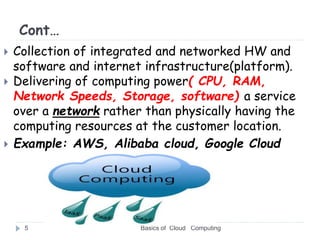
 Collection of integrated and networked HW and
software and internet infrastructure(platform).
 Delivering of computing power( CPU, RAM,
Network Speeds, Storage, software) a service
over a network rather than physically having the
computing resources at the customer location.
 Example: AWS, Alibaba cloud, Google Cloud
Cont..
 These services typically provides access to
advanced software applications, high end
networks of server computers.
"You don't generate your own electricity. Why
generate your own computing?“ -Jeff Bezos,
Amazon
Basics of Cloud Computing
6
Evolution of cloud computing
With increase in computer and Mobile user’s, data
storage has become a priority in all fields.
Large and small scale businesses today succeed on
their data & they spent a huge amount of money to
maintain this data.
 It requires a strong IT support and a storage.
Not all businesses can pay for high cost of IT
infrastructure and back up support services.
For them Cloud Computing is cheaper solution.
Its efficiency in storing data, computation and
less maintenance cost has succeeded to attract
even bigger businesses as well.
Basics of Cloud Computing
7
Cont.…
 Cloud computing decreases the hardware and
software demand from the user’s side.
 The only thing that user must be able to run is
the cloud computing systems interface
software, which can be as simple as Web
browser, and the Cloud network takes care of
the rest.
 We all have experienced cloud computing at
some instant of time, some of the popular cloud
services we have used or we are still using are
mail services like Gmail, Hotmail or yahoo etc.
Basics of Cloud Computing
8
History
 It was a gradual evolution that started in the
1950s with mainframe computing
 After some time, around 1970, the concept
of virtual machines (VMs) was created.
 In 1999, Salesforce.com started delivering
of applications to users using a simple
website.
 In 2002 Amazon provided First public cloud
AWS (Amazon Web Service) , providing
services like storage, computation
Basics of Cloud Computing
9
Cont.…
 In 2009, Google Apps also started to provide
cloud computing enterprise applications.
 In 2009, Microsoft launched Windows Azure,
and companies like Oracle and HP have all
joined the game.
 This proves that today, cloud computing has
become mainstream.
Basics of Cloud Computing
10
Benefits of cloud computing
 Low IT infrastructure and computer costs for user.
 Fewer Maintenance issues
 Instant software updates
 Storage, back up, and recovery of data
 Scalability
 Increase data safety
 Developing new applications and services
 Hosting blogs and websites
 Delivery of software on demand
 Analysis of data
 Streaming videos and audios
Basics of Cloud Computing
11
Common Cloud Characteristic
1. On Demand Self Service
 A consumer can singly setting up computing
capability such as server and storage as
needed automatically without requiring
human interaction with service provider
 Customer can access at anytime from
anywhere.
 Customer can upgrade/downgrade services
anytime.
Basics of Cloud Computing
12
Cont…
2. No up-front commitment/elasticity
 Start small and grow as required
 No contract, Only credit card!
 Pay for what you use
3. Heterogeneous Access:
 Cloud computing resource are accessible over
the internet supporting heterogeneous client
platforms such as mobile devices and
workstations.
Basics of Cloud Computing
13
Cont…
4. Measured Service:
 Resource usage can be monitored, controlled and
reported providing transparency for both the
provider and consumer.
5. High availability and reliability
 The availability of servers is high and more reliable
because the chances of infrastructure failure are
minimum.
6. Multi-Sharing
 With the help of cloud computing, multiple users
and applications can work more efficiently with
cost reductions by sharing common infrastructure.
Basics of Cloud Computing
14
Cont…
Basics of Cloud Computing
15
7. Device and Location Independence
 Cloud computing enables the users to access
systems using a web browser regardless of their
location or what device they use e.g. PC, mobile
phone, etc.
 As infrastructure is off-site (typically provided by
a third-party) and accessed via the Internet,
users can connect from anywhere
Cloud Models
 Deployment Models
 Service Models
1. Deployment Models
 A cloud deployment model represents a
specific type of cloud environment, primarily
distinguished by ownership, size, and
access.
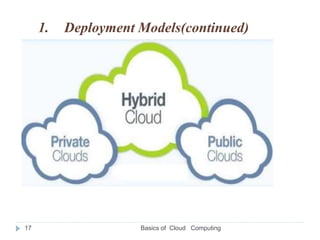
 There are three common cloud deployment
models:
Basics of Cloud Computing
16
1. Deployment Models(continued)
Basics of Cloud Computing
17
1. Public Cloud
 Public cloud is open to all to store and access
information via the Internet using the pay-per-
usage method.
 In public cloud, computing resources are managed
and operated by the Cloud Service Provider (CSP).
 This type of cloud is used usually for B2C (Business
to Consumer) type interactions.
 As the name suggests, Public cloud is open to
public.
 Anyone can access and use it by paying accordingly
Example e-mail, AWS
Basics of Cloud Computing
18
Advantages of Public Cloud
Basics of Cloud Computing
19
 Public cloud is owned at a lower cost than the
private and hybrid cloud.
 Maintained by the provider, so do not need to
worry about the maintenance.
 Easier to integrate. Hence it offers a better
flexibility approach to consumers.
 Location independent because its services are
delivered through the internet.
 Highly scalable as per the requirement.
 There is no limit to the number of users.
Disadvantages of Public Cloud
Basics of Cloud Computing
20
 Less secure because resources are shared publicly.
 Performance depends upon the high-speed internet
network link to the cloud provider.
 The Client has no control of data.
2. Private Cloud:
 Private cloud is also known as an internal
cloud or corporate cloud.
 It is used by organizations to build and manage
their own data centers internally.
 This method is more used for intra-business
interactions.
 Where the computing resources can be governed,
owned and operated by the same organization.
Basics of Cloud Computing
21
Advantages of Private Cloud
Basics of Cloud Computing
22
 High level of security and privacy to the users.
 Better performance with improved speed and space
capacity.
 The organization has full control over the cloud
because it is managed by the organization itself.
Disadvantages of Private Cloud
Basics of Cloud Computing
23
 Skilled people are required to manage and operate
cloud services.
 Private cloud is accessible within the organization,
so the area of operations is limited.
 Private cloud is not suitable for organizations that
have a high user base.
3. Hybrid
 Hybrid Cloud is a combination of the public cloud
and the private cloud.
 we can say:
Hybrid Cloud = Public Cloud + Private Cloud
 Hybrid cloud is partially secure because the
services which are running on the public cloud can
be accessed by anyone, while the services which are
running on a private cloud can be accessed only by
the organization's users.
 This type of cloud can be used for both type of
interactions - B2B or B2C.
Basics of Cloud Computing
24
Cont…
Basics of Cloud Computing
25
 This model gives business greater flexibility and
more deployment options
Example: Gmail, Google Apps, and Google Drive),
Office 365 (MS Office on the Web and One
Drive), Amazon Web Services
Advantages of Hybrid Cloud
Basics of Cloud Computing
26
 Suitable for organizations that require more
security than the public cloud.
 Provides an excellent way to reduce the risk.
 Offer flexible resources because of the public
cloud and secure resources because of the
private cloud.
Disadvantages of Hybrid Cloud
Basics of Cloud Computing
27
 security feature is not as good as the private cloud.
 Managing a hybrid cloud is complex because it is
difficult to manage more than one type of
deployment model.
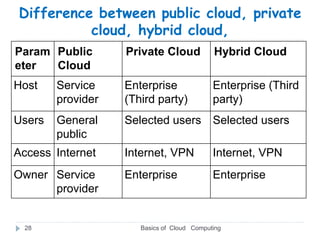
Difference between public cloud, private
cloud, hybrid cloud,
Basics of Cloud Computing
28
Param
eter
Public
Cloud
Private Cloud Hybrid Cloud
Host Service
provider
Enterprise
(Third party)
Enterprise (Third
party)
Users General
public
Selected users Selected users
Access Internet Internet, VPN Internet, VPN
Owner Service
provider
Enterprise Enterprise
2. Cloud computing services(Service Models ):
1. Infrastructure as a Service (IaaS)
2. Software as a Service (SaaS)
3. Platform as a Service (PaaS)
Basics of Cloud Computing
29
1. Infrastructure As a Service (IaaS):
 The Infrastructure as a Service (IaaS) is
the most basic level of service.
 is a cloud computing offering in which a seller
provides users access to computing
resources such as servers, storage, and
networking.
 Organizations use their own platforms and
applications within a service provider
infrastructure.
Basics of Cloud Computing
30
Example:-Microsoft azure, AWS, icloud,,.
31
2. Platform as a service (PaaS):
 provides users a cloud environment in which
they can develop, manage, and deliver
applications.
 PaaS provides all of the facilities required to
support the complete life cycle of building
and delivering web applications and services
entirely from the Internet.
 Example:- SAP Cloud Platform
Basics of Cloud Computing
31
3. SaaS (Software as a Service)
 It is also known as cloud application services.
 Mostly, SaaS applications run directly through the
web browser means we do not require to download
and install these applications.
 SaaS is a software distribution model in which
applications are hosted by a service provider and
made available to customers over a internet.
 Through internet this service is available to users
anywhere in the world.
Example:- google docs,
Basics of Cloud Computing
32
Advantages of Cloud Computing
Basics of Cloud Computing
33
1. Instance software update
 Cloud computing offers a competitive advantage
over your competitors.
 It helps you to access the latest applications any
time without spending your time and money on
installation.
2. High Speed
 Cloud computing allows you to deploy your service
quickly in fewer clicks.
 This faster deployment allows you to get the
resources required for your system within fewer
minutes.
Cont…
3. Automatic Software Integration
 In the cloud, software integration is something
that occurs automatically.
 Therefore, you don't need to take additional
efforts to customize and integrate your
applications as per your preferences.
4. Improved collaboration
 By allowing groups of people to quickly and
easily share information in the cloud via shared
storage
Basics of Cloud Computing
34
Cont…
5. Device independence
 You are no longer tied to a single computer or
network.
 Change to computer, application and document
follow you through in cloud.
6. Excellent accessibility
 allows us to quickly and easily access store
information anywhere, anytime in the whole
world, using an internet connection.
 An internet cloud infrastructure increases
organization productivity and efficiency by ensuring
that our data is always accessible.
Basics of Cloud Computing
35
Cont…
Basics of Cloud Computing
36
7. Low maintenance cost
 Reduces both hardware and software
maintenance costs for organizations.
8. Mobility
 Cloud computing allows us to easily access all
cloud data via mobile.
Cont…
Basics of Cloud Computing
37
9. Unlimited storage capacity
 offers huge amount of storing capacity for storing
our important data such as documents, images,
audio, video, etc. in one place.
10.Data security
 Data security is one of the biggest advantages of
cloud computing.
 Cloud offers many advanced features related to
security and ensures that data is securely stored
and handled.
Disadvantages of Cloud Computing
1. Internet Connectivity
 As you know, in cloud computing, every data (image,
audio, video, etc.) is stored on the cloud, and we
access these data through the cloud by using the
internet connection.
 If you do not have good internet connectivity, you
cannot access these data.
 However, we have no any other way to access data
from the cloud.
Basics of Cloud Computing
38
Cont…
2) Vendor lock-in
 Vendor lock-in is the biggest disadvantage of
cloud computing.
 Organizations may face problems when
transferring their services from one vendor to
another.
 As different vendors provide different
platforms, that can cause difficulty moving
from one cloud to another.
Basics of Cloud Computing
39
Cont…
3) Limited Control
 As we know, cloud infrastructure is completely
owned, managed, and monitored by the service
provider, so the cloud users have less control over
the function and execution of services within a
cloud infrastructure.
Basics of Cloud Computing
40
Cont…
Basics of Cloud Computing
41
4) Security
 Although cloud service providers implement the
best security standards to store important
information.
 But, before adopting cloud technology, you should
be aware that you will be sending all your
organization's sensitive information to a third
party, i.e., a cloud computing service provider.
 While sending the data on the cloud, there may be
a chance that your organization's information is
hacked by Hackers.
Free Cloud Storage (2020 Update)
1) Google Drive
 Google Drive is a free online data storage
service provided by Google.
 The service syncs stored files, photos, and more
across all the user's PCs, tablets, and mobile
devices.
 It offers 15 GB of free space.
Basics of Cloud Computing
42
2. OneDrive
 Microsoft OneDrive is an internet-based storage
and synchronization service provider.
 It is available for free to all the people having
Microsoft account.
 OneDrive apps can be used to sync files on a
Windows PC or Mac operating system.
Basics of Cloud Computing
43
3. Media Fire
 MediaFire is a file hosting, cloud storage,
and synchronization service.
 It provides an easy-to-use solution for
managing file online.
 MediaFire can be used for iPhone, Windows,
and Android.
Basics of Cloud Computing
44
What is Cloud Computing Architecture?
 Cloud computing architecture is a combination
of service-oriented architecture and event-driven
architecture(user).
 Cloud computing comprises of two components front
end and back end.
 Front end consist client part of cloud computing.
 It comprise of interfaces and applications that are
required to access the cloud computing.
 While back end refers to the cloud itself, it
comprises of the resources that are required for
cloud computing services.
Basics of Cloud Computing
45
Cont.…
 It consists of virtual machines, servers, data
storage, security mechanism etc.
 It is under providers control.
 Data is never stored in one place only and in case
one unit fails the other will take over
automatically.
Basics of Cloud Computing
46
1. Front End
 The front end is used by the client.
 It contains client-side interfaces and applications
that are required to access the cloud computing
platforms.
 The front end includes web servers (including
Chrome, Firefox, internet explorer, etc.), thin &
fat clients, tablets, and mobile devices.
Basics of Cloud Computing
47
2. Back End
Basics of Cloud Computing
48
 The back end is used by the service provider.
 It manages all the resources that are required to
provide cloud computing services.
 It includes a huge amount of data storage, security
mechanism, virtual machines, deploying models,
servers, traffic control mechanisms, etc.
Virtualization and Cloud Computing
 Virtualization is the "creation of a virtual (rather
than actual) version of something, such as a server,
desktop, storage device, an operating system or
network resources".
 In other words, Virtualization is a technique, which
allows to share a single physical instance of a
resource or an application among multiple customers
and organizations.
 It does by assigning a logical name to a physical
storage and providing a pointer to that physical
resource when demanded.
Basics of Cloud Computing
49
Cont.…
 Virtualization, is a shift in thinking from physical to
logical, treating resources as logical resources
rather than separate physical resources
 For software developers and testers virtualization
comes very handy, as it allows developer to write
code that runs in many different environments and
more importantly to test that code.
Basics of Cloud Computing
50
Characteristics of Virtualization
Basics of Cloud Computing
51
 Sharing of resources helps cost reduction
 Isolation: Virtual machines are isolated from
each other as if they are physically separated
 Encapsulation: Virtual machines encapsulate a
complete computing environment
 Partitioning: Run multiple application and OS in a
single physical machine by partitioning the
available resources
The concept behind the Virtualization
Basics of Cloud Computing
52
Creation of a VM over existing operating system and
hardware.
 Host machine: The machine on which the virtual
machine is created.
 Guest machine: virtual machines referred as a
guest machine.
 Hypervisor is a software that you can use to run
multiple virtual machines on a single physical machine.
Every virtual machine has its own OS and applications.
The hypervisor allocates the underlying physical
computing resources such as CPU and memory to
individual VM as required..
E.g virtual box, BIOS etc
Architecture of virtualization
Basics of Cloud Computing
53
Normal computer system Virtualized computer system
Types of virtualizations
1. Hardware Virtualization:- is the process of a
physical machine (host) utilizing specialized software
called a hypervisor to emulate one or more virtual
machines.
These VMs (guests) operate independently and can
run different OS and applications as though they were
distinct physical entities.
Basics of Cloud Computing
54
2. Storage Virtualization
 Process of grouping the physical storage from
multiple network storage devices so that it
looks like a single storage device.
 Implemented by using software applications.
 Is mainly done for back-up and recovery
purposes.
Basics of Cloud Computing
55
3. Operating System Virtualization
Basics of Cloud Computing
56
 OS Virtualization means in which we use software
that lets system hardware run different OS on a
single computer.
 These multiple OS can be used for running d/t
applications without interfering with each other.
 Operating System Virtualization is mainly used for
testing the applications on different platforms of
OS.
Virtualization vs cloud
 In short, virtualization creates simulated versions
of a machine'software or hardware components,
while cloud computing is a model that enables users
to access a shared pool of resources conveniently.
 One of the main cost-saving, hardware-reducing,
and energy-saving techniques used by cloud
providers is virtualization
 For example PC can use virtual memory to
borrow extra memory from the hard disk.
 Virtualization can exist without the cloud but cloud
computing cannot exist without virtualization.
Basics of Cloud Computing
57
Advantages of Virtualization
Basics of Cloud Computing
58
1. Reduced Costs.
2. Better resource Utilization
3. Testing for software development.
4. Save energy
5. Possibility to Divide Services
End of chapter three
Question?
Basics of Cloud Computing
59
Exercise
1. What is grid computing?
2. Write the deference between grid
computing and cloud computing?
3. Define the following terms
a. Desktop virtualization
b. Network Virtualization:
c. Full virtualization
d. Para virtualization
Basics of Cloud Computing
60

chapter 3 Selected Topics in computer.pptx

  • 1.
    Chapter 3 Basic conceptof cloud computing Basics of Cloud Computing 1
  • 2.
    Agenda  What isCloud ?  What is Cloud Computing?  History  Top Benefits of Cloud Computing  Essential Characteristics of cloud.  Cloud Models  Cloud Computing Architecture  Advantages and disadvantages of cloud.  Virtualization and cloud computing. Basics of Cloud Computing 2
  • 3.
    What is Cloud? Basicsof Cloud Computing 3  The term cloud refers to a network or internet  The word “cloud” is used as a metaphor for “ the Internet.” .  In other words, we can say cloud is something, which is present at remote location.  Well it is an abstraction of fundamental infrastructures involved in computing.
  • 4.
    What is Cloudcomputing?. It is a technology that uses remote servers on the internet to store, manage, and access data online rather than local drives. The data can be anything such as files, images, documents, audio, video, and more. Cloud computing is general term used to describe a new class of network based computing that takes place over the internet/cloud. Basics of Cloud Computing 4
  • 5.
    Cont… Basics of CloudComputing 5  Collection of integrated and networked HW and software and internet infrastructure(platform).  Delivering of computing power( CPU, RAM, Network Speeds, Storage, software) a service over a network rather than physically having the computing resources at the customer location.  Example: AWS, Alibaba cloud, Google Cloud
  • 6.
    Cont..  These servicestypically provides access to advanced software applications, high end networks of server computers. "You don't generate your own electricity. Why generate your own computing?“ -Jeff Bezos, Amazon Basics of Cloud Computing 6
  • 7.
    Evolution of cloudcomputing With increase in computer and Mobile user’s, data storage has become a priority in all fields. Large and small scale businesses today succeed on their data & they spent a huge amount of money to maintain this data.  It requires a strong IT support and a storage. Not all businesses can pay for high cost of IT infrastructure and back up support services. For them Cloud Computing is cheaper solution. Its efficiency in storing data, computation and less maintenance cost has succeeded to attract even bigger businesses as well. Basics of Cloud Computing 7
  • 8.
    Cont.…  Cloud computingdecreases the hardware and software demand from the user’s side.  The only thing that user must be able to run is the cloud computing systems interface software, which can be as simple as Web browser, and the Cloud network takes care of the rest.  We all have experienced cloud computing at some instant of time, some of the popular cloud services we have used or we are still using are mail services like Gmail, Hotmail or yahoo etc. Basics of Cloud Computing 8
  • 9.
    History  It wasa gradual evolution that started in the 1950s with mainframe computing  After some time, around 1970, the concept of virtual machines (VMs) was created.  In 1999, Salesforce.com started delivering of applications to users using a simple website.  In 2002 Amazon provided First public cloud AWS (Amazon Web Service) , providing services like storage, computation Basics of Cloud Computing 9
  • 10.
    Cont.…  In 2009,Google Apps also started to provide cloud computing enterprise applications.  In 2009, Microsoft launched Windows Azure, and companies like Oracle and HP have all joined the game.  This proves that today, cloud computing has become mainstream. Basics of Cloud Computing 10
  • 11.
    Benefits of cloudcomputing  Low IT infrastructure and computer costs for user.  Fewer Maintenance issues  Instant software updates  Storage, back up, and recovery of data  Scalability  Increase data safety  Developing new applications and services  Hosting blogs and websites  Delivery of software on demand  Analysis of data  Streaming videos and audios Basics of Cloud Computing 11
  • 12.
    Common Cloud Characteristic 1.On Demand Self Service  A consumer can singly setting up computing capability such as server and storage as needed automatically without requiring human interaction with service provider  Customer can access at anytime from anywhere.  Customer can upgrade/downgrade services anytime. Basics of Cloud Computing 12
  • 13.
    Cont… 2. No up-frontcommitment/elasticity  Start small and grow as required  No contract, Only credit card!  Pay for what you use 3. Heterogeneous Access:  Cloud computing resource are accessible over the internet supporting heterogeneous client platforms such as mobile devices and workstations. Basics of Cloud Computing 13
  • 14.
    Cont… 4. Measured Service: Resource usage can be monitored, controlled and reported providing transparency for both the provider and consumer. 5. High availability and reliability  The availability of servers is high and more reliable because the chances of infrastructure failure are minimum. 6. Multi-Sharing  With the help of cloud computing, multiple users and applications can work more efficiently with cost reductions by sharing common infrastructure. Basics of Cloud Computing 14
  • 15.
    Cont… Basics of CloudComputing 15 7. Device and Location Independence  Cloud computing enables the users to access systems using a web browser regardless of their location or what device they use e.g. PC, mobile phone, etc.  As infrastructure is off-site (typically provided by a third-party) and accessed via the Internet, users can connect from anywhere
  • 16.
    Cloud Models  DeploymentModels  Service Models 1. Deployment Models  A cloud deployment model represents a specific type of cloud environment, primarily distinguished by ownership, size, and access.  There are three common cloud deployment models: Basics of Cloud Computing 16
  • 17.
  • 18.
    1. Public Cloud Public cloud is open to all to store and access information via the Internet using the pay-per- usage method.  In public cloud, computing resources are managed and operated by the Cloud Service Provider (CSP).  This type of cloud is used usually for B2C (Business to Consumer) type interactions.  As the name suggests, Public cloud is open to public.  Anyone can access and use it by paying accordingly Example e-mail, AWS Basics of Cloud Computing 18
  • 19.
    Advantages of PublicCloud Basics of Cloud Computing 19  Public cloud is owned at a lower cost than the private and hybrid cloud.  Maintained by the provider, so do not need to worry about the maintenance.  Easier to integrate. Hence it offers a better flexibility approach to consumers.  Location independent because its services are delivered through the internet.  Highly scalable as per the requirement.  There is no limit to the number of users.
  • 20.
    Disadvantages of PublicCloud Basics of Cloud Computing 20  Less secure because resources are shared publicly.  Performance depends upon the high-speed internet network link to the cloud provider.  The Client has no control of data.
  • 21.
    2. Private Cloud: Private cloud is also known as an internal cloud or corporate cloud.  It is used by organizations to build and manage their own data centers internally.  This method is more used for intra-business interactions.  Where the computing resources can be governed, owned and operated by the same organization. Basics of Cloud Computing 21
  • 22.
    Advantages of PrivateCloud Basics of Cloud Computing 22  High level of security and privacy to the users.  Better performance with improved speed and space capacity.  The organization has full control over the cloud because it is managed by the organization itself.
  • 23.
    Disadvantages of PrivateCloud Basics of Cloud Computing 23  Skilled people are required to manage and operate cloud services.  Private cloud is accessible within the organization, so the area of operations is limited.  Private cloud is not suitable for organizations that have a high user base.
  • 24.
    3. Hybrid  HybridCloud is a combination of the public cloud and the private cloud.  we can say: Hybrid Cloud = Public Cloud + Private Cloud  Hybrid cloud is partially secure because the services which are running on the public cloud can be accessed by anyone, while the services which are running on a private cloud can be accessed only by the organization's users.  This type of cloud can be used for both type of interactions - B2B or B2C. Basics of Cloud Computing 24
  • 25.
    Cont… Basics of CloudComputing 25  This model gives business greater flexibility and more deployment options Example: Gmail, Google Apps, and Google Drive), Office 365 (MS Office on the Web and One Drive), Amazon Web Services
  • 26.
    Advantages of HybridCloud Basics of Cloud Computing 26  Suitable for organizations that require more security than the public cloud.  Provides an excellent way to reduce the risk.  Offer flexible resources because of the public cloud and secure resources because of the private cloud.
  • 27.
    Disadvantages of HybridCloud Basics of Cloud Computing 27  security feature is not as good as the private cloud.  Managing a hybrid cloud is complex because it is difficult to manage more than one type of deployment model.
  • 28.
    Difference between publiccloud, private cloud, hybrid cloud, Basics of Cloud Computing 28 Param eter Public Cloud Private Cloud Hybrid Cloud Host Service provider Enterprise (Third party) Enterprise (Third party) Users General public Selected users Selected users Access Internet Internet, VPN Internet, VPN Owner Service provider Enterprise Enterprise
  • 29.
    2. Cloud computingservices(Service Models ): 1. Infrastructure as a Service (IaaS) 2. Software as a Service (SaaS) 3. Platform as a Service (PaaS) Basics of Cloud Computing 29
  • 30.
    1. Infrastructure Asa Service (IaaS):  The Infrastructure as a Service (IaaS) is the most basic level of service.  is a cloud computing offering in which a seller provides users access to computing resources such as servers, storage, and networking.  Organizations use their own platforms and applications within a service provider infrastructure. Basics of Cloud Computing 30 Example:-Microsoft azure, AWS, icloud,,.
  • 31.
    31 2. Platform asa service (PaaS):  provides users a cloud environment in which they can develop, manage, and deliver applications.  PaaS provides all of the facilities required to support the complete life cycle of building and delivering web applications and services entirely from the Internet.  Example:- SAP Cloud Platform Basics of Cloud Computing 31
  • 32.
    3. SaaS (Softwareas a Service)  It is also known as cloud application services.  Mostly, SaaS applications run directly through the web browser means we do not require to download and install these applications.  SaaS is a software distribution model in which applications are hosted by a service provider and made available to customers over a internet.  Through internet this service is available to users anywhere in the world. Example:- google docs, Basics of Cloud Computing 32
  • 33.
    Advantages of CloudComputing Basics of Cloud Computing 33 1. Instance software update  Cloud computing offers a competitive advantage over your competitors.  It helps you to access the latest applications any time without spending your time and money on installation. 2. High Speed  Cloud computing allows you to deploy your service quickly in fewer clicks.  This faster deployment allows you to get the resources required for your system within fewer minutes.
  • 34.
    Cont… 3. Automatic SoftwareIntegration  In the cloud, software integration is something that occurs automatically.  Therefore, you don't need to take additional efforts to customize and integrate your applications as per your preferences. 4. Improved collaboration  By allowing groups of people to quickly and easily share information in the cloud via shared storage Basics of Cloud Computing 34
  • 35.
    Cont… 5. Device independence You are no longer tied to a single computer or network.  Change to computer, application and document follow you through in cloud. 6. Excellent accessibility  allows us to quickly and easily access store information anywhere, anytime in the whole world, using an internet connection.  An internet cloud infrastructure increases organization productivity and efficiency by ensuring that our data is always accessible. Basics of Cloud Computing 35
  • 36.
    Cont… Basics of CloudComputing 36 7. Low maintenance cost  Reduces both hardware and software maintenance costs for organizations. 8. Mobility  Cloud computing allows us to easily access all cloud data via mobile.
  • 37.
    Cont… Basics of CloudComputing 37 9. Unlimited storage capacity  offers huge amount of storing capacity for storing our important data such as documents, images, audio, video, etc. in one place. 10.Data security  Data security is one of the biggest advantages of cloud computing.  Cloud offers many advanced features related to security and ensures that data is securely stored and handled.
  • 38.
    Disadvantages of CloudComputing 1. Internet Connectivity  As you know, in cloud computing, every data (image, audio, video, etc.) is stored on the cloud, and we access these data through the cloud by using the internet connection.  If you do not have good internet connectivity, you cannot access these data.  However, we have no any other way to access data from the cloud. Basics of Cloud Computing 38
  • 39.
    Cont… 2) Vendor lock-in Vendor lock-in is the biggest disadvantage of cloud computing.  Organizations may face problems when transferring their services from one vendor to another.  As different vendors provide different platforms, that can cause difficulty moving from one cloud to another. Basics of Cloud Computing 39
  • 40.
    Cont… 3) Limited Control As we know, cloud infrastructure is completely owned, managed, and monitored by the service provider, so the cloud users have less control over the function and execution of services within a cloud infrastructure. Basics of Cloud Computing 40
  • 41.
    Cont… Basics of CloudComputing 41 4) Security  Although cloud service providers implement the best security standards to store important information.  But, before adopting cloud technology, you should be aware that you will be sending all your organization's sensitive information to a third party, i.e., a cloud computing service provider.  While sending the data on the cloud, there may be a chance that your organization's information is hacked by Hackers.
  • 42.
    Free Cloud Storage(2020 Update) 1) Google Drive  Google Drive is a free online data storage service provided by Google.  The service syncs stored files, photos, and more across all the user's PCs, tablets, and mobile devices.  It offers 15 GB of free space. Basics of Cloud Computing 42
  • 43.
    2. OneDrive  MicrosoftOneDrive is an internet-based storage and synchronization service provider.  It is available for free to all the people having Microsoft account.  OneDrive apps can be used to sync files on a Windows PC or Mac operating system. Basics of Cloud Computing 43
  • 44.
    3. Media Fire MediaFire is a file hosting, cloud storage, and synchronization service.  It provides an easy-to-use solution for managing file online.  MediaFire can be used for iPhone, Windows, and Android. Basics of Cloud Computing 44
  • 45.
    What is CloudComputing Architecture?  Cloud computing architecture is a combination of service-oriented architecture and event-driven architecture(user).  Cloud computing comprises of two components front end and back end.  Front end consist client part of cloud computing.  It comprise of interfaces and applications that are required to access the cloud computing.  While back end refers to the cloud itself, it comprises of the resources that are required for cloud computing services. Basics of Cloud Computing 45
  • 46.
    Cont.…  It consistsof virtual machines, servers, data storage, security mechanism etc.  It is under providers control.  Data is never stored in one place only and in case one unit fails the other will take over automatically. Basics of Cloud Computing 46
  • 47.
    1. Front End The front end is used by the client.  It contains client-side interfaces and applications that are required to access the cloud computing platforms.  The front end includes web servers (including Chrome, Firefox, internet explorer, etc.), thin & fat clients, tablets, and mobile devices. Basics of Cloud Computing 47
  • 48.
    2. Back End Basicsof Cloud Computing 48  The back end is used by the service provider.  It manages all the resources that are required to provide cloud computing services.  It includes a huge amount of data storage, security mechanism, virtual machines, deploying models, servers, traffic control mechanisms, etc.
  • 49.
    Virtualization and CloudComputing  Virtualization is the "creation of a virtual (rather than actual) version of something, such as a server, desktop, storage device, an operating system or network resources".  In other words, Virtualization is a technique, which allows to share a single physical instance of a resource or an application among multiple customers and organizations.  It does by assigning a logical name to a physical storage and providing a pointer to that physical resource when demanded. Basics of Cloud Computing 49
  • 50.
    Cont.…  Virtualization, isa shift in thinking from physical to logical, treating resources as logical resources rather than separate physical resources  For software developers and testers virtualization comes very handy, as it allows developer to write code that runs in many different environments and more importantly to test that code. Basics of Cloud Computing 50
  • 51.
    Characteristics of Virtualization Basicsof Cloud Computing 51  Sharing of resources helps cost reduction  Isolation: Virtual machines are isolated from each other as if they are physically separated  Encapsulation: Virtual machines encapsulate a complete computing environment  Partitioning: Run multiple application and OS in a single physical machine by partitioning the available resources
  • 52.
    The concept behindthe Virtualization Basics of Cloud Computing 52 Creation of a VM over existing operating system and hardware.  Host machine: The machine on which the virtual machine is created.  Guest machine: virtual machines referred as a guest machine.  Hypervisor is a software that you can use to run multiple virtual machines on a single physical machine. Every virtual machine has its own OS and applications. The hypervisor allocates the underlying physical computing resources such as CPU and memory to individual VM as required.. E.g virtual box, BIOS etc
  • 53.
    Architecture of virtualization Basicsof Cloud Computing 53 Normal computer system Virtualized computer system
  • 54.
    Types of virtualizations 1.Hardware Virtualization:- is the process of a physical machine (host) utilizing specialized software called a hypervisor to emulate one or more virtual machines. These VMs (guests) operate independently and can run different OS and applications as though they were distinct physical entities. Basics of Cloud Computing 54
  • 55.
    2. Storage Virtualization Process of grouping the physical storage from multiple network storage devices so that it looks like a single storage device.  Implemented by using software applications.  Is mainly done for back-up and recovery purposes. Basics of Cloud Computing 55
  • 56.
    3. Operating SystemVirtualization Basics of Cloud Computing 56  OS Virtualization means in which we use software that lets system hardware run different OS on a single computer.  These multiple OS can be used for running d/t applications without interfering with each other.  Operating System Virtualization is mainly used for testing the applications on different platforms of OS.
  • 57.
    Virtualization vs cloud In short, virtualization creates simulated versions of a machine'software or hardware components, while cloud computing is a model that enables users to access a shared pool of resources conveniently.  One of the main cost-saving, hardware-reducing, and energy-saving techniques used by cloud providers is virtualization  For example PC can use virtual memory to borrow extra memory from the hard disk.  Virtualization can exist without the cloud but cloud computing cannot exist without virtualization. Basics of Cloud Computing 57
  • 58.
    Advantages of Virtualization Basicsof Cloud Computing 58 1. Reduced Costs. 2. Better resource Utilization 3. Testing for software development. 4. Save energy 5. Possibility to Divide Services
  • 59.
    End of chapterthree Question? Basics of Cloud Computing 59
  • 60.
    Exercise 1. What isgrid computing? 2. Write the deference between grid computing and cloud computing? 3. Define the following terms a. Desktop virtualization b. Network Virtualization: c. Full virtualization d. Para virtualization Basics of Cloud Computing 60