CLOUD COMPUTING
HISTORY 
• Cloud computing is a natural evolution of the 
widespread adoption of virtualization , service-oriented 
architecture and utility computing. 
• The actual term “cloud” borrows from telephony 
in that telecommunication companies who until 
1990s offered primarily dedicated point-to-point 
data circuits started offering Virtual Private 
Network services with comparable quality of 
service.
What Is Cloud 
Computing?? 
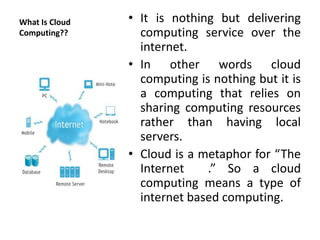
• It is nothing but delivering 
computing service over the 
internet. 
• In other words cloud 
computing is nothing but it is 
a computing that relies on 
sharing computing resources 
rather than having local 
servers. 
• Cloud is a metaphor for “The 
Internet .” So a cloud 
computing means a type of 
internet based computing.
Why Cloud Computing? 
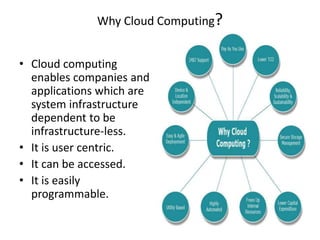
• Cloud computing 
enables companies and 
applications which are 
system infrastructure 
dependent to be 
infrastructure-less. 
• It is user centric. 
• It can be accessed. 
• It is easily 
programmable.
Cloud Architecture
• Individual users connect to cloud from their 
own personal computers or portable devices 
over the internet. 
• To these individual users cloud is seen as a 
single application , device or document. 
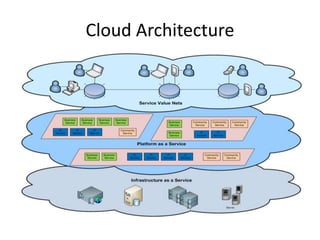
• Cloud Architecture includes cloud service , 
cloud platform , cloud infrastructure and cloud 
storage.
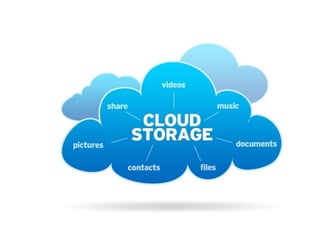
CLOUD STORAGE 
• It means “storage of data online in the cloud , ” 
where in a company’s data is stored and is 
accessible from multiple distributed and 
connected resources that comprise a cloud. 
• They provide benefits of greater accessibility , 
reliability , rapid deployment. 
• They have strong protection for data backup and 
recovery purposes. 
• However cloud storage has potential for security 
and compliance concerns.
TYPES OF CLOUD STORAGE 
• Public Cloud 
• Private Cloud 
• Hybrid Cloud
PUBLIC CLOUD 
• A form of cloud storage where the enterprise 
and storage service provider are separate and 
data is stored outside of enterprises data 
center. 
• They free small businesses and enterprises 
from expensive costs of having to purchase, 
manage and maintain on premises storage 
hardware and software resources. 
• Example is Amazon.
PRIVATE CLOUD 
• It also offers same benefits as of public cloud 
systems but removes a number of objections 
to cloud computing model including control 
over enterprise and customer data. 
• It is also very secure. 
• Example are HP data centers
HYBRID CLOUD 
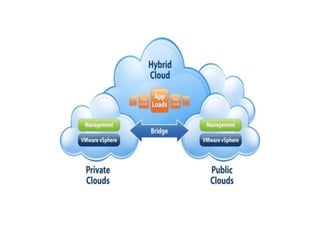
• It is a combination of both private and public 
cloud systems where some secure or important 
data resides in enterprise’s private cloud while 
other data can be accessible from public storage 
provider. 
• These systems combines the advantages of 
scalability , reliability , rapid deployment and cost 
savings of public cloud storage with security. 
• Examples are sales and emails in public.
CLOUD SERVICE STACKS 
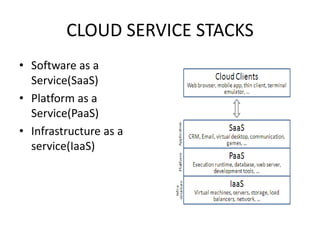
• Software as a 
Service(SaaS) 
• Platform as a 
Service(PaaS) 
• Infrastructure as a 
service(IaaS)
SaaS 
• In this model , cloud providers install and operate 
application software in the cloud and cloud users 
access software from the cloud clients. 
• Users do not manage cloud infrastructure and 
platform where application runs which simplifies 
maintenance as there is no need to install and 
run application on own desktops. 
• Examples are Google apps , Microsoft office 365.
Pros and Cons 
Pros 
• Free or can be paid through 
subscription. 
• Accessible from any 
computer. 
Cons 
• Generating apllications not 
suitable for business 
purpose.
PaaS 
• In this model , cloud providers deliver a 
computing platform including OS , data base 
and webserver. 
• Application developers can develop and run 
software solutions on platform without cost 
and complexity of managing software and 
hardware layers. 
• Examples are Google app engine and windows 
azure cloud services.
Pros and Cons 
Pros 
• Private or Public 
deployment. 
• Low cost and rapid 
development. 
Cons 
• Limits developers to 
provider languages and 
tools.
IaaS 
• In this model , providers offer computers 
physical or virtual machines and other 
resources. 
• They offer capacity for rent , basically hosted 
data centers and servers. 
• An evolution of website and server hosting 
services provided by VPS. 
• Examples are Google compute engine , HP 
cloud , Azure services platform.
Pros and Cons 
Pros 
• Capability to transfer work 
to cloud during periods of 
peak demand for on 
premise systems. 
Cons 
• This model depends on 
service provider.
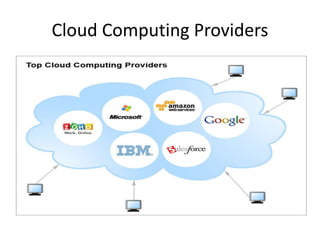
Cloud Computing Providers
Pros of Cloud Computing 
• Lower hardware and software maintenance 
• Improved performance 
• Increased data reliability 
• Improved document format compatibility 
• Instant software updates 
• Portability 
• Cost reduction 
• Unlimited storage capacity
Cons of Cloud Computing 
• Requires a constant internet connection 
• Features might be limited 
• Stored data may be lost 
• It can be slow 
• Bandwidth could bust budget
CONCLUSION 
• Cloud computing provides a super computing 
power. 
• Cloud services are simpler to acquire 
• They have tremendous benefits to customers 
of all sizes 
• This cloud of computers can extend beyond a 
single company or enterprise. 
• It is the fast growing part of IT
BOTTOM LINE
Cloud computing by G.SASHIDHAR

Cloud computing by G.SASHIDHAR

  • 1.
  • 2.
    HISTORY • Cloudcomputing is a natural evolution of the widespread adoption of virtualization , service-oriented architecture and utility computing. • The actual term “cloud” borrows from telephony in that telecommunication companies who until 1990s offered primarily dedicated point-to-point data circuits started offering Virtual Private Network services with comparable quality of service.
  • 3.
    What Is Cloud Computing?? • It is nothing but delivering computing service over the internet. • In other words cloud computing is nothing but it is a computing that relies on sharing computing resources rather than having local servers. • Cloud is a metaphor for “The Internet .” So a cloud computing means a type of internet based computing.
  • 4.
    Why Cloud Computing? • Cloud computing enables companies and applications which are system infrastructure dependent to be infrastructure-less. • It is user centric. • It can be accessed. • It is easily programmable.
  • 5.
  • 6.
    • Individual usersconnect to cloud from their own personal computers or portable devices over the internet. • To these individual users cloud is seen as a single application , device or document. • Cloud Architecture includes cloud service , cloud platform , cloud infrastructure and cloud storage.
  • 7.
    CLOUD STORAGE •It means “storage of data online in the cloud , ” where in a company’s data is stored and is accessible from multiple distributed and connected resources that comprise a cloud. • They provide benefits of greater accessibility , reliability , rapid deployment. • They have strong protection for data backup and recovery purposes. • However cloud storage has potential for security and compliance concerns.
  • 9.
    TYPES OF CLOUDSTORAGE • Public Cloud • Private Cloud • Hybrid Cloud
  • 10.
    PUBLIC CLOUD •A form of cloud storage where the enterprise and storage service provider are separate and data is stored outside of enterprises data center. • They free small businesses and enterprises from expensive costs of having to purchase, manage and maintain on premises storage hardware and software resources. • Example is Amazon.
  • 11.
    PRIVATE CLOUD •It also offers same benefits as of public cloud systems but removes a number of objections to cloud computing model including control over enterprise and customer data. • It is also very secure. • Example are HP data centers
  • 12.
    HYBRID CLOUD •It is a combination of both private and public cloud systems where some secure or important data resides in enterprise’s private cloud while other data can be accessible from public storage provider. • These systems combines the advantages of scalability , reliability , rapid deployment and cost savings of public cloud storage with security. • Examples are sales and emails in public.
  • 14.
    CLOUD SERVICE STACKS • Software as a Service(SaaS) • Platform as a Service(PaaS) • Infrastructure as a service(IaaS)
  • 15.
    SaaS • Inthis model , cloud providers install and operate application software in the cloud and cloud users access software from the cloud clients. • Users do not manage cloud infrastructure and platform where application runs which simplifies maintenance as there is no need to install and run application on own desktops. • Examples are Google apps , Microsoft office 365.
  • 16.
    Pros and Cons Pros • Free or can be paid through subscription. • Accessible from any computer. Cons • Generating apllications not suitable for business purpose.
  • 17.
    PaaS • Inthis model , cloud providers deliver a computing platform including OS , data base and webserver. • Application developers can develop and run software solutions on platform without cost and complexity of managing software and hardware layers. • Examples are Google app engine and windows azure cloud services.
  • 18.
    Pros and Cons Pros • Private or Public deployment. • Low cost and rapid development. Cons • Limits developers to provider languages and tools.
  • 19.
    IaaS • Inthis model , providers offer computers physical or virtual machines and other resources. • They offer capacity for rent , basically hosted data centers and servers. • An evolution of website and server hosting services provided by VPS. • Examples are Google compute engine , HP cloud , Azure services platform.
  • 20.
    Pros and Cons Pros • Capability to transfer work to cloud during periods of peak demand for on premise systems. Cons • This model depends on service provider.
  • 21.
  • 22.
    Pros of CloudComputing • Lower hardware and software maintenance • Improved performance • Increased data reliability • Improved document format compatibility • Instant software updates • Portability • Cost reduction • Unlimited storage capacity
  • 23.
    Cons of CloudComputing • Requires a constant internet connection • Features might be limited • Stored data may be lost • It can be slow • Bandwidth could bust budget
  • 24.
    CONCLUSION • Cloudcomputing provides a super computing power. • Cloud services are simpler to acquire • They have tremendous benefits to customers of all sizes • This cloud of computers can extend beyond a single company or enterprise. • It is the fast growing part of IT
  • 26.