G. H. Raisoni college of Engineering and management
DEPT. OF COMPUTER ENGINEERING
SUB:- SEMINAR AND TECHNICAL COMMUNICATION
Third year (B Division)
Topic :- Cloud Computing
Presented By:- Guided By:-
1) Mukhid khan Dr.R.S.Bichakar
2) Balaji Deshmukh
3) Sambhaji Jadhav
Outlines
 Trends in Computing
 Introduction
 History
 What is Cloud Computing
 Why Cloud Computing?
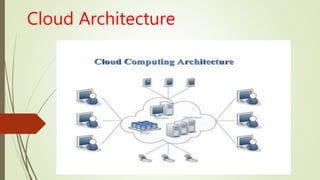
 Cloud Architecture
 Types of clound
 Cloud Service Models
 Cloud Storage
 Advantages
 Disadvantages
 Real Life Example
 Conclusion
Trends in Computing
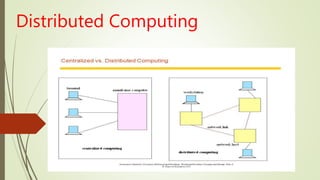
 Distributed Computing
 Cluster Computing
 Utility Computing
 Cloud Computing
Distributed Computing
Cluster Computing
• A cluster is a type of parallel or distributed computer system, which
consists of a collection of inter-connected stand-alone computers working
together as a single integrated computing resource .
• Key components of a cluster include multiple standalone computers (PCs,
Workstations, or SMPs), operating systems, high-performance interconnects,
middleware, parallel programming environments, and applications
Utility Computing
Utility Computing is purely a concept which cloud computing practically
implements.
• Utility computing is a service provisioning model in which a service provider
makes computing resources and infrastructure management available to the
customer as needed, and charges them for specific usage rather than a flat rate.
• This model has the advantage of a low or no initial cost to acquire computer
resources; instead, computational resources are essentially rented.
Introductin Clound computing:
 With traditional desktop computing, we run copies of software programs on our own
computer. The documents we create are stored on our own pc.
 Although documents can be accessed from other computers on the network, they can’t
be accessed by computers outside the network. This is PC-centric.
 With cloud computing, the software programs one use aren’t run from one’s pe
 If a computer crashes, the software is still available for others to use. Same goes for the
documents one create; they’re stored on a collection of servers accessed via the
Internet.
 Anyone with permission can not only access the documents, but can also edit and
collaborate on those documents in real time.
 Unlike traditional computing, this cloud computing model isn’t PC-centric, it’s
document-centric.rsonal computer, but are rather stored on servers accessed via the
Internet
History
The father of this idea is considered to be John McCarthy, a professor at MIT
University in US, who first in 1961 presented the idea of sharing the same computer
technology as being the same as for example sharing electricity. Electrical power
needs many households/firms that possess a variety of electrical appliances but do
not possess power plant. One power plant serves many customers and using the
electricity example,
One of the first milestones was the arrival of Salesforce.com in 1999, which
pioneered the concept of delivering enterprise applications via a simple website.
The next development was Amazon Web Services in 2002, which provided a suite
of cloud‐based services including storage, computation and even human
intelligence.
Another big milestone came in 2009 as Google and others started to offer
browser‐based enterprise applications, though services such as Google Apps
Cloud Architecture
Types of Cloud (Deployment Models)
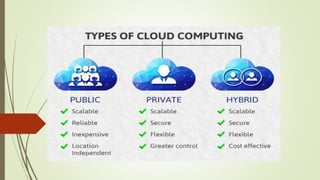
 Public cloud.
Private cloud.
Hybrid cloud .
Public Cloud
The Public Cloud allows systems and services to be easily accessible to the
general public. Public cloud may be less secure because of its openness,
e.g., e-mail
A form of cloud storage where the enterprise and storage service provider
are separate and the data is stored outside of the enterprise's data center.
With public cloud storage, or external storage clouds, enterprises and
small businesses offload their data storage and archival / backup needs to
a third-party cloud storage service provider, freeing them from the
expensive costs of having to purchase, manage and maintain on-premises
storage hardware and software resources
Private Cloud
 The Private Cloud allows systems and services to be accessible within an
organization. It offers increased security because of its private nature
Community cloud :-The Community Cloud allows systems and services to
be accessible by group of organizations. The cloud infrastructure is hared
by several organizations and supports a specific goal
 The phrase used to describe a cloud computing platform that is
implemented within the corporate firewall, under the control of the IT
department.
 A private cloud is designed to offer the same features and benefits of
public cloud systems, but removes a number of objections to the cloud
computing model including control over enterprise and customer data,
worries about security, and issues connected to regulatory compliance
Hybrid Cloud
 The Hybrid Cloud is mixture of public and private cloud. However, the critical
activities are performed using private cloud while the non-critical activities are
performed using public cloud
e.g Cloud Bursting for load balancing between clouds
 A combination of public cloud storage and private cloud storage where some
critical data resides in the enterprise's private cloud while other data is stored
and accessible from a public cloud storage provider.
 Hybrid cloud storage combines the advantages of scalability, reliability, rapid
deployment and potential cost savings of public cloud storage with the security
and full control of private cloud storage.
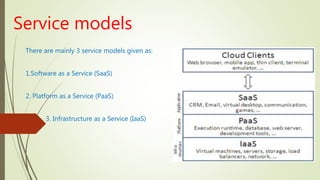
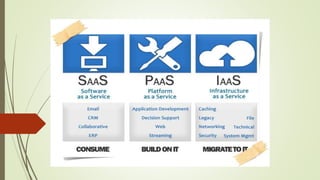
Service models
There are mainly 3 service models given as:
1.Software as a Service (SaaS)
2. Platform as a Service (PaaS)
3. Infrastructure as a Service (IaaS)
SaaS
 Defined as service-on-demand, where a provider will license software
tailored.
 In the SaaS model, cloud providers install and operate application software
in the cloud and cloud users access the software from cloud clients.
 Cloud users do not manage the cloud infrastructure and platform where
the application runs.
 This eliminates the need to install and run the application on the cloud
user's own computers, which simplifies maintenance and support.
 Examples of SaaS include: Fb,Google Apps, Microsoft Office 365, Onlive,

GT Nexus, Marketo, and TradeCard.
PaaS
 In the PaaS model, cloud providers deliver a computing platform typically
including operating system, programming language execution
environment, database, and web server.
 Application developers can develop and run their software solutions on a
cloud platform without the cost and complexity of buying and managing
the underlying hardware and software layers.
 Examples of PaaS include:
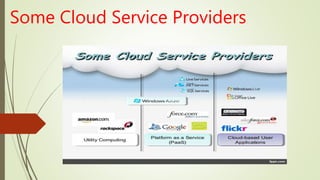
AWS Elastic Beanstalk, Cloud Foundry, Heroku, Force.com, , Mendix,
OpenShift, Google App Engine, Windows Azure Cloud Services and Orange
Scape
IaaS
 In the most basic cloud-service model, providers of IaaS offer computers
physical or (more often) virtual machines and other resources.
 IaaS clouds often offer additional resources such as a virtual-machine disk
image library, raw (block) and file-based storage, firewalls, load balancers, IP
addresses, virtual local area networks (VLANs), and software bundles.
 IaaS-cloud providers supply these resources on-demand from their large
pools installed in data centers.
Examples of IaaS providers include:
Amazon EC2, Azure Services Platform, DynDNS, Google Compute Engine,
HP Cloud, iland, NaviSite, Oracle Infrastructure as a Service,
Some Cloud Service Providers
Cloud Storage
Cloud storage means "the storage of data online in the cloud," wherein a
company's data is stored in and accessible from multiple distributed and
connected resources that comprise a cloud.
Cloud storage can provide the benefits of greater accessibility and reliability;
rapid deployment; strong protection for data backup, archival and disaster
recovery purposes; and lower overall storage costs as a result of not having to
purchase, manage and maintain expensive hardware.
However, cloud storage does have the potential for security and compliance
concerns.
Advantages of Cloud Computing
 1. Lower computer costs.
 2. Improved performance.
 3. Reduced software costs.
 4. Instant software updates.
 5. Improved document format compatibility.
 6. Unlimited storage capacity.
 7. Increased data reliability.
 8. Universal document access.
 9. Latest version availability.
 10. Device independence
Disadvantages of Cloud
Computing
 1. Requires a constant Internet connection.
 2. Does not work well with low-speed connections.
 3. Features might be limited.
 4. Can be slow.
 5. Stored data might not be secure.
 6. Stored data can be lost.
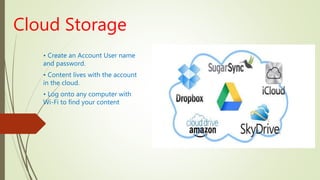
Cloud Storage
• Create an Account User name
and password.
• Content lives with the account
in the cloud.
• Log onto any computer with
Wi-Fi to find your content
Download For Storage
• Download a cloud based app to on your computer
• The app lives on your Computer
• Save files to the app
• When connected to the Internet it will sync with the cloud
• The Cloud can be accessed from any Internet connection
Real Life Example
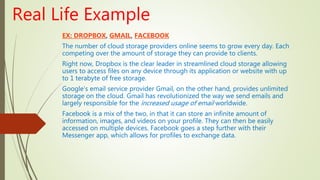
EX: DROPBOX, GMAIL, FACEBOOK
The number of cloud storage providers online seems to grow every day. Each
competing over the amount of storage they can provide to clients.
Right now, Dropbox is the clear leader in streamlined cloud storage allowing
users to access files on any device through its application or website with up
to 1 terabyte of free storage.
Google’s email service provider Gmail, on the other hand, provides unlimited
storage on the cloud. Gmail has revolutionized the way we send emails and
largely responsible for the increased usage of email worldwide.
Facebook is a mix of the two, in that it can store an infinite amount of
information, images, and videos on your profile. They can then be easily
accessed on multiple devices. Facebook goes a step further with their
Messenger app, which allows for profiles to exchange data.
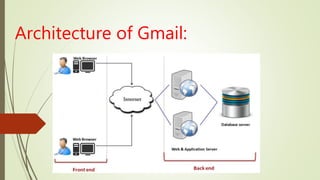
Architecture of Gmail:
Conclusion
Thus cloud computing provide a super-computing power .
• This cloud of computers extends beyond a single company or enterprise.
• The applications and data served by the cloud are available to broad group
of users, cross-enterprise and crossplatform.
Thank You

cloud computing

  • 1.
    G. H. Raisonicollege of Engineering and management DEPT. OF COMPUTER ENGINEERING SUB:- SEMINAR AND TECHNICAL COMMUNICATION Third year (B Division) Topic :- Cloud Computing Presented By:- Guided By:- 1) Mukhid khan Dr.R.S.Bichakar 2) Balaji Deshmukh 3) Sambhaji Jadhav
  • 2.
    Outlines  Trends inComputing  Introduction  History  What is Cloud Computing  Why Cloud Computing?  Cloud Architecture  Types of clound  Cloud Service Models  Cloud Storage  Advantages  Disadvantages  Real Life Example  Conclusion
  • 3.
    Trends in Computing Distributed Computing  Cluster Computing  Utility Computing  Cloud Computing
  • 4.
  • 5.
    Cluster Computing • Acluster is a type of parallel or distributed computer system, which consists of a collection of inter-connected stand-alone computers working together as a single integrated computing resource . • Key components of a cluster include multiple standalone computers (PCs, Workstations, or SMPs), operating systems, high-performance interconnects, middleware, parallel programming environments, and applications
  • 6.
    Utility Computing Utility Computingis purely a concept which cloud computing practically implements. • Utility computing is a service provisioning model in which a service provider makes computing resources and infrastructure management available to the customer as needed, and charges them for specific usage rather than a flat rate. • This model has the advantage of a low or no initial cost to acquire computer resources; instead, computational resources are essentially rented.
  • 7.
    Introductin Clound computing: With traditional desktop computing, we run copies of software programs on our own computer. The documents we create are stored on our own pc.  Although documents can be accessed from other computers on the network, they can’t be accessed by computers outside the network. This is PC-centric.  With cloud computing, the software programs one use aren’t run from one’s pe  If a computer crashes, the software is still available for others to use. Same goes for the documents one create; they’re stored on a collection of servers accessed via the Internet.  Anyone with permission can not only access the documents, but can also edit and collaborate on those documents in real time.  Unlike traditional computing, this cloud computing model isn’t PC-centric, it’s document-centric.rsonal computer, but are rather stored on servers accessed via the Internet
  • 8.
    History The father ofthis idea is considered to be John McCarthy, a professor at MIT University in US, who first in 1961 presented the idea of sharing the same computer technology as being the same as for example sharing electricity. Electrical power needs many households/firms that possess a variety of electrical appliances but do not possess power plant. One power plant serves many customers and using the electricity example, One of the first milestones was the arrival of Salesforce.com in 1999, which pioneered the concept of delivering enterprise applications via a simple website. The next development was Amazon Web Services in 2002, which provided a suite of cloud‐based services including storage, computation and even human intelligence. Another big milestone came in 2009 as Google and others started to offer browser‐based enterprise applications, though services such as Google Apps
  • 9.
  • 10.
    Types of Cloud(Deployment Models)  Public cloud. Private cloud. Hybrid cloud .
  • 11.
    Public Cloud The PublicCloud allows systems and services to be easily accessible to the general public. Public cloud may be less secure because of its openness, e.g., e-mail A form of cloud storage where the enterprise and storage service provider are separate and the data is stored outside of the enterprise's data center. With public cloud storage, or external storage clouds, enterprises and small businesses offload their data storage and archival / backup needs to a third-party cloud storage service provider, freeing them from the expensive costs of having to purchase, manage and maintain on-premises storage hardware and software resources
  • 12.
    Private Cloud  ThePrivate Cloud allows systems and services to be accessible within an organization. It offers increased security because of its private nature Community cloud :-The Community Cloud allows systems and services to be accessible by group of organizations. The cloud infrastructure is hared by several organizations and supports a specific goal  The phrase used to describe a cloud computing platform that is implemented within the corporate firewall, under the control of the IT department.  A private cloud is designed to offer the same features and benefits of public cloud systems, but removes a number of objections to the cloud computing model including control over enterprise and customer data, worries about security, and issues connected to regulatory compliance
  • 13.
    Hybrid Cloud  TheHybrid Cloud is mixture of public and private cloud. However, the critical activities are performed using private cloud while the non-critical activities are performed using public cloud e.g Cloud Bursting for load balancing between clouds  A combination of public cloud storage and private cloud storage where some critical data resides in the enterprise's private cloud while other data is stored and accessible from a public cloud storage provider.  Hybrid cloud storage combines the advantages of scalability, reliability, rapid deployment and potential cost savings of public cloud storage with the security and full control of private cloud storage.
  • 15.
    Service models There aremainly 3 service models given as: 1.Software as a Service (SaaS) 2. Platform as a Service (PaaS) 3. Infrastructure as a Service (IaaS)
  • 16.
    SaaS  Defined asservice-on-demand, where a provider will license software tailored.  In the SaaS model, cloud providers install and operate application software in the cloud and cloud users access the software from cloud clients.  Cloud users do not manage the cloud infrastructure and platform where the application runs.  This eliminates the need to install and run the application on the cloud user's own computers, which simplifies maintenance and support.  Examples of SaaS include: Fb,Google Apps, Microsoft Office 365, Onlive, GT Nexus, Marketo, and TradeCard.
  • 17.
    PaaS  In thePaaS model, cloud providers deliver a computing platform typically including operating system, programming language execution environment, database, and web server.  Application developers can develop and run their software solutions on a cloud platform without the cost and complexity of buying and managing the underlying hardware and software layers.  Examples of PaaS include: AWS Elastic Beanstalk, Cloud Foundry, Heroku, Force.com, , Mendix, OpenShift, Google App Engine, Windows Azure Cloud Services and Orange Scape
  • 18.
    IaaS  In themost basic cloud-service model, providers of IaaS offer computers physical or (more often) virtual machines and other resources.  IaaS clouds often offer additional resources such as a virtual-machine disk image library, raw (block) and file-based storage, firewalls, load balancers, IP addresses, virtual local area networks (VLANs), and software bundles.  IaaS-cloud providers supply these resources on-demand from their large pools installed in data centers. Examples of IaaS providers include: Amazon EC2, Azure Services Platform, DynDNS, Google Compute Engine, HP Cloud, iland, NaviSite, Oracle Infrastructure as a Service,
  • 20.
  • 21.
    Cloud Storage Cloud storagemeans "the storage of data online in the cloud," wherein a company's data is stored in and accessible from multiple distributed and connected resources that comprise a cloud. Cloud storage can provide the benefits of greater accessibility and reliability; rapid deployment; strong protection for data backup, archival and disaster recovery purposes; and lower overall storage costs as a result of not having to purchase, manage and maintain expensive hardware. However, cloud storage does have the potential for security and compliance concerns.
  • 22.
    Advantages of CloudComputing  1. Lower computer costs.  2. Improved performance.  3. Reduced software costs.  4. Instant software updates.  5. Improved document format compatibility.  6. Unlimited storage capacity.  7. Increased data reliability.  8. Universal document access.  9. Latest version availability.  10. Device independence
  • 23.
    Disadvantages of Cloud Computing 1. Requires a constant Internet connection.  2. Does not work well with low-speed connections.  3. Features might be limited.  4. Can be slow.  5. Stored data might not be secure.  6. Stored data can be lost.
  • 24.
    Cloud Storage • Createan Account User name and password. • Content lives with the account in the cloud. • Log onto any computer with Wi-Fi to find your content
  • 25.
    Download For Storage •Download a cloud based app to on your computer • The app lives on your Computer • Save files to the app • When connected to the Internet it will sync with the cloud • The Cloud can be accessed from any Internet connection
  • 26.
    Real Life Example EX:DROPBOX, GMAIL, FACEBOOK The number of cloud storage providers online seems to grow every day. Each competing over the amount of storage they can provide to clients. Right now, Dropbox is the clear leader in streamlined cloud storage allowing users to access files on any device through its application or website with up to 1 terabyte of free storage. Google’s email service provider Gmail, on the other hand, provides unlimited storage on the cloud. Gmail has revolutionized the way we send emails and largely responsible for the increased usage of email worldwide. Facebook is a mix of the two, in that it can store an infinite amount of information, images, and videos on your profile. They can then be easily accessed on multiple devices. Facebook goes a step further with their Messenger app, which allows for profiles to exchange data.
  • 27.
  • 28.
    Conclusion Thus cloud computingprovide a super-computing power . • This cloud of computers extends beyond a single company or enterprise. • The applications and data served by the cloud are available to broad group of users, cross-enterprise and crossplatform.
  • 29.