CLOUD COMPUTNG
WHAT IS CLOUD COMPUTING ??
An emerging computer paradigm where data
and services reside in massively scalable
data centers in the cloud and can be
accessed from any connected devices over
the internet.
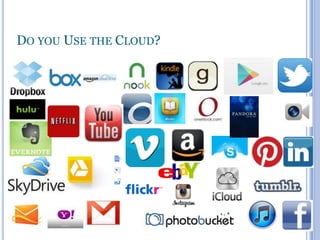
DO YOU USE THE CLOUD?
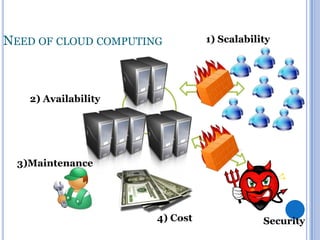
NEED OF CLOUD COMPUTING

2) Availability

1) Scalability

End Users

3)Maintenance

4) Cost

5) Security
SO WHAT A CLOUD COMPUTING?
A distributed computation model which offers
managed, scalable, secured, highly-available
computation resources and software as a
service.
Computing and software resources that are
delivered on demand, as service.
BACK STORY

[FROM GROUND TO CLOUD]

Computers have internal or hard drive storage for
storing pictures, documents etc.
 To access this data you come to that computer only
not accessible from another.
 External storage: That allows the data to be mobile
through pendrives, CD.
 Networked storage: In this data stored in network
drive which can be accessible from any
workstations connected to the network.

Cloud storage: Content lives with the account in the
cloud, Log onto any computer with Wi-Fi to find
your content.
 It’s a type of app on your computer when you make
change or addition it saves to the app then when
you connected to the internet it sync with the cloud
and data get stored in cloud.
 Other than storage it provide software and other
application services like document creation in
Google doc.

TYPES OF CLOUD
1] Private cloud
This type of cloud is maintained within an
organization and used solely for their internal
purpose. So the utility model is not a big term in
this scenario.
2] Private cloud
In this type an organization rents cloud services
from cloud providers on-demand basis. Services
provided the users using utility computing model.
3] Hybrid cloud
This type of cloud is composed of multiple
internal or external cloud. This is the scenario when
an organization moves to public cloud computing
domain from its internal private cloud.
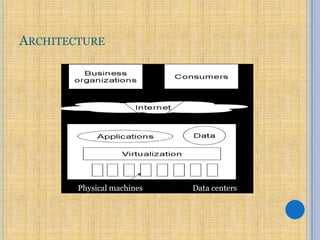
ARCHITECTURE

Physical machines

Data centers
TYPES OF SERVICES
1] SaaS (Software as a service)
2] PaaS (Platform as a service)
3] IaaS (Infrastructure as a Service)
SAAS
Delivers a single application through the web browser
to thousands of customers using a multitenant
architecture. On the customer side, it means no
upfront investment in servers or software licensing
on the provider side, with just one application to
maintain, cost is low compared to conventional
hosting. Under SaaS, the software publisher (seller)
runs and maintains all necessary hardware and
software.
Eg. Google docs is also a very nice example of SaaS
where the users can create, edit, delete and share
their documents, spreadsheets or presentations
whereas Google have the responsibility to maintain
the software and hardware.
PAAS
Delivers development environment as a service.
One can build his/her own applications that run on
the provider's infrastructure that support
transactions, uniform authentication, robust
scalability and availability. The applications built
using PaaS are offered as SaaS and consumed
directly from the end users' web browsers. This
gives the ability to integrate or consume third-party
web-services from other service platforms.
E.g. - Google App Engine.
IAAS
IaaS service provides the users of the cloud greater
exibility to lower level than other services. It gives
even CPU clocks with OS level control to the
developers.
The cloud computing vendors offer infrastructure as a
service. One may avail hardware services such as
processors, memory, networks etc on agreed basis
for specific duration and price.
E.g. - Amazon EC2 and S3.
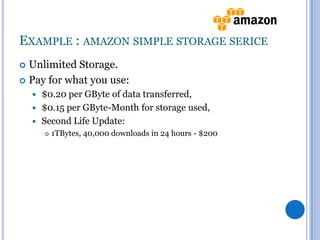
EXAMPLE : AMAZON SIMPLE STORAGE SERICE
Unlimited Storage.
 Pay for what you use:


$0.20 per GByte of data transferred,
 $0.15 per GByte-Month for storage used,
 Second Life Update:




1TBytes, 40,000 downloads in 24 hours - $200
ADVANTAGES
Lower computer cost
 Improved performance
 Reduced software cost
 Instant software updates
 Improved document format compatibility
 Unlimited storage capacity
 Increased data reliability
 Universal document access
 Latest version availability
 Easier group collaboration
 Device independence

DISADVANTAGES
Requires a constant Internet connection
 Does not work well with low-speed connections
 Features might be limited
 Can be slow
 Stored data might not be secure
 Stored data can be lost

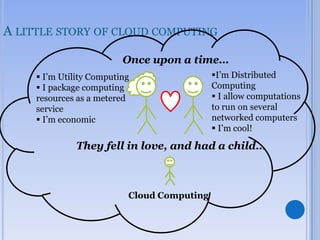
A LITTLE STORY OF CLOUD COMPUTING
Once upon a time…
 I’m Utility Computing
 I package computing
resources as a metered
service
 I’m economic

I’m Distributed
Computing
 I allow computations
to run on several
networked computers
 I’m cool!

They fell in love, and had a child…

Cloud Computing
CONCLUSION
Cloud‖ computing builds on decades of research in
virtualization, distributed computing, utility
computing, and more recently networking, web and
software services. It implies a service oriented
architecture, reduced information technology
overhead for the end-user, great flexibility, reduced
total cost of ownership, on demand services and
many other things.
Cloud computng

Cloud computng

  • 1.
  • 2.
    WHAT IS CLOUDCOMPUTING ?? An emerging computer paradigm where data and services reside in massively scalable data centers in the cloud and can be accessed from any connected devices over the internet.
  • 3.
    DO YOU USETHE CLOUD?
  • 4.
    NEED OF CLOUDCOMPUTING 2) Availability 1) Scalability End Users 3)Maintenance 4) Cost 5) Security
  • 5.
    SO WHAT ACLOUD COMPUTING? A distributed computation model which offers managed, scalable, secured, highly-available computation resources and software as a service. Computing and software resources that are delivered on demand, as service.
  • 6.
    BACK STORY [FROM GROUNDTO CLOUD] Computers have internal or hard drive storage for storing pictures, documents etc.  To access this data you come to that computer only not accessible from another.  External storage: That allows the data to be mobile through pendrives, CD.  Networked storage: In this data stored in network drive which can be accessible from any workstations connected to the network. 
  • 7.
    Cloud storage: Contentlives with the account in the cloud, Log onto any computer with Wi-Fi to find your content.  It’s a type of app on your computer when you make change or addition it saves to the app then when you connected to the internet it sync with the cloud and data get stored in cloud.  Other than storage it provide software and other application services like document creation in Google doc. 
  • 8.
    TYPES OF CLOUD 1]Private cloud This type of cloud is maintained within an organization and used solely for their internal purpose. So the utility model is not a big term in this scenario. 2] Private cloud In this type an organization rents cloud services from cloud providers on-demand basis. Services provided the users using utility computing model.
  • 9.
    3] Hybrid cloud Thistype of cloud is composed of multiple internal or external cloud. This is the scenario when an organization moves to public cloud computing domain from its internal private cloud.
  • 10.
  • 11.
    TYPES OF SERVICES 1]SaaS (Software as a service) 2] PaaS (Platform as a service) 3] IaaS (Infrastructure as a Service)
  • 12.
    SAAS Delivers a singleapplication through the web browser to thousands of customers using a multitenant architecture. On the customer side, it means no upfront investment in servers or software licensing on the provider side, with just one application to maintain, cost is low compared to conventional hosting. Under SaaS, the software publisher (seller) runs and maintains all necessary hardware and software. Eg. Google docs is also a very nice example of SaaS where the users can create, edit, delete and share their documents, spreadsheets or presentations whereas Google have the responsibility to maintain the software and hardware.
  • 13.
    PAAS Delivers development environmentas a service. One can build his/her own applications that run on the provider's infrastructure that support transactions, uniform authentication, robust scalability and availability. The applications built using PaaS are offered as SaaS and consumed directly from the end users' web browsers. This gives the ability to integrate or consume third-party web-services from other service platforms. E.g. - Google App Engine.
  • 14.
    IAAS IaaS service providesthe users of the cloud greater exibility to lower level than other services. It gives even CPU clocks with OS level control to the developers. The cloud computing vendors offer infrastructure as a service. One may avail hardware services such as processors, memory, networks etc on agreed basis for specific duration and price. E.g. - Amazon EC2 and S3.
  • 15.
    EXAMPLE : AMAZONSIMPLE STORAGE SERICE Unlimited Storage.  Pay for what you use:  $0.20 per GByte of data transferred,  $0.15 per GByte-Month for storage used,  Second Life Update:   1TBytes, 40,000 downloads in 24 hours - $200
  • 16.
    ADVANTAGES Lower computer cost Improved performance  Reduced software cost  Instant software updates  Improved document format compatibility  Unlimited storage capacity  Increased data reliability  Universal document access  Latest version availability  Easier group collaboration  Device independence 
  • 17.
    DISADVANTAGES Requires a constantInternet connection  Does not work well with low-speed connections  Features might be limited  Can be slow  Stored data might not be secure  Stored data can be lost 
  • 18.
    A LITTLE STORYOF CLOUD COMPUTING Once upon a time…  I’m Utility Computing  I package computing resources as a metered service  I’m economic I’m Distributed Computing  I allow computations to run on several networked computers  I’m cool! They fell in love, and had a child… Cloud Computing
  • 19.
    CONCLUSION Cloud‖ computing buildson decades of research in virtualization, distributed computing, utility computing, and more recently networking, web and software services. It implies a service oriented architecture, reduced information technology overhead for the end-user, great flexibility, reduced total cost of ownership, on demand services and many other things.

Editor's Notes

  • #3 Now we proceed with the definition…I would bet everyone in attendance today uses the cloud. I am going to show a slide with several examples of cloud based applications. I would like you to count up how many from this sampling you use. I will then put up a poll question to get your answers.