Cloud computing
Presented by priya gharate,
Sandip foundation
Outline
• Introduction
• What is cloud computing
• Why cloud computing
• Cloud Architecture
• Cloud service models
• Types of Cloud Storage
• Advantages
• Dis advantages
• conclusion
Introduction
• Isn't PC-centric; “document centric”.
• Software programs stored on servers accessed via the internet.
• Edit and collaborate documents in real time.
What is cloud computing?
• Relies on sharing computing resources
• Cloud computing- internet based computing
• Servers, storage and applications are delivered through internet.
• It is comparable to grid computing
Why cloud computing?
• User centric
• Task centric
• Powerful
• Accessible
• Intelligent
• programmable
Cloud Architecture
• Users connect to the cloud from personal
computers or portable- over the internet.
• Cloud is seen as single application, device, or
document
• Hardware in cloud is invisible.
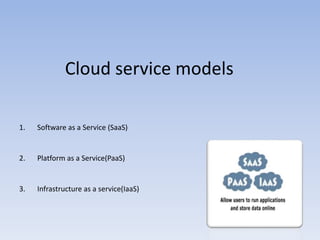
Cloud service models
1. Software as a Service (SaaS)
2. Platform as a Service(PaaS)
3. Infrastructure as a service(IaaS)
SaaS
• Provider will license user
• E.g.: Google Apps, Microsoft Office 365, Onlive, GT Nexus,
Marketo, TradeCard.
• Prons: 1.free paid
2.accessible
3.collaborative working
• Cons: Generic applications not always suitable for business
use…
PaaS
• Cloud provider deliver a “computing platform”
• E.g., cloud foundry, Google app engine, Mendix, OrangeScape
• Pros: 1. Rapid development at low cost
2.private or public deployment
• Cons: limits developer to provider languages and tools.
IaaS
• Offers virtual machines and other resources.
• Ex.: Amazon EC2, HP cloud, SingleHop
Types of Cloud Storage
• Public cloud
• Private cloud
• Hybrid cloud
• Public cloud: computing resources are provisioned over
the Internet, and third party service provider services as
“utilities”.
• private cloud: it has removed no of objections over
security & issues connected.
• Hybrid cloud: combination of public & private cloud
storage.
Conclusion
• Provide a “super computing power”
• The applications and data served by the cloud are available to broad group of
users.
• So many advantages like lower costs, improved performance, device
independence.
Thank you

Cloud computing

  • 1.
    Cloud computing Presented bypriya gharate, Sandip foundation
  • 2.
    Outline • Introduction • Whatis cloud computing • Why cloud computing • Cloud Architecture • Cloud service models • Types of Cloud Storage • Advantages • Dis advantages • conclusion
  • 3.
    Introduction • Isn't PC-centric;“document centric”. • Software programs stored on servers accessed via the internet. • Edit and collaborate documents in real time.
  • 4.
    What is cloudcomputing? • Relies on sharing computing resources • Cloud computing- internet based computing • Servers, storage and applications are delivered through internet. • It is comparable to grid computing
  • 5.
    Why cloud computing? •User centric • Task centric • Powerful • Accessible • Intelligent • programmable
  • 6.
    Cloud Architecture • Usersconnect to the cloud from personal computers or portable- over the internet. • Cloud is seen as single application, device, or document • Hardware in cloud is invisible.
  • 7.
    Cloud service models 1.Software as a Service (SaaS) 2. Platform as a Service(PaaS) 3. Infrastructure as a service(IaaS)
  • 8.
    SaaS • Provider willlicense user • E.g.: Google Apps, Microsoft Office 365, Onlive, GT Nexus, Marketo, TradeCard. • Prons: 1.free paid 2.accessible 3.collaborative working • Cons: Generic applications not always suitable for business use…
  • 9.
    PaaS • Cloud providerdeliver a “computing platform” • E.g., cloud foundry, Google app engine, Mendix, OrangeScape • Pros: 1. Rapid development at low cost 2.private or public deployment • Cons: limits developer to provider languages and tools.
  • 10.
    IaaS • Offers virtualmachines and other resources. • Ex.: Amazon EC2, HP cloud, SingleHop
  • 11.
    Types of CloudStorage • Public cloud • Private cloud • Hybrid cloud
  • 12.
    • Public cloud:computing resources are provisioned over the Internet, and third party service provider services as “utilities”. • private cloud: it has removed no of objections over security & issues connected. • Hybrid cloud: combination of public & private cloud storage.
  • 13.
    Conclusion • Provide a“super computing power” • The applications and data served by the cloud are available to broad group of users. • So many advantages like lower costs, improved performance, device independence.
  • 14.