Pari vallal Kannan
Center for Integrated Circuits and Systems
University of Texas at Dallas
8051 I/O and 8051 Interrupts
Class 7
EE4380 Fall 2002
19-Sep-02 2
Agenda
l 8051 I/O Interfacing
– Scanned LED displays
– LCD displays
– Keypads
l 8051 Interrupts
– IVT, ISR
– Interrupt enable and priority
– External interrupts
19-Sep-02 3
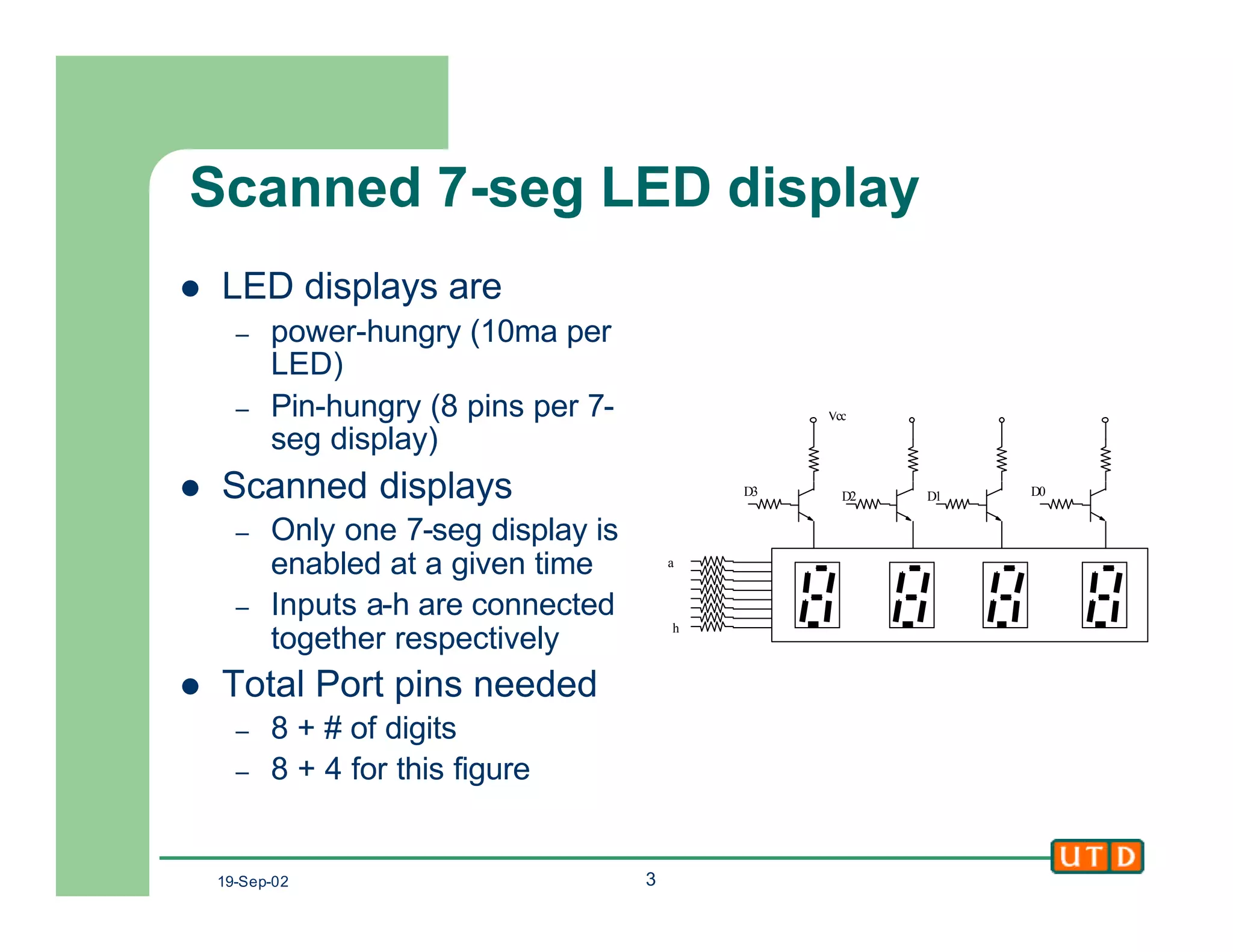
Scanned 7-seg LED display
l LED displays are
– power-hungry (10ma per
LED)
– Pin-hungry (8 pins per 7-
seg display)
l Scanned displays
– Only one 7-seg display is
enabled at a given time
– Inputs a-h are connected
together respectively
l Total Port pins needed
– 8 + # of digits
– 8 + 4 for this figure
h
D2 D1 D0
Vcc
D3
a
19-Sep-02 4
Scanned 7-seg display
l Algorithm to display a 4
digit value.
l The scanning frequency
should be high enough
to be flicker-free
– At least 30HZ
– Time one digit is ON
l 1/30 seconds
– Higher values give better
flicker reduction (60Hz)
start: disable [D3:D0]
again: enable D3
[a:h] ß pattern for Digit3
delay
disable D3. Enable D2
[a:h] ß pattern for Digit2
delay
disable D2. Enable D1
[a:h] ß pattern for Digit1
delay
disable D1. Enable D0
[a:h] ß pattern for Digit0
delay
disable D0
Goto again
19-Sep-02 5
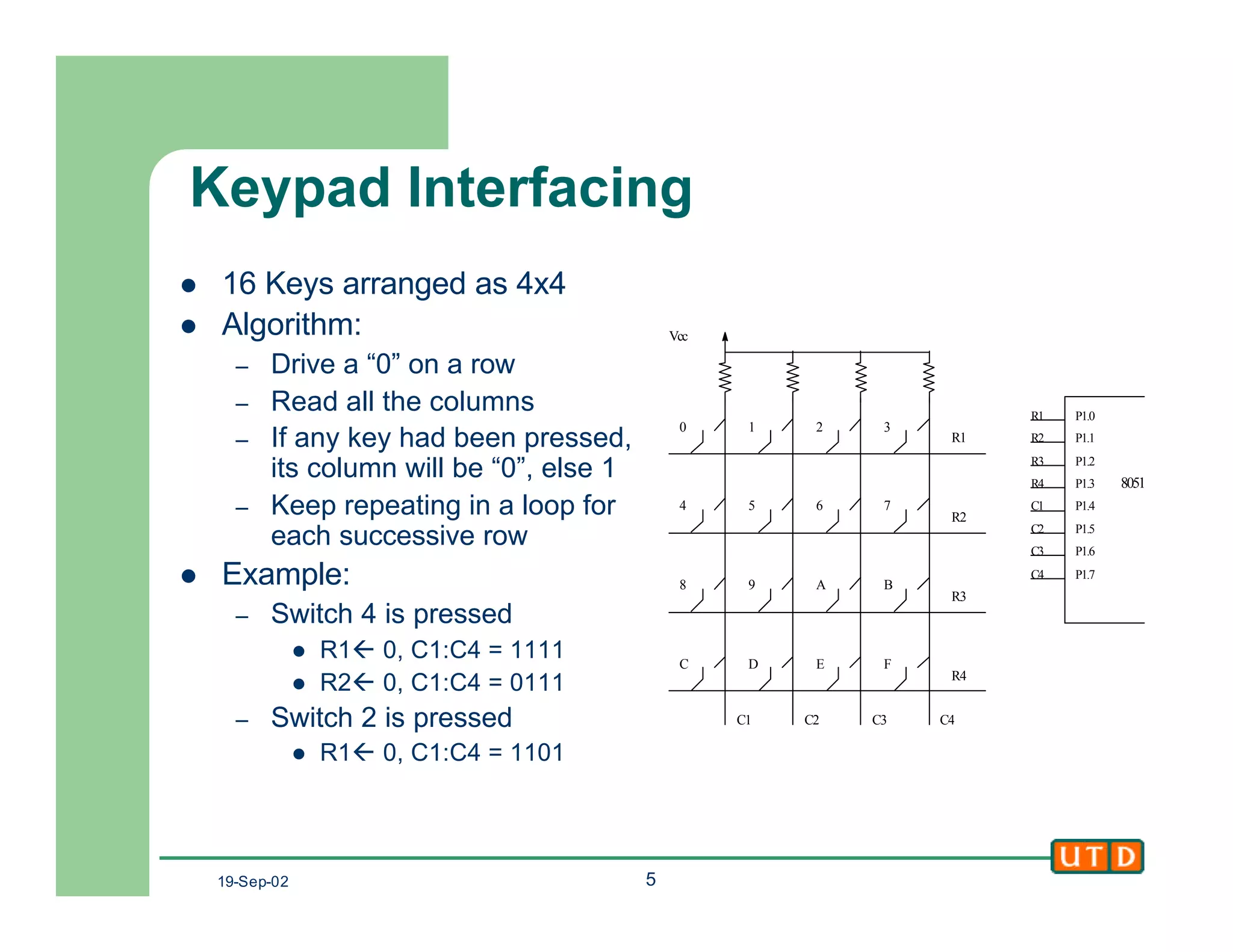
Keypad Interfacing
l 16 Keys arranged as 4x4
l Algorithm:
– Drive a “0” on a row
– Read all the columns
– If any key had been pressed,
its column will be “0”, else 1
– Keep repeating in a loop for
each successive row
l Example:
– Switch 4 is pressed
l R1ß 0, C1:C4 = 1111
l R2ß 0, C1:C4 = 0111
– Switch 2 is pressed
l R1ß 0, C1:C4 = 1101
Vcc
R1
R2
R3
R4
C1 C2 C3 C4
0 1 2
4 5 6 7
8 9 A B
C D E F
P1.0
P1.1
P1.2
P1.3
P1.4
P1.5
P1.6
P1.7
R1
R2
R3
R4
C1
C2
C3
C4
8051
3
19-Sep-02 6
LCD Interfacing
l LCDs are cheap and easy way to get text display for an
embedded system
– Various configurations (1x20 to 8x80), starting from $5
– Graphics LCDs are also available
l Intelligent LCDs have internal ASCII decoders,
Character Generators and LCD control circuitry
l Some also have custom character generation capacity
– User defined character RAM
– Program this RAM with the character pattern
– Then use it like ordinary ASCII characters
– Usually MSB decides between std ASCII and custom
characters
19-Sep-02 7
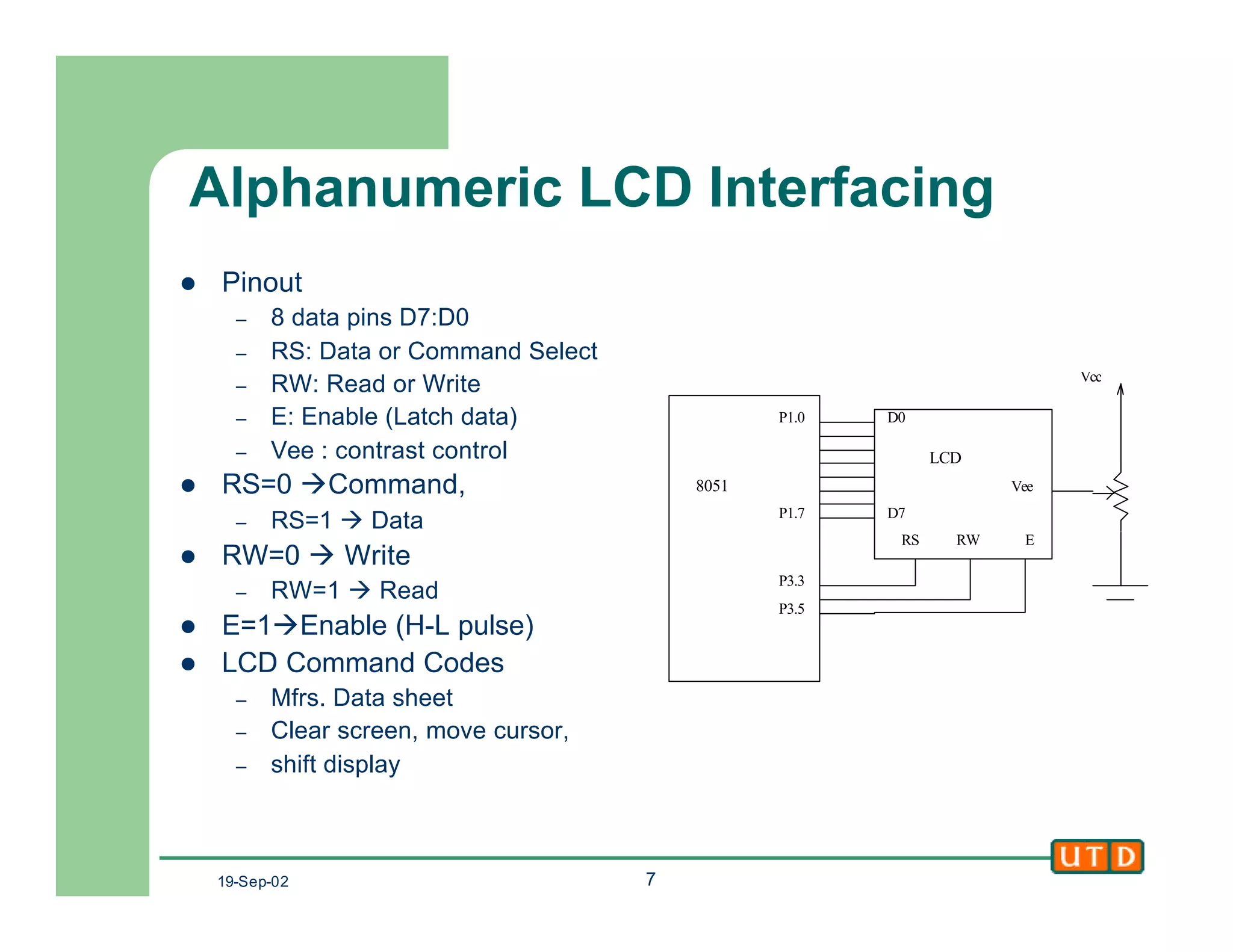
Alphanumeric LCD Interfacing
l Pinout
– 8 data pins D7:D0
– RS: Data or Command Select
– RW: Read or Write
– E: Enable (Latch data)
– Vee : contrast control
l RS=0 àCommand,
– RS=1 à Data
l RW=0 à Write
– RW=1 à Read
l E=1àEnable (H-L pulse)
l LCD Command Codes
– Mfrs. Data sheet
– Clear screen, move cursor,
– shift display
P1.0
P1.7
D0
D7
P3.3
P3.5
Vcc
Vee8051
LCD
ERWRS
19-Sep-02 8
Alphanumeric LCD - Algorithm
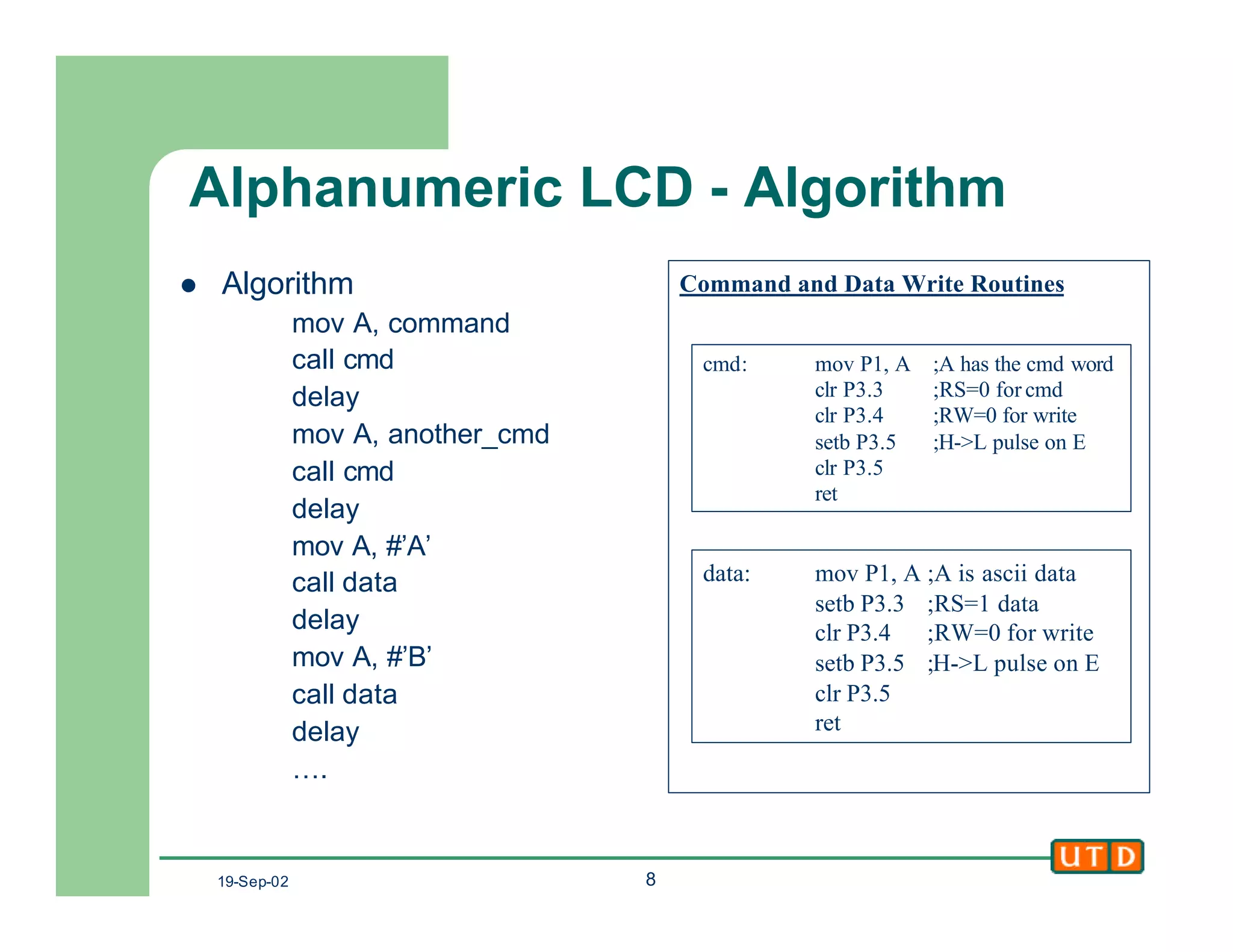
l Algorithm
mov A, command
call cmd
delay
mov A, another_cmd
call cmd
delay
mov A, #’A’
call data
delay
mov A, #’B’
call data
delay
….
Command and Data Write Routines
data: mov P1, A ;A is ascii data
setb P3.3 ;RS=1 data
clr P3.4 ;RW=0 for write
setb P3.5 ;H->L pulse on E
clr P3.5
ret
cmd: mov P1, A ;A has the cmd word
clr P3.3 ;RS=0 for cmd
clr P3.4 ;RW=0 for write
setb P3.5 ;H->L pulse on E
clr P3.5
ret
19-Sep-02 9
Alphanumeric LCD - Algorithm
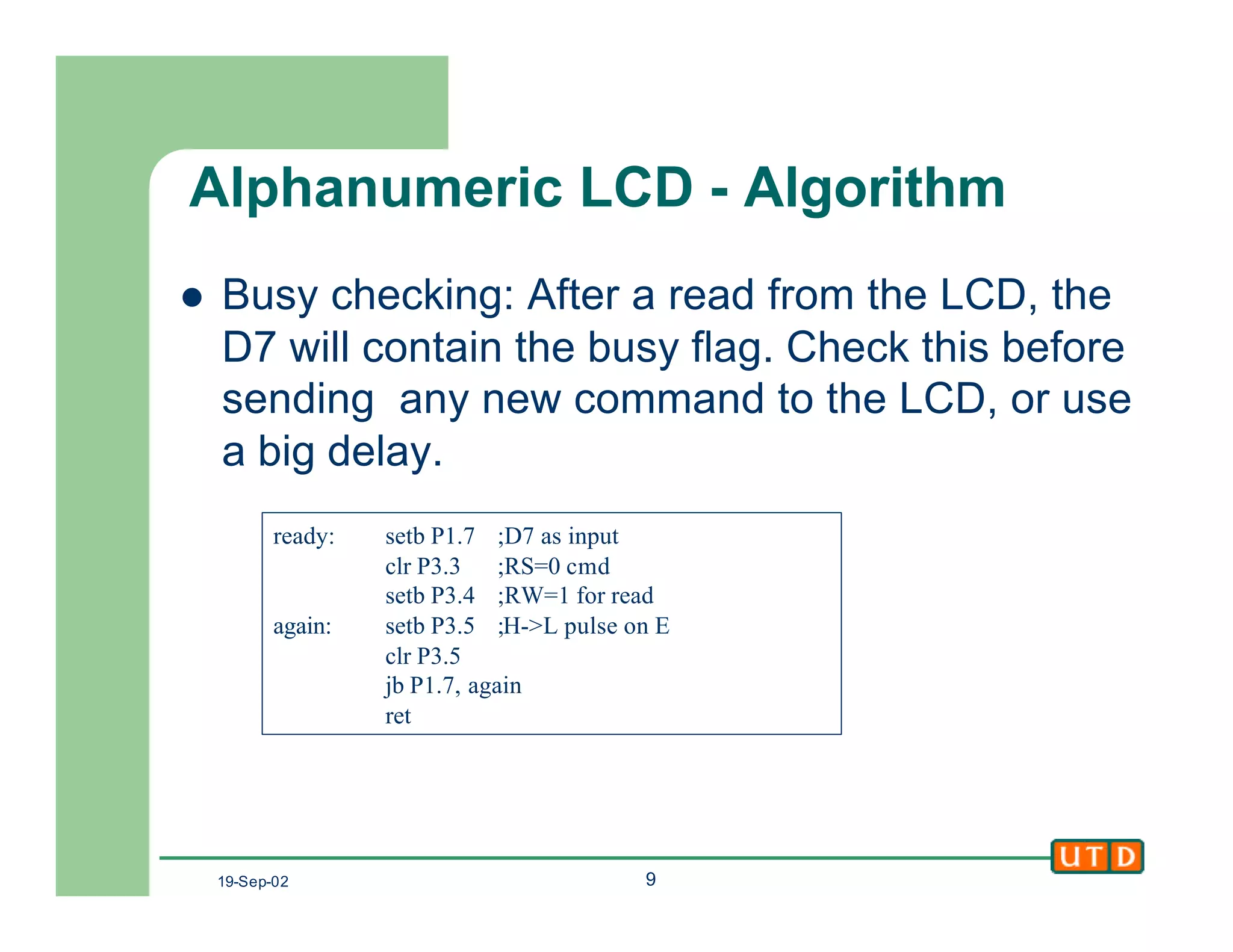
l Busy checking: After a read from the LCD, the
D7 will contain the busy flag. Check this before
sending any new command to the LCD, or use
a big delay.
ready: setb P1.7 ;D7 as input
clr P3.3 ;RS=0 cmd
setb P3.4 ;RW=1 for read
again: setb P3.5 ;H->L pulse on E
clr P3.5
jb P1.7, again
ret
19-Sep-02 10
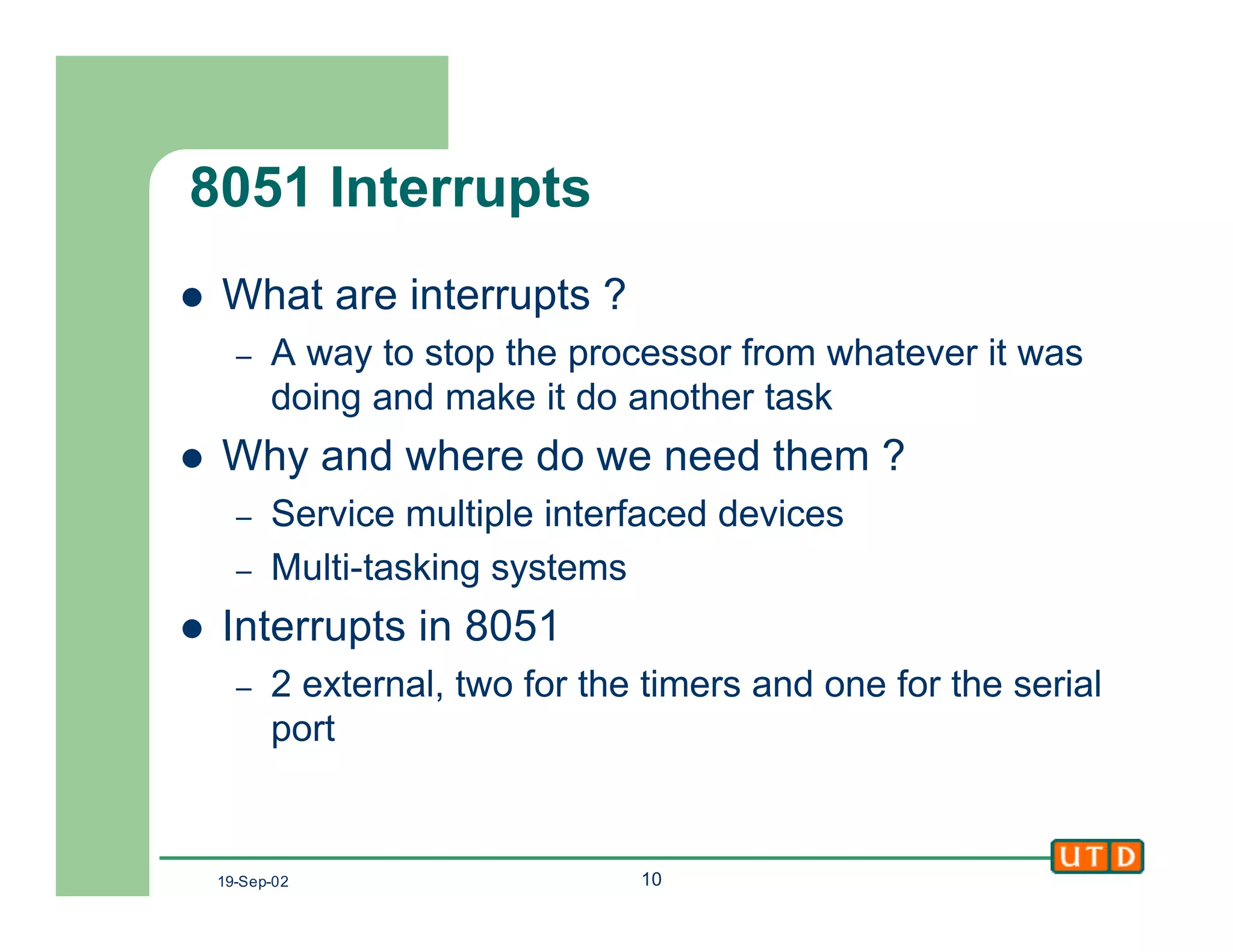
8051 Interrupts
l What are interrupts ?
– A way to stop the processor from whatever it was
doing and make it do another task
l Why and where do we need them ?
– Service multiple interfaced devices
– Multi-tasking systems
l Interrupts in 8051
– 2 external, two for the timers and one for the serial
port
19-Sep-02 11
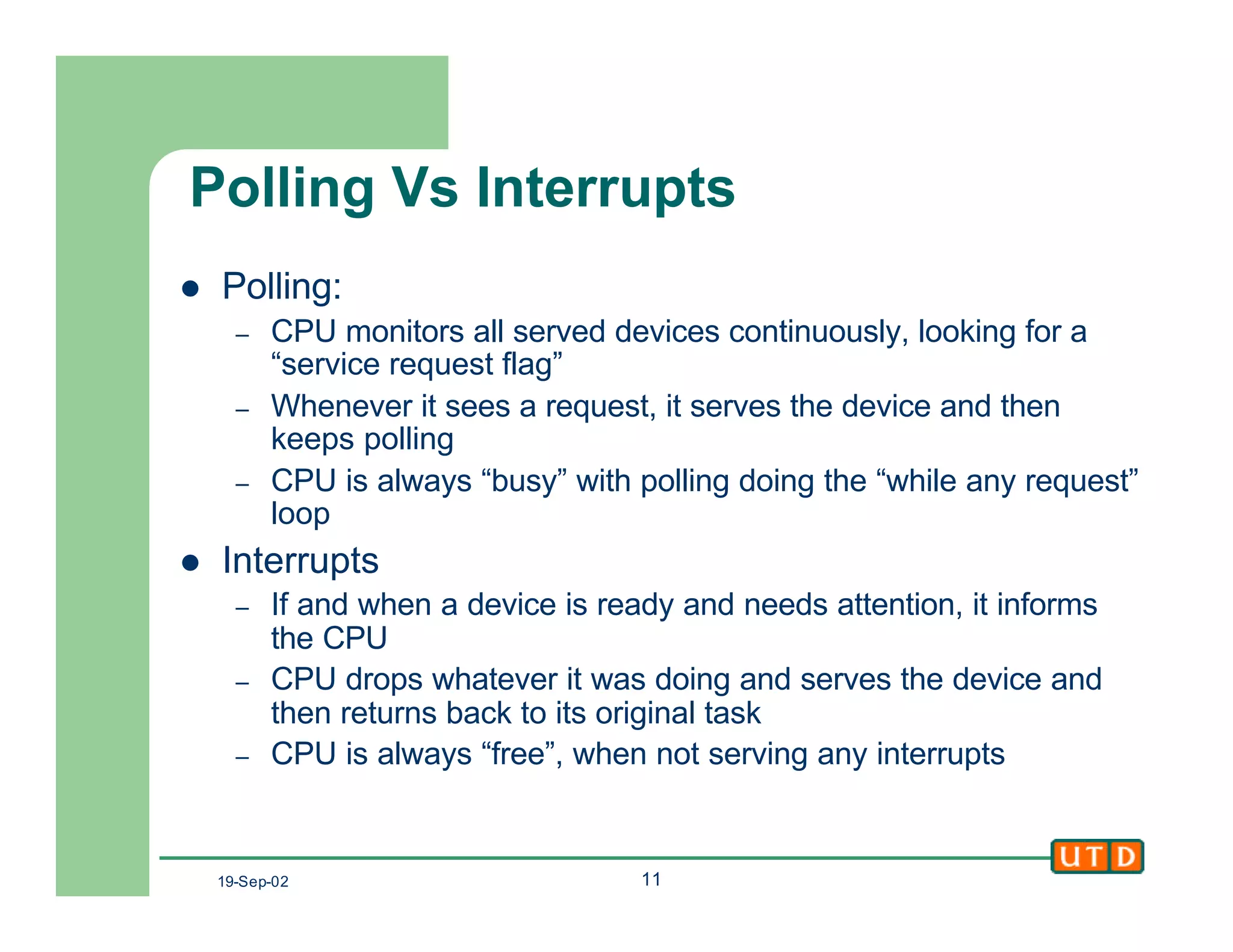
Polling Vs Interrupts
l Polling:
– CPU monitors all served devices continuously, looking for a
“service request flag”
– Whenever it sees a request, it serves the device and then
keeps polling
– CPU is always “busy” with polling doing the “while any request”
loop
l Interrupts
– If and when a device is ready and needs attention, it informs
the CPU
– CPU drops whatever it was doing and serves the device and
then returns back to its original task
– CPU is always “free”, when not serving any interrupts
19-Sep-02 12
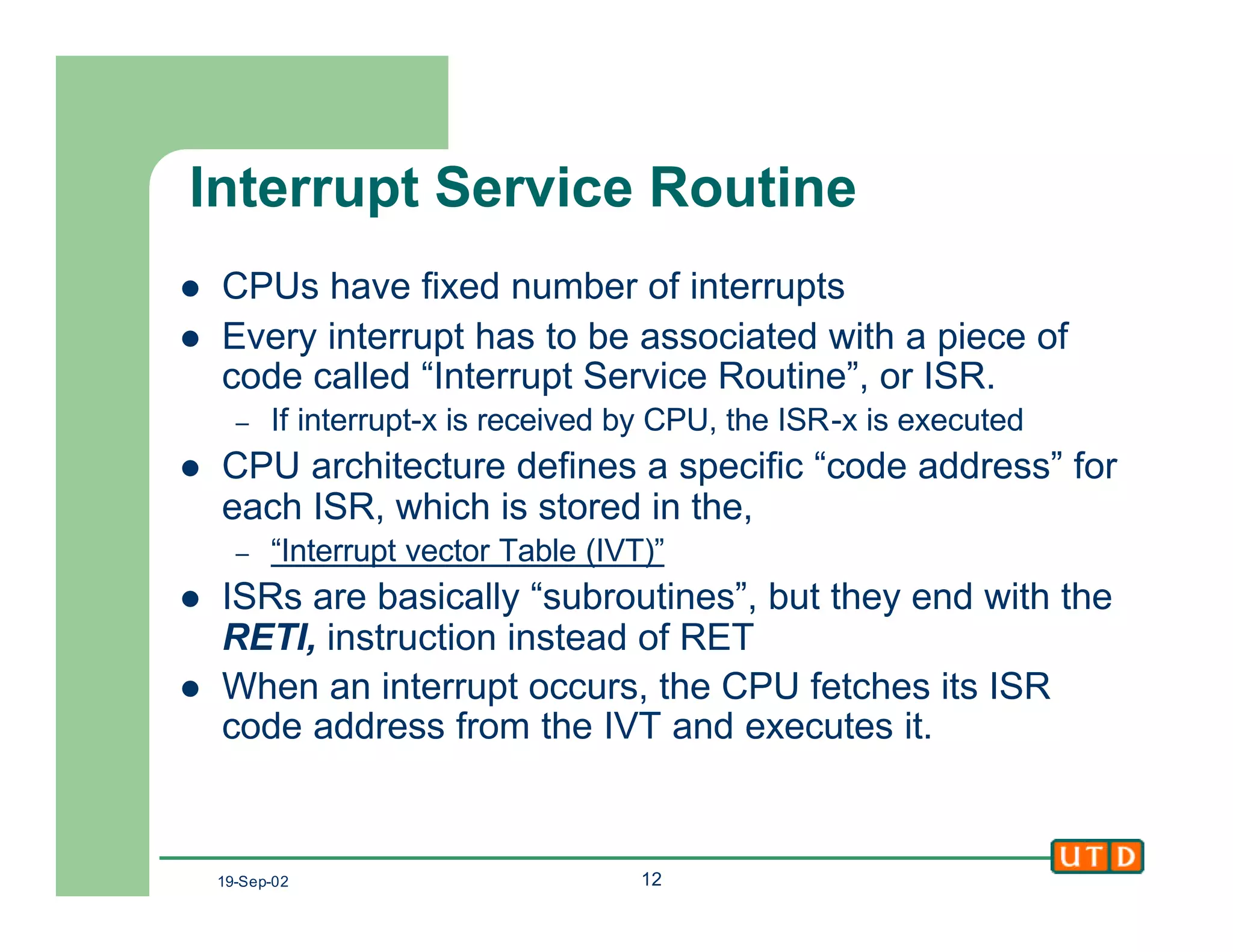
Interrupt Service Routine
l CPUs have fixed number of interrupts
l Every interrupt has to be associated with a piece of
code called “Interrupt Service Routine”, or ISR.
– If interrupt-x is received by CPU, the ISR-x is executed
l CPU architecture defines a specific “code address” for
each ISR, which is stored in the,
– “Interrupt vector Table (IVT)”
l ISRs are basically “subroutines”, but they end with the
RETI, instruction instead of RET
l When an interrupt occurs, the CPU fetches its ISR
code address from the IVT and executes it.
19-Sep-02 13
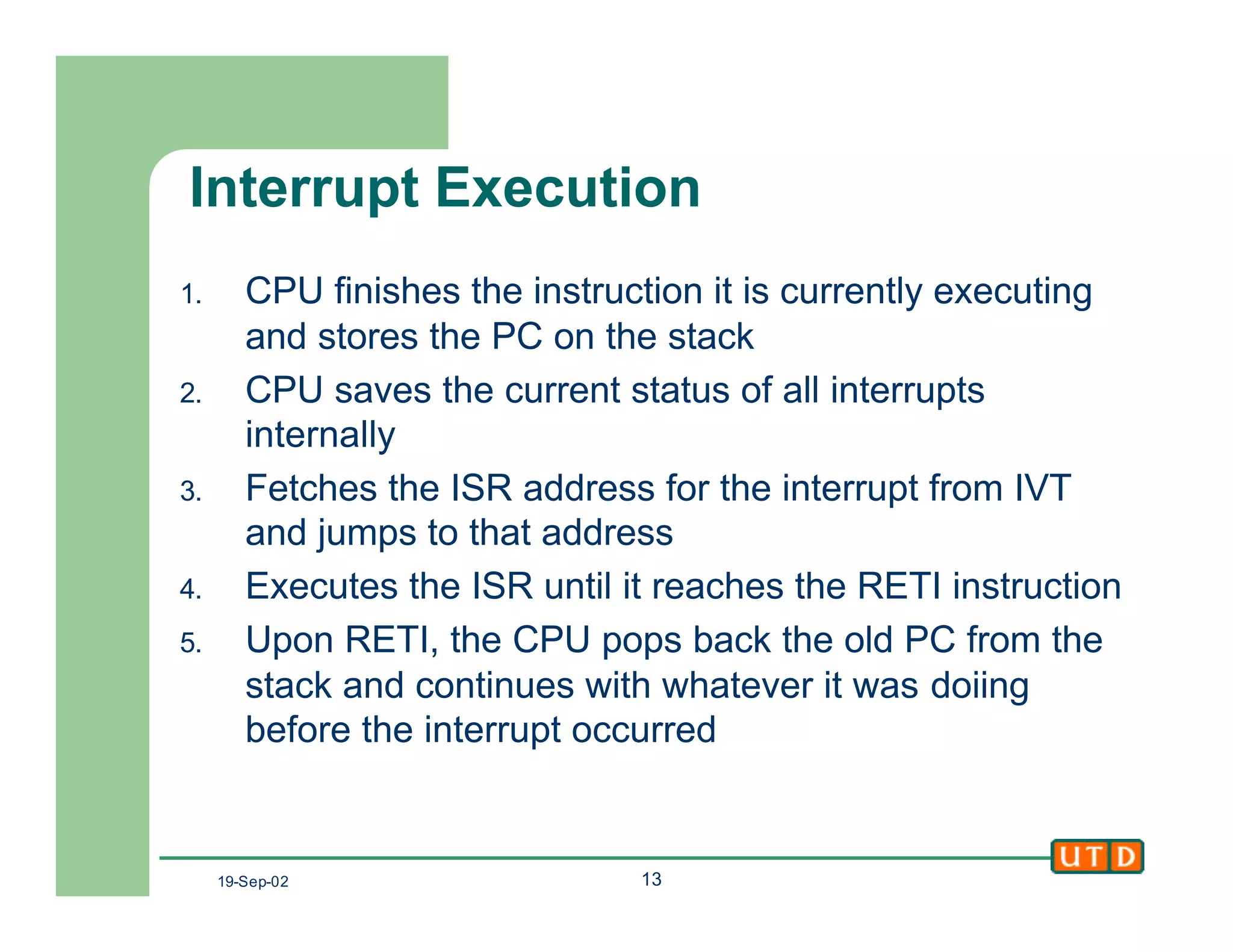
Interrupt Execution
1. CPU finishes the instruction it is currently executing
and stores the PC on the stack
2. CPU saves the current status of all interrupts
internally
3. Fetches the ISR address for the interrupt from IVT
and jumps to that address
4. Executes the ISR until it reaches the RETI instruction
5. Upon RETI, the CPU pops back the old PC from the
stack and continues with whatever it was doiing
before the interrupt occurred
19-Sep-02 14
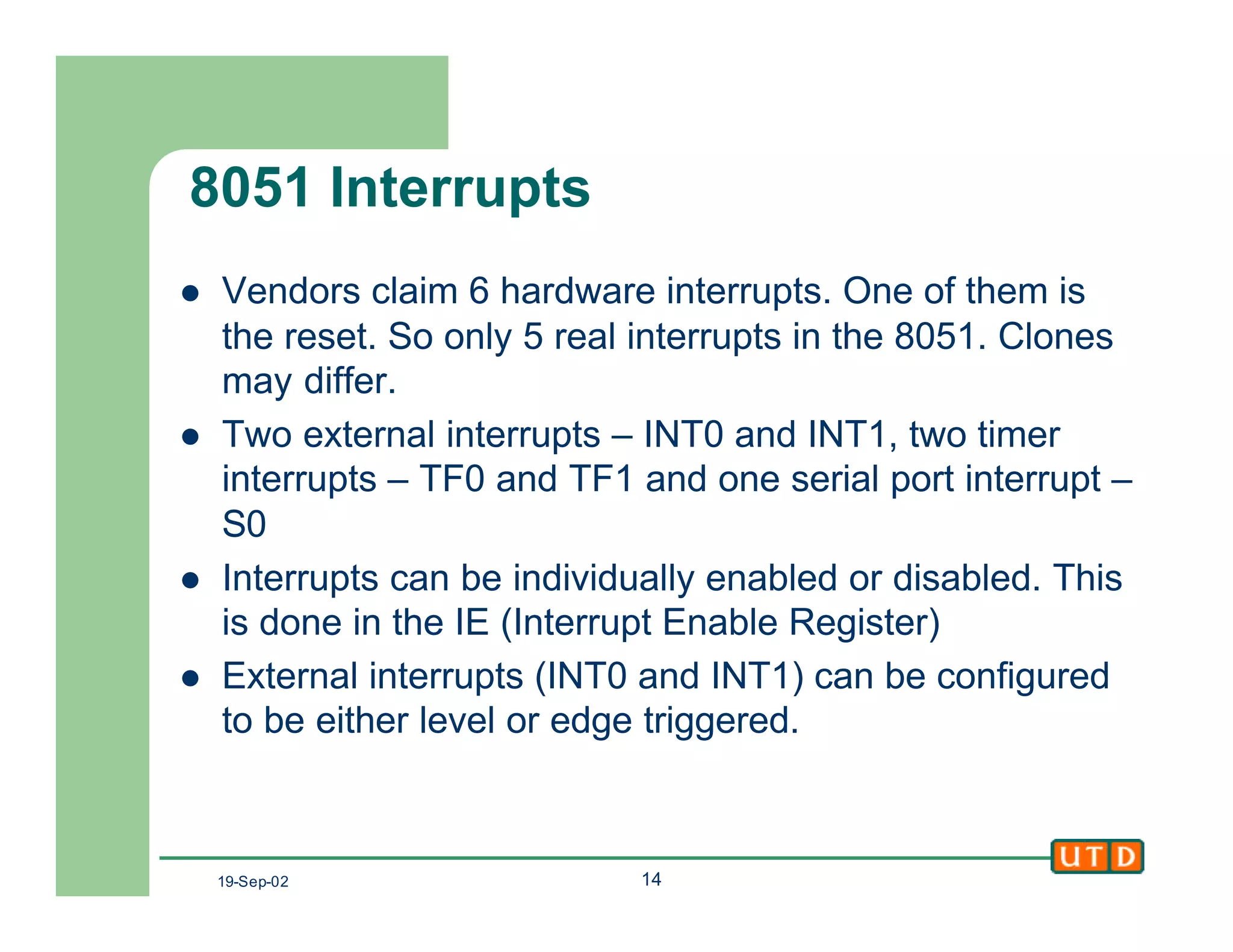
8051 Interrupts
l Vendors claim 6 hardware interrupts. One of them is
the reset. So only 5 real interrupts in the 8051. Clones
may differ.
l Two external interrupts – INT0 and INT1, two timer
interrupts – TF0 and TF1 and one serial port interrupt –
S0
l Interrupts can be individually enabled or disabled. This
is done in the IE (Interrupt Enable Register)
l External interrupts (INT0 and INT1) can be configured
to be either level or edge triggered.
19-Sep-02 15
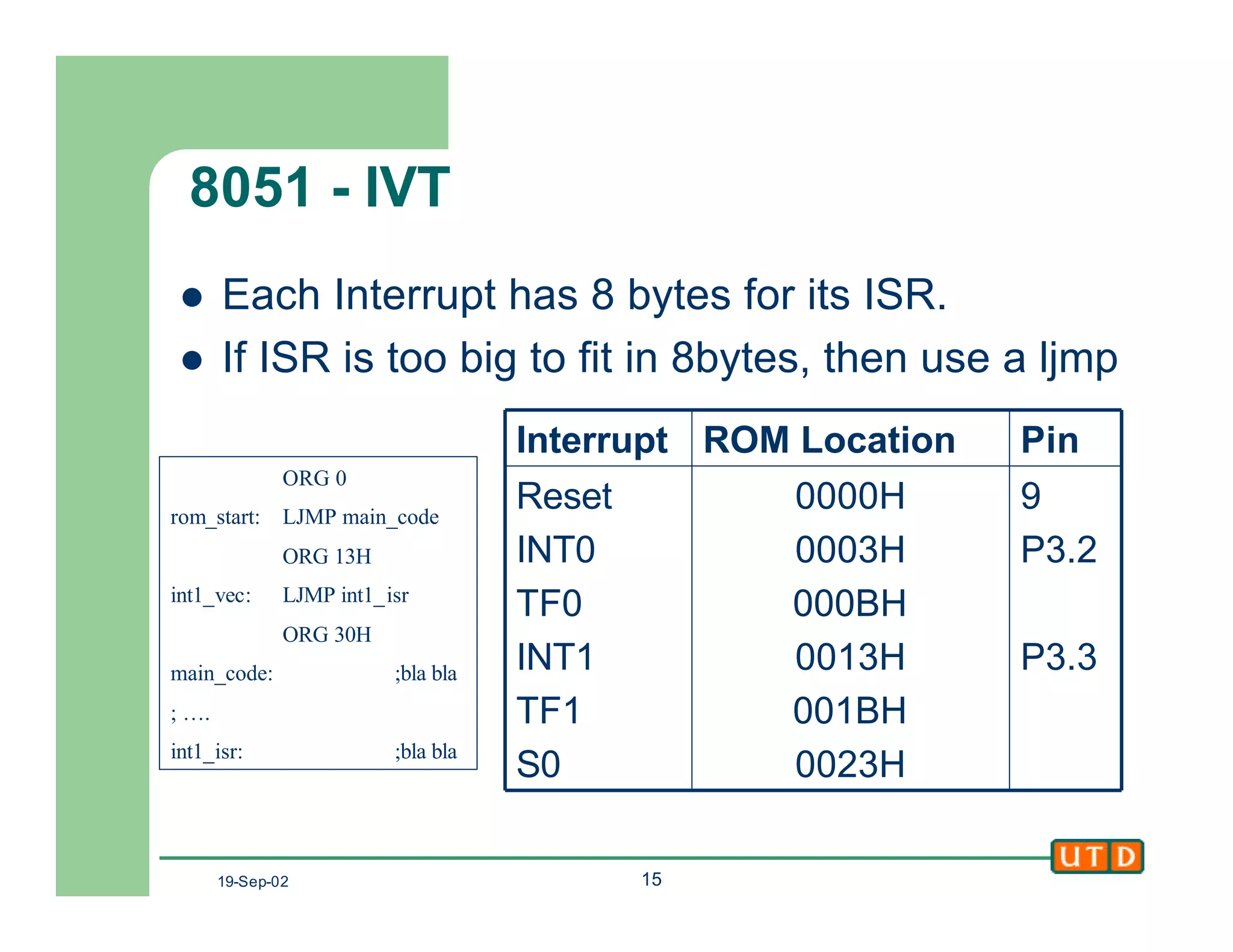
8051 - IVT
l Each Interrupt has 8 bytes for its ISR.
l If ISR is too big to fit in 8bytes, then use a ljmp
9
P3.2
P3.3
0000H
0003H
000BH
0013H
001BH
0023H
Reset
INT0
TF0
INT1
TF1
S0
PinROM LocationInterrupt
ORG 0
rom_start: LJMP main_code
ORG 13H
int1_vec: LJMP int1_isr
ORG 30H
main_code: ;bla bla
; ….
int1_isr: ;bla bla
19-Sep-02 16
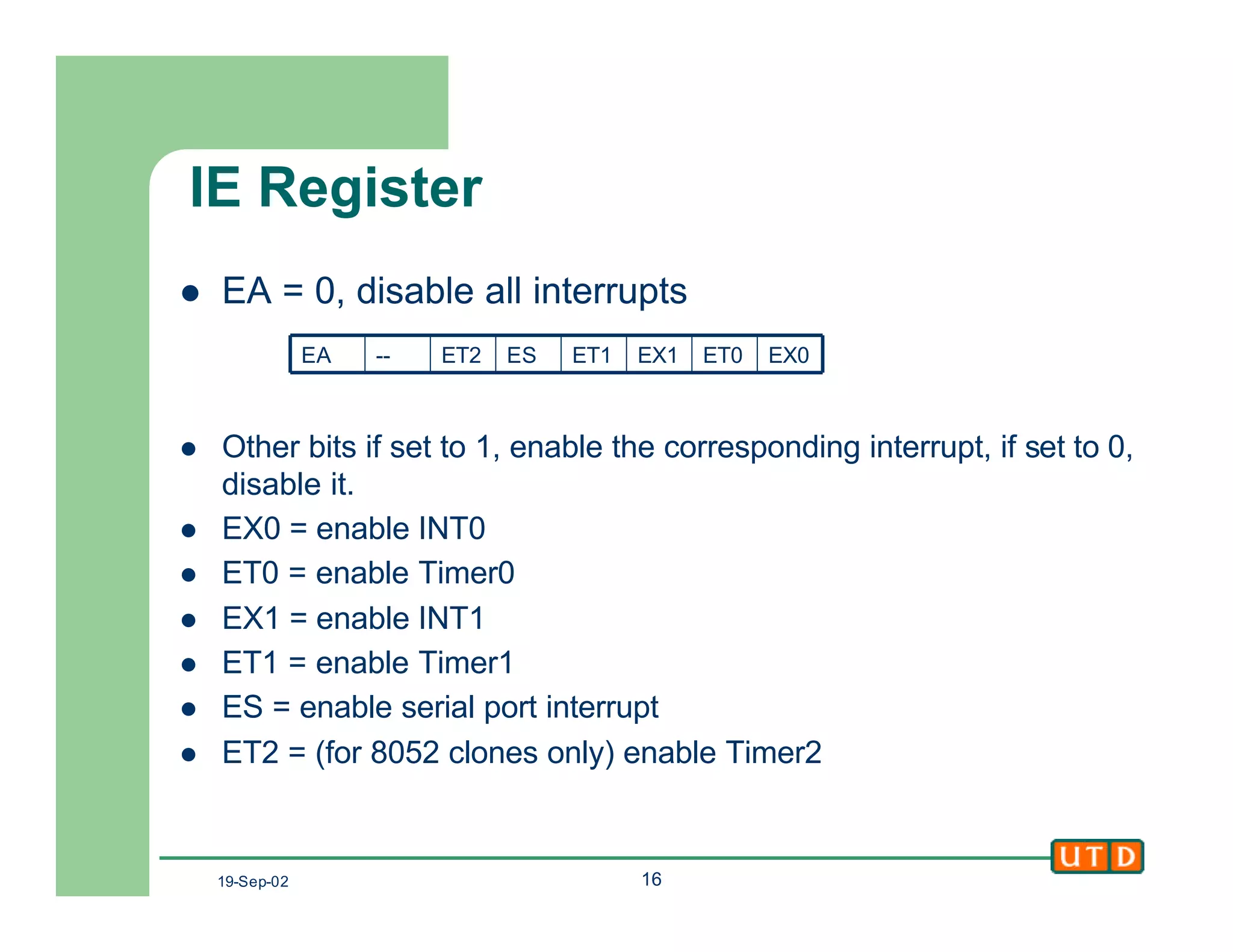
IE Register
l EA = 0, disable all interrupts
l Other bits if set to 1, enable the corresponding interrupt, if set to 0,
disable it.
l EX0 = enable INT0
l ET0 = enable Timer0
l EX1 = enable INT1
l ET1 = enable Timer1
l ES = enable serial port interrupt
l ET2 = (for 8052 clones only) enable Timer2
EX0ET0EX1ET1ESET2--EA
19-Sep-02 17
Simple Example
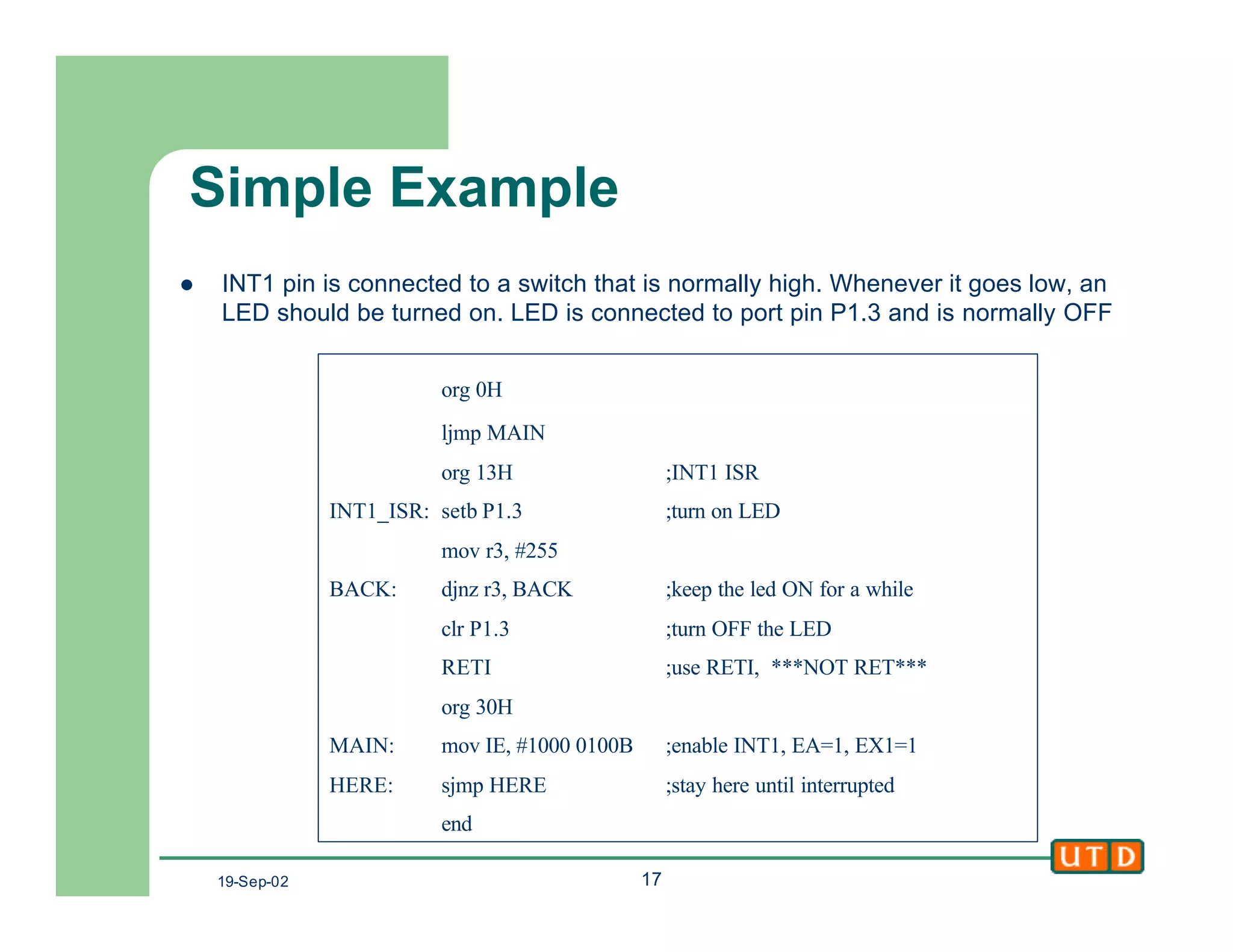
l INT1 pin is connected to a switch that is normally high. Whenever it goes low, an
LED should be turned on. LED is connected to port pin P1.3 and is normally OFF
org 0H
ljmp MAIN
org 13H ;INT1 ISR
INT1_ISR: setb P1.3 ;turn on LED
mov r3, #255
BACK: djnz r3, BACK ;keep the led ON for a while
clr P1.3 ;turn OFF the LED
RETI ;use RETI, ***NOT RET***
org 30H
MAIN: mov IE, #1000 0100B ;enable INT1, EA=1, EX1=1
HERE: sjmp HERE ;stay here until interrupted
end
19-Sep-02 18
External Interrupts
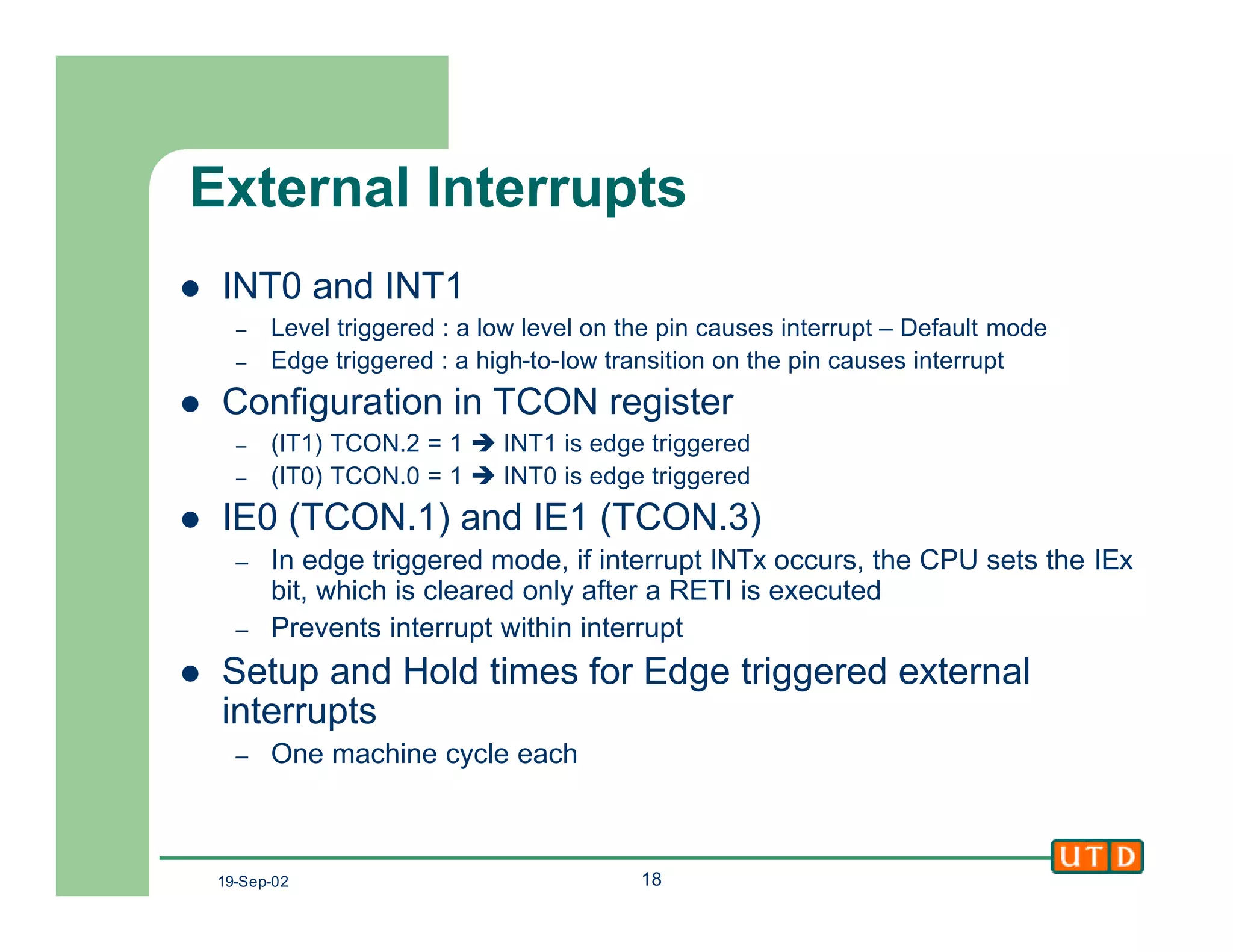
l INT0 and INT1
– Level triggered : a low level on the pin causes interrupt – Default mode
– Edge triggered : a high-to-low transition on the pin causes interrupt
l Configuration in TCON register
– (IT1) TCON.2 = 1 è INT1 is edge triggered
– (IT0) TCON.0 = 1 è INT0 is edge triggered
l IE0 (TCON.1) and IE1 (TCON.3)
– In edge triggered mode, if interrupt INTx occurs, the CPU sets the IEx
bit, which is cleared only after a RETI is executed
– Prevents interrupt within interrupt
l Setup and Hold times for Edge triggered external
interrupts
– One machine cycle each
19-Sep-02 19
Interrupt Priority
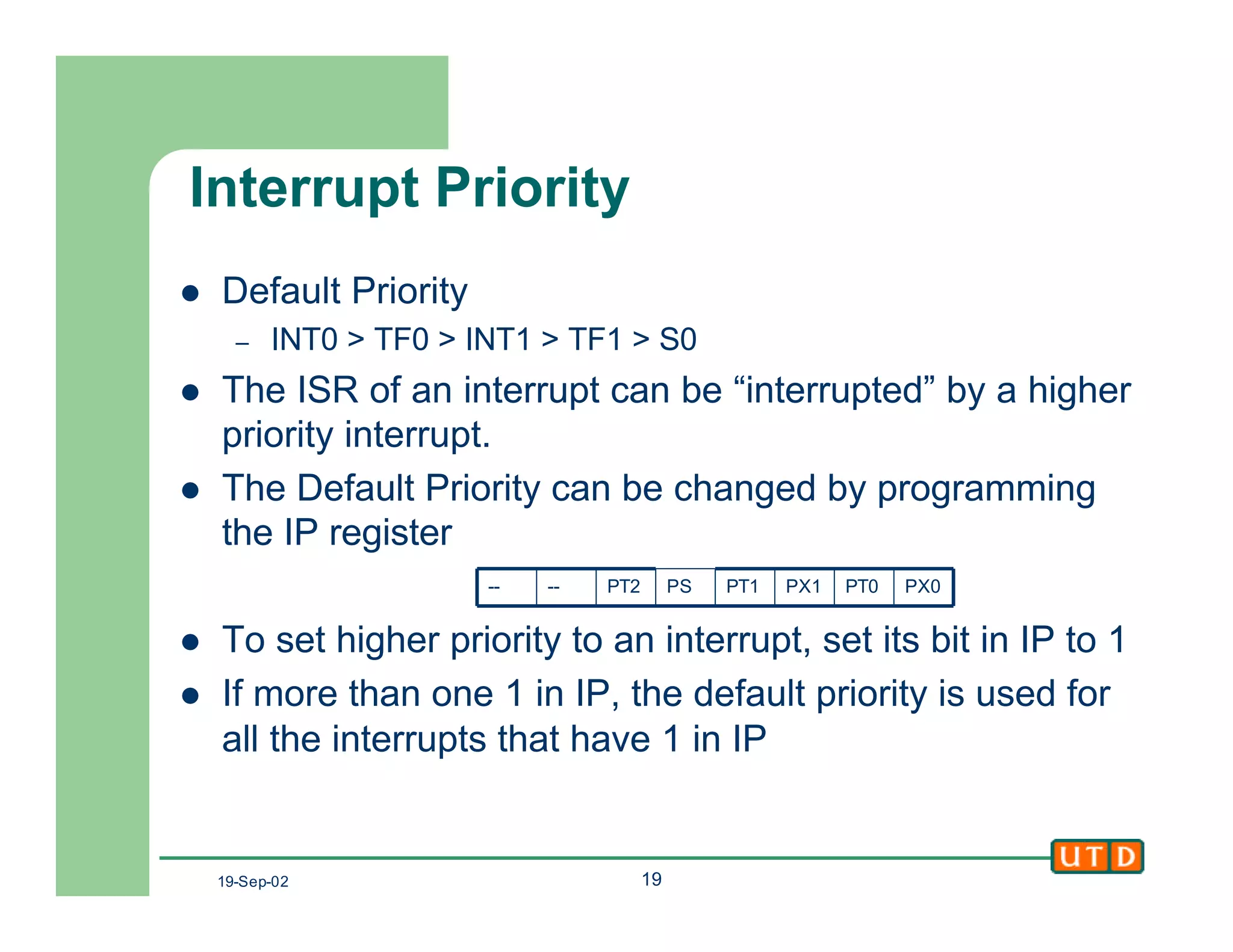
l Default Priority
– INT0 > TF0 > INT1 > TF1 > S0
l The ISR of an interrupt can be “interrupted” by a higher
priority interrupt.
l The Default Priority can be changed by programming
the IP register
l To set higher priority to an interrupt, set its bit in IP to 1
l If more than one 1 in IP, the default priority is used for
all the interrupts that have 1 in IP
PX0PT0PX1PT1PSPT2----
19-Sep-02 20
Next Class
l 8051 Timers
l Timers and Interrupts
l Applications

Class8

  • 1.
    Pari vallal Kannan Centerfor Integrated Circuits and Systems University of Texas at Dallas 8051 I/O and 8051 Interrupts Class 7 EE4380 Fall 2002
  • 2.
    19-Sep-02 2 Agenda l 8051I/O Interfacing – Scanned LED displays – LCD displays – Keypads l 8051 Interrupts – IVT, ISR – Interrupt enable and priority – External interrupts
  • 3.
    19-Sep-02 3 Scanned 7-segLED display l LED displays are – power-hungry (10ma per LED) – Pin-hungry (8 pins per 7- seg display) l Scanned displays – Only one 7-seg display is enabled at a given time – Inputs a-h are connected together respectively l Total Port pins needed – 8 + # of digits – 8 + 4 for this figure h D2 D1 D0 Vcc D3 a
  • 4.
    19-Sep-02 4 Scanned 7-segdisplay l Algorithm to display a 4 digit value. l The scanning frequency should be high enough to be flicker-free – At least 30HZ – Time one digit is ON l 1/30 seconds – Higher values give better flicker reduction (60Hz) start: disable [D3:D0] again: enable D3 [a:h] ß pattern for Digit3 delay disable D3. Enable D2 [a:h] ß pattern for Digit2 delay disable D2. Enable D1 [a:h] ß pattern for Digit1 delay disable D1. Enable D0 [a:h] ß pattern for Digit0 delay disable D0 Goto again
  • 5.
    19-Sep-02 5 Keypad Interfacing l16 Keys arranged as 4x4 l Algorithm: – Drive a “0” on a row – Read all the columns – If any key had been pressed, its column will be “0”, else 1 – Keep repeating in a loop for each successive row l Example: – Switch 4 is pressed l R1ß 0, C1:C4 = 1111 l R2ß 0, C1:C4 = 0111 – Switch 2 is pressed l R1ß 0, C1:C4 = 1101 Vcc R1 R2 R3 R4 C1 C2 C3 C4 0 1 2 4 5 6 7 8 9 A B C D E F P1.0 P1.1 P1.2 P1.3 P1.4 P1.5 P1.6 P1.7 R1 R2 R3 R4 C1 C2 C3 C4 8051 3
  • 6.
    19-Sep-02 6 LCD Interfacing lLCDs are cheap and easy way to get text display for an embedded system – Various configurations (1x20 to 8x80), starting from $5 – Graphics LCDs are also available l Intelligent LCDs have internal ASCII decoders, Character Generators and LCD control circuitry l Some also have custom character generation capacity – User defined character RAM – Program this RAM with the character pattern – Then use it like ordinary ASCII characters – Usually MSB decides between std ASCII and custom characters
  • 7.
    19-Sep-02 7 Alphanumeric LCDInterfacing l Pinout – 8 data pins D7:D0 – RS: Data or Command Select – RW: Read or Write – E: Enable (Latch data) – Vee : contrast control l RS=0 àCommand, – RS=1 à Data l RW=0 à Write – RW=1 à Read l E=1àEnable (H-L pulse) l LCD Command Codes – Mfrs. Data sheet – Clear screen, move cursor, – shift display P1.0 P1.7 D0 D7 P3.3 P3.5 Vcc Vee8051 LCD ERWRS
  • 8.
    19-Sep-02 8 Alphanumeric LCD- Algorithm l Algorithm mov A, command call cmd delay mov A, another_cmd call cmd delay mov A, #’A’ call data delay mov A, #’B’ call data delay …. Command and Data Write Routines data: mov P1, A ;A is ascii data setb P3.3 ;RS=1 data clr P3.4 ;RW=0 for write setb P3.5 ;H->L pulse on E clr P3.5 ret cmd: mov P1, A ;A has the cmd word clr P3.3 ;RS=0 for cmd clr P3.4 ;RW=0 for write setb P3.5 ;H->L pulse on E clr P3.5 ret
  • 9.
    19-Sep-02 9 Alphanumeric LCD- Algorithm l Busy checking: After a read from the LCD, the D7 will contain the busy flag. Check this before sending any new command to the LCD, or use a big delay. ready: setb P1.7 ;D7 as input clr P3.3 ;RS=0 cmd setb P3.4 ;RW=1 for read again: setb P3.5 ;H->L pulse on E clr P3.5 jb P1.7, again ret
  • 10.
    19-Sep-02 10 8051 Interrupts lWhat are interrupts ? – A way to stop the processor from whatever it was doing and make it do another task l Why and where do we need them ? – Service multiple interfaced devices – Multi-tasking systems l Interrupts in 8051 – 2 external, two for the timers and one for the serial port
  • 11.
    19-Sep-02 11 Polling VsInterrupts l Polling: – CPU monitors all served devices continuously, looking for a “service request flag” – Whenever it sees a request, it serves the device and then keeps polling – CPU is always “busy” with polling doing the “while any request” loop l Interrupts – If and when a device is ready and needs attention, it informs the CPU – CPU drops whatever it was doing and serves the device and then returns back to its original task – CPU is always “free”, when not serving any interrupts
  • 12.
    19-Sep-02 12 Interrupt ServiceRoutine l CPUs have fixed number of interrupts l Every interrupt has to be associated with a piece of code called “Interrupt Service Routine”, or ISR. – If interrupt-x is received by CPU, the ISR-x is executed l CPU architecture defines a specific “code address” for each ISR, which is stored in the, – “Interrupt vector Table (IVT)” l ISRs are basically “subroutines”, but they end with the RETI, instruction instead of RET l When an interrupt occurs, the CPU fetches its ISR code address from the IVT and executes it.
  • 13.
    19-Sep-02 13 Interrupt Execution 1.CPU finishes the instruction it is currently executing and stores the PC on the stack 2. CPU saves the current status of all interrupts internally 3. Fetches the ISR address for the interrupt from IVT and jumps to that address 4. Executes the ISR until it reaches the RETI instruction 5. Upon RETI, the CPU pops back the old PC from the stack and continues with whatever it was doiing before the interrupt occurred
  • 14.
    19-Sep-02 14 8051 Interrupts lVendors claim 6 hardware interrupts. One of them is the reset. So only 5 real interrupts in the 8051. Clones may differ. l Two external interrupts – INT0 and INT1, two timer interrupts – TF0 and TF1 and one serial port interrupt – S0 l Interrupts can be individually enabled or disabled. This is done in the IE (Interrupt Enable Register) l External interrupts (INT0 and INT1) can be configured to be either level or edge triggered.
  • 15.
    19-Sep-02 15 8051 -IVT l Each Interrupt has 8 bytes for its ISR. l If ISR is too big to fit in 8bytes, then use a ljmp 9 P3.2 P3.3 0000H 0003H 000BH 0013H 001BH 0023H Reset INT0 TF0 INT1 TF1 S0 PinROM LocationInterrupt ORG 0 rom_start: LJMP main_code ORG 13H int1_vec: LJMP int1_isr ORG 30H main_code: ;bla bla ; …. int1_isr: ;bla bla
  • 16.
    19-Sep-02 16 IE Register lEA = 0, disable all interrupts l Other bits if set to 1, enable the corresponding interrupt, if set to 0, disable it. l EX0 = enable INT0 l ET0 = enable Timer0 l EX1 = enable INT1 l ET1 = enable Timer1 l ES = enable serial port interrupt l ET2 = (for 8052 clones only) enable Timer2 EX0ET0EX1ET1ESET2--EA
  • 17.
    19-Sep-02 17 Simple Example lINT1 pin is connected to a switch that is normally high. Whenever it goes low, an LED should be turned on. LED is connected to port pin P1.3 and is normally OFF org 0H ljmp MAIN org 13H ;INT1 ISR INT1_ISR: setb P1.3 ;turn on LED mov r3, #255 BACK: djnz r3, BACK ;keep the led ON for a while clr P1.3 ;turn OFF the LED RETI ;use RETI, ***NOT RET*** org 30H MAIN: mov IE, #1000 0100B ;enable INT1, EA=1, EX1=1 HERE: sjmp HERE ;stay here until interrupted end
  • 18.
    19-Sep-02 18 External Interrupts lINT0 and INT1 – Level triggered : a low level on the pin causes interrupt – Default mode – Edge triggered : a high-to-low transition on the pin causes interrupt l Configuration in TCON register – (IT1) TCON.2 = 1 è INT1 is edge triggered – (IT0) TCON.0 = 1 è INT0 is edge triggered l IE0 (TCON.1) and IE1 (TCON.3) – In edge triggered mode, if interrupt INTx occurs, the CPU sets the IEx bit, which is cleared only after a RETI is executed – Prevents interrupt within interrupt l Setup and Hold times for Edge triggered external interrupts – One machine cycle each
  • 19.
    19-Sep-02 19 Interrupt Priority lDefault Priority – INT0 > TF0 > INT1 > TF1 > S0 l The ISR of an interrupt can be “interrupted” by a higher priority interrupt. l The Default Priority can be changed by programming the IP register l To set higher priority to an interrupt, set its bit in IP to 1 l If more than one 1 in IP, the default priority is used for all the interrupts that have 1 in IP PX0PT0PX1PT1PSPT2----
  • 20.
    19-Sep-02 20 Next Class l8051 Timers l Timers and Interrupts l Applications