High-Availability with Novell Cluster Services ™  for Novell ®  Open Enterprise Server on Linux Tim Heywood , CTO, NDS8 [email_address] Martin Weiss , Senior Technical Specialist [email_address] Dr. Frieder Schmidt , Senior Technical Specialist [email_address]
Agenda High Availability and Fault Tolerance Novell Cluster Services ™ Best Practices Deploying Cluster Services What is Clusterable? Demo
High-Availability and Fault Tolerance
High-Availability: Motivation Murphy's Law is universal: faults will occur Power failures, hardware crashes, software errors, human mistakes... Unmasked faults show through to the user
How much does downtime of a service cost you? Even if you can afford a 5 second blip, can you afford a day long outage or worse, loss of data? Can you afford low availability systems? If you are selling or depending on a service, service unavailability translates to cost
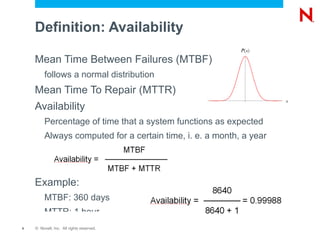
Definition: Availability Mean Time Between Failures (MTBF) follows a normal distribution Mean Time To Repair (MTTR)
Availability Percentage of time that a system functions as expected
Always computed for a certain time, i. e. a month, a year Example: MTBF: 360 days
MTTR: 1 hour
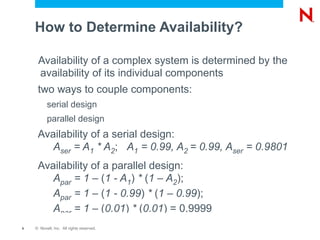
How to Determine Availability? Availability of a complex system is determined by the availability of its individual components
two ways to couple components: serial design
parallel design Availability of a serial design: A ser  = A 1  * A 2 ;    A 1  = 0.99, A 2  = 0.99, A ser  = 0.9801
Availability of a parallel design: A par  = 1 –  ( 1 - A 1 )  *  ( 1 – A 2 ); A par  = 1 –  ( 1 - 0.99 )  *  ( 1 – 0.99 ); A par  = 1 –  ( 0.01 )  *  ( 0.01 ) = 0.9999
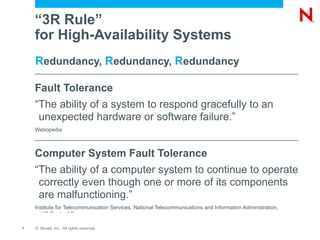
“3R Rule”  for High-Availability Systems R edundancy,  R edundancy,  R edundancy Fault Tolerance  “The ability of a system to respond gracefully to an unexpected hardware or software failure.” Webopedia Computer System Fault Tolerance “The ability of a computer system to continue to operate correctly even though one or more of its components are malfunctioning.” Institute for Telecommunication Services, National Telecommunications and Information Administration, US Dept. of Commerce
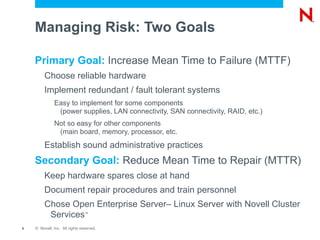
Managing Risk: Two Goals Primary Goal:  Increase Mean Time to Failure (MTTF) Choose reliable hardware
Implement redundant / fault tolerant systems Easy to implement for some components (power supplies, LAN connectivity, SAN connectivity, RAID, etc.)
Not so easy for other components (main board, memory, processor, etc. Establish sound administrative practices Secondary Goal:  Reduce Mean Time to Repair (MTTR) Keep hardware spares close at hand
Document repair procedures and train personnel
Chose Open Enterprise Server– Linux Server with Novell Cluster Services ™
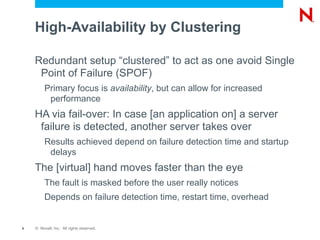
High-Availability by Clustering Redundant setup “clustered” to act as one avoid Single Point of Failure (SPOF) Primary focus is  availability , but can allow for increased performance HA via fail-over: In case [an application on] a server failure is detected, another server takes over Results achieved depend on failure detection time and startup delays The [virtual] hand moves faster than the eye The fault is masked before the user really notices
Depends on failure detection time, restart time, overhead
Novell Cluster Services ™
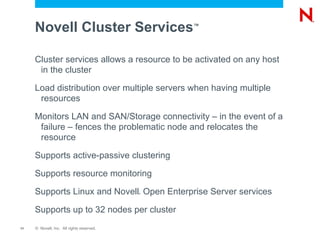
Novell Cluster Services ™ Cluster services allows a resource to be activated on any host in the cluster
Load distribution over multiple servers when having multiple resources
Monitors LAN and SAN/Storage connectivity – in the event of a failure – fences the problematic node and relocates the resource
Supports active-passive clustering
Supports resource monitoring
Supports Linux and Novell ®  Open Enterprise Server services
Supports up to 32 nodes per cluster
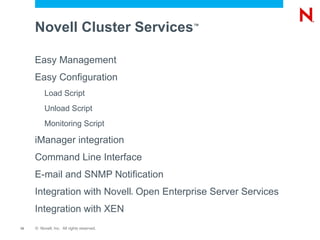
Novell Cluster Services ™ Easy Management
Easy Configuration Load Script
Unload Script
Monitoring Script iManager integration
Command Line Interface
E-mail and SNMP Notification
Integration with Novell ®  Open Enterprise Server Services
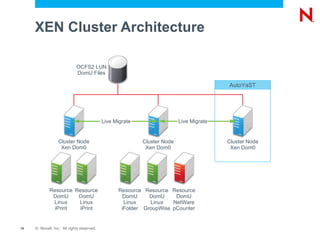
Integration with XEN
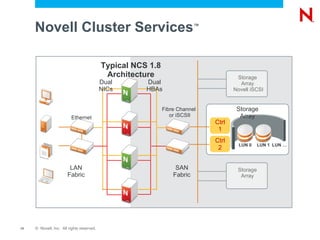
Novell Cluster Services ™ Ctrl 2 Dual NICs Dual HBAs LUN 0 LUN 1 LUN … Ctrl 1 LAN Fabric SAN Fabric Storage Array Storage Array Novell iSCSI Storage Array Typical NCS 1.8 Architecture Fibre Channel or iSCSIl Ethernet
Cluster Services in  Novell ®  Open Enterprise Server (OES) 2 New features are Linux only
New from OES2 FCS on: Resource monitoring
XEN virtualization support
x86_64 platform support Including mixed 32/64 bit node support Dynamic Storage Technology
What's New in SP1/2? Major rewrite of cluster code for SP2 Removed NetWare ®  translation layer
Much faster
Much lower system load
Typical load average of 0.2! New/improved clustering for: iFolder 3
AFP
…
… NCP ™  virtual server for POSIX filesystem resources  :-(

Cl306

Editor's Notes

  • #6 Mean Time Between Failurs (MTBF) Mean Time To Failure (MTTF); Time to FIRST Failure (new components) = statistical metric that is only valid for a large number (batch) of a given component - follows a normal distribution - does not give any indication after what time a certain individual component (i. e. hard disk) will fail
  • #7 Availability (365,2425 day year 365 + 0,25 - 0,01 + 0,0025 ) 98.01% 174,44 h of allowable down time 99% 87,66 h of allowable down time 99.5% 43,83 h of allowable down time 99.9% 8,77 h of allowable down time 99.99% 52,59 min of allowable down time 99.999% 5,26 min of allowable down time Think of a multi-segmented NSS pool as an example of a serial design. Think of a NIC team as an example of parallel design All systems are made up of a combination of serial and parallel components
  • #32 Talk about creating the two pools and why. DEMO: Create pool1/vol1 Create pool1_shd/vol1_shd
  • #33 Talk about creating the two pools and why. DEMO: Create pool1/vol1 Create pool1_shd/vol1_shd
  • #34 Talk about creating the two pools and why. DEMO: Create pool1/vol1 Create pool1_shd/vol1_shd
  • #35 Talk about creating the two pools and why. DEMO: Create pool1/vol1 Create pool1_shd/vol1_shd
  • #36 Talk about creating the two pools and why. DEMO: Create pool1/vol1 Create pool1_shd/vol1_shd
  • #37 Talk about creating the two pools and why. DEMO: Create pool1/vol1 Create pool1_shd/vol1_shd
  • #38 Talk about creating the two pools and why. DEMO: Create pool1/vol1 Create pool1_shd/vol1_shd
  • #39 Talk about creating the two pools and why. DEMO: Create pool1/vol1 Create pool1_shd/vol1_shd
  • #40 Talk about creating the two pools and why. DEMO: Create pool1/vol1 Create pool1_shd/vol1_shd
  • #41 Talk about creating the two pools and why. DEMO: Create pool1/vol1 Create pool1_shd/vol1_shd
  • #43 Talk about creating the two pools and why. DEMO: Create pool1/vol1 Create pool1_shd/vol1_shd
  • #44 Talk about creating the two pools and why. DEMO: Create pool1/vol1 Create pool1_shd/vol1_shd