Integrating Novell ®  Teaming within Your Existing Infrastructure Robin Redgrave Collaboration Technical Specialist [email_address] Tracy Smith Product Manager, Novell Teaming [email_address] Kai Reichert Collaboration Technical Specialist [email_address]
Agenda Teaming Overview
Using Existing Server Environment
Authentication Sources
Inbound and Outbound Messaging
Using WebDAV Mapped Drives
Using Mirrored Folders to Access Existing Documents
Data Synchronization with Novell ®  Data Synchronizer
Using Information Feeds
Access from Mobile Devices
Teaming Overview
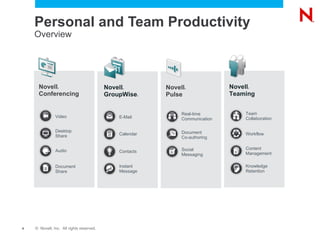
Personal and Team Productivity Overview Novell ® GroupWise ® Novell ® Conferencing Novell ® Pulse Novell ® Teaming E-Mail Calendar Contacts Instant Message Audio Desktop Share Video Document Share Real-time Communication Document Co-authoring Social Messaging Team Collaboration Workflow Content Management Knowledge Retention
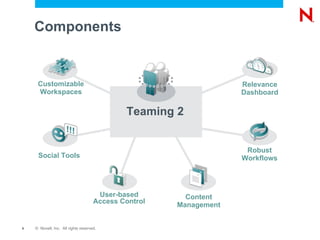
Customizable Workspaces Relevance Dashboard Social Tools Robust Workflows Content Management Components User-based Access Control Teaming 2
Teaming: Key Success Areas Knowledge Repository Document Management Project Collaboration Process Automation New: Intranet Replacement/Augmentation Customer Themes / Profiles Distributed Teams, Security and Identity, Knowledge Retention, Collaboration vs Sharing, Cost, Support, Experience, Open & Flexible
Validation “ Teaming brings very strong capabilities for workspaces and collaborative application development, particularly in the area of workflow” — The Forrester Wave™: Collaboration  Platforms, Q3 2009 Rob Koplowitz , Forrester Analyst, United States Novell Teaming 2 Named a Leader in Forrester Wave Report
Server Environment
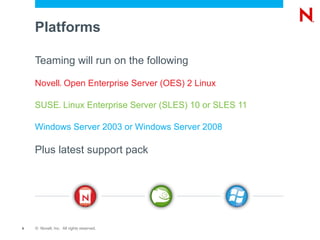
Platforms Teaming will run on the following  Novell ®  Open Enterprise Server (OES) 2 Linux
SUSE ®  Linux Enterprise Server (SLES) 10 or SLES 11
Windows Server 2003 or Windows Server 2008 Plus latest support pack
Databases Can use existing Database environment MySQL
MSSQL
Oracle Take advantage of Existing High availability
Existing Backup environment
Existing product knowledge
File system Teaming needs a file system to store files Can use existing data environment Take advantage of Existing High availability
Existing Backup environment
Front End Access Access to Teaming via Browser Supports http and https on Internet Explorer 7 or newer
Firefox 3.5 or newer
Safari Teaming uses Tomcat Default ports need to be redirected to use port 80 or 443 Access to can be secured by using Access Manager
DMZ scenario may require a multi-server setup
Authentication
Authentication Can use existing LDAP Authentication sources eDirectory ™
Active Directory
Open LDAP? Also has a local directory Useful for external users Can mix and match directories in your environment eDirectory/Active Directory/Local
LDAP S ynchronisation Can use filters to limit imported users Only members of a Teaming group have access Users can be removed/disabled if deleted from LDAP
Can import existing Groups No requirement to recreate groups
Can assign rights dynamically to new users Can create Groups based on OU Based on filter

Cl219

Editor's Notes

  • #5 Novell provides collaboration tools to meet all needs. From e-mail and calendaring in GroupWise, to real-time communication, authoring and social messaging in Novell Pulse. Depending on your needs, your can choose to use one, or all of our tools – they are working together to serve specific use cases. GroupWise provides a highly efficient workspace to manage your e-mails, calendars, tasks and contacts. You can also easily access your Teaming workspaces from within GroupWise. GroupWise also includes a solution for secure, enterprise instant messaging, from which you can easily start a web conference using Novell Conferencing. Teaming provides workspaces where teams can store all types of content related to the project they are working on. Instead of circulating documents in e-mails, teams can work together using the team workspace, supported by social tools such as wikis, blogs and discussion forums. The built-in workflow capabilities allows for business processes such as document approvals to be automated. Conferencing enables people to meet virtually. They can share their desktops, applications and hold conference calls. You can reduce your travel costs and make people more productive as a meeting is always only a “click” away. Novell Pulse is our real-time collaboration platform that will be available in mid-2010. It enables real-time communication, co-authoring and social messaging. It solves a key issue many people are facing today – how can I effectively work together with people that are geographically dispersed? Together with people outside of my organization?
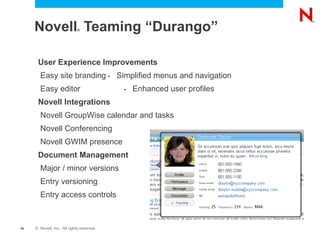
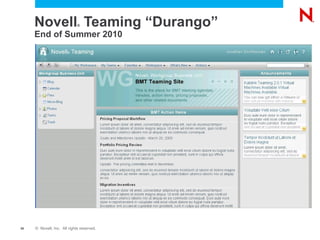
  • #35 The Durango release is planned for the second half of 2010. This release will see significant improvement to the user experience, simplifying the ability to brand with corporate colors and graphics that match company web standards. The left navigation and menu structure will be simplified based on user feedback from the release of Teaming 2.0. User profiles will be enhanced (think of LinkedIn) to improve skills and expertise location. A simple organization chart will be added to allow for quick access to organizational data. The long awaiting integration of GroupWise calendars and tasks with Teaming calendars and tasks will be addressed. This will be done via a new Teaming connector using Novell Data Synchronizer. The presence and conferencing integrations will be updated to work with GW Instant Messenger and Novell Conferencing. This will facilitate a more seamless collaboration experience for the end user. Document management capabilities will be improved by introducing major and minor version,s entry level access control and entry versioning. This will help GW DMS customers that are looking to migrate to Teaming as well as provide commonly requested document management improvements.
  • #36 The Durango release is planned for the second half of 2010. This release will see significant improvement to the user experience, simplifying the ability to brand with corporate colors and graphics that match company web standards. The left navigation and menu structure will be simplified based on user feedback from the release of Teaming 2.0. User profiles will be enhanced (think of LinkedIn) to improve skills and expertise location. A simple organization chart will be added to allow for quick access to organizational data. The long awaiting integration of GroupWise calendars and tasks with Teaming calendars and tasks will be addressed. This will be done via a new Teaming connector using Novell Data Synchronizer. The presence and conferencing integrations will be updated to work with GW Instant Messenger and Novell Conferencing. This will facilitate a more seamless collaboration experience for the end user. Document management capabilities will be improved by introducing major and minor version,s entry level access control and entry versioning. This will help GW DMS customers that are looking to migrate to Teaming as well as provide commonly requested document management improvements.